

Understanding How Aged Receivable Reports Work in Odoo 19 Accounting
How Aged Receivable Reports Work in Odoo 19 Accounting is a common question among businesses wanting better control over their outstanding customer invoices. In Odoo 19, this feature becomes even more powerful, offering complete visibility into overdue payments, credit risks, and customer-wise pending balances. When you understand how aged receivable reports work in Odoo 19 Accounting, your company gains the ability to track overdue invoices more accurately, automate follow-ups, and reduce unnecessary cash flow delays.
Many organizations rely on the aged receivable report in Odoo 19 to stay updated on outstanding customer amounts. The system provides detailed aging by bucket, 0–30 days, 30–60 days, 60–90 days, and 90+ days, making it easier to identify delays. A clear understanding of Odoo accounting aged receivables ensures better decision-making, faster financial reporting, and improved customer credit management.
Businesses can automate financial checks and eliminate spreadsheet tracking, and gain real-time payment behavior insights through aged receivable report analysis in Odoo 19 Accounting. The knowledge of aged receivables analysis in Odoo enables finance managers, accountants, and business owners to enhance their company’s financial stability.
This document provides a step-by-step explanation of Odoo 19 Accounting’s aged receivable report functionality, including setup procedures, usage instructions, benefits, and optimal methods for tracking late payments. The financial dashboard of Odoo 19 provides comprehensive business financial clarity through its partner reports, enhanced dashboards, and improved receivables management.
What Is an Aged Receivable Report in Odoo 19?
An aged receivable report is a financial tool that shows outstanding customer invoices broken down by the length of time they have remained unpaid. In Odoo 19, this report becomes extremely valuable because it integrates with sales, invoicing, contacts, accounting, and payment modules in real-time.
Why this report matters:
- It identifies overdue clients
- It highlights high-risk receivables
- It improves collection efficiency
- It boosts cash flow management
- It supports credit control decisions
The aged receivable report in Odoo 19 displays the number of days since an invoice was due. Odoo automatically categorises it into the following intervals:
- Not Due
- 0–30 Days
- 30–60 Days
- 60–90 Days
- 90+ Days Overdue
This structured approach provides clarity that manual spreadsheets can never match.
How Aged Receivable Reports Work in Odoo 19 Accounting (Main Functionality Explained)
Understanding how aged receivable reports work in Odoo 19 Accounting begins with analyzing the Odoo reporting engine. Odoo automatically tracks customer invoices from the moment they are created, posted, and validated. Once the due date is reached, the system moves unpaid invoices into corresponding “aged” categories.
Here’s how the system works in simple terms:
1. Real-Time Synchronization with Customer Invoices
Any invoice created through Odoo Sales or Accounting becomes part of the financial records. When the invoice is posted, it appears instantly in the aged receivable report.
This eliminates manual data entry, prevents errors, and ensures that financial reports always remain up to date.
2. Automatic Overdue Payment Tracking
The Odoo 19 Accounting system enables businesses to perform automated financial checks, replacing spreadsheet tracking with real-time payment behavior insights through the analysis of aged receivable reports. The knowledge of aged receivables analysis in Odoo helps finance managers, accountants, and business owners to strengthen their company’s financial stability.
3. Bucket-Based Categorization for Better Clarity
All invoices are categorized by age interval. This provides better clarity for financial analysis and credit control strategies. For example, if many invoices fall under the 90+ days category, the finance team can tighten credit policies.
4. Integration With Collections & Follow-ups
One of the most powerful features is the connection between receivable ageing and Odoo’s automatic follow-up system.
You can configure Odoo to send:
- Friendly reminders
- Follow-up emails
- SMS alerts
- Final warning notifications
This drastically improves collection timelines.
How to Access and Use Aged Receivable Reports in Odoo 19
This is where the practical explanation begins. Knowing how aged receivable reports work in Odoo 19 Accounting also includes understanding how to navigate them inside the system.
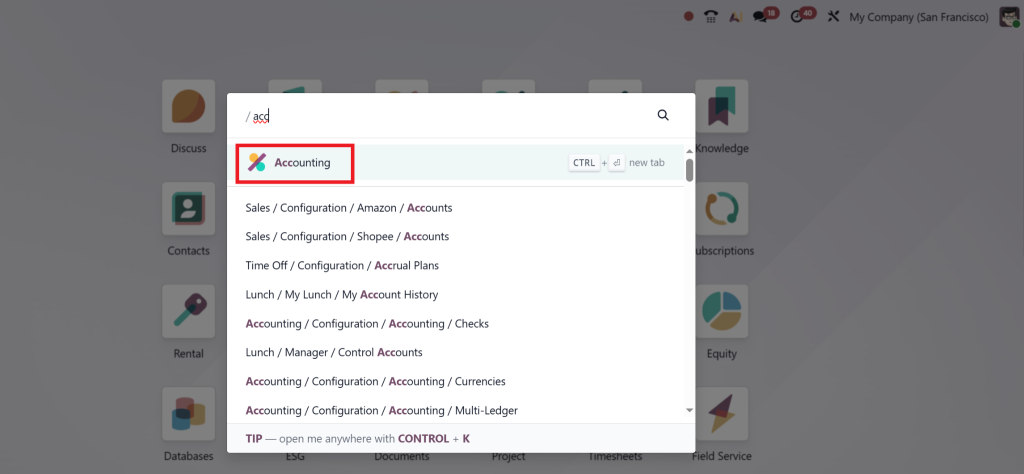
Step 1: Open the Accounting Module
Go to:
Accounting →
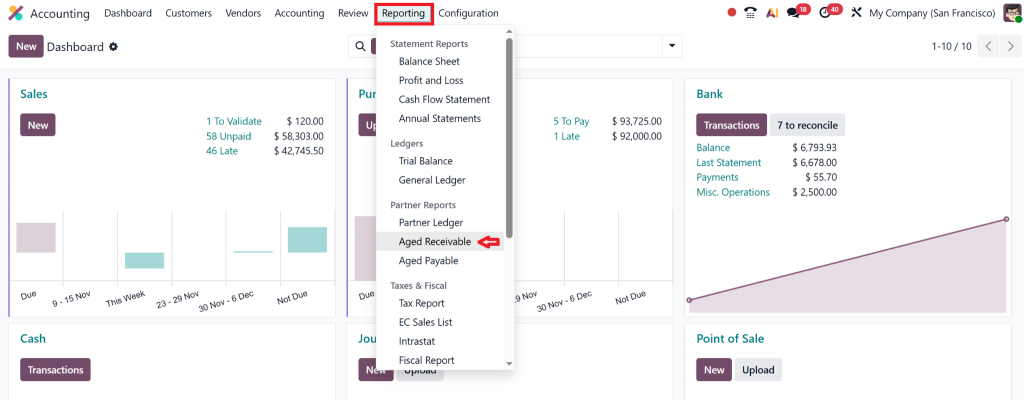
Reporting → Aged Receivable
Step 2: Select Date and Filters
Choose the cutoff date for the report.
You can also apply filters such as:
- Customer
- Currency
- Salesperson
- Invoice type
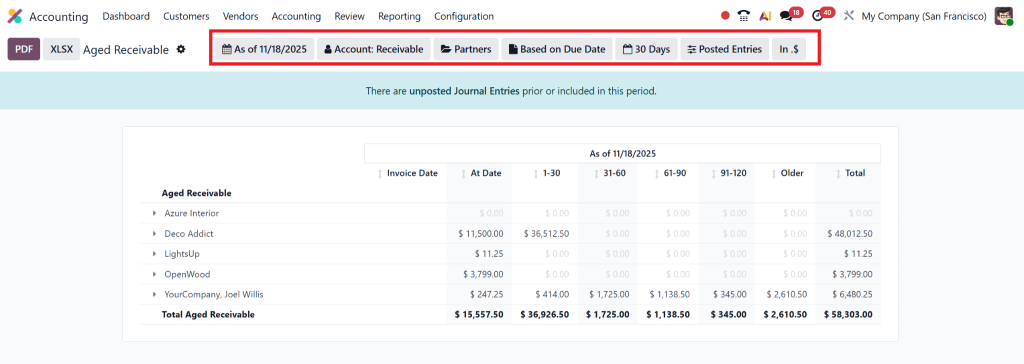
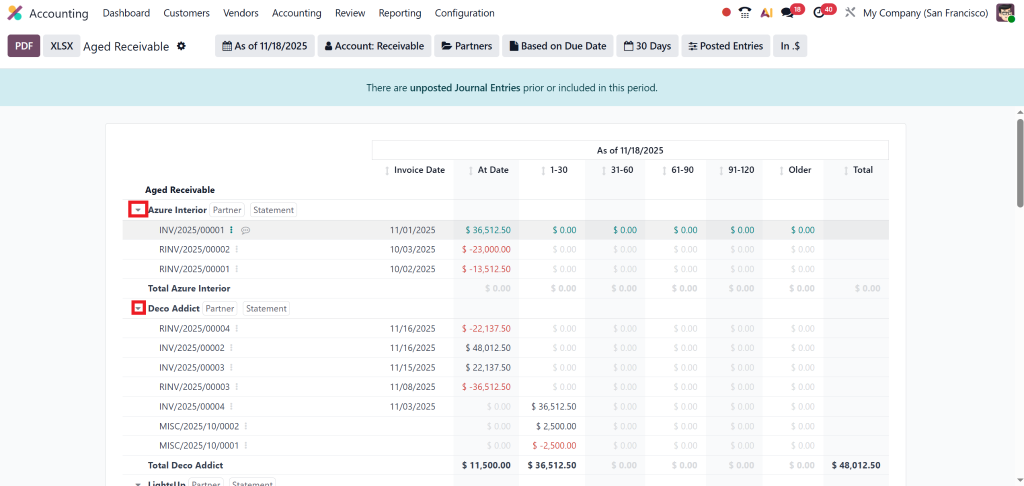
Step 3: Analyze Aging Buckets
Read through the breakdown of aging intervals. Click on any bucket to expand invoices.
Step 4: Export or Schedule Report
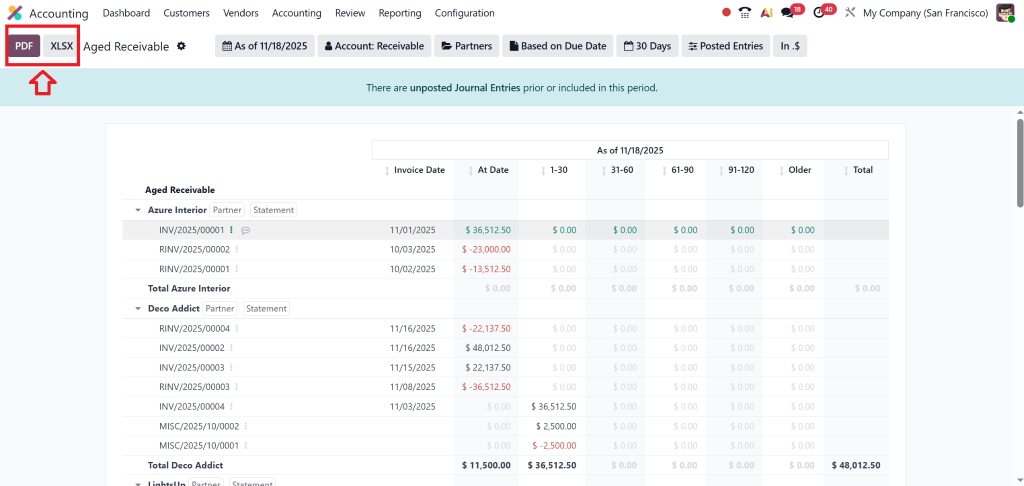
Odoo allows:
- PDF export
- Excel export
- Scheduling for daily/weekly/monthly reports
Step 5: Use Follow-Up Tools
To speed up collections, click on any customer and initiate reminders.
For a complete understanding of Odoo’s financial tools, don’t miss our guide on How to Do Bank Reconciliation in Odoo 19 Accounting, where we break down the entire reconciliation workflow.
Key Features of the Aged Receivable Report in Odoo 19
Odoo 19 includes multiple improvements that make receivable aging more accurate, intuitive, and valuable.
1. Customer-Wise Receivable Summary
You can view the total outstanding amounts for each customer in a single table. This is extremely helpful for sales, credit control, and finance teams.
2. Invoice Breakdown with Due Dates
When you click on any bucket, Odoo expands the section to show individual invoices, due dates, currencies, and pending amounts.
3. Currency Conversion Support
If your business handles multiple currencies, Odoo automatically converts all amounts into your company’s currency for consistent reporting.
4. Filter and Grouping Options
You can filter by:
- Customer
- Invoice status
- Sales team
- Partner category
- Due date range
This facilitates in-depth analysis of aged receivables, Odoo reporting, and informed decision-making.
- Export to PDF or Excel
If financial reports need to be shared with auditors, management, or investors, Odoo offers quick export options.
Benefits of Using Aged Receivable Reports in Odoo 19
Understanding how aged receivable reports work in Odoo 19 Accounting provides your business with multiple benefits that extend beyond simple reporting.
1. Stronger Cash Flow Management
A well-managed receivable process ensures your business has steady working capital. The report identifies clients who are delaying payments, enabling you to prioritize your collection efforts.
2. Faster Decision-Making
Whether you want to block sales orders for customers with overdue invoices or renegotiate payment terms, the aged receivable report highlights the necessary insights.
3. Prevention of Bad Debts
The earlier you identify overdue invoices, the faster you can take action, reduce risks, negotiate settlements, or apply penalties.
4. Real-Time Financial Accuracy
Since Odoo automatically updates invoice statuses, your aging report stays accurate without manual effort.
Best Practices for Using Aged Receivable Reports Effectively
To get maximum value from Odoo 19 partner reports receivables, follow these recommended practices:
1. Update Customer Payment Terms Regularly
Choose realistic due dates and enforce them through Odoo automation.
2. Use Automatic Follow-Up Levels
Configure multiple levels of reminders:
- Level 1: Friendly reminder
- Level 2: Payment warning
- Level 3: Final notice
3. Reconcile Outstanding Payments Frequently
This ensures accurate aging.
4. Align Sales and Finance Teams
Sales teams should be aware of customers with pending dues to avoid extending additional credit.
5. Monitor Weekly or Monthly
Aging reports must be reviewed regularly, not just at the end of each month.
Aged Receivable Reports Work in Odoo 19 Accounting
Understanding how aged receivable reports work in Odoo 19 Accounting empowers your business to maintain proper financial discipline, prevent overdue payment issues, and strengthen cash flow. The aged receivable report Odoo 19, combined with follow-up automation and real-time insights, brings exceptional value to finance teams and business owners alike.
By adopting Odoo 19 and partnering with Netilligence, you gain a reliable financial system that keeps your business running smoothly, efficiently, and without unexpected payment delays.
If you are ready to improve your receivable management, reduce overdue invoices, and gain complete visibility into customer payments, Netilligence is here to help.




