Why You Need to Set Up E-Wallet and Gift Cards in Odoo 19
Have you ever noticed how customers enjoy paying faster, saving their credit for later, or gifting store value to someone else? That’s precisely what happens when you Set Up E-Wallet and Gift Cards in Odoo 19; it helps your business offer smarter, faster, and more flexible payment options to your customers. In today’s digital world, everyone wants flexibility and comfort when shopping, whether online or in stores. With Odoo 19 e-wallet setup and Odoo 19 gift card configuration, you can give your customers that ease.
For example, a customer buys from your online store, adds extra credit to their wallet for the next purchase, or gifts their friend a card for your products. They’ll remember how easy it was and want to return. That’s the strength of using Odoo POS e-wallet integration and the ability to create gift cards in Odoo 19. And when you manage e-wallet balances in Odoo, you can keep everything organized.
This blog will walk you through everything you need to know, from why these features matter to how to activate them. By the end, you’ll understand precisely how Odoo’s digital payments setup makes your business run more smoothly and keeps your customers happy.
Understanding How Odoo 19 E-Wallet Setup Works
An e-wallet in Odoo 19 is just like a digital wallet where consumers can store money and use it whenever they shop with you again. Once you complete your Odoo 19 e-wallet setup, customers can add credit directly on your website or at your physical store.
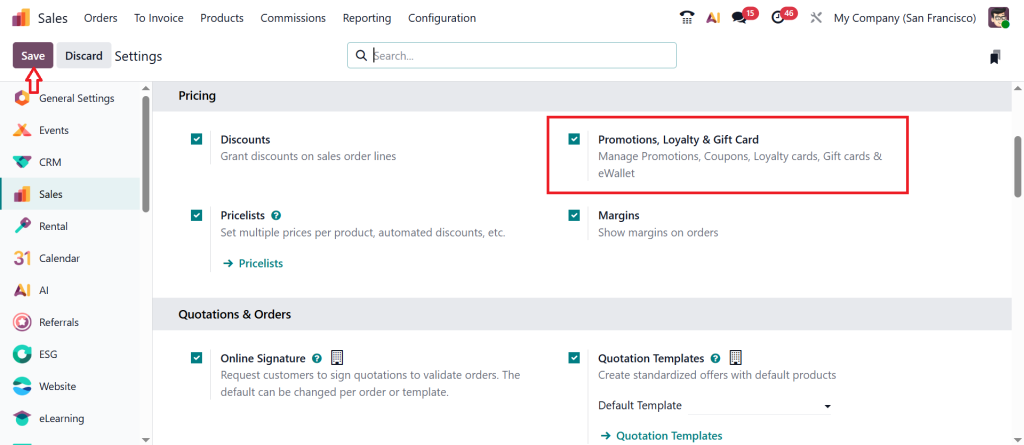
Setting it up isn’t difficult; it’s more about knowing where the right options are. In your Odoo 19 dashboard, you’ll find settings under the Sales module that let you enable the “Discounts, Loyalty & Gift Card” option. Once it’s active, the e-wallet feature is ready to use. You can then create “Top-Up” products, for example, $25, $50, or $100 wallet recharge options. These appear in your online store or POS system so customers can add money easily.
Every time someone tops up, their balance automatically updates. As a business owner, you don’t have to track it manually. You can check everything in the backend, who topped up, how much balance they have left, and where they used it. That’s how you manage e-wallet balance in Odoo without any extra tools or confusion.
Setting Up Odoo 19 Gift Card Configuration for Your Store
Gift cards are not just for holidays; they’re an all-year-round way to bring new people to your store. In Odoo 19, the gift card configuration lets you form both physical and digital gift cards. You decide the value, the expiry date, and how customers can use them.
In Odoo 19, it’s as simple as creating a few products called “Gift Cards.” You might have one worth $25, one for $50, and one for $100. When customers buy these cards, they receive a unique code through email. The recipient can then enter the code during checkout, either on your website or at your POS system. The amount will be automatically deducted from the total.
What’s great about this is its flexibility. You can use Odoo 19 customer loyalty features to connect these gift cards to loyalty programs, offer special rewards, or use them as part of promotions. You can even create gift cards in bulk and send them to your best customers as a gesture of appreciation.
If you’re running both an online and physical store, your Odoo POS e-wallet integration ensures that these gift cards work everywhere. This means customers can buy a card online and redeem it at your shop without any problem.
How to Create Gift Cards in Odoo 19 That Attract Customers
When you create gift cards in Odoo 19, think of it as another reason for your customers to stay connected to your brand. People love sharing experiences, and a gift card is exactly that: a simple way to invite someone new to try your products.
In the backend, you can create different designs and personalize your gift card messages. You can also set rules, for example, whether the gift card can be used once or multiple times until the balance runs out. The good thing is that Odoo keeps track of everything for you, from balances to expiration dates. You’ll always know which cards are active, which ones are redeemed, and which ones are close to expiry.
By managing this efficiently, you’re not only offering convenience but also collecting valuable data about customer behavior. This data helps you plan better promotions and reward programs through Odoo 19 customer loyalty features.
How to Set Up E-Wallet and Gift Cards in Odoo 19: A Step-By-Step Guide
Running a business becomes easier when your customers can pay the way they like. That’s precisely what setting up E-Wallet and Gift Cards in Odoo 19 helps you do. Let’s go through each step simply so you can set it up without any confusion.
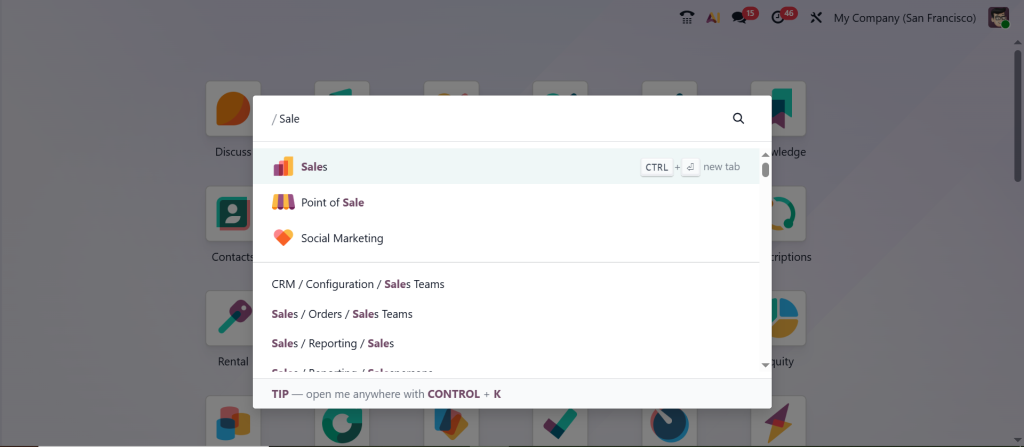
Open the Sales app from your Odoo 19 dashboard.
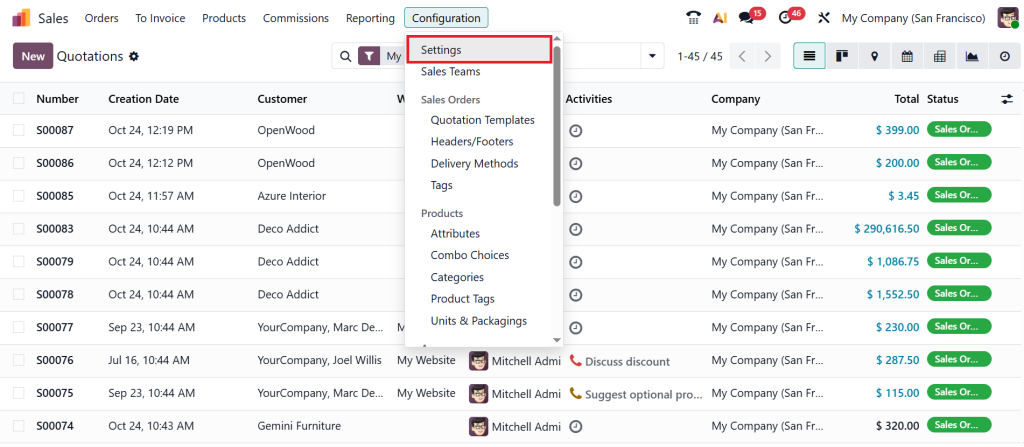
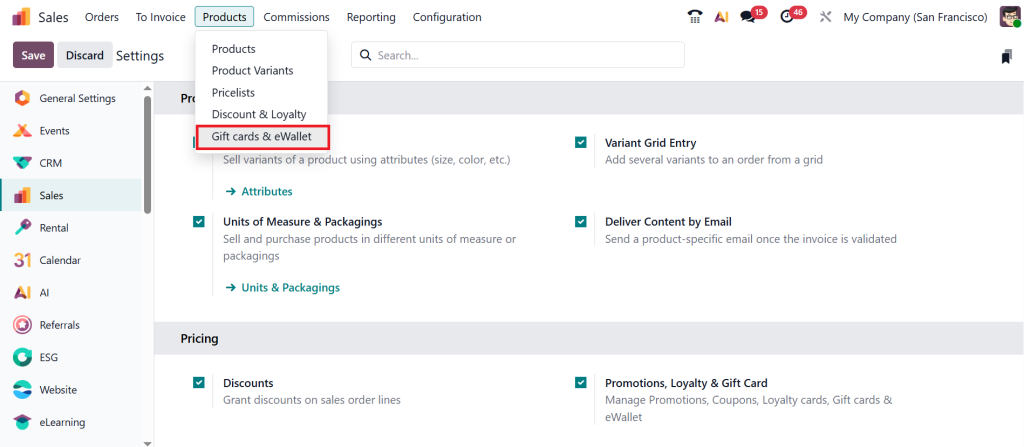
Go to Configuration > Settings.
Enable ‘‘Promotions, Loyalty & Gift Card’’ and click Save.
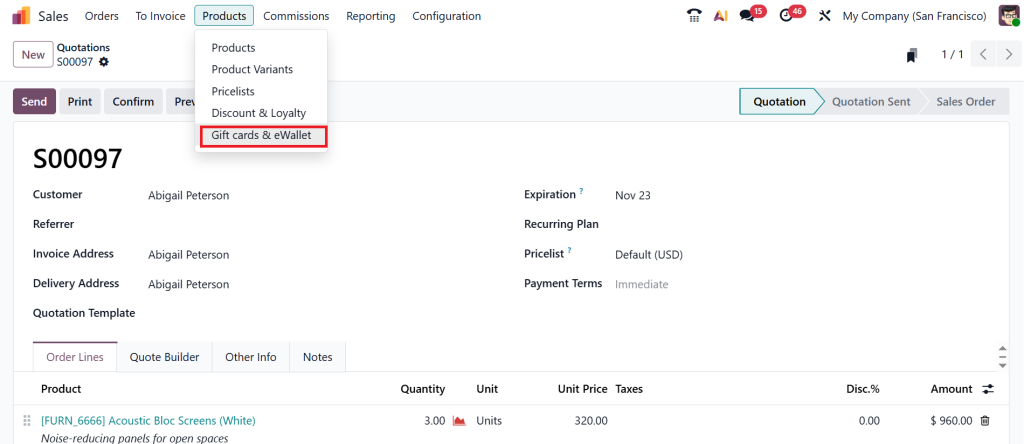
Then, click Products > Gift cards & eWallet.
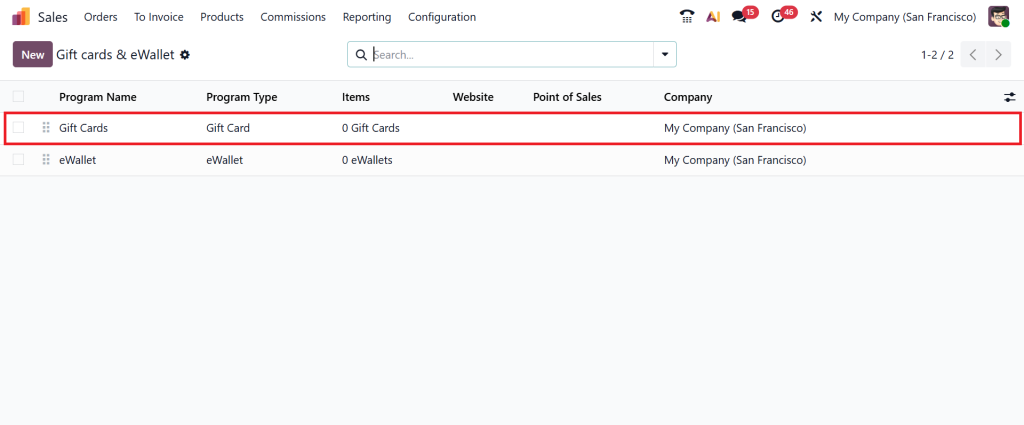
Under the dashboard, you can create a gift card & eWallet as shown in the screenshot below. Here, I am using the existing one by clicking on the Gift Cards option.
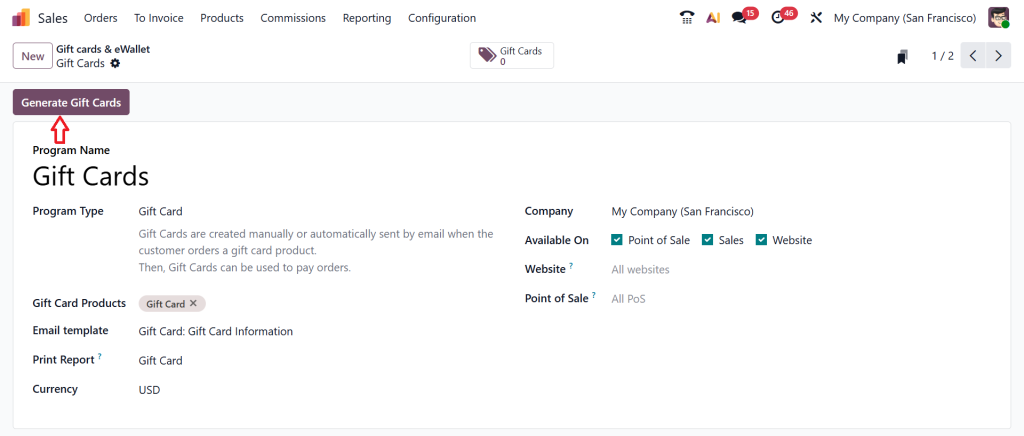
Click on ‘‘Generate Gift Cards’’ by creating a new gift card.
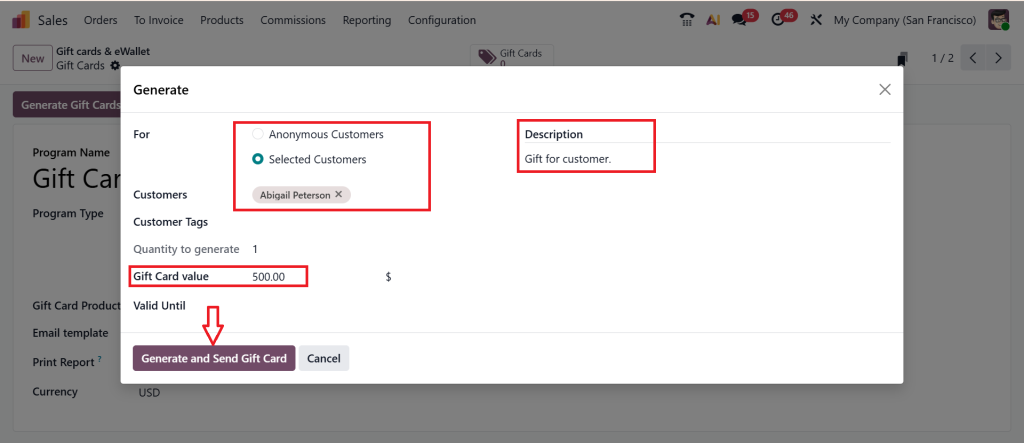
If you want to create gift cards for an Anonymous Customer or a Selected Customer, you can choose either one. So, let’s choose the selected one, select the customer, write a description, and add the gift card value, then click Generate and Send Gift Card.
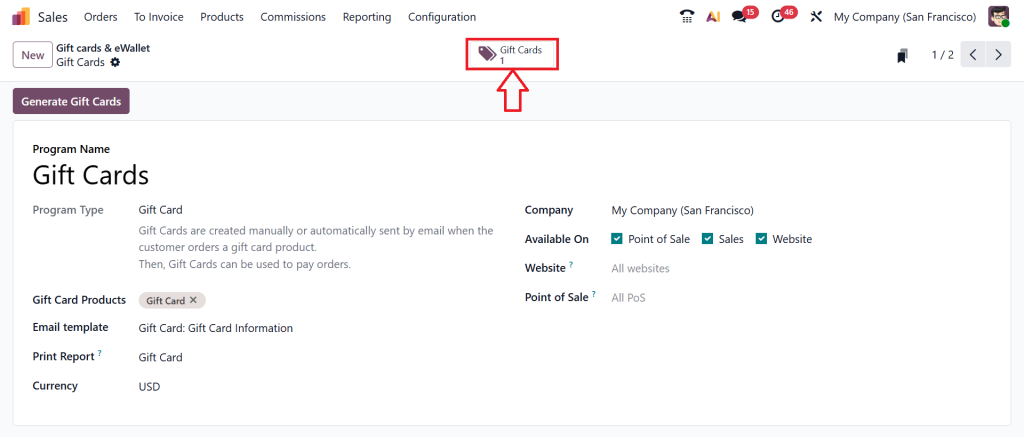
Click the ‘‘Gift Cards’’ smart button.
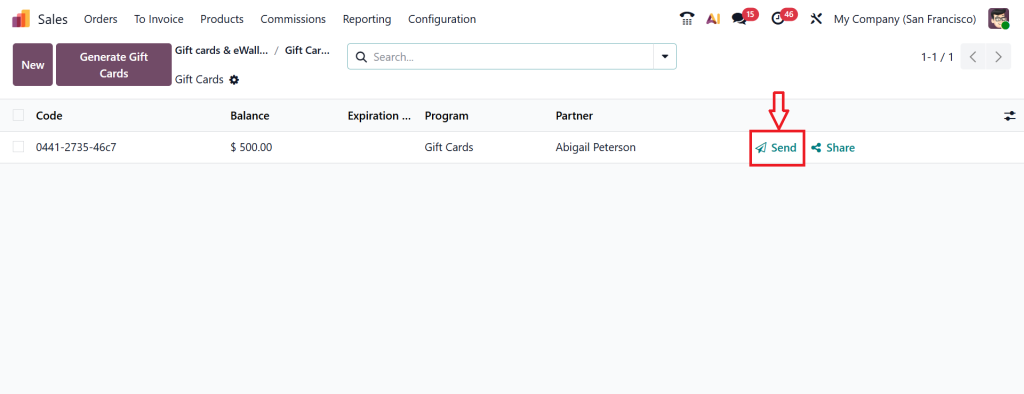
As you can see, our gift card is in the screenshot below. If you want to send this gift card, click on the ‘‘Send’’ button.
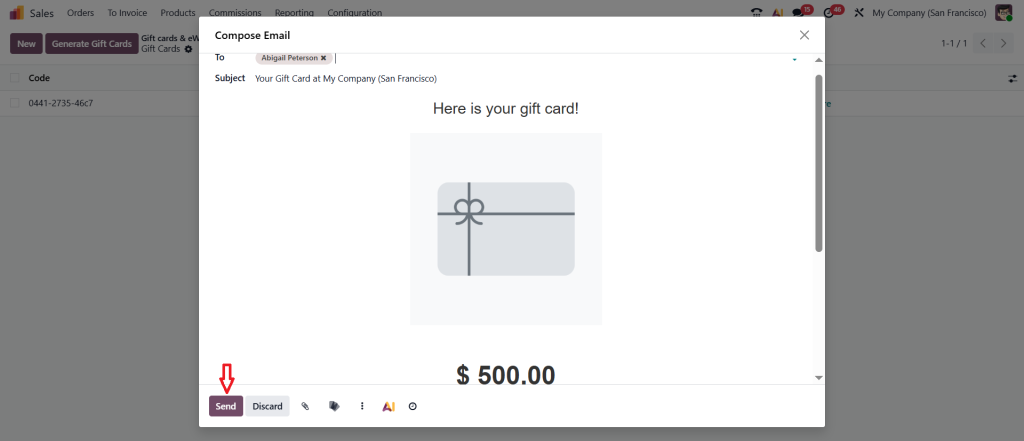
As shown below, you can easily send your gift card to the customer.
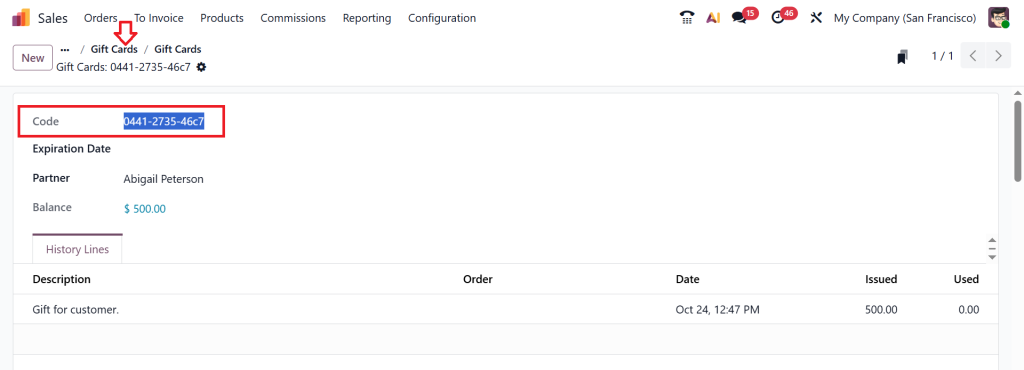
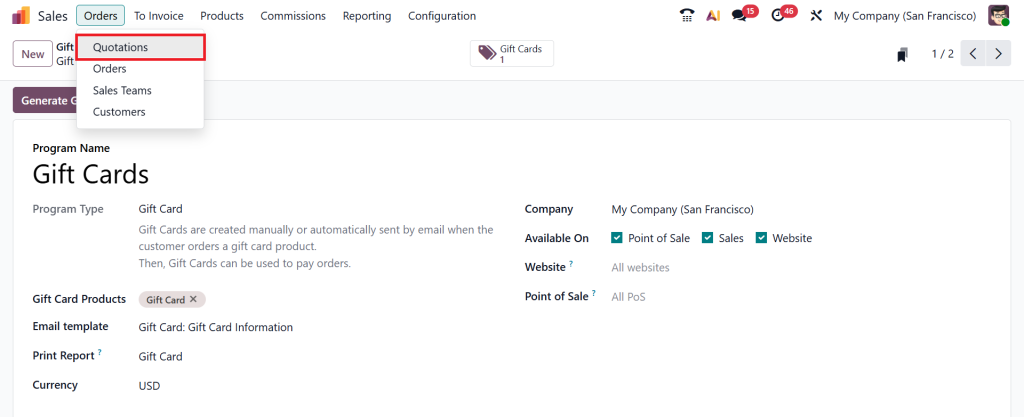
Open the Gift Card and copy the ‘‘Code’’. Let’s go back to the Gift Cards section.
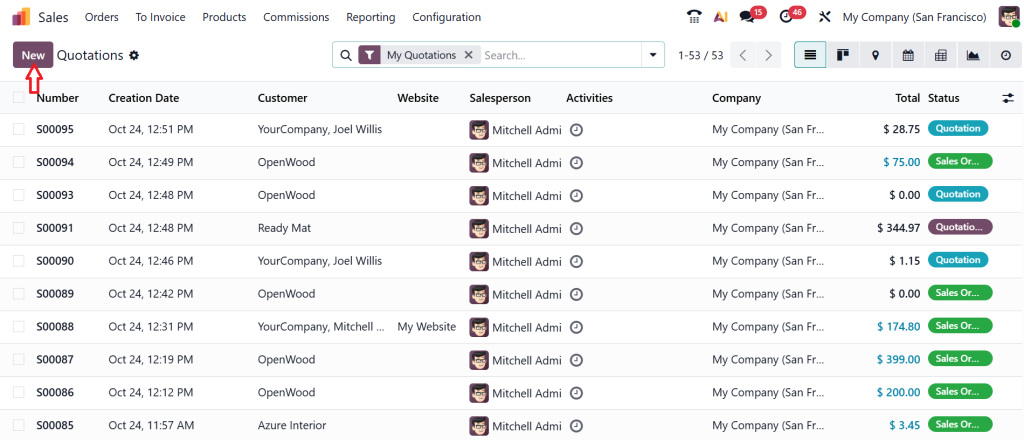
Click Orders > Quotations.
Create a New quotation.
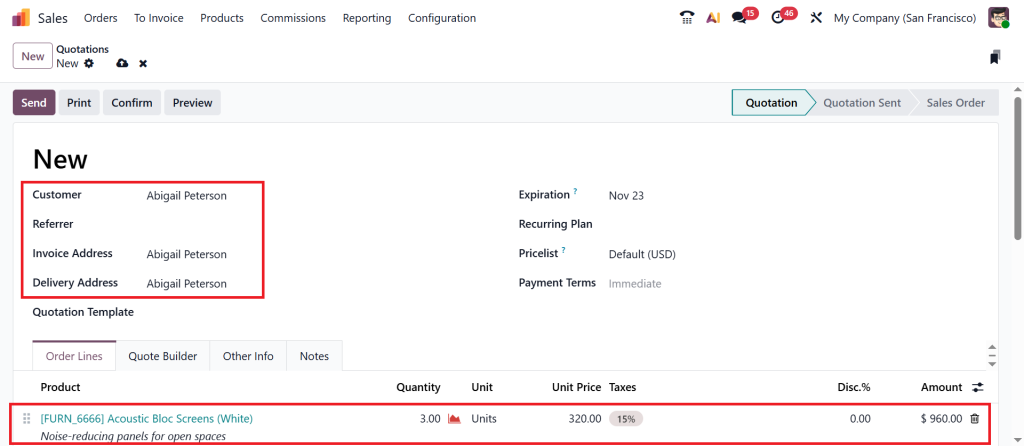
First, specify the customer as ‘‘Abigail Peterson’’, add the product, and select the product quantity.
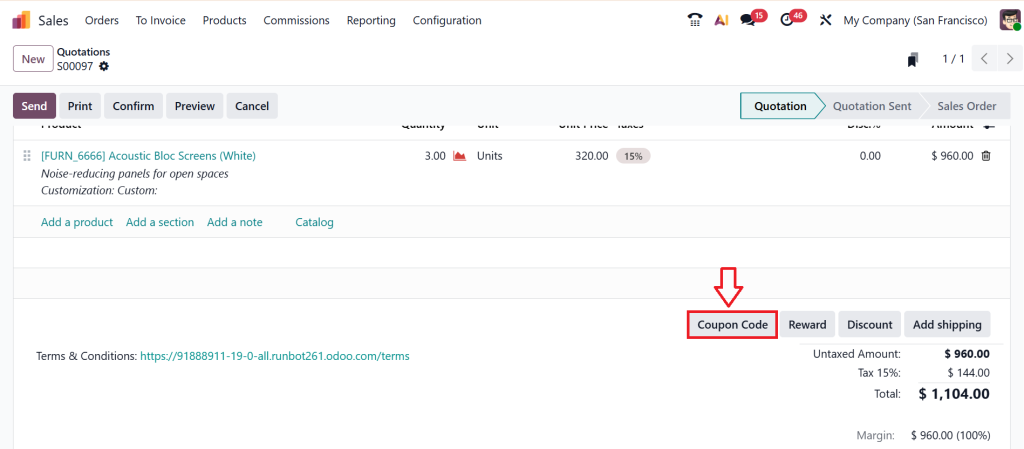
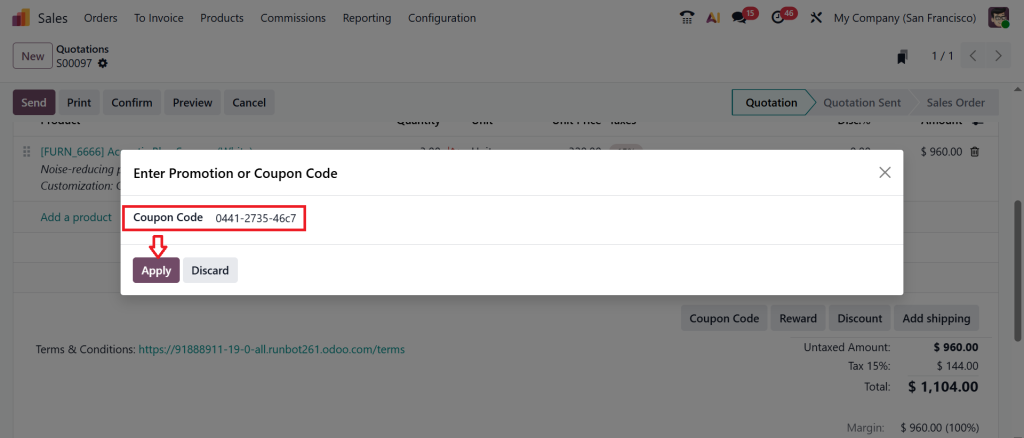
Now, let me show you how to use the coupon code. Scroll down and click on Coupon Code.
Paste the copied coupon code and click Apply.
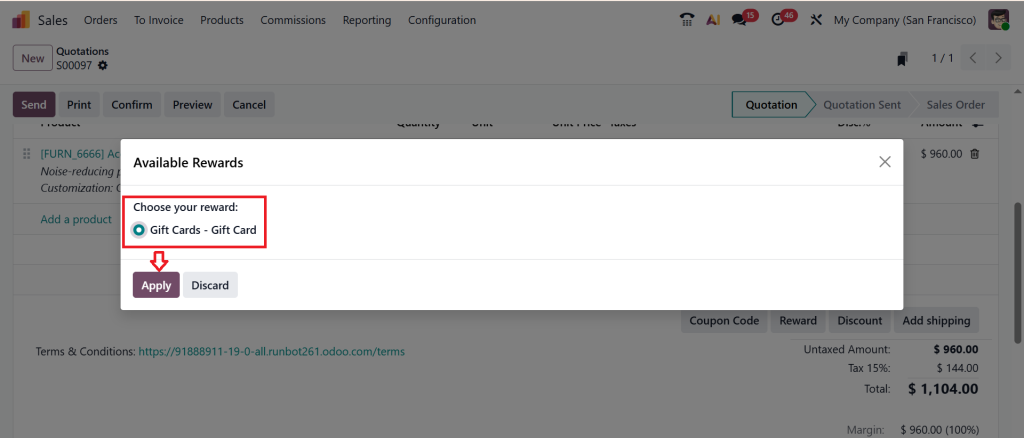
Choose your reward, then click Apply again.
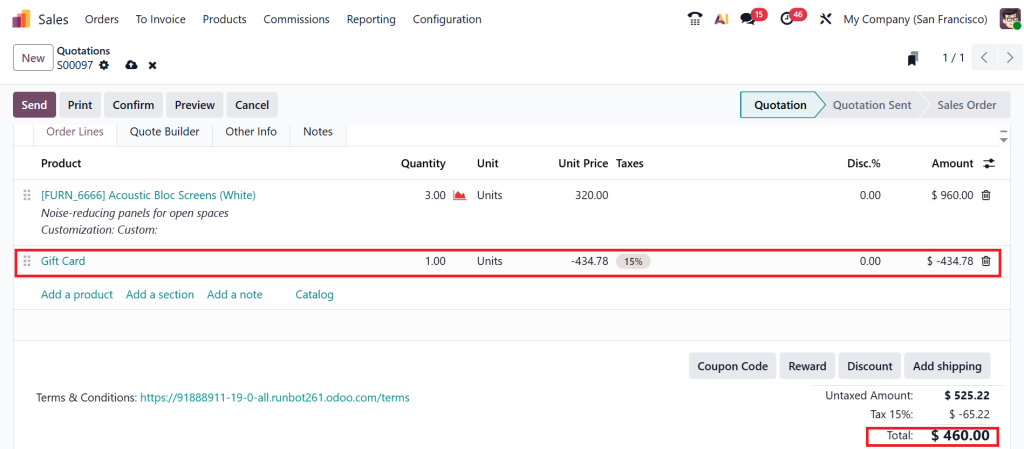
After applying the coupon card, you can see the amount deducted here.
So, that’s how you can create a gift card and add that gift card to a sale order. Let’s move to the Products > Gift cards & eWallet and create an eWallet.
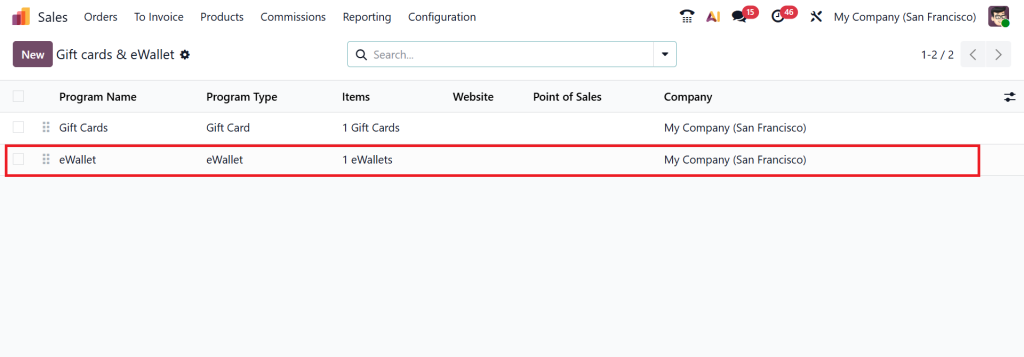
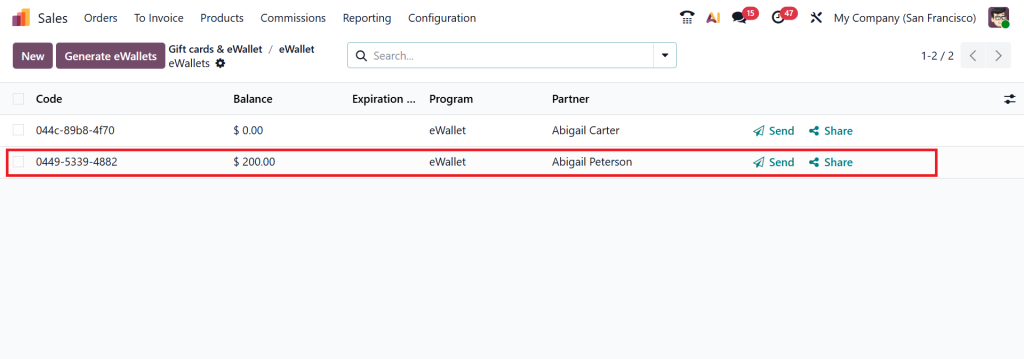
From the Gift Cards & eWallet dashboard, click the eWallet option.
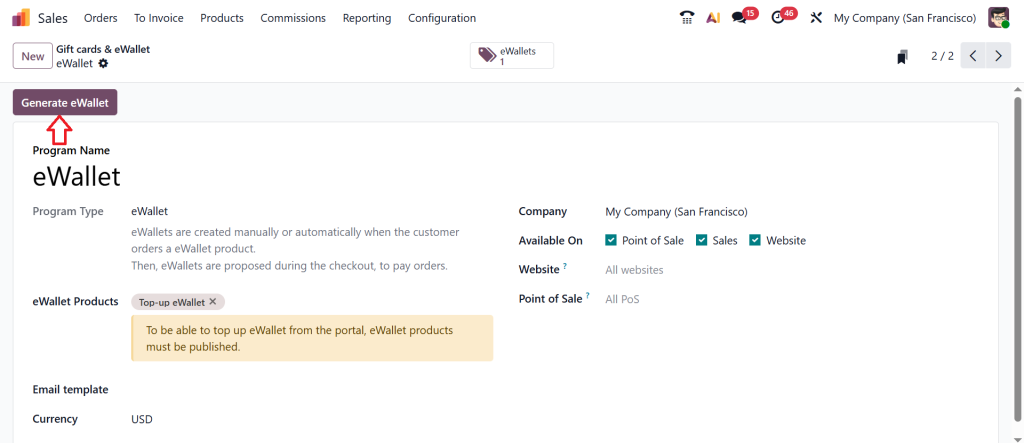
Then, click ‘‘Generate eWallet’’.
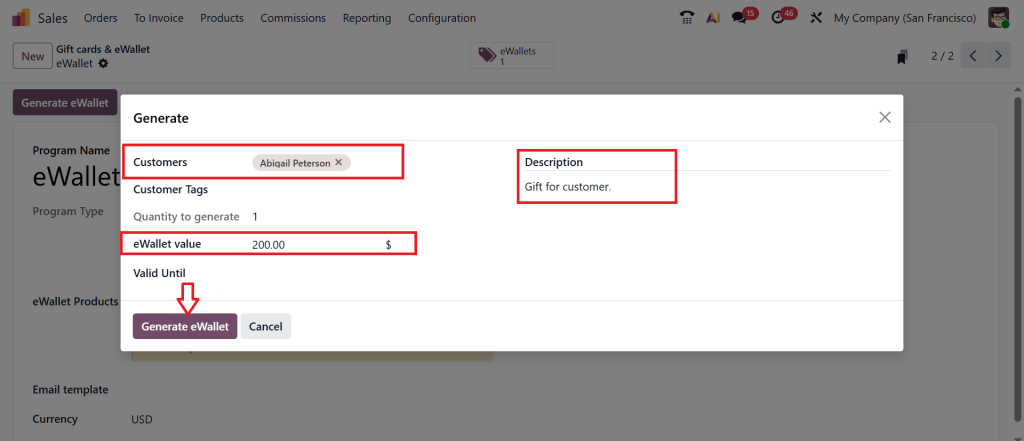
Fill out all the details just like we did above, and click ‘‘Generate eWallet’’.
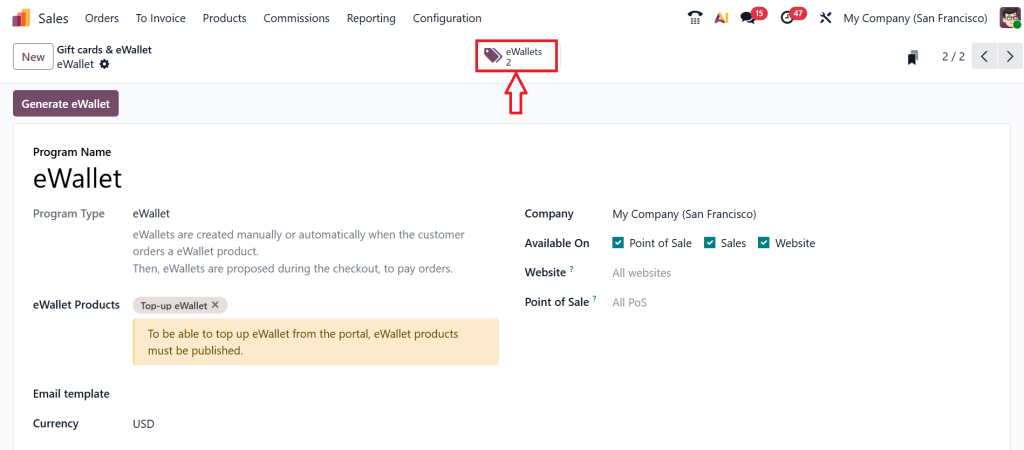
Click the above eWallets smart button.
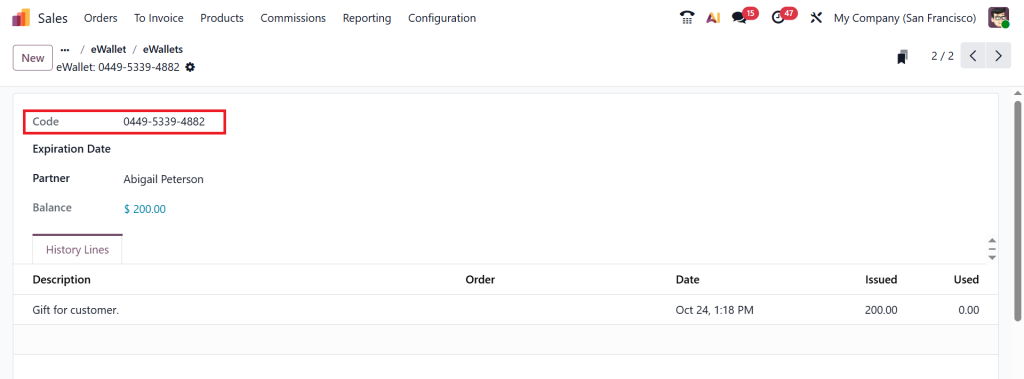
From here, you can easily send or share this with your customer.
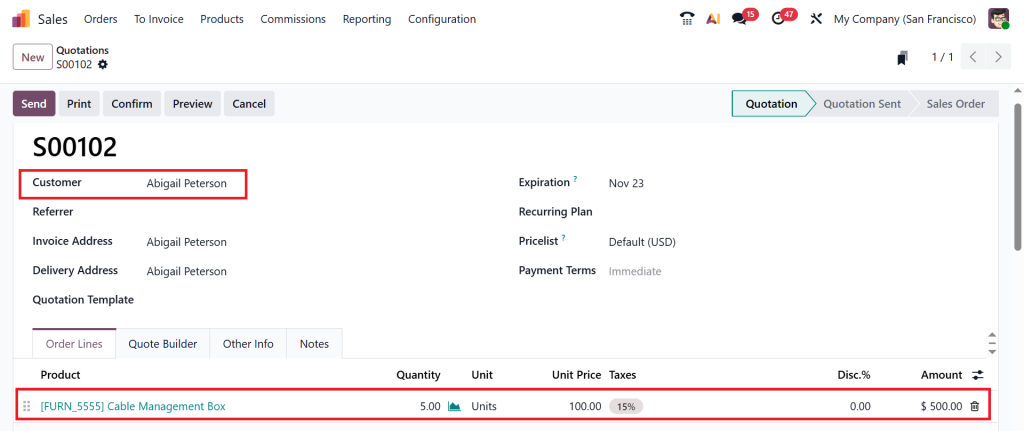
To apply this eWallet, you can copy this coupon code from here. And go to the Orders > Quotations > New and create a new quotation.
Select the customer and add the product.
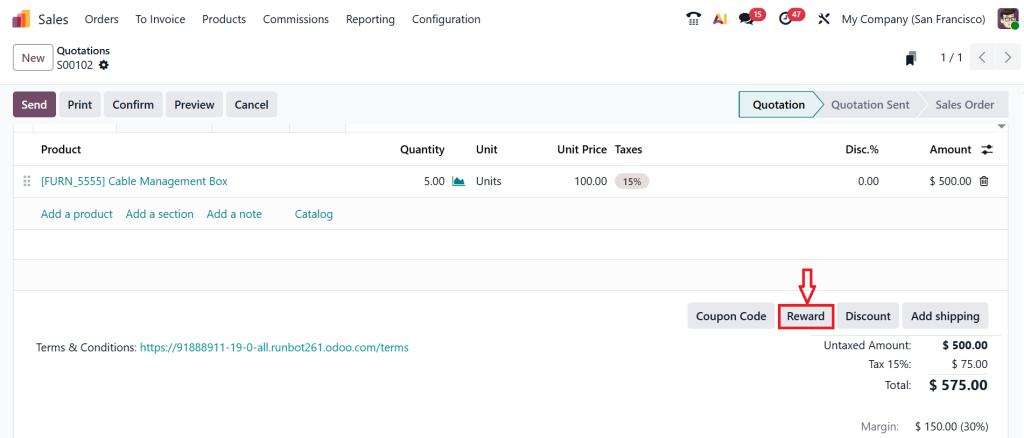
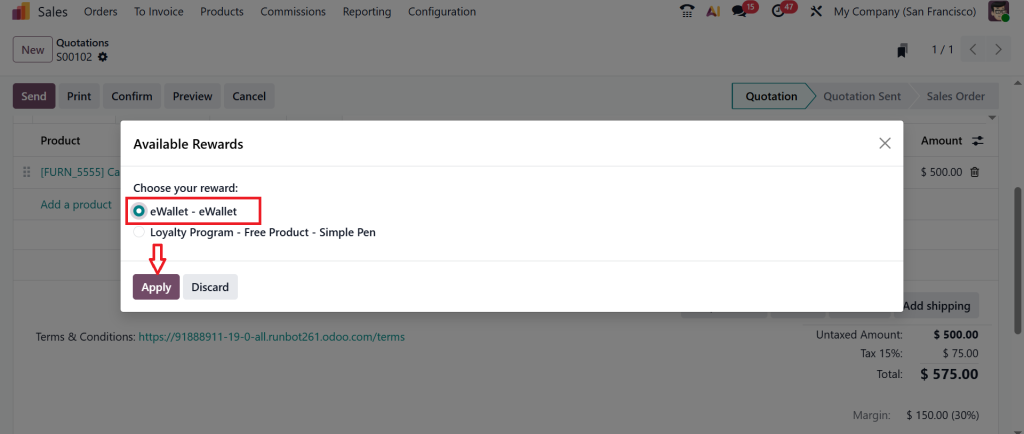
Scroll down and click on the Reward button.
Then, choose your reward and click Apply.
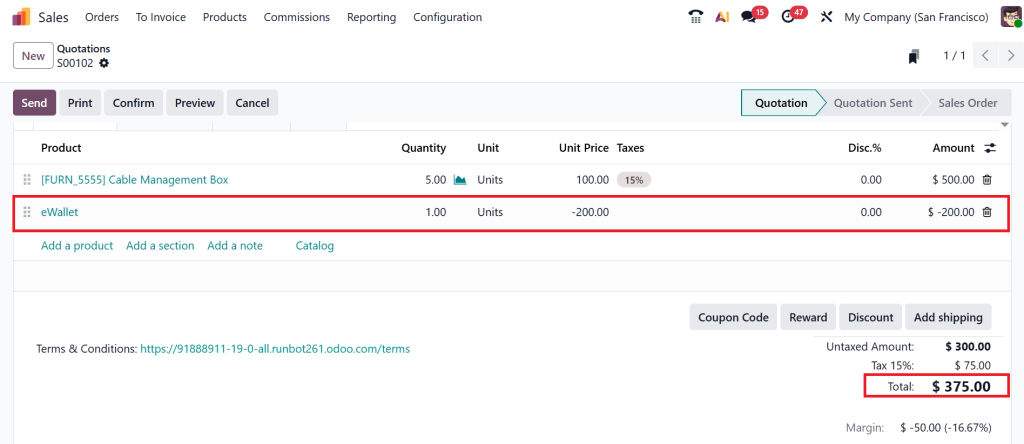
After clicking apply, you will receive an eWallet and the amount. And that amount will be deducted from our total amount.
That’s how you can create an eWallet and gift cards and use them inside any quotation or a single order. After that, you can confirm the quotation, deliver the product, issue an invoice, and process payment as per your requirements.
Odoo POS E-Wallet Integration — Connecting Online and In-Store Payments
If you have a retail shop and an online store, you’ll love Odoo’s POS e-wallet integration. It connects both worlds. Imagine a customer tops up their wallet online, then visits your store the next day, they can use that same balance for in-person shopping. The system updates automatically; no manual steps are needed.
Similarly, gift cards purchased at your physical counter can be used online, too. Everything syncs in real-time. This makes your Odoo digital payments setup reliable and straightforward for everyone, both you and your customers.
This connection also means your staff at the POS system can check wallet or gift card balances instantly. They can apply the amount to an order or inform the customer if they still have credit available. It’s all about giving the customer a better shopping experience and you, better control over transactions.
How to Manage E-Wallet Balance in Odoo Without Confusion
When you start using the e-wallet feature, one question always comes up: “How do I keep track of all these balances?” The good thing about Odoo 19 is that it has already addressed this problem.
From your backend dashboard, you can see every wallet created, who owns it, its available balance, and when it was last used. This makes it easy to manage e-wallet balances in Odoo without losing track of them. You can manually adjust balances when necessary, as a goodwill gesture to a customer or to resolve a complaint.
You can also set expiry dates on wallets to avoid long-term unused credits. And since everything connects to your accounting system, your financial reports stay accurate too. This gives you a clear picture of how much credit your customers hold at any time.
Using Odoo 19 Customer Loyalty Features to Build Stronger Relationships
Both e-wallets and gift cards are part of Odoo 19’s customer loyalty features, allowing you to keep your customers engaged. For example, you can create loyalty programs that reward customers with wallet credit for every purchase. Or, send them small gift cards as thank-you rewards for frequent buying.
You can even create special campaigns, such as offering wallet bonuses for referrals or limited-time gift cards during festivals. When people know they can earn or share store credit, they are more likely to come back. That’s how you build long-term relationships without spending too much on separate marketing tools.
Every action, such as top-ups, redemptions, or rewards, is automatically recorded in Odoo. That’s why you always know what’s working and what needs improvement.
Setting Up Odoo Digital Payments for Smooth Transactions
Before using wallets or gift cards, you’ll need to set up your Odoo digital payments properly. This step ensures your customers have a safe and quick checkout experience.
In Odoo’s settings, go to the eCommerce or POS section and enable your preferred payment methods, such as PayPal, bank transfer, or card payment. Once done, connect these methods with your e-wallet and gift card options. This allows customers to add money to their wallets or purchase gift cards easily.
Odoo manages all digital payments in one place. Whether it’s a wallet top-up, a gift card purchase, or a regular order, everything is recorded under your payment journals. This keeps your business records clean and straightforward to follow.
Why Set Up E-Wallet and Gift Cards in Odoo 19 Is Worth Your Time
When you first hear about these features, you might think it’s not very easy. But once you start working with Set Up E-Wallet and Gift Cards in Odoo 19, you realize how much time and effort it saves you later. Customers no longer have to go through long, manual refund processes; you can issue gift cards or credit their e-wallets.
They also get the satisfaction of using store value at their own pace. This convenience naturally builds trust and loyalty toward your brand. Plus, it helps you bring in new customers when someone gifts your store credit to a friend.
It’s not just about payments, it’s about creating a smooth experience that encourages people to come back. That’s precisely what every business wants.
Making the Most of Odoo 19 E-Wallet and Gift Cards for Your Business
After you’ve set up everything, it’s time to integrate it into your business strategy. Promote your wallet and gift card options on your website banner, emails, and social media. Let your customers know they can store credit, gift value to others, or earn rewards through their purchases.
You can even offer small incentives, such as an extra $5 for every $50 wallet top-up. These small steps make a big difference in how customers see your brand. They feel valued, and you enjoy repeat sales.
And because Odoo 19 connects everything like sales, POS, website, accounting, and loyalty. You can easily see how your business is performing. You do not need any extra apps or add-ons for it.
Start Using E-Wallet and Gift Cards in Odoo 19 Today
Learning how to set up e-wallets and gift cards in Odoo 19 may seem like a technical task at first, but once you follow the steps, you’ll see how easy and rewarding it can be. Through Odoo 19 e-wallet setup, Odoo 19 gift card configuration, and Odoo POS e-wallet integration, you can make payments faster, more flexible, and more customer-friendly.
When you create gift cards in Odoo 19, leverage its customer loyalty features, and properly manage e-wallet balances, you’re not only simplifying payments; you’re creating reasons for customers to return, share, and engage.
With the proper Odoo digital payments setup, you’ll find everything connects naturally. No extra effort, no confusion, just a smooth way to keep your customers happy while keeping your business running efficiently.
At Netilligence, technology should make business easier, not complicated. That’s why our team helps companies like yours configure Odoo 19 e-wallets and gift cards effectively so you can focus on advancing your sales while we handle the setup with precision and care.
Ready to Get Started?
Let Netilligence help you set up E-Wallet and Gift Cards in Odoo 19 the right way. Our Odoo experts will guide you step by step from configuration to integration, ensuring your system runs smoothly and supports your business goals.
Get in touch with Netilligence today and turn your digital payment options into a strong customer loyalty tool.
Hi, I'm Ilsa Shabbir, an Odoo ERP content writer specializing in functional blogs on Odoo modules. I simplify complex Odoo features, creating clear and engaging content to help businesses understand and optimize their ERP solutions.
We use cookies to ensure that we give you the best experience on our website. If you continue to use this site we will assume that you are happy with it.