

When you run a company, one thing always feels difficult to manage: expenses. Sometimes employees forget receipts, sometimes managers miss approvals, and sometimes finance teams sit with piles of emails trying to understand who spent what and why. If you have been dealing with these issues for a long time, you’re not alone. Many businesses face the same problems every day. That’s why I want to talk about how to track company expenses in Odoo 19. This version of Odoo offers an efficient way to manage costs in a clean, simple, and fast way.
Today, every business wants clarity. You want to see where money is going, you want proper records, and you want a system that keeps everything organized without making everyone frustrated. And this is where Odoo 19 becomes extremely helpful. While talking to you on this blog, I’m showing you a path that removes your stress about expenses, step by step. So, stay with me as we explore how to track company expenses in Odoo 19 in a way that genuinely supports your day-to-day work.
Why You Need to Track Company Expenses in Odoo 19 the Right Way
Before anything, I want to share something important with you. If you’re struggling with lost receipts, delayed approvals, confusion around employee claims, or difficulty keeping accurate records, learning to track company expenses in Odoo 19 can change how you experience expense management. And I fully understand how tiring it becomes when expenses are handled manually. Today, we will talk about how to track company expenses in Odoo 19 in a simple, practical way.
When you start planning to track company expenses in Odoo 19, you will notice that the system makes you feel more in control. It clearly guides employees, helps managers reduce back-and-forth conversations, and supports the finance team by providing a clear picture of all expenses. But the thing I really want you to notice is how much easier things become when you decide to track company expenses with Odoo 19, with its new tools.
As we go deeper, you will see why so many people are shifting to this version and why it is becoming one of the easiest ways to track company expenses in Odoo 19 without confusion. By the end of this blog, you will feel confident enough to start using these features on your own.
Odoo 19 Expense Management – A System That Fits Real Business Life
When I talk about Odoo 19 expense management, I want you to imagine something straightforward. Think about all the times an employee emailed you a picture of a receipt, or maybe someone brought a crumpled paper to approve a meal claim, or a manager forgot to review expenses because the email got buried under hundreds of other messages. This is where Odoo 19 changes your experience. It organizes everything in one clean place, so expenses don’t get lost and employees don’t get confused.
What I personally liked while exploring Odoo 19 expense management is how it respects your time. If someone uploads a receipt, the system automatically reads it. If someone enters an expense, it guides them with the correct category. If a manager needs to approve something, the notification appears right on their dashboard. No one needs to run behind anyone. Work keeps moving.
I know many businesses feel pressure when expense season arrives, but with Odoo 19 expense management, the whole process becomes calmer and more predictable. You can clearly see what’s pending, what’s approved, and what needs attention. And if you’re someone who wants things to run smoothly without adding extra workload to your team, this system will feel very comforting.
Odoo 19 Expenses App New Features – What Makes Everything Easier
Let’s talk about the latest improvements because the Odoo 19 expenses app’s new features are beneficial for daily workflow. The first thing you will notice is how clean and simple the interface has become. Everything is visually apparent, so employees don’t feel lost when they open the app. They can upload receipts, create expense reports, or check the status of old claims without asking for help.
One feature that many companies love is AI receipt reading. AI sounds like a fancy term, but in this case, it simply means the system reads the uploaded receipt for you. So when someone uploads a picture of a fuel bill or a restaurant receipt, the system catches the date, amount, vendor, and even the tax values. This reduces mistakes and saves everyone’s time.
Another smart update in the Odoo 19 expenses app’s new features is the improved approval flow. Managers can now view everything clearly, comment if needed, request edits, or approve instantly. You don’t need long email chains or WhatsApp messages anymore. Everything sits inside one place.
All these updates make the expense journey easier for employees, managers, and finance teams together.
Company Expense Tracking in Odoo – A Clean Way to Stay in Control
Whenever I think about company expense tracking in Odoo, I think about clarity. Most companies struggle not because they don’t want to manage expenses, but because they don’t have a clear system. With Odoo, you get a clean environment where you can see all your costs in one place. You can check how much each person has spent, which categories are used most, and where approvals are stuck.
The advantage of company expense tracking in Odoo is that it integrates with your accounting module in real time. As soon as an expense is approved, the financial entry is created. This removes double work and improves accuracy.
You also get the comfort of creating your own rules. For example, you can define spending limits, approval hierarchy, or expense categories based on your company’s needs. You’re not forced to follow a fixed setup. You build things the way your business actually works.
Odoo 19 Employee Expenses – Making Life Easier for Your Team
Whenever any employee is asked to submit expenses, they often worry about whether the process will be complicated. But Odoo 19 employee expenses feel very friendly to them. The dashboard shows them exactly where to click, how to attach receipts, and where to submit. Employees can even use their phones to upload receipts instantly. This avoids situations where someone forgets the receipt or later loses it.
What I also found helpful is how employees can track the status of their claims. Usually, people keep asking, “Has my expense been approved?” or “When will I get reimbursed?” In Odoo, status updates appear immediately, so employees stay informed without disturbing anyone.
For companies with frequent travel, food, and small office purchases, Odoo 19 employee expenses is a very reliable companion that keeps everything organized.
AI Expense Tracking Odoo 19 – Simple, Quick, and Very Helpful
This is the part that many people get excited about because AI expense-tracking in Odoo 19 helps save time. And no, it’s not something complicated at all. If I explain it in daily language, you take a picture of your receipt, upload it, and the system fills in the details for you. That’s it. No typing the amount, no entering the date, no worrying about calculation mistakes.
The AI reads the receipt just like a person would. It helps employees avoid errors and makes the finance team’s job much easier. They don’t need to cross-check every small detail again and again. And when you’re handling a large number of expenses every month, this feature becomes extremely helpful.
So, if your company wants to reduce manual work and keep things organized, Odoo 19 AI expense tracking is something you’ll enjoy using every day.
Odoo 19 Expense Cards – A Modern and Clear Way to View Expenses
Another feature that brings clarity to your workflow is the new Odoo 19 expense cards. They work like little visual cards that show you every single expense separately. This makes reviewing faster because you don’t have to open each expense in a long list. You can look at the card, check the amount and date, and review the attached receipt to decide what to do.
These expense cards make conversations between employees and managers easier, too. If something looks unclear, they can comment directly on the card instead of sending emails back and forth.
Whenever I talk to someone about Odoo 19 expense cards, I always mention how much they help in building a quick understanding. You can see the whole picture in seconds, and that solves a lot of daily office stress.
How to Track Company Expenses Odoo 19 – A Simple Step-by-Step Flow
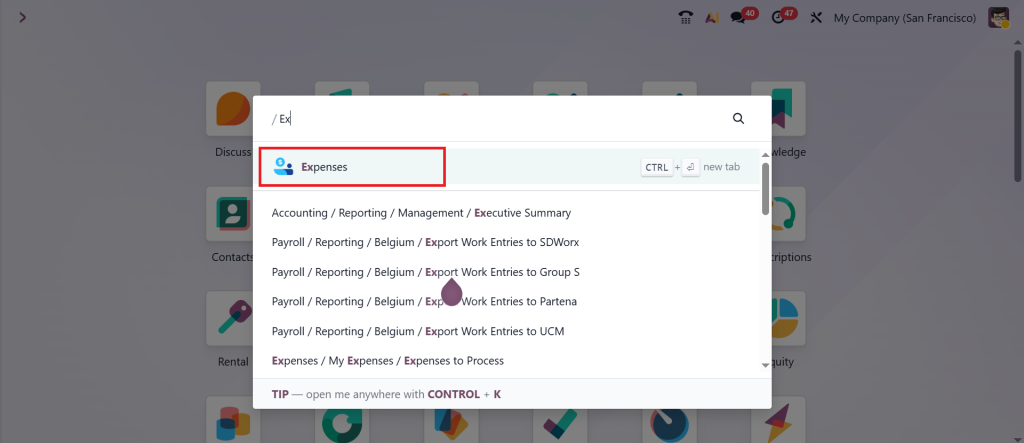
Now that we’ve talked about the essential features, let me walk you through how to actually track company expenses in Odoo 19 in your routine work. First, you open the Expenses app.
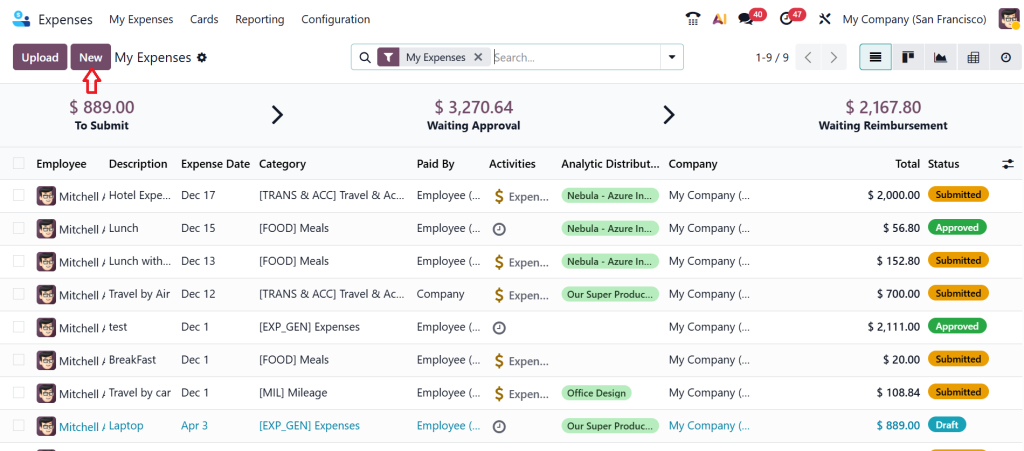
Click ‘‘New’’.
Now, you can see the form to fill up all the expense details. Fill in the details and click Submit.
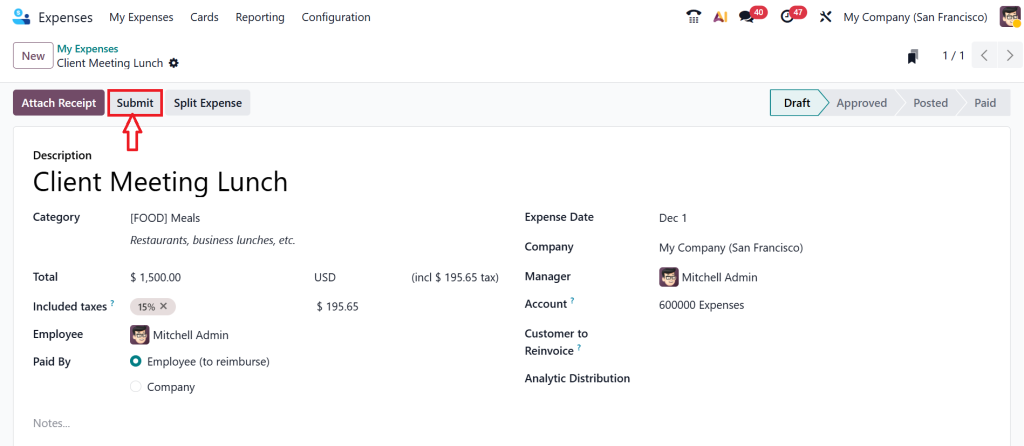
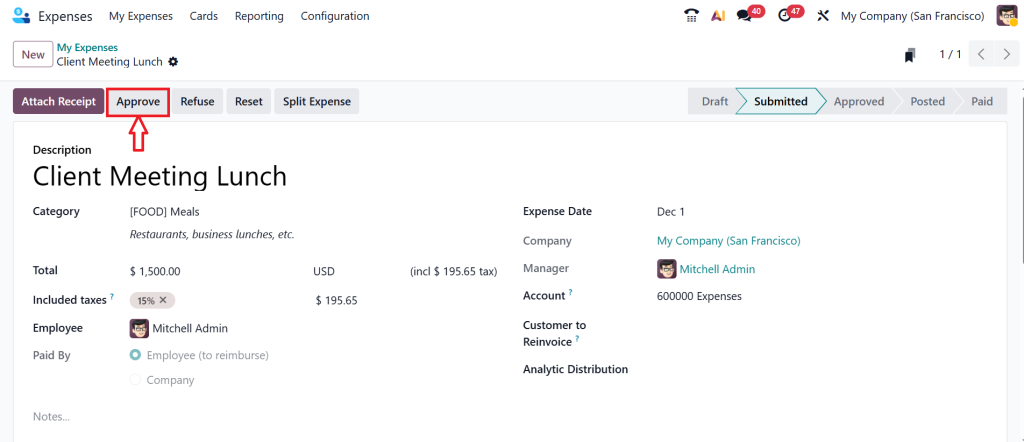
After clicking submit, you can see more options at the top of the page: approve, refuse, reset, and split expense. Because we are submitting this report as an admin, that’s why you can see all these options. Let’s click on Approve.
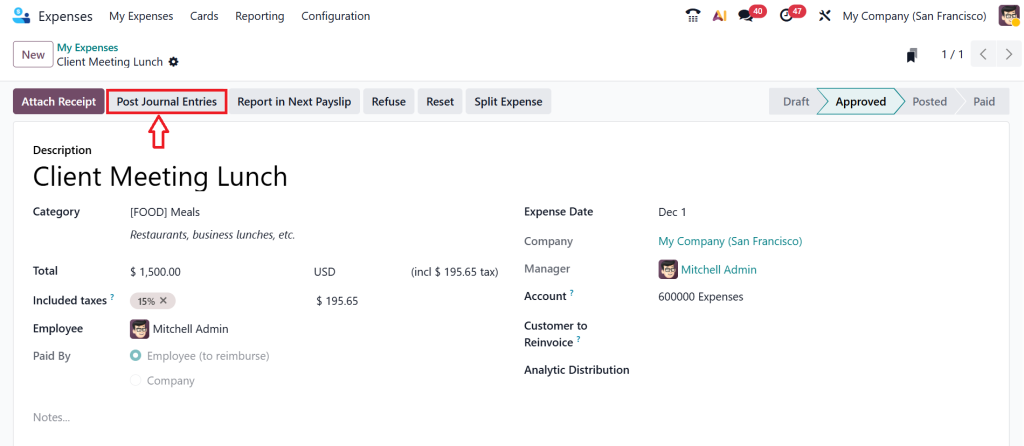
Now, click on Post Journal Entries.
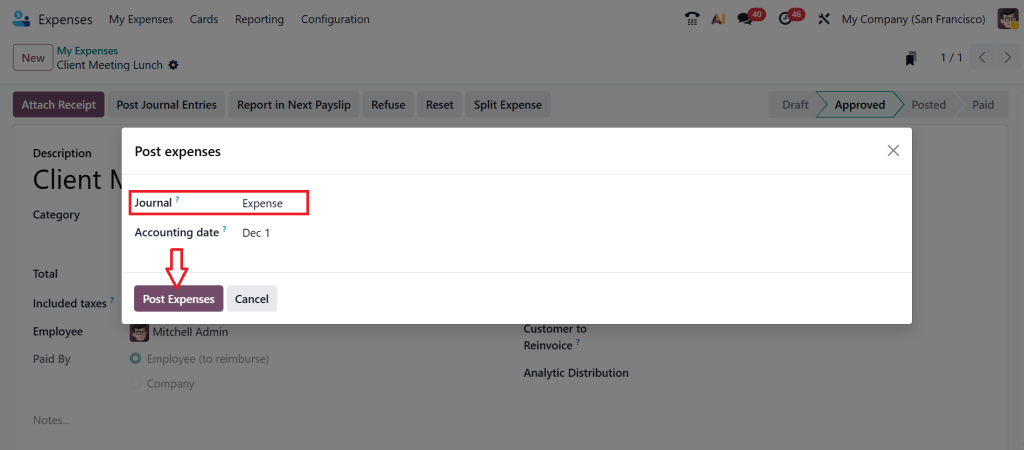
Provide the Journal here as Expense, then click Post Expenses.
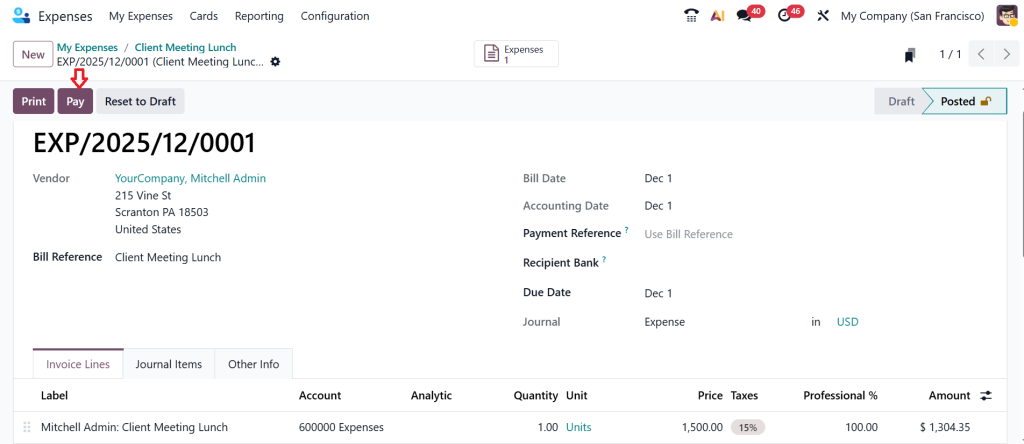
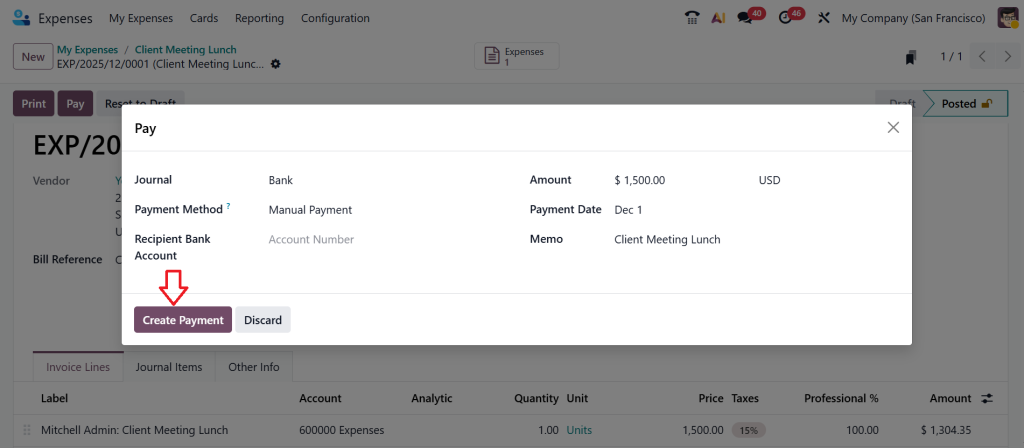
Let’s Pay.
Click the Create Payment button.
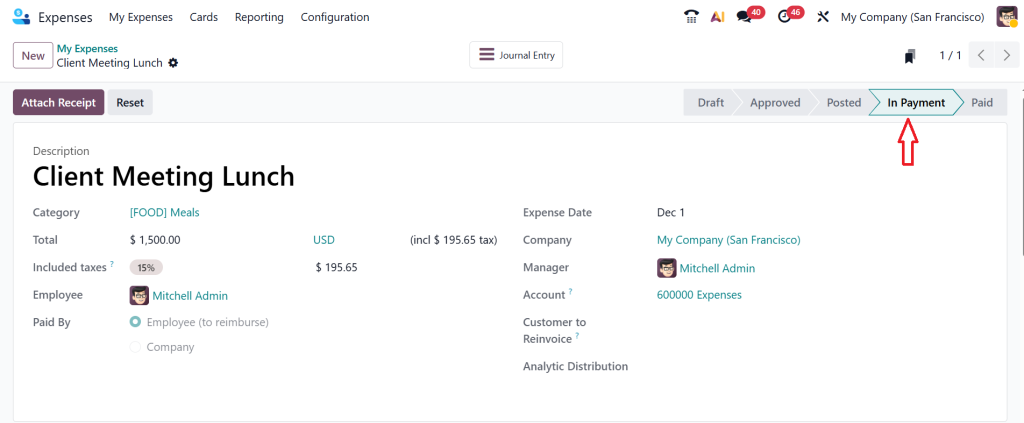
As you can see in the screenshot below, it’s in the ‘‘In Payment’’ stage.
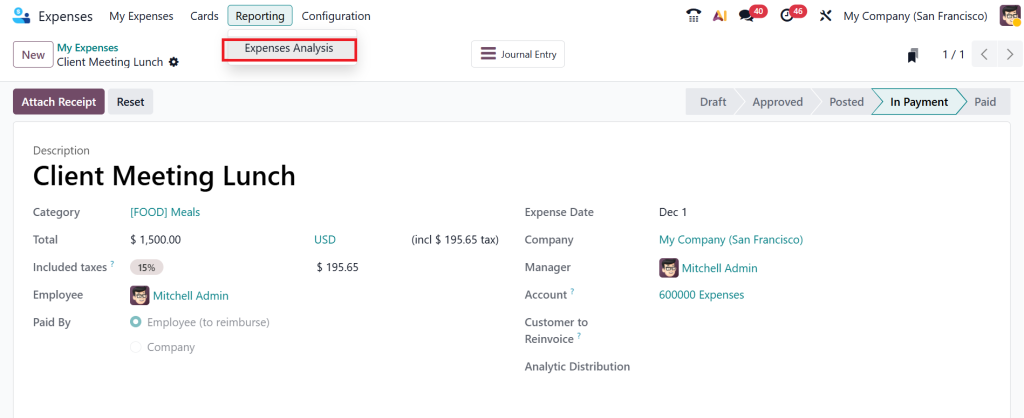
After that, the finance team can mark it as paid in the accounting or bank journal. To analyse the expense report, go to Reporting > Expenses Analysis.
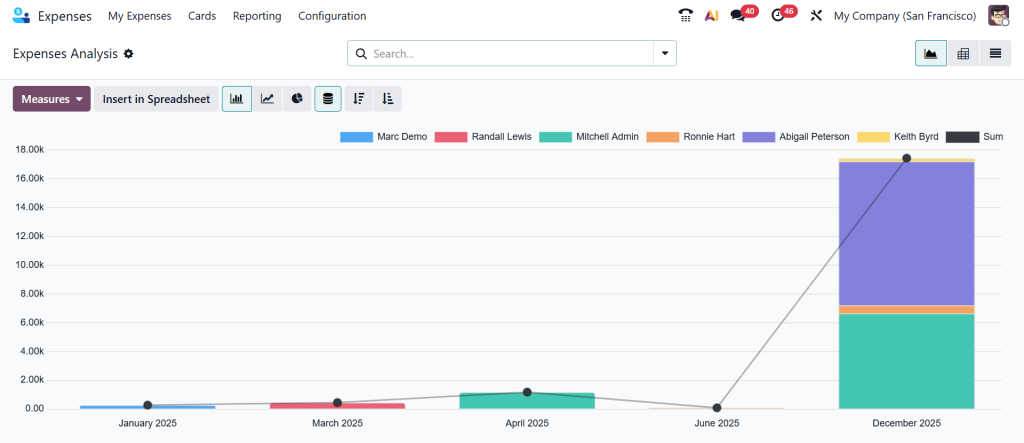
In the reporting, Odoo provides clear insight into your company’s spending by employees, departments, expense type, and more.
This entire flow makes your expense work lighter, clearer, and more reliable.
Why You Should Start Tracking Company Expenses in Odoo 19 Today
When you look honestly at your company’s expense process, you already know where the pain points are. Delayed approvals, missing receipts, unclear categories, late reimbursements, and messy calculations these things don’t just slow down work; they affect trust and comfort within the team. And this is precisely why choosing to track company expenses with Odoo 19 can make a real difference in your everyday workflow.
This system doesn’t force you to change the way you work; it adapts to how your business naturally operates. With clear expense cards, automatic reading, smooth approvals, and real-time accounting entries, Odoo 19 quietly supports you in the background without creating extra noise or stress. Please think about the calmness that comes when every expense is recorded clearly, and everyone knows what’s happening. That relief alone is worth taking the step.
If you’ve been looking for a practical, simple, and organized way to manage company expenses, this is your moment to try Odoo 19’s expense tracking in your daily workflow.
If you want to set this up for your business or need guidance on getting started, please let us know at Netilligence. Our team helps you build the perfect expense management flow in Odoo 19.




