

Whenever someone begins using Odoo for manufacturing, one of the first questions is how to create work centers in Odoo 19 that accurately reflect their production flow. This question makes complete sense. If your work centers are not set up correctly, your planning becomes confusing, your production orders don’t behave as you expect, and your team ends up relying on guesswork rather than a proper system.
That is why, before anything else, we need to understand the purpose of work centers and how they support real manufacturing. When you know how to create work centers in Odoo, you finally start controlling your production instead of just reacting to problems.
Odoo 19 Work Centers – Understanding What They Truly Mean in Your Factory's Everyday Life
Before you even start clicking around in the system, it’s essential to understand what Odoo 19 work centers represent inside your factory. Think of them as the digital version of your real machines, real people, or real workstations. If something happens on your shop floor, your work centers should reflect that inside Odoo. Many companies start using work centers without understanding them, and then later they feel the system is confusing or inaccurate.
But the truth is that Odoo only knows what you tell it, and if you do not define work centers properly, Odoo cannot plan your production correctly. When I speak to manufacturing teams, they often say they know their machines well but are unsure how to convey that to the system. And this is where Odoo 19 work centers serve as the link between your physical factory and your digital workspace. Once you understand the meaning behind each section of a work center, your entire production flow starts making more sense.
Odoo Manufacturing Work Center Setup – The Real Beginning of Everything
Whether you are starting from scratch or correcting an old setup, the first step in Odoo manufacturing work center setup is enabling the right features. Users often jump straight into configuration screens without activating work orders. And without work orders, Odoo cannot use work centers correctly. Once work orders are active, Odoo opens up the full manufacturing flow for you.
But let me explain why this step matters: your manufacturing depends on proper structure. When the system knows you want to work with step-by-step operations, it starts guiding your production according to the real machines and real timings you define. This is why your Odoo manufacturing work center setup should begin with the right switches turned on. It sets the stage for everything you will do afterward, and it ensures the system behaves the way your production team needs.
How to Configure Work Centers in Odoo – The Step Where Most People Get Confused
Now, we can move on to understanding how to configure work centers in Odoo correctly. And trust me, this is the part where most users feel a little lost because they see a lot of fields and don’t know what each one means for their real shop floor. When you create a work center, the first thing you decide is its name. This may sound simple, but many teams choose vague names that later confuse everyone. If your machine is a cutting station, call it Cutting Station. If it’s an assembly table, call it Assembly Table. Clear names help your team understand exactly what step happens where.
Once you add the name, you see options for capacity, costing, efficiency, OEE, and working hours. And this is where users usually stop thinking and start guessing. But you don’t need to guess. You only need to describe your real production inside Odoo. Whatever happens in your factory every day is exactly what you enter here. That’s how you learn to configure work centers in Odoo with confidence, not fear.
Step-by-Step Guide to Create Work Centers in Odoo 19 Manufacturing
Now this is the part you came for. Follow these steps in order, and you’ll have your work centers ready in just a few minutes.
The moment you enter Odoo, click on the Manufacturing app from your dashboard. This is the home base for everything related to your production process. Once you’re inside, you’ll instantly feel the entire workflow layout in front of you.
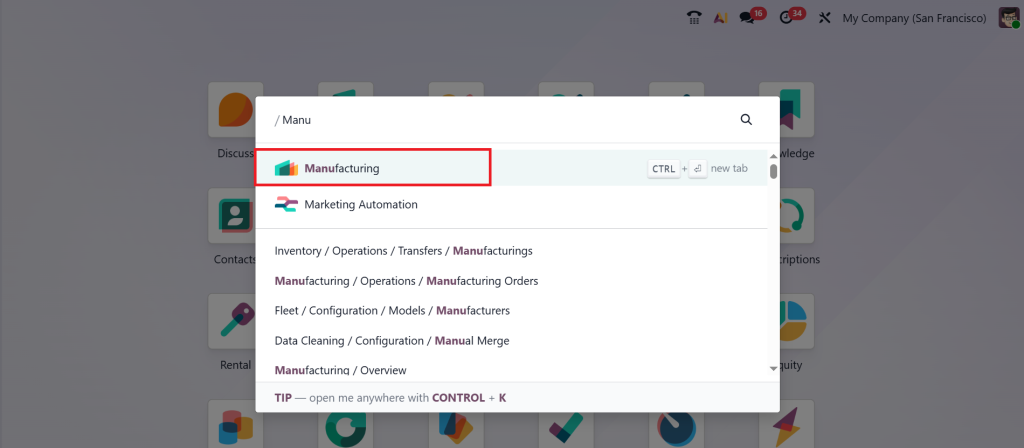
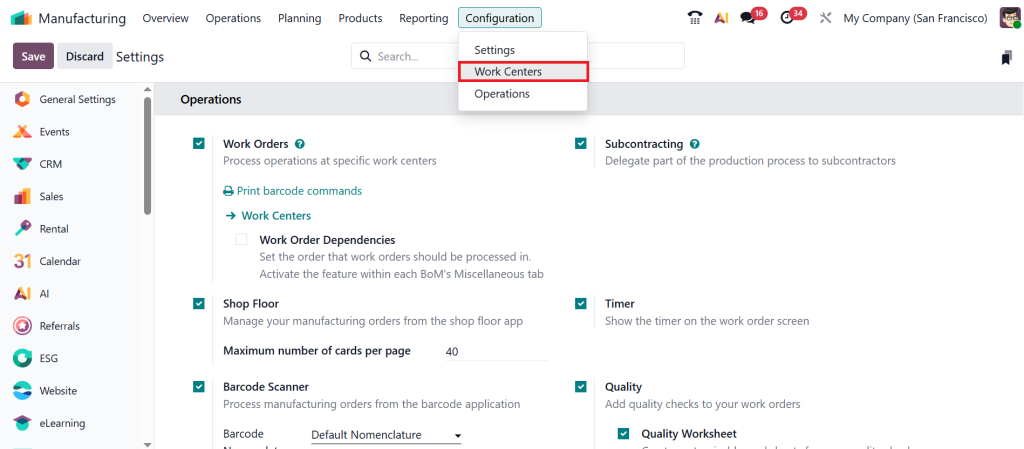
A lot of people miss this part and then wonder why they can’t find work centers. Just go to:
Configuration → Settings.
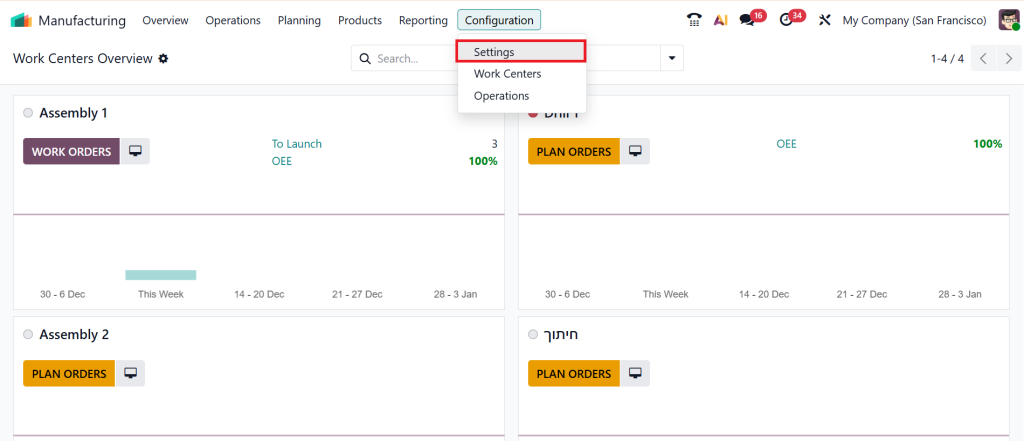
Enable Work Orders, then click Save. This will activate all features related to work centers and operations.
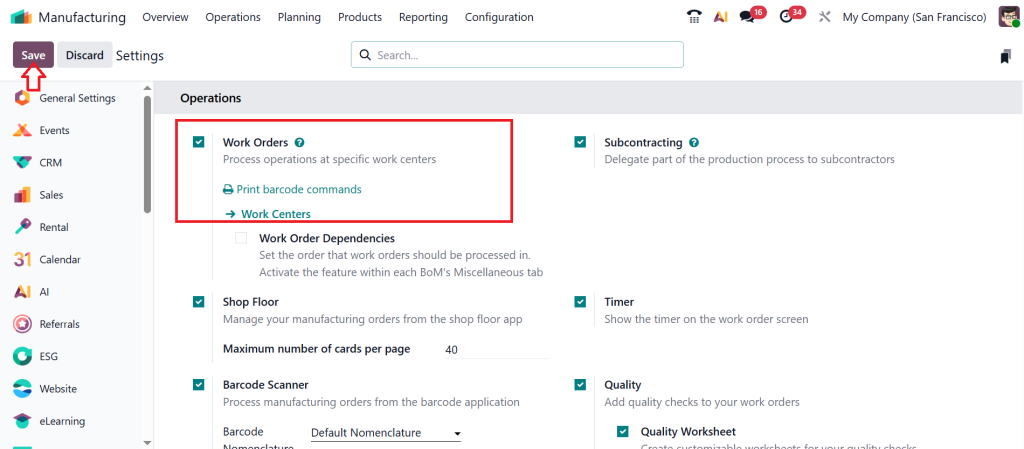
Now that everything is activated, go to:
Configuration→ Work Centers
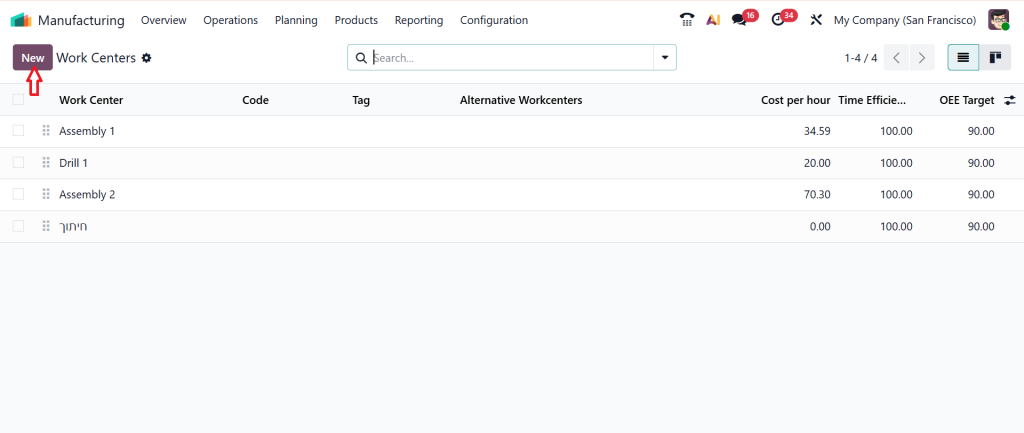
Here you’ll see an empty list if you’re setting up for the first time. Click New.
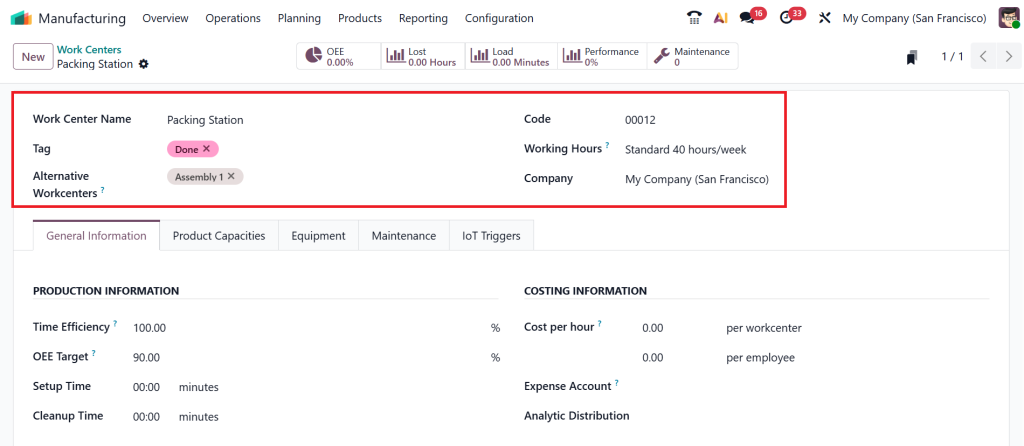
A clean form will pop up, and this is where your real setup begins. Enter basic details:
Work Center Name (e.g., Cutting Machine A, Assembly Line 1, Packing Station)
Code (short identifier)
Working Hours (crucial for scheduling)
Think of this page as a way to describe your real-life workplace, but digitally.
Now, tell Odoo how strong and capable your work center is.
Time Efficiency: how fast this center works
Setup Time / Cleanup Time: so Odoo calculates accurate production time
When you add these details, Odoo automatically optimizes your production. Add Costing Information. This section helps you understand how much each production step costs you.
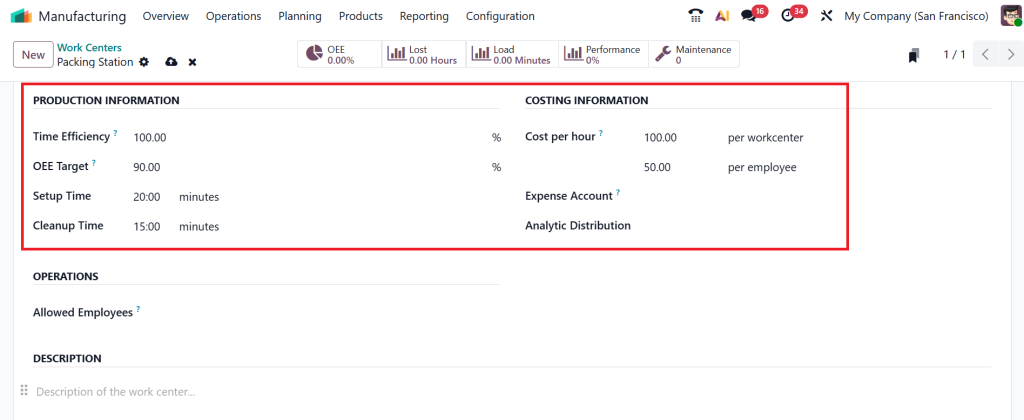
Once this is added, Odoo will show you the real manufacturing cost based on actual work center usage. This is super helpful when you want to improve profit margins.
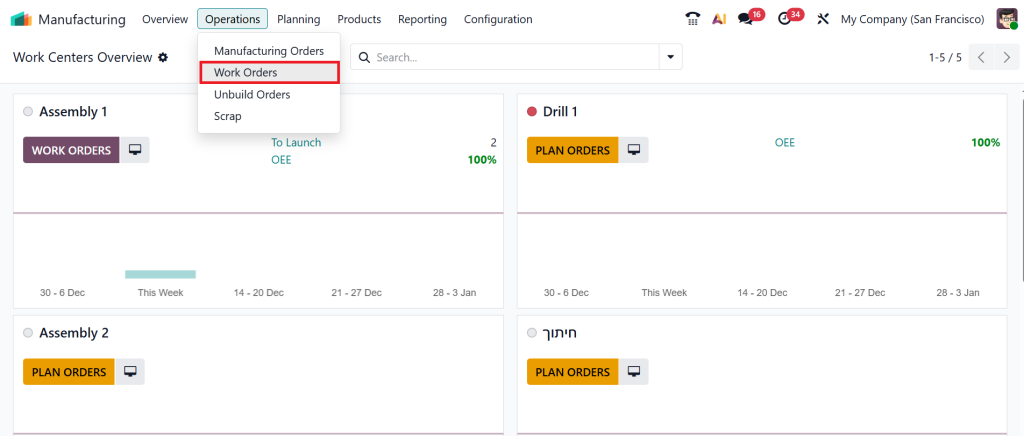
Your work center is ready. But it won’t work until you link it to an operation. Go to:
Operations → Work Orders
Choose the operation and select your new work center (Packing Station).
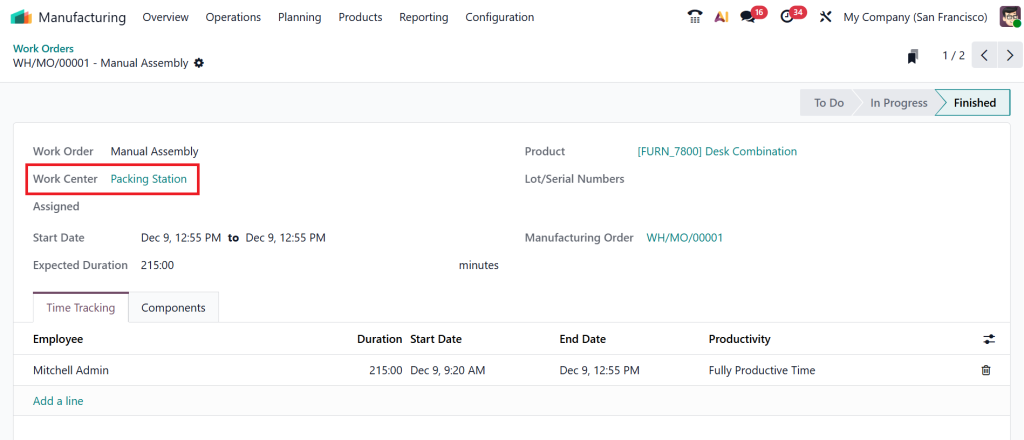
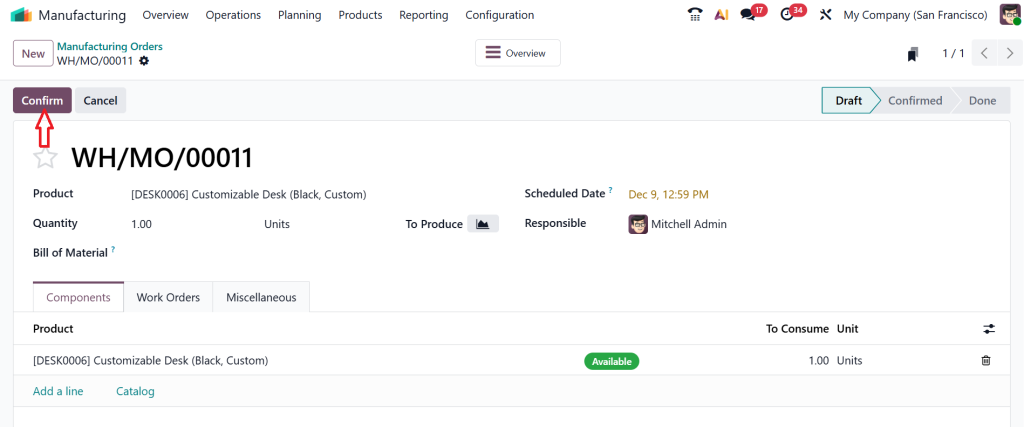
Now your production workflow becomes complete. The final step is to test it. Create a new Manufacturing Order, Confirm it.
And then click on Work Orders. You’ll now see your new work center assigned and active.
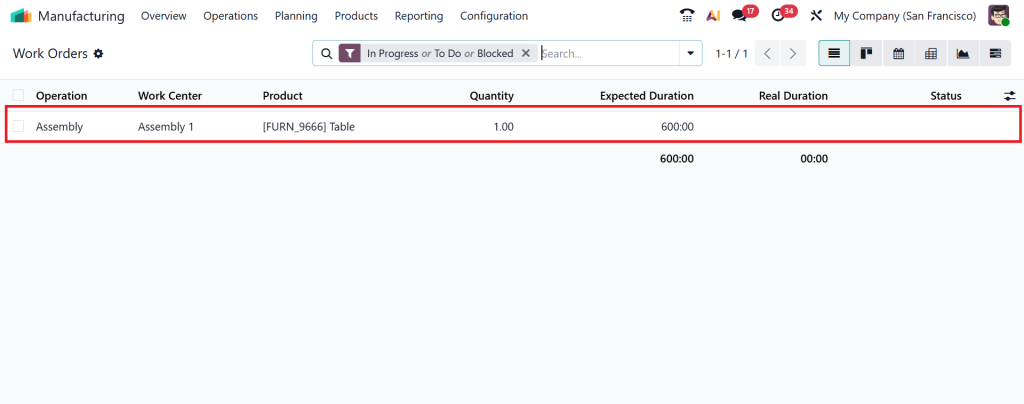
This is where everything comes alive, tracking time, performance, and actual production movement.
Odoo 19 Manufacturing Tutorial – Capacity, Timing, and Why They Matter More Than You Think
If you follow any Odoo 19 manufacturing tutorial, you will repeatedly see one thing: capacity matters. This one value directly affects how Odoo schedules your production. If your machine handles one item at a time, your capacity is 1. But if you have four identical stations that work together, your capacity might be 4. Setting the capacity wrong is one of the biggest reasons why planning goes off track.
People often set everything to 1, even when their machine can handle more, and Odoo starts planning everything slowly. Then they think the system is the issue, but the setup is the real problem. When you genuinely understand your factory, you know exactly what to enter here. That is why a proper Odoo 19 manufacturing tutorial always explains that your work center should reflect your actual daily capacity, not what you assume or guess.
Odoo Work Centers Manufacturing – Working Hours: Decide Your Entire Planning Flow
Another misunderstood area in Odoo work centers manufacturing is working hours. If your team works from 9 am to 6 pm, Odoo should know that. If your machine works two shifts, Odoo should know that. If your operator only uses a machine during the first half of the day, Odoo should know that too. When working hours are wrong, Odoo starts planning tasks when no one is actually working.
This creates stress, confusion, and a last-minute rush. But when working hours match reality, Odoo guides your production in a predictable rhythm. And this is what good manufacturing feels like. It feels like your system is walking with you, not pulling you in the wrong direction. That is the real value of understanding Odoo work centers and manufacturing, and of correctly defining your calendar.
Work Center Configuration Odoo MRP – Costing and the Clarity It Brings to Your Product Pricing
Once you reach the costing section in Odoo MRP work center configuration, many users stop paying attention. They think costing is optional. But the truth is that costing tells you how much it actually costs to manufacture a product. If your machine consumes electricity, needs labor, or requires regular maintenance, all of this affects your product cost. And Odoo can only calculate real cost if you enter realistic values here.
You don’t need complicated calculations. Just enter the hourly cost of that machine or the labor charge connected to that workstation. Over time, this helps you understand which part of your production costs more and where your money is being used. Without costing, you may end up selling a product without realizing how much you spent making it. That is why the Odoo MRP work center configuration helps you see the financial side of manufacturing in a simple, honest way.
How to Create Work Centers in Odoo – Connecting Work Centers with Your Bill of Materials
Now that your work center is ready, the next step in learning how to create work centers in Odoo is linking them to your BoM operations. Many users don’t know this step is necessary, and then they wonder why their production orders don’t show any operations. When you open your BoM and add operations, you choose which work center performs which step.
This connection is vital because it tells Odoo how your product is actually made. Without this link, work centers have no role in your production. But once linked, everything changes. Your production orders become detailed, realistic, and easier to follow. You can see which step happens first, which machine is involved, how long it takes, and when the next step starts. This is the moment when the effort you put into work center setup finally shows results inside your manufacturing flow.
Odoo 19 Work Centers – The Small Mistakes That Cause Big Manufacturing Confusion
Every manufacturing team I’ve worked with repeats the same mistakes when dealing with Odoo 19 work centers, and I want to share them so you don’t fall into the same issues. The first mistake is incorrect capacity. The second mistake is unrealistic working hours. The third mistake is ignoring costing. And the fourth mistake is failing to connect operations in the BoM.
These four things may look small, but they create major planning problems. Once you fix them, everything becomes clearer. Production orders feel more accurate. Timelines make sense. And your team stops guessing and starts trusting the system. This is the difference a properly configured work center makes.
Odoo Manufacturing Work Center Setup – How It Helps You Feel More In Control of Your Factory
When you complete your Odoo manufacturing work center setup, you begin to see your factory differently. You feel more aware of where delays occur, which machines are overloaded, which operations take longer, and how your planning behaves.
Odoo gives you simple dashboards that show machine usage, performance, and timing. You don’t need complicated reports. These small insights tell you everything you need to know about your production line. This is why I always say that work centers are not just technical settings. They are the digital heartbeat of your factory. When they are set correctly, the rest of your manufacturing flow becomes easier to manage.
Your Clarity Begins When You Learn How to Create Work Centers in Odoo
Now that you understand how work centers behave, how they are created, and how they guide your production planning, you can move forward with a clearer mind. You now understand the real purpose of knowing how to set up work centers in Odoo. You know why capacity matters, why working hours shape your planning, why costing brings financial clarity, and why linking operations is necessary for actual production flow.
This entire guide was written as if I were sitting right in front of you, helping you fix these issues step by step. If you ever felt confused or unsure about Odoo’s manufacturing module, I hope this gave you the confidence you needed.
Ready to Build a Better Manufacturing Flow in Odoo?
If you want help setting up your work centers, fixing configuration issues, or improving your complete Odoo Manufacturing system, Netilligence can guide you from start to finish.
Our team works with real factories every day, and we know exactly what settings work for which type of production.
Message us today and let’s fix your manufacturing setup together.




