


If you’ve ever wondered how to create a commission plan in Odoo, you’re not alone. Most businesses seek a straightforward way to reward their sales team fairly while monitoring performance without relying on multiple spreadsheets. The Odoo 19 commission plan feature is specifically designed for this purpose. Whether you’re running a small company or managing an extensive sales network, setting up Odoo sales commissions can make the entire process smoother and more accurate.
In this guide, I’ll walk you through everything you need to know about creating a commission plan in Odoo. From defining Odoo commission rules to setting up commission management in Odoo 19, everything will be explained in an easy, conversational way. You’ll also see how to automate sales commissions in Odoo and make Odoo commission tracking work efficiently for your team.
By the end, you’ll not only know how to create a commission plan in Odoo, but you’ll also understand how it helps improve transparency, accuracy, and motivation across your sales department.
Why Businesses Need Odoo 19 Commission Plan
Every business owner knows that keeping the sales team motivated is crucial for growth. However, manually calculating commissions can become a headache, as errors, delays, and confusion are common. That’s where the Odoo 19 ERP commission plan comes in.
With this feature, you can set rules once and let Odoo do the work for you. No more chasing spreadsheets or adjusting calculations manually. Odoo sales commission setup ensures that your team receives accurate and timely payments based on their performance data.
The flexibility of the Odoo 19 ERP commission plan allows you to define how commissions are calculated, whether it’s a fixed amount, a percentage of sales, or tiered incentives. You can even set different Odoo commission rules for other roles, products, or regions.
Step-by-Step: How to Create a Commission Plan in Odoo 19 Sales
So, let’s get practical. Here’s how you can easily create a commission plan in Odoo using the Odoo 19 Sales app.
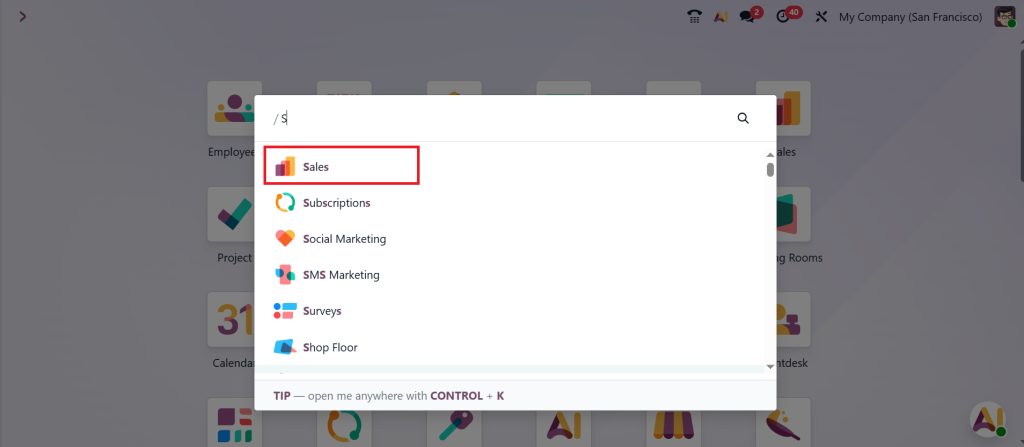
First, go to your Odoo Sales app.
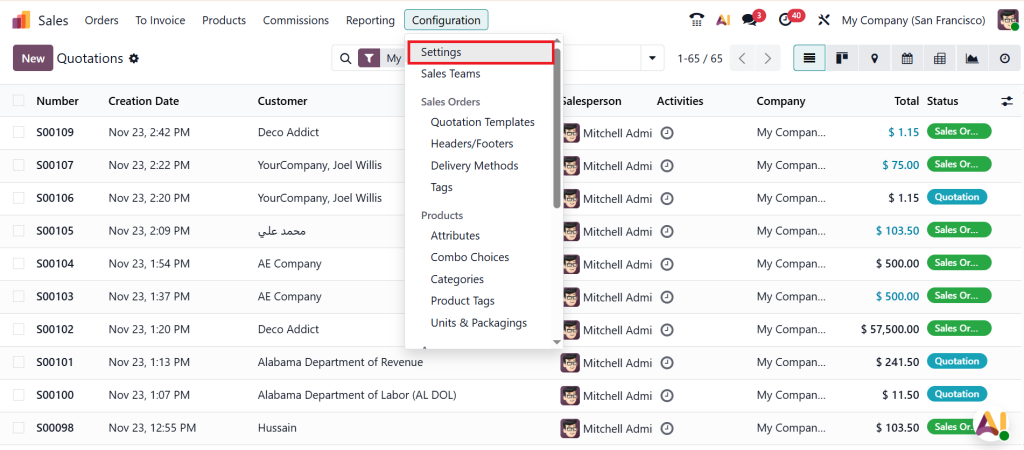
Head over to Configuration > Settings.
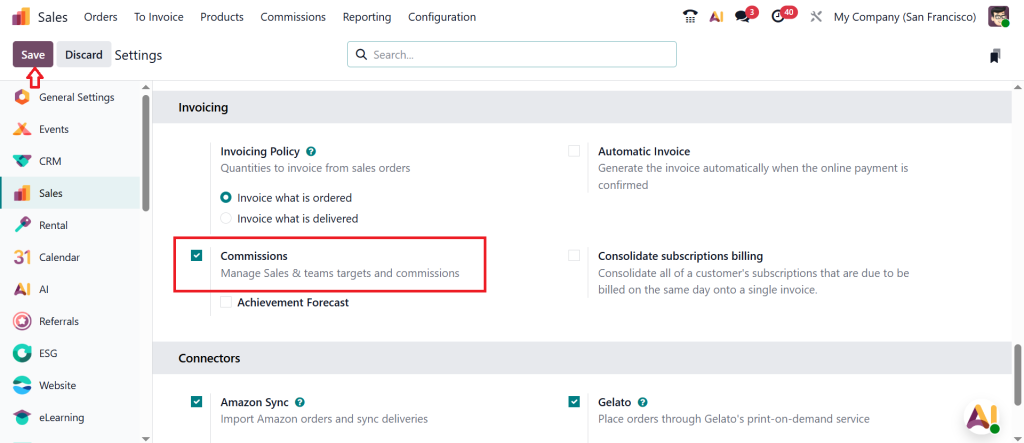
And look for “Commissions” under the Invoicing section. Please enable it and click Save. This step activates the commission management module in Odoo 19, allowing you to start building your plans.
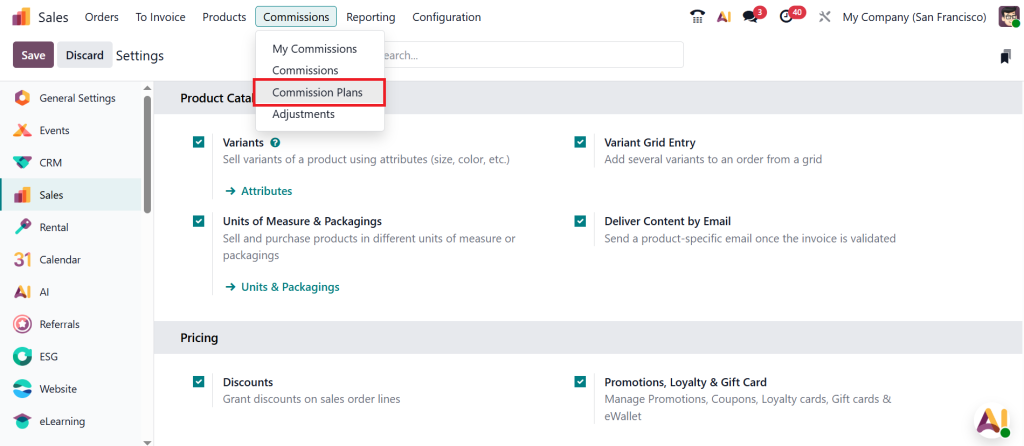
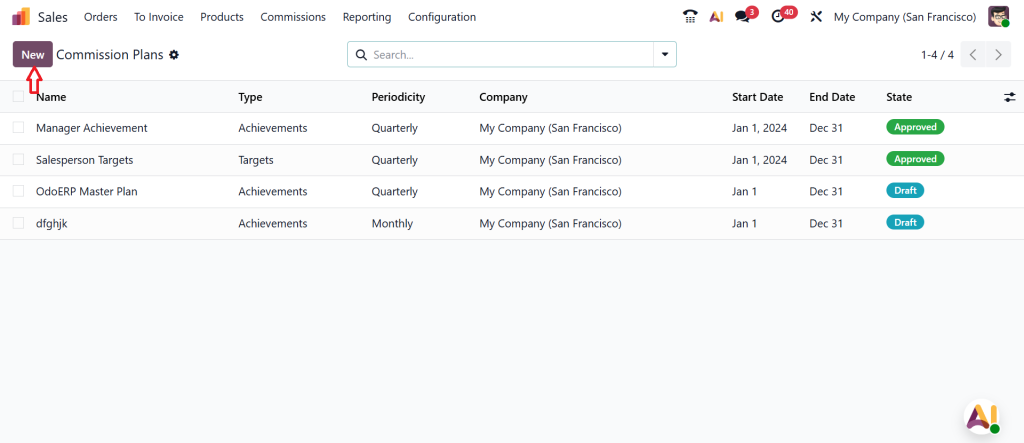
Once enabled, go to Commissions > Commission Plans.
Click on New. Here, you’ll define the structure of your Odoo 19 ERP commission plan, including its name, description, and plan type. You can decide whether your strategy is based on invoices, payments, or orders. This flexibility makes your Odoo sales commission setup fit your exact business model.
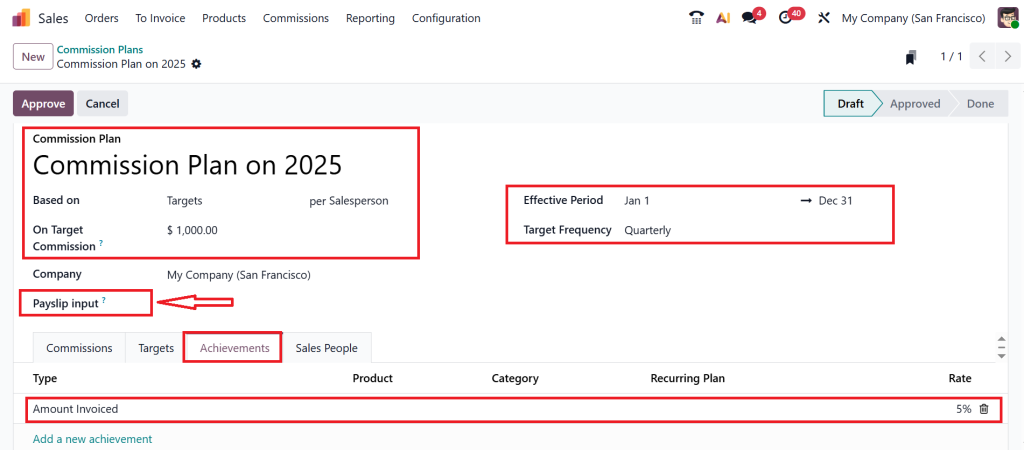
Let’s specify the commission name, and in this example, I am going to create a Target based commission plan and set a target for each salesperson. This means each salesperson will have a target to hit, and the commission will be calculated accordingly. Now, set the Effective period and Target Frequency to monthly, quarterly, or yearly, as per your requirements.
The important part, called a ‘Payslip input’, you cannot see in Odoo 18 because it’s a new feature in Odoo 19. If you check the ‘‘Payslip input’’ box, Odoo will automatically push the commission amount into the employee’s payroll as an input line. So, when you generate a payslip inside the HR or Payroll module, the salesperson’s commission is already included with their salary. If you don’t want to add any payslip input or leave this unchecked, the commission is still tracked in Odoo Sales, but it won’t automatically appear in the Payroll module.
As you can see, there are different types of tabs that start from the Achievements. Under the achievements tab, you can provide the achievements in rates. So, we can set a condition for earning commission, for example, add an achievement of both types, is an amount invoice and with a commission rate of 5%. If you want to add any product category and the recurring plan, we can easily provide that, which means the salesperson earns a 5% commission on the total invoiced amount.
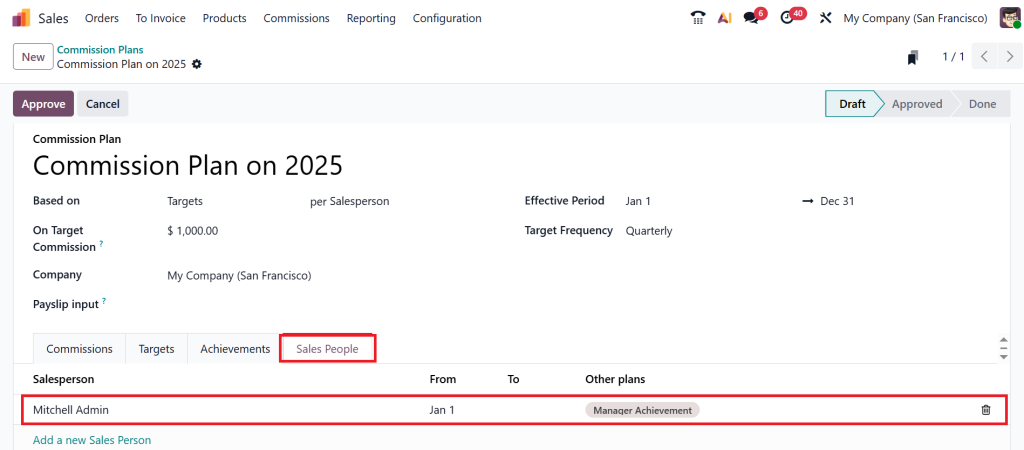
Now, move to the Sales People tab. Here, you can add the Salesperson, and after adding the salesperson, you can also automatically find the other plans for the selected salesperson.
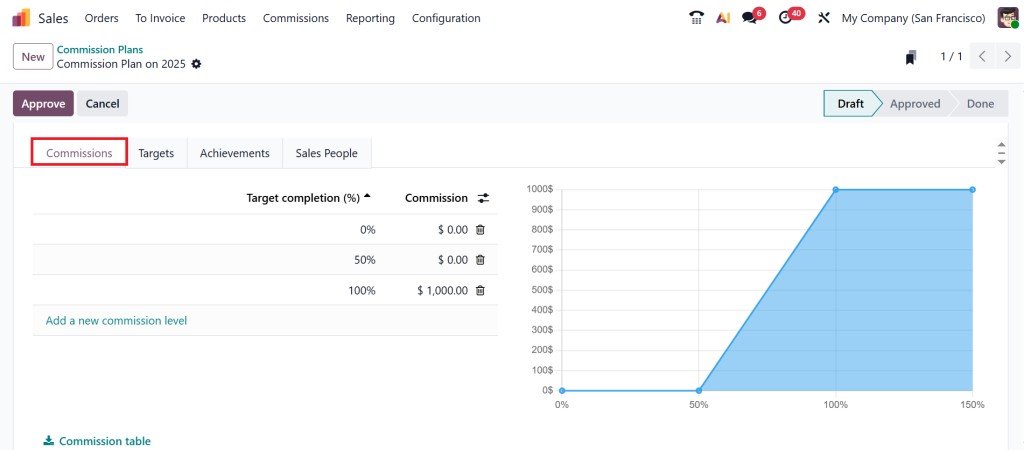
Under the Commissions tab, you can see the target completion.
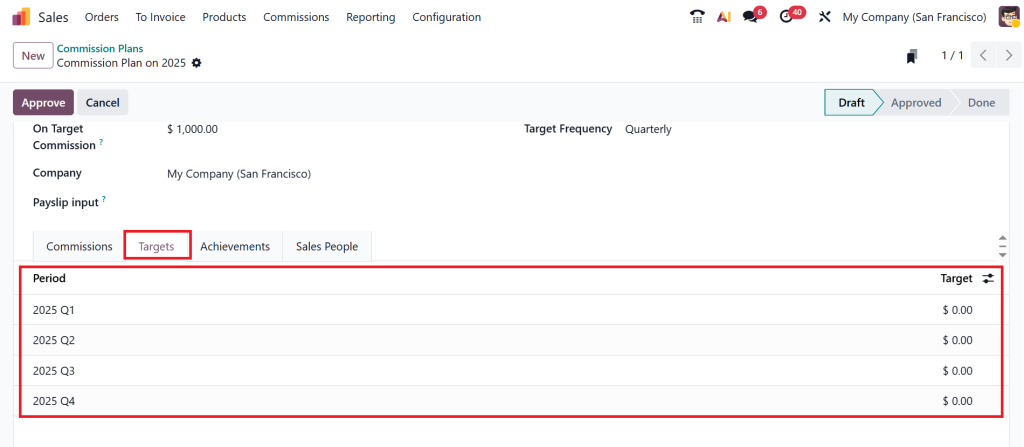
And the Targets tab, which is on a period basis, starts in 2025 Quarter One and ends in 2025 Quarter Four.
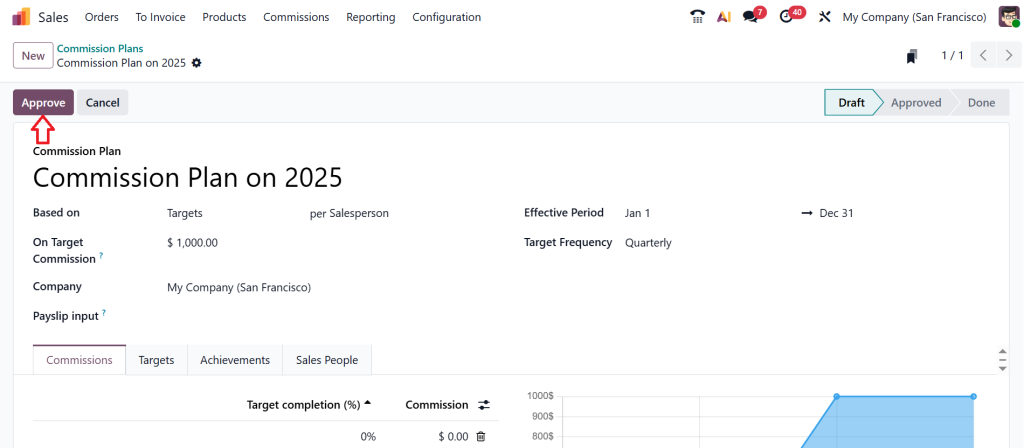
Click on the Approve button. Here, I am using an admin account. If you are just an employee, you don’t have the right to approve this; you can simply request approval.
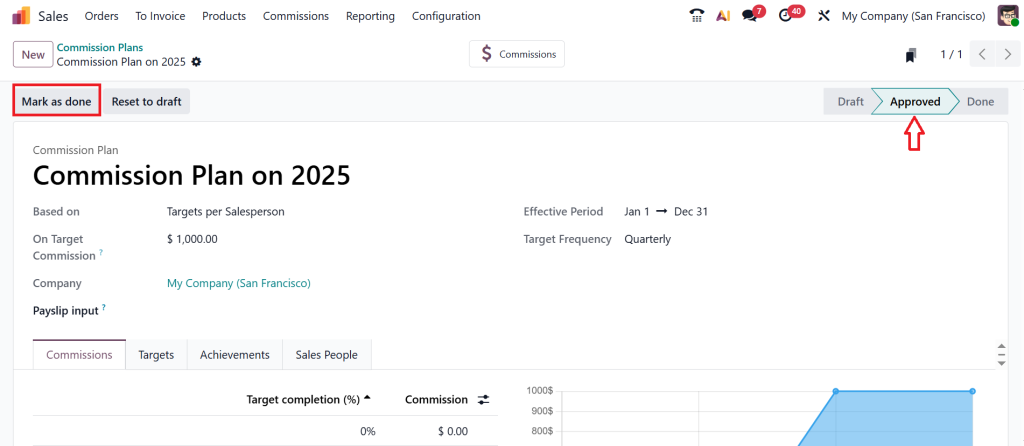
After approval, you can see that this plan is moving from the Draft stage to the Approved stage. And if this commission plan is marked as done, you can easily move this plan from the approved stage to the Done stage.
Understanding Odoo Sales Commission Setup in Detail
When setting up Odoo sales commission setup, you’re actually building a system that runs your reward structure effortlessly. Think of it as a digital assistant that keeps everything organized, including sales performance, commission amounts, and payment history.
You can categorize your Odoo 19 ERP commission plan into different levels. For instance, you might have one plan for junior sales representatives and another for senior team members. Or you might offer higher rates for specific high-value products.
And if your business works with partners or distributors, Odoo 19’s commission management allows you to manage external sales agents as well. You can set Odoo commission rules that are specific to agents outside your company, ensuring fairness and transparency for all parties involved.
Making Odoo Commission Tracking Effortless
Now that you’ve built your commission plan, tracking is the next important part. The Odoo commission tracking system gives you clear insights into who’s earning what and why.
You can view commissions based on various filters, including employee, date, product, or sales region. This visibility helps you quickly identify top performers, evaluate trends, and make informed decisions.
Instead of waiting for end-of-month reports, you can see commission progress anytime. This real-time view keeps your sales team updated and motivated. And since Odoo updates automatically, there’s no manual calculation left to worry about.
Simplifying Commission Management in Odoo 19
The strength of commission management in Odoo 19 lies in its simplicity. Everything happens within the same platform where you manage your sales. There’s no need for third-party tools or complicated integrations.
From Odoo commission rules to real-time tracking, you can manage everything in one place. You can easily edit, delete, or duplicate commission plans whenever needed.
And since Odoo 19 brings performance improvements and smoother workflows, creating and maintaining your Odoo 19 ERP commission plan has never been easier.
Benefits of Automating Sales Commissions in Odoo
When you automate sales commissions in Odoo, you eliminate the biggest issues businesses face: errors, delays, and confusion. Automation ensures every transaction is processed correctly, every percentage is applied according to Odoo commission rules, and every salesperson receives what they deserve.
Here are some benefits:
- Accuracy: No more manual miscalculations.
- Speed: Commissions are processed instantly after validation.
- Transparency: Both managers and salespeople can view commission data at any time.
- Motivation: Your team knows their efforts are tracked fairly.
The result? A more confident and productive sales team that focuses on selling, not chasing their earnings.
How Odoo Commission Rules Create Flexibility
One of the best aspects of the Odoo 19 ERP commission plan is its flexibility, thanks to Odoo’s commission rules. You can design a structure that fits your company’s needs, including percentage-based, fixed-amount, or target-driven models.
For example:
- 5% commission for all confirmed sales.
- 10% for exceeding $10,000 in monthly sales.
- Extra rewards for cross-selling or upselling.
These rules enable you to create incentive programs that truly drive results. And since everything is part of the commission management in Odoo 19, you won’t need to make any manual adjustments later.
Real Impact of Creating a Commission Plan in Odoo
When you create a commission plan in Odoo, you’re building a system that keeps your sales and finance teams aligned and informed. Every commission is tracked, calculated, and reported within the same environment.
It saves time, builds trust, and improves accuracy. More importantly, it reduces friction between departments and gives you complete control over how commissions are handled.
The Odoo commission tracking tools provide you with insights that can help you improve performance, such as identifying which products or regions generate the most commissions.
By using the Odoo 19 ERP commission plan, you’re not just setting up commissions; you’re creating a structure that supports growth and transparency.
Take Control of Your Sales Commissions Today
Now you know how to create a commission plan in Odoo and how the Odoo 19 ERP commission plan makes your sales process smoother and more reliable. Whether it’s defining Odoo commission rules, improving commission management in Odoo 19, or learning to automate sales commissions in Odoo, everything you need is already in your Odoo system.
Managing commissions doesn’t have to be stressful anymore. With Odoo commission tracking, you can focus more on your team’s performance and less on manual calculations.
If you’re ready to make your sales process smarter, start exploring the Odoo 19 ERP commission plan today. And if you want expert help setting up or customizing your commission structure, connect with Netilligence. We’ll help you build a system that fits your business and makes commission management simpler than ever.




