


If you’re handling customer queries daily and still depending on emails, WhatsApp messages, or random notes, I know exactly how messy it feels. One message gets missed, another customer follows up again, and suddenly, your team looks busy, but nothing feels under control. This is precisely where learning to manage tickets in Odoo 19 Helpdesk starts to make sense.
In this blog, I’m not going to talk in complicated system language. I’ll talk to you like we’re sitting together and solving a real problem. I’ll show you how tickets are created, how they move, how teams work on them, and how nothing slips through the cracks when you properly manage tickets in Odoo 19 Helpdesk.
Why Businesses Struggle Before They Manage Tickets in Odoo 19 Helpdesk
Most businesses don’t fail at customer support because they don’t care. They fail because everything is scattered. Emails are in one place, calls are somewhere else, and follow-ups depend on memory. When you don’t have a clear system, customers feel ignored even when your team is trying hard.
The moment you decide to manage tickets in Odoo 19 Helpdesk, things start to become visible. You know who raised the issue, what the problem is, who is handling it, and what stage it is at. That clarity alone removes half of the daily stress.
Every Customer Story Begins with Odoo 19 Helpdesk Ticket Creation
Every support issue starts with a straightforward action: creating an Odoo 19 helpdesk ticket. Think of a ticket as a written version of what your customer is trying to tell you. When a customer sends an email, fills a form, or contacts your team, Odoo turns that message into a ticket so nothing gets lost.
With Odoo 19 helpdesk ticket creation, you don’t have to worry about searching emails or WhatsApp chats anymore. Everything comes into one system where the issue, customer name, and request are clearly visible. This is where support teams feel relief because now they can focus on solving the problem instead of finding it.
Create Customer Ticket Odoo So No Issue Is Ever Ignored
Many customers don’t complain loudly; they just leave silently when they don’t get a response. This is why it is essential to create a customer ticket as soon as a request comes in. When you make a customer ticket in Odoo, you are basically telling your customer, “Yes, we have received your issue and we are working on it.”
In Odoo 19, creating a ticket is quick and straightforward. Once the ticket is created, it stays there until it is resolved. This gives both your support team and your customers peace of mind, as nothing is forgotten or ignored. To create customer tickets in Odoo, follow these steps:
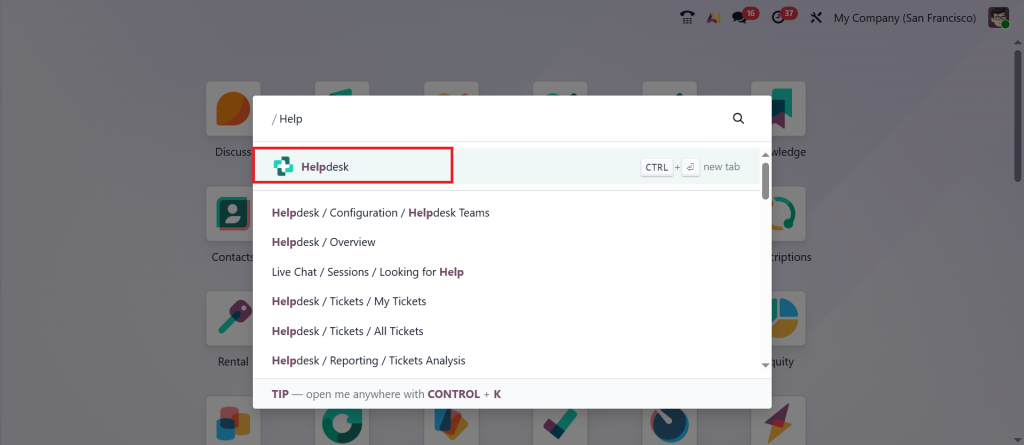
Direct to Helpdesk Module.
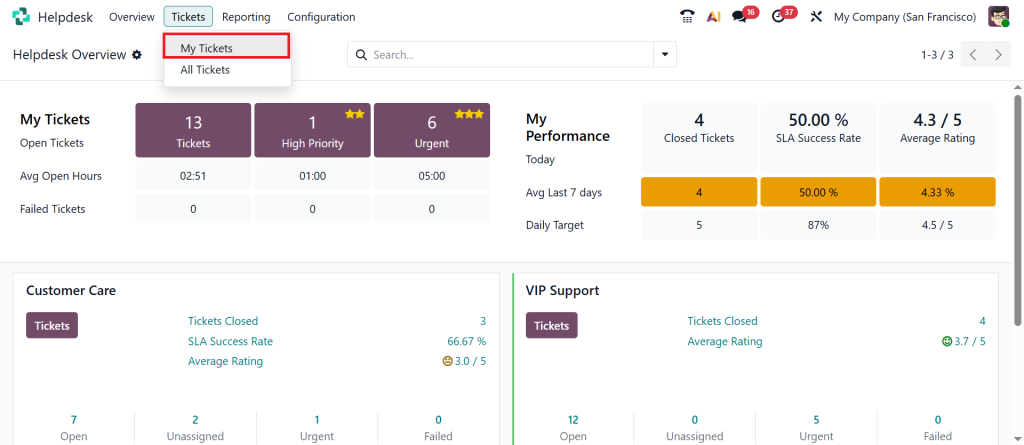
Go to the Tickets > My Tickets.
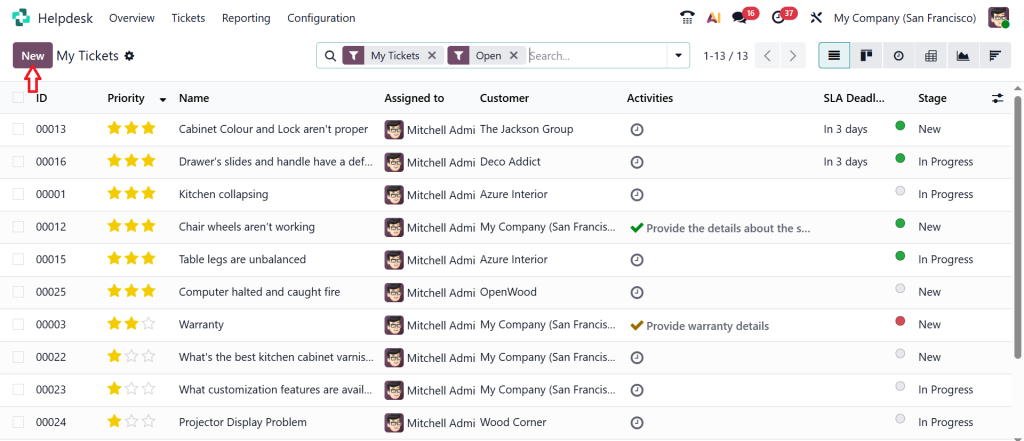
Click on New.
Enter the ticket subject, select the customer, assign priority, and team, then Save the ticket.
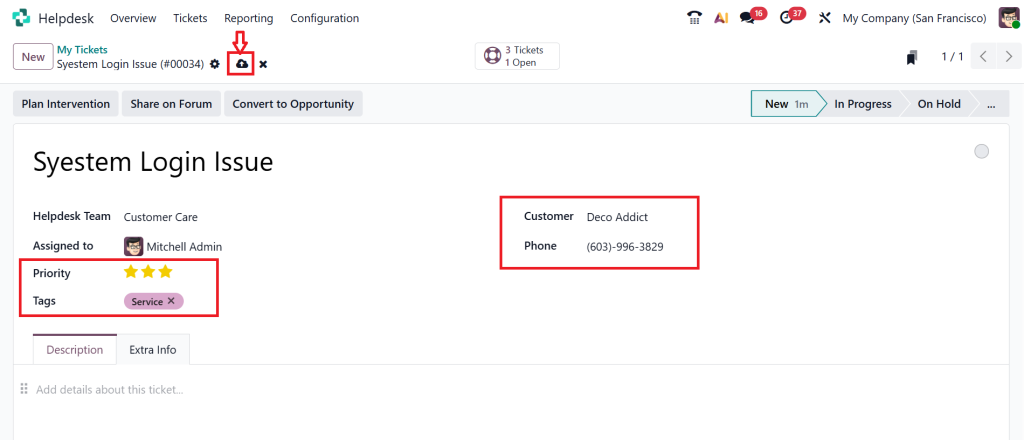
There are 5 stages for a ticket: New, In Progress, On Hold, Solved, and Cancelled. After creating the ticket, you can move it to the In Progress stage. If you want to hold it, click the On Hold button.
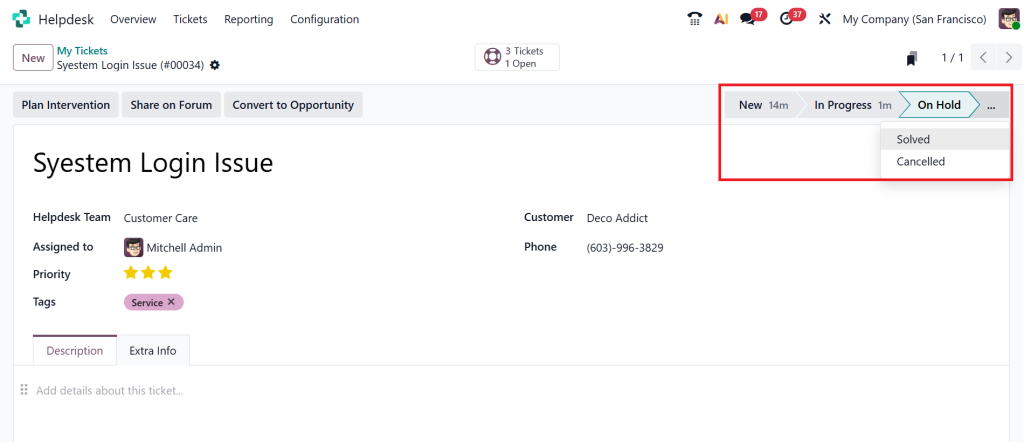
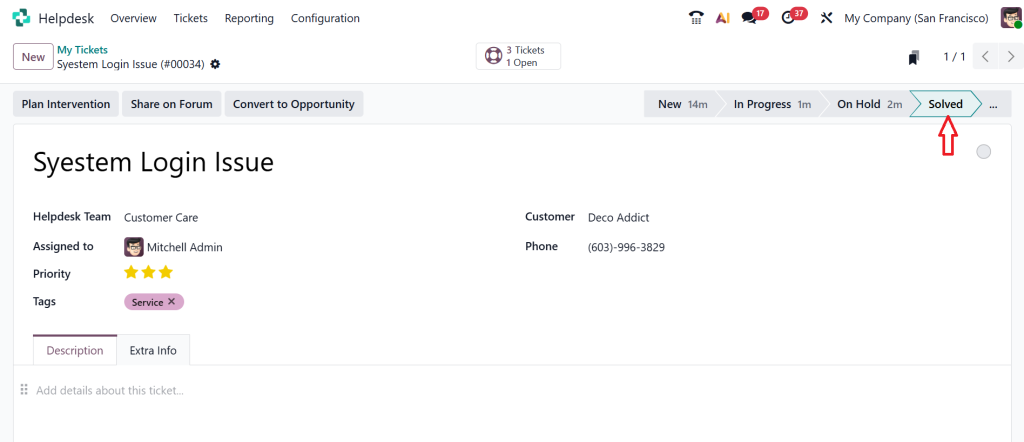
And when the problem is solved, you can move this ticket to the Solved stage; if it is cancelled, you can move it to the Cancelled stage.
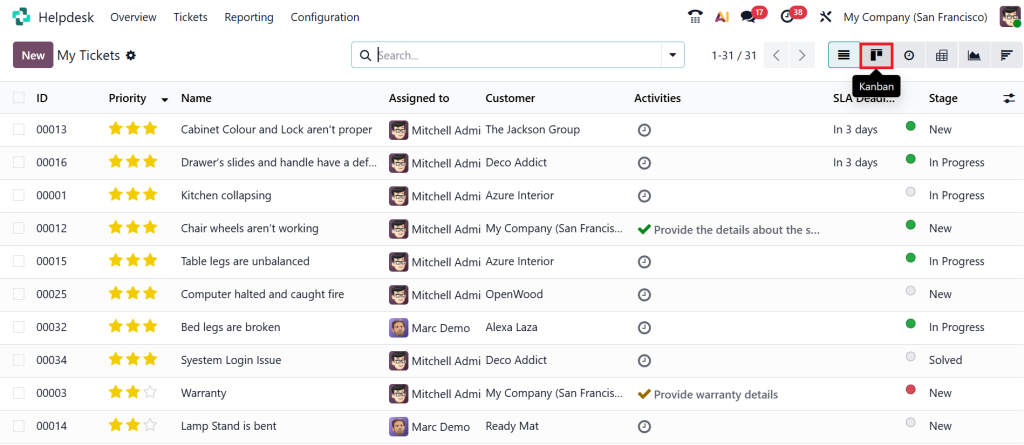
Now, go back to Tickets > My Tickets, remove all default filters, and click the Kanban view.
In the Kanban view, you can find all the tickets, including the one we just created and moved to the solved stage.
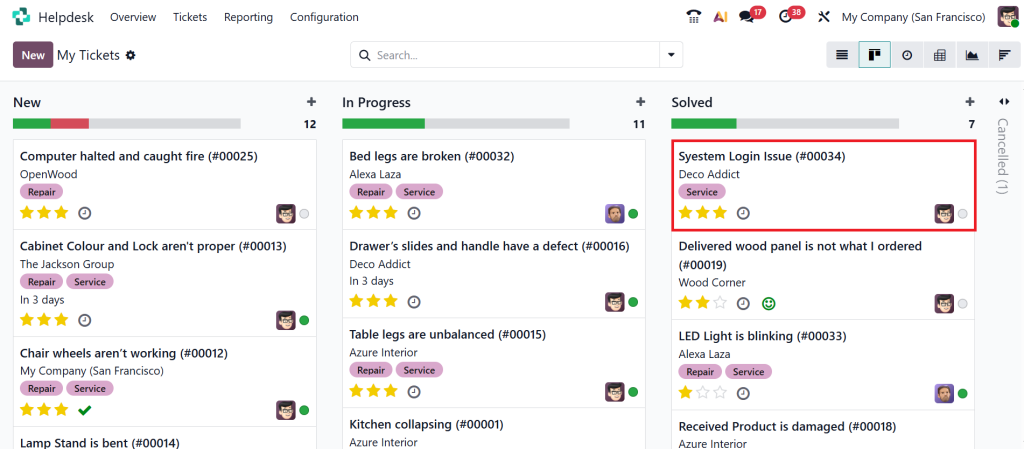
This simple process ensures every customer concern is documented and tracked efficiently.
Manage Helpdesk Tickets Odoo 19 Without Confusion
Once tickets start coming in, the real challenge begins. This is where businesses usually get stuck. If tickets are not appropriately handled, support teams feel overwhelmed. That is why it is vital to manage Odoo 19 helpdesk tickets in a clear, organized manner.
When you manage helpdesk tickets in Odoo 19, you always know which ticket is new, which one is being worked on, and which one is waiting for customer feedback. This clarity helps your team respond faster and with more confidence. Instead of asking each other what to do next, everyone can see the status directly in Odoo.
Odoo Helpdesk Ticket Workflow That Makes Daily Work Easier
The Odoo helpdesk ticket workflow is like a clear path that every ticket follows. From the moment a ticket is created until it is closed, it progresses in steps. This helps your team understand exactly where the ticket stands at any moment.
With a proper Odoo helpdesk ticket workflow, there is no guessing. A ticket is either new, in progress, waiting for information, or resolved. This helps managers see delays early and helps agents stay focused on what needs attention right now.
Odoo 19 Ticket Assignment Stages That Reduce Team Pressure
One common issue support teams face is uneven workload. Some agents get too many tickets while others wait. Odoo 19 ticket assignment stages solve this problem by clearly defining who is responsible for what.
In Odoo 19, ticket assignment stages allow tickets to be assigned based on teams, issue type, or workload. This means your support team works in a balanced way, and customers don’t suffer because of internal confusion.
Helpdesk Pipeline Management Odoo Gives You a Clear Picture
If you want to understand how your support system is actually performing, helpdesk pipeline management in Odoo is where you should look. It shows all tickets in one visual flow, making it easy to see where things are slowing down.
Through Odoo’s helpdesk pipeline management, you can quickly identify if too many tickets are stuck at a single stage. This helps you fix problems before customers start complaining. It is like having a daily overview of your support health without having to dig into reports.
Odoo Helpdesk SLA Ticket Tracking Keeps Commitments on Time
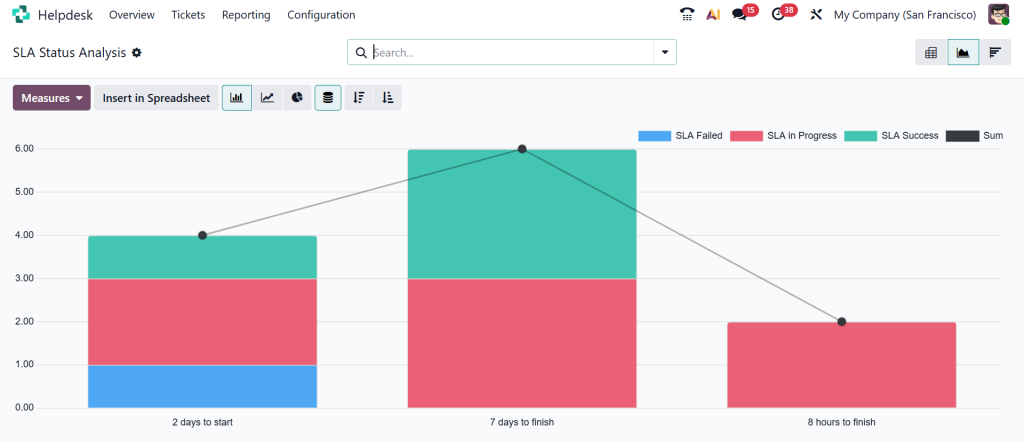
Customers care deeply about response time, even if they don’t say it directly. Odoo helpdesk SLA ticket tracking helps you keep the promises you make to your customers regarding response and resolution times.
With Odoo helpdesk SLA ticket tracking, you always know which ticket needs urgent attention. This reduces delays and builds trust with customers because they see that you respect their time.
Why Businesses Prefer to Manage Tickets in Odoo 19 Helpdesk
Businesses that choose to manage tickets in Odoo 19 helpdesk notice one clear difference: less confusion and better communication. Support teams feel more confident, managers feel more in control, and customers feel valued.
When you manage tickets in Odoo 19 helpdesk, you stop reacting randomly and start responding with clarity. Every ticket has a place, every issue has a path, and every customer gets a response that makes sense.
How Netilligence Helps You Set Up Odoo 19 Helpdesk the Right Way
At Netilligence, we understand that software only works well when it matches how your business actually runs. We help you configure Odoo 19 for helpdesk ticket creation, workflows, assignment stages, and SLA tracking that align with your actual support process.
Our goal is not just to install Odoo but to help you manage tickets in Odoo 19 helpdesk in a way that feels simple, clear, and useful for your team every single day.
Ready to Bring Order to Your Customer Support with Odoo 19 Helpdesk
If customer support feels heavy or unclear, the issue is usually not your team but the system behind them. Learning how to manage tickets in Odoo 19 Helpdesk gives your support process a clear direction. Every customer request is recorded, tracked, and handled in a way that makes sense for both your team and your customers.
From Odoo 19 helpdesk ticket creation to Odoo helpdesk SLA ticket tracking, each step helps reduce delays and confusion. When tickets move through clear stages and responsibilities are defined, your support team can focus on resolving issues instead of searching for them.
If you want your helpdesk setup to match how your business actually works, Netilligence is here to help. Our team can guide you through setting up workflows, ticket assignment stages, and tracking rules so your customer support runs smoothly every day.
Get in touch with Netilligence today and start building a support system your customers can rely on.




