

If you are running email campaigns in Odoo and still feeling confused about how to organize your contacts, you are not alone. Many businesses struggle to create mailing lists and add contacts in Odoo 19, especially as the list grows larger every day. One wrong setup, and suddenly emails are going to the wrong people, subscribers are leaving, and campaigns are not getting results.
In this blog, we are going to talk about how to create mailing lists and add contacts in Odoo 19, why it matters, and how Odoo 19 actually makes this process simple once you understand it. I’ll walk you through creating mailing lists and adding contacts in Odoo 19 in a way that feels clear, practical, and doable.
By the time you reach the end, you will feel confident about creating mailing lists and adding contacts in Odoo 19, managing subscribers properly, and stopping worrying about messy contact data.
Why Create Mailing Lists and Add Contacts in Odoo 19 Properly from Day One
Email marketing only works when your contacts are organized. When you correctly create mailing lists and add contacts in Odoo 19, you know exactly who is receiving your emails and why. This means no random sending, no confusion, and no wasted effort.
Odoo 19 is designed to help businesses keep everything connected: CRM, sales, website, and email marketing. When you create mailing lists and add contacts in Odoo 19, you are not just building a list. You are building a communication channel that grows with your business.
Many businesses skip this step or rush through it. Later, they realize their data is messy, subscribers are duplicated, and campaigns feel uncontrolled. That is why understanding this process early saves you time and effort later.
Odoo 19 Mailing List Creation: Start with the Right Structure
When we talk about Odoo 19 mailing list creation, we mean giving your email marketing a clear structure. A mailing list in Odoo is simply a group of contacts who share something in common: they signed up for newsletters, they are customers, or they showed interest in a service.
Creating mailing lists in Odoo 19 is not about creating one big list and adding everyone to it. It is about building smaller, meaningful lists that make sense. When you create Odoo 19 mailing lists with a clear purpose, your emails feel relevant rather than random.
Inside Odoo 19 Email Marketing, you can create as many mailing lists as you need. Each list can serve a different goal. This is where your email marketing starts to feel organized instead of confusing.
Create Mailing Lists in Odoo Email Marketing with Clear Intent
When you create mailing lists in Odoo email marketing, always ask a straightforward question: why does this list exist? Is it for newsletters? Promotions? Updates? Leads?
Odoo gives you the space to create mailing lists with names and descriptions that make sense. This helps not only today but also months later when your data grows. Clear lists make daily work easier. You don’t have to guess which list to use before sending a campaign.
When you create mailing lists in Odoo email marketing, you also reduce the risk of sending emails to people who don’t want them. That alone improves engagement and trust. Creating a mailing list in Odoo 19 is straightforward and user-friendly.
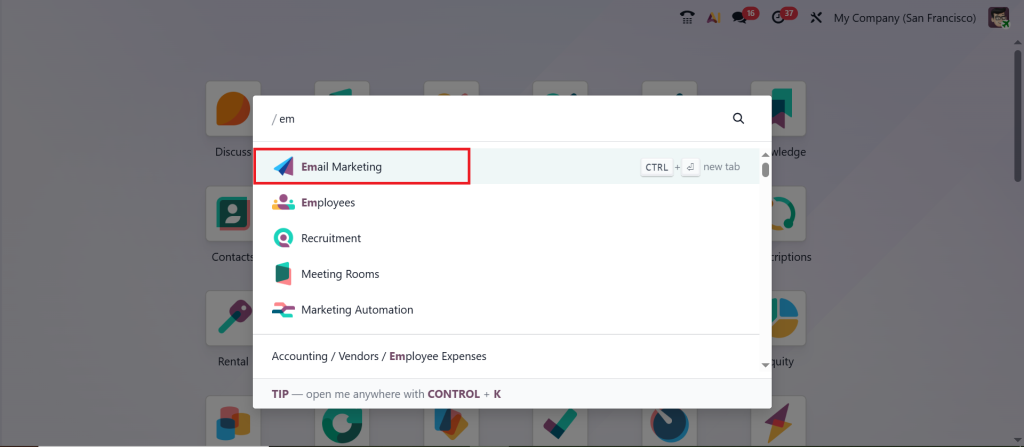
Access the Email Marketing Module.
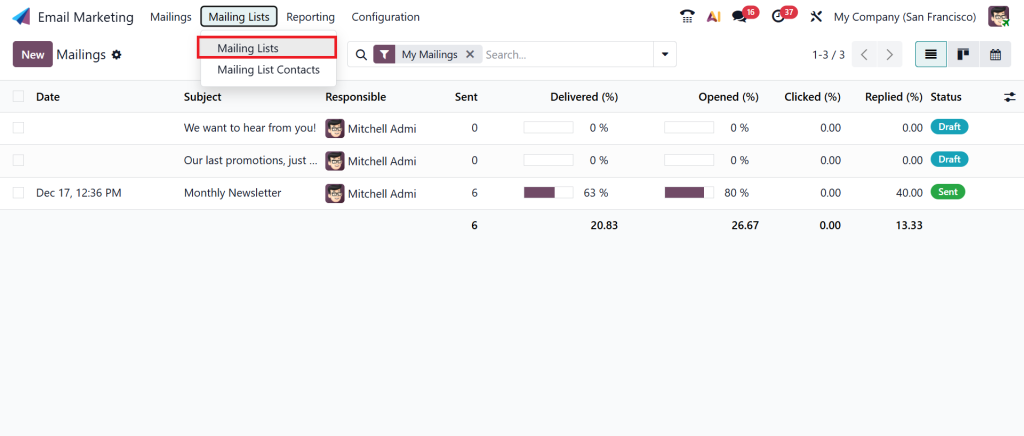
Select Mailing Lists from the dashboard.
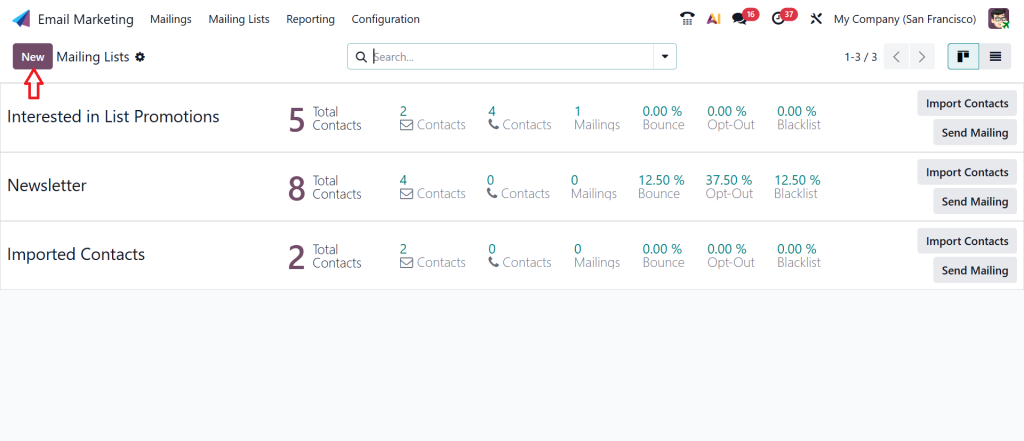
Click on New.
Enter the mailing list name and click Save.
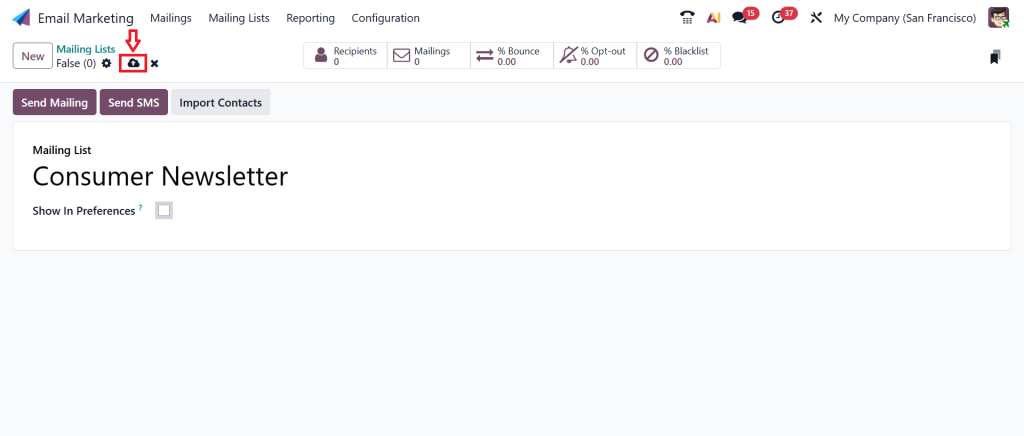
This process completes Odoo 19 mailing list creation and prepares the list to receive contacts.
Add Contacts to Mailing List Odoo 19 Without Confusion
Once your mailing list is ready, the next step is to add people to it. To add contacts to the mailing list in Odoo 19, you can do it manually or in bulk, depending on your needs. Manual addition is valuable when you are dealing with a few contacts.
Open your mailing list and click Contacts.
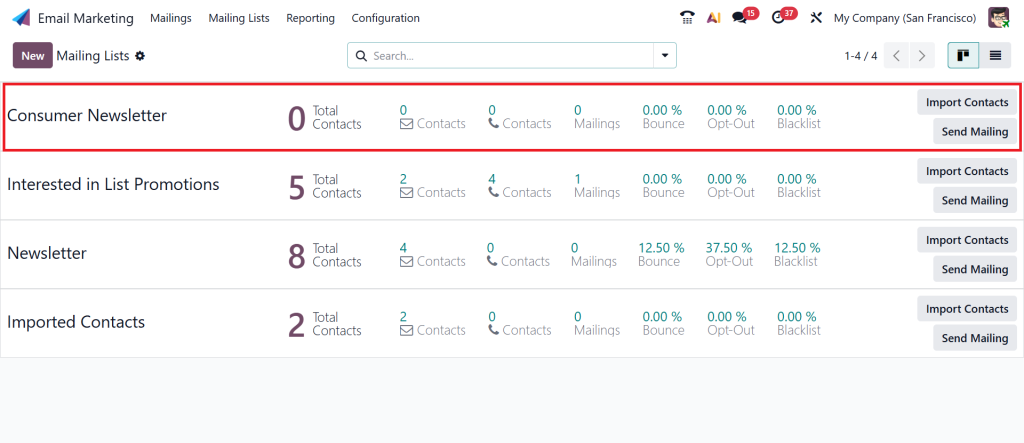
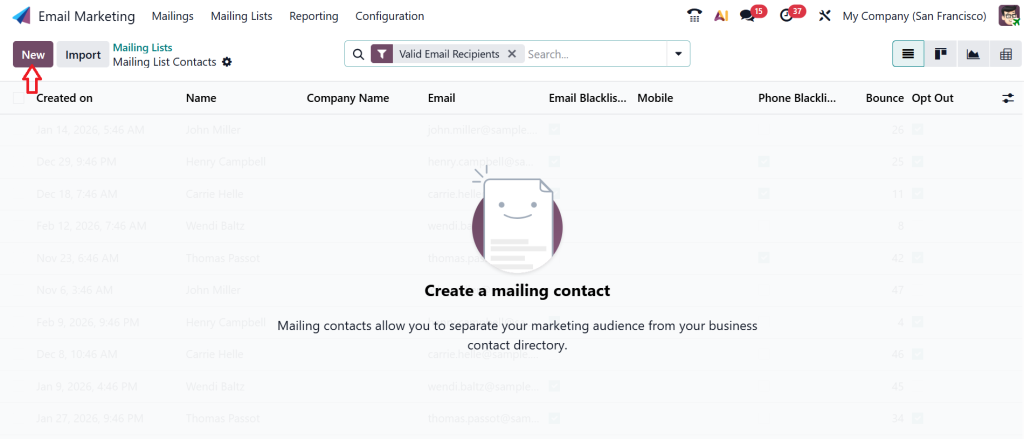
Click New.
Enter contact details such as email, name, and company, and Save the record.
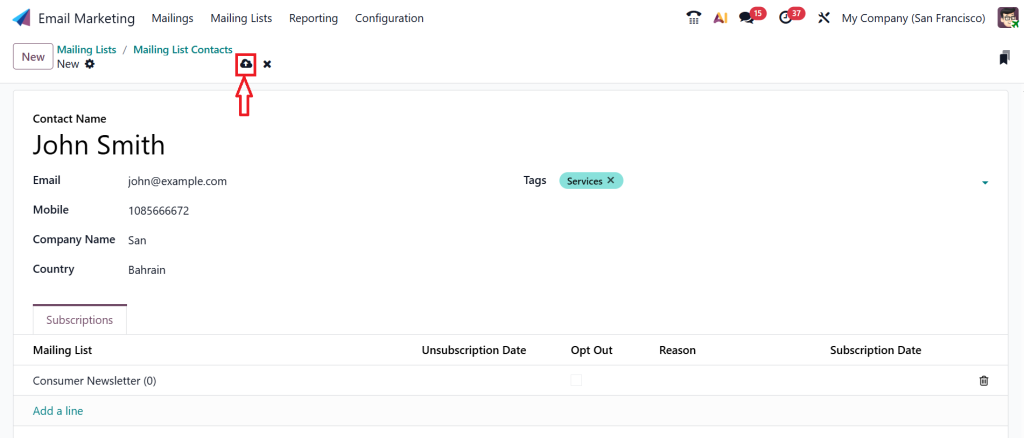
This method is ideal for adding a few high-value contacts.
But most businesses deal with larger contact lists. That is where Odoo really helps. You can import contacts, assign them to mailing lists, and manage everything from one place. When you add contacts to a mailing list in Odoo 19 in a planned way, you avoid duplicates and missing information.
Odoo 19 Email Marketing Contacts Import for Growing Businesses
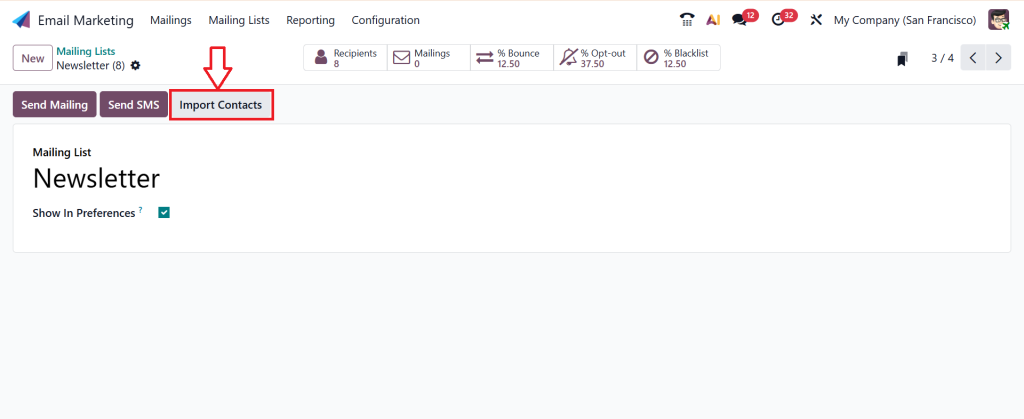
If your business already has contacts stored in files, emails, or other systems, Odoo 19 email marketing contacts import becomes your best friend. Instead of adding contacts one by one, you can upload them using CSV or Excel files.
This process allows you to map fields like email address, name, company, and mailing list. Once imported, your contacts are ready to use for campaigns.
The key here is preparation. Before you use Odoo 19 email marketing contacts import, make sure your file is clean. Remove empty rows, fix email errors, and properly organize the data. A clean import saves you from future problems.
Odoo Newsletter Mailing List Setup That People Actually Want to Stay On
Newsletter subscribers are special. They choose to hear from you. That’s why the Odoo newsletter mailing list setup needs extra care.
When you create a newsletter mailing list, make sure it is separate from promotional or sales lists. This way, subscribers get what they signed up for, not something unexpected.
Odoo allows you to connect website forms directly to your newsletter mailing list. When someone subscribes, they are automatically added. This kind of Odoo newsletter mailing list setup helps you grow your list without manual effort and keeps everything organized.
Odoo 19 Subscriber List Management for Long-Term Results
Adding contacts is only the beginning. Real success comes from Odoo 19 subscriber list management. This means keeping your list up to date, removing inactive contacts, and honoring unsubscribe requests.
Odoo automatically handles unsubscribe requests, protecting your email reputation. You can also see which subscribers are active and which are no longer engaging.
With proper Odoo 19 subscriber list management, your emails go to people who actually want to read them. This improves open rates and reduces complaints.
Odoo Email Marketing Segmentation That Makes Emails Feel Relevant
Sending the same email to everyone rarely works. That’s where Odoo email marketing segmentation comes in.
Segmentation lets you divide your contacts based on simple conditions such as location, behavior, or interests. When you use Odoo email marketing segmentation, your emails feel more personal, even when sent to many people.
Odoo lets you create filters that automatically update your lists. This means you don’t have to adjust contacts every time something changes manually. Segmentation keeps your communication focused and meaningful.
How All These Pieces Work Together in Daily Business Life
When you create mailing lists & add contacts in Odoo 19, you are not just setting up email marketing. You are building a system that works quietly in the background.
Your website adds subscribers. Your CRM updates contact details. Your email campaigns use clean lists. Your reports show precise results. Everything stays connected.
This is why businesses that take time to understand, create mailing lists & add contacts in Odoo 19 feel more in control of their communication.
Common Struggles Businesses Face and How Odoo 19 Solves Them
Many businesses face the same problems. Contacts are scattered. Mailing lists overlap. People receive emails they didn’t sign up for.
Odoo 19 solves these problems by keeping everything in one place. When you follow the proper process for Odoo 19 mailing list creation, contact import, and segmentation, these issues slowly disappear. The system works best when it is used correctly from the start.
Why Netilligence Helps You Create Mailing Lists and Add Contacts in Odoo 19 Correctly
At Netilligence, we see these challenges every day. Businesses want to use Odoo Email Marketing without confusion or mistakes. That’s where expert guidance matters.
We help businesses create mailing lists and add contacts in Odoo 19 that fit their real needs. From Odoo newsletter mailing list setup to Odoo email marketing segmentation, everything is planned and practical.
Our goal is simple: help you communicate better with your audience without stress.
Make Email Marketing in Odoo 19 Work for You
Email marketing does not need to feel confusing or complicated to manage. Once you understand how to create mailing lists & add contacts in Odoo 19, everything starts to feel clearer and organized. Your contacts stay in the right place, your emails reach people who actually want to hear from you, and your campaigns stop feeling random.
Odoo 19 provides a complete system that connects mailing lists, subscribers, and campaigns. When you take the time to set up Odoo 19 mailing list creation, manage contacts properly, and use segmentation in the right way, email marketing becomes a steady part of your daily business work instead of a constant struggle.
If you feel stuck, unsure, or simply don’t have the time to set things up properly, Netilligence is here to help. Our team can guide you through creating mailing lists, adding contacts, and managing subscribers in Odoo 19 so your email marketing works the way you expect.
Reach out to Netilligence today, and let’s set up your Odoo Email Marketing the right way.




