


Why Closing the Fiscal Year in Odoo 19 Accounting Matters
Close the Fiscal Year in Odoo 19 Accounting is not just a technical task, it is a critical financial milestone that defines how accurately your business moves into the following year. Close the Fiscal Year in Odoo 19 Accounting the right way, and you ensure compliance, clarity, and confidence in your financial data. Close the Fiscal Year in Odoo 19 Accounting incorrectly, and you risk errors, audit issues, and poor business decisions.
In a competitive environment, companies using Odoo 19 for fiscal year closing, Odoo 19 fiscal year-end, Odoo accounting year-end steps, Odoo 19 lock date budgetary year, and the complete Odoo year-end accounting process need more than basic knowledge; they need a proven method. This is precisely where Netilligence helps businesses succeed.
This guide will walk you through everything you need to know to close the Fiscal Year in Odoo 19 Accounting, step by step, using simple language, real-world best practices, and expert insights. By the end, you’ll understand not only how to close your books, but why doing it correctly in Odoo 19 can transform your financial control.
How to Close the Fiscal Year in Odoo 19 Accounting
Closing your fiscal year is about accuracy, control, and strategic growth. Odoo 19 Accounting offers powerful tools to make year-end closing smooth, but only when configured and executed correctly.
Let’s break down the entire Odoo year-end accounting process into manageable, reliable, and stress-free steps.
Understanding the Fiscal Year Closing Process in Odoo 19
Before you close the Fiscal Year in Odoo 19 Accounting, it’s essential to understand what fiscal year closing actually means inside Odoo.
Fiscal year closing in Odoo 19 includes:
- Finalizing all accounting entries
- Reconciling accounts
- Locking periods to prevent changes
- Carrying forward balances into the new year
Odoo does not “close” the year with a single button. Instead, it follows a structured Odoo accounting year end steps approach that ensures accuracy and compliance.
This design is robust because it gives finance teams flexibility, but it also requires expertise to avoid mistakes.
Odoo Accounting Year End Steps - Step-by-Step Execution
Now, let’s walk through the actual Odoo accounting year end steps to close the Fiscal Year in Odoo 19 Accounting.
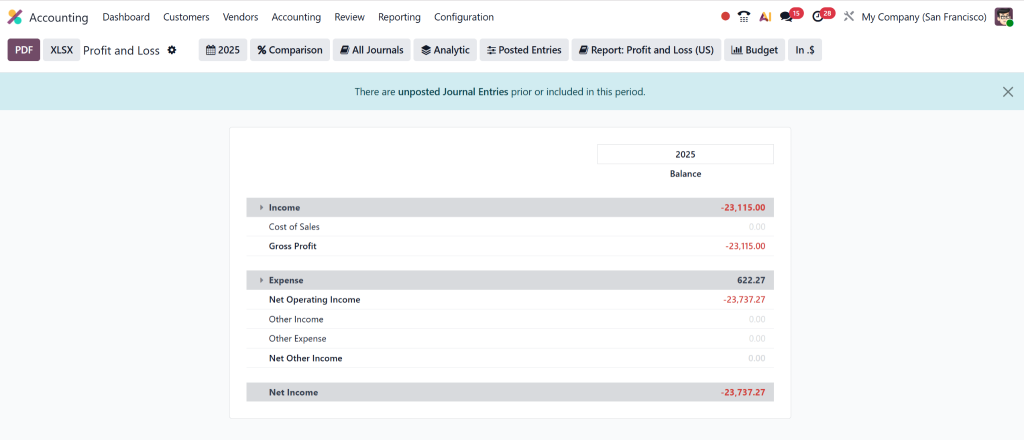
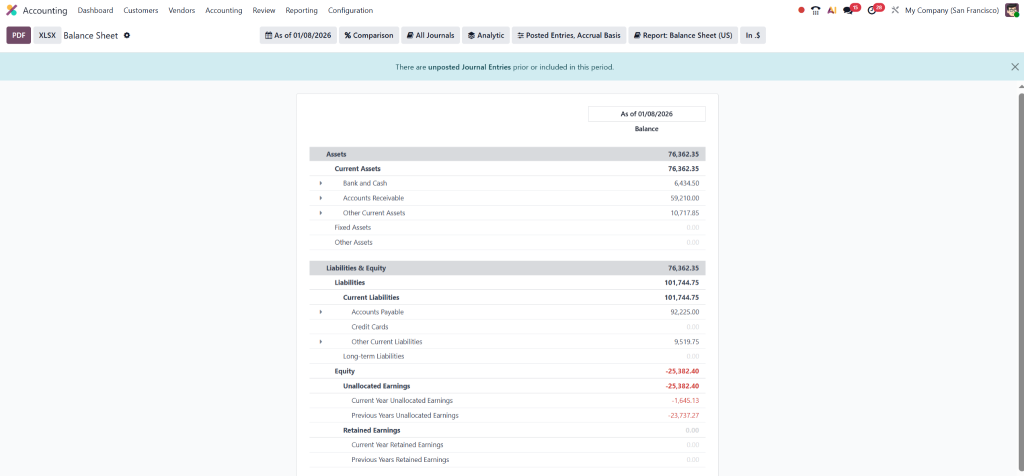
Step 1 – Run Financial Reports
Generate and review:
- Profit & Loss Statement
- Balance Sheet
- Cash Flow Report
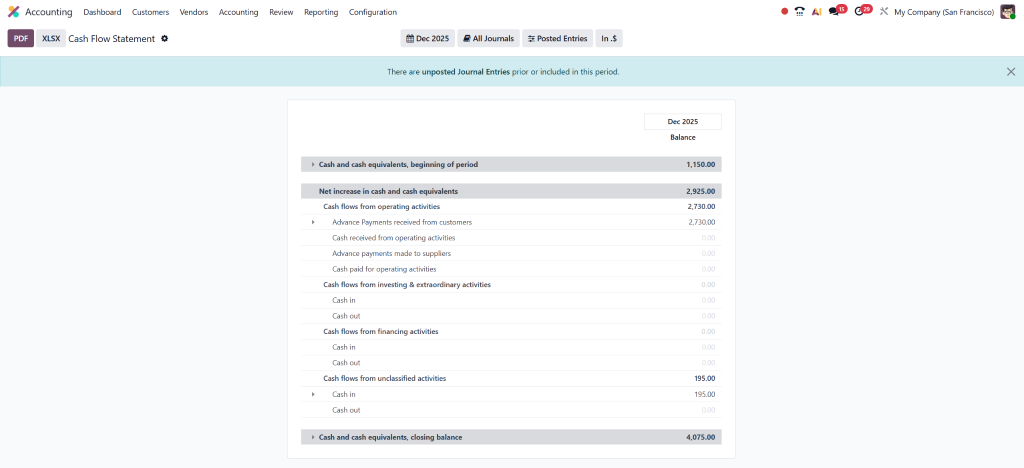
These reports help you spot discrepancies before locking the year.
Step 2 – Adjusting Entries
Post year-end adjustments such as:
- Depreciation
- Accruals
- Provisions
Odoo 19 allows detailed journal entries, ensuring financial accuracy.
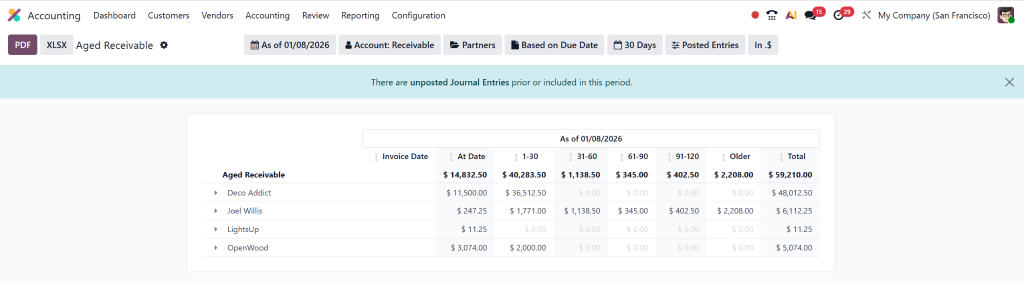
Step 3 – Final Account Reconciliation
Confirm:
- Receivables and payables match statements
Receivables
Payables:
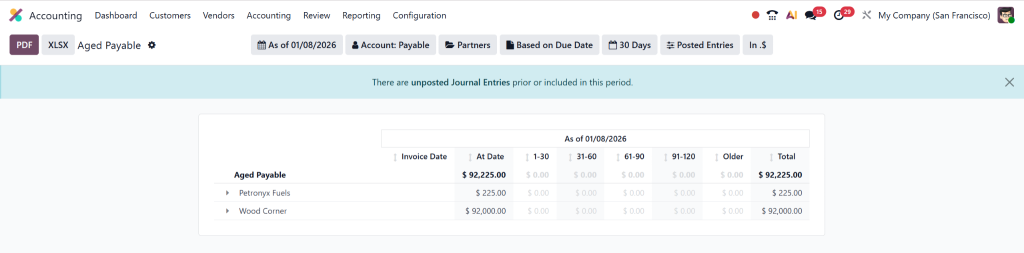
- Intercompany balances are correct
This ensures clean opening balances for the following year.
How to Set Odoo 19 Lock Date Fiscal Year Correctly
Setting the Odoo 19 lock date fiscal year is one of the most critical steps when you close the Fiscal Year in Odoo 19 Accounting.
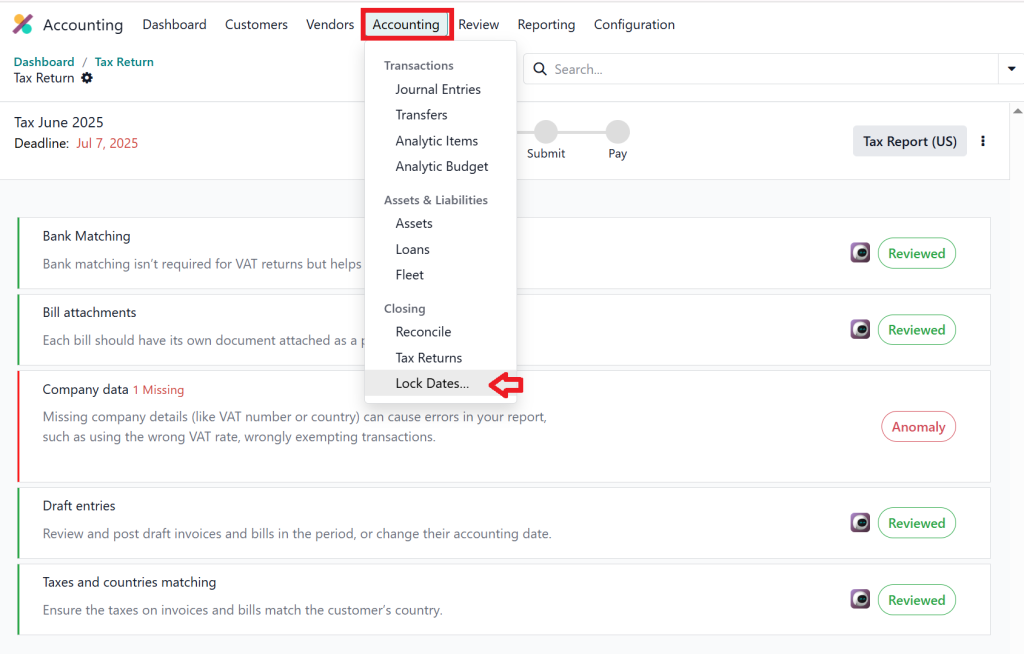
Lock dates prevent users from modifying past transactions, protecting your finalized data.
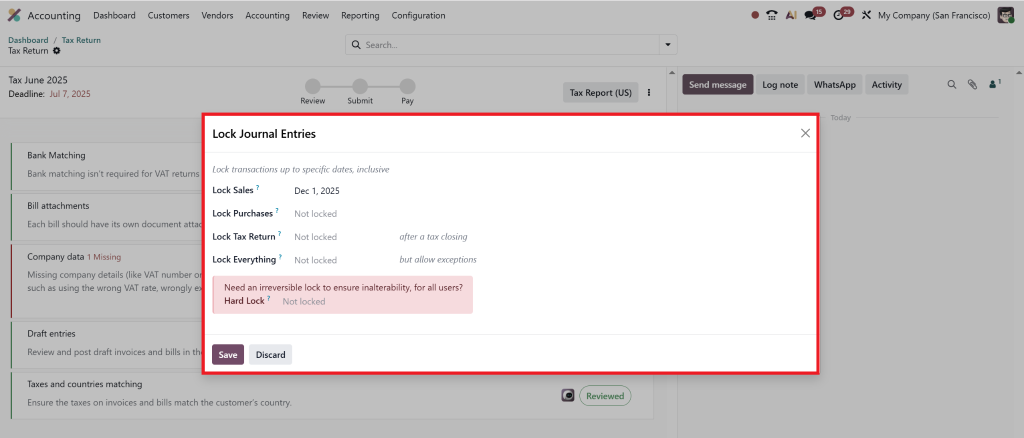
Types of Lock Dates in Odoo 19
Odoo 19 provides:
- Accounting Lock Date – Locks all accounting entries
- Tax Lock Date – Prevents tax-related changes
Best Practice for Lock Dates
Always:
- Lock periods only after final verification
- Allow accountants restricted access if needed
- Keep management informed before applying locks
Incorrect lock date settings can disrupt daily operations, this is where professional guidance from Netilligence becomes invaluable.
Pre-Closing Checklist Before You Close the Fiscal Year in Odoo 19 Accounting
Preparation is the foundation of a successful fiscal-year close in Odoo 19. Skipping these steps can cause serious issues later.
1. Verify All Accounting Entries
Ensure:
- All vendor bills and customer invoices are posted
- No draft journal entries remain
- All expenses and revenues belong to the correct fiscal year
2. Bank and Cash Reconciliation
Every bank and cash account must be fully reconciled. Odoo 19 makes reconciliation easier, but incomplete reconciliation leads to inaccurate closing balances.
3. Review Tax and Compliance Data
Before Odoo 19 fiscal year closing, double-check:
- Tax reports
- VAT/GST postings
- Regional compliance requirements
This step is crucial for audit-ready financials.
Lorem ipsum dolor sit amet, consectetur adipiscing elit. Ut elit tellus, luctus nec ullamcorper mattis, pulvinar dapibus leo.
Post-Closing Activities After Odoo 19 Fiscal Year Closing
Once you close the Fiscal Year in Odoo 19 Accounting, the process doesn’t entirely end. Post-closing tasks ensure a smooth transition into the new fiscal year.
Carry Forward Balances
Odoo automatically carries forward:
- Asset balances
- Liability balances
- Equity balances
Income and expense accounts reset to zero, ensuring a clean start.
Validate Opening Balances
Review the new fiscal year’s opening balance sheet to confirm accuracy.
Backup and Documentation
Always store:
- Financial reports
- Audit documents
- System backups
This protects your business from future discrepancies or audits.
Common Mistakes When You Close the Fiscal Year in Odoo 19
Even experienced teams make mistakes during the close of the fiscal year, Odoo 19 processes. Avoid these common pitfalls:
- Closing without reconciliation
- Forgetting adjusting entries
- Incorrect lock date setup
- Missing compliance checks
- Rushing the process
Each of these errors can lead to inaccurate financials and compliance risks. Working with Odoo experts dramatically reduces these risks.
Why Businesses Trust Netilligence for Odoo Year-End Accounting Process
At Netilligence, we don’t just help you close the Fiscal Year in Odoo 19 Accounting, we ensure your accounting system becomes a strategic asset.
What Makes Netilligence Different?
- Certified Odoo Accounting Experts
- Proven year-end closing frameworks
- Compliance-focused execution
- Customized support for your industry
Whether you are a startup or an enterprise, our team ensures your Odoo year-end accounting process is accurate, secure, and stress-free.
Our Value to Your Business
- Zero data loss
- Audit-ready reports
- Smooth fiscal transitions
- Better financial decision-making
When you partner with Netilligence, you gain peace of mind and financial clarity.
Close the Fiscal Year in Odoo 19 Accounting with Confidence
To close the Fiscal Year in Odoo 19 Accounting successfully, you need more than software, you need expertise, planning, and precision. Odoo 19 provides the tools, but the proper implementation makes all the difference.
By following the correct Odoo accounting year-end steps, properly managing Odoo 19 lock date fiscal year settings, and executing a structured Odoo year-end accounting process, your business is set up for long-term success.
If you want a flawless fiscal year closing, minimal risk, and maximum confidence, Netilligence is your trusted Odoo partner.
Ready to Close Strong and Start Smarter?




