

Why Calculate Overtime in Odoo 19 Attendance Becomes Confusing for Many Teams
If you are trying to calculate overtime in Odoo 19 attendance and things don’t match what your employees are actually working, I completely understand your frustration. Many HR and payroll teams come to this point where attendance looks fine, check-in and check-out are correct, but overtime numbers feel off.
When you calculate overtime in Odoo 19 attendance, it’s not just about extra hours. It’s about trust. Employees trust that their extra time is counted. Payroll teams trust that the system is giving correct numbers. And management trusts that reports reflect reality.
The problem is, most people try to calculate overtime in Odoo 19 attendance without understanding how Odoo thinks. Odoo doesn’t calculate overtime on assumptions. It follows rules, schedules, and conditions very strictly. Once you understand this logic, calculating overtime in Odoo 19 attendance stops feeling difficult.
In this blog, I’m going to walk you through everything in a very practical way, so that by the time you reach the end, you’ll know exactly why overtime was missing and how to fix it properly.
Understanding Odoo 19 Overtime Calculation Attendance from the System’s Point of View
Let me explain Odoo 19 overtime calculation attendance in the simplest way possible. Odoo compares two things only:
what time the employee should work and what time the employee actually worked.
If Odoo does not know what “should work” means, it cannot decide what overtime means. This is where most issues start. People expect Odoo to automatically understand overtime, but Odoo needs clear instructions.
Overtime is not calculated just because someone stayed late. It is calculated only when extra hours cross the defined limits. This small detail explains why overtime sometimes shows zero even after long working days.
Why Working Schedules Decide How You Calculate Overtime in Odoo 19 Attendance
Before thinking about overtime, ask yourself one question: Does Odoo know my employee’s daily working hours? If the answer is no, overtime will never calculate correctly.
Working schedules specify when work starts and ends, and how many hours are considered normal. When you calculate overtime in Odoo 19 attendance, the system always checks the schedule first.
If an employee has no schedule or the schedule is wrong, Odoo has nothing to compare attendance with. As a result, overtime stays missing or inaccurate.
How to Configure Overtime Rules Odoo 19 So Extra Hours Are Counted Properly
Now we come to the most ignored step, overtime rules. Knowing how to configure overtime rulesin Odoo 19 changes everything. Overtime rules decide:
- After how many hours does overtime starts
- Whether overtime is counted daily or weekly
- Whether a minimum extra time is required
Many companies forget to define these rules and then wonder why overtime is not calculated. Odoo will not assume anything for you. Once rules are clearly defined, Odoo follows them exactly the same way every time. So, let’s dive into the Attendance module to configure overtime rules.
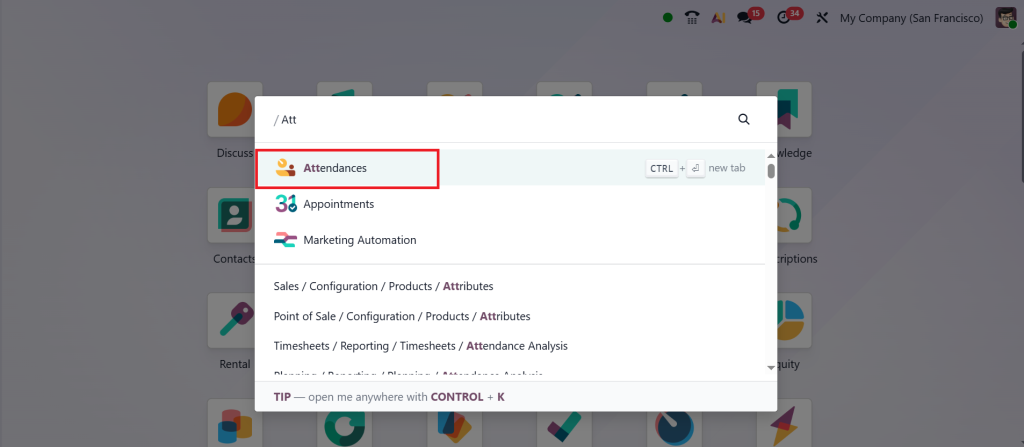
Go to the Configuration > Overtime Rulesets.
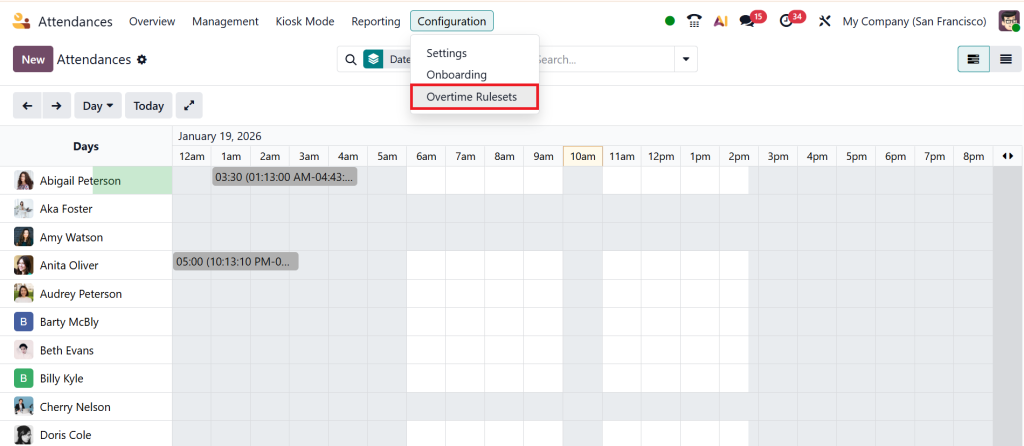
Click New.
Give the ruleset name, add the overtime rules, and click Save.
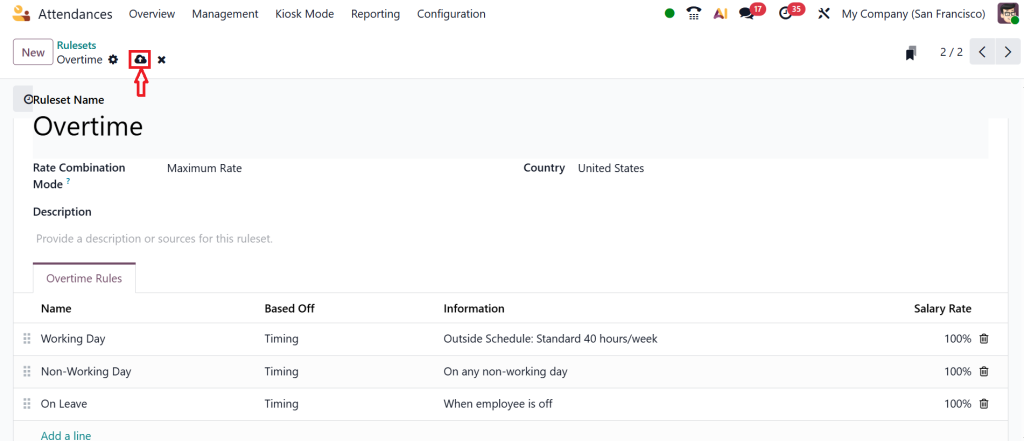
Think of overtime rules as instructions you give to Odoo. The clearer they are, the more accurate your overtime results will be.
Odoo Attendance Overtime Rule Sets UAE and Why Location Matters
If your business operates in the UAE, overtime cannot be treated like a generic setup. UAE labor laws clearly mention working hours, overtime limits, and holiday compensation. This is why Odoo’s attendance overtime rule sets for the UAE need special attention.
In Odoo, you can create different overtime rules for normal days, weekends, and public holidays. This helps the system treat extra hours differently based on the day.
When UAE-specific rule sets are applied correctly, overtime reports start matching real payroll expectations, and manual corrections reduce significantly.
Auto Calculate Overtime Odoo 19 Tutorial for Daily Attendance Flow
Once schedules and overtime rules are in place, Odoo can start automatic calculation. This is where auto calculate overtime Odoo 19 tutorial becomes important.
Odoo reads attendance daily, checks the planned working hours, and compares them with actual hours worked. Any extra time that fits overtime rules is recorded automatically.
This automated workflow eliminates the need to manually count hours or maintain separate overtime sheets. It also ensures that every employee is treated equally based on the same rules.
Overtime Work Entries Odoo Attendance and Why They Matter More Than You Think
Overtime hours don’t go directly to payroll. First, they are converted into system records called overtime work entries in Odoo Attendance.
These work entries tell payroll exactly how many overtime hours exist and which category they fall under. Without work entries, payroll has no way to separate regular hours from overtime.
If overtime is not showing on payslips, most of the time the issue is not attendance it’s missing or incorrect work entries.
Handling Odoo 19 Attendance Overtime Holidays Without Manual Adjustments
Overtime on holidays is a sensitive topic. Employees expect higher compensation, and payroll teams want accuracy. That’s why Odoo 19 attendance, overtime, and holidays need proper configuration.
When public holidays are marked in Odoo and linked with overtime rules, the system automatically treats those days differently. Extra hours on holidays are calculated separately and sent to payroll with the correct logic. This setup saves payroll teams from having to perform manual checks at the end of every month.
Connecting Attendance with Salary Using Odoo 19 Payroll Overtime Setup
Attendance can calculate overtime, but payroll must pay for it. This connection is made through Odoo 19’s payroll overtime setup.
In payroll, overtime is defined as a separate salary component. It reads overtime work entries and calculates payment based on defined rates. If this step is skipped, overtime hours stay invisible on payslips.
Once the payroll overtime setup is complete, attendance and payroll start speaking the same language, and salary calculations become consistent.
Why Overtime Still Looks Wrong Even After Setup
Sometimes everything looks configured, yet over time still feels incorrect. In most cases, the reason is very simple:
- Attendance is not validated
- Employee is not linked to a working schedule
- Overtime rule is not assigned to the correct structure
- Payroll structure is incomplete
Fixing these basics usually solves the problem faster than expected.
A Simple Real Example of Overtime Calculation
An employee is scheduled from 9 AM to 6 PM. One day, they check out at 8 PM. Odoo checks the schedule, applies overtime rules, records two extra hours, creates overtime work entries, and sends them to payroll.
This is exactly how overtime in Odoo 19 attendance should work when everything is set correctly.
Calculating Overtime in Odoo 19 Attendance Without Daily Confusion
When you correctly calculate overtime in Odoo 19 attendance, daily work becomes smoother. HR teams stop answering the same questions again and again. Payroll teams trust the numbers. Employees feel confident that their extra effort is recorded properly.
Overtime issues usually don’t come from Odoo itself. They come from missing steps during setup. Once schedules, overtime rules, holiday calendars, and payroll are connected properly, overtime starts working exactly the way you expect.
If you want help setting this up correctly without trial and error, Netilligence can guide you through the complete Odoo attendance and payroll configuration, so overtime stops being a monthly problem and becomes a normal process.




