

Why Bank Reconciliation in the Odoo 19 Accounting Module Feels Confusing at First
If you are handling accounts every day, you already know this feeling. Your invoices look correct. Your payments look fine. But when you open your bank statement, the numbers don’t fully match. Something feels off, and now you’re stuck trying to figure out where the gap is. This is exactly where bank reconciliation in the Odoo 19 accounting module becomes essential.
Many businesses struggle with bank reconciliation in the Odoo 19 accounting module because they either don’t understand the workflow or rely too heavily on manual checks. If you’re searching for an Odoo 19 bank reconciliation tutorial or trying to learn how to reconcile bank statements in Odoo 19, you’re not alone. Almost every growing business reaches this stage.
The good news is that bank reconciliation in the Odoo 19 accounting module isn’t designed to confuse you. It is designed to help you see what is happening with your money, step by step. Once you understand the Odoo 19 bank matching view, the logic behind the Odoo 19 automatic bank reconciliation models, and how to import and reconcile bank statements in Odoo 19, everything starts to make sense.
In this blog, I’m not going to throw technical terms at you. I’m going to walk you through bank reconciliation in the Odoo 19 accounting module, the same way I would explain it to a client sitting across the table, trying to fix mismatched bank records and a delayed monthly close.
Understanding Bank Reconciliation in the Odoo 19 Accounting Module from a Real Business Point of View
At its core, bank reconciliation in the Odoo 19 accounting module is simple. Whatever money comes in or goes out of your bank account should match what you see in Odoo. If it doesn’t, you need to know why.
Sometimes the reason is simple. A customer paid late. A bank fee was charged. A payment was recorded twice. Other times, the issue remains hidden for weeks, and suddenly your reports no longer feel reliable. This is why regular bank reconciliation in the Odoo 19 accounting module matters more than most people realise.
Odoo 19 doesn’t expect you to manually search every transaction. It helps you match, review, and confirm entries in a logical workflow, so your accounting stays clean without consuming your entire day.
How to Configure Bank Reconciliation in Odoo 19 Accounting Before You Start Matching
Before you even think about matching transactions, you need the basics in place. If this setup is rushed, reconciliation will always feel messy later.
When you configure bank reconciliation in Odoo 19 accounting, you are basically telling Odoo how your bank behaves. You connect your bank account to the correct journal, set the currency, and ensure your accounting settings align with how payments flow in real life.
This setup step is often overlooked, but it directly affects the effectiveness of bank reconciliation in the Odoo 19 accounting module. When configurations are set up correctly, Odoo determines which transactions belong where, and your matching suggestions become far more accurate.
Import Bank Statements and Reconcile in Odoo 19 Without Stress
One of the most common questions I hear is how to import bank statements and reconcile in Odoo 19 without spending hours cleaning data.
Odoo 19 supports multiple file formats, such as CSV and Excel, so you don’t have to manually enter every transaction. Once you import your bank statement, Odoo populates it in the accounting dashboard, ready for reconciliation.
At this stage, many users panic because they see a long list of transactions. But this is where bank reconciliation in the Odoo 19 accounting module really starts to help you. Instead of guessing, Odoo begins suggesting matches based on amounts, dates, and references. This is the moment where reconciliation shifts from manual work to guided review.
How to Manage Bank Reconciliation in the Odoo 19 Accounting Module: A Step-By-Step Guide
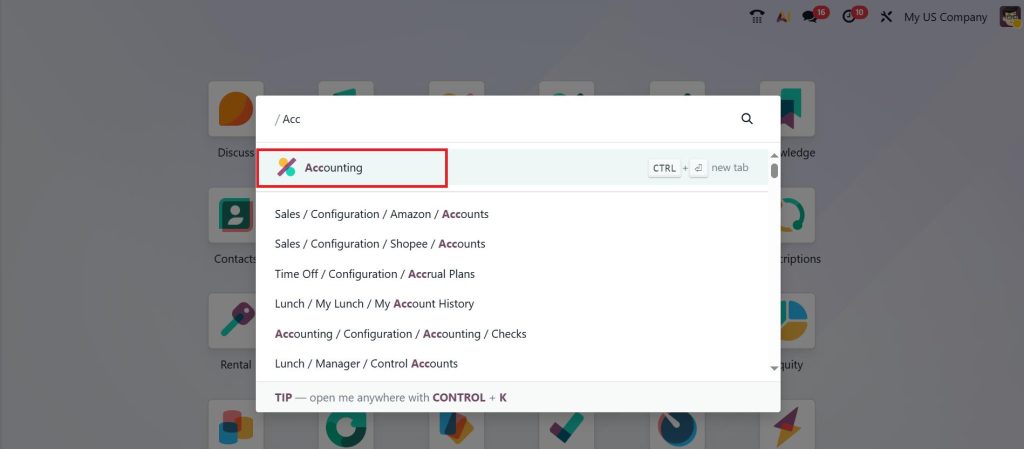
Bank reconciliation is a crucial accounting process that ensures your company’s financial records match the bank’s records. Odoo 19 simplifies this process through automation and user-friendly features. To manage bank reconciliation in the Odoo 19 accounting app, go to the Accounting module from your Odoo 19 dashboard.
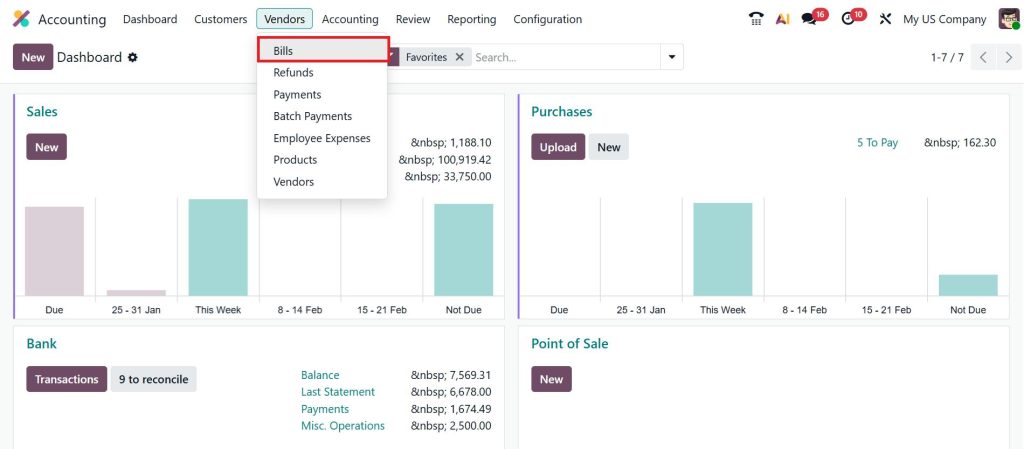
Let’s move on to reconciling a bill. To manage it, go to Vendors > Bills.
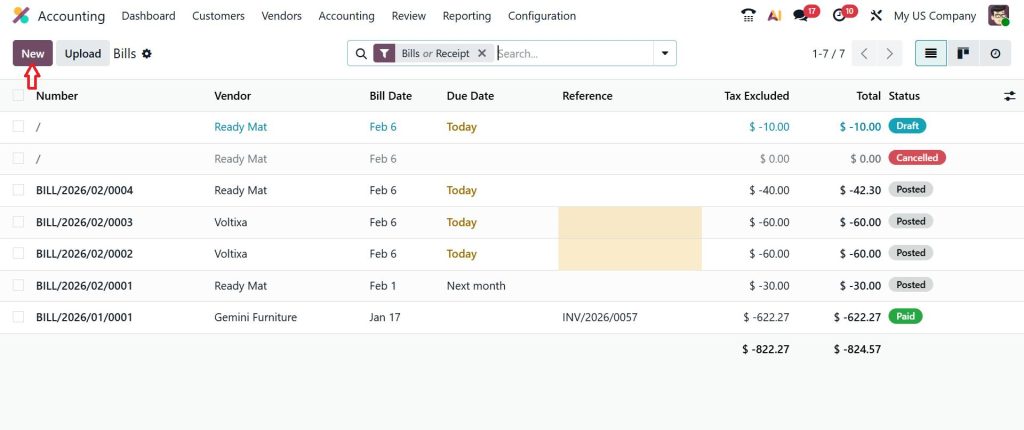
Click New.
Select the Vendor, add the Product, and click Confirm.
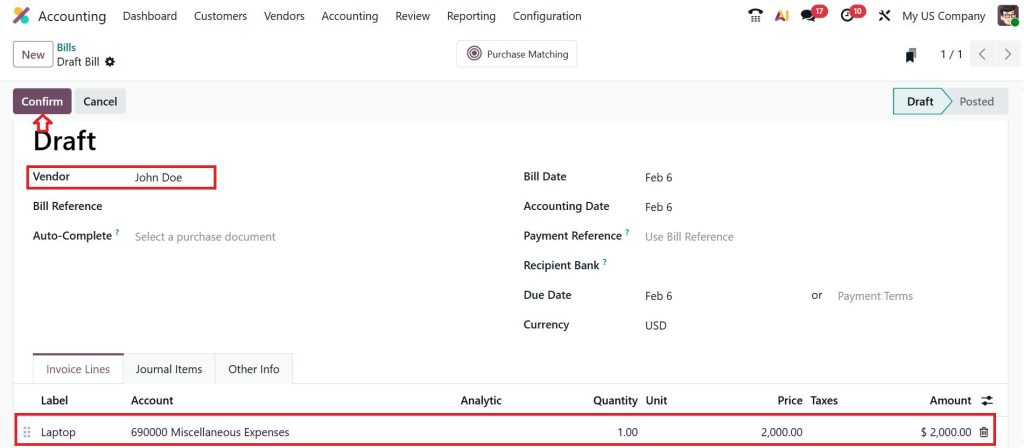
Click Pay.
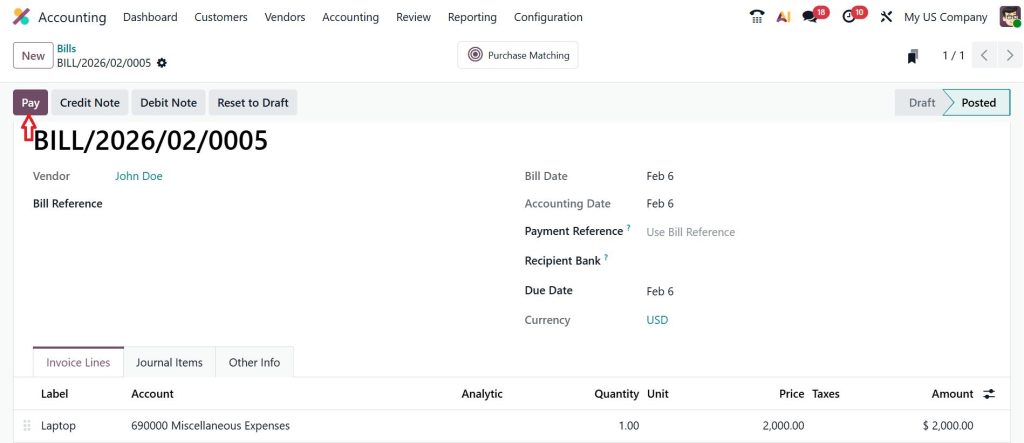
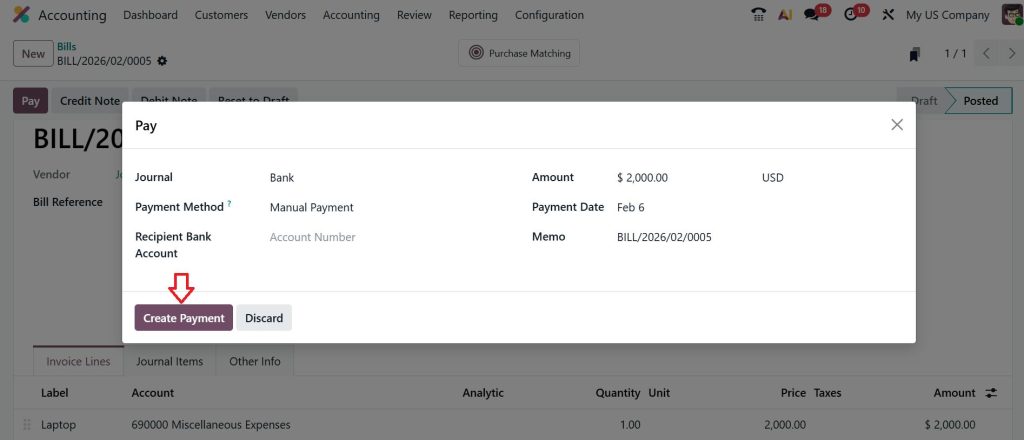
Let’s Create a Payment.
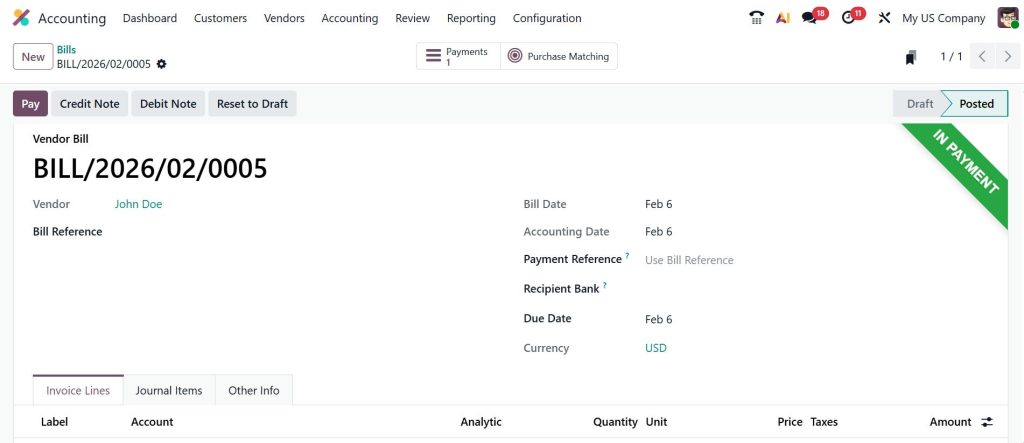
As you can see in the screenshot below, it’s IN PAYMENT stage.
Now, let’s go back to the dashboard and click on the Transactions button.
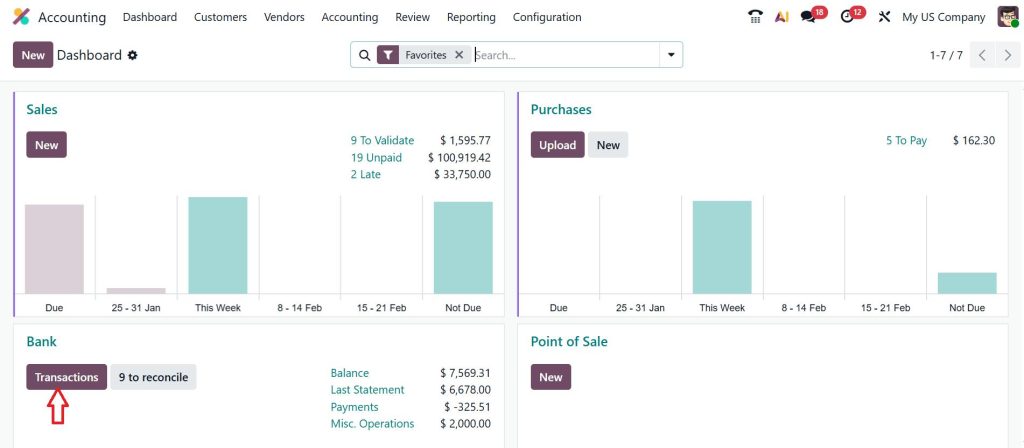
Click on New.
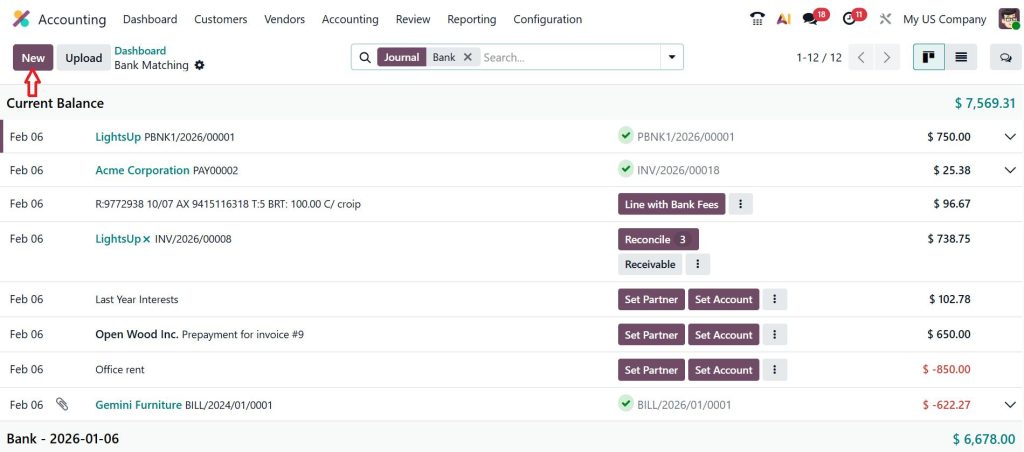
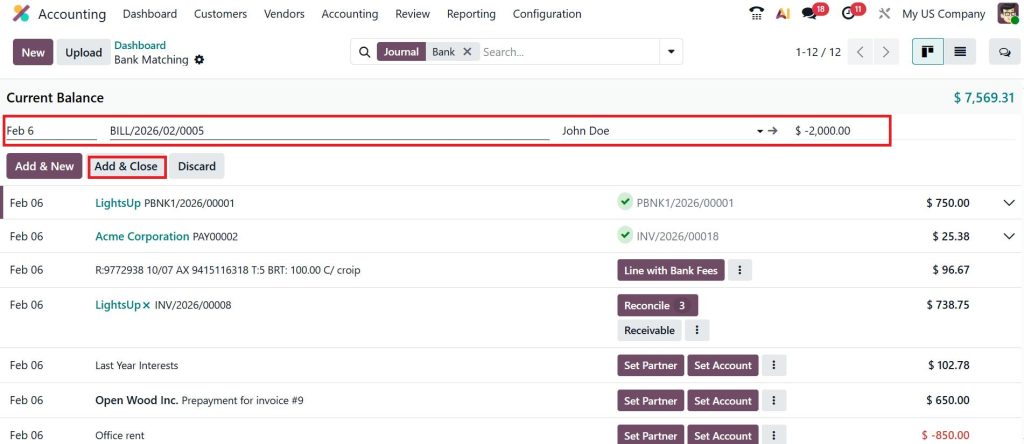
This is where you need to enter the label. The label must include the bill reference number. Select the partner as John Doe and indicate that we are handling the bill. In Bill’s case, we know the amount will be debited from the bank, so we need to enter a negative amount (-$ 2000) here, then click Add & Close.
After the reconciliation, the payment will be sent to the bank, and you can view the bill here.
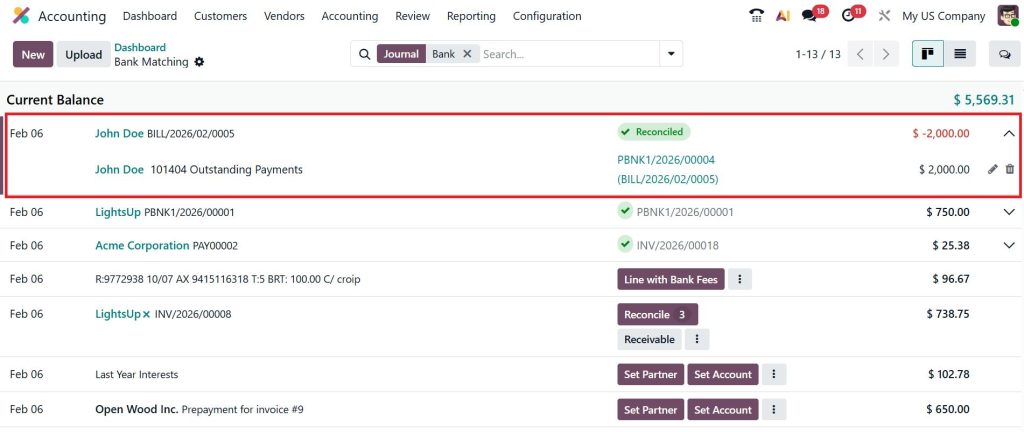
So, that’s how we manage reconciliation in the Odoo 19 accounting module.
Odoo 19 Bank Matching View Accounting and Why It Changes the Way You Work
The Odoo 19 bank matching view accounting screen is where everything connects. Think of it as a workspace where Odoo shows you one bank transaction at a time and asks a simple question: “Do you recognise this?”
For each transaction, Odoo suggests possible matches. It might show you an unpaid invoice or vendor bill, or suggest creating a new entry if none exists yet. You don’t need to dig through reports or switch screens.
This view makes bank reconciliation in the Odoo 19 accounting module feel more controlled. You are not rushing through numbers. You review each transaction in context, reducing errors and building confidence in your records.
How to Reconcile Bank Statements in Odoo 19 When Automatic Matches Are Not Enough
Automation helps, but real accounting is not always clean. Sometimes payments are partial. Sometimes references are missing. This is where understanding how to reconcile bank statements in Odoo 19 manually becomes important.
Odoo allows you to split transactions, adjust amounts, or assign entries to the correct accounts when things don’t line up perfectly. This flexibility is what keeps bank reconciliation in the Odoo 19 accounting module practical for real businesses, not just textbook examples.
Manual reconciliation is not a failure of the system. It’s a safety net that ensures accuracy when automation cannot make a decision on its own.
Odoo 19 Smart Matching Bank Transactions and How It Learns from You
The more you use Odoo, the smarter it becomes. Odoo 19 smart matching bank transactions work quietly in the background, learning from your past actions.
If you regularly mark certain transactions as bank charges, Odoo remembers. If a specific customer always pays in the same way, Odoo starts suggesting that they match faster next time. Over time, bank reconciliation in the Odoo 19 accounting module becomes less about decisions and more about confirmation.
This learning behaviour reduces repetitive work and enables your accounting team to focus on review rather than data entry.
Odoo 19 Automatic Bank Reconciliation Models and Why They Matter
One of the most useful tools for bank reconciliation in Odoo 19 is the automatic bank reconciliation models. These models are rule-based instructions that tell Odoo how to treat specific transactions.
For example, if your bank deducts fees every month, you can create a model that automatically records those fees under the correct expense account. The same applies to interest income, regular service charges, or recurring payments.
Once these models are active, many transactions are reconciled automatically when you import your bank statement. This doesn’t remove control; it simply removes repetition.
Using an Odoo 19 Bank Reconciliation Tutorial Approach for Your Team
Even the best system fails if users don’t understand it. That’s why following an Odoo 19 bank reconciliation tutorial approach internally makes a big difference.
Instead of handing your team a long manual, walk them through real examples. Show them how bank reconciliation in the Odoo 19 accounting module works with actual bank statements. Let them see the matching view, the suggestions, and the validation process. When people understand the “why” behind the steps, they make fewer errors and trust the system more.
Common Issues Businesses Face During Bank Reconciliation in Odoo 19
Most reconciliation problems come from small gaps. Missing references, delayed entries, or incorrect setup. The strength of bank reconciliation in the Odoo 19 accounting module is that it highlights these issues instead of hiding them.
Unmatched transactions stay visible. Differences don’t disappear into reports. This transparency helps businesses identify and fix problems early rather than discovering them at month-end.
Why Consistent Bank Reconciliation in the Odoo 19 Accounting Module Builds Confidence
When reconciliation is performed regularly, financial reports become more reliable. Cash balances make sense. Audit preparation becomes easier. Decisions are made with confidence instead of assumptions.
This is the real value of bank reconciliation in the Odoo 19 accounting module. It’s not just about matching numbers. It’s about knowing where your business stands, without second-guessing your data.
Bringing Clarity Back to Your Accounts with Bank Reconciliation in Odoo 19
If bank reconciliation has always felt confusing or time-consuming, Odoo 19 gives you a clearer way to stay in control of your numbers. Once you understand how to configure your bank journals, import statements, review matches, and apply reconciliation models, the process becomes manageable rather than stressful.
Regular bank reconciliation in Odoo 19 helps you trust your reports, close your books on time, and avoid unpleasant surprises at month-end. More importantly, it gives you a clear picture of where your business stands based on real bank data, not assumptions.
If you’re still unsure whether your reconciliation setup is working as expected, or if mismatches keep appearing in your accounts, this is the right time to review your process.
Reach out to the Netilligence team to get expert guidance on setting up, optimising, or correcting bank reconciliation in Odoo 19 so your accounting stays accurate, consistent, and easy to manage.




