

If you run a business, you already know how stressful unpaid invoices can be. You deliver products or services, send invoices, and then wait. Sometimes customers pay late, sometimes they forget, and sometimes payments simply get lost in communication. This is where managing customer dues and accounts receivable becomes very important.
Many businesses still manage customer dues and accounts receivable using spreadsheets or manual records, which creates confusion and delays. When companies adopt ERP systems such as Odoo, operations become easier and more organized.
With customer dues and accounts receivable tools available in Odoo 19, you can track unpaid invoices, follow up with customers, and keep your cash flow healthy without spending your whole day chasing payments. In this blog, I will walk you through how Odoo 19 helps solve these everyday problems.
Odoo 19 Customer Dues Management: Keeping Track of Every Rupee You Should Receive
Let me ask you something. How often do you wonder which customers still owe you money? Or which invoices are already overdue? Many business owners don’t get a clear picture until cash flow problems appear.
Odoo 19’s customer dues management provides a clear view of all outstanding payments. Every invoice created from sales automatically appears in accounting records, and the system keeps updating customer balances in real time.
When a customer pays, the payment gets recorded and matched with the invoice. If payment is partial, Odoo still displays the remaining amount. So, you never lose track of what is pending.
Instead of searching through files or calling your accountant, you open the dashboard and instantly know who owes what. This visibility helps you make better decisions about credit limits, payment terms, and customer relationships.
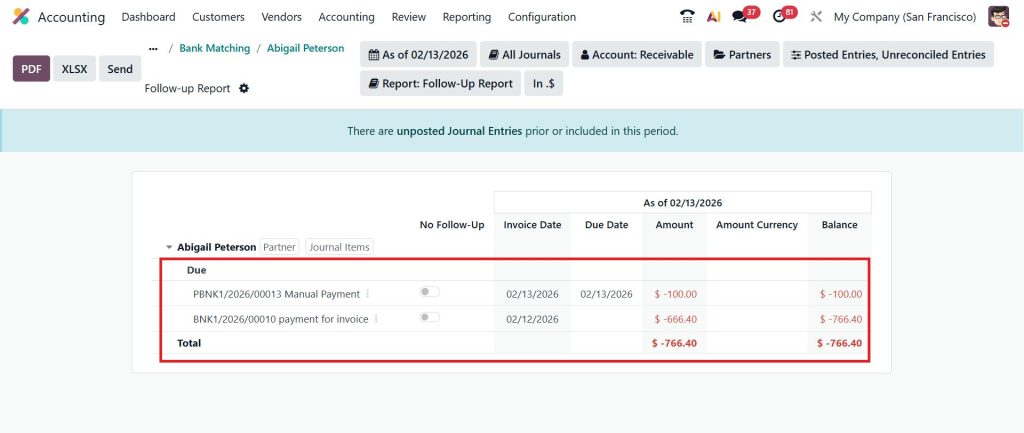
Customer dues in Odoo 19 are the amounts customers still owe you; they are also called receivables. If you sell on credit and don’t track it properly, you may have sales but no cash. So, let’s see how Odoo solved this. We have several ways to view the due amount or customer dues in Odoo 19. Let me show you one in this blog.
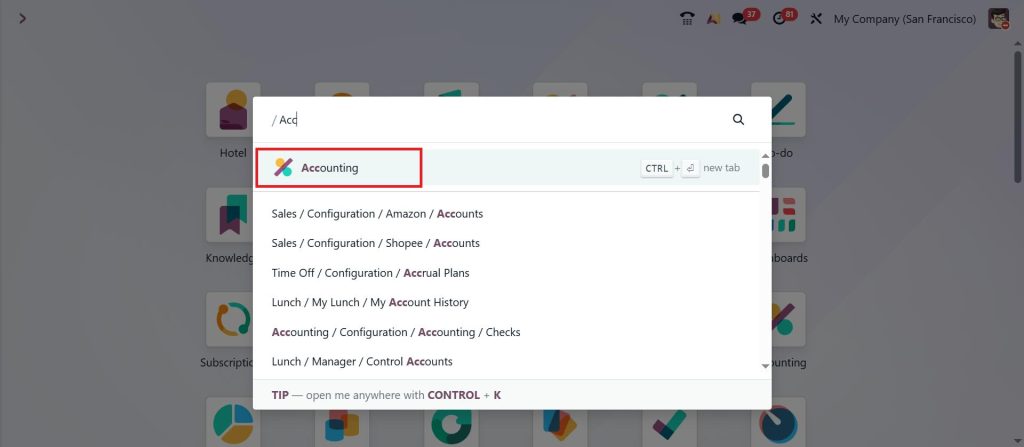
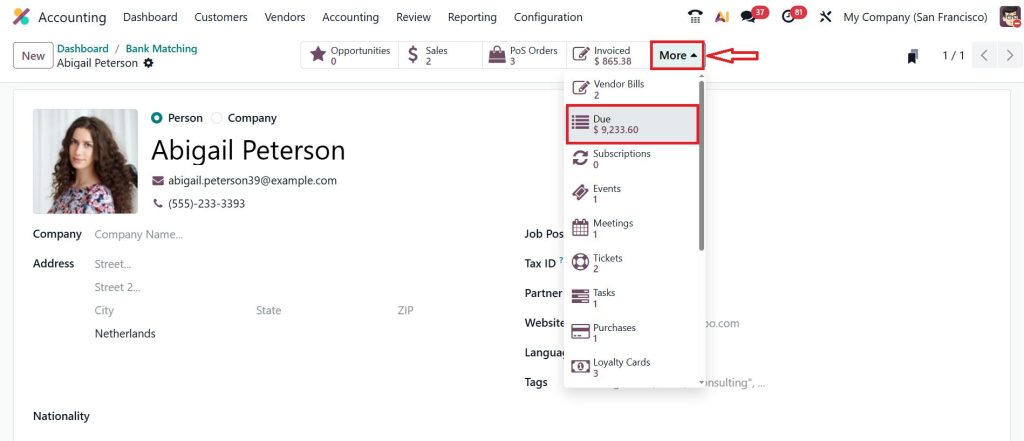
So, the first step is to go to the Accounting module.
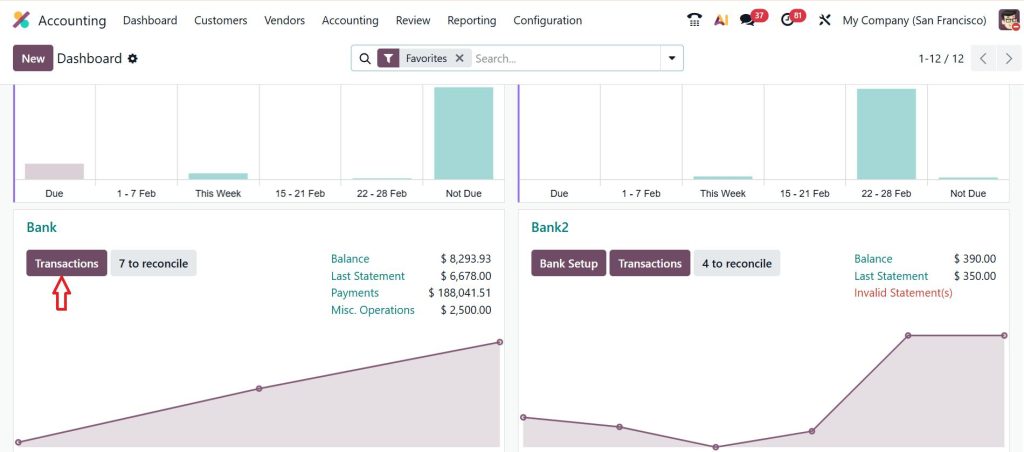
Move on to the Bank and click Transactions.
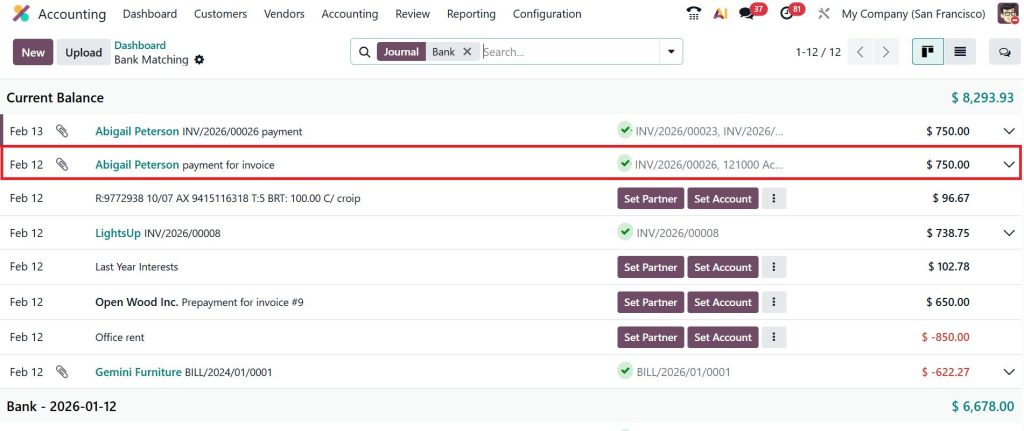
Open the reconciled invoice.
Go to More, then click Due.
Now, you can see the customer dues in the screenshot below.
Odoo 19 Accounts Receivable Tracking: Seeing Outstanding Payments in Real Time
One big challenge businesses face is not knowing their current receivable position. Sometimes invoices are sent but not recorded properly, or payments are received but not updated in the books.
With Odoo 19 accounts receivable tracking, every invoice and payment automatically updates accounting records. This means you always see the correct outstanding amount.
The system allows you to check invoices that are paid, partially paid, or overdue. You can also monitor customer payment history to identify customers who regularly delay payments.
This tracking not only keeps finance teams organized but also helps management forecast incoming cash more accurately. When you know how much money is expected and when it might arrive, planning expenses becomes much easier.
How to Manage Customer Payments Odoo 19 Accounting Without Stress
Handling payments manually often creates errors. Payments are received via bank transfers, online gateways, or cash, and accountants sometimes struggle to match payments to invoices.
In Odoo 19 accounting, the system enables businesses to record payments quickly and automatically match them to invoices. Bank statements can be imported to enable automatic payment reconciliation.
If a customer pays multiple invoices together, Odoo still handles the matching process smoothly. If only partial payment is received, the system tracks the remaining balance.
This reduces mistakes and saves hours of accounting work. Your team spends less time correcting records and more time focusing on business growth.
Odoo 19 Aged Receivable Report: Finding Out Which Payments Are Late
Now imagine this situation. You feel customers are paying late, but you don’t know exactly how late or which accounts are risky. This is where the Odoo 19 aged receivable report becomes very useful.
The report classifies unpaid invoices by the length of time they have been pending. You can view invoices that are current, overdue by 30 days, 60 days, or more.
This information helps finance teams prioritize collections. Instead of contacting customers at random, they can focus on those with the longest overdue balances.
Business owners also use aging reports to review customer credit behavior and decide future payment terms accordingly.
Customer Payment Follow Up Odoo 19: Automated Reminders That Save Time
Following up with customers is necessary but often uncomfortable. Many businesses delay sending reminders because they don’t want to upset customers or simply forget to do so.
The Odoo 19 customer payment follow-up system solves this by automating reminders. Emails or notices can be scheduled automatically based on due dates.
Customers receive gentle reminders before due dates and stronger notices if invoices are overdue. Finance teams no longer need to send emails manually or track reminders in calendars.
Automated follow-ups also show customers that your billing process is professional and organized, encouraging faster payments.
Odoo 19 Overdue Invoices Follow-Up: Handling Delayed Payments Professionally
Late payments happen in almost every industry. But ignoring overdue invoices can quickly damage a business’s cash flow.
With Odoo 19 overdue invoices follow-up, businesses can track overdue invoices and take action quickly. The system highlights delayed payments and allows teams to send reminders or schedule follow-up actions.
Because all communication history is recorded, staff members always know which reminders have already been sent and what steps should come next. This avoids confusion when multiple team members manage collections.
Consistent follow-up improves payment behavior over time because customers understand that invoices are monitored regularly.
Odoo 19 Customer Statement and Aging Report: Giving Customers Clear Payment Details
Sometimes payments are delayed not because customers don’t want to pay, but because they don’t have clear records. They may ask for account statements or invoice summaries.
The Odoo 19 customer statement and aging report provide customers with a complete summary of outstanding invoices, payments made, and remaining balances.
Sending regular statements improves transparency and builds trust. Customers can verify records easily and clear pending amounts faster.
Businesses that share clear statements often face fewer payment disputes because all details are already documented.
Why Businesses Struggle with Receivables and How Odoo 19 Solves It
Many businesses grow quickly yet continue to use outdated accounting methods. Invoices get lost, payments remain unmatched, and overdue balances go unnoticed.
Odoo 19 addresses these problems by integrating sales, accounting, and payment processes into a single system. Every invoice, payment, and adjustment updates records instantly.
This reduces human errors and gives business owners confidence that their financial data is correct. When receivables are under control, companies can invest more confidently in expansion and operations.
Practical Advice for Improving Customer Dues and Accounts Receivable Collection
Based on real-world business experience, companies that collect payments faster typically follow a few simple practices. They set clear payment terms, send invoices on time, use automated reminders, and regularly check aging reports.
Encouraging customers to pay online also speeds up collections. Reviewing customer credit limits prevents overdue balances from becoming excessive. Odoo 19 supports all these practices, making it easier to maintain healthy receivables.
Making Customer Dues Management Simple with Odoo 19
Managing customer dues and accounts receivable need not be stressful or complicated. With the right tools in place, businesses can track invoices, follow up on payments, and maintain stable cash flow.
Odoo 19 Accounting brings everything together: invoicing, tracking, payment matching, aging reports, and automated reminders. Whether you need better Odoo 19 accounts receivable tracking, improved customer payment follow-up Odoo 19, or reliable reports, the system helps businesses stay in control.
If unpaid invoices are slowing your business down, adopting structured receivable management through Odoo 19 could be the step that brings clarity and stability to your finances.
And if you’ve been facing payment collection challenges, I hope this guide helped you see how the right system can make everyday accounting much easier.
Ready to Take Control of Your Customer Payments?
If late payments and unpaid invoices are slowing down your business growth, now is the right time to fix the process. With the right setup in Odoo 19 Accounting, you can easily manage customer dues, track accounts receivable, and make payment follow-ups organized and consistent. Let’s help you turn unpaid invoices into timely payments and smoother business operations.
At Netilligence, we help businesses implement and optimize Odoo solutions so finance teams spend less time chasing payments and more time growing the business.
Book a consultation with Netilligence today and see how Odoo 19 can improve your accounts receivable process and cash flow.




