

If you are managing finances in Odoo, then understanding how to setup cash discounts in Odoo 19 can make a real difference in your cash flow. Many businesses struggle with late payments, and this is exactly where cash discounts become useful.
When you properly learn how to setup cash discounts in Odoo 19, you give your customers a strong reason to pay earlier. This not only improves liquidity but also builds better financial discipline in your business.
In this guide, I will walk you through how to setup cash discounts in Odoo 19, explain how early payment discounts work, and show you how to manage gain/loss accounts in a way just like you would expect in a real business scenario.
What Are Cash Discounts in Odoo 19 Accounting?
Cash discounts are incentives offered to customers when they pay their invoices before the due date.
For example:
Invoice total = $1000
Payment term = 2% discount if paid within 10 days
Customer pays early → Pays only $980
In Odoo 19 accounting, this feature is fully automated when configured properly. You can easily manage:
- Odoo 19 cash discount on invoices
- Customer early payment discounts
- Discount gain/loss accounting entries
Odoo 19 Setup Cash Discounts in Accounting – What Actually Happens Behind the Screen
When you give a discount to your customer for early payment, you are actually accepting less money than your invoice amount. That means there is a small loss on your side.
And when your supplier gives you a discount, you are paying less. That means it becomes a gain for you.
This is where the early payment discount gain or loss in Odoo 19 comes in. Odoo doesn’t just reduce the amount; it also records that difference properly in your accounts.
So, when we talk about Odoo 19 setting up cash discounts in accounting, we are not just setting a discount; we are also telling Odoo how to handle that difference in accounting.
Odoo 19 Payment Terms with Cash Discount – The Real Place Where Everything Starts
In Odoo, cash discounts are controlled through payment terms. So, if you are thinking about Odoo 19 payment terms with a cash discount, just remember this is where everything begins.
You are basically telling Odoo something like this:
- If the customer pays early → give a discount
- If the customer pays late → take the full amount
For example:
2% discount if paid in 10 days
Otherwise, full payment in 30 days
This is how Odoo 19 customer early payment discount is defined in the system.
How to Setup Cash Discounts in Odoo 19 Step by Step Without Confusion
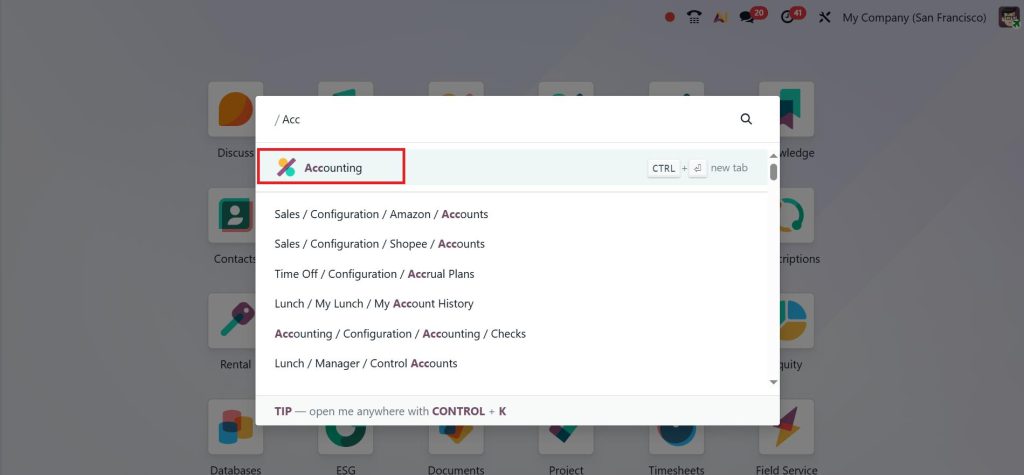
Let’s now go step by step on how to set up cash discounts in Odoo 19. First, open the Accounting app.
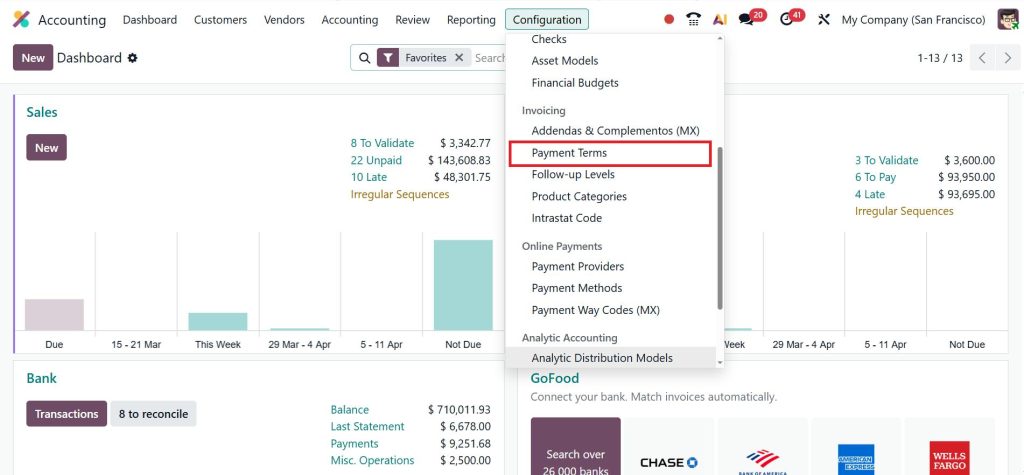
Go to Configuration > Payment Terms.
Click New and create a new one.
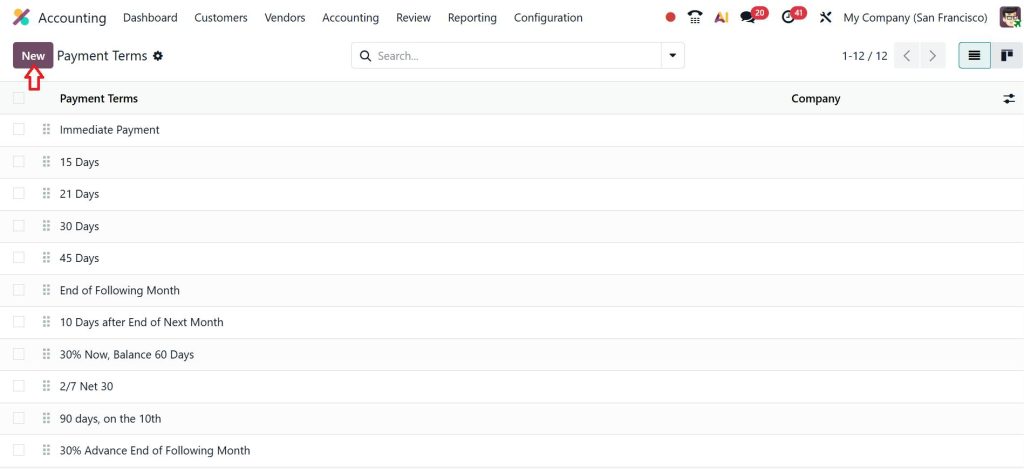
Give it a name that is easy to understand, like “2/7 Net 30 OR 2% in 7 Days Net 30”. Now add two lines. In the first line, define the discount percentage and the number of days. In the second line, define the full payment due date.
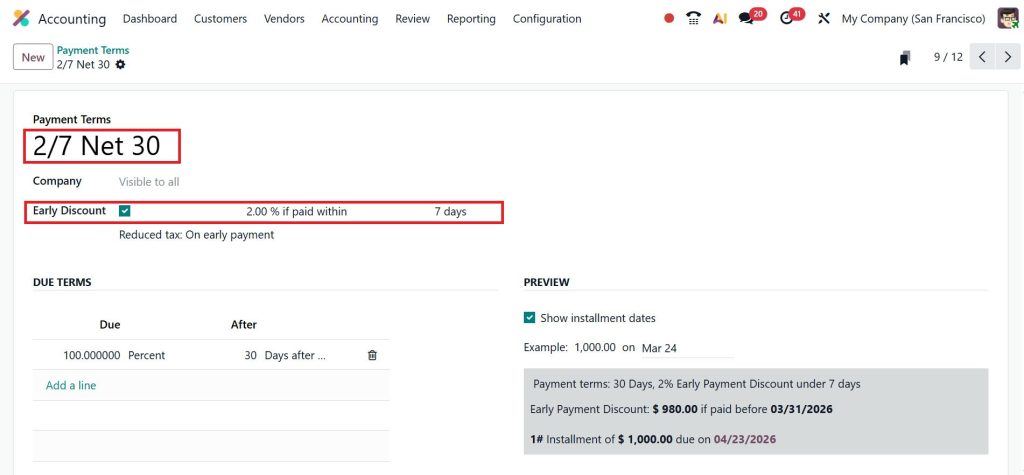
This is the core setup of Odoo 19 payment terms with cash discount. Take your time here. If this part is correct, everything else becomes easy.
Configure Discount Gain Loss Accounts Odoo – The Step Most People Skip
Now, I want you to focus carefully here, because this is where most people make mistakes. When a discount is applied, Odoo needs to know where to record that difference. That’s why you need to configure discount gain loss accounts in Odoo.
Go to your Chart of Accounts and create two accounts:
- One for cash discount loss
- One for cash discount gain
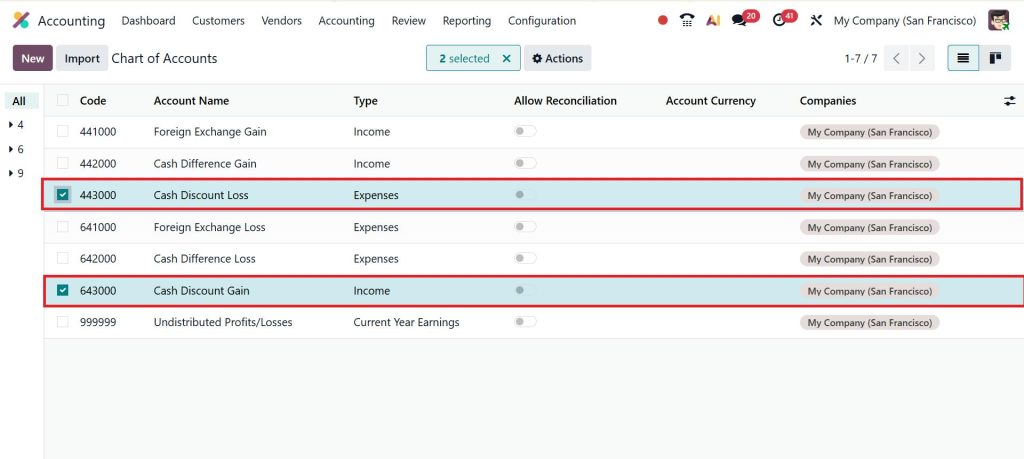
After that, go back to settings and link these accounts.
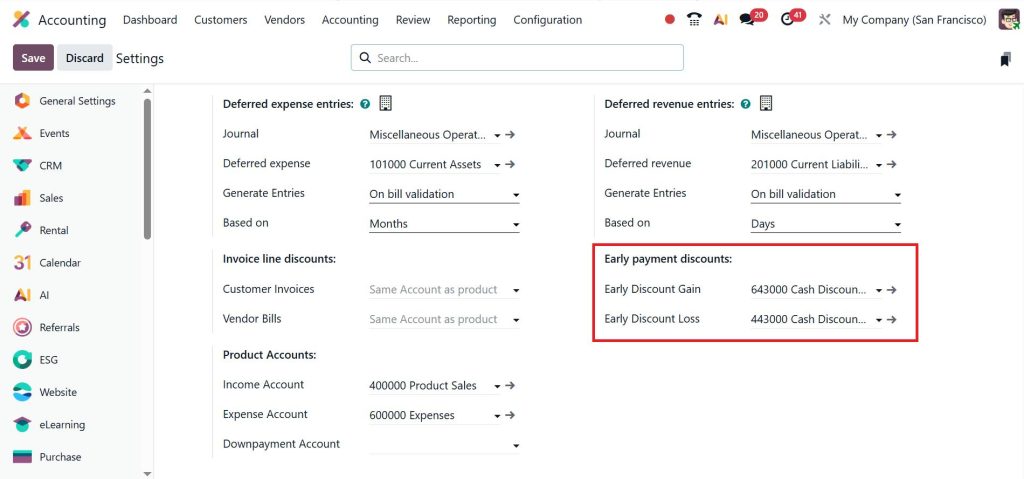
This step connects your discount with proper accounting. Without this, your reports will not show correct values. So, if you really want to understand how to set up cash discounts in Odoo 19, don’t skip this part.
Odoo 19 Customer Early Payment Discount – How It Works When You Create Invoices
Now let’s see what happens when you actually create an invoice. You select your customer and apply the payment term you created. Your Odoo 19 customer’s early payment discount is now active.
When the invoice is sent, the customer sees:
- Pay early → get a discount
- Pay later → full amount
This is how Odoo 19’s cash discount on invoices works from the customer side.
Early Payment Discount Gain Loss Odoo 19 – What Happens When Payment is Received
Let’s say your invoice is 1000, and the discount is 2%. If a customer pays early, they pay 980.
Odoo will:
- Record 980 as payment
- Record 20 as a discount loss
This is exactly how the early payment discount gain loss in Odoo 19 works. And if the customer pays late, then no discount is applied, and the full amount is recorded. So, you don’t have to calculate anything manually. Everything is handled automatically once your setup is correct.
Odoo 19 Cash Discount on Invoices – What You Should Always Check Before Sending
Before sending any invoice, always check:
- Is the correct payment term selected?
- Are discount days and percentages correct?
Because once an invoice is sent, changing things can create confusion. So, while working with Odoo 19 cash discount on invoices, just take a few seconds to review everything. It saves you from future problems.
How to Setup Cash Discounts in Odoo 19 in a Way That Avoids Common Mistakes
Let me share a few things that can save you time. Sometimes people create payment terms but forget to link gain/loss accounts. Then they wonder why accounting entries look wrong.
Sometimes, discount days are not set properly, and customers don’t get the benefit even when they pay early. And sometimes teams don’t even know how discounts work, so they avoid using them.
If you really understand how to set up cash discounts in Odoo 19, these small issues won’t bother you.
Odoo 19 Payment Terms with Cash Discount – A Simple Example You Can Relate To
You send an invoice of 5000 with a 3% discount if paid within 7 days.
Customer pays early → pays 4850
Odoo records 150 as a discount
Everything is handled automatically because your Odoo 19 payment terms with cash discount are already set.
Now You Know Exactly How to Setup Cash Discounts in Odoo 19 – Take the Next Step
So now, if you were feeling confused before, things should be much clearer. You’ve seen how to set up cash discounts in Odoo 19, and how it actually works step by step. From creating Odoo 19 payment terms with cash discount to handling early payment discount gain or loss in Odoo 19, everything becomes easy once the setup is done the right way.
You also understand how Odoo 19 sets up cash discounts in accounting, connects with real transactions, how Odoo 19 customer early payment discount works on invoices, and why it’s important to properly configure discount gain loss accounts in Odoo.
Now it’s your turn to apply this in your system. If you want to try it yourself, start with a simple payment term and test it on one invoice. That’s the easiest way to build confidence. And if you don’t want to take any risk or waste time fixing mistakes later, we are here to help you.
At Netilligence, we help you set up Odoo in a way that fits your daily work. We make sure your accounting, discounts, and reports are working correctly from day one.
Reach out to us today, and let’s get your cash discount set up properly.




