


Multi-Warehouse Manufacturing in Odoo 19 Explained
Multi-Warehouse Manufacturing is no longer just a feature; it’s the hidden engine behind fast-growing, highly efficient businesses. But here’s the real question: Are you truly using its full power, or just scratching the surface?
In today’s competitive market, managing production from a single location is rarely enough. Businesses are expanding, operations are spreading, and customer expectations are rising. This is where multi-warehouse manufacturing in Odoo 19 completely changes the game. It doesn’t just connect your warehouses, it transforms how your entire production system thinks, moves, and performs.
Imagine this: a customer places an order, and instead of delays, confusion, or stock issues, your system instantly decides where to manufacture, which warehouse has the materials, and how to deliver faster, all automatically. Sounds powerful, right? That’s exactly how multi-warehouse manufacturing works in Odoo 19, smart, fast, and incredibly efficient.
But here’s what most businesses don’t realize…
Without properly understanding Odoo 19 multi warehouse manufacturing, you could be:
- Losing time in manual coordination
- Facing unnecessary stock shortages
- Delaying production due to poor routing
- Missing out on automation that saves hours daily
On the other hand, businesses that master Odoo 19 manufacturing workflow and optimize Odoo 19 multi warehouse inventory are operating at a completely different level. They’re faster, smarter, and more profitable.
So what’s really happening behind the scenes?
How does Odoo decide when to trigger internal transfers between warehouses in Odoo 19?
How does it manage Odoo 19 production order in multiple warehouses without confusion?
And how do Odoo 19 warehouse routing rules and the Odoo 19 MTO manufacturing route silently automate everything?
This is exactly what we’re about to uncover.
In this guide, you won’t just learn the basics, you’ll discover how multi warehouse manufacturing in Odoo 19 works step-by-step, how it connects manufacturing and stock transfer impeccably, and how you can use it to scale your business faster than ever before.
Keep reading… because what you’re about to learn can completely transform how your manufacturing operations run.
What is Multi-Warehouse Manufacturing in Odoo 19?
Multi-Warehouse Manufacturing refers to managing production processes across multiple warehouse locations within a single system.
In Odoo 19, this means:
- Each warehouse can have its own inventory
- Manufacturing orders can be processed in different locations
- Raw materials and finished goods can move between warehouses
This setup is ideal for:
- Businesses with multiple production units
- Companies with regional warehouses
- Enterprises managing large-scale inventory
With Odoo 19 multi warehouse manufacturing, you get centralized control while maintaining decentralized operations.
How Multi-Warehouse Manufacturing Works in Odoo 19
Understanding how multi warehouse manufacturing works in Odoo 19 involves several key components working together.
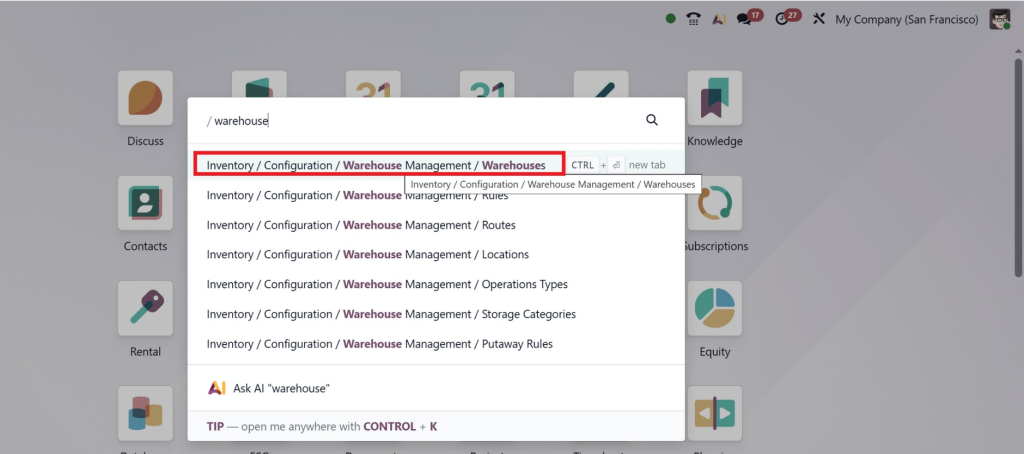
1. Warehouse Setup
First, you create multiple warehouses in Odoo:
- Main Warehouse (Production)
- Secondary Warehouse (Storage)
- Distribution Centers
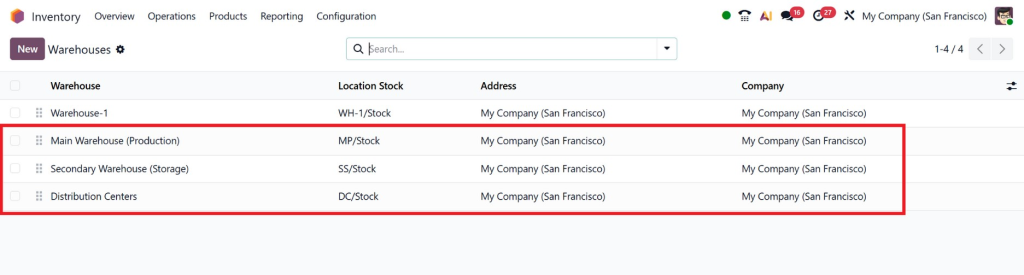
Each warehouse can have:
- Separate stock locations
- Different routes
- Unique operation types
2. Routing Rules and Configuration
Odoo 19 warehouse routing rules define how products move between warehouses.
Common routes include:
- Buy → Store → Manufacture → Deliver
- Manufacture in Warehouse A, Store in Warehouse B
- Replenish from another warehouse
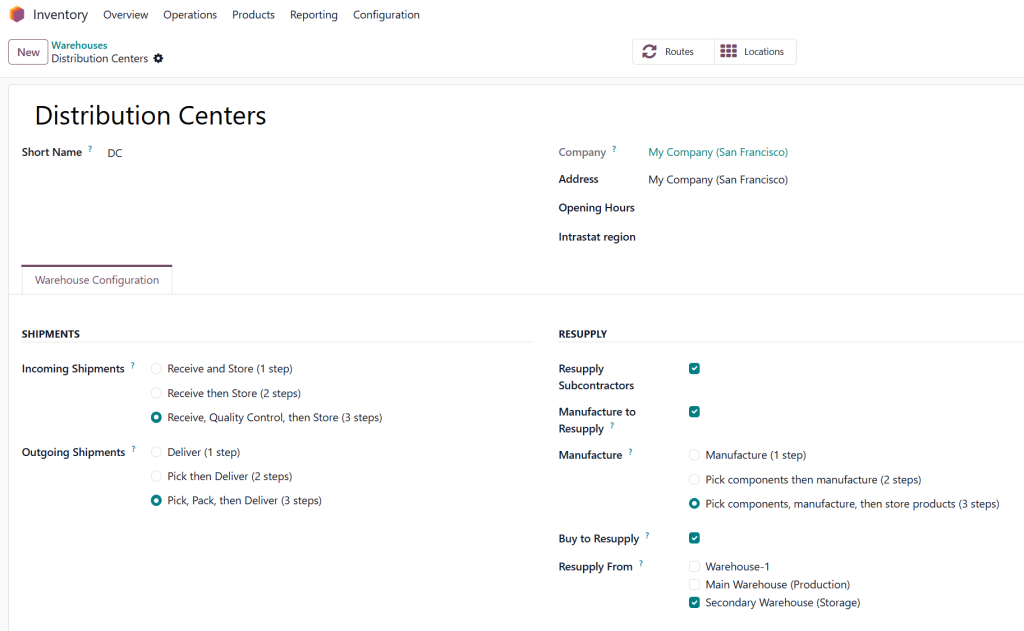
These rules automate Odoo 19 manufacturing and stock transfer without manual intervention.
3. Bill of Materials (BoM)
BoM defines:
- Raw materials required
- Production steps
- Warehouse-specific sourcing
In a multi-warehouse setup:
- Raw materials can be sourced from different warehouses
- Finished goods can be stored in another location
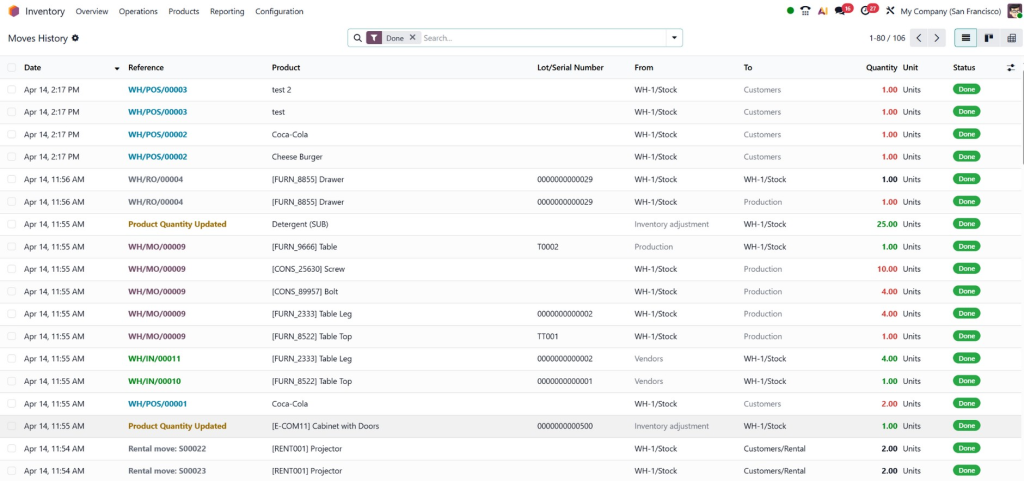
4. Manufacturing Orders (MO)
Odoo 19 production order in multiple warehouses allows:
- Creating manufacturing orders in one warehouse
- Pulling materials from another warehouse
- Delivering finished goods elsewhere
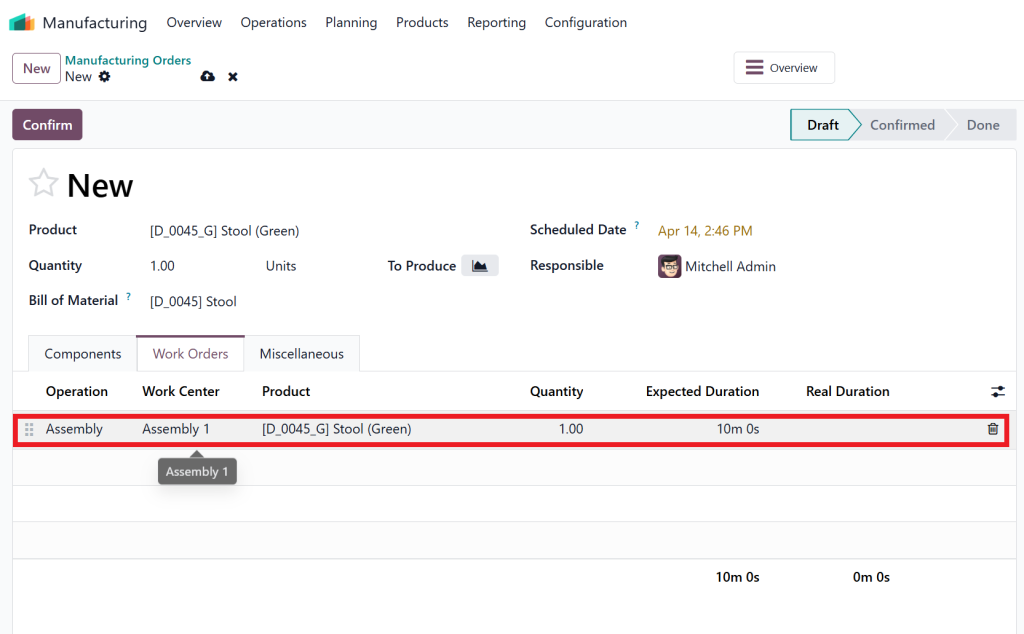
This ensures flexibility and efficiency.
5. Internal Transfers Between Warehouses
Odoo 19 internal transfers between warehouses are automatically triggered when:
- Stock is insufficient in one warehouse
- Materials are needed for production
- Products must be relocated
This avoids stock shortages and delays.
Odoo 19 Manufacturing Workflow Across Multiple Warehouses
The Odoo 19 manufacturing workflow becomes more powerful with multiple warehouses.
Typical Workflow:
- Sales Order is created
- System checks inventory across warehouses
- If stock is unavailable → triggers manufacturing
- Raw materials are fetched via internal transfers
- Manufacturing order is processed
- Finished goods are stored or delivered
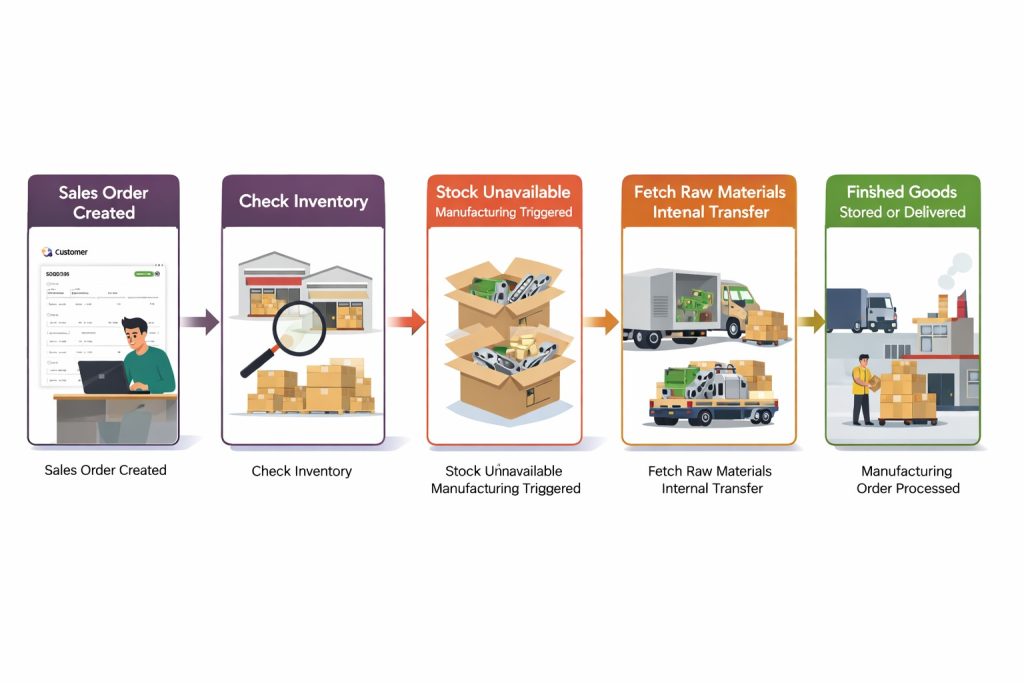
This integrated workflow ensures:
- Real-time tracking
- Better planning
- Reduced production downtime
Role of MTO Route in Multi-Warehouse Manufacturing
One of the most important features is the Odoo 19 MTO manufacturing route (Make-To-Order).
What is MTO?
MTO means:
- Products are manufactured only when there is demand
- No unnecessary stock buildup
How it Works in Multi-Warehouse Setup:
- A sales order triggers manufacturing
- Odoo checks warehouse availability
- If materials are in another warehouse → internal transfer
- Production starts in the selected warehouse
This ensures:
- Zero overstock
- Optimized inventory
- Faster response to demand
Managing Inventory in Multiple Warehouses
Odoo 19 multi warehouse inventory gives you full control over stock levels.
Key Features:
- Real-time inventory tracking
- Stock visibility across warehouses
- Automatic replenishment
- Forecasting demand
Benefits:
- Avoid stockouts
- Reduce excess inventory
- Improve warehouse coordination
You can also:
- Track batch numbers
- Manage serial numbers
- Monitor stock movements
Benefits of Multi-Warehouse Manufacturing in Odoo 19
Using multi warehouse manufacturing in Odoo 19 provides multiple advantages:
1. Increased Efficiency
Automated workflows reduce manual work and errors.
2. Better Resource Utilization
Use materials and production capacity across all warehouses.
3. Faster Production
Raw materials are sourced quickly through internal transfers.
4. Improved Customer Satisfaction
Faster deliveries and accurate order fulfillment.
5. Scalability
Easily expand operations to new locations.
Real-Life Example of Multi-Warehouse Manufacturing
Imagine a company with:
- Warehouse A (Raw Materials)
- Warehouse B (Production Unit)
- Warehouse C (Distribution)
Process:
- Customer places an order
- Odoo checks Warehouse C (no stock)
- Triggers manufacturing in Warehouse B
- Raw materials fetched from Warehouse A
- Production completed in Warehouse B
- Finished goods sent to Warehouse C
- Delivered to customer
This entire flow is automated using Odoo 19 multi warehouse manufacturing.
Best Practices for Multi-Warehouse Manufacturing in Odoo 19
To get the best results:
1. Define Clear Routing Rules
Ensure proper Odoo 19 warehouse routing rules are set.
2. Optimize Warehouse Locations
Avoid unnecessary transfers by planning warehouse roles.
3. Use Automation
Leverage automated workflows for efficiency.
4. Monitor Inventory Regularly
Track stock levels across all warehouses.
5. Train Your Team
Ensure your staff understands the system.
Why Choose Netilligence for Odoo 19 Implementation?
Implementing multi warehouse manufacturing in Odoo 19 can be complex without expert guidance.
At Netilligence, we help you:
- Configure multi-warehouse setups
- Optimize manufacturing workflows
- Customize routing and automation
- Ensure smooth integration
Our experts ensure your business runs efficiently with Odoo 19 multi warehouse manufacturing.
The Future of Manufacturing is Multi-Warehouse
Multi-Warehouse Manufacturing in Odoo 19 is a powerful solution for businesses looking to scale operations and improve efficiency. From Odoo 19 internal transfers between warehouses to Odoo 19 manufacturing and stock transfer, every process is streamlined and automated.
By understanding how multi warehouse manufacturing works in Odoo 19, businesses can:
- Reduce operational costs
- Improve production speed
- Enhance inventory control
If you want to take your manufacturing operations to the next level, implementing multi warehouse manufacturing in Odoo 19 is the right step forward.




