

Why Manage Group Access Rights in Odoo Matters
Managing Group Access Rights in Odoo is one of the most important steps for keeping your business data safe, your team productive, and your operations organized. When companies start using Odoo, many users get quick access, so work can move fast. But without a clear plan for Odoo group access rights, things can become messy very quickly. Some users may see records they should not see. Others may edit, delete, or approve items they should never touch. That is why businesses need to manage user permissions in Odoo 19 in a structured way from day one.
A smart setup of Odoo 19 user roles and groups helps you control who can view, create, edit, or delete data. It also helps answer a very common question: how to set access rights in Odoo without making the system too open or too hard to use. On top of that, understanding Odoo record rules and access rights gives you even deeper control over what users can do with specific records. This becomes even more useful when you want to manage permissions by groups in Odoo 19 instead of assigning rights one by one. A strong Odoo security group configuration saves time, reduces mistakes, and keeps your ERP secure as your team grows.
If you want your Odoo system to run smoothly, securely, and professionally, learning how to Manage Group Access Rights in Odoo is not optional anymore. It is a core part of building a reliable business system.
What Does It Mean to Manage Group Access Rights in Odoo?
Before configuring permissions, it is important to understand the security architecture used in Odoo.
The security system in Odoo mainly consists of three major components:
1. User Roles
Users represent individuals who access the system.
2. Groups
Groups define roles and determine access permissions.
3. Access Rights and Record Rules
These control what users can do and which records they can access.
When businesses manage user permissions in Odoo 19, they mainly work with groups. Instead of assigning permissions individually to each user, administrators assign users to groups. This makes system administration much easier.
For example:
Department | Odoo Group |
Sales | Sales User |
HR | HR Manager |
Accounting | Accountant |
Inventory | Inventory Manager |
Each group has predefined permissions for modules and records.
This approach allows businesses to manage permissions by groups rather than individually managing every user.
What Are Odoo Group Access Rights?
Odoo group access rights determine what actions users can perform within the system.
These rights generally include:
- Read Access – Users can view records
- Write Access – Users can modify records
- Create Access – Users can create new records
- Delete Access – Users can remove records
For example:
Permission | Meaning |
Read | View data |
Write | Edit existing data |
Create | Add new data |
Delete | Remove data |
If a user belongs to a group with only Read Access, they can see the information but cannot modify it.
This level of control helps organizations maintain security and accountability.
How to Set Access Rights in Odoo Step by Step
If you are wondering how to set access rights in Odoo, Odoo provides a clear interface for it. According to the official Odoo 19 user documentation, administrators can go to the user form, open the Access Rights tab, and set permission levels for each installed application. The options vary by app, but common levels include none, own documents, all documents, and administrator. Only an administrator can change access rights, and Odoo warns that poor changes can seriously affect the database.
Step 1: Review the user type
Odoo 19 works with different user types such as Internal User, Portal, and Public. Portal users are more restricted and usually do not follow the normal internal group structure. This is important because many companies accidentally confuse portal access with internal access.
First, enable developer mode.
Settings → Activate Developer Mode
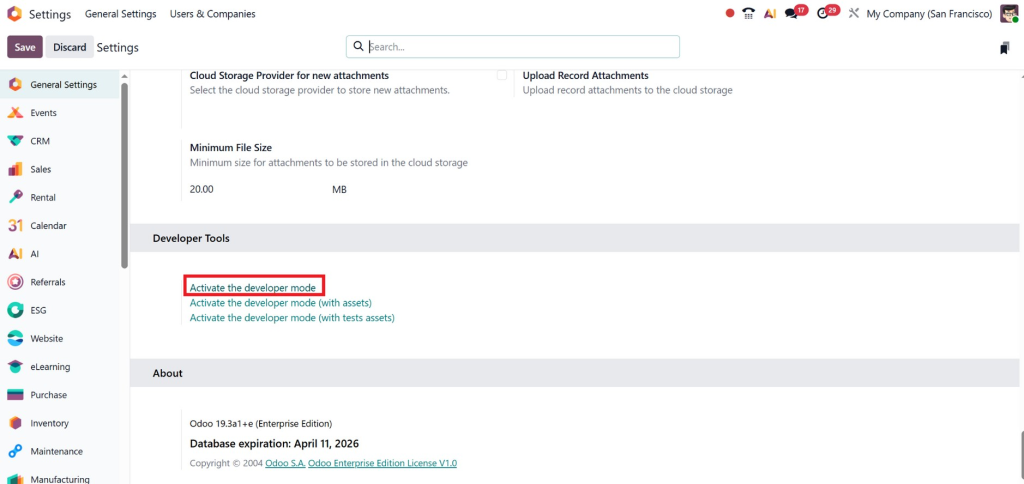
Developer mode allows you to configure advanced security settings.
Step 2: Open the Access Rights tab
Go to:
Settings → Manage Users → Select User → Access Rights
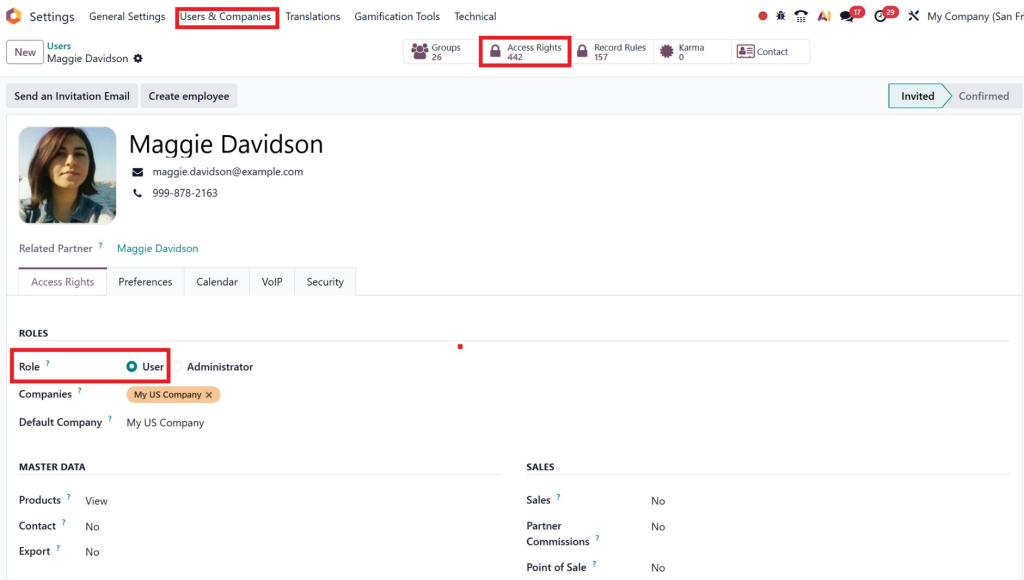
From there, choose the right permission level for each app. This is the fastest way to control standard app access like Sales, Inventory, Accounting, or Project.
Step 3: Use groups instead of random manual control
The best long-term method is not to configure every user from scratch. Instead, create logical groups and assign people to those groups. This is the heart of Odoo 19 manage permissions by groups. It gives your business consistency and makes onboarding much faster.
Go to:
Settings → Users & Companies → Groups
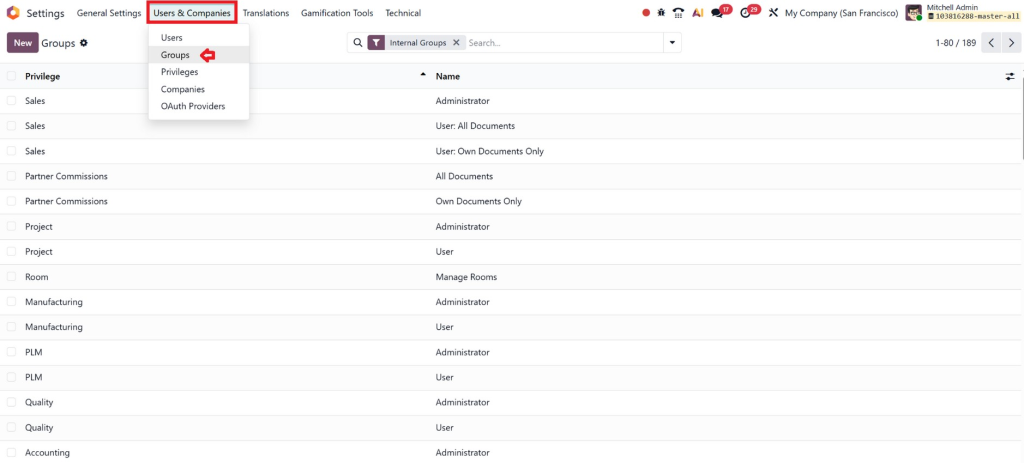
Here you will see all available Odoo 19 user roles and groups.
Step 4: Add record rules where needed
If users need limited visibility, such as seeing only their own leads, branch data, or company records, you should use record rules. Odoo’s security model clearly separates model-level access rights from record-level restrictions.
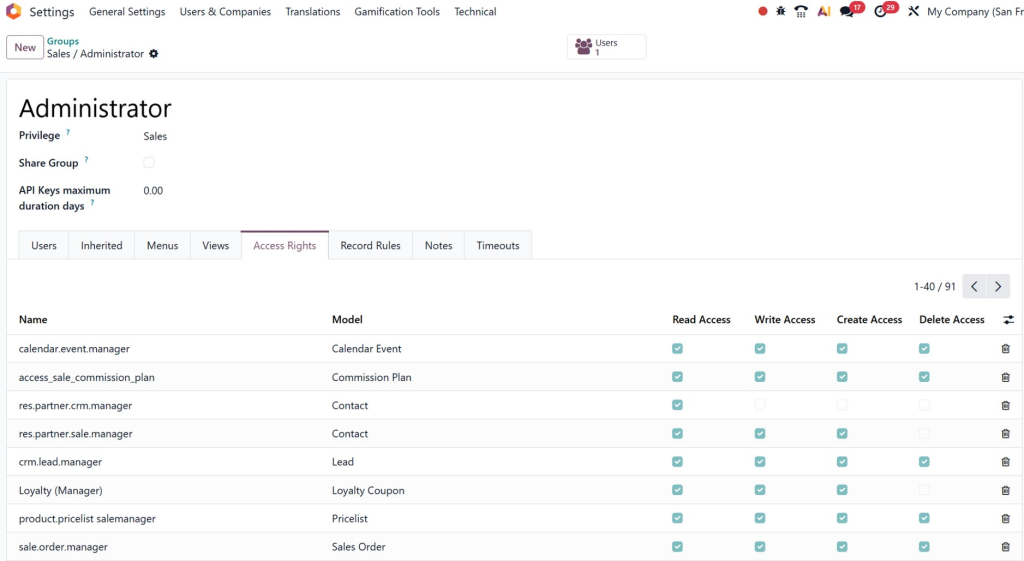
You can either:
- Modify an existing group
- Create a new group
For example:
Sales Manager
HR Officer
Inventory Supervisor
Each group can be customized according to business needs.
Step 5: Assign Access Rights
Once inside the group settings, define module permissions such as:
- CRM
- Accounting
- Inventory
- Sales
- HR
For example:
Sales User Group
Module | Access |
CRM | Read, Write |
Sales | Full Access |
Accounting | No Access |
This ensures employees only access the modules they require.
Step 6: Assign Users to Groups
After creating groups, assign users.
Go to:
Settings → Users

Select the user and assign the appropriate group.
This automatically applies the permissions defined in the group.
Step 7: Test before going live
This step is often skipped. But it matters a lot. Log in as a test user and verify what they can really see and do. Odoo even notes that menus connected to models without access may disappear for users, which is a helpful way to validate your setup.
Odoo 19 User Roles and Groups: A Practical Business Setup
A clean permission structure should match the way your business actually works. That is where Odoo 19 user roles and groups become valuable. Instead of assigning rights by person, build a role-based structure.
Common internal groups businesses use
Sales Team
Sales users usually need access to leads, quotations, customers, and sales orders. Some can create and edit. Managers may need approval and reporting access.
Accounts Team
This group may need invoice access, payment registration, journal visibility, and reporting features. They usually should not touch warehouse or HR records.
Inventory Team
Warehouse users need stock moves, receipts, deliveries, and inventory adjustments, but they may not need pricing or payroll access.
HR Team
HR staff need employee data and attendance tools, while only selected users should access payroll or sensitive employee files.
Management
Managers often require cross-app visibility, approvals, and reports. But even they should not always receive full administrator control.
This is exactly why Odoo security groups configuration should be designed around duties, not just job titles. A “manager” in sales is different from a “manager” in finance. When groups are mapped to real responsibilities, the system becomes easier to use and far safer.
Odoo’s developer documentation also explains that an empty access control group can apply rights to everyone, including portal or public users, depending on context. That is why group design must be done carefully. A small mistake can open access much wider than intended.
Odoo Record Rules and Access Rights: The Difference You Must Understand
Many Odoo users know about roles and app permissions, but fewer understand Odoo record rules and access rights. This is where advanced security becomes truly powerful.
Access rights are broad. They decide whether someone can read, create, write, or delete records in a model. Record rules are more precise. They decide which specific records a user can work with. Odoo describes record rules as conditions checked record by record after access rights are evaluated. Odoo also notes that if access rights allow the action and no record rule applies, access is granted by default.
Real example 1: Salesperson visibility
You may want all salespeople to access the CRM module, but only see their own leads. In that case:
- Access rights allow CRM usage
- The record rules filter leads to only the assigned salesperson
Real example 2: Multi-company protection
In multi-company setups, users should not see data from companies they are not allowed to work in. Odoo’s multi-company guidance explains that security rules often use company_ids to keep access limited to the companies selected for the current user. The user form also includes Allowed Companies and Default Company fields.
Real example 3: Protecting sensitive models
You may want a group to read a document type, but never delete it. Odoo’s access rights model supports separate read, create, write, and delete permissions, so you can allow operational work without giving destructive power.
This is why companies that want serious control over data must go beyond basic roles. To truly Manage Group Access Rights in Odoo, you need both layers working together.
Best Practices to Manage User Permissions in Odoo 19 Without Risk
To manage user permissions in Odoo 19 the right way, you need a strategy, not just settings. Below are the best practices that experienced Odoo consultants follow.
1. Start with the least access needed
Do not give broad permissions first and reduce them later. Start small. Give only what a person needs to do their job. This lowers risk and makes audits easier.
2. Build roles around real tasks
Your groups should reflect real business functions such as Sales User, Sales Manager, Inventory Operator, Accounts Executive, or HR Admin. Avoid vague groups that mix unrelated permissions.
3. Do not overuse administrator access
Odoo clearly states that only administrators can change access rights and warns that bad changes can cause serious issues, including situations where no one can properly manage rights. Admin access should stay limited to trusted people only.
4. Use groups for scale
If your company is growing, one-by-one permission control becomes a nightmare. Odoo 19 manages permissions by groups, which is the smarter path because it keeps access structured and repeatable.
5. Add record rules for precision
Groups alone are not enough for branch-based access, salesperson ownership, or multi-company separation. Add record rules where the business needs narrower control.
6. Review menus and hidden access
Odoo notes that menus may not display if the user lacks access to the underlying model and has no visible submenu. This is useful for both security and a cleaner user experience.
7. Audit user access regularly
As teams grow, roles change. A person who moved from sales to operations may still have old access. Regular audits prevent security gaps and reduce confusion.
8. Be careful with the portal and public exposure
Odoo distinguishes internal, portal, and public users. If you misconfigure global rights, external access can become riskier than expected.
These best practices are not just technical tips. They directly affect productivity, compliance, privacy, and trust.
Common Mistakes Businesses Make With Odoo Group Access Rights
Even smart teams make mistakes with Odoo group access rights. Here are the most common ones:
Giving multiple overlapping groups without review
Because access rights are additive, one extra group can silently expand what a user can do.
Relying only on app-level permissions
App access alone does not control data visibility deeply enough. Record rules are often needed.
Creating too many custom groups too early
Over-customization makes the system hard to maintain. Start with a clean structure first.
Ignoring multi-company rules
If your business has more than one company, failing to control company access can expose the wrong records.
Forgetting testing
Many permission issues are discovered only after a user reports them. Always test with sample users before rollout.
Treating security as a one-time task
Odoo permissions need review as your apps, departments, and workflows expand.
If any of these sound familiar, it may be time to get expert help.
Why Netilligence Is the Smart Choice for Odoo Permission Setup
A strong Odoo setup is not just about features. It is about confidence. Your team should know what they can access. Your managers should trust the data. Your leadership should feel secure that sensitive information is protected.
That is where Netilligence can make a real difference.
When businesses try to Manage Group Access Rights in Odoo alone, they often lose time, create confusing roles, or open access too widely. Netilligence helps you avoid that. Instead of guesswork, you get a clean access structure built around your real workflow. Instead of generic groups, you get practical permissions that match your departments, approval flows, and reporting needs.
Our team can help you with:
Odoo security groups configuration
We build logical, scalable group structures that are easy to manage.
Role-based permission planning
We map user roles to actual business functions.
Record rule setup
We help limit access at the record level where needed.
Multi-company permission control
We reduce cross-company visibility risks.
Ongoing audits and optimization
We keep your Odoo environment secure as your business grows.
The result is simple: fewer errors, stronger security, faster onboarding, and a smoother user experience. That is what businesses want from Odoo, and that is what Netilligence helps deliver.
Final Thoughts on How to Manage Group Access Rights in Odoo
To manage group access rights in Odoo, you need more than basic permissions. A good understanding of roles, group permissions, record rules, and regular audits. Odoo 19 comes with an excellent security framework, but it is only powerful if implemented correctly. Odoo itself also agrees when it comes to user access rights. These are controlled via groups, access rights, record rules, and company security rules. Therefore, planning is needed.
Is your business looking for a robust, scalable, and manageable environment for Odoo? Now is a great time to act. Proper permission structure secures your data, streamlines teamwork and avoids costly problems further down the road.
IT can be complicated. And if you want the setup done with certainty and clarity, we can help.




