

Introduction to Cycle Counts in Odoo
Cycle counts in Odoo are one of the most important processes for businesses that want accurate stock records, better warehouse control, and fewer inventory mistakes. Whether you manage a retail store, manufacturing company, wholesale warehouse, or distribution business, maintaining accurate inventory is critical for smooth operations.
In many companies, stock quantities inside the system do not always match the physical products available in the warehouse. This happens because of damaged products, manual errors, theft, supplier mistakes, incorrect transfers, or delayed stock updates. This is where inventory adjustments in Odoo become essential.
Using cycle counts in Odoo, businesses can regularly verify inventory without shutting down warehouse operations. Instead of counting the entire warehouse once or twice a year, employees count smaller groups of products on scheduled dates. This improves inventory accuracy in Odoo while reducing operational disruption.
The Odoo inventory adjustments feature helps businesses quickly update incorrect stock quantities after a physical count. Companies can perform inventory count in Odoo, compare counted quantities with system quantities, and apply corrections instantly.
Modern businesses need efficient tools for Odoo physical inventory, stock validation, and warehouse management. With stock adjustment Odoo features, companies can reduce inventory losses, improve order fulfillment, and maintain better customer satisfaction.
Another major advantage of cycle counts in Odoo is automation. Businesses can schedule recurring counts, assign inventory tasks to employees, and monitor discrepancies directly from the Odoo Inventory module. This makes Odoo inventory management more efficient and reliable.
If your business struggles with stock mismatches, warehouse confusion, or inaccurate inventory reports, then learning how to manage cycle counts in Odoo can significantly improve your operations.
In this blog, we will explore everything about inventory adjustments in Odoo, including cycle counting methods, physical inventory management, stock corrections, and best practices for improving inventory control.
Understanding Inventory Adjustments in Odoo
Inventory adjustments are used to correct stock quantities inside the system whenever the actual warehouse stock differs from the recorded quantity.
For example:
- The system shows 100 units
- Physical stock shows only 95 units
- A stock adjustment is needed to correct the difference
These corrections are known as inventory adjustments in Odoo.
Businesses usually perform inventory adjustments because of:
- Damaged products
- Missing stock
- Warehouse mistakes
- Supplier quantity errors
- Manual entry problems
- Incorrect stock transfers
- Expired inventory
- Theft or loss
The Odoo inventory management system allows businesses to identify these differences quickly and apply corrections easily.
Why Inventory Accuracy Matters
Poor inventory accuracy creates serious business problems, such as:
- Delayed deliveries
- Wrong purchase planning
- Overstocking
- Stock shortages
- Customer dissatisfaction
- Financial reporting issues
Using regular cycle counts in Odoo helps businesses maintain accurate stock levels and avoid these operational problems.
What Are Cycle Counts in Odoo?
Cycle counts in Odoo are scheduled inventory counting activities performed regularly throughout the year instead of conducting one large annual inventory count.
Instead of counting every product at once, businesses count small sections of inventory daily, weekly, or monthly.
For example:
- Monday → Electronics
- Tuesday → Accessories
- Wednesday → Spare parts
This method improves efficiency and reduces warehouse downtime.
Benefits of Odoo Cycle Count
There are many advantages of using Odoo cycle count processes:
Better Inventory Accuracy
Frequent counts help businesses maintain accurate stock records.
Reduced Warehouse Disruption
Warehouses continue operating while smaller inventory sections are counted.
Faster Error Detection
Inventory issues are identified earlier before becoming major problems.
Improved Financial Reporting
Correct stock values improve accounting and inventory valuation.
Better Customer Satisfaction
Accurate inventory prevents order cancellations and shipping delays.
Efficient Warehouse Operations
Employees can manage inventory systematically without pressure.
How to Perform an Inventory Count in Odoo
Managing an inventory count in Odoo is simple because the system provides user-friendly tools for warehouse staff.
Follow these steps to perform inventory counting.
Step 1 – Open the Inventory Module
First, open the Inventory module from the Odoo dashboard.
Go to:
Inventory → Operations → Physical Inventory
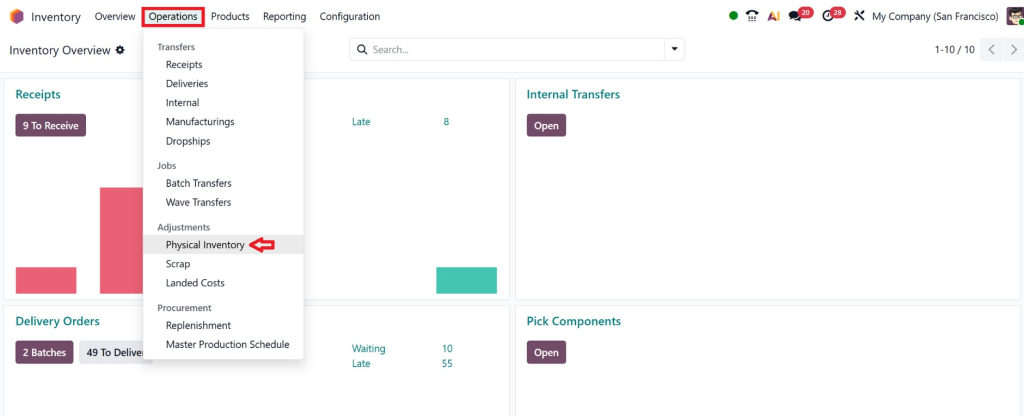
This section manages all Odoo physical inventory activities.
Step 2 – Create a New Inventory Adjustment
Click the Create button.
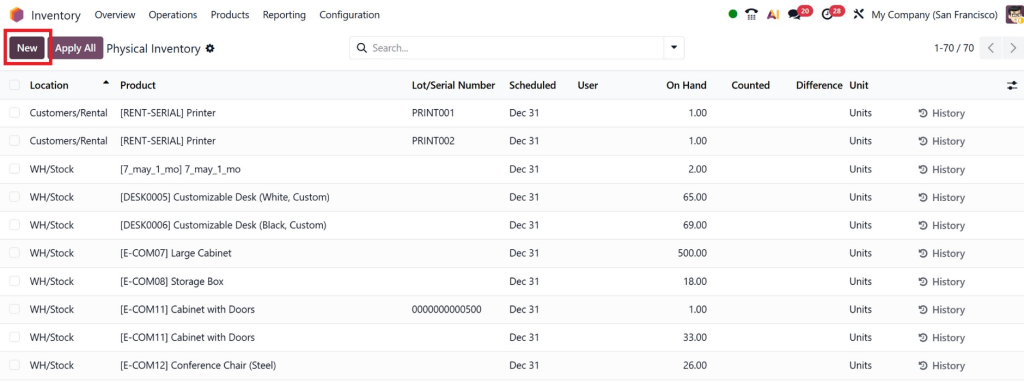
Now define:
- Product
- Warehouse location
- Scheduled date
- Assigned employe
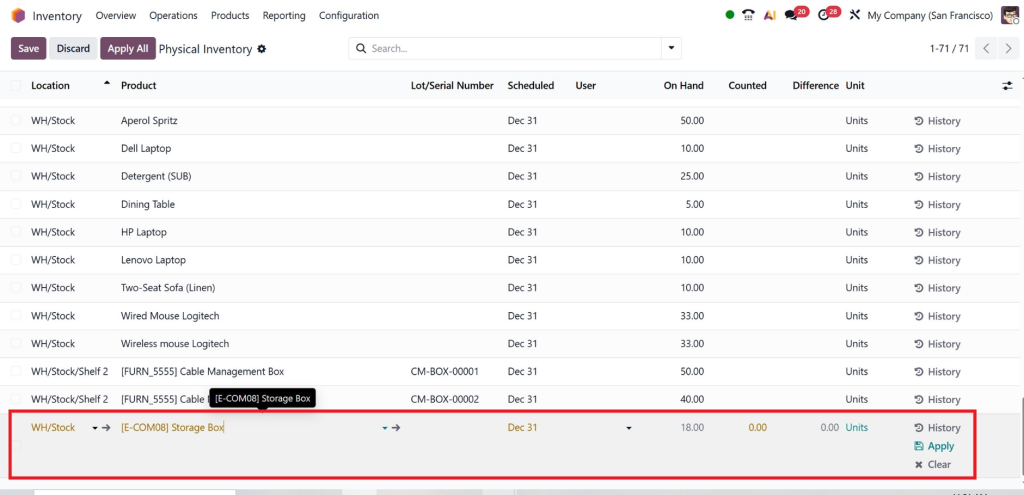
Businesses can perform counts for:
- Specific products
- Entire warehouse
- Product categories
- Storage locations
Step 3 – Enter Counted Quantity
Warehouse staff physically count products and enter the real quantity inside Odoo.
Example:
Storage boxes | 50 | 47 |
This difference indicates inventory variance.
Step 4 – Validate the Adjustment
After entering quantities, click Apply or Validate.
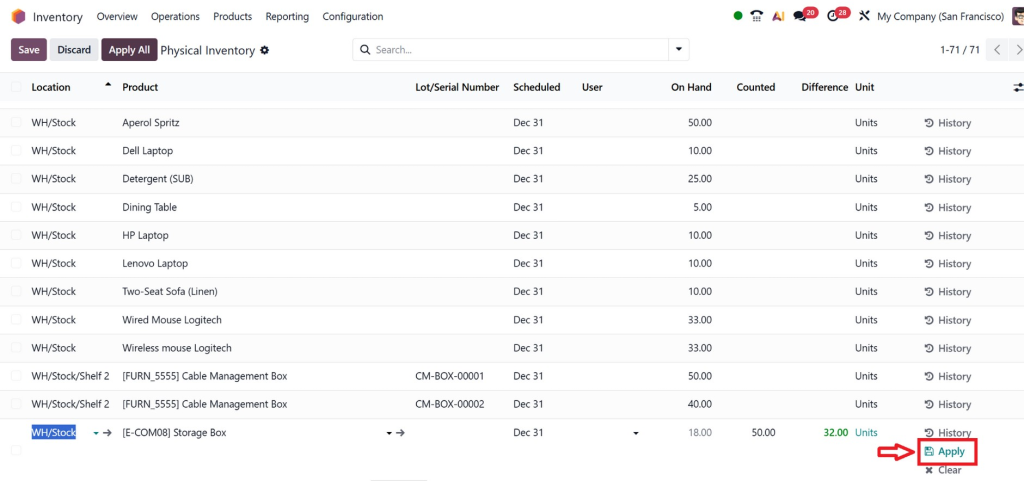
The system automatically creates the necessary stock adjustment Odoo entries.
Inventory quantities are updated instantly.
Best Practices for Managing Cycle Counts in Odoo
To get the best results from cycle counts in Odoo, businesses should follow proper inventory management strategies.
Count High-Value Products Frequently
Expensive products should be counted more often because even small mistakes can cause major financial losses.
For example:
- Electronics
- Medical equipment
- Luxury products
- Industrial machinery
Use ABC Inventory Classification
ABC analysis helps businesses prioritize inventory counts.
Category A
High-value products are counted weekly.
Category B
Medium-value products are counted monthly.
Category C
Low-value products are counted quarterly.
This strategy improves inventory accuracy in Odoo efficiently.
Assign Responsible Employees
Inventory tasks should be assigned clearly.
Odoo allows businesses to allocate counting responsibilities to warehouse staff, supervisors, or managers.
This improves accountability.
Schedule Regular Counts
Consistency is important for effective Odoo inventory management.
Businesses should schedule recurring inventory checks instead of waiting for annual audits.
Investigate Inventory Differences
Do not simply adjust quantities.
Always identify the root cause behind stock differences.
Common reasons include:
- Damaged goods
- Barcode scanning mistakes
- Unauthorized stock movement
- Data entry errors
Understanding these issues helps businesses reduce future inventory problems.
How Odoo Improves Inventory Management
The Odoo Inventory module provides powerful tools for businesses that need professional inventory control.
Real-Time Inventory Tracking
Odoo updates stock quantities instantly after:
- Sales
- Purchases
- Manufacturing
- Transfers
- Returns
This ensures better stock visibility.
Barcode Integration
Businesses can use barcode scanners during inventory count in Odoo.
This speeds up counting and reduces human errors.
Multi-Warehouse Management
Companies managing multiple warehouses can perform inventory adjustments in Odoo separately for each location.
This is especially useful for large businesses.
Automated Reporting
Odoo provides detailed inventory reports, such as:
- Stock valuation
- Inventory movement
- Product availability
- Adjustment history
- Cycle count reports
These reports improve business decision-making.
Lot & Serial Number Tracking
For industries like pharmaceuticals, electronics, and food businesses, Odoo supports lot and serial number tracking.
This improves traceability during Odoo physical inventory operations.
Common Challenges in Inventory Adjustments
Although Odoo simplifies inventory management, businesses still face several challenges.
Human Errors
Manual counting mistakes remain common during physical inventory processes.
Solutions:
- Use barcode scanners
- Train employees properly
- Double-check counts
Unrecorded Stock Movements
Sometimes, warehouse staff move products without updating the system.
This creates inventory mismatches.
Businesses should enforce strict warehouse procedures.
Poor Warehouse Organization
Disorganized warehouses make counting difficult.
Best practices include:
- Proper shelf labeling
- Organized storage locations
- Barcode tagging
- Product categorization
Lack of Regular Cycle Counts
Many companies only perform annual stock counts.
This causes large inventory differences.
Regular cycle counts in Odoo solve this problem effectively.
Advanced Features for Odoo Inventory Adjustments
Odoo also offers advanced inventory management capabilities.
Scheduled Inventory Dates
Businesses can assign scheduled count dates for products.
This automates the cycle counting process.
Inventory Adjustment History
Odoo stores complete adjustment records.
Businesses can review:
- Who made changes
- Date of adjustment
- Quantity differences
- Warehouse location
This improves transparency.
Inventory Forecasting
Odoo forecasting tools help businesses estimate future inventory requirements based on:
- Sales trends
- Purchase history
- Manufacturing demand
This reduces stock shortages.
Integration with Accounting
Every stock adjustment Odoo entry can impact inventory valuation and accounting records.
Odoo automatically synchronizes inventory with accounting for accurate financial reporting.
Why Businesses Choose Netilligence for Odoo Inventory Solutions
Managing inventory efficiently requires proper Odoo implementation and customization.
At Netilligence, we help businesses optimize their warehouse and inventory operations using advanced Odoo solutions.
Our Odoo experts assist businesses with:
- Odoo Inventory implementation
- Warehouse setup
- Cycle count configuration
- Barcode integration
- Inventory automation
- Custom inventory workflows
- Odoo customization
- Staff training
- Inventory reporting
We understand that every business has different warehouse requirements. Our team provides tailored solutions to improve inventory accuracy in Odoo and reduce operational inefficiencies.
Whether you run a retail business, manufacturing company, logistics operation, or distribution warehouse, Netilligence can help you build a more organized and efficient inventory management system.
Cycle Counts in Odoo
Accurate inventory management is essential for every business that handles stock. Without proper inventory control, companies face stock shortages, financial losses, delayed deliveries, and operational confusion.
Using cycle counts in Odoo allows businesses to maintain accurate inventory records through regular stock verification instead of disruptive annual counts.
With advanced tools for inventory adjustments in Odoo, businesses can easily identify discrepancies, apply corrections, and improve warehouse efficiency. Features like barcode scanning, automated reporting, real-time stock tracking, and multi-warehouse management make Odoo inventory management a powerful solution for modern businesses.
Regular inventory count in Odoo processes helps businesses maintain operational stability, improve customer satisfaction, and reduce inventory-related losses.
If your company needs professional support to implement or optimize Odoo Inventory, Netilligence is ready to help you transform your warehouse operations with customized Odoo solutions.




