

Prevent Accidental Database Deletion in Odoo18
Managing databases is an important part of working with Odoo 18. A database stores all the essential business information, including customer records, sales data, inventory details, accounting information, and much more. Because of this, deleting a database is considered a highly sensitive action.
In Odoo, administrators can delete databases using the database management page. Although the system asks for a master password before deletion, accidental clicks or human mistakes can still happen, especially when managing multiple databases in development, testing, or production environments.
Imagine accidentally deleting the wrong database with important business data. Recovering that information can be stressful, time-consuming, and sometimes even impossible without proper backups.
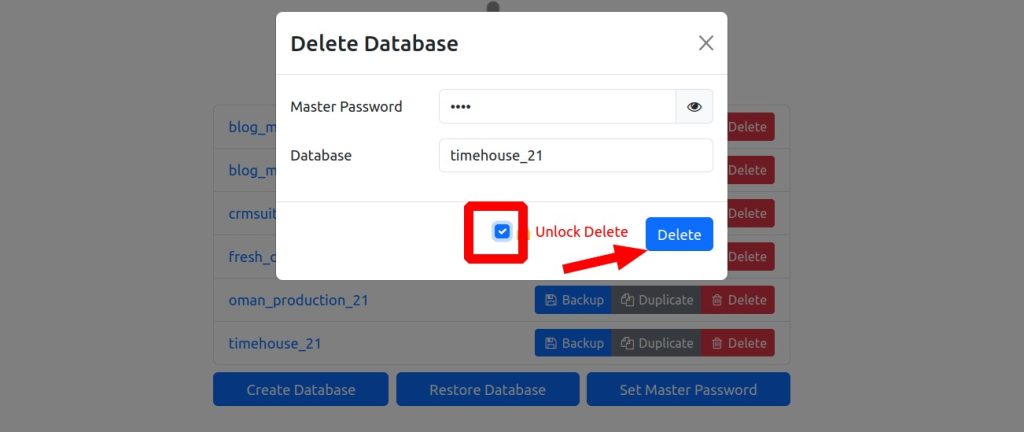
To reduce this risk, we developed a simple yet effective custom protection module for Odoo 18. This module adds extra safety steps before a database can be deleted. It introduces an unlock checkbox, disables the delete button by default, and displays a confirmation pop-up before the final action is performed.
The goal of this customization is simple: prevent accidental database deletion and improve user safety without modifying Odoo’s core system files.
In this blog, we will explain how the module works, how it is implemented, and why this small enhancement can make database management much safer in Odoo 18.
Why Database Protection Matters
Database deletion is a highly sensitive operation. In many organizations, developers and administrators frequently switch between staging, testing, and production databases. In such scenarios, even a small mistake can lead to major consequences.
Some common risks include:
- Accidentally deleting the wrong database
- Human error during testing
- Misclicks caused by repetitive administrative tasks
- Lack of visual warnings in the default interface
- Permanent loss of important business data
Although backups can help restore deleted information, recovery procedures often consume valuable time and resources. Adding preventive measures directly into the user interface is a far more practical approach.
This is where our custom database delete protection module becomes useful.
Features of the Database Delete Protection Module
The module introduces several safety-focused enhancements to the default Odoo database management interface.
Key Features
- Unlock the checkbox before deletion
- The delete button is disabled by default
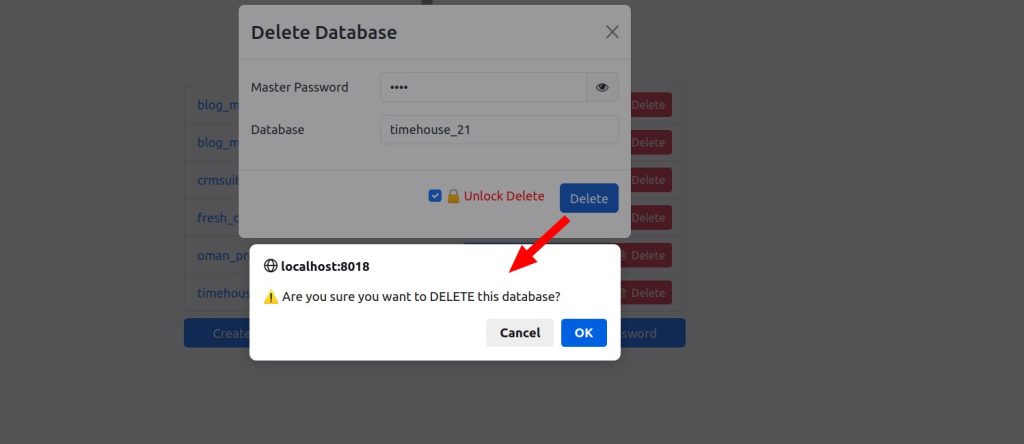
- Confirmation pop-up before final deletion
- Additional visual warning system
- Lightweight implementation
- No modification to Odoo core files
These enhancements may seem small, but together they significantly reduce the chances of accidental database deletion.
Backend Implementation in Odoo 18
To implement this feature, we extended Odoo’s default database controller and injected a custom JavaScript file into the database management pages.
The backend logic is responsible for loading the protection script only where it is needed.
Controller File
The implementation starts with a custom controller:
db_delete_protection/controllers/main.py
The controller inherits from Odoo’s existing database controller:
					from odoo import http
from odoo.addons.web.controllers.database import Database
import markupsafe


class DatabaseProtect(Database):


   def _inject_js(self, response):
       import time
       version = int(time.time())
       injection = f'<script src="/db_delete_protection/static/src/js/db_delete_lock.js?v={version}"></script>'


       # If response is a werkzeug Response object
       if hasattr(response, 'get_data') and hasattr(response, 'set_data'):
           html_content = response.get_data(as_text=True)
           if '</body>' in html_content:
               print("BODY TAG FOUND IN GET_DATA!")
               html_content = html_content.replace('</body>', f'{injection}</body>')
               response.set_data(html_content)
           else:
               print("NO BODY TAG IN GET_DATA!")
           return response


       # If response is bytes
       if isinstance(response, bytes):
           html_content = response.decode('utf-8')
           if '</body>' in html_content:
               print("BODY TAG FOUND IN BYTES!")
               html_content = html_content.replace('</body>', f'{injection}</body>')
           return html_content.encode('utf-8')


       # If response is string or Markup
       if hasattr(markupsafe, 'Markup') and isinstance(response, markupsafe.Markup):
           injection = markupsafe.Markup(injection)


       if '</body>' in response:
           print("BODY TAG FOUND IN STRING/MARKUP!")
           response = response.replace('</body>', f'{injection}</body>')
       return response


   @http.route('/web/database/manager', type='http', auth="none")
   def manager(self, **kw):
       print("MY MANAGER ROUTE EXECUTED!")
       response = super().manager(**kw)
       return self._inject_js(response)


   @http.route('/web/database/selector', type='http', auth="none")
   def selector(self, **kw):
       response = super().selector(**kw)
       return self._inject_js(response)
🔍 Explanation
✔ _inject_js() Method
This method ensures the JavaScript file is injected into the HTML response.
- Handles multiple response types:
- werkzeug response
- bytes
- string / markup
- Finds </body> and injects script before it
- Uses timestamp for cache-busting
✔ Route Override
@http.route(‘/web/database/manager’)
@http.route(‘/web/database/selector’)
- Extends Odoo’s default database UI pages
- Ensures our script loads only where needed
Frontend Protection Logic Using JavaScript
After handling the backend integration, the next step is implementing the frontend safety workflow using JavaScript.
The frontend script manages:
- Delete button behavior
- Unlock mechanism
- Confirmation alerts
- User interaction flow
The file is located at:
db_delete_protection/static/src/js/db_delete_lock.js
The script automatically detects the delete database form once the page load
					/** @odoo-module **/


function initDeleteLock() {
   const dropForm = document.getElementById("form_drop_db");
   if (!dropForm) {
       setTimeout(initDeleteLock, 500);
       return;
   }
   const deleteBtn = dropForm.querySelector('input[type="submit"][value="Delete"]');
   if (!deleteBtn) return;
   // Prevent duplicate injection
   if (document.getElementById("unlock_delete")) return;
   // 🔒 Create checkbox dynamically
   const wrapper = document.createElement("div");
   wrapper.style.marginBottom = "10px";
   wrapper.style.display = "inline-block";
   wrapper.style.marginRight = "15px";
   const checkbox = document.createElement("input");
   checkbox.type = "checkbox";
   checkbox.id = "unlock_delete";
   checkbox.className = "form-check-input";
   checkbox.style.marginRight = "5px";
   const label = document.createElement("label");
   label.htmlFor = "unlock_delete";
   label.style.color = "red";
   label.className = "form-check-label";
   label.innerText = " 🔒 Unlock Delete";
   wrapper.appendChild(checkbox);
   wrapper.appendChild(label);
   // Insert before delete button
   // Insert before delete button in the footer
   deleteBtn.parentNode.insertBefore(wrapper, deleteBtn);
   // Disable delete initially
   deleteBtn.setAttribute("disabled", "disabled");
   // Toggle enable/disable
   checkbox.addEventListener("change", () => {
       deleteBtn.toggleAttribute("disabled", !checkbox.checked);
       if (checkbox.checked) {
           deleteBtn.removeAttribute("disabled");
       } else {
           deleteBtn.setAttribute("disabled", "disabled");
       }
   });
   // Confirmation popup
   deleteBtn.addEventListener("click", (e) => {
       if (!confirm("⚠️ Are you sure you want to DELETE this database?")) {
           e.preventDefault();
           e.stopPropagation();
       }
   });
}
initDeleteLock();
Explanation
✔ Step 1: Detect Delete Form
const dropForm = document.getElementById(“form_drop_db”);
- Targets Odoo delete database form
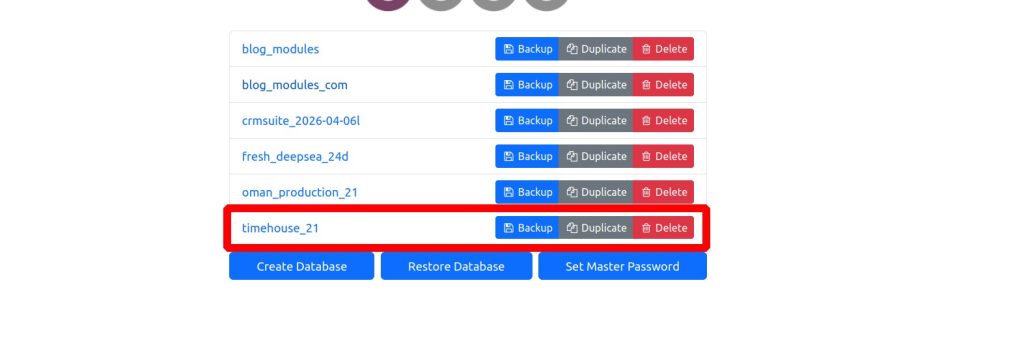
✔ Step 2: Add Unlock Checkbox
- Dynamically creates checkbox
- Adds label: “🔒 Unlock Delete”
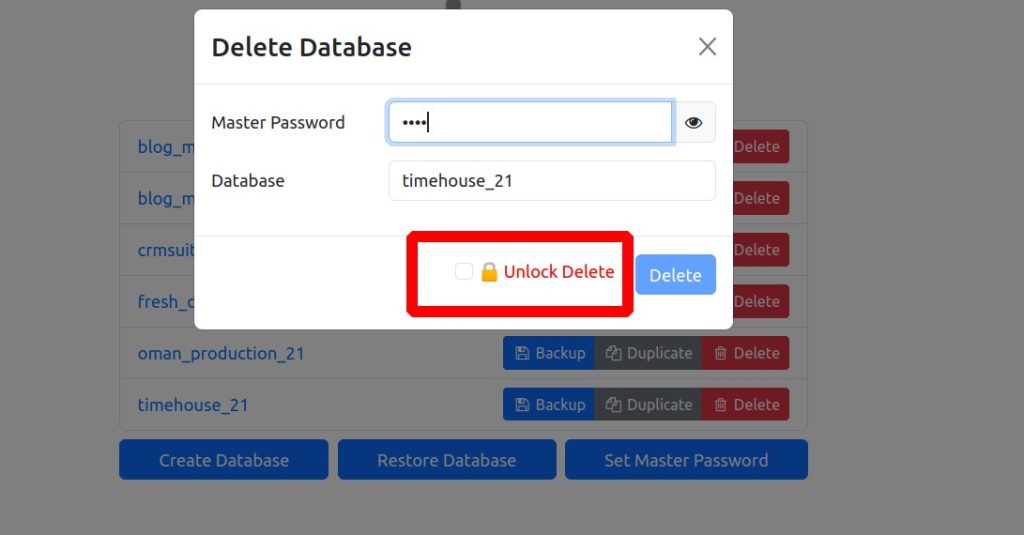
The checkbox acts as a deliberate action step. Users must consciously enable database deletion before the delete button becomes active.
This simple interaction greatly reduces accidental clicks.
✔ Step 3: Disable Delete Button
To improve safety, the delete button is initially disabled:
deleteBtn.setAttribute(“disabled”, “disabled”);
- Prevents accidental click
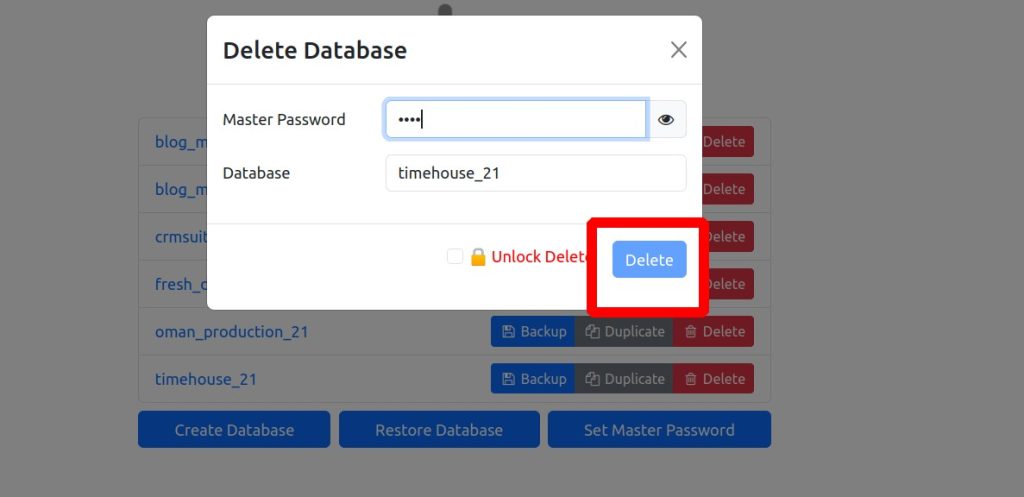
This creates a controlled workflow where users must intentionally confirm their actions.
✔ Step 4: Enable on Checkbox Click
checkbox.addEventListener(“change”, () => {
deleteBtn.toggleAttribute(“disabled”, !checkbox.checked);
});
✔ Step 5: Final Confirmation Popup
confirm(“⚠️ Are you sure you want to DELETE this database?”)
- Adds second layer of confirmation
User Experience After Implementation
Once the module is installed, users will notice several interface changes in the database management page.
What Users Will See
- A visible “Unlock Delete” checkbox
- Disabled delete button by default
- Visual warning before enabling deletion
- Confirmation popup before final execution
These interface changes encourage more careful interaction with sensitive database operations.
Instead of instantly allowing deletion, the system now guides users through a deliberate verification process.
Why This Approach Is Effective
One of the biggest strengths of this solution is its simplicity.
Rather than implementing complex backend restrictions or modifying Odoo’s internal database deletion logic, this approach focuses on improving user awareness and reducing human error.
Benefits of This Method
Improved Safety
The additional steps help prevent accidental database removal.
Clean Implementation
The solution works without modifying Odoo core files.
Easy Maintenance
Since the customization is isolated, future upgrades become easier to manage.
Better User Awareness
Visual warnings encourage users to think carefully before deleting databases.
Lightweight Customization
The module adds minimal overhead while delivering meaningful protection.
Practical Use Cases
This module can be especially useful in environments where multiple databases are managed regularly.
Examples include:
- Development environments
- Testing servers
- ERP implementation projects
- Multi-client hosting environments
- Training databases
- QA systems
In these situations, administrators often perform repetitive database operations, increasing the likelihood of accidental mistakes.
Adding even a small layer of interaction-based protection can prevent major operational issues.
A Simple Yet Valuable Odoo Customization
Many ERP improvements are not about adding large features or complex workflows. Sometimes, small usability enhancements can provide significant real-world value.
This module demonstrates how a simple frontend customization can improve operational safety inside Odoo 18.
Instead of relying entirely on backend restrictions, the customization improves the overall user experience by making sensitive actions more deliberate and visible.
It is a practical example of how thoughtful UI enhancements can reduce risks in everyday ERP administration tasks.
Prevent Accidental Database Deletion
This module demonstrates how a small UI enhancement can significantly improve safety in Odoo. By introducing a simple unlock mechanism and confirmation step, we reduce the chances of accidental database deletion without modifying the core system.
The approach is lightweight, easy to implement, and practical for both development and testing environments. While it does not replace backend-level security, it acts as an effective first line of defense against human error.




