

Introduction to Packages Managed in Odoo 19 Inventory
If you are running a warehouse, online store, manufacturing business, or distribution company, then you already know how stressful packaging and inventory handling can become after your business starts growing. At first, everything feels manageable. A few orders, a small stock room, and simple delivery handling seem easy.
But after some time, products start getting misplaced, shipments become confusing, and warehouse teams waste hours finding the right items. This is why many businesses are now focusing on packages managed in Odoo 19 inventory to handle daily warehouse operations properly.
The latest Odoo 19 ERP package management system helps businesses organize products inside packages, track movements, manage deliveries, and reduce inventory mistakes. Instead of depending on spreadsheets or manual tracking, companies can now manage every package directly inside Odoo.
When businesses start using Odoo 19 ERP inventory packages, they quickly notice how much time gets wasted in manual stock handling. Staff members no longer need to guess which carton contains which products. Everything becomes visible inside the system.
Many business owners also search for how to manage packages in Odoo 19 because warehouse handling is no longer just about storing products. Today, customers expect fast deliveries, accurate shipments, and proper packaging. One small mistake can create customer complaints, returns, and delivery delays.
The good thing is that Odoo 19 product packages are designed to make inventory handling easier for warehouse teams. Whether you are handling cartons, pallets, boxes, or bulk shipments, Odoo inventory packaging helps businesses stay organized.
With proper Odoo package configuration, companies can create packaging rules, manage package types, and monitor inventory movement without confusion. The complete Odoo 19 warehouse packages system is built for businesses that want better warehouse control and smoother logistics operations.
In this blog, I will explain everything, so you can fully understand the Odoo 19 packaging feature and learn how businesses can successfully manage product packages in Odoo without making warehouse operations complicated.
Why Businesses Are Moving Towards Odoo 19 Package Management?
Many businesses still manage inventory manually. Some use notebooks, spreadsheets, or disconnected software systems. The problem starts when order volume increases.
Suddenly, warehouse staff cannot locate products quickly. Delivery teams pack the wrong items. Inventory numbers stop matching. Customers receive damaged shipments or incomplete orders. And this situation creates frustration for everyone. This is why businesses are moving toward Odoo 19 ERP package management.
Instead of handling products individually, Odoo allows businesses to group products inside packages and track every movement from one place. Warehouse teams know exactly where products are stored, which shipment contains them, and where they need to go. For businesses handling large inventory daily, this makes a huge difference in operational speed.
How Odoo 19 Inventory Packages Help Warehouse Teams Daily?
When we talk about Odoo 19 ERP inventory packages, we are talking about organized warehouse handling. Imagine your warehouse receives hundreds of products every day. Without proper packaging management, products can easily get mixed up.
Staff members waste time checking labels manually. Deliveries become slower because nobody knows where the exact products are located. Odoo solves this problem by assigning products into packages that can be tracked throughout the entire warehouse process.
Warehouse teams can:
- Create packages
- Move packages between locations
- Scan packages using barcodes
- Split packages
- Combine packages
- Track package history
- Monitor delivery status
This reduces confusion inside the warehouse and improves daily operations.
How to Manage Packages in Odoo 19 Without Confusion?
Many people search online for how to manage packages in Odoo 19 because they think package management is difficult. But once the setup is completed properly, the process becomes much easier for warehouse teams.
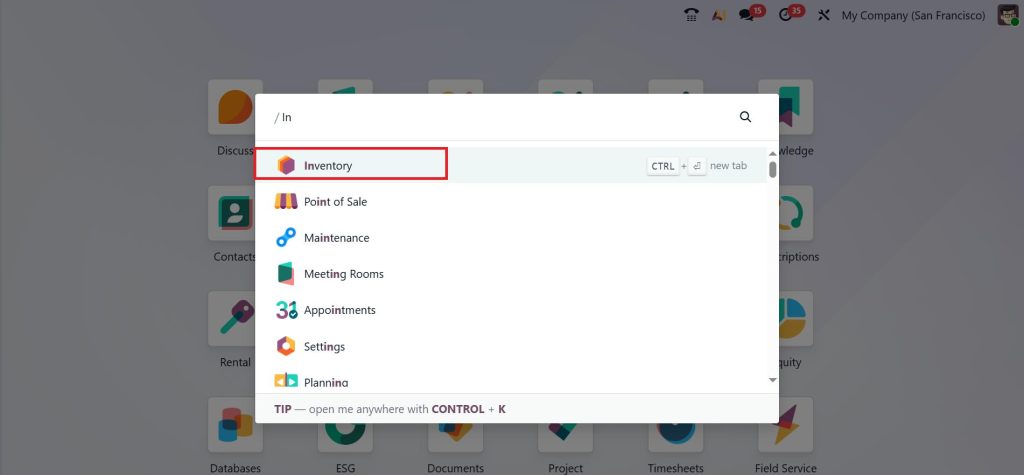
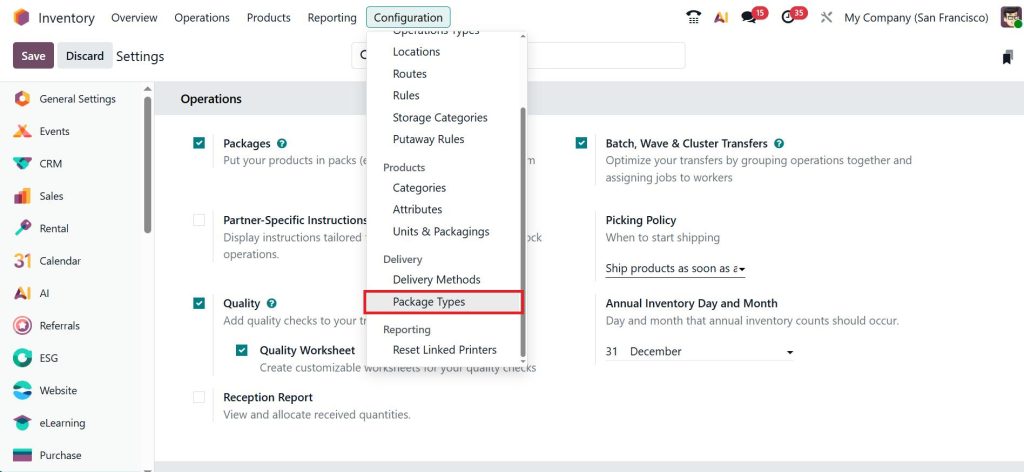
First, businesses enable package settings inside the inventory module. Open the Inventory App from your Odoo 19 dashboard.
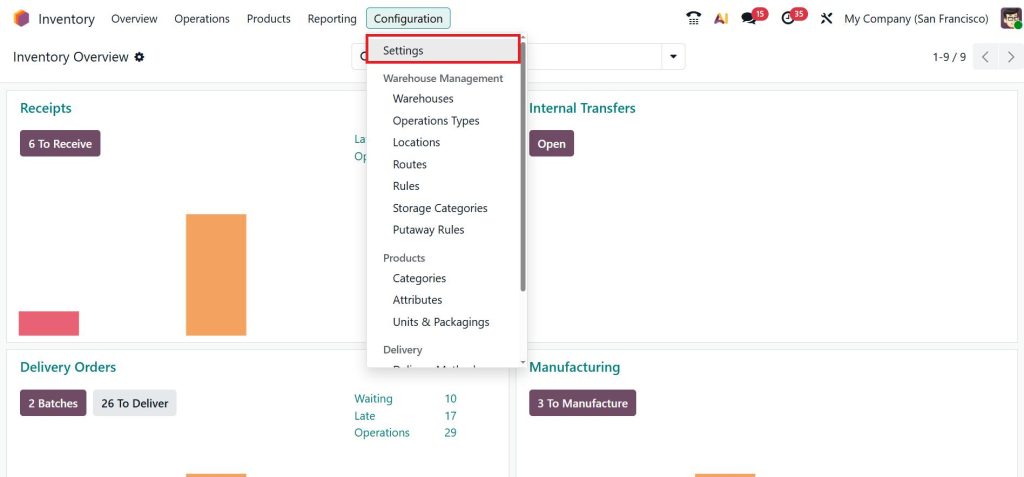
Go to Configuration → Settings.
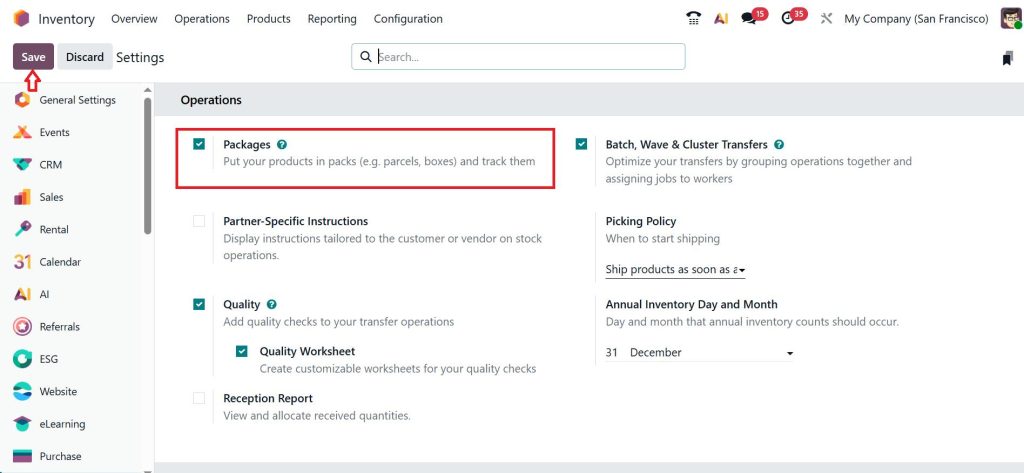
Under the Operations section, enable Packages and Save the changes.
Now go to the Configuration → Package Types.
Click on the New button.
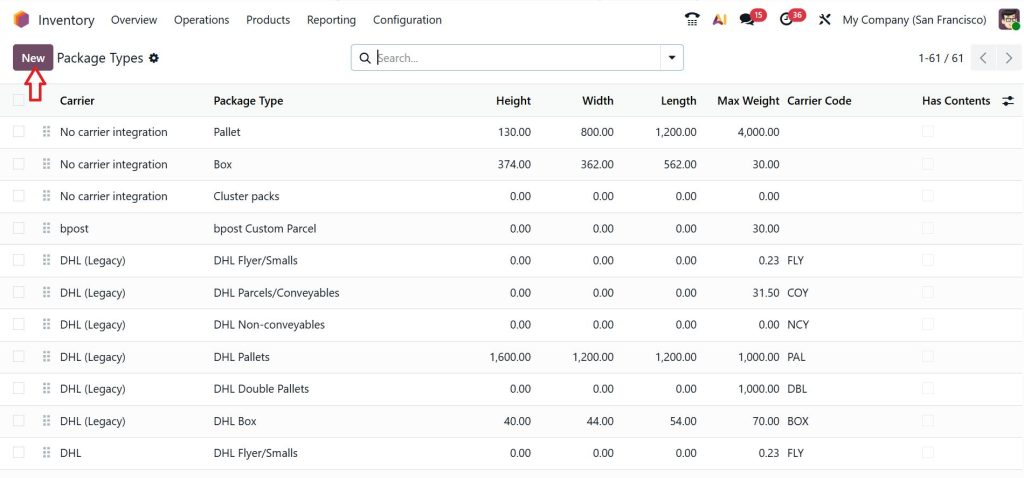
Here you can define:
- Package name & Size
- Dimensions
- Weight
- Barcode
- Carrier integration
Package size like:
- Small boxes
- Large cartons
- Plastic containers
- Wooden pallets
- Shipping bundles
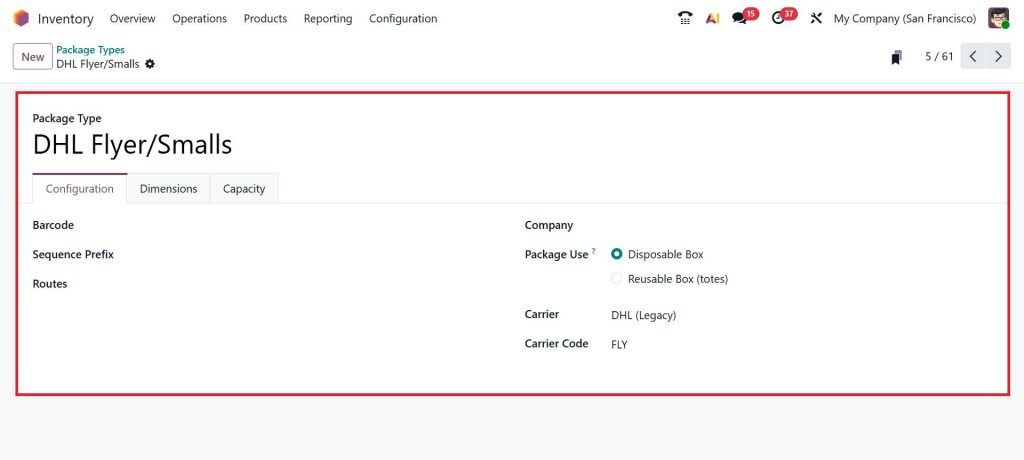
Each package can hold different products depending on warehouse requirements. Odoo also allows businesses to assign unique barcodes to every package. This means warehouse staff can simply scan packages during receiving, storage, picking, packing, and shipping processes.
Instead of manually checking products again and again, the system already knows what is inside each package. This saves time and reduces mistakes.
Understanding Odoo 19 Product Packages in Real Warehouse Operations
The Odoo 19 product packages feature becomes extremely useful when businesses deal with products in different quantities. For example, some companies sell products individually, while others sell them in boxes, cartons, or bulk quantities.
Let’s say a beverage company sells:
- Single bottles
- Packs of 6
- Cartons of 24
Without packaging management, inventory tracking becomes messy very quickly. Odoo helps businesses define these packaging structures clearly. The system knows how products are packed, stored, purchased, and delivered. This improves inventory visibility and reduces stock handling confusion.
Why Odoo Inventory Packaging Improves Delivery Accuracy?
One of the biggest warehouse problems is shipment mistakes. Customers order one thing but receive something else. Sometimes products are missing. Sometimes, wrong quantities are packed. And sometimes products get damaged because the packaging was not handled correctly. This is where Odoo inventory packaging becomes very helpful.
The system helps warehouse teams validate packages before shipment. Staff members can scan packages, verify products, and confirm quantities before delivery leaves the warehouse.
This reduces:
- Wrong deliveries
- Missing products
- Shipment delays
- Customer complaints
- Product damage
Businesses also gain better control over packaging quality.
Odoo Package Configuration Helps Businesses Stay Organized
Good inventory handling always depends on proper setup. With a smart Odoo package configuration, businesses can organize their warehouse operations according to their own workflow.
For example, companies can define:
- Package dimensions
- Weight limits
- Barcode formats
- Shipping methods
- Product grouping rules
- Storage locations
This allows warehouse teams to work faster because everything already follows a structured process. Instead of making packaging decisions manually every time, Odoo helps businesses standardize operations. And when warehouses become more organized, daily stress levels also become lower for staff members.
How Odoo 19 Warehouse Packages Support Multi-Warehouse Operations?
Businesses with multiple warehouses often face another challenge. Products move between locations regularly, but tracking those movements manually becomes difficult. Packages can easily get delayed, misplaced, or incorrectly transferred.
The Odoo 19 warehouse packages system helps businesses monitor package movement across multiple warehouse locations.
Warehouse managers can check:
- Which warehouse contains specific packages
- Which products are currently in transit
- Which shipments are pending
- Which packages were already delivered
This improves coordination between different warehouse branches. For growing businesses, this level of visibility becomes very important.
Why the Odoo 19 Packaging Feature Matters for eCommerce Businesses?
eCommerce businesses handle large numbers of daily orders. During sales campaigns or seasonal periods, order volume can increase very quickly. Without proper packaging management, warehouse teams struggle to fulfill orders on time.
The Odoo 19 packaging feature helps eCommerce businesses organize deliveries properly by creating structured package workflows. Instead of manually preparing every shipment, businesses can automate parts of the process.
Warehouse teams can quickly:
- Pick products
- Pack products
- Assign shipping labels
- Track package status
- Confirm deliveries
This improves delivery speed and helps businesses manage customer expectations better.
How Businesses Manage Product Packages in Odoo for Better Inventory Control?
When businesses start to manage product packages in Odoo, they usually notice improvements in inventory accuracy very quickly. The system provides better visibility of stock movement because products remain connected to packages throughout warehouse operations.
Managers can monitor:
- Incoming stock
- Outgoing deliveries
- Internal transfers
- Package history
- Damaged products
- Returned shipments
This gives businesses more control over daily inventory activities. Instead of reacting to warehouse problems after they happen, companies can identify issues earlier.
Barcode Scanning Makes Odoo 19 Package Management Faster
Many warehouses still depend heavily on manual data entry. The problem with manual work is that human mistakes happen very easily. Barcode scanning improves the entire Odoo 19 ERP package management process.
Warehouse teams can scan packages instantly during:
- Product receiving
- Storage operations
- Inventory transfers
- Picking tasks
- Delivery validation
This reduces typing mistakes and improves warehouse speed. Employees also feel less pressure because scanning packages is much easier than manually checking inventory records repeatedly.
Common Problems Businesses Solve with Odoo 19 Inventory Packages
Many companies start using Odoo 19 ERP inventory packages after facing repeated warehouse issues.
Some common problems include:
- Inventory mismatches
- Slow order processing
- Product misplacement
- Delivery errors
- Poor package tracking
Odoo helps reduce these problems by improving package visibility and inventory organization.
Industries That Benefit from Odoo Inventory Packaging
The good thing about Odoo inventory packaging is that it works for different industries. Businesses using Odoo packaging features include:
- Retail companies
- Manufacturing industries
- eCommerce stores
- Food suppliers
- Pharmaceutical businesses
- Electronics distributors
- Logistics companies
Every industry that handles inventory can benefit from organized package tracking.
Why Do Growing Businesses Need Better Odoo Package Configuration?
Small businesses sometimes think advanced package management is only needed for large companies. But honestly, warehouse problems usually start during business growth. As orders increase, manual systems stop working properly.
This is why growing businesses should focus on better Odoo package configuration before warehouse operations become difficult to manage. A properly configured system helps businesses grow without creating inventory confusion.
Improve Your Warehouse Operations with Smart Odoo 19 Package Management
Warehouse operations become stressful when businesses lose control over packaging, inventory movement, and shipment tracking. Many companies deal with delayed deliveries, misplaced products, inventory mismatches, and packaging confusion because their warehouse system is not properly organized.
The good thing about packages managed in Odoo 19 inventory is that businesses finally get a proper system to handle everything from product packaging to shipment tracking in one place.
With advanced Odoo 19 ERP package management, companies can organize inventory better, reduce warehouse mistakes, improve delivery accuracy, and monitor package movement without depending on manual tracking methods.
Whether your business needs better Odoo 19 inventory packages, smoother Odoo inventory packaging, or more structured Odoo package configuration, Odoo 19 helps warehouse teams work faster and with better accuracy.
If your warehouse operations are becoming difficult to manage, now is the right time to start using the Odoo 19 packaging feature and properly manage product packages in Odoo before inventory issues start affecting your business growth and customer satisfaction.
Ready to improve your warehouse efficiency with Odoo 19?
Connect with Netilligence today and get expert Odoo solutions for smarter inventory and package management.




