

Automated Product Suggestions Work in Odoo 19.3
Automated Product Suggestions Work in Odoo 19.3 by helping businesses recommend relevant products to customers at the right time. In modern eCommerce and sales environments, customers expect personalized shopping experiences. Instead of manually searching for related items, they prefer to receive intelligent recommendations that match their interests and purchasing behavior.
The way Automated Product Suggestions Work in Odoo 19.3 is through built-in recommendation features that analyze product relationships and display relevant suggestions throughout the customer journey. Whether it is an online store, sales quotation, or customer portal, Odoo can automatically show complementary products that improve customer engagement and increase order values.
Businesses using Odoo 19.3 automated product suggestions can encourage customers to purchase additional products without appearing overly promotional. These recommendations help buyers discover useful items they may have otherwise missed.
One of the major advantages of understanding how Automated Product Suggestions Work in Odoo 19.3 is the ability to implement effective sales strategies such as Odoo 19.3 cross-sell suggestions, Odoo 19.3 optional products, Odoo 19.3 alternative products, and Odoo 19.3 accessories products. These features create a smarter buying experience while helping companies maximize revenue opportunities.
As competition in online retail continues to grow, businesses increasingly rely on smart product suggestions in Odoo 19 to improve conversion rates. The built-in Odoo eCommerce product recommendations system makes it easier to personalize the customer journey and present the most relevant products at every stage.
In this guide, we will explore how Automated Product Suggestions Work in Odoo 19.3, the different types of recommendations available, their benefits, setup procedures, and how Netilligence can help businesses unlock the full potential of the Odoo 19.3 product recommendation engine.
Understanding the Odoo 19.3 Product Recommendation Engine
The Odoo 19.3 product recommendation engine is designed to suggest products based on predefined relationships and sales strategies automatically.
Instead of relying on complex third-party recommendation systems, Odoo provides a practical and business-friendly approach that allows companies to:
- Increase average order value
- Improve customer satisfaction
- Encourage product discovery
- Promote related inventory
- Generate additional revenue opportunities
The recommendation engine works by associating products with one another. Whenever a customer views a product, adds an item to the cart, or receives a quotation, Odoo displays relevant recommendations automatically.
These recommendations can appear in:
- Product pages
- Shopping carts
- Checkout processes
- Sales quotations
- Customer portals
- Online stores
The result is a seamless customer experience that feels personalized and relevant.
Types of Automated Product Suggestions Work in Odoo 19.3
Odoo offers several recommendation methods that support different sales objectives.
Odoo 19.3 Cross-Sell Suggestions
Odoo 19.3 cross-sell suggestions encourage customers to purchase related products alongside their primary selection.
Example
A customer purchases:
- Laptop
Cross-sell suggestions may include:
- Wireless mouse
- Laptop bag
- Keyboard
- Screen cleaner
These recommendations increase basket size while improving customer convenience.
Cross-selling works because the recommended items are naturally connected to the customer’s main purchase.
Benefits of Cross-Sell Suggestions
- Higher revenue per order
- Better customer experience
- Increased product visibility
- Improved inventory movement
Many successful online stores rely heavily on Odoo 19.3 cross-sell suggestions to increase sales without acquiring additional customers.
Odoo 19.3 Optional Products
Odoo 19.3 optional products allow businesses to suggest extra products during the quotation or ordering process.
Unlike cross-selling, optional products appear as selectable additions that customers can accept or decline.
Example
When selling a software subscription:
Main Product:
- ERP License
Optional Products:
- Training Package
- Implementation Service
- Premium Support
The customer can easily choose additional services based on their requirements.
Advantages of Optional Products
- Upselling opportunities
- Improved service adoption
- Higher project value
- Better customer flexibility
Many service-based businesses use Odoo 19.3 optional products extensively in quotations to increase deal value.
Odoo 19.3 Alternative Products
Sometimes a product is unavailable, expensive, or unsuitable for a customer’s needs.
This is where Odoo 19.3 alternative products become valuable.
Alternative products provide substitute options when customers are comparing products or looking for different features.
Example
Customer views:
- Premium Smartphone
Alternative Products:
- Mid-Range Smartphone
- Budget Smartphone
- Different Brand Smartphone
These alternatives prevent customers from leaving the store when the original product does not meet their expectations.
Benefits
- Reduced lost sales
- Better customer retention
- More product choices
- Improved conversion rates
By offering alternatives, businesses ensure customers remain engaged rather than abandoning the purchase process.
Odoo 19.3 Accessories Products
Odoo 19.3 accessories products focus on complementary items that enhance the use of the primary product.
Example
Customer purchases:
- Camera
Accessories Products:
- Camera Bag
- Memory Card
- Extra Battery
- Tripod
Accessory recommendations often achieve high conversion rates because customers recognize their immediate usefulness.
Key Advantages
- Increased average order value
- Better customer satisfaction
- Strong product bundling opportunities
- Improved inventory utilization
Businesses selling electronics, automotive products, furniture, and equipment frequently use Odoo 19.3 accessory products to maximize sales potential.
How to Configure Automated Product Suggestions in Odoo 19.3
Setting up recommendations in Odoo is relatively straightforward.
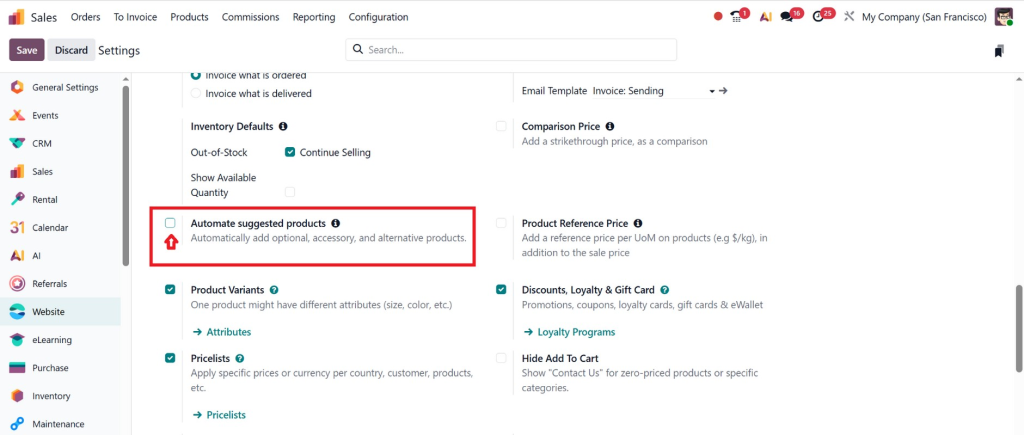
Website → Configuration → Enable product recommendation option and save the settings.
Step 1: Open Product Configuration
Navigate to:
Sales → Products → Products
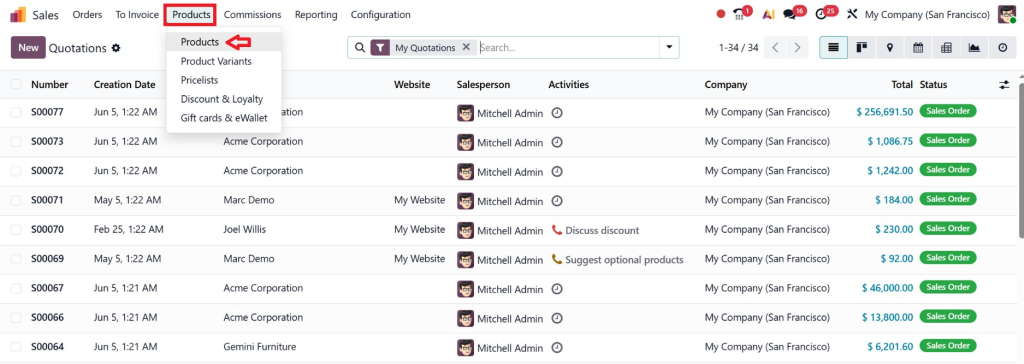
Select the desired product.
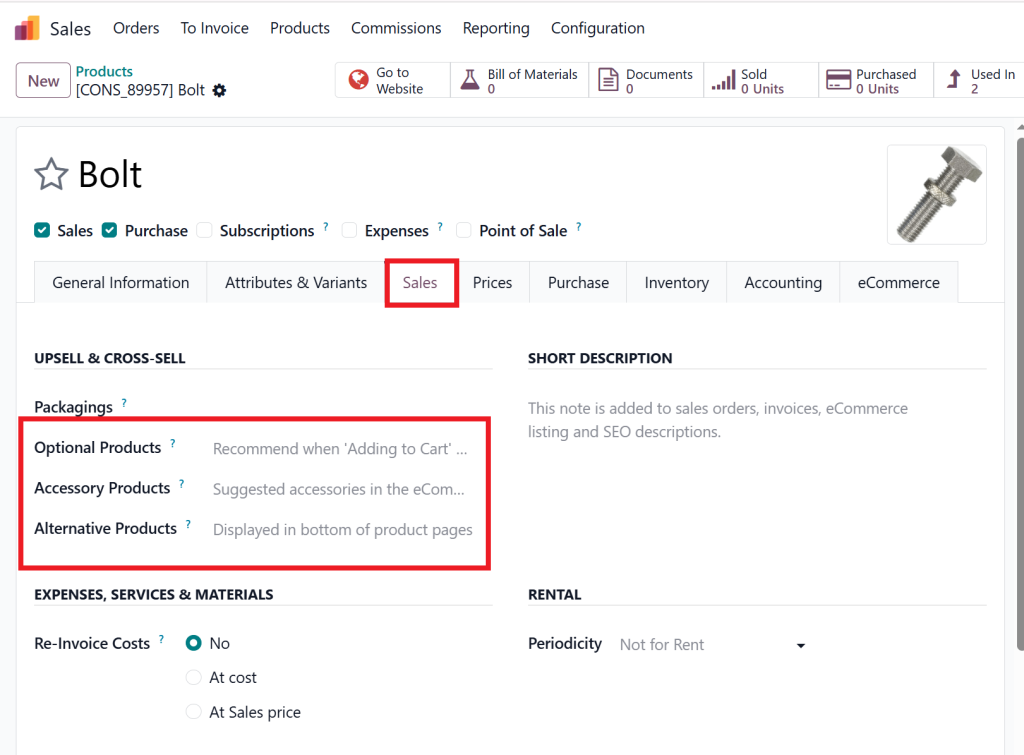
Step 2: Configure Related Products
Locate the product recommendation section.
Add:
- Optional products
- Accessory products
- Alternative products
Step 3: Save Product Settings
Save all configurations.
The relationships are now stored within the system.
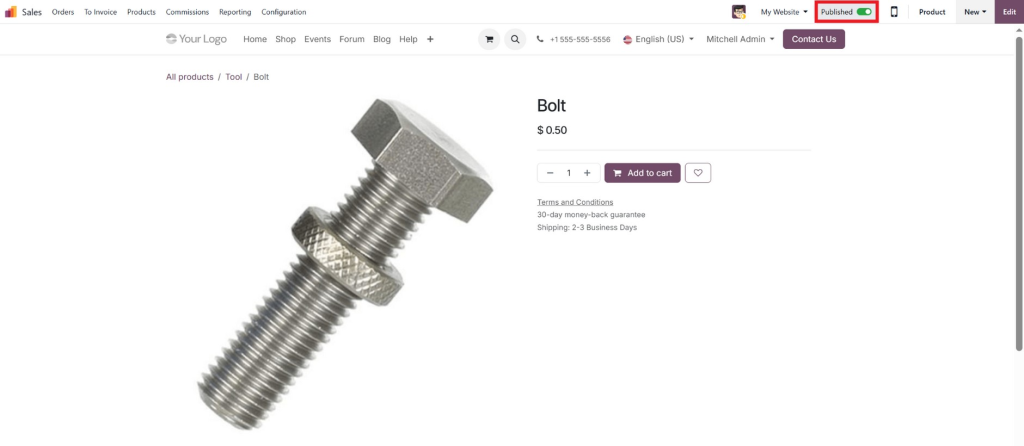
Step 4: Publish Products
Ensure products are visible on the website and sales channels.
Step 5: Test Customer Experience
Review:
- Product pages
- Shopping cart
- Checkout process
- Quotations
Verify that recommendations appear correctly.
How Automated Product Suggestions Work in Odoo 19.3 Behind the Scenes
Understanding how Automated Product Suggestions Work in Odoo 19.3 requires looking at the relationship-based recommendation system.
The process typically follows these steps:
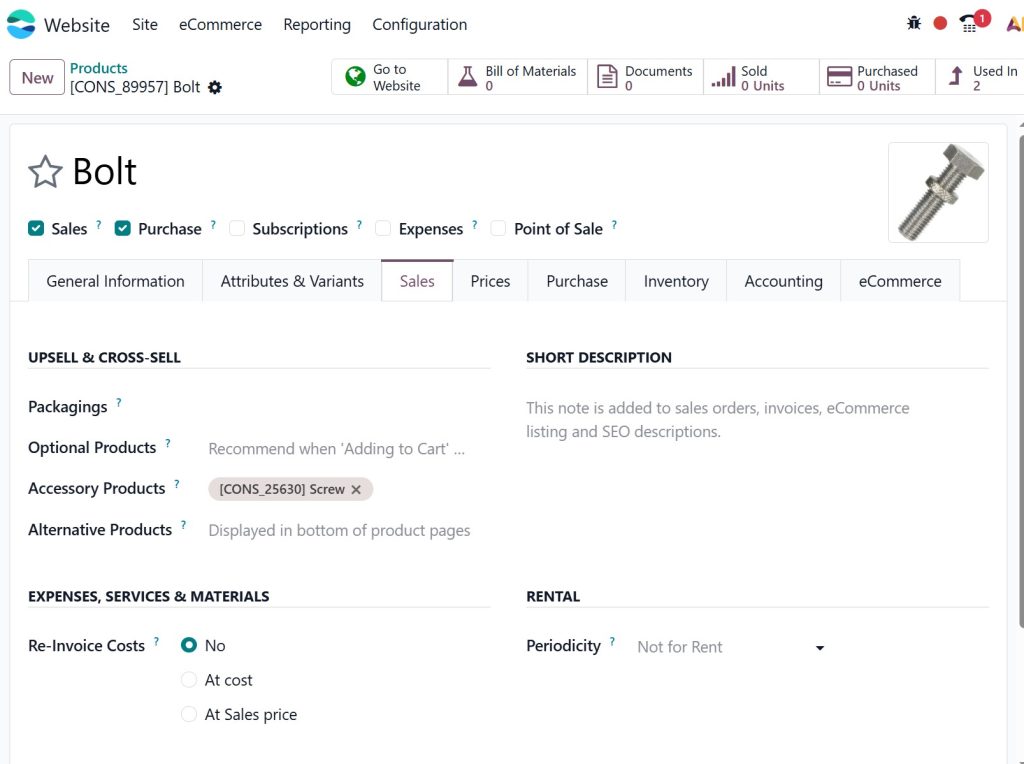
Step 1: Product Configuration
Administrators define relationships between products.
Examples:
- Product A → Optional Product B
- Product A → Accessory Product C
- Product A → Alternative Product D
Step 2: Customer Interaction
A customer:
- Visits a product page
- Requests a quotation
- Adds items to a cart
Step 3: Recommendation Display
Odoo automatically displays related products based on predefined configurations.
Step 4: Customer Selection
The customer can:
- Add recommended products
- Compare alternatives
- Include optional services
Step 5: Order Completion
The final order often contains multiple products, increasing overall sales value.
This automated workflow eliminates manual selling efforts while delivering personalized experiences.
Benefits of Smart Product Suggestions Odoo 19
Many businesses underestimate the impact of intelligent recommendations.
The smart product suggestions Odoo 19 feature delivers measurable benefits across multiple areas.
Increased Revenue
Additional product recommendations naturally lead to larger orders.
Even small increases in average order value can generate substantial annual revenue growth.
Better Customer Experience
Customers appreciate relevant suggestions that simplify purchasing decisions.
Instead of searching for related products, they receive useful recommendations instantly.
Improved Product Discovery
Many products remain unnoticed in large catalogs.
Recommendation engines expose customers to products they might otherwise miss.
Stronger Inventory Movement
Businesses can promote:
- Slow-moving inventory
- Seasonal products
- New arrivals
- High-margin items
This improves stock turnover and profitability.
Higher Conversion Rates
Relevant recommendations reduce customer hesitation and support purchasing decisions.
The result is better conversion performance throughout the sales funnel.
Odoo eCommerce Product Recommendations for Online Stores
One of the most powerful applications of Odoo eCommerce product recommendations is within online stores.
Customers browsing products can immediately see relevant recommendations without leaving the page.
Typical recommendation placements include:
Product Pages
Showing:
- Accessories
- Alternatives
- Related items
Shopping Cart
Displaying:
- Frequently purchased products
- Complementary products
Checkout Process
Offering:
- Last-minute add-ons
- Service upgrades
- Extended warranties
Customer Accounts
Presenting:
- Reorder suggestions
- Related products
- Personalized recommendations
These placements help businesses create an engaging shopping experience while maximizing sales opportunities.
Best Practices for Using Odoo 19.3 Automated Product Suggestions
To maximize performance, businesses should follow proven recommendation strategies.
Keep Recommendations Relevant
Customers respond best to suggestions that genuinely match their needs.
Avoid unrelated products.
Focus on Customer Value
Recommendations should solve problems or enhance product usage.
Limit Recommendation Volume
Too many suggestions can overwhelm customers.
Present only the most relevant options.
Review Performance Regularly
Monitor:
- Conversion rates
- Product attachment rates
- Revenue impact
Adjust recommendations based on results.
Use Multiple Recommendation Types
Combine:
- Cross-sell suggestions
- Optional products
- Alternative products
- Accessories products
This creates a more comprehensive recommendation strategy.
Lorem ipsum dolor sit amet, consectetur adipiscing elit. Ut elit tellus, luctus nec ullamcorper mattis, pulvinar dapibus leo.
Why Businesses Choose Netilligence for Odoo 19.3 Implementation
While Odoo provides powerful recommendation capabilities, proper configuration and optimization are essential for achieving the best results.
At Netilligence, our Odoo specialists help businesses:
- Configure product recommendation strategies
- Set up eCommerce stores
- Optimize sales workflows
- Implement automation features
- Customize product relationships
- Improve customer buying experiences
Our team understands how Automated Product Suggestions Work in Odoo 19.3 and helps organizations design recommendation systems that align with their sales objectives.
Whether you need assistance with Odoo 19.3 automated product suggestions, quotation optimization, website recommendations, or advanced eCommerce implementation, Netilligence provides practical solutions tailored to your business requirements.
Automated Product Suggestions Work in Odoo 19.3
Understanding how Automated Product Suggestions Work in Odoo 19.3 is essential for businesses that want to increase revenue, improve customer experiences, and maximize product visibility. Through features such as Odoo 19.3 cross-sell suggestions, Odoo 19.3 optional products, Odoo 19.3 alternative products, and Odoo 19.3 accessories products, companies can present relevant recommendations at the right moment in the customer journey.
The built-in Odoo 19.3 product recommendation engine enables organizations to create personalized buying experiences without relying on complicated third-party systems. Combined with smart product suggestions in Odoo 19 and effective Odoo eCommerce product recommendations, businesses can significantly improve conversion rates and average order values.
If you are planning to enhance your Odoo sales and eCommerce processes, Netilligence can help you implement and optimize automated recommendation strategies that deliver measurable business results. By leveraging the full power of Odoo 19.3, you can turn every customer interaction into an opportunity for increased sales and long-term growth.




