

Understanding Withholding Tax on Payments in Odoo 20
Businesses that work with vendors, contractors, consultants, or service providers often have to deduct tax before making payments. Managing these deductions manually can become difficult as transaction volumes increase. This is why many companies prefer using ERP software that automates financial processes while maintaining accounting accuracy.
If your organisation is planning to implement withholding tax on payments in Odoo 20, understanding the correct setup is essential. The latest accounting improvements in Odoo make tax deductions easier to configure and track throughout the payment lifecycle.
This guide explains everything about withholding tax on payments in Odoo 20, from configuration to vendor payments, accounting entries, reconciliation, and reporting. Whether you are new to Odoo Accounting or upgrading from an earlier version, this tutorial will help you understand every important step.
In this article, you’ll learn:
- How withholding tax on payments in Odoo 20 works
- How to complete the Odoo 20 withholding tax configuration
- The complete Odoo withholding tax setup
- How to apply withholding tax in Odoo 20
- Managing withholding tax on vendor payments
- Understanding Odoo payment withholding tax
- Recording the correct withholding tax journal entry in Odoo
- Best practices for maintaining compliance
By the end of this guide, you’ll know exactly how to configure and use withholding tax on payments in Odoo 20 for accurate accounting and tax compliance.
What is Withholding Tax?
Withholding tax (WHT) is a tax deducted by the payer before paying the full invoice amount to a supplier or service provider. Instead of paying the entire invoice value, the business deducts a specified percentage and deposits that amount with the tax authority.
For example:
Invoice Amount: $10,000
Withholding Tax: 10%
Vendor Receives: $9,000
Tax Payable to Government: $1,000
This ensures that tax obligations are fulfilled at the time of payment rather than later.
Many countries require withholding tax for:
- Professional services
- Consultancy fees
- Contract work
- Rental payments
- Legal services
- Freelancers
- Government contractors
Because tax rules differ across countries, Odoo allows businesses to configure withholding taxes according to local regulations.
Why Use Odoo 20 for Withholding Tax Management?
Handling withholding tax manually often creates problems such as:
- Incorrect deductions
- Vendor payment errors
- Tax reporting mistakes
- Manual journal adjustments
- Compliance issues
- Reconciliation difficulties
Using Odoo 20 accounting withholding tax helps automate these tasks.
Benefits include:
- Automatic tax calculations
- Reduced accounting errors
- Faster payment processing
- Accurate vendor balances
- Complete audit trail
- Simplified tax reporting
- Easy reconciliation
- Better financial transparency
These features save accounting teams significant time while reducing compliance risks.
Prerequisites Before Applying Withholding Tax on Payments in Odoo 20
Before configuring withholding taxes, make sure your Accounting module is properly configured.
Configure Fiscal Localisation
The first step is selecting the correct country localization.
Localisation determines:
- Available taxes
- Tax reports
- Government compliance
- Accounting standards
Some localisations already include withholding tax templates
Enable Developer Features (If Required)
Depending on your implementation, advanced accounting configurations may require developer mode.
This allows access to:
- Advanced tax settings
- Tax repartition lines
- Journal configurations
- Technical accounting options
Create Vendor Records
Each supplier should have:
- Company information
- Tax identification number
- Payment terms
- Vendor account
- Applicable tax settings
Maintaining complete vendor information improves payment accuracy.
Step-by-Step Odoo Withholding Tax Setup
Now let’s configure the Odoo withholding tax setup.
Step 1 – Open Accounting Module
Navigate to:
Accounting → Configuration → Taxes
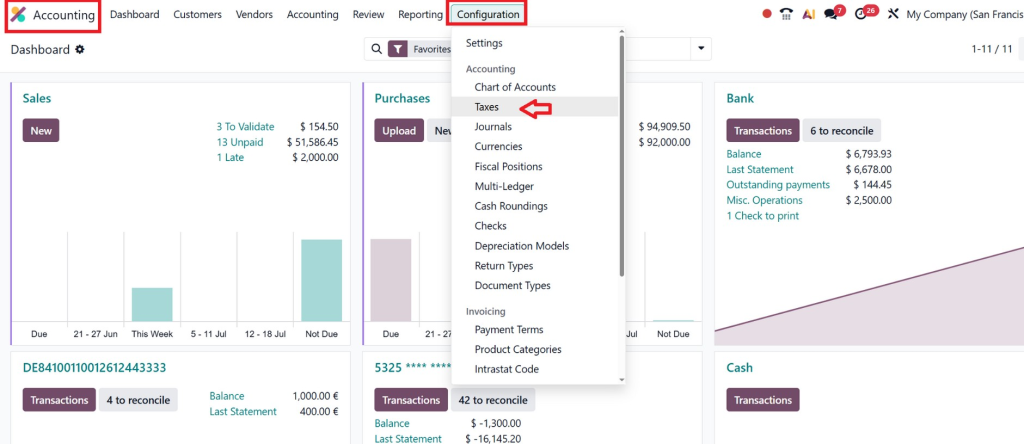
Here you’ll find all tax definitions.
Step 2 – Create a New Tax
Create a new tax specifically for withholding.
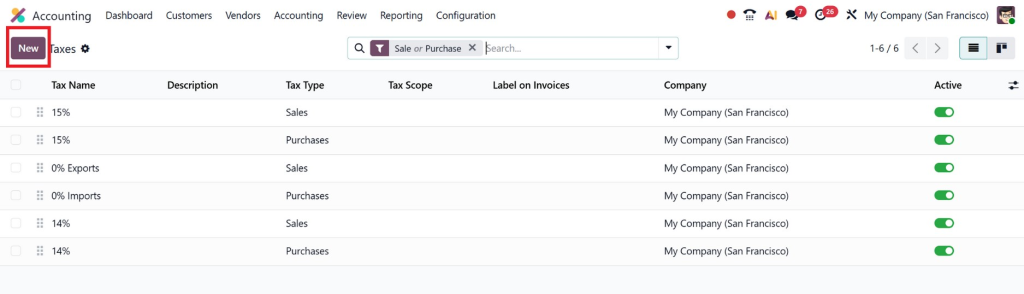
Define:
- Tax Name
- Tax Type
- Tax Scope
- Percentage
- Country
- Company
Example:
Withholding Tax 5%
Step 3 – Configure Tax Computation
Choose the appropriate calculation method.
Examples include:
- Percentage of price
- Fixed amount
- Group taxes
Most withholding taxes use a percentage.
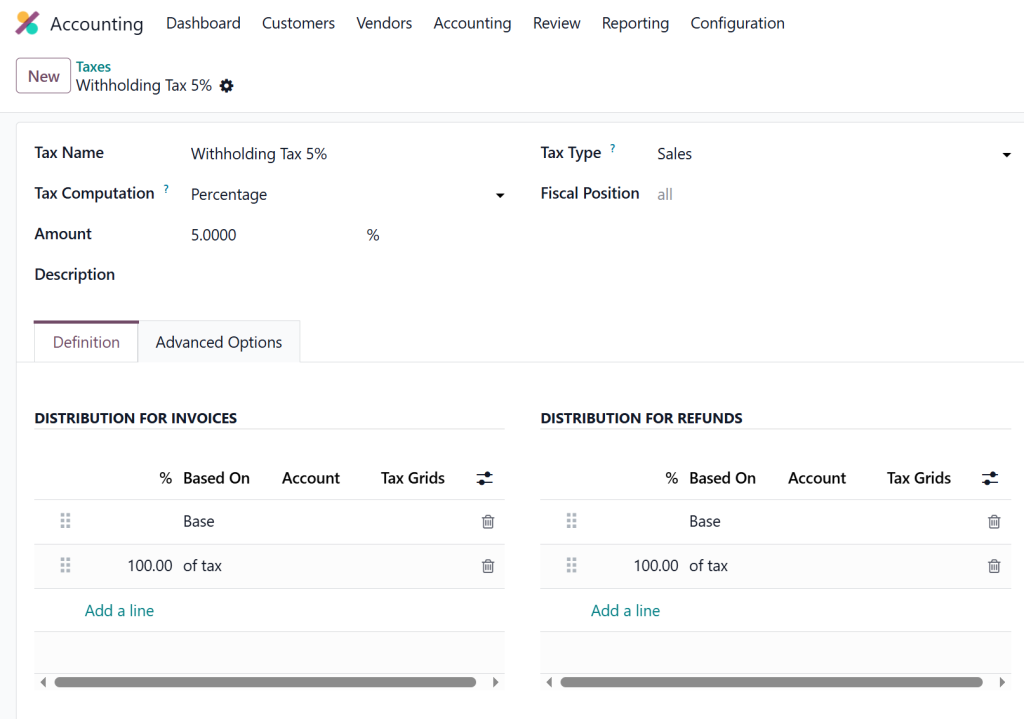
Step 4 – Configure Tax Distribution
Specify where the deducted tax should be recorded.
Usually, the tax is posted to:
Withholding Tax Payable
instead of revenue or expense accounts.
This allows businesses to later remit tax to government authorities.
Step 5 – Save the Configuration
Review all settings carefully before saving.
Incorrect tax configuration may affect every vendor payment afterwards.
How to Apply Withholding Tax in Odoo 20
Once the tax is configured, applying it during payments becomes straightforward.
Create a Vendor Bill
Navigate to:
Accounting → Vendors → Bills
Create a new vendor bill.
Enter:
- Vendor
- Bill Date
- Products or Services
- Quantity
- Unit Price
Apply Withholding Tax
Select the withholding tax created earlier.
Odoo automatically calculates:
- Gross amount
- Tax deduction
- Net payable
No manual calculations are required.
Validate the Bill
Review all values carefully before validation.
After validation:
- Vendor liability is created
- Tax amount is recognized
- Accounting entries are generated
Register the Payment
Click:
Register Payment
Odoo deducts the withholding amount automatically.
Vendor receives only the net payment.
Managing Withholding Tax on Vendor Payments
Many companies deduct tax only during payment instead of invoice creation.
This is especially common when:
- Tax depends on the payment date
- Multiple partial payments exist
- Government rules require deduction only upon payment
Odoo supports these workflows depending on the accounting configuration.
Benefits include:
- Correct payment calculations
- Vendor transparency
- Reduced manual adjustments
- Easier reconciliation
The system automatically updates outstanding balances.
Understanding Odoo Payment Withholding Tax
Let’s understand this with an example.
Invoice Amount:
$5,000
Withholding Tax:
10%
Tax Amount:
$500
Vendor Payment:
$4,500
Odoo records:
Expense
$5,000
Vendor Liability
$5,000
Payment
$4,500
Withholding Tax Liability
$500
This ensures financial statements remain accurate.
Withholding Tax Journal Entry Odoo Example
A common question accountants ask is how journal entries are generated.
Let’s consider an example.
Vendor Invoice:
$20,000
Withholding Tax:
5%
Tax:
$1,000
Payment:
$19,000
The journal entries typically include:
Invoice Entry
Debit:
Expense Account
$20,000
Credit:
Vendor Payable
$20,000
Payment Entry
Debit:
Vendor Payable
$20,000
Credit:
Bank
$19,000
Credit:
Withholding Tax Payable
$1,000
These entries ensure the vendor account is fully settled while maintaining tax liabilities separately.
Reporting Withholding Tax in Odoo 20
Good reporting is essential for tax compliance.
Odoo provides reports for:
- Vendor payments
- Tax summaries
- Journal entries
- Tax liabilities
- Audit history
- Payment reports
- General ledger
- Trial balance
These reports help accountants prepare statutory filings more efficiently
Common Mistakes During Odoo Withholding Tax Configuration
Even experienced accountants make mistakes during setup.
Avoid these common issues.
Incorrect Tax Percentage
Always verify current government regulations.
Wrong Ledger Account
Posting withholding tax into an expense account instead of a liability account creates reporting errors.
Missing Vendor Configuration
Some vendors may require withholding tax, while others may not.
Review vendor-specific settings carefully
Forgetting Partial Payments
Partial payments should calculate withholding correctly.
Always test these scenarios.
Skipping Testing
Before going live:
- Create Sample invoices
- Process payments
- Verify journal entries
- Check reports
Testing prevents future accounting corrections.
Best Practices for Applying Withholding Tax in Odoo 20
To maximise accuracy, consider these recommendations:
Maintain Updated Tax Rates
Government regulations change periodically.
Review tax percentages regularly.
Train Accounting Staff
Ensure users understand:
- Tax rules
- Payment workflow
- Reporting
- Vendor configuration
Proper training reduces mistakes.
Reconcile Accounts Monthly
Review:
- Tax payable accounts
- Vendor balances
- Payment journals
- Bank statements
Monthly reconciliation improves financial accuracy.
Review Reports Frequently
Don’t wait until year-end.
Generate reports monthly to identify issues early.
Keep Documentation
Maintain copies of:
- Vendor tax certificates
- Government notifications
- Payment receipts
- Tax filings
This supports future audits.
Why Businesses Choose Netilligence for Odoo Accounting Implementation
Configuring withholding tax is not simply about creating a tax percentage. Every country has unique tax regulations, reporting requirements, payment rules, and accounting standards. A small configuration mistake can lead to incorrect vendor payments, inaccurate financial statements, and compliance issues.
At Netilligence, we help businesses implement Odoo Accounting with configurations tailored to their local tax requirements. Our team works closely with clients to understand their business processes and ensure that every financial workflow is properly configured from the beginning.
Our Odoo Accounting services include:
- Odoo 20 Accounting implementation
- Complete Odoo withholding tax setup
- Financial workflow customization
- Vendor payment automation
- Tax configuration based on local regulations
- Accounting data migration
- User training and support
- Ongoing maintenance and optimization
Whether your organization needs a new Odoo implementation or wants to improve an existing accounting system, our experts can help you create a reliable, compliant, and efficient financial environment.
Implementing Withholding Tax on Payments in Odoo 20
Implementing withholding tax on payments in Odoo 20 helps businesses simplify tax compliance, automate vendor payment deductions, and maintain accurate accounting records. Instead of relying on manual calculations, Odoo enables organisations to configure tax rules once and apply them consistently across all relevant transactions.
By following the correct Odoo withholding tax setup, businesses can automatically calculate deductions, generate accurate withholding tax journal entry Odoo records, manage withholding tax on vendor payments, and produce reliable financial reports for audits and statutory filings.
Whether you’re processing a handful of supplier invoices or managing thousands of payments every month, Odoo 20 accounting withholding tax features provide the flexibility and automation needed to reduce errors and improve financial control.
If you’re planning to apply withholding tax in Odoo 20, working with experienced Odoo professionals ensures your accounting system is configured according to your country’s regulations and your business requirements. At Netilligence, we specialize in delivering customized Odoo Accounting solutions that help organizations streamline financial operations, stay compliant, and get the most value from their ERP investment.




