

Waiting for Customer Payments? There’s a Better Way
You’ve finished the project, delivered the product, and sent the invoice. Everything is done, except getting paid.
A few days pass. Then a week. You send a friendly reminder, but the payment still doesn’t arrive. Sound familiar?
For many businesses, delayed payments aren’t always because customers don’t want to pay. Sometimes the payment process itself creates unnecessary friction. Customers have to open their banking app, type long account numbers, enter the payment amount, copy the invoice reference, and double-check every detail before they can finally click “Pay.” Even a small typing mistake can delay the transaction or send money to the wrong account.
This is where Invoice QR Codes make a real difference.
With Odoo 19 accounting, every invoice can include a QR code that contains all the payment information your customer needs. Instead of entering everything manually, they simply scan the code with their banking app, confirm the details, and complete the payment in seconds.
It sounds like a small feature, but it has a big impact. Businesses using QR code payments often spend less time chasing unpaid invoices and more time focusing on work that actually grows their business.
As companies continue moving toward digital invoice payment methods, features like the Odoo invoice QR code are becoming an important part of everyday accounting. They improve customer experience, reduce payment errors, support automated invoice payments, and contribute to the better accounting automation Odoo is known for.
If your goal is faster invoice payments, this is one feature you shouldn’t overlook.
What Exactly Are Invoice QR Codes?
Think about the last time you paid a utility bill or transferred money using your banking app. There’s a good chance you scanned a QR code instead of typing every payment detail yourself.
The same idea now applies to business invoices.
An Invoice QR Code is a small, scannable code printed directly on an invoice. It securely stores important payment details such as:
- The amount due
- Your company’s bank account information
- Payment reference
- Invoice number
- Currency
When customers scan the code, all of these details are automatically filled into their banking application. They simply review the information and approve the payment.
No copying.
No typing.
No worrying about entering the wrong account number.
This simple process makes QR code payments much more convenient than traditional bank transfers.
For businesses, it’s equally valuable. Instead of answering customer questions about payment references or correcting payment mistakes, finance teams receive more accurate payments with much less effort.
How Does Odoo 19 Generate Invoice QR Codes?
One reason businesses enjoy working with Odoo 19 accounting is that many tasks happen automatically.
Invoice QR codes are no exception.
Once your payment information has been configured, Odoo automatically creates a QR code every time you generate a customer invoice. There is no need to visit another website, use a third-party QR code generator, or manually paste images into your invoices.
Everything happens inside Odoo.
When the invoice PDF is created, the QR code appears alongside the payment details, giving customers an easy way to complete their payment.
From the customer’s perspective, the process feels incredibly simple.
They receive the invoice.
They open it on their phone or computer.
They scan the QR code using their preferred banking application.
The payment amount, account details, and reference are already filled in.
All that’s left is confirming the payment.
What used to take several minutes now takes only a few seconds.
That convenience may seem small, but when you’re sending dozens or even hundreds of invoices every month, it can significantly improve the speed at which customers pay.
How to Enable Invoice QR Codes in Odoo 19 Accounting
The good news is that you don’t need a separate application to use Invoice QR Codes in Odoo 19 Accounting. Once your payment details are configured correctly, Odoo can automatically generate a QR code on customer invoices.
Here’s how it works.
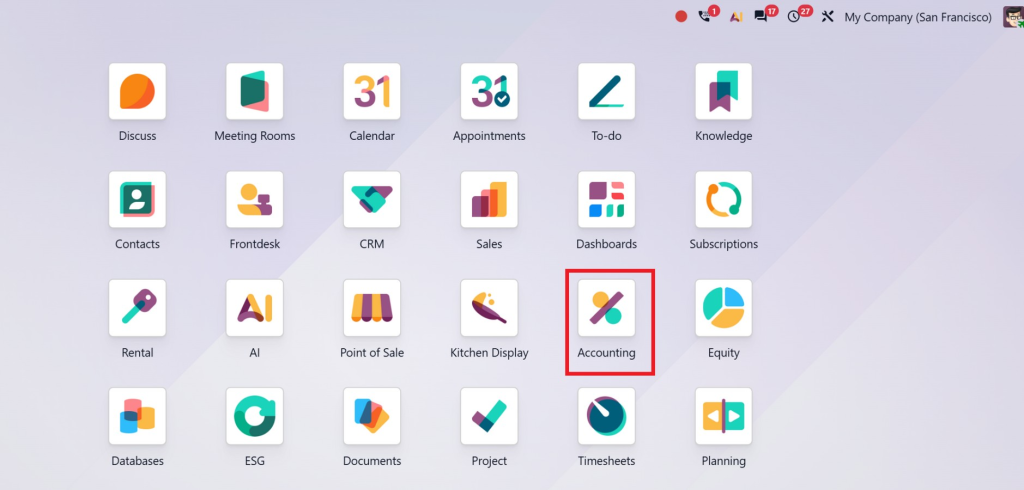
Step 1 – Open the Accounting Module
Log in to your Odoo 19 database and open the Accounting module.
From the dashboard, go to Configuration and then open Settings.
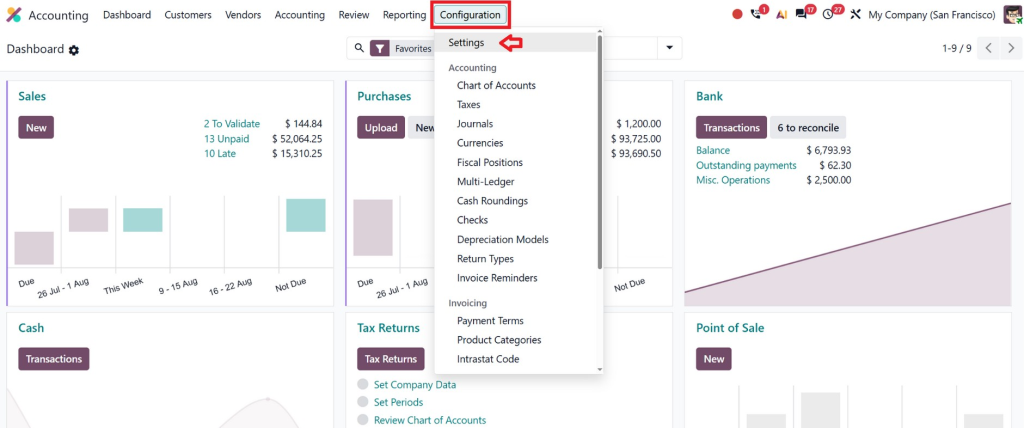
This is where you can manage payment-related options for your accounting system.
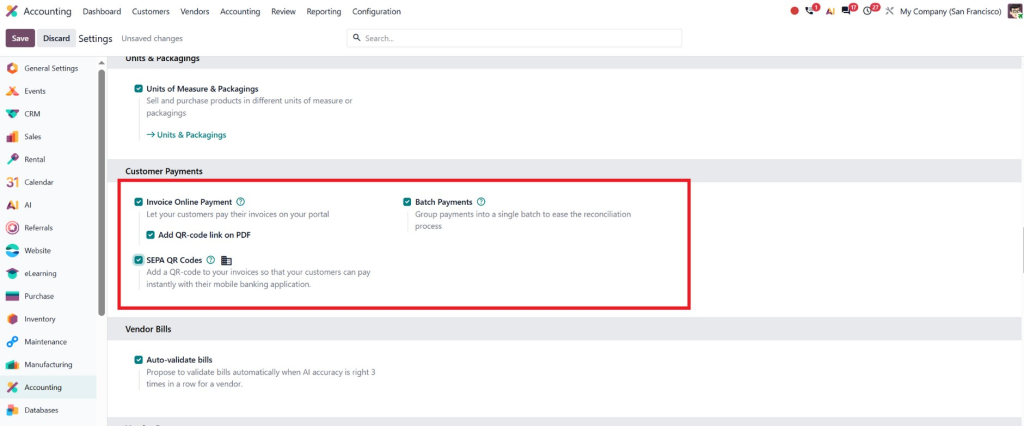
Step 2 – Configure Your Bank Account
Before Odoo can create a QR code, you must add your company’s bank account.
Go to Configuration → Bank Accounts (or open your company record if your localization stores bank details there).
Make sure your bank account number, account holder name, and other required payment information are correct.
If any information is missing, Odoo won’t be able to generate a valid QR code.
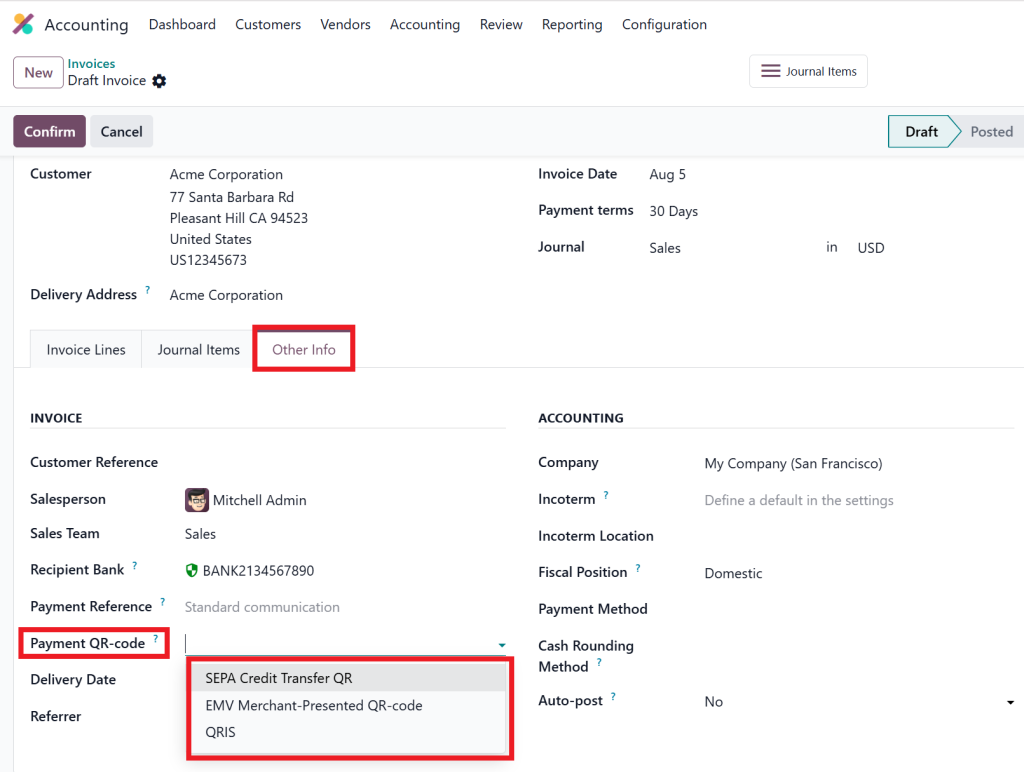
Step 3 – Select a Supported Payment Method
Different countries use different QR payment standards.
Odoo supports QR code generation based on your company’s localization and payment method.
Choose the supported payment option for your region and save the configuration.
Once this is done, Odoo knows which payment information should be included in the QR code.
Step 4 – Create a Customer Invoice
Now create a new customer invoice as you normally would.
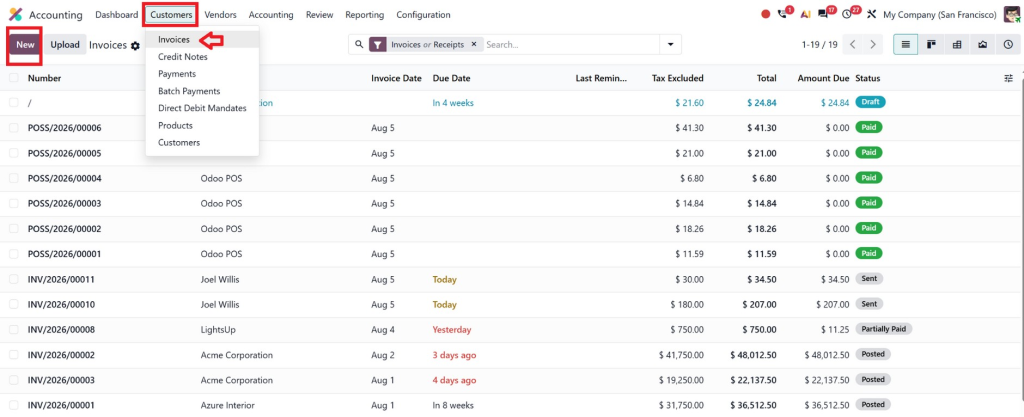
Add:
- Customer
- Products or services
- Quantity
- Price
- Taxes
- Payment terms
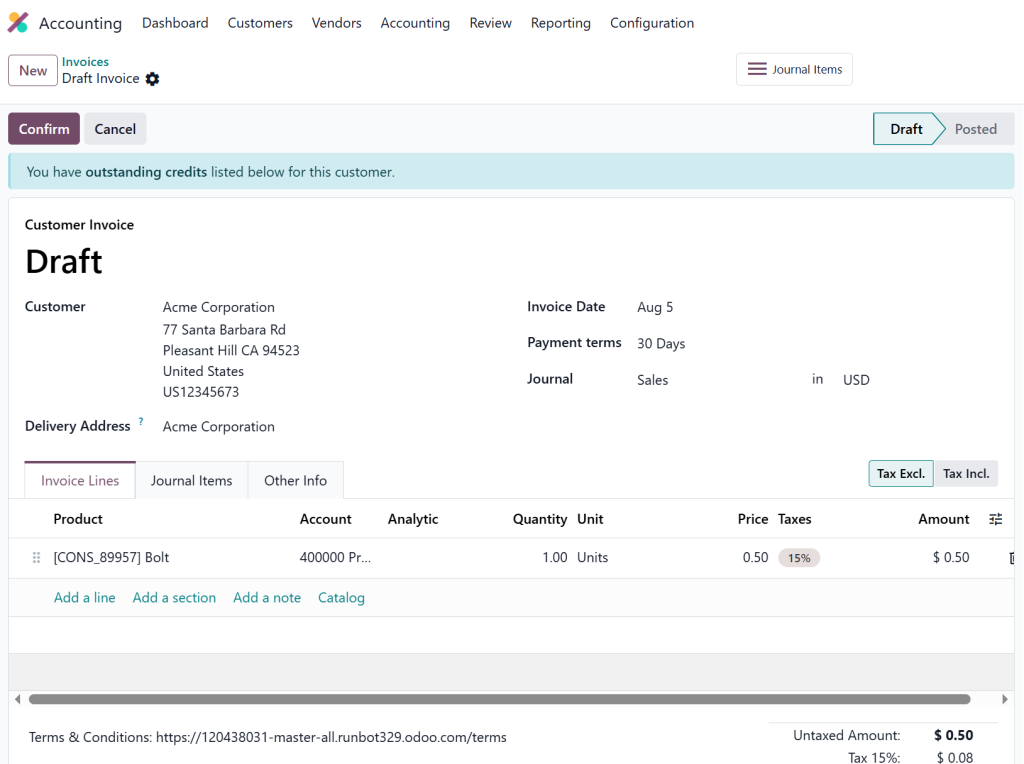
There is nothing different about creating the invoice.
The QR code is added automatically when all payment information is available.
Step 5 – Print or Send the Invoice
Validate the invoice and click Print or Send.
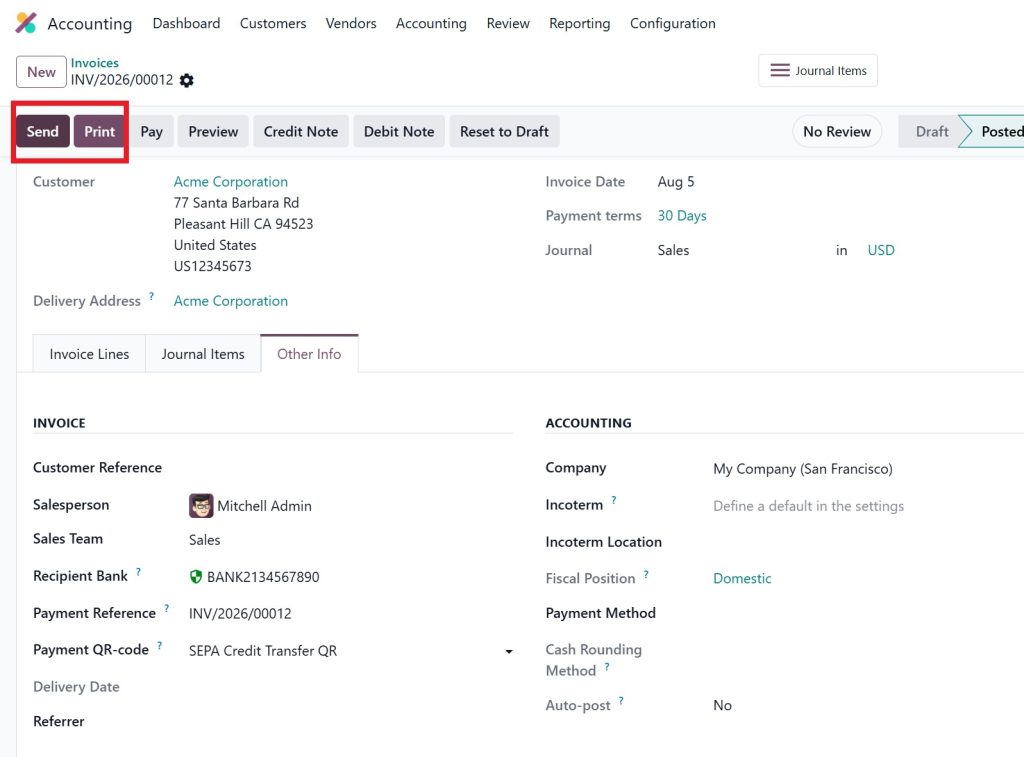
You’ll notice a QR code on invoice documents near the payment section.
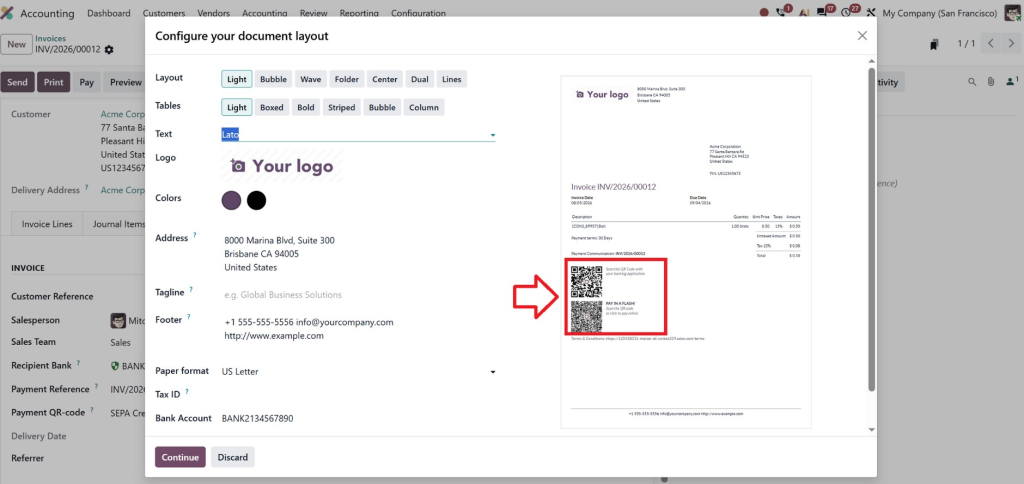
Customers can scan it using their banking or payment application without entering account details manually.
Step 6 – Customer Completes the Payment
When the customer scans the QR code:
- Payment amount is filled automatically.
- Bank details appear instantly.
- Payment reference is already included.
- The customer simply reviews the information and confirms the payment.
Because everything is pre-filled, payments are usually completed much faster and with fewer mistakes.
⚠️ One Important Note
The exact menu names and QR code options depend on your country’s localization. For example, Swiss QR-bills, EPC QR codes (Europe), and other regional standards are available only when the corresponding localization package is installed. If your localization doesn’t support invoice QR codes, you may need to enable the appropriate localization or use a compatible payment provider.
Why Customers Prefer QR Code Payments
Businesses often focus on making their own work easier, but successful companies also think about the customer’s experience.
Imagine receiving an invoice after a busy workday.
One invoice asks you to manually copy account numbers, payment references, and invoice details before making a transfer.
Another invoice simply says:
“Scan the QR code below to pay instantly.”
Most people won’t think twice, they’ll choose the easier option.
That’s exactly why QR code on invoice documents are becoming more common.
Customers appreciate convenience.
The fewer steps involved, the more likely they are to complete payment immediately instead of postponing it.
This doesn’t just improve customer satisfaction.
It also leads to faster invoice payments, which means healthier cash flow for your business.
For companies sending recurring invoices every month, even reducing the average payment time by a few days can make a noticeable difference.
More Than Faster Payments - A Smarter Accounting Process
Many people think Invoice QR Codes are only about collecting payments faster.
In reality, they improve your entire accounting workflow.
When payments arrive with the correct information attached, your finance team spends less time matching transactions with invoices. Instead of sorting through bank records and checking references manually, they can focus on reporting, planning, and other important financial tasks.
This is where Odoo 19 Accounting stands out.
Its built-in automation helps businesses reduce repetitive work without making the accounting process more complicated.
As your business grows, you naturally send more invoices every month. Without automation, that also means more manual work.
With the right setup, however, automated invoice payments and QR-enabled invoices help your accounting process grow with your business, not against it.
The result is a finance department that works faster, makes fewer mistakes, and spends more time adding value instead of fixing problems.
Is This Feature Right for Every Business?
Absolutely.
Whether you’re a small business sending ten invoices a month or a growing company processing hundreds, Invoice QR Codes can make a noticeable difference.
They’re especially useful for businesses such as:
- Trading companies
- Retail businesses
- Manufacturers
- Service providers
- Consultants
- Healthcare organizations
- Educational institutions
- Wholesale distributors
If your business sends invoices, you can benefit from making payments simpler.
You don’t need to change the way you work, you simply make the final step of the customer journey much easier.
That small improvement often leads to quicker payments, fewer follow-up emails, and happier customers.
Why the Right Odoo Partner Makes All the Difference
Installing Odoo is one thing.
Getting the most out of it is something else entirely.
Many businesses use only a fraction of what Odoo 19 Accounting can actually do because their system wasn’t configured properly from the beginning.
A trusted Odoo implementation partner can help you:
- Configure secure payment methods
- Enable Invoice QR Codes correctly
- Customize invoice layouts to match your brand
- Set up automated invoice payments
- Connect accounting with sales and banking modules
- Train your team to use the system effectively
At Netilligence, we don’t just implement Odoo, we help businesses build accounting systems that save time, reduce manual work, and improve the overall customer experience.
Our goal is to ensure every feature, including Invoice QR Codes, works the way your business needs it to.
When technology is implemented properly, your team spends less time solving accounting issues and more time growing the business.
Make Every Invoice Easier to Pay
Getting paid shouldn’t be the hardest part of doing business.
You can deliver great products, provide excellent service, and build strong customer relationships, but if the payment process is slow or complicated, your cash flow will still suffer.
That’s why Invoice QR Codes are more than just a modern feature in Odoo 19 Accounting. They remove unnecessary steps, reduce payment errors, and make life easier for both businesses and customers.
Instead of asking customers to manually enter payment details, you give them a faster, simpler way to complete the transaction with a single scan.
It’s a small change that creates a better experience, encourages faster invoice payments, and supports a more efficient accounting process.
If you’re planning to upgrade your accounting system or want to make better use of Odoo 19 Accounting, now is the perfect time to explore what Invoice QR Codes can do for your business.
At Netilligence, we help businesses implement Odoo solutions that don’t just work, they work smarter. From setup and customization to automation and ongoing support, our team ensures your accounting system is built to save time, improve accuracy, and help you get paid faster.
Because when getting paid becomes easier, growing your business becomes easier too.




