

Why Consignment Notes Matter in Modern Logistics
Consignment Notes are an important part of road transportation because they provide a clear record of what is being shipped, who is sending it, who is receiving it, and who is responsible for transporting it. For businesses that handle frequent deliveries, manually preparing Consignment Notes can be time-consuming and lead to unnecessary paperwork.
Odoo Inventory can make the process much easier. With Odoo’s dispatch and delivery management features, businesses can generate a CMR consignment note directly from a delivery order. The system uses information already available in Odoo, reducing the need to enter the same shipment details repeatedly.
With Odoo CMR, businesses can connect shipment documentation to their inventory operations. Odoo can generate a consignment note from a delivery order, and its Inventory CMR functionality helps prepare the required transport document for road shipments. This makes consignment notes in Odoo useful for companies that handle domestic or international road transportation.
If your business still prepares every CMR manually, manages separate documents, or copies information between systems, it may be time to consider a better approach. Understanding CMR in Odoo Inventory can help you build a more organized, reliable shipping workflow.
What Is a CMR Consignment Note?
A CMR is a standardized waybill used for international road carriage of goods. CMR stands for the Convention on the Contract for the International Carriage of Goods by Road. The document provides important shipment information for the sender, receiver, and carrier.
In practical terms, a CMR can contain information such as:
- Sender details
- Receiver details
- Carrier information
- Shipment and delivery information
- Description of goods
- Quantity and other transport details
- Transport-related information
- Required signatures or additional details
A traditional CMR typically has multiple copies for the various parties involved in the transportation process. Odoo’s documentation explains that the standard CMR contains copies for the sender, receiver, carrier, and a second carrier. Odoo can populate the form with information already stored in the system, and you can add additional information manually where needed.
This distinction matters: a consignment note is a transport document, whereas Odoo’s consignment inventory feature refers to stock owned by another party. These are two different concepts, even though they use similar terminology.
How Does Odoo CMR Work With Inventory?
The main advantage of Odoo CMR is that it integrates the consignment note into the delivery process rather than treating it as a separate document.
In Odoo Inventory, outgoing shipments are managed through delivery orders. Once the delivery order contains the relevant shipment information, the CMR can be generated from the delivery operation when the required dispatch management setup is available.
This creates a more connected workflow:
Sales Order → Delivery Order → Shipment Preparation → CMR → Delivery
Instead of creating a CMR from scratch, Odoo takes information from the relevant delivery operation. This reduces duplicate data entry and makes documentation easier to manage.
This is especially useful for companies with a high volume of deliveries. A logistics team can prepare shipment information in Odoo and then generate the corresponding transport document from the same system.
Odoo also supports batch delivery CMRs. When you group several delivery orders into a batch transfer, Odoo can generate a CMR for each delivery in that batch.
How to Create a CMR in Odoo Inventory
If you are wondering how to create a CMR in Odoo, start with the delivery order.
Step 1: Prepare the Delivery Order
First, make sure the relevant delivery order has been created in Odoo Inventory.
Go to:
Inventory → Operations → Deliveries
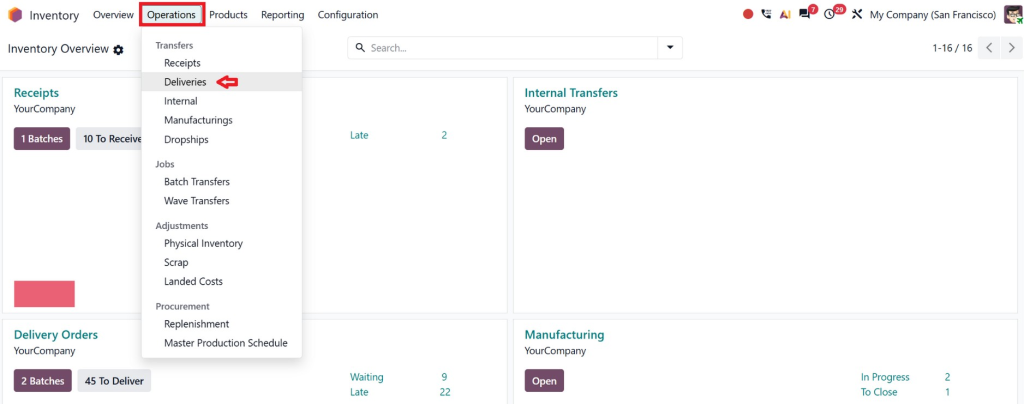
Open the delivery order for which you need a CMR.
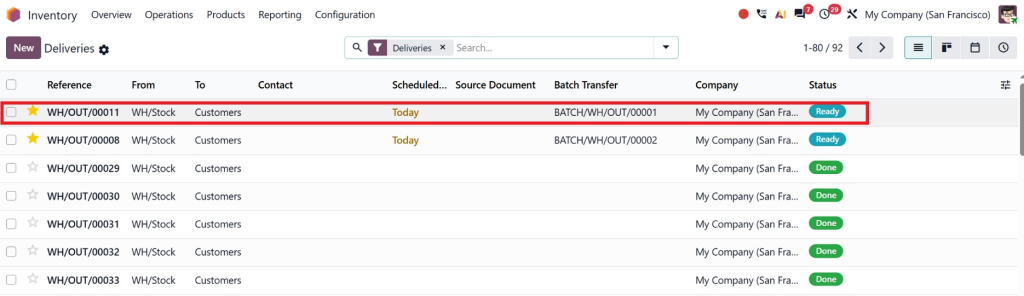
The delivery order should include the relevant shipment information, such as the products being delivered and the customer or destination details.
A properly prepared delivery order matters because Odoo uses delivery operation information to complete the CMR.
Step 2: Review Shipment Information
Before generating the document, review the delivery order carefully.
Check:
- Customer or receiver information
- Delivery address
- Products
- Quantities
- Shipment details
- Carrier or delivery method, where applicable
- Scheduled delivery information
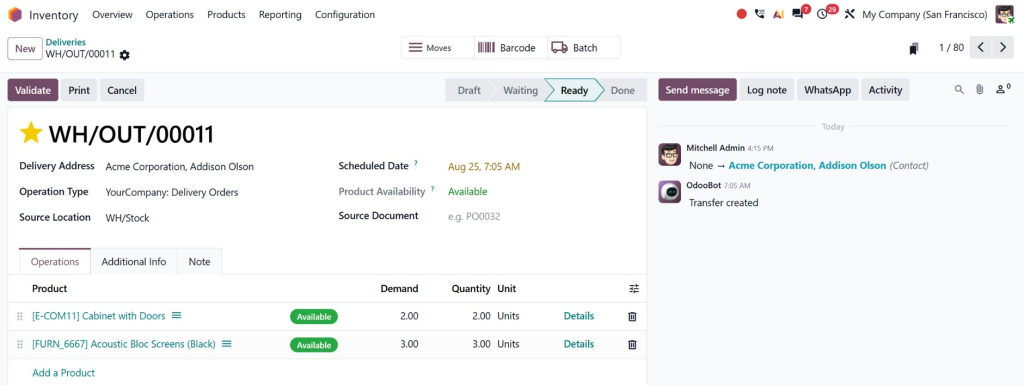
This simple review can help prevent mistakes from appearing on the final Odoo delivery note, CMR, or related shipping documentation.
Step 3: Generate the CMR
Once the delivery order is ready, click the Actions menu.
Then select:
Print → Consignment Note (CMR)
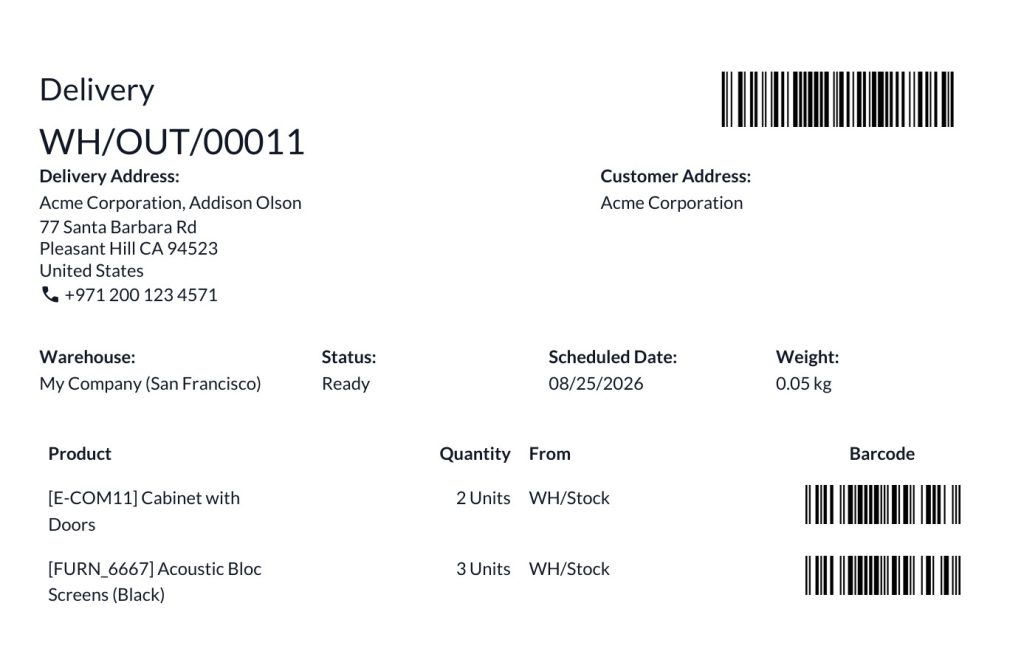
Odoo generates the CMR based on the information available in the delivery order.
This is one of the biggest advantages of CMR in Odoo Inventory. Instead of preparing a separate document manually, Odoo generates the transport document from an existing operational record.
Step 4: Add Any Required Information
Although Odoo can automatically fill in information available in the system, not every detail will be available automatically.
Odoo notes that you may need to enter additional information manually on the CMR.
Therefore, your logistics team should review the generated document before sending it with the shipment.
Managing CMRs for Multiple Deliveries
Businesses that handle only a few shipments can generate a CMR individually. But what happens when dozens of deliveries need to leave the warehouse?
This is where batch processing becomes useful.
Odoo allows businesses to group delivery orders into batch transfers. From the batch transfer, users can generate a CMR for each delivery included in that batch.
To work with batch CMRs, navigate to:
Inventory → Operations → Batch Transfers
Open the relevant batch transfer and use:
Actions → Print → Consignment Note (CMR)
Odoo then generates a consignment note for each delivery within the batch.
For logistics teams, this can save considerable administrative effort. Instead of opening each shipment individually, preparing documents, and repeating the process, you can handle multiple delivery documents through a batch workflow.
Odoo Delivery Note CMR vs. Regular Delivery Documentation
Understanding the difference between a regular delivery slip and a CMR is useful.
A delivery slip primarily documents the goods being delivered to a customer. It can include product details, quantities, and other delivery information. Odoo also supports printing delivery slips from delivery orders, including relevant lot or serial information when the appropriate settings are enabled.
A CMR, on the other hand, is a transport document designed for road carriage.
Therefore, an Odoo CMR delivery note should not be treated simply as another name for a standard delivery slip. They serve related but different purposes.
For a logistics business, you may need both:
- Delivery Slip: Helps document the goods being delivered.
- CMR: Provides the road transport waybill.
- Shipping Label: Helps identify the shipment or package.
- Invoice: Handles the commercial and financial side of the transaction.
Keeping these documents connected through Odoo can give your team better visibility throughout the delivery process.
Benefits of Managing Consignment Notes in Odoo
Using Consignment Notes within a connected Odoo workflow can provide several practical advantages.
Less Manual Data Entry
Because Odoo can populate the CMR using information already available in the delivery operation, employees do not have to recreate every shipment detail from scratch.
Better Shipment Accuracy
Manual document preparation creates opportunities for typing mistakes. Connecting the CMR to the delivery order helps reduce unnecessary duplication.
Faster Documentation
For companies processing many shipments every day, even a few saved minutes per delivery can make a meaningful difference.
Better Coordination
Warehouse employees, logistics teams, carriers, and administrative staff can work from information stored within the same ERP environment.
Easier Batch Processing
Companies handling multiple deliveries can use batch transfers and generate CMRs for deliveries included in the batch.
Improved Traceability
Odoo Inventory already provides visibility into product movements, delivery operations, and shipment-related information. Connecting transport documentation to these workflows can make it easier to understand what was scheduled, processed, and delivered.
Important Difference: CMR vs. Consignment Stock
One common source of confusion is the word “consignment.”
In Odoo, consignment stock refers to products a business stores and sells, but another party still owns. Odoo provides a dedicated consignment feature for managing this type of inventory.
A CMR consignment note, however, is a transport document used for road freight.
These are not the same thing.
For example, a retailer might store products that belong to a supplier. That is consignment stock. If those products are later transported by road and require a CMR, the CMR is the transport document for that shipment.
Understanding this difference matters most when configuring Odoo for businesses involved in distribution, logistics, wholesale, or international trade.
How Netilligence Can Help With Odoo Inventory and CMR
Managing Consignment Notes may sound simple, but getting the complete workflow right can require more than enabling a feature.
Your business may need to connect sales, inventory, warehouse operations, delivery, transport management, and documentation in a way that matches your actual processes.
This is where an experienced Odoo implementation partner can add value.
At Netilligence, we help businesses assess their existing workflows, configure Odoo around their operational requirements, and reduce unnecessary manual work. Instead of forcing your logistics team to adapt to a complicated process, we build an Odoo environment that supports how your business works.
Whether you need help with Odoo CMR, delivery workflows, inventory configuration, warehouse operations, or broader Odoo implementation, professional configuration can help you get more value from your ERP.
Move Every Shipment Forward With Smarter Consignment Notes in Odoo
Managing Consignment Notes does not have to be a disconnected paperwork process. With Odoo Inventory, businesses can generate CMR documents for delivery operations and use batch transfers to handle multiple shipments. Odoo can automatically populate available information while allowing you to add details when needed.
For businesses in road transportation, distribution, and logistics, Odoo consignment note management can reduce repetitive data entry, improve documentation, and connect transport paperwork with inventory operations.
If your current process involves spreadsheets, manually prepared CMRs, repeated data entry, or disconnected shipping documents, it may be worth reviewing how Odoo can improve your workflow.
The right Odoo configuration can turn shipment documentation from a daily administrative burden into a structured part of your logistics process. Contact Netilligence to discuss how Odoo Inventory can be configured around your business and delivery requirements.




