

Why Businesses Need to Manage Company Documents in Odoo 19
Every company deals with documents every single day. These documents may include invoices, contracts, employee records, purchase orders, reports, or important internal files. As businesses grow, the number of documents grows as well. Without a proper system, managing these files can quickly become confusing and time-consuming.
This is exactly why modern companies choose to Manage Company Documents in Odoo 19. Instead of storing documents across emails, local folders, paper files, or different software platforms, Odoo allows businesses to manage everything from one centralized system.
With the Odoo 19 document management module, companies can organize their documents in structured digital workspaces where every file is easy to find and easy to manage. This means no more wasting time searching through endless folders or asking colleagues where a file is stored.
When businesses Manage Company Documents in Odoo 19, they can create a fully digital environment through Odoo 19 paperless document management. Instead of relying on physical paperwork, companies can store and manage documents digitally, which improves efficiency and reduces operational costs.
Another powerful benefit is the ability to Odoo 19 centralize invoices and contracts within the same system. Financial documents, agreements, and other important files can be safely stored in dedicated workspaces where they remain organized and accessible whenever needed.
Odoo also allows companies to Odoo 19 link documents to accounting, sales, and HR, which means documents are not just stored, they are connected to actual business processes. For example, an invoice can automatically be linked to an accounting record, while an employee contract can be connected to the HR profile.
Using Odoo 19 workspaces tags documents, businesses can categorize files using smart tags, making it extremely easy to search and retrieve documents within seconds.
In this complete Odoo 19 documents app tutorial, we will explore how businesses can Manage Company Documents in Odoo 19 effectively, improve productivity, and build a modern paperless workspace.
Understanding the Odoo 19 Document Management Module
What is the Odoo 19 Document Management Module?
The Odoo 19 document management module is a powerful digital tool designed to help businesses store, organize, and manage all company files in one centralized location.
Instead of using multiple tools for document storage, Odoo provides an integrated platform where documents are directly connected with business operations.
For example:
- Invoices can be linked with accounting entries
- Contracts can be connected to sales orders
- Employee documents can be attached to HR records
This integration makes document management not only easier but also smarter.
With Odoo 19 paperless document management, companies can eliminate traditional paper-based filing systems and move toward a modern digital workspace.
How to Manage Company Documents in Odoo 19
Now, let’s explore the practical steps businesses can follow to Manage Company Documents in Odoo 19 efficiently.
Step 1: Install the Documents Application
The first step in this Odoo 19 documents app tutorial is installing the Documents module.
Steps:
- Go to the Odoo Apps menu
- Search for Documents
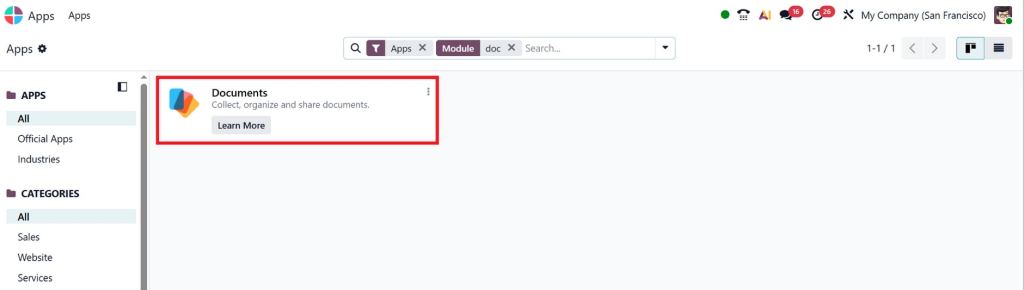
- Click Install
Once installed, the system automatically creates a document dashboard where all company files can be managed.
Step 2: Create Workspaces for Departments
Workspaces are like folders where documents are organized according to departments or functions.
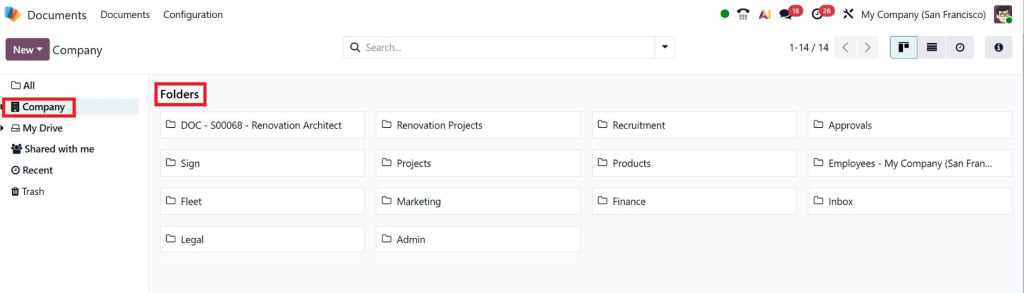
Examples of workspaces include:
- Finance
- Human Resources
- Sales
- Purchasing
- Legal
- Marketing
With Odoo 19 workspaces, tags, and documents, businesses can organize files within these workspaces using smart tags and labels.
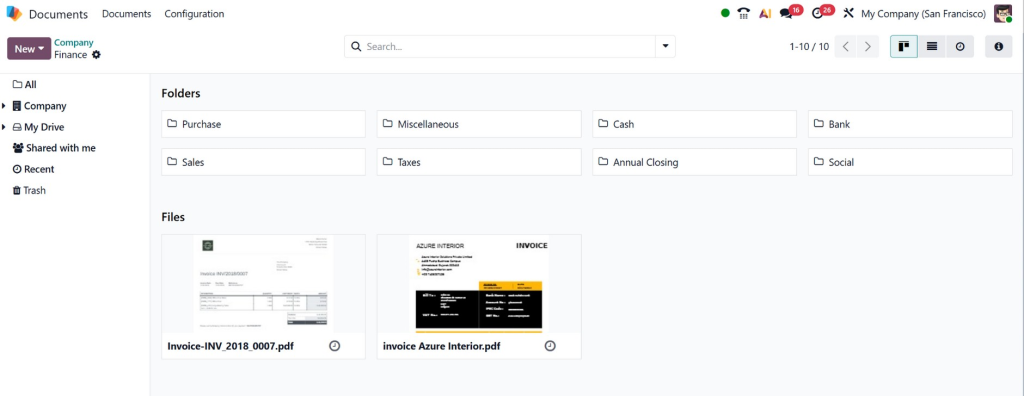
For example:
The Finance workspace may contain:
- invoices
- payment records
- financial reports
The HR workspace may contain:
- employee contracts
- identity documents
- payroll records
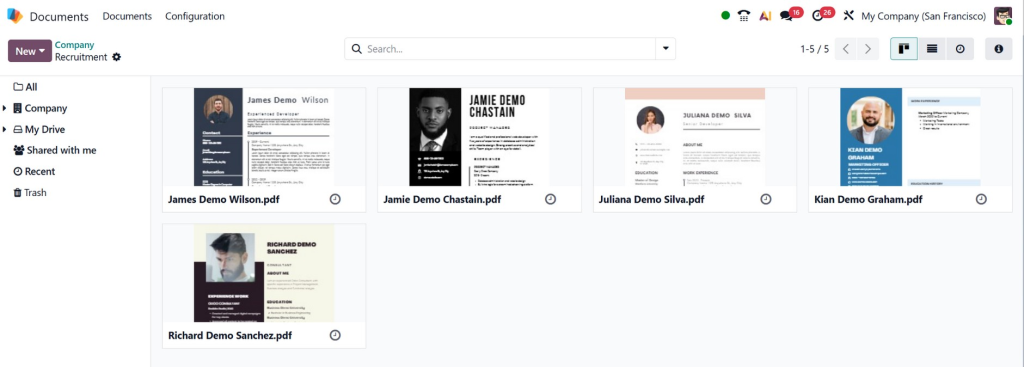
This structure makes it easier to Manage Company Documents in Odoo 19 without confusion.
Step 3: Upload and Organize Documents
Uploading documents in Odoo is extremely simple.
Users can upload files by:
- dragging and dropping files
- uploading from their computer
- scanning documents directly
- importing documents via email
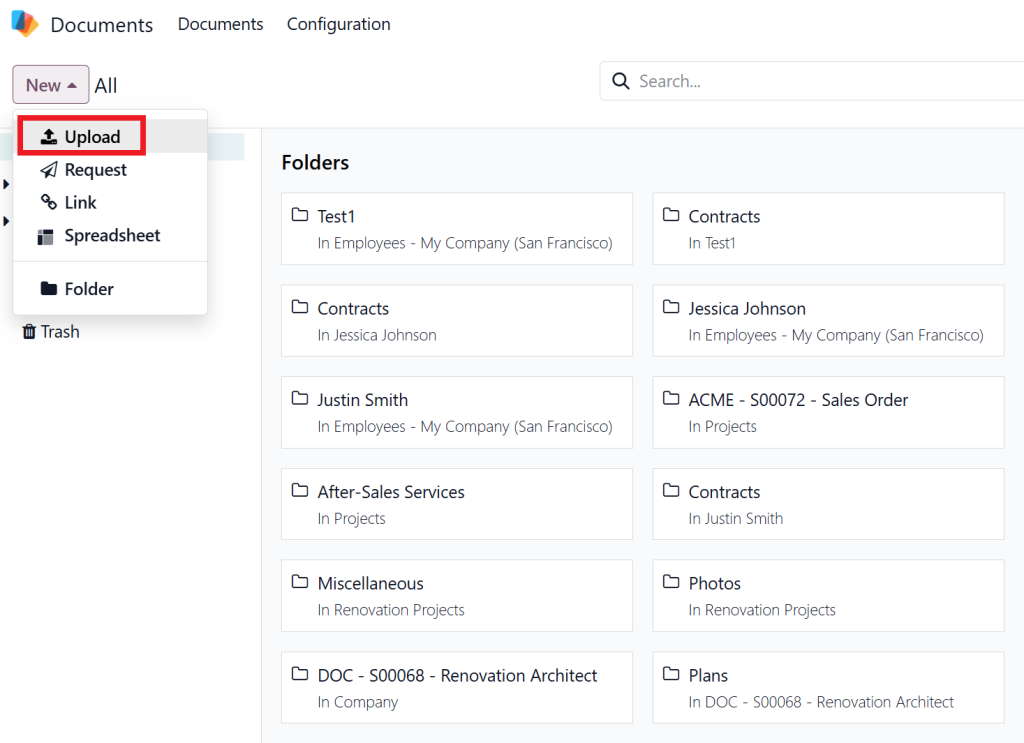
Once uploaded, documents can be categorized using tags.
Examples of tags include:
- invoice
- contract
- approved
- pending
- confidential
These tags help businesses in Odoo 19 workspaces to tag documents effectively and retrieve them instantly.
Step 4: Link Documents to Business Operations
A powerful feature of Odoo is integration with other modules.
Businesses can link documents to Odoo 19 accounting, sales, and HR, making documents part of the workflow rather than just stored files.
Examples include:
Accounting Integration
Invoices, receipts, and financial documents can automatically link with accounting entries.
Sales Integration
Customer agreements and quotations can be attached to sales orders.
HR Integration
Employee contracts and certifications can be linked to employee profiles.
This makes document tracking much easier for businesses.
Step 5: Automate Document Workflows
Automation is another powerful capability of the Odoo 19 document management module.
Businesses can create automation rules such as:
- automatic document classification
- document approval workflows
- automatic tagging of invoices
- department-based document routing
For example:
When an invoice is uploaded, Odoo can automatically:
- tag it as “invoice.”
- Send it to accounting for review
- store it in the finance workspace
This automation saves time and improves accuracy.
Why Traditional Document Management Creates Problems
Common Challenges Businesses Face
Many organizations still rely on manual document management methods. These traditional methods often cause several challenges, such as:
- Lost documents
- Duplicate files
- Slow document retrieval
- Security risks
- Limited collaboration
For example, imagine a finance team trying to find an invoice from six months ago. If documents are stored in multiple folders or emails, finding the correct file may take hours.
However, when companies Manage Company Documents in Odoo 19, everything becomes searchable, structured, and organized.
Employees can search using document names, tags, or related records to find the required file instantly.
Key Benefits of Managing Documents in Odoo 19
1. Centralized Document Storage
One of the biggest advantages is the ability to Odoo 19 centralize invoices and contracts in one platform.
This means:
- no scattered documents
- no multiple storage locations
- easy document tracking
Every file remains organized inside the Odoo system.
2. Faster Access to Important Documents
With smart search and tagging features, employees can quickly locate documents when needed.
Using Odoo 19 workspaces, tags, and documents, businesses can categorize files based on departments, document types, or project names.
This saves valuable time and improves productivity.
3. Improved Team Collaboration
Odoo allows teams to collaborate on documents easily.
Employees can:
- Share files internally
- Add notes or comments
- request approvals
This makes collaboration much smoother compared to traditional document systems.
4. Enhanced Security
Security is another major advantage of using Odoo.
When businesses Manage Company Documents in Odoo 19, they can control access permissions for different users.
For example:
- HR files are only accessible to HR managers
- financial records accessible to accounting staff
- confidential contracts accessible to executives
This ensures sensitive data remains protected.
Practical Example: Document Management in a Real Company
To understand the real benefits, imagine a company dealing with hundreds of invoices and contracts every month.
Without a document management system:
- Files are stored in emails
- Contracts are saved in random folders
- Employees struggle to find documents
But when the company decides to Manage Company Documents in Odoo 19, everything changes.
Invoices are automatically stored in the finance workspace.
Employee contracts are stored within the HR workspace.
Sales agreements are connected to sales orders.
Within seconds, employees can locate any document using tags or search filters.
This dramatically improves efficiency and reduces operational stress.
Building a Fully Paperless Office with Odoo 19
Businesses around the world are moving toward digital operations.
Using Odoo 19 paperless document management, companies can reduce paper usage significantly.
Benefits include:
- lower printing costs
- faster document sharing
- better document security
- easier document backups
A paperless system is not only more efficient but also environmentally friendly.
Why Businesses Choose Netilligence for Odoo Implementation
Implementing Odoo successfully requires experience and technical expertise.
This is where Netilligence plays a crucial role.
At Netilligence, we help businesses design and implement customized Odoo solutions that match their workflows and business needs.
Our services include:
- Odoo implementation
- Odoo customization
- Odoo training
- Odoo integration
- ongoing support
We help companies Manage Company Documents in Odoo 19 by creating structured document systems that improve efficiency and productivity.
Remake Your Document Management with Odoo 19
In today’s digital world, businesses cannot afford to rely on outdated document management methods.
When organizations Manage Company Documents in Odoo 19, they gain a powerful system that simplifies document storage, improves collaboration, and enhances security.
With features like the Odoo 19 document management module, the ability to Odoo 19 centralize invoices and contracts, smart organization through Odoo 19 workspaces, tags documents, and seamless integration to Odoo 19 link documents to accounting, sales, HR, businesses can completely transform how they handle documents.
By adopting Odoo 19 paperless document management, companies can create a smarter, faster, and more organized digital workplace.
If you want to simplify your document management and improve operational efficiency, Odoo 19 is the perfect solution.
And with the expert support of Netilligence, your business can unlock the full power of Odoo and move confidently toward a modern paperless future.




