

Why You Need to Prevent Duplicate Customer Records
Preventing duplicate customer records is more important than it may seem when managing customer data in an ERP system. As a business grows, the number of customers, leads, suppliers, and contacts also increases. Without proper Odoo contact management, the same customer may accidentally be added more than once.
For example, one salesperson may create a customer record using the company name, while another employee creates the same customer using the contact person’s name. Over time, these Odoo duplicate contacts can make your database confusing and difficult to manage.
Duplicate records can affect sales activities, customer communication, reporting, invoicing, and overall Odoo customer management. A sales representative may contact the same customer twice, while another employee may unknowingly work on a separate record for the same company.
This is why businesses need a reliable way to Prevent Duplicate Customer Records before they become a bigger problem.
Odoo provides tools that help businesses identify and manage duplicate customer records. It also allows users to merge duplicate contacts and clean up existing customer data.
With the right Odoo setup and professional implementation, businesses can build a cleaner customer database, reduce manual work, and improve the accuracy of their day-to-day operations.
What Causes Duplicate Customer Records in Odoo?
Before learning how to Prevent Duplicate Customer Records, it is important to understand why duplicates happen in the first place.
In many businesses, customer information enters the system from different sources. A customer might contact the company via the website, email, phone, social media, or a sales representative. If employees don’t check whether the customer already exists, they may create a new record unnecessarily.
Some common reasons for duplicate contacts in Odoo include:
- Different employees creating the same customer record
- Spelling variations in customer names
- Different phone number formats
- Customers being entered through different business processes
- Importing customer data from external systems
- Creating a new contact instead of searching for an existing one
- Multiple employees maintaining customer information independently
For instance, one record may be created as ABC Trading LLC, while another employee enters ABC Trading. Both records may belong to the same business.
This creates an Odoo duplicate customer problem that can affect the entire customer lifecycle.
The solution is not simply deleting one record. Businesses need a structured process to identify, review, and manage duplicates.
How to Merge Duplicate Contacts in Odoo
Sometimes duplicate records already exist. In that situation, knowing how to merge duplicate contacts in Odoo becomes essential.
Odoo allows users to select duplicate contacts and merge them into a single record. According to the Odoo 19 documentation, users can open the Contacts application, switch to list view, select the duplicate records, and choose Actions → Merge.
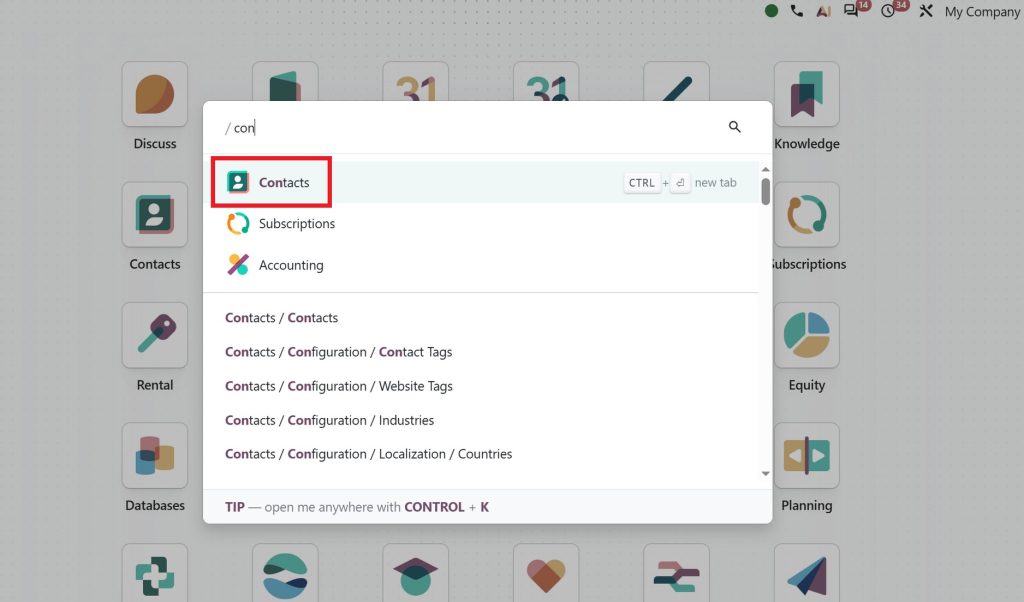
Step 1: Open the Contacts Application
Go to the Contacts application in Odoo.
Switch to the list view to easily identify and select multiple records.
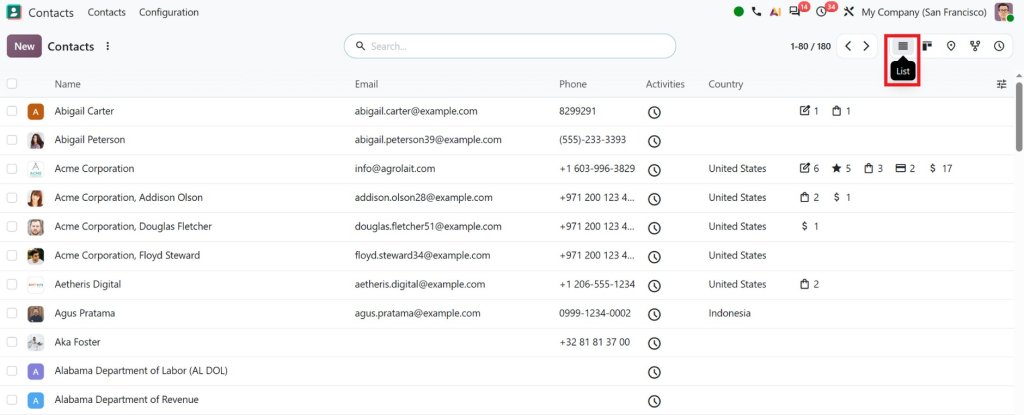
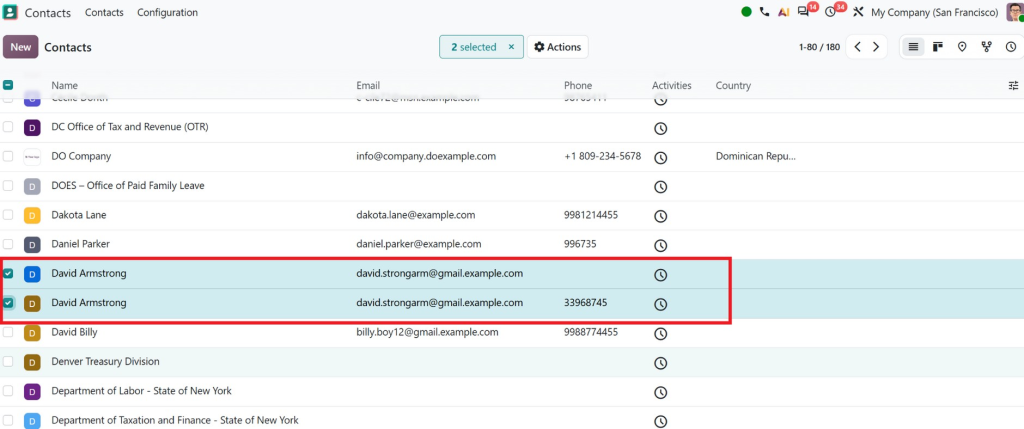
Step 2: Select the Duplicate Records
Find the customer records that appear to represent the same person or company.
Select the relevant records using the checkboxes.
Before merging, carefully compare details such as:
- Name
- Phone
- Company
- VAT
- Address
- Customer history
This step is important because not every similar-looking contact is actually a duplicate.
Step 3: Select Merge
Once you have confirmed that the records belong to the same customer, go to:
Actions → Merge
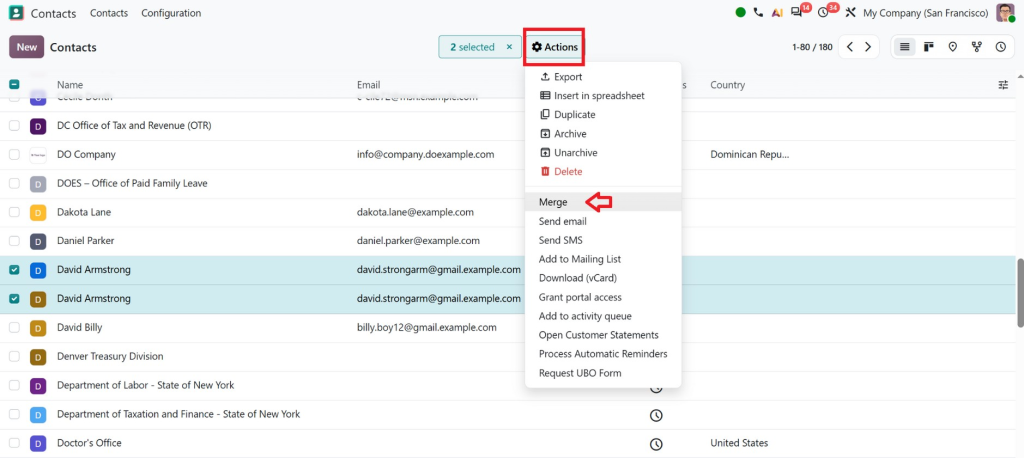
Odoo opens a merge window where you can review the selected contact information before completing the process.
Step 4: Select the Destination Contact
Odoo allows users to select the destination contact. The system defaults to the first-created contact record, but users can choose another record if necessary.
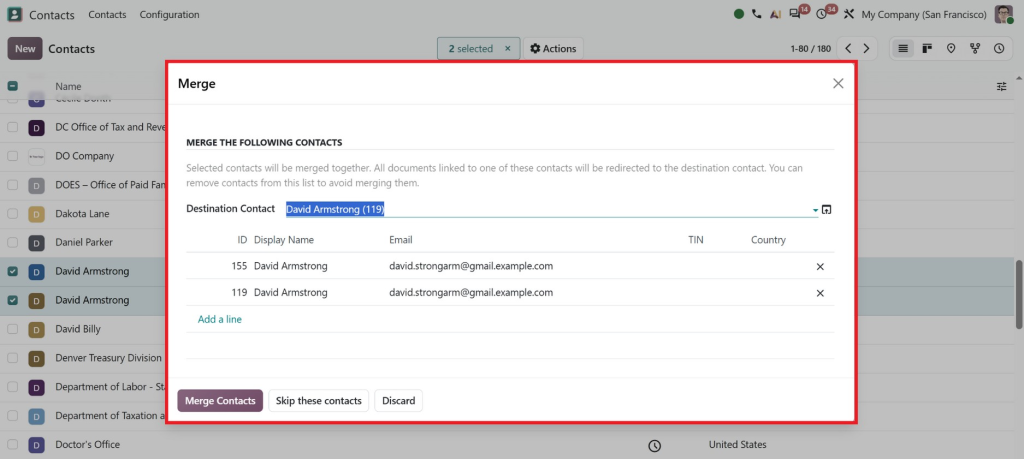
Review the information carefully and confirm the merge.
Important: Merging contacts is irreversible, so businesses should merge records only when they are certain the contacts represent the same customer.
How Odoo Helps Prevent Duplicate Customer Records
Odoo’s Contacts application serves as a central place to store important customer and business information. Contact records can include names, email addresses, phone numbers, addresses, company relationships, and other details.
This centralized approach is a foundation of effective Odoo customer management.
1. Centralized Customer Information
Instead of keeping customer information across spreadsheets, emails, and separate systems, businesses can maintain customer records in Odoo.
With centralized customer information, employees can search the existing database before creating a new record.
This simple habit can significantly reduce duplicate Odoo contacts.
2. Consistent Contact Details
Odoo allows businesses to maintain structured information such as:
- Customer name
- Company
- Phone number
- Address
- VAT information
- Parent company
- Contact type
Consistent information makes it easier to identify whether two records belong to the same customer.
3. Duplicate Detection and Deduplication
One of Odoo’s most useful features for preventing duplicate contact workflows is deduplication.
Odoo can search for possible duplicate records using criteria such as Email, Name, Is Company, VAT, and Parent Company. If you select multiple criteria, Odoo can suggest records that match all selected fields.
This gives businesses a practical way to identify potential duplicate Odoo customer records without manually checking the entire database.
Why Duplicate Customer Records Can Hurt Your Business
Many businesses underestimate the impact of duplicate customer records in Odoo.
A duplicate may look like a small data-entry issue, but when hundreds or thousands of records are involved, the consequences can become significant.
Poor Customer Communication
If two salespeople work from separate records for the same customer, the customer may receive multiple calls or emails about the same matter.
This can make your business look unorganized.
Inaccurate Sales Reports
Duplicate records can split customer activities between multiple profiles.
As a result, management may not get a complete picture of the customer’s sales history or value.
Repeated Manual Work
Employees may waste time updating the same customer information in different records.
Instead of working with one complete profile, teams have to check multiple records.
Inconsistent Customer Information
One contact may have the latest phone number while another contains an old email address.
This creates confusion and increases the chance of using outdated information.
Problems Across Business Operations
Customer records are not limited to the Contacts application. They can connect to other business processes such as sales, CRM, invoicing, and accounting.
That makes clean data an important part of effective ERP management.
Best Practices for Odoo Contact Management
Odoo’s deduplication tools help, but businesses should also establish strong Odoo contact management practices.
Make Search Before Create a Habit
Employees should search for a customer before creating a new record.
Searching by name, email, phone number, or company can help identify an existing record.
Standardize Customer Information
Create internal guidelines for entering customer information.
For example, decide how to record company names, phone numbers, addresses, and VAT numbers.
Review Imported Data
If you import customer information from spreadsheets or another system, review the data before importing it into Odoo.
Poor-quality imported data can quickly increase duplicate contacts in Odoo.
Schedule Regular Data Cleanup
Do not wait until your database becomes difficult to manage.
Regularly review customer records and use Odoo’s deduplication functionality to identify potential duplicates.
Train Your Team
Even the best ERP system cannot fully prevent poor data entry if employees do not know how to use it correctly.
Train employees to search for contacts, create records, update information, and handle duplicates.
How Netilligence Can Help You Keep Your Odoo Database Clean
Odoo gives businesses the tools they need to manage customer information, but the best results depend on how the system is configured and used.
At Netilligence, we understand that Odoo customer management is not simply about creating contact records. It is about building a structured system where customer information remains accurate, accessible, and useful across business operations.
Our Odoo experts can help businesses:
- Configure Odoo Contacts according to business requirements
- Review and clean existing customer databases
- Identify Odoo duplicate customer records
- Establish better data-entry processes
- Help teams understand how to merge duplicate contacts in Odoo
- Improve customer and contact management workflows
- Support data migration and cleanup
- Customize Odoo when standard functionality is not enough
If your database already contains many duplicate records, manually fixing everything can be time-consuming and risky. A professional Odoo team can review your current setup and recommend a safer and more efficient approach.
Turn Your Customer Data Into a Business Asset
A clean customer database is more than an administrative requirement. It directly supports better sales, customer service, reporting, and decision-making.
Using Odoo’s centralized Contacts application, structured customer information, and deduplication features, businesses can take practical steps to Prevent Duplicate Customer Records and maintain better data quality.
Odoo also provides tools to identify possible duplicates based on fields such as email, name, VAT, company status, and parent company, and to review and merge existing duplicate records when appropriate.
However, technology alone is not enough. Businesses also need the right configuration, processes, and employee practices.
If your Odoo database is becoming difficult to manage because of duplicate contacts, inconsistent customer information, or inefficient workflows, Netilligence can help you make your Odoo environment cleaner and more reliable.
Clean data. Better decisions. Stronger customer relationships, powered by Odoo.




