

In landscape of business management software, the Odoo 18 Documents Module emerges as a powerful tool designed to enhance file management and streamline document workflows. This module offers a comprehensive suite of Odoo file management features, facilitating centralized document storage that is secure, efficient, and user-friendly. In this blog post, we will explore the core functionalities of the Odoo 18 Documents Module, including how to use Odoo Documents, the benefits of document tagging, and the secure storage options available to users.
Key Features of the Odoo 18 Documents Module
- Centralized Document Storage
One of the standout features of the Odoo Documents Module is its ability to provide centralized document storage. This functionality allows users to store all their files in a single location, making accessing, managing, and sharing documents across teams and departments easier. By leveraging this feature, organizations can eliminate the chaos of scattered documents and enhance collaboration among team members.

2. Odoo File Management Features
The Odoo file management features are designed to simplify document handling. Users can easily upload, organize, and categorize files using a user-friendly interface. The module supports various file formats, ensuring compatibility with various documents. Additionally, users can create folders and subfolders to maintain an organized structure, which is crucial for efficient document retrieval.

- how to use Odoo Documents
Utilizing the Odoo Documents Module is straightforward. Here is a step-by-step guide to help you get started:
Installation: Ensure the Odoo 18 Documents Module is installed in your Odoo environment.

Access the Module: Navigate to the Documents app from the Odoo dashboard.

Upload Files: Click the “Upload” button to add new documents. You can drag and drop files or select them from your computer.
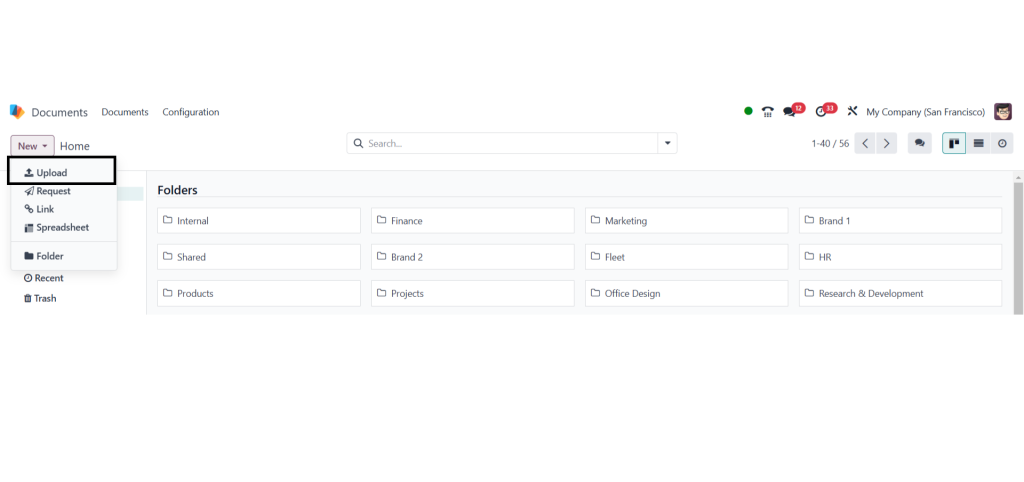
Organize Files: Create folders and subfolders to categorize your documents. This organization will facilitate quicker access in the future.
Tagging Documents: Use the document tagging feature to add relevant tags to your files, making it easier to search and filter documents later.
Share and Collaborate: Share documents with team members by granting access permissions, allowing seamless collaboration.
4. Odoo 18 Document Tagging
Document tagging is a crucial aspect of the Odoo 18 Documents Module that enhances file organization and retrieval. Users can quickly locate specific files based on keywords or categories by assigning tags to documents. This feature significantly improves search functionality within the module, allowing users to filter documents based on their tags.
- Secure Document Storage in Odoo
Security is paramount when it comes to document management. The Odoo 18 Documents Module provides robust security features to protect sensitive information. Users can set access permissions for each document or folder, allowing only authorized personnel to view or edit files. Additionally, Odoo employs encryption protocols to safeguard documents during storage and transmission.
- Manage Files with Odoo 18
Efficient file management is at the heart of the Odoo 18 Documents Module. The module allows users to perform various actions on documents, including editing, sharing, and deleting files. The intuitive interface ensures that even users with minimal technical expertise can manage their documents effectively. Furthermore, the module integrates seamlessly with other Odoo applications, enabling users to link documents to specific projects, tasks, or records.
Benefits of Using the Documents Module
The Odoo 18 Documents Module offers numerous benefits that can transform how organizations manage their documents:
– Improved Collaboration: Centralized storage and sharing capabilities foster better teamwork.
– Enhanced Productivity: Quick access to documents reduces time spent searching for files.
– Increased Security: Robust security measures protect sensitive information.
– Workflows: Integration with other Odoo applications allows for seamless document handling within broader business processes.
Documents Module is a game-changer for organizations
Seeking to enhance their file management capabilities With features such as centralized document storage, robust security measures, and intuitive tagging options, this module empowers users to manage documents efficiently while fostering collaboration and productivity. By adopting the Odoo 18 Documents Module, businesses can streamline their document workflows and focus on what truly matters—achieving their goals.




