
Managing product variants in Odoo can sometimes feel overwhelming, especially for newcomers unfamiliar with its structure. At its core, Odoo’s product management system, it’s common to encounter scenarios where changes made at the Product Template (product.template) level must be reflected automatically in its corresponding Product Variants (product.product). This is especially important in systems with complex product configurations or when maintaining data consistency across variants.
In this blog post, we’ll explore how to automate the synchronization of field updates from the product template to its related Product Variants in Odoo, ensuring your data stays consistent without manual intervention.
Why Sync Fields Between Product Template and Variants?
Odoo separates product data into two models:
Product.template:
The shared attributes (like name, category, type) for all variants of a product.product.product:
The specific variants of that product (each with its own combination of attributes).
By default, not every field is automatically synchronized between these models. Manual intervention or automation is needed to maintain consistency if you introduce custom fields or require specific fields to propagate from templates to variants.
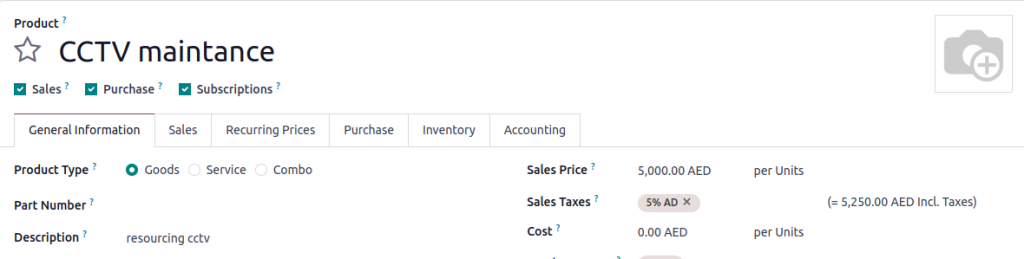
For instance, if you’ve added a custom field such as “Part Number” or “Description,” it’s essential for these fields to stay consistent across all related product variants. Without automation, this can be a time-consuming and error-prone process.
How to Automatically Sync a Field from Product Template to Product Variants in odoo:
When we introduce custom fields such as part number or description, we may want them to stay in sync with the product template and Product Variants in Odoo – both when creating a product and updating existing records.
Below is a robust implementation that automatically syncs fields between product.template and product.product, using context flags to prevent infinite recursion.
Sync Field Updates from Variant to Template
					from odoo import api, fields, models, _
class ProductProduct(models.Model):
   _inherit = 'product.product'
   _inherits = {'product.template': 'product_tmpl_id'}
   part_number = fields.Char(string="Part Number")
   product_description = fields.Char(string="Description")
   @api.model
   def create(self, vals):
       # Sync part_number from product.template if product_tmpl_id is provided
       template_id = vals.get('product_tmpl_id')
       if template_id:
           template = self.env['product.template'].browse(template_id)
           vals['part_number'] = template.part_number
           vals['product_description'] = template.product_description
       return super(ProductProduct, self).create(vals)
   def write(self, vals):
       if 'part_number' in vals:
           self.mapped('product_tmpl_id').with_context(skip_part_number_sync=True).write({'part_number': vals['part_number']})
       if 'product_description' in vals:
           self.mapped('product_tmpl_id').with_context(skip_product_description_sync=True).write({'product_description': vals['product_description']})
       return super(ProductProduct, self).write(vals)
Sync Fields on Product Variant Creation
					from odoo import api, fields, models, _
class ProductTemplate(models.Model):
   _inherit = 'product.template'
   part_number = fields.Char(string="Part Number")
   product_description = fields.Char(string='Description')
   def write(self, vals):
       # Avoid recursion by using a context flag
       res = super(ProductTemplate, self).write(vals)
       if not self.env.context.get('skip_part_number_sync') and 'part_number' in vals:
           for template in self:
               template.product_variant_ids.with_context(skip_part_number_sync=True).write({'part_number': vals['part_number']})
       if 'product_description' in vals and not self.env.context.get('skip_product_description_sync'):
           for template in self:
               template.product_variant_ids.with_context(skip_product_description_sync=True).write({'product_description': vals['product_description']})
       return res
Visual Representation of the Workflow
By implementing this workflow, you can ensure a consistent data structure that aligns with your operational needs, whether managing a small inventory or an extensive catalog.
Key Benefits of This Approach
Bi-directional Synchronization:
Ensures updates flow smoothly between templates and variants.Prevents Recursion:
Uses context flags to avoid infinite loops during synchronization.Data Consistency:
Maintains uniformity in product data across all records.Universal Application:
Supports manual UI updates and programmatic changes (via XML-RPC, imports, or automation).Time-Saving Automation:
Reduces the need for manual updates, freeing up time for more critical tasks.
Practical Applications in Real-World Scenarios
Consider a retail business managing a catalog of clothing items. Like a t-shirt, each product has multiple variants based on size and color. By implementing this synchronization:
- Updating the “Material” or “Style” field in the product template automatically updates all related variants.
- Reduces errors in product descriptions across platforms.
- Ensures consistency for customers viewing the catalog online or in-store.
This automation helps eliminate repetitive tasks, allowing your team to focus on strategic priorities rather than data correction.
The Road to Efficient Product Management
Implementing this solution can simplify your product management process and reduce the chances of errors caused by manual data updates. Whether adding custom fields or managing large product catalogues, this approach ensures your data stays consistent across all templates and product variants in Odoo.
Would you like assistance implementing this feature in your Odoo environment? Feel free to reach out for expert guidance!