How Do Putaway Rules Work in Odoo 19 to Automatically Store Products in the Correct Location?
How Putaway Rules Work in Odoo 19
Putaway Rules Work in Odoo 19 in a straightforward way: they help your warehouse decide where exactly a product should go the moment it enters your storage area. No guessing. No asking seniors and no placing boxes wherever space is available.
In most warehouses, receiving goods is stressful. A truck arrives. Boxes are unloaded. Staff stand there wondering, “Where do we keep this?” Someone says, “Put it there for now.” Another says, “We’ll arrange it later.” Later never comes.
This is where problems begin.
Products get lost. Picking takes longer. New employees get confused. Managers complain about stock mismatch. And everyone thinks the problem is “staff efficiency,” when in reality it’s a lack of automation.
This is precisely why Putaway Rules Work in Odoo 19 are so powerful. They remove human confusion from storage decisions. Odoo already knows where your products should go because you taught it once.
In this blog, we will explain how Putaway Rules Work in Odoo 19, using everyday warehouse language. No technical overload. No dull textbook tone. By the end, you’ll clearly see why businesses that use Odoo putaway rules run calmer, cleaner, and more profitable warehouses, and why Netilligence is trusted to implement it the right way.
Why Warehouses Struggle Without Putaway Rules
Most inventory problems don’t start big. They start small.
A box was placed in the wrong rack. A product stored far from its picking zone. A new employee is guessing where items belong.
Without Odoo putaway rules, warehouses slowly turn into confusing spaces where finding products takes longer than receiving them.
Here’s what usually happens when putaway rules are missing:
Staff waste time deciding storage locations
Products are scattered across the warehouse
Picking teams struggle to find items
Delivery delays become common
When Putaway Rules Work in Odoo 19, these problems disappear because Odoo itself guides every storage decision.
Step-by-Step: How to Configure Putaway Rules in Odoo 19 (Without Stress)
You don’t need to be technical to configure putaway rules Odoo 19 putaway rules, especially with the right partner.
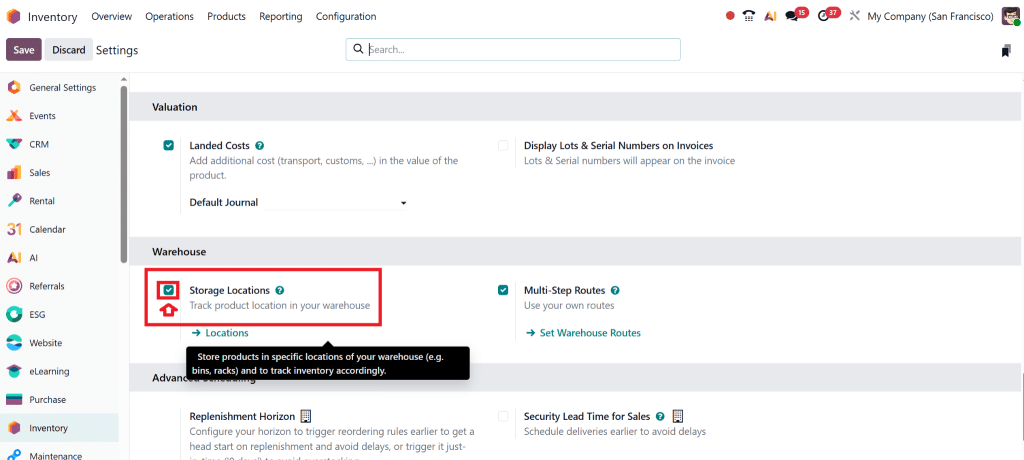
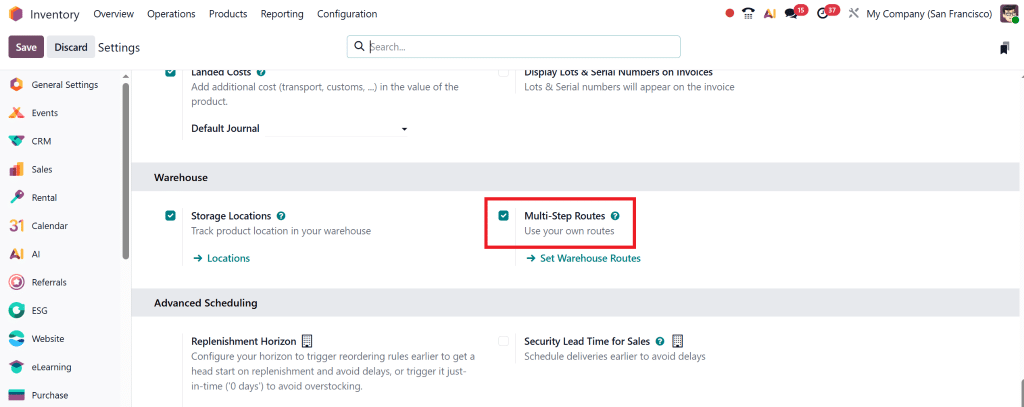
Step 1: Enable Storage Locations
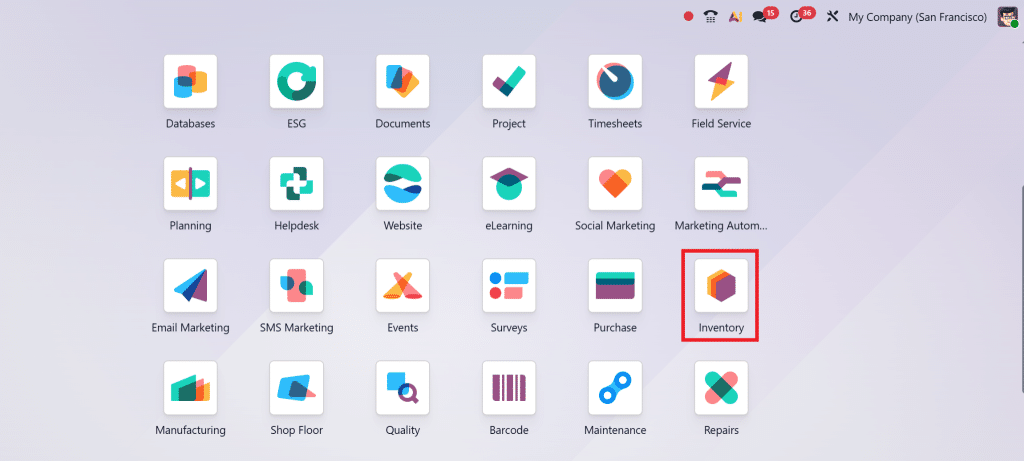
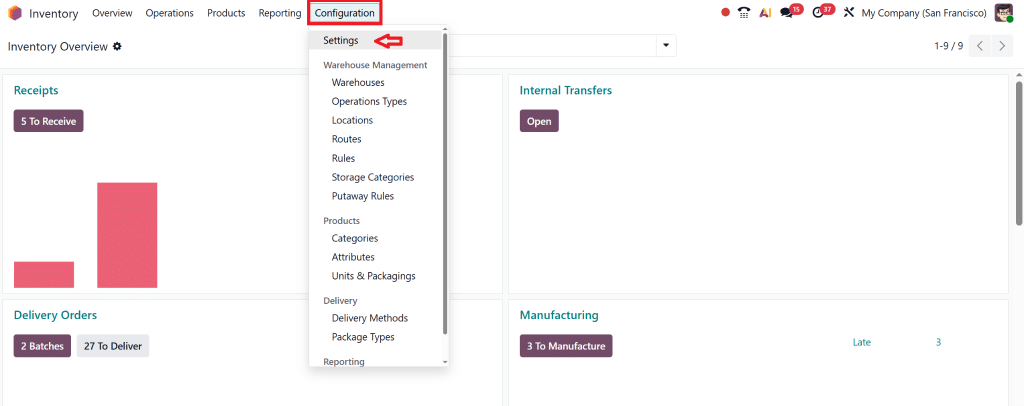
Go to Inventory →
Configuration → Settings
And enable Storage Locations.
Step 2: Activate Multi-step Routes
Enable the multi-step routes option, then save.
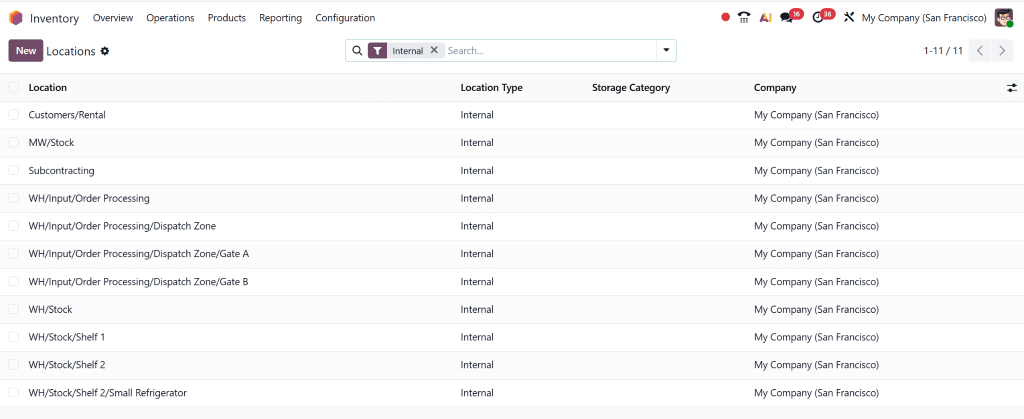
Step 3: Create Smart Warehouse Locations
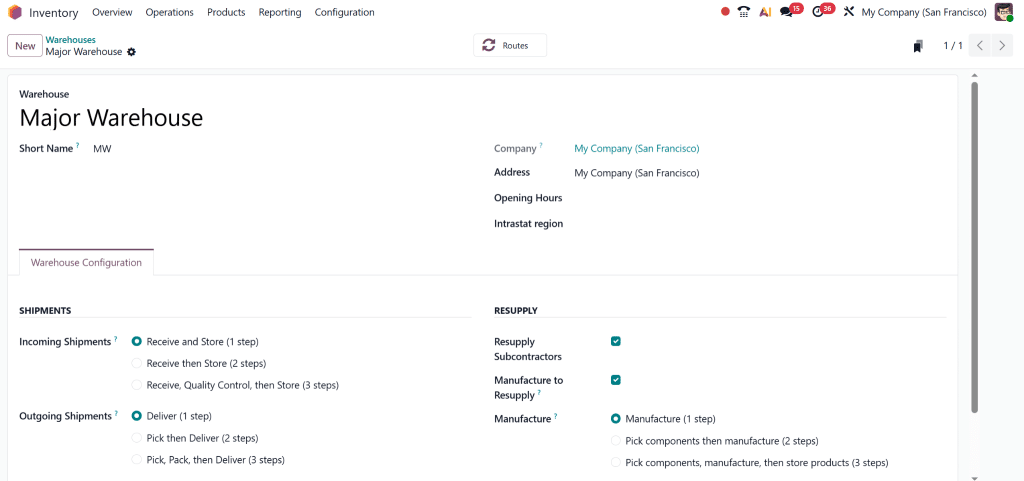
Inventory → Configuration → Warehouse
Create a major warehouse to correctly set locations, so that products are received clearly without unnecessary steps.
Also, set the shelf locations.
Create areas like receiving, bulk storage, fast-moving zones, and fragile sections.
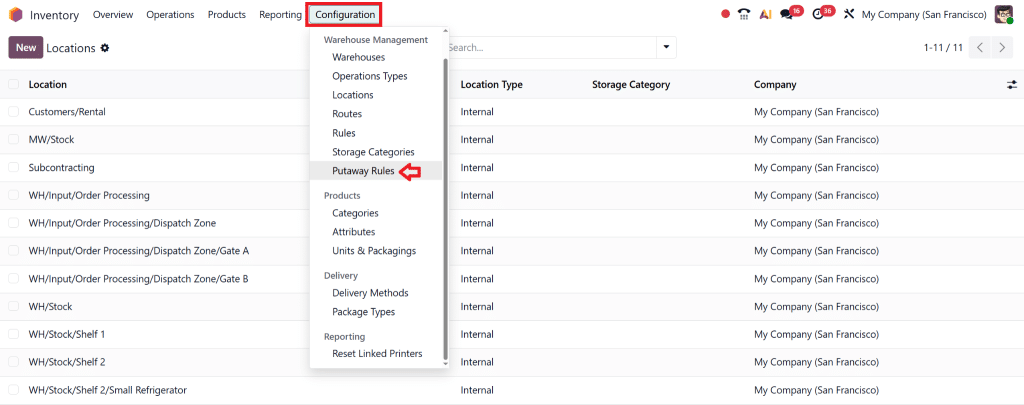
Step 4: Create Putaway Rules
Inventory → Configuration → Putaway Rules
You can set rules based on:
Product
Product category
Package type
Once done, Putaway Rules Work in Odoo 19 automatically, no daily adjustments needed.
What Exactly Are Putaway Rules in Odoo Inventory?
Odoo inventory putaway rules specify where products should be stored after receipt. Think of it as a rulebook your warehouse follows automatically.
How Putaway Rules Work in Odoo 19 – In Simple Language
Here’s what happens step by step:
A product arrives in the warehouse
Odoo checks if a putaway rule exists
Odoo suggests the best location
Warehouse staff simply follow the suggestion
No confusion. No discussion. No mistakes.
That’s how Putaway Rules Work in Odoo 19, quietly, intelligently, and efficiently.
Different Putaway Strategies Available in Odoo 19
Every warehouse is different. That’s why Odoo offers flexible Odoo inventory putaway strategies.
Fixed Location Strategy
Some products always belong in one place. Fast-moving items, expensive goods, or fragile products work best with fixed locations.
Nearest Location Strategy
Odoo chooses the closest available location. This reduces walking time and speeds up operations.
Empty Location Strategy
Odoo looks for empty spaces and fills them smartly, helping you use warehouse space efficiently.
Each strategy controls how Putaway Rules Work in Odoo 19 based on your warehouse needs.
A Real-Life Example You'll Relate To
Imagine a warehouse receiving both electronics and glass items.
Without rules:
Items go wherever space is free
Glass items risk damage
With putaway rules:
Electronics go near the dispatch
Glass items go to padded storage
This is a perfect example of how Putaway Rules Work in Odoo 19 to protect products and save time.
The Real Benefits of Odoo Automatic Product Storage
Faster Receiving
Staff stop thinking and start following Odoo suggestions.
When Putaway Rules Work in Odoo 19, efficiency becomes natural.
Common Mistakes Businesses Make (And How to Avoid Them)
Creating too many rules
Ignoring product categories
Skipping testing
With expert guidance, Putaway Rules work smoothly and reliably in Odoo 19.
Advanced Tips to Get Maximum Value
Combine with replenishment rules
Use barcode scanners
Review rules regularly
These steps enhance how Putaway Rules Work in Odoo 19 as your business grows.
Why Businesses Trust Netilligence for Odoo 19
At Netilligence, we don’t just install Odoo, we understand real warehouses. We design systems that ensure Putaway Rules Work in Odoo 19 for your daily operations.
What We Do Best
Odoo 19 Inventory Setup
Custom Putaway Strategies
Warehouse Optimization
Staff Training & Support
We make Odoo simple, powerful, and profitable.
From Warehouse Confusion to Warehouse Control
Once you truly understand how Putaway Rules Work in Odoo 19, your warehouse stops being stressful and starts being organized. Products go where they should. Staff work faster. Customers get their orders on time.
If you’re ready to move from manual decisions to intelligent automation, Netilligence is here to help.
Hi, I'm Nabia, an Odoo ERP functional & technical content writer. I specialize in blogs, social media content, ad copy, landing pages, service pages, and email campaigns.
We use cookies to ensure that we give you the best experience on our website. If you continue to use this site we will assume that you are happy with it.