How Does Odoo 18 POS Support Online Table Reservations?
Revolutionizing Table Reservations with Odoo 18 POS
Efficient table reservations are crucial for restaurant success, and Odoo 18 POS revolutionizes this process with smooth online booking capabilities. Whether managing bustling restaurants or small cafes, the Odoo POS restaurant module ensures smoother operations and happier customers. With advanced Odoo 18 features, it integrates Odoo table reservation and management tools into an intuitive system. The Odoo online booking system offers flexibility, empowering businesses to efficiently handle Odoo POS online reservations.
Restaurants seeking innovation will appreciate how Odoo 18 POS enhances the dining experience. The combination of Odoo restaurant management tools and advanced reservation features makes it a comprehensive solution. Here’s an in-depth look at how Odoo 18 ERP POS supports online table reservations and transforms restaurant operations.
What is Odoo 18 POS?
Odoo 18 ERP POS is a robust point-of-sale system designed to cater to modern restaurant needs. Its advanced capabilities extend beyond traditional POS systems, integrating Odoo ERP restaurant management tools and an Odoo ERP online booking system for enhanced functionality.
Key Features of Odoo 18 ERP POS
Real-time updates: Enables all-in-one order management.
Customizable dashboards: Custom-made to restaurant workflows.
Integration capabilities: Includes the Odoo ERP POS restaurant module for table reservations.
User-friendly interface: Simplifies adoption and training.
These features make Odoo 18 POS a transformative tool for restaurants aiming to raise their services.
Why Online Table Reservations Matter
In an era where convenience is paramount, online reservations enhance customer satisfaction by restructuring the dining experience. Odoo ERP table reservation tools play a critical role in enabling the following:
Increased efficiency
Improved customer loyalty
Revenue optimization
Odoo 18 ERP Features That Make It Stand Out
Customizable Layouts
The dashboard and reservation interface in Odoo 18 ERP POS can be personalised to match the restaurant’s branding and operational requirements.
Multi-Language Support
For businesses serving a diverse customer, the Odoo ERP POS restaurant module’s multi-language capabilities ensure better customer communication.
Data Analytics and Reporting
From tracking peak booking times to analyzing customer preferences, Odoo’s 18 features offer data-driven insights that empower restaurants to make informed decisions.
How Odoo 18 POS Facilitates Online Table Reservations
Odoo 18 ERP POS introduces innovative tools for handling Odoo ERP table reservations flawlessly. Here’s how it stands out:
User-Friendly Reservation Interface
The Odoo ERP online booking system ensures easy table reservations for customers. Features include:
Mobile and desktop-friendly booking forms.
Instant confirmation notifications.
Smart Table Allocation
The Odoo POS restaurant module uses real-time data to optimize table assignments and balance capacity and customer preferences.
Integrated Payment Options
With Odoo 18 POS, customers can:
Prepay for bookings.
Choose from multiple payment methods.
These features make reservations smooth and reliable for both restaurants and patrons.
Benefits of Odoo 18 POS for Restaurant Management
The Odoo ERP POS restaurant module is integral to efficient Odoo ERP restaurant management. Its benefits include:
Enhanced Operational Efficiency
Odoo 18 ERP POS reduces manual errors and increases staff productivity by automating reservations, order tracking, and billing.
Improved Customer Experience
With the Odoo ERP online booking system, guests enjoy a smooth reservation and dining process.
Data-Driven Insights
Leverage Odoo 18 features for analytics, helping businesses make informed decisions about:
Peak dining hours.
Popular menu items.
Customer preferences.
Success Stories with Odoo 18 POS
A Family Restaurant’s Journey to Efficiency
A mid-sized family restaurant implemented Odoo ERP table reservation tools, witnessing:
A 30% increase in reservation efficiency.
Significant reduction in no-shows.
Reshuffling Operations for a Luxury Dining Spot
A high-end restaurant adopted Odoo 18 ERP POS and integrated it with its Odoo restaurant management system. The result? Enhanced customer satisfaction and operational clarity.
Boutique Restaurants
Small-scale restaurants benefit from the simplicity of the Odoo online booking system, which eliminates manual errors and ensures unified table management.
High-Volume Chains
Large restaurant chains leverage the Odoo ERP POS restaurant module to centrally manage reservations, orders, and payments across multiple locations.
Event-Driven Dining
Venues hosting events can use Odoo ERP table reservation tools to manage bookings efficiently, preventing double booking during high-demand times.
Steps to Implement Odoo POS Restaurant Module
The Odoo ERP POS Restaurant Module can transform restaurant operations by integrating reservations, orders, and payments into a unified system. Below is a detailed step-by-step guide to successfully implementing this module:
Step 1: Install the POS Restaurant Module
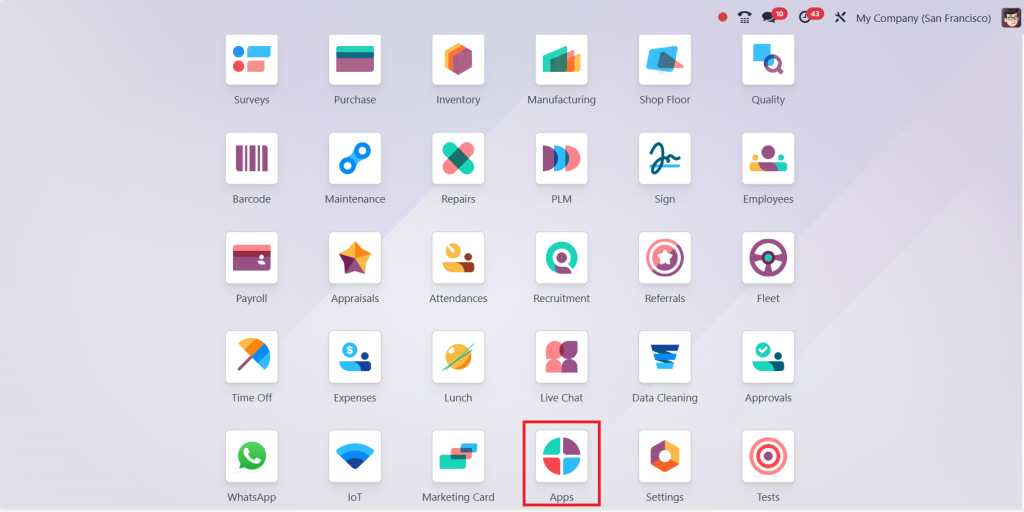
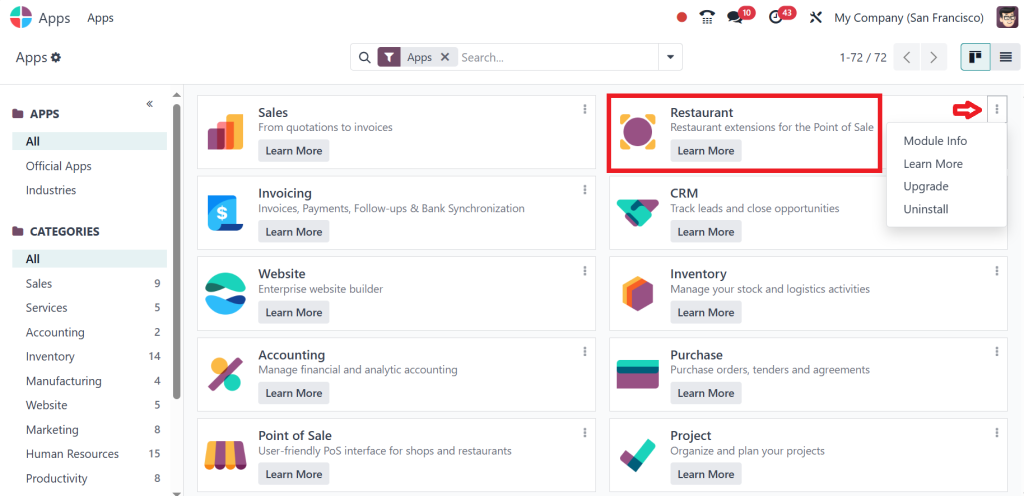
Log in to your Odoo account and direct to the apps module.
Locate the module and click the Install button. We already installed this app in our system. That’s why it shows the option uninstall but in your case here shows the install option.
Step 2: Configure the POS Restaurant Module
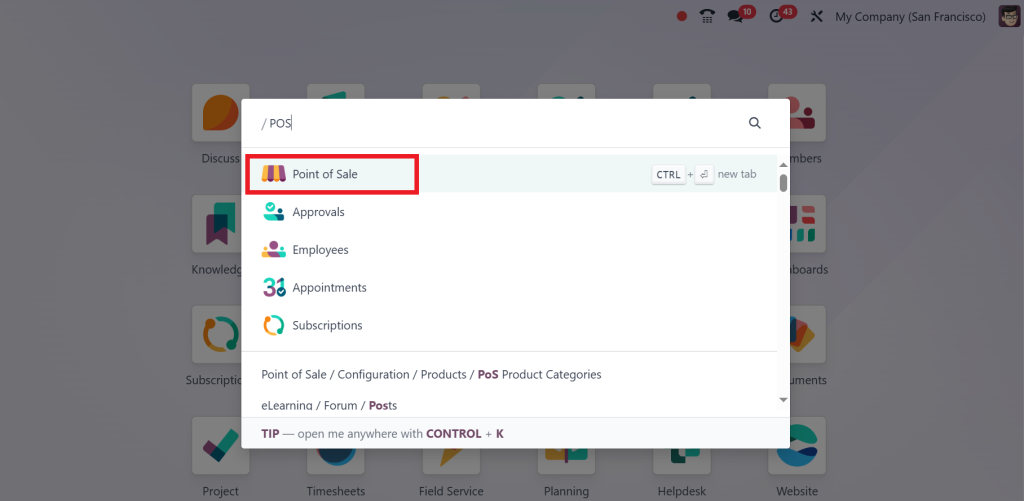
Go to the Point of Sale module.
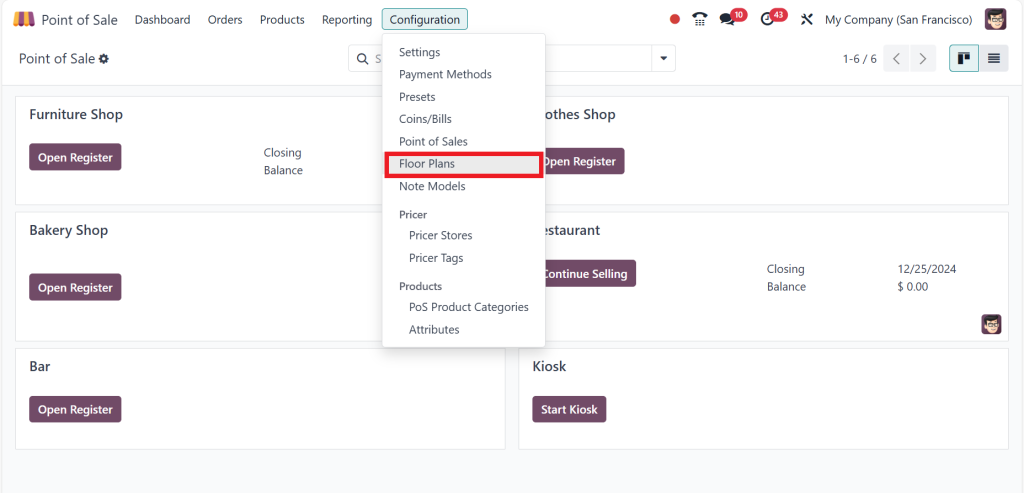
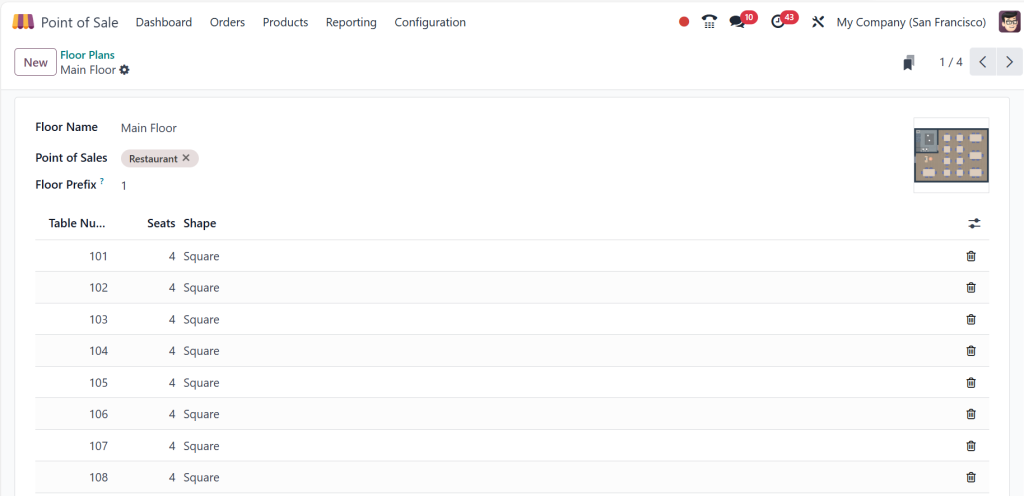
Open the POS configuration and click on the floor plans for the restaurant environment.
Set Restaurant Features such as
Floor Plans:Enable and design floor plans by defining tables and layouts for better order tracking.
Order Management:Configure features like table merging, bill splitting, and transferring orders.
Kitchen Printing: Set up printers for the kitchen and bar areas to route orders directly.
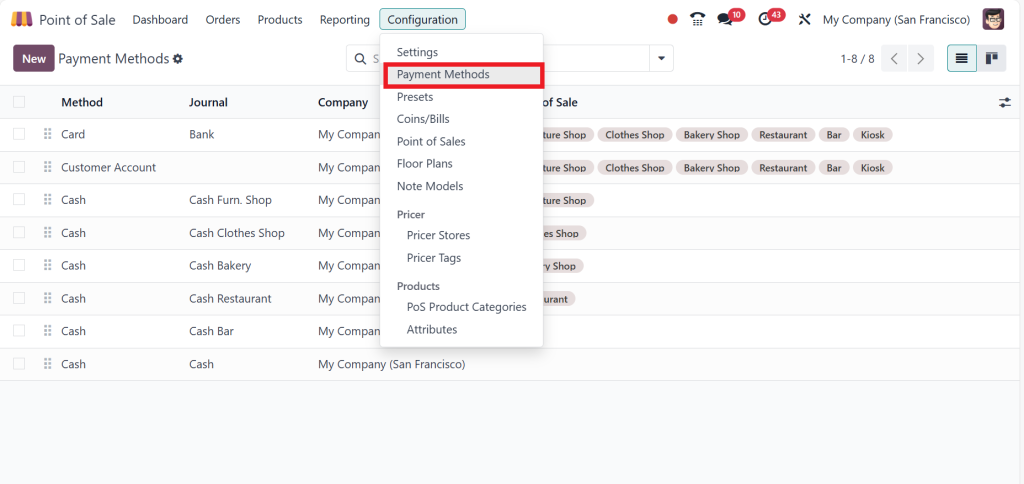
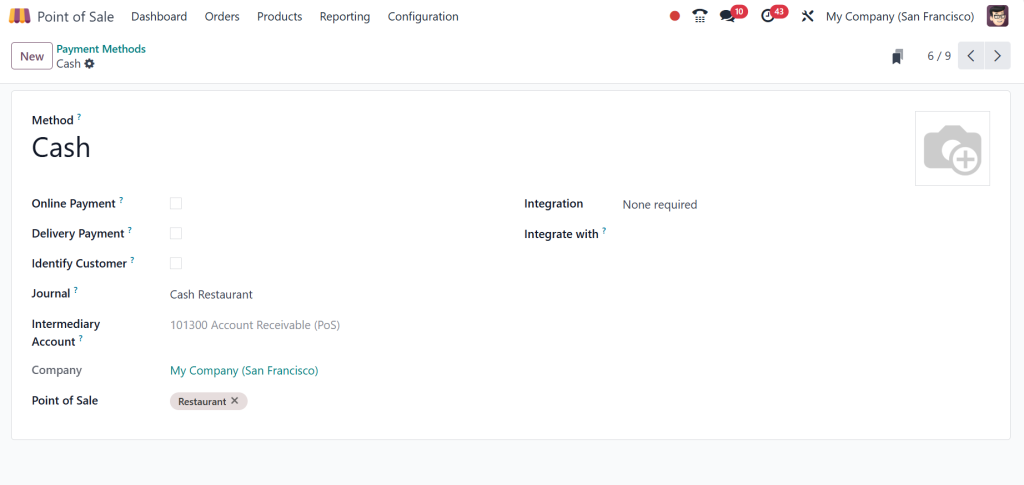
Go to the configuration and click on payment methods.
By clicking on the new button enable multiple payment methods, such as cash, card, or mobile.
Step 3: Add Products and Categories
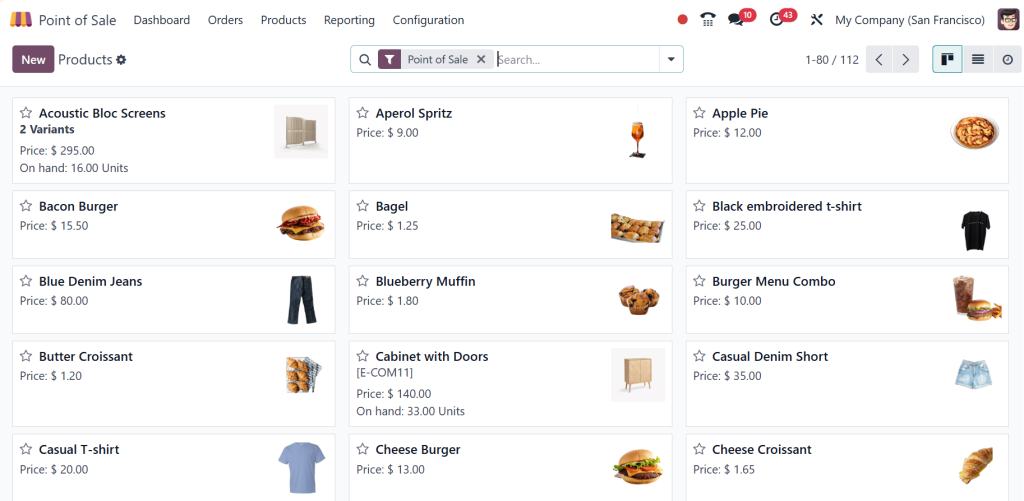
Go to the Products menu and add menu items with prices, descriptions, and images.
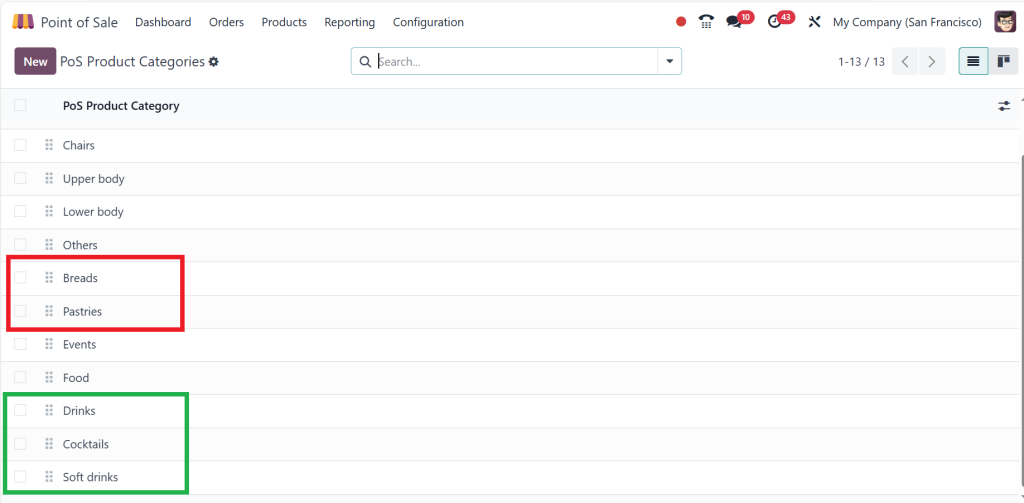
Create categories like drinks, cocktails, breads, pastries, soft drinks, desserts, etc., to simplify order taking.
Step 4: Integrate Devices
Connect POS terminals, receipt printers, barcode scanners, or cash drawers.
Set up a Kitchen Display Screen (KDS) for real-time order updates.
Step 5: Set Up User Roles
Define user roles for cashiers, servers, and managers.
Provide training for staff on how to use the POS system effectively.
Step 6: Test the Configuration
Simulate a restaurant environment to ensure the system correctly handles orders, payments, and kitchen routing.
Address any bugs or misconfigurations during testing.
Step 7: Go Live
Open a POS session for the restaurant and use it during business operations.
Use Odoo’s reporting tools to monitor sales, track orders, and evaluate staff performance.
Step 8: Continuous Improvement
Collect feedback from staff and customers to refine the system.
Keep the module updated to benefit from new features and improvements.
With these steps, the Odoo POS restaurant software module should be fully operational and optimized for your business needs!
Future of Online Table Reservations with Odoo 18 POS
As customer expectations evolve, the need for advanced solutions like Odoo 18 POS will continue to grow. Integrating AI and machine learning into the Odoo ERP online booking system could enhance reservation management, while augmented reality (AR) might allow customers to view table layouts before booking.
The future of Odoo POS online reservations looks promising, with innovations aimed at improving both operational efficiency and customer satisfaction.
Why Choose Odoo 18 POS for Your Restaurant?
Odoo 18 POS bridges traditional and modern dining gaps by integrating innovative Odoo ERP restaurant management tools with an intuitive Odoo ERP online booking system. Its ability to handle Odoo ERP POS online reservations and its advanced features make it the go-to solution for forward-thinking restaurant owners.
From all-in-one Odoo table reservation to data-driven insights, the benefits of adopting Odoo 18 POS are transformative. Whether you run a small bistro or a luxury dining establishment, this system ensures efficiency, customer satisfaction, and profitability. Don’t miss out on the future of restaurant management and squeeze Odoo 18 POS today.
Hi, I'm Ilsa Shabbir, an Odoo ERP content writer specializing in functional blogs on Odoo modules. I simplify complex Odoo features, creating clear and engaging content to help businesses understand and optimize their ERP solutions.
We use cookies to ensure that we give you the best experience on our website. If you continue to use this site we will assume that you are happy with it.