


If you have ever searched for a missing product, tried to answer a client about where their order came from, or struggled during an audit, then you already understand why traceability work in Odoo 19 inventory is so important. Many businesses don’t realize this until a real problem shows up. Suddenly, everyone wants answers, and the system doesn’t have them.
This is where traceability in Odoo 19 inventory starts to make sense in real life, not just in system settings. With proper Odoo 19 ERP inventory traceability, you always know where your product came from, where it moved, and where it finally ended up. In Odoo 19, lot serial tracking gives each product its own identity, helping you track it step by step. When questions arise, the Odoo traceability report provides a clear, unambiguous history of movements. And with robust Odoo inventory lot management, you avoid the mistakes that often occur with manual tracking.
In simple words, traceability in Odoo 19 inventory helps you stay calm when others are stressed. It helps you answer questions quickly, control quality better, and avoid losses. In this blog, I’ll explain Odoo 19 product traceability in a way that feels like we’re sitting together and solving a real business issue, not reading a boring manual.
Understanding Traceability in Odoo 19 Inventory in Real Business Terms
When we talk about traceability in Odoo 19 inventory, we mean visibility. It means being able to follow your product’s story from the moment it enters your warehouse until it leaves your business. Every move is recorded, every change is saved, and nothing is left to guessing.
With Odoo 19 ERP inventory traceability, you don’t need to rely on memory or spreadsheets. The system records product details automatically when you use Odoo 19 ERP lot serial tracking. Whether you handle food items, electronics, medical supplies, or manufactured goods, Odoo 19 product traceability ensures you always know what happened to which product and when.
How Odoo 19 Inventory Traceability Starts with Product Setup
Everything begins when you create or update a product in Odoo. Once you enable tracking, traceability in Odoo 19 inventory starts working silently in the background. You choose whether your product will be tracked by lot or by serial number. This single decision changes how deeply you can track the product later.
In Odoo inventory lot management, lot numbers are useful when products are made or received in batches. Serial numbers help when every item matters individually. Both methods support Odoo 19 ERP inventory traceability and automatically feed data into the Odoo ERP traceability report.
Odoo 19 Lot Serial Tracking and Why It Matters Daily
Odoo 19 ERP lot serial tracking is not only for audits or large companies. It helps during daily operations. When stock arrives, the system prompts for the lot or serial numbers. When stock moves, the system records it. When stock is depleted, customer details are saved alongside the product history.
This means traceability in Odoo 19 inventory can be achieved without extra effort once the system is properly set up. If a supplier sends a faulty batch, Odoo 19 product traceability helps you find every product linked to that lot. If a customer reports an issue, the Odoo ERP traceability report shows exactly which batch or serial number was delivered.
How Does Traceability Work in Odoo 19 Inventory Step by Step?
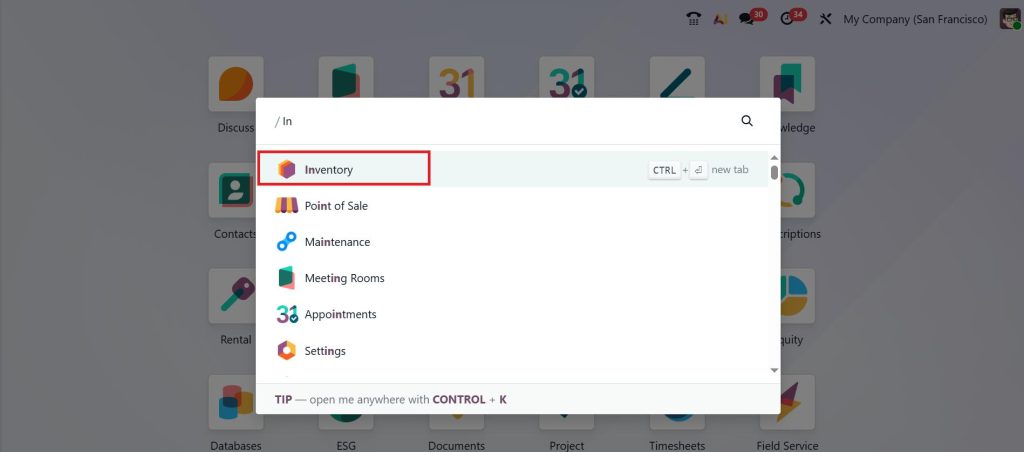
To enable traceability work in Odoo 19 inventory, open the Inventory app from your Odoo 19 dashboard.
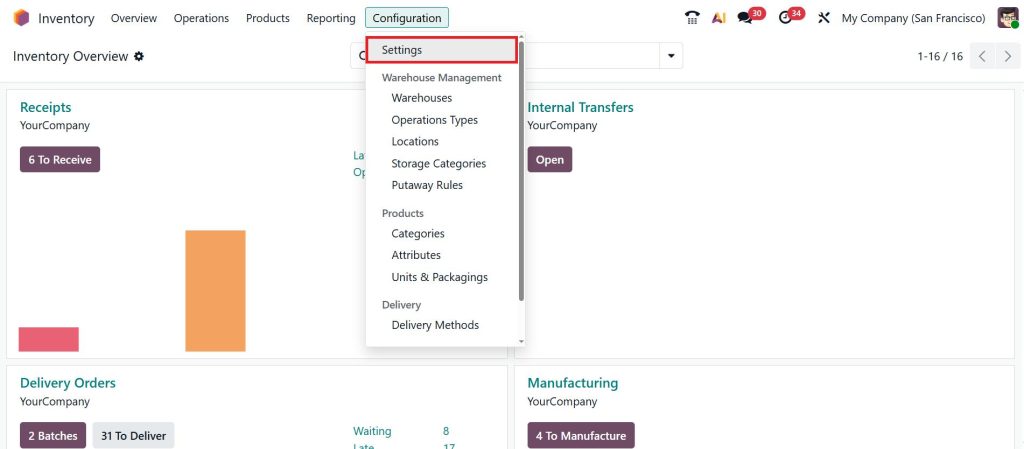
Go to Configuration > Settings.
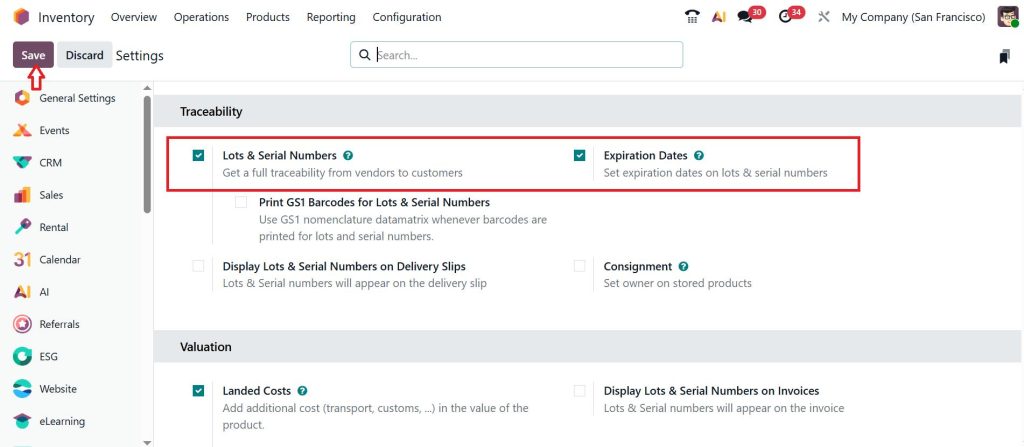
Under the Traceability section, enable the Lots & Serial Numbers and Expiration Dates, then click Save.
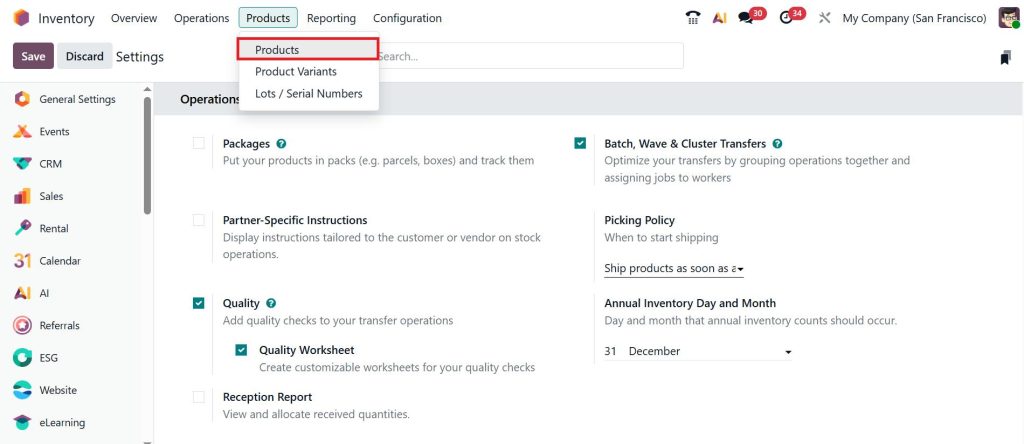
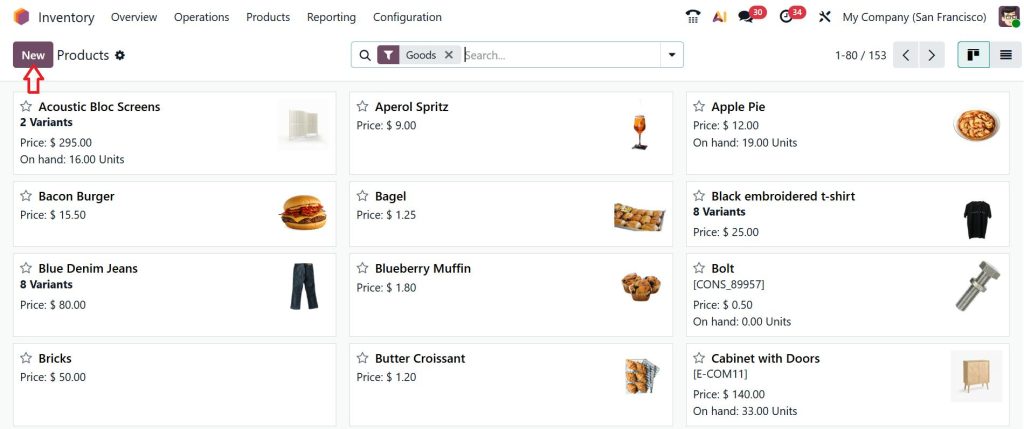
Then, go to the Products > Products.
Click New to create a product.
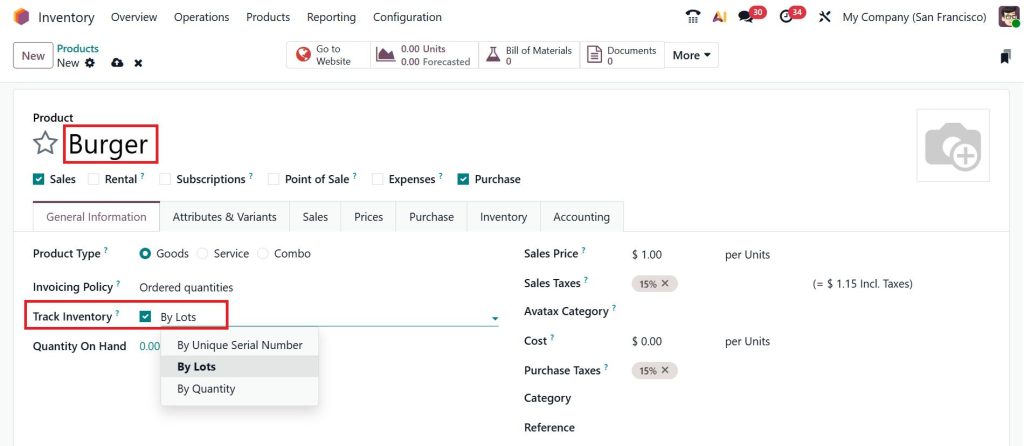
Create a new Product, then under Track Inventory, click By Lots, and Save.
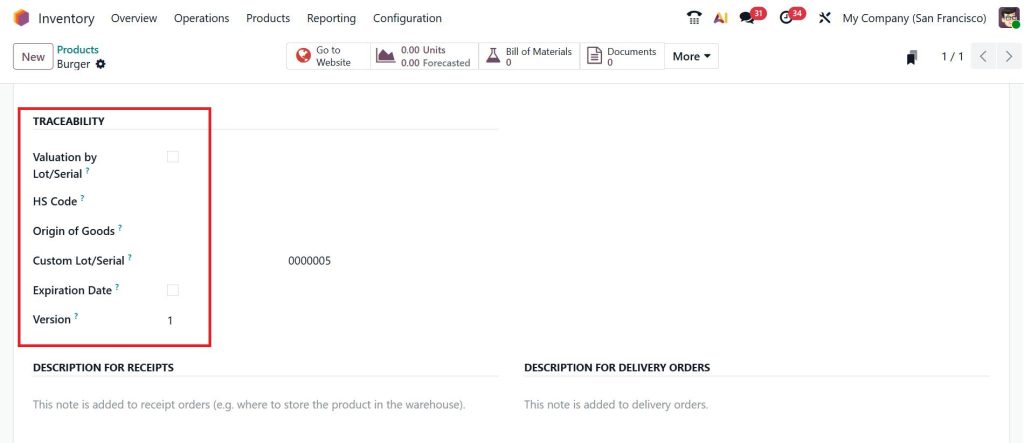
Now, go to the Inventory tab you can see a separate section called Traceability. Under this section, you can find many options like Valuation by Lot/Serial, HS Code, Origin of Goods, Custom Lot/Serial, Expiration Date, and Version.
Check (✔) the Expiration Date option, and then you can find the different configured options that appear on the right side. Provide the Dates and the custom Lot/Serial (bg-1), then click Save.
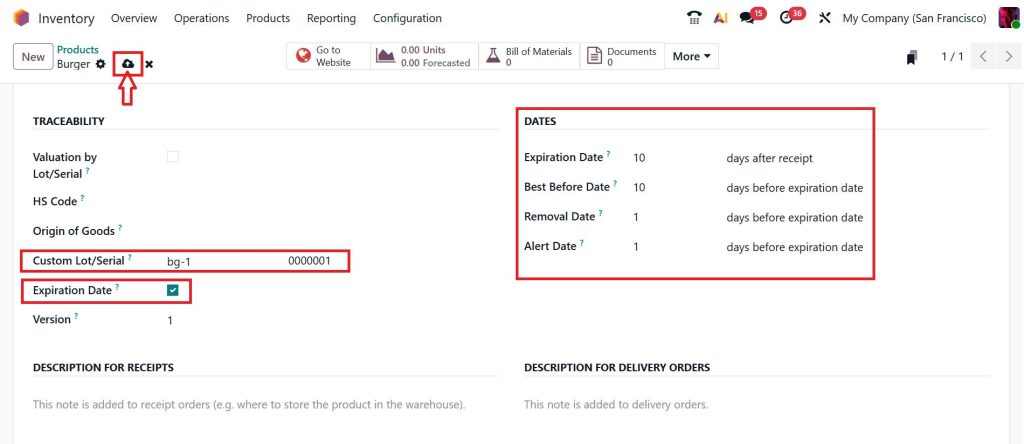
This is how we can track the traceability, which means the lot, serial number, and dates for a particular product.
Odoo Inventory Lot Management and Stock Accuracy
Many inventory issues start with poor lot handling. Products expire, get mixed, or are shipped incorrectly. Odoo inventory lot management helps you avoid these problems by keeping each lot separate and clearly recorded.
With Odoo 19 ERP inventory traceability, expiration dates, quantities, and movements are always visible. This means fewer losses, better planning, and cleaner stock records. Over time, traceability work in Odoo 19 ERP inventory builds trust between your warehouse team, sales team, and management.
How Traceability in Odoo 19 Inventory Follows Every Movement
Once a product enters your warehouse, traceability in Odoo 19 inventory follows it throughout the warehouse. Internal transfers, repacking, manufacturing, and deliveries are all connected through tracking records.
When raw materials are used in production, Odoo 19 product traceability links them to finished goods. When finished goods are delivered, the customer is linked to that same tracking history. This complete chain is visible in the Odoo ERP traceability report, without requiring any extra tools.
Odoo Traceability Report and How It Solves Real Problems
The Odoo ERP traceability report is where everything comes together. It shows you the full product journey in one place. You can check where it came from, how it moved, and where it went.
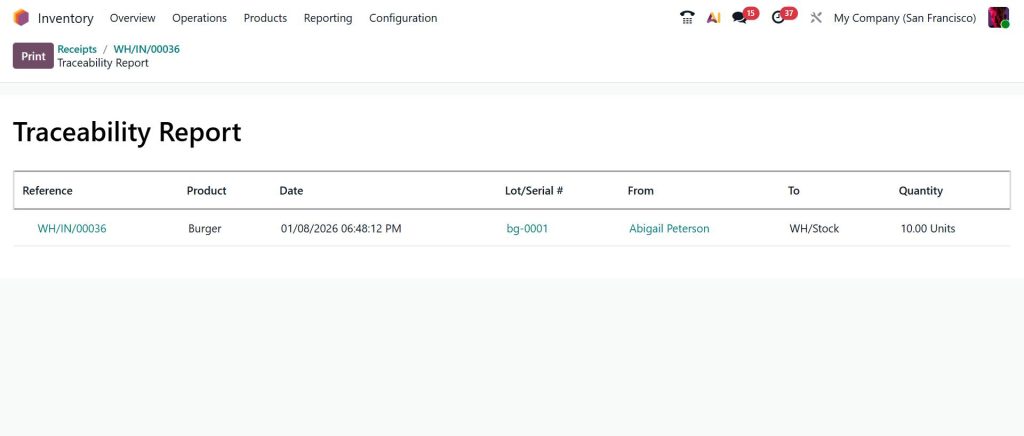
If a product needs to be recalled, traceability work in Odoo 19 ERP inventory helps you act quickly. If a supplier issue arises, Odoo 19 ERP inventory traceability helps you identify affected stock. If customers ask questions, Odoo 19 ERP lot serial tracking gives you clear answers without delay.
Odoo 19 Product Traceability in Manufacturing and Distribution
For manufacturers, Odoo 19 product traceability connects raw materials to finished items. This connection helps you control quality and reduce waste. Every material used is recorded, and every output is traceable.
For distributors, Odoo 19 ERP inventory traceability helps manage batch-based deliveries. You always know which customer received which lot. This clarity reduces disputes and supports better customer communication.
Why Traceability in Odoo 19 Inventory Reduces Daily Stress
Many inventory problems create stress because answers are missing. In Odoo 19 inventory, traceability work stores answers in the system. You don’t need to chase files or ask multiple teams.
Odoo inventory lot management keeps records clean. Odoo 19 ERP lot serial tracking keeps movements clear. The Odoo ERP traceability report keeps history visible. Together, they reduce confusion and save time.
How Netilligence Helps You Use Odoo 19 Inventory Traceability Properly
Netilligence understands that systems should support people, not confuse them. Our team helps businesses set up traceability in Odoo 19 inventory correctly from the start. We focus on real workflows, not just system settings.
With our experience in Odoo 19 ERP inventory traceability, Odoo 19 product traceability, and Odoo inventory lot management, we help you avoid common mistakes and get clear results from day one.
Take the Next Step Toward Clear and Reliable Inventory Control
By now, it’s clear that traceability in Odoo 19 inventory is not just a technical feature; it’s a practical solution to everyday inventory problems. When products are properly tracked in Odoo 19 ERP inventory traceability, confusion is reduced, answers come faster, and decisions become easier. With Odoo 19 ERP lot serial tracking, Odoo ERP traceability report, and reliable Odoo inventory lot management, your team always knows what’s happening with your stock.
If you want your inventory to be clear, reliable, and easy to manage, it’s important to set things up the right way from the start. This is where Netilligence can support you. Our team helps businesses implement Odoo 19 product traceability that aligns with real operations, not just system theory.
Talk to Netilligence today to see how traceability work in Odoo 19 inventory can solve your current inventory challenges and help you move forward with confidence.




