

Why Employee Records in Odoo 19 Need a Birthday Field
We all know HR systems can feel a little too serious sometimes. They focus on payroll, attendance, and compliance. But what about the human side? That’s where Employee Records in Odoo 19 can do more than just hold data. They can help you connect with your people.
Think about it. When you open an employee profile and see their birthday, it instantly feels personal. You don’t need to remember dates on sticky notes or calendars. A simple Odoo 19 employee birthday field inside the record makes everything easier. And when you go further with employee birthday tracking in Odoo, you turn this small detail into a big cultural win for your workplace.
Adding birthdays is not complicated. You can add a birthday field to Odoo HR in just a few steps. Then you can set up a birthday reminder in Odoo so managers never forget to wish someone. If you want to make it even more fun, you can enable the birthday icon in Odoo 19 so a cake or balloon shows up in the profile. That’s the influence of Odoo HR records customization: you make the software fit your people, not just your processes.
In this blog, I’ll walk you through why and how to add birthdays to Employee Records in Odoo 19, how to use the Odoo employee module birthday setup, and why this small step makes such a big difference in culture.
Why Employee Records in Odoo 19 Deserve More Than Just Data
Every company already uses Employee Records in Odoo 19 to keep basic information: names, emails, job roles, and departments. But do those records show who the person really is? Not really. That’s why adding personal touches like birthdays matters.
When you customize records with an Odoo 19 employee birthday field, you move from “just managing” to “actually engaging.” You don’t just store details, you celebrate them. And when you take it further with employee birthday tracking in Odoo, you make it automatic. HR doesn’t need to run around remembering dates because the system does it for them.
This is where Odoo HR records customization shows its real value. It lets you make the software feel alive. Instead of being just a database, your HR module becomes part of your company culture. And the truth is, people remember how you made them feel. A company that celebrates birthdays is a company people love working for.
How to Add Birthday Field Odoo HR Step by Step
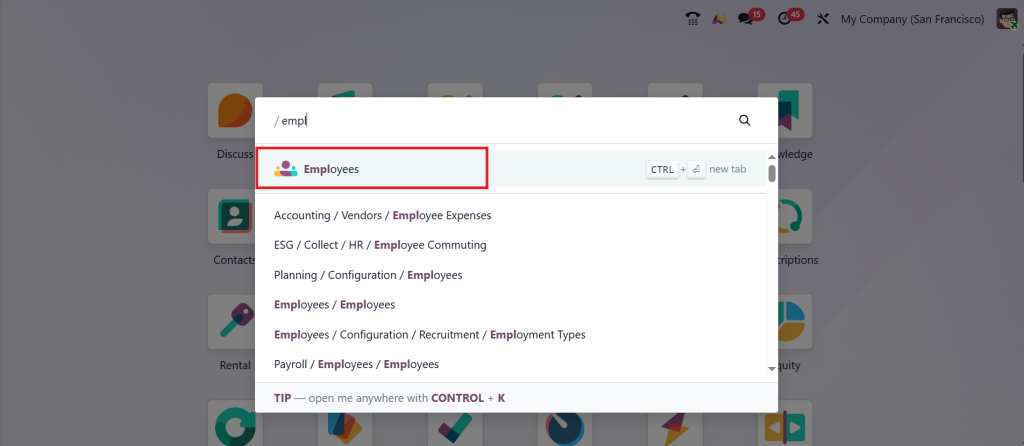
Now let’s get practical. Adding a birthday field is simple if you know where to look. Open the Employees module in your Odoo dashboard.
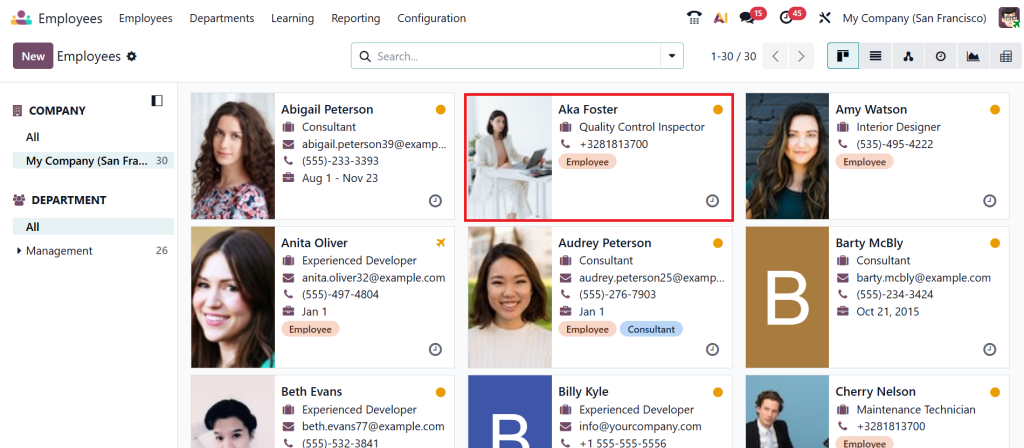
Go to the employee card.
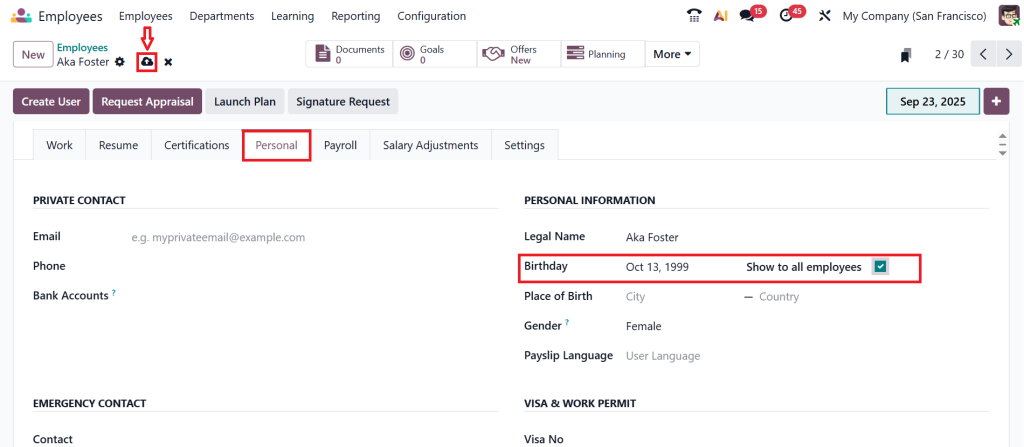
Choose the Personal tab.
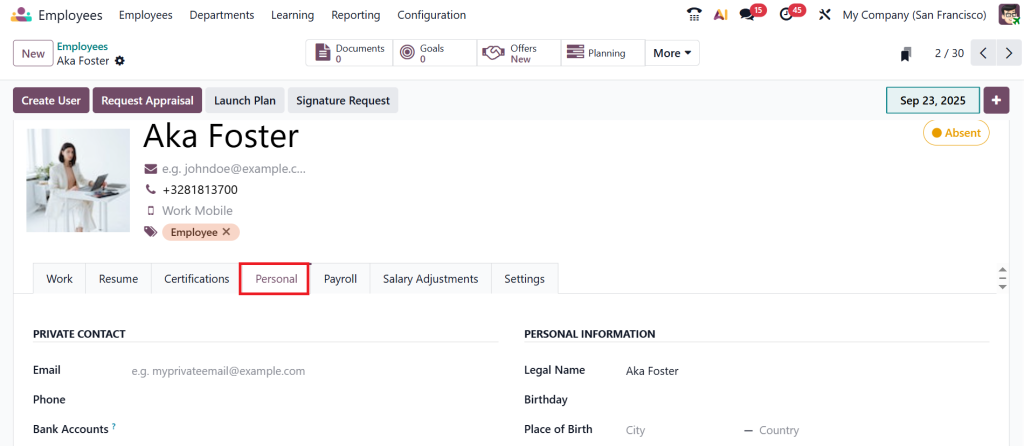
Under the personal tab, you can see a field called Birthday where we can set the birthday. Let’s choose the date of birth of the employee, and if you want to show this to all employees, you can just enable this field and then click on Save.
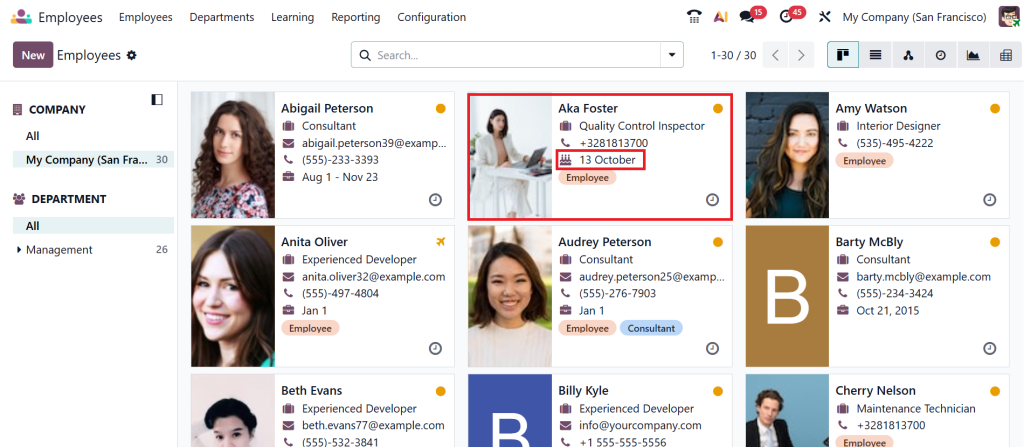
Let’s go back to the employees, and as you can see in the screenshot below, there is a slight change in the design of the employee card. You can find the designation of the employee, which has different icons like phone number and birthday cake icon, and now you can easily identify the birthdays of your employees.
That’s the magnificence of Odoo employee module birthday setup: it’s practical, but it also makes work feel lighter and more human.
The Value of Employee Birthday Tracking in Odoo
You may wonder, do birthdays really matter in business? The answer is yes. Celebrating birthdays is about recognition. People work hard, and a simple “happy birthday” shows you see them as more than just employees. With employee birthday tracking in Odoo, this becomes easy.
HR teams no longer need to check separate calendars. Managers don’t have to worry about forgetting. Everything is there in the system. The Odoo 19 employee birthday field makes tracking effortless, while the birthday reminder employee Odoo feature ensures everyone stays on top of it.
And don’t underestimate the impact. An employee who feels valued on their birthday is more engaged, more loyal, and more positive at work. This is why Odoo HR records customization is worth the effort, as it directly improves workplace culture.
Why Odoo HR Records Customization Is a Turning Point
The real supremacy of Odoo is flexibility. You’re not stuck with a one-size-fits-all setup. Once you add an Odoo 19 employee birthday field, you realize how much you can do with customization.
Think beyond birthdays. You could add work anniversaries, certification renewal dates, or even fields for hobbies and interests. But birthdays are the easiest place to start because they matter to everyone. When you add the birthday field to Odoo HR, you’re not just making a technical change. You’re creating moments of connection.
And the best part is: when you enable the birthday icon in Odoo 19, the system feels alive. A small symbol next to a name can brighten up a whole dashboard. These little details are what turn Employee Records in Odoo 19 from cold data into warm interactions.
How Birthday Reminder Employee Odoo Saves Time
Efficiency matters in HR. Without reminders, birthdays often get forgotten or require manual effort to track. With the birthday reminder of an employee in Odoo, the system does all the work. It sends alerts, creates tasks, or even generates automatic messages.
This not only saves time but also ensures consistency. No employee is left out. Every birthday gets noticed. And because it’s automated, HR can focus on bigger things while still keeping employees happy. That’s how employee birthday tracking in Odoo improves efficiency and culture at the same time.
Enable Birthday Icon Odoo 19 to Add Fun
One of my favorite features is the visual birthday icon. When you enable the birthday icon in Odoo 19, you make birthdays impossible to miss. Imagine the difference between a long list of names and one that instantly shows you who has a birthday today.
This kind of Odoo HR records customization adds fun to the system. It makes HR dashboards feel less formal and more engaging. It also makes employees smile when they see their birthday being highlighted. It’s such a small touch, but it makes a big difference.
The Bigger Impact of Odoo Employee Module Birthday Setup
The Odoo employee module birthday setup is about more than just remembering dates. It’s about building a culture where people feel appreciated. And the truth is, culture drives performance. A happy employee is a productive employee.
Adding birthdays to Employee Records in Odoo 19 might seem like a minor tweak, but it changes how employees see the company. It tells them: “We care about you.” And that message is strong. It improves engagement, retention, and loyalty, all from one simple Odoo 19 employee birthday field.
Why You Should Add Birthday Field Odoo HR Today
At the end of the day, adding an Odoo 19 employee birthday field is one of the easiest but most effective things you can do in HR. It makes Employee Records in Odoo 19 more human, it simplifies employee birthday tracking in Odoo, and it brings smiles to the workplace. With a birthday reminder in Odoo, no one is ever forgotten. And when you enable the birthday icon in Odoo 19, you add joy and personality to your HR system.
So, don’t wait. Try the Odoo employee module birthday setup today. Start small with this simple Odoo HR records customization and see how it transforms your culture. If you’re ready to make HR smarter and friendlier, Netilligence is here to help you customize Odoo in ways that make your employees feel valued every single day.




