

Improve Your Product Listings with Odoo 19 Website Video Integration
The integration of product videos into your Odoo 19 website will transform your website into a superior platform. Product video in Odoo 19 website serve two purposes by attracting potential customers while simultaneously boosting site engagement and conversion rates. This blog provides step-by-step instructions to help you add product videos to your Odoo 19 website, which will enhance your online store’s functionality.
Visual content stands as the dominant force in modern digital times. Your customers gain a better understanding through product demonstrations, which text and images cannot deliver on their own. Your Odoo website benefits from product video uploads because they create an immersive shopping experience for your visitors through product demos, tutorials and customer testimonials. Odoo 19 provides users with an intuitive website builder that simplifies the addition of videos to product pages.
This article will provide you with a step-by-step guide to embed videos on Odoo 19 product pages while making your product pages more engaging. This guide provides comprehensive instructions to enhance Odoo 19, add product video, product media upload, and improve product presentation, allowing you to start now.
Why You Should Add Product Videos to Your Odoo 19 Website
Product videos on Odoo 19 website are a fantastic way to highlight the features of your products, demonstrate their functionality, and build trust with your customers. Here’s why you should consider uploading product videos to your Odoo 19 store:
1. Increased Customer Engagement
Videos provide more dynamic and engaging content than static images. A well-placed product video can grab your customers’ attention, keeping them on your site longer. This increased time spent on your website also helps improve your SEO rankings.
2. Higher Conversion Rates
Customers like to buy products when they see them in action. Studies show that product pages with videos tend to have more conversion rates than those without.
3. Better Product Understanding
A product video in Odoo e-commerce helps potential buyers better understand the product, especially for complex or technical items. Demonstrating the product in use can remove doubts and showcase its actual value.
4. Improve SEO Performance
Videos play an important role in enhancing SEO rankings. When you upload a product video Odoo website, you can optimize it with relevant keywords, helping search engines like Google to index your page more effectively.
5. Build Trust and Credibility
Online sales require customer trust as their fundamental basis. A product video enables your brand to appear more human while demonstrating authenticity which builds stronger personal relationships with your audience.
Odoo 19 website video tutorial
Now that we’ve established why you should add product videos to your Odoo 19 website, let’s get to the exciting part: how to do it! Follow these simple steps to upload product video on Odoo website.
Step 1: Prepare Your Video
Before uploading the video, make sure it’s ready for use. The video should be:
- High-quality: Ensure the video is clear, visually appealing, and of high definition.
- Short and to the point: Aim for videos that are around 25 seconds, 30 seconds to 2 minutes long, depending on the complexity of your product.
- Properly formatted: Odoo 19 supports various video formats like MP4, AVI, and MOV, so ensure your video is in a compatible format.
- Optimized for the web: Compress the video to reduce loading times. Larger videos can slow down your website, potentially impacting user experience.
Step 2: Log in to Your Odoo 19 Admin Panel
To start the process of adding a video, log in to your Odoo 19 admin panel and go to the Website app.
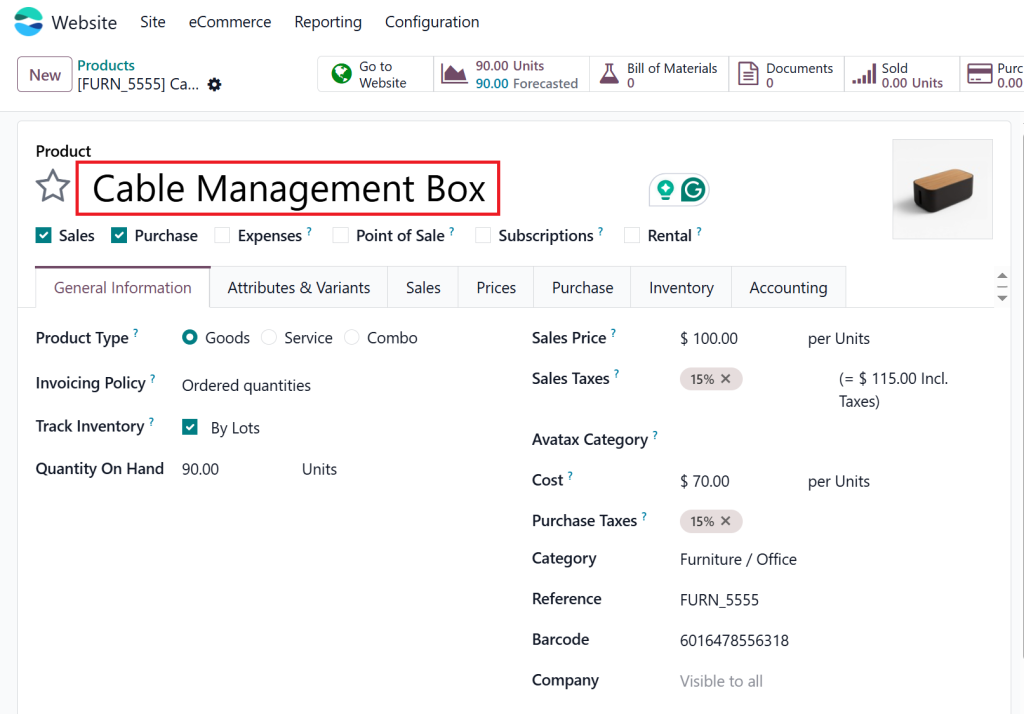
Step 3: Navigate to the Product Page
Next, go to the Products section, where you manage your product listings. You can either create a new product page or edit an existing one.
- For a new product, select “Create” to add it.
- For an existing product: Find the product you want to edit or change and click on it to open the product page.
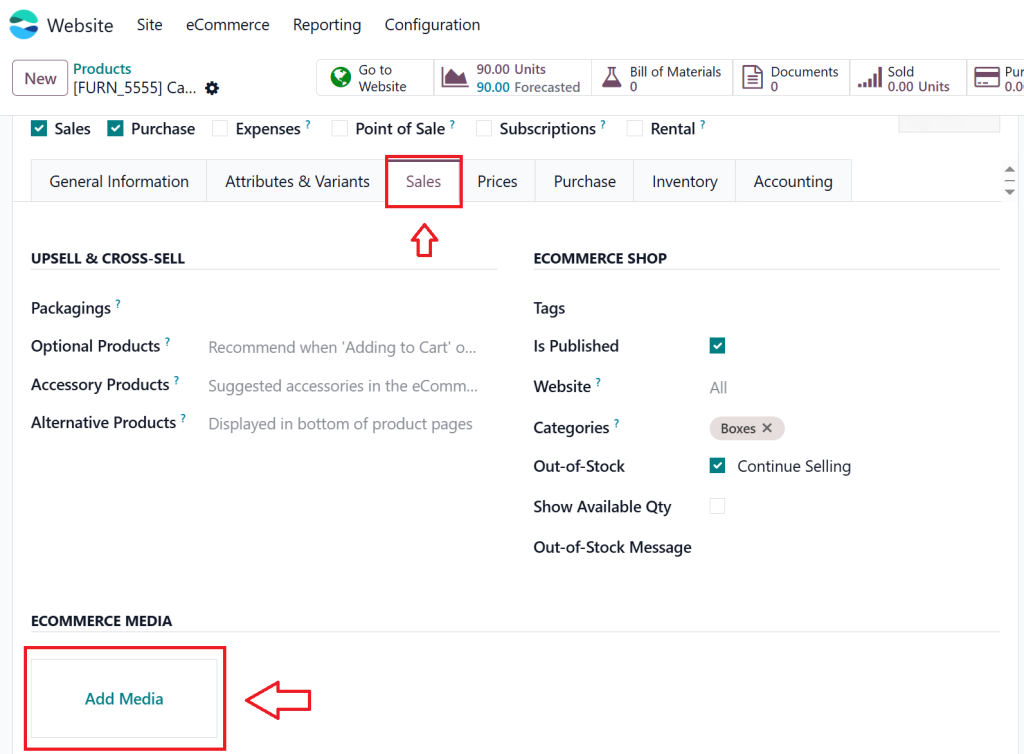
Step 4: Enable the Media Section
Once you’re on the product page, locate the Media section, where you can add product images and videos. This is typically located in the product details section.
Step 5: Odoo 19 Product Media Upload
There are two ways to add product videos in Odoo 19:
1. Embed video on Odoo 19 product page
If your product video is hosted on an external platform like YouTube or Vimeo, follow these steps:
- Copy the video URL from YouTube or any other place.
- In the product page, click on the Insert/Edit Video button.
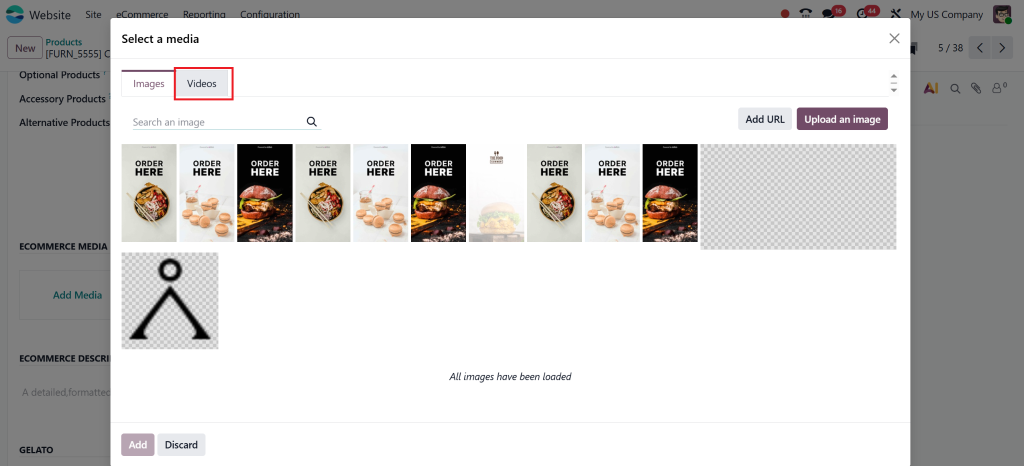
- Paste the video Uniform Resource Locator into the provided field.
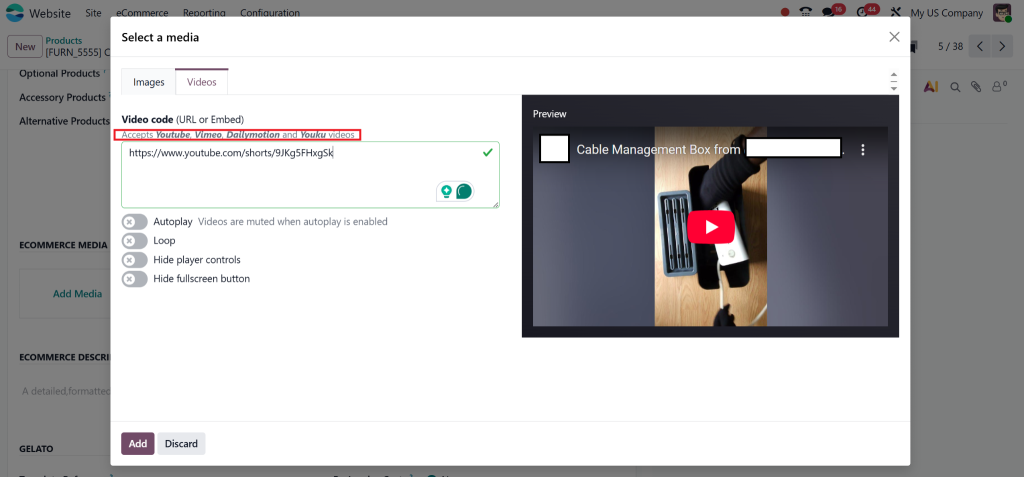
- Choose your preferred video settings (size, alignment, etc.).
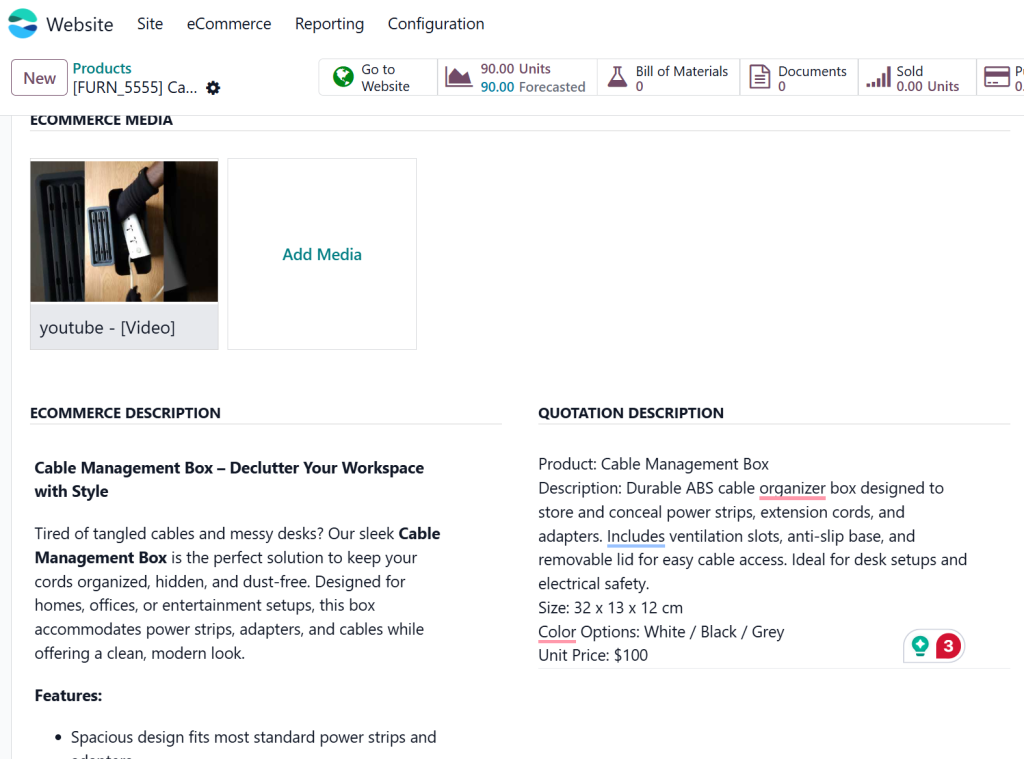
- Save your selected changes, and the video will appear.
2. Uploading a Video Directly to Odoo
To upload the video directly to your Odoo website, click the Add File button in the Media section. Then select the video file from your system.
- Odoo will automatically upload and host the video.
- You can adjust the video’s size and placement as needed.
Step 6: Customize Video Settings
Odoo allows you to customize the appearance of the video on the page. You can:
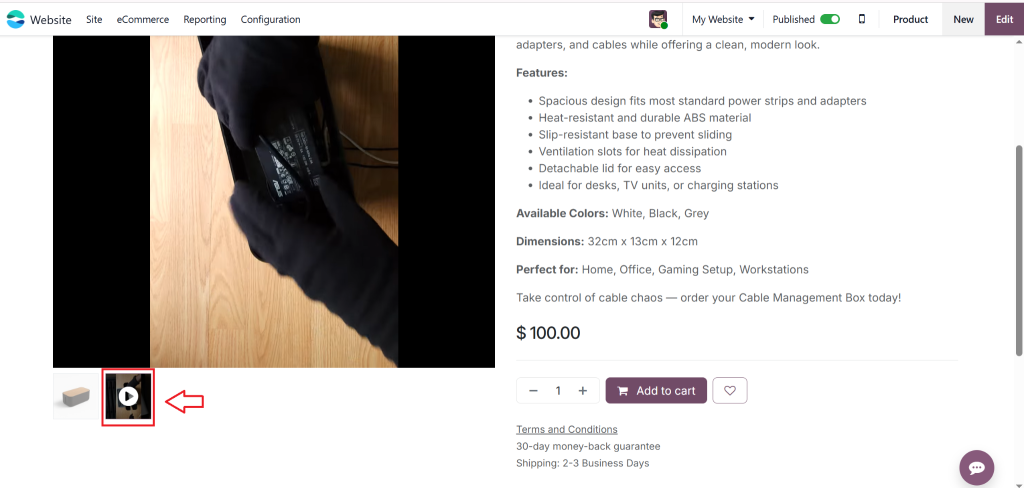
- Set the thumbnail for the video (the image that will be displayed before the video plays).
- Adjust the play button style.
- Select whether the video should autoplay or start when clicked.
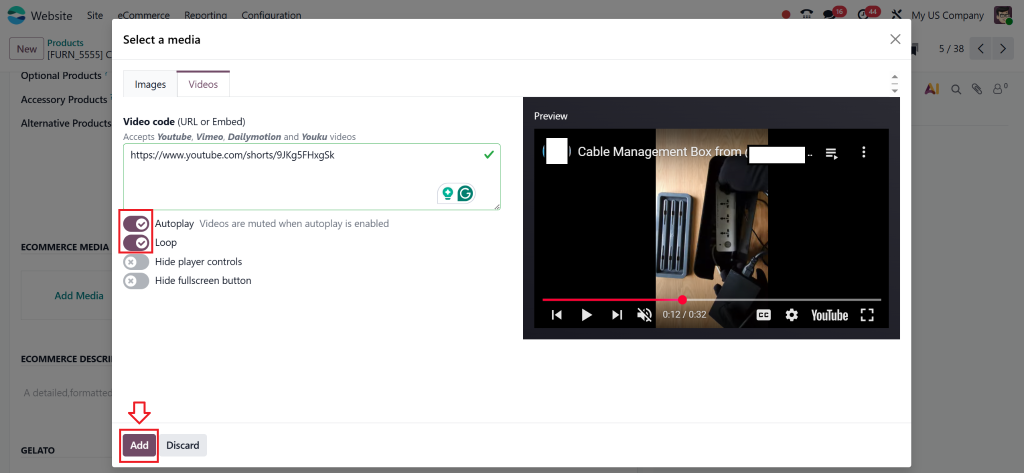
Ensure you preview the page before saving to ensure the video appears as intended.
Step 7: Save and Publish Your Product Page
Once you’re satisfied with the video’s appearance, save your changes and publish the product page.
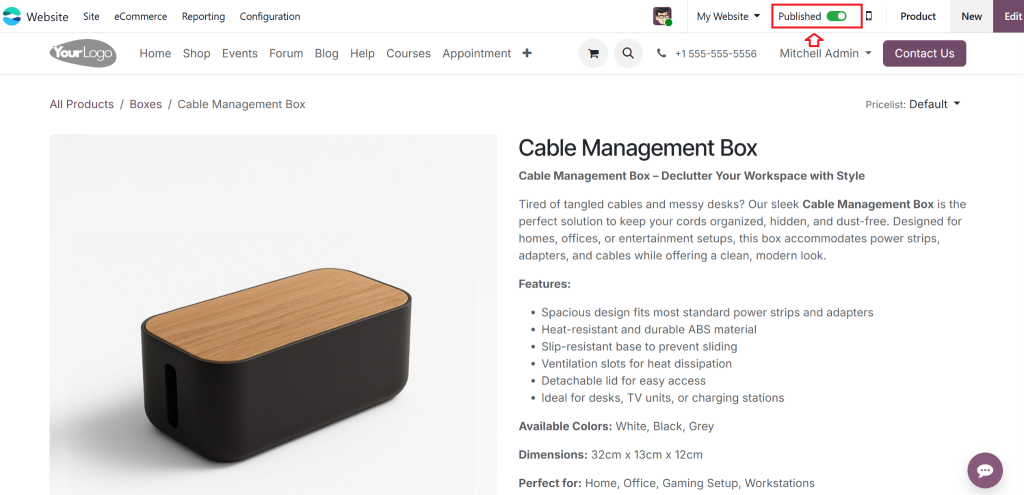
Your product video will now be visible on your Odoo 19 website, and your customers can view it when they visit the product page.
Best Practices for Product Video in Odoo 19 Website
The process of adding product videos remains straightforward yet you should follow these best practices to maximize this feature:
1. Create High-Quality Content
Your video needs to deliver helpful content to viewers. The video content should demonstrate products, teach viewers, or showcase customer feedback, while remaining both informative and relevant to the product.
2. Use Clear and Engaging Thumbnails
A well-designed video thumbnail serves as a powerful tool to drive viewers toward watching the video content. The thumbnail needs to be clear while representing the product and should also be visually appealing.
3. Videos for Speed
Large or heavy video files can slow down your website. Web video optimization requires you to compress your files while maintaining their original quality. The optimization process will enhance the speed at which your product pages load.
4. Use Videos for New or Complex Products
New or complex products benefit from videos because they enable potential buyers to grasp their value and benefits. The videos should present product features and provide how-to guides and installation instructions to customers.
5. Keep Videos Short and Focused
Online viewers tend to have brief attention spans. Your videos should deliver direct information without unnecessary details. The first few seconds of the video should present essential product features and benefits to grab viewer’s attention.
Solving Common Issues with Product Videos in Odoo 19
While adding a product video to your Odoo 19 website, creating a video tutorial is generally straightforward; however, you may encounter a few common issues. Here’s how to solve them:
1. Video Not Playing
- Check Video Format: Ensure the video is in a compatible format (e.g., MP4).
- Clear Cache: If the video isn’t displaying correctly, try clearing your browser cache memory or refreshing the page.
2. Slow Loading Times
- Compress the Video: If your video is taking too long to load, compress it to reduce its file size and improve loading speed.
- Use External Hosting: Consider hosting videos on platforms like YouTube or Vimeo to lessen the load on your Odoo server.
3. Video Alignment Issues
- Adjust Alignment Settings: If the video is misaligned, check the alignment settings in Odoo and adjust them as needed.
4. Audio Issues
- Check Audio Settings: Ensure your video has proper audio settings. If you’re embedding a video from an external platform, check the audio on the platform itself.
Enhance Your E-Commerce Store with Product Videos in Odoo 19 Website
Adding product video in Odoo 19 website is a good way to engage customers and increase conversions. By following the simple steps mentioned above, you can upload product video Odoo website and provide your customers with a more dynamic and immersive shopping experience. Videos enable customers to make informed purchasing decisions, resulting in increased sales and customer satisfaction.
As an Odoo website video integration solution, embedding videos is simple, effective, and a great way to elevate your product pages. Follow perfect or best practices for video content creation, and you’ll see improvements in customer engagement and conversions in no time.
Now that you know how to add product video in Odoo 19 website, it’s time to enhance your product listings and watch your sales soar. Happy selling!




