

Understanding How to Analyse the Balance Sheet in Odoo 19
When it comes to maintaining financial clarity and business transparency, every accountant and manager needs the ability to analyse the balance sheet in Odoo effectively. The Odoo 19 balance sheet is not just a static report; it’s a real-time snapshot of your organisation’s financial position. In Odoo 19 accounting, the balance sheet acts as a gateway to understanding assets, liabilities, and equity, empowering you to make data-driven decisions.
In this guide, we’ll walk you step-by-step through analysing a balance sheet in Odoo, exploring the Odoo 19 accounting module 2025, and understanding the comparison between Odoo profit and loss and the balance sheet. Whether you’re an accountant, business owner, or finance manager, this comprehensive Odoo 19 accounting tutorial will help you uncover valuable insights and master Odoo accounting analysis for more innovative financial management.
Why Analyse the Balance Sheet in Odoo 19?
A balance sheet is more than a report; it’s the foundation of financial analysis. In Odoo 19 accounting, analysing the balance sheet helps you understand how your business assets are funded and where your financial resources stand at any given moment.
The Odoo 19 financial reports module simplifies this process by providing a dynamic, real-time financial overview. By learning to analyse the balance sheet in Odoo, you gain visibility into:
- The total value of assets and liabilities
- How your business is funded (debt vs equity)
- The liquidity and solvency of your organisation
- Year-over-year financial performance comparisons
In short, the Odoo 19 balance sheet helps you make informed financial decisions, ensuring you maintain a healthy financial position and stay compliant with accounting standards.
Getting Started with Odoo 19 Accounting Module 2025
The analysis of Odoo balance sheets requires the proper setup of your accounting environment as a first step. The Odoo 19 accounting module 2025 includes advanced features that enhance financial management operations by improving speed and analytical capabilities.
1. Accessing the Accounting Dashboard
Log in to your Odoo 19 Accounting app
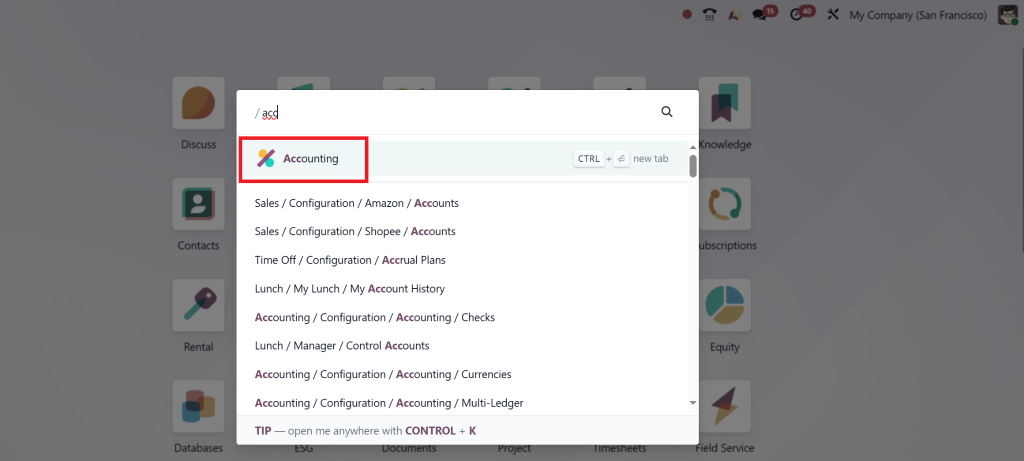
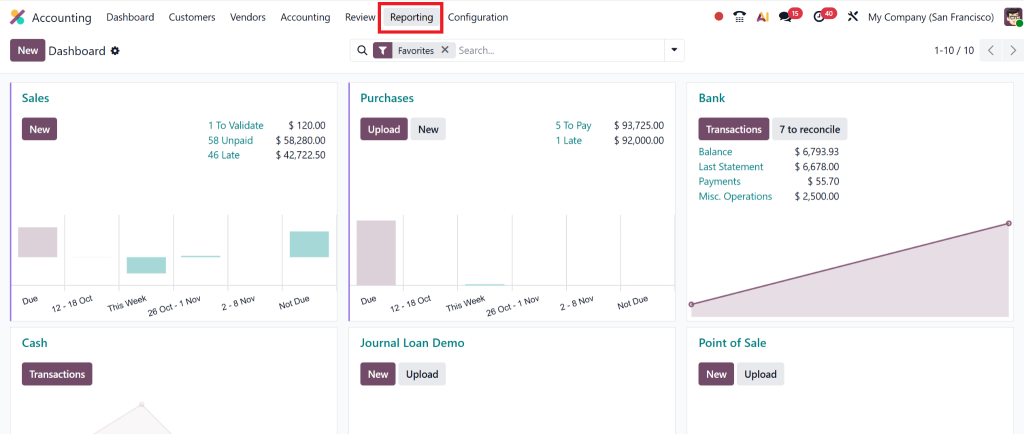
And navigate to the Reports section.
From here, you’ll find “Balance Sheet,” “Profit and Loss,” and “Cash Flow Statements.”
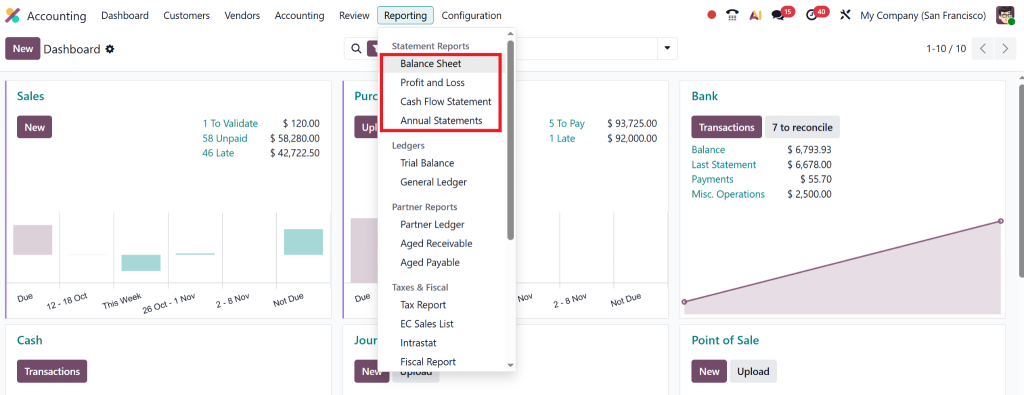
Each report updates in real time as you enter journal entries, ensuring the data you analyse is always current.
2. Configuring Chart of Accounts
The Chart of Accounts (CoA) structure in Odoo requires proper setup to achieve accurate balance sheet analysis. All financial transactions, including purchases, sales, and asset depreciation, must be linked to their appropriate account types: assets, liabilities, and equity.
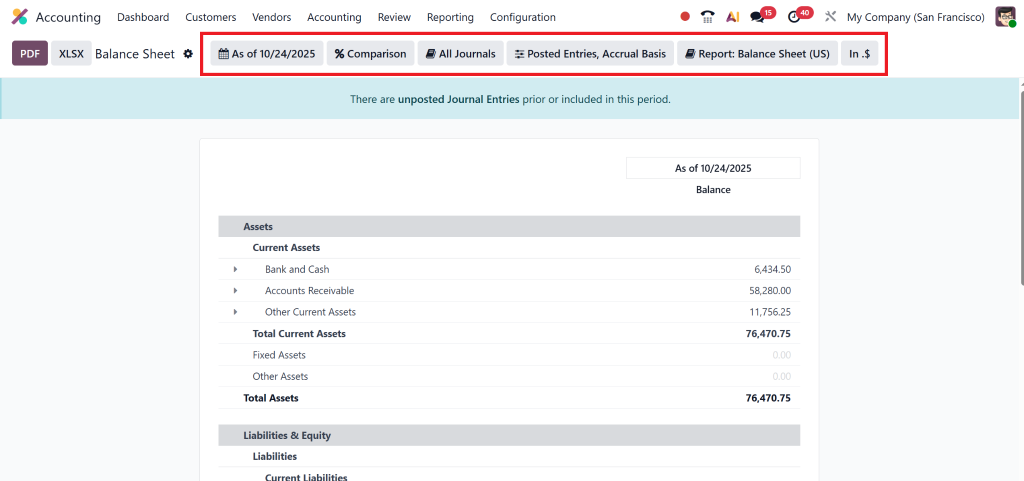
3. Using Filters and Date Ranges
Users of Odoo 19 can access balance sheet data via specific date ranges, journal selections, and tag applications. The system provides complete flexibility for users to perform exact financial period-based analysis through its Odoo accounting system.
Step-by-Step Guide to Analyse Balance Sheet in Odoo 19
Let’s break down how to analyse the balance sheet effectively in Odoo to understand your organisation’s financial pulse.
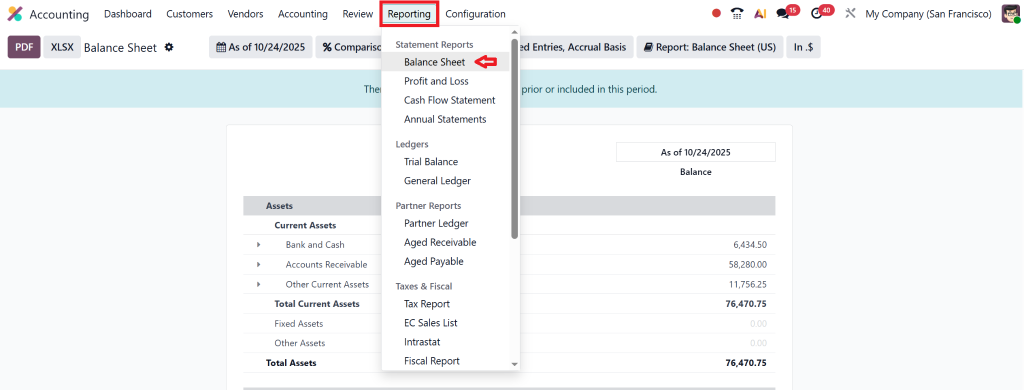
Step 1: Open the Balance Sheet Report
Go to Accounting → Reporting → Balance Sheet.
Here you’ll see a structured report divided into Assets, Liabilities, and Equity.
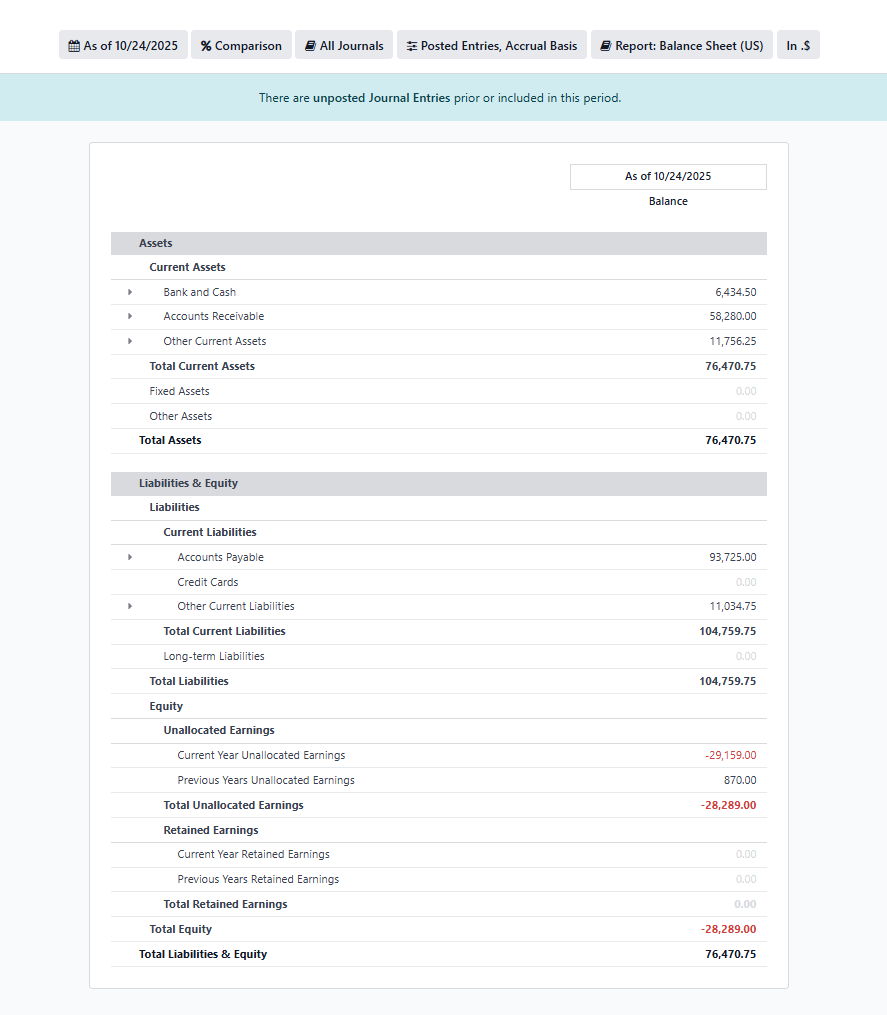
Step 2: Understand Each Section
Assets
Assets represent what your company owns, both tangible (like machinery, cash, and inventory) and intangible (like patents and goodwill).
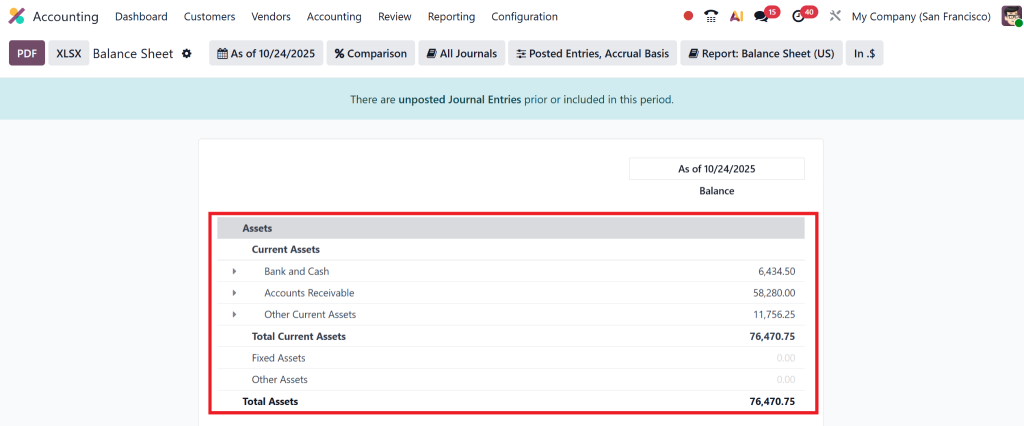
In Odoo 19, the balance sheet automatically classifies assets into Current Assets and Non-Current Assets.
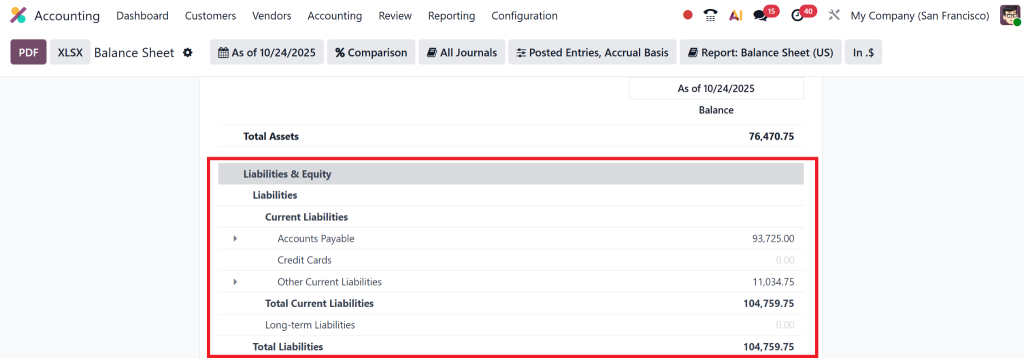
Liabilities
Liabilities reflect what your company owes. These are also grouped into Current Liabilities (due within a year) and Long-Term Liabilities (loans and deferred taxes).
Equity
Equity represents the owner’s stake in the business. It includes retained earnings and capital investments.
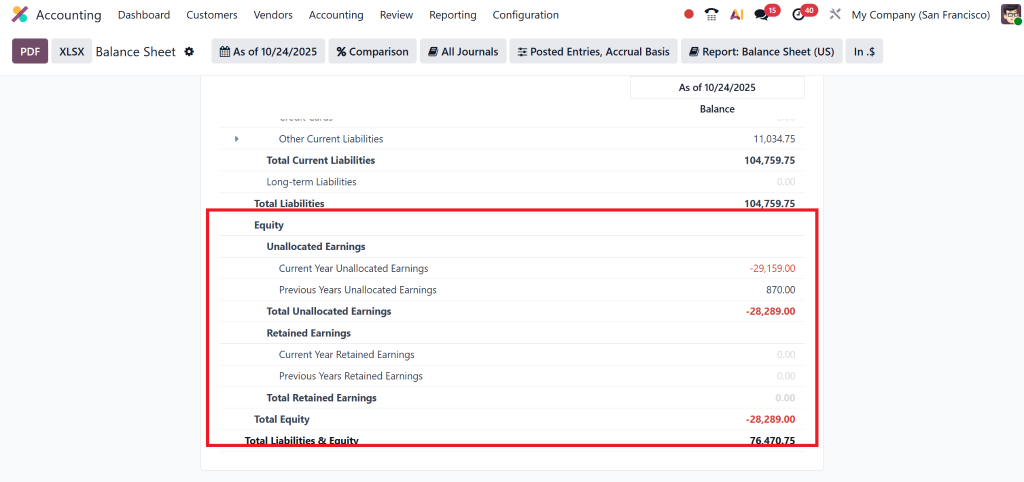
By exploring these three sections in Odoo 19 accounting, users can quickly determine whether the company is growing sustainably or over-leveraged.
If your business operates multiple entities, you can also learn how to manage inter-company accounts efficiently by reading our detailed guide on how to share accounts between companies in Odoo 18 Accounting.
Comparing Odoo Profit and Loss vs Balance Sheet
One of the most common confusions among new Odoo users is the distinction between Odoo profit and loss and the balance sheet.
Here’s the distinction:
Aspect | Profit & Loss Statement | Balance Sheet |
Purpose | Shows the company’s performance over a period | Shows the financial position at a specific date |
Focus | Revenue, expenses, and profit | Assets, liabilities, and equity |
Frequency | Period-based (monthly, quarterly) | Snapshot view (as of date) |
In Odoo 19 | Under “Reports → Profit and Loss” | Under “Reports → Balance Sheet” |
By understanding both reports in Odoo 19 accounting, you can create a complete financial story for your company: how much you earned (P&L) and how much you’re worth (Balance Sheet).
Deep Odoo Accounting Analysis
The true strength of Odoo lies in its analytics. When you analyse the balance sheet in Odoo, you’re not just reading numbers, you’re decoding your business’s financial DNA.
1. Ratio Analysis
The system uses Odoo’s reporting features to generate three financial ratios.
- The Current Ratio equals Current Assets divided by Current Liabilities.
- The Debt-to-Equity Ratio equals Total Liabilities divided by Total Equity.
- The Return on Assets (ROA) ratio equals Net Income divided by Total Assets.
- These ratios help you evaluate liquidity, leverage, and profitability in a few clicks.
2. Comparative and Trend Analysis
The dynamic dashboard in Odoo 19 enables users to view their balance sheets across different time periods, including monthly and yearly comparisons. The system allows users to track financial patterns by showing how assets change while liabilities decrease and equity values rise.
3. Exporting and Sharing Reports
Another powerful Odoo 19 accounting tutorial tip: You can export reports to PDF, Excel, or directly email them to stakeholders.
This makes Odoo 19 an all-in-one solution for financial transparency and collaboration.
Benefits of Analysing Balance Sheet in Odoo 19
Learning to analyse the balance sheet in Odoo provides numerous benefits:
- Real-Time Financial Insights – Get updated figures without waiting for manual reports.
- Automated Accounting – No need for spreadsheets; Odoo does the calculations for you.
- Improved Decision-Making – Use data-backed insights to allocate resources efficiently.
- Regulatory Compliance – Generate audit-ready reports effortlessly.
- Comprehensive Odoo Accounting Analysis – Combine balance sheet data with profit and loss insights for a complete financial picture.
How Netilligence Helps You Master Odoo 19 Accounting
Netilligence operates as an Odoo Partner to help businesses achieve the maximum benefits from Odoo’s accounting functionality. Our team of Odoo experts delivers:
- Custom Odoo 19 Accounting Implementation
- The system automates both Balance Sheet and Financial Reporting tasks.
- Our team provides comprehensive training on Odoo 19’s financial reporting and analysis capabilities.
- Our experts will help you set up Profit and Loss vs Balance Sheet functionality in Odoo.
- Our team delivers complete accounting system integration from start to finish.
Why Choose Netilligence for Odoo Accounting Analysis?
At Netilligence, we go beyond implementation. Our mission is to empower businesses to analyse the balance sheet in Odoo with confidence and accuracy.
We ensure that your Odoo 19 balance sheet reflects real-time, error-free data and that your team understands every insight the platform provides.
Our clients trust us because we deliver:
- Certified Odoo Partner Expertise
- Customised Accounting Solutions
- Data Migration & Integration Services
- Continuous Support & Upgrades for Odoo 19
Odoo 19 Balance Sheet Analysis
The financial information management of businesses undergoes a fundamental transformation through the analysis of balance sheets in Odoo. The financial management system of Odoo 19 enables companies to track their assets and evaluate their liabilities with maximum clarity and control.
The financial operations of businesses can be automated and scaled through 2025 and beyond with Odoo 19 accounting, which offers seamless integration, dynamic filters, and intuitive reports.
Netilligence stands ready to assist you in improving your financial management through our Partner status with Odoo. Our team will optimise your accounting system so you can focus on business expansion.




