

Why You Should Analyze Customer Buying Patterns Using Odoo 19
If you are running a business and still guessing what your customers want, then you are making things harder for yourself. You already have data. Every sale, every order, every customer interaction is stored in your system. But the real question is, are you actually using it?
When you analyze customer buying patterns using Odoo 19, you start understanding your customers in a much clearer way. You get to know what they buy, when they buy, and how often they come back. And once you know this, your decisions become more confident.
Many businesses use Odoo 19 sales reports to analyse customer behaviour, but only look at basic numbers. They check total sales and move on. But there is much more hidden inside those reports.
In this blog, I will walk you through how to use Odoo 19 sales analysis, so you can actually use your data to solve real problems like low repeat sales, inactive customers, and unpredictable buying behaviour.
How to Use Odoo 19 Sales Analysis to Understand Real Customer Behavior
When you open the Sales module in Odoo 19, you will see reports. But just looking at them is not enough. You need to read them properly. In how to use Odoo 19 sales analysis, the first step is to go deeper than totals. Instead of asking “How much did we sell?”, start asking “Who bought from us, and how often?”
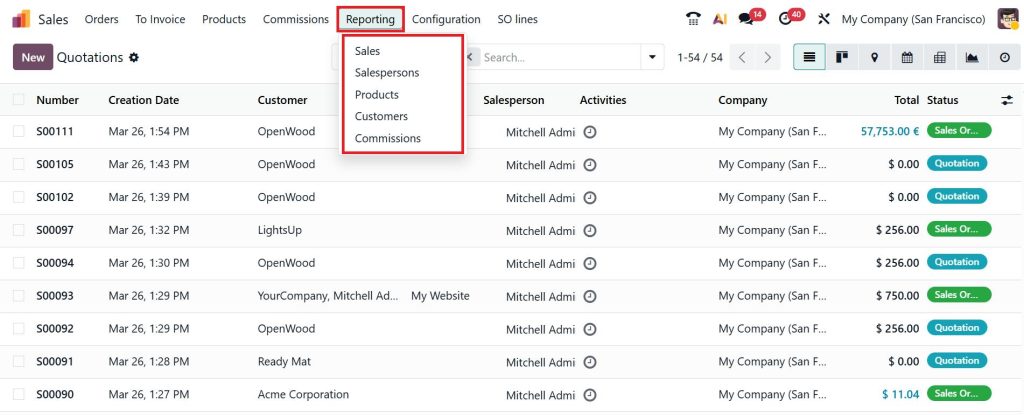
Inside Odoo, go to Sales and open the reporting section. You will see data based on customers, products, and time.
Now here is where things get interesting. You can filter this data and focus on specific customers or time periods.
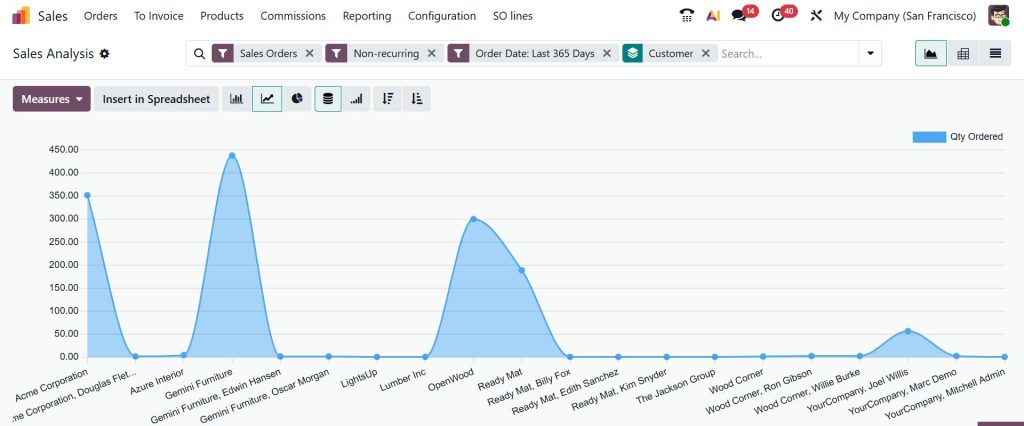
For example, you can check which customers purchased in the last 30 days and which ones didn’t. This small step already gives you a direction. You are no longer looking at random numbers, you are starting to see patterns. And once you start doing this regularly, Odoo 19 sales reports customer behavior will begin to make more sense.
Odoo 19 Sales Reports Customer Behavior – What You Should Actually Look For
When people hear reports, they often think it’s just numbers. But reports are actually telling you a story. With Odoo 19, sales reports customer behavior, you can see how your customers are acting over time. Some customers buy regularly. Some disappear after one order. Some only buy during discounts.
Now, if you know these patterns, won’t your marketing become easier? Inside Odoo reports, you can group data by customers. This shows you who is buying more and who is slowly becoming inactive. You can also check trends over weeks or months to see changes in behavior.
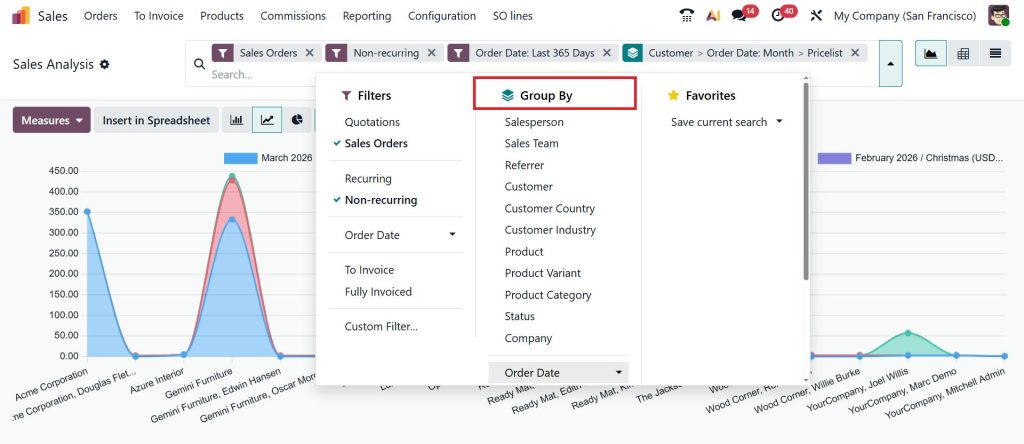
Instead of treating all customers the same, you start understanding them differently. And that’s where better decisions come from.
Odoo 19 Pivot Table Customer Analysis – See Patterns More Clearly
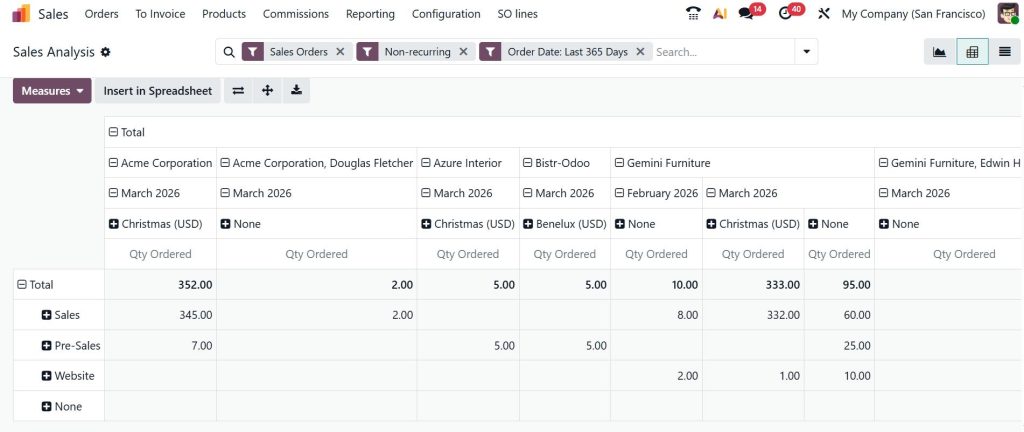
If you haven’t used pivot tables in Odoo yet, you are missing a very useful feature. In Odoo 19 pivot table customer analysis, you can arrange your data in a way that makes patterns easy to spot. You can place customers in rows and months in columns. Then you can see how much each customer purchased in each month.
Now, you notice a customer who was buying every month, but suddenly stopped. That’s not just data. That’s a signal. Using pivot tables, you don’t need to go through long reports. Everything is in front of you in a clean format. You can compare customers, track changes, and notice patterns without confusion.
This is one of the easiest ways to analyze customer buying patterns using Odoo 19 without making things complicated.
Track Customer Purchase Frequency Odoo 19 – Know Who Comes Back
One of the most important things in any business is repeat customers. When you track customer purchase frequency in Odoo 19, you start seeing who comes back and who doesn’t. And this matters more than you think.
Some customers buy once and never return. Others keep coming back again and again. These are the customers you need to focus on. In Odoo, you can check how many orders each customer has placed. You can also track the time gap between their purchases. This helps you understand their buying habits.
For example, if a customer usually buys every 20 days but hasn’t purchased in 40 days, something is off. And if you notice this early, you can take action before losing them. This is how small insights can lead to better results.
Identify Inactive Customers Odoo 19 – Don’t Ignore This Group
Many businesses focus only on new customers. But they forget about the ones who already bought from them. When you identify inactive customers in Odoo 19, you find people who were once interested but are now silent.
In Odoo, you can filter customers based on their last purchase date. For example, you can find customers who haven’t bought anything in the last 3 or 6 months. These customers already know your business. You don’t need to convince them from zero.
You can reach out to them with a simple message, a reminder, or a small offer. Sometimes, that’s all it takes to bring them back. Ignoring inactive customers means leaving money on the table.
Odoo 19 Customer Value Reporting – Focus on the Right Customers
Not every customer contributes the same to your business. Some customers bring more revenue, while others buy occasionally. When you use Odoo 19 customer value reporting, you can clearly see this difference.
In Odoo reports, you can group sales by customers and check the total revenue generated by each one. This shows you who your high-value customers are. If a few customers are bringing most of your revenue, shouldn’t you pay more attention to them?
You can give them better service, special offers, or early access to products. This helps in building long-term relationships. Understanding customer value helps you spend your time and effort in the right place.
How to Use Odoo 19 Sales Analysis to Improve Your Decisions
Once you understand the data, the next step is to act on it. With how to use Odoo 19 sales analysis, you can improve different areas of your business.
- If you see customers buying only during discounts, you can adjust your pricing strategy.
- If you notice customers dropping off after one purchase, you can improve follow-ups.
- If you find high-value customers, you can give them more attention.
Everything becomes more focused. And the more you use these insights, the better your results become over time.
Start Small but Stay Consistent
You don’t need to analyze everything at once. Start small. Open your Odoo reports. Look at your customers. Try to understand their behavior step by step. The more you explore, the more patterns you will notice.
When you consistently analyze customer buying patterns using Odoo 19, you will see a clear difference in how you run your business. You will stop relying on assumptions and start making decisions based on real data.
Need Help Understanding Your Odoo Data?
If you feel like you have the data but don’t know how to use it properly, you’re not alone. At Netilligence, we help businesses practically understand their Odoo system, so they can actually use it in daily operations.
If you want to improve your sales, understand your customers better, and make smarter decisions, we’re here to help. Let’s make your data work for you.




