

Why You Should Create a Lead from a Business Card in Odoo 19 Instead of Typing Everything Manually
You know that moment after a meeting or an event when your pocket or bag is full of business cards? You tell yourself you’ll enter them later, but later turns into days. Some cards get lost, some numbers get typed wrong, and some good contacts never hear from you again. This is exactly why learning how to create a lead from a business card in Odoo 19 is so helpful for your daily sales work.
Instead of typing name, phone number, company, and email again and again, you can now create a lead from a business card in Odoo 19 directly from your phone. Yes, just take a picture, and the system reads the details for you. The new Odoo 19 business card scanner CRM feature is built for people like you who are always meeting new contacts but don’t have time for data entry.
When you import business card leads into Odoo 19, your follow-up becomes faster and more professional. In Odoo 19, AI leads capture from a card; the system understands the card text and automatically fills the CRM fields. You simply scan a business card in Odoo 19 to create a lead, and your contact is saved as a valid lead. The Odoo 19 mobile CRM business card feature lets you do this anywhere, at an exhibition, in a client’s office, or even in your car after a meeting. If you want to automate lead creation from Odoo cards, this is exactly the kind of tool you’ve been needing.
So, if you’ve ever lost a potential client just because you didn’t enter their card on time, keep reading. This will make your life much easier.
Odoo 19 Business Card Scanner CRM – How Your Camera Becomes Your Lead Entry Assistant
Think about how many times you’ve typed contact details from a card and made small mistakes. One wrong digit in a phone number and you can’t reach the person again. The Odoo 19 business card scanner CRM reduces these problems by automatically reading the card.
You open your CRM app, point your camera at the card, and the system captures the details. It reads the name, company, job title, phone number, email, and more. Instead of copying everything line by line, you review and save. That’s how you create a lead from a business card in Odoo 19 without spending several minutes on each contact.
This is especially helpful after events where you collect 20 or 30 cards in one day. Rather than feeling tired and postponing the work, you can take a few minutes to quickly import business card Odoo 19 leads while the meetings are still fresh in your mind.
Import Business Card Odoo 19 Leads – No More Piles of Cards on Your Desk
Be honest with yourself for a second. How many business cards are lying somewhere on your desk, in your drawer, or in your wallet right now? Each card represents a person who may be waiting for your call or message.
When you import business card data into Odoo 19, those contacts stop being just paper and become real opportunities in your CRM. Once saved, you can assign them to a salesperson, schedule a follow-up call, or send an introduction email. Everything becomes organized.
The good thing is that when you create a lead from a business card in Odoo 19, the lead doesn’t just sit there. It enters your sales pipeline, where you can track what happens next. Did you call them? Did they reply? Are they interested? All of that becomes easy to manage.
Odoo 19 AI Lead Capture from Card – How the System Understands the Card Details
You might be wondering how the system actually reads the card. This is where Odoo 19 AI lead capture from the card comes in. The software uses smart text recognition to understand the text on the card.
When you scan a business card to lead in Odoo 19, the system attempts to identify the person’s name, company, phone number, and email address. You don’t have to teach it every time. Just check that everything looks correct and save.
This makes it much easier to automate lead creation from cards in Odoo, since the system handles most of the reading for you. You are not starting from a blank form; the details are already filled in.
Scan Visiting Card to Lead Odoo 19 – What Actually Happens Step by Step
Let me walk you through this simply, just like you’re doing it right now. First, you open your CRM in Odoo. Then you go to the leads section. There, you’ll see an option to add a new lead; within that option, you can use the camera. When you tap it, the Odoo 19 mobile CRM business card feature opens your phone camera.
You place the card in front of the camera and take a clear photo. In a few seconds, the system processes the image. This is where Odoo 19 AI lead capture from the card works in the background. The details appear on your screen in the lead form.
You check the spelling, make any necessary edits, and then save. That’s it. You can create a lead from a business card in Odoo 19 without manually entering all the details.
Step-by-Step Guide: Create a Lead from a Business Card in Odoo 19
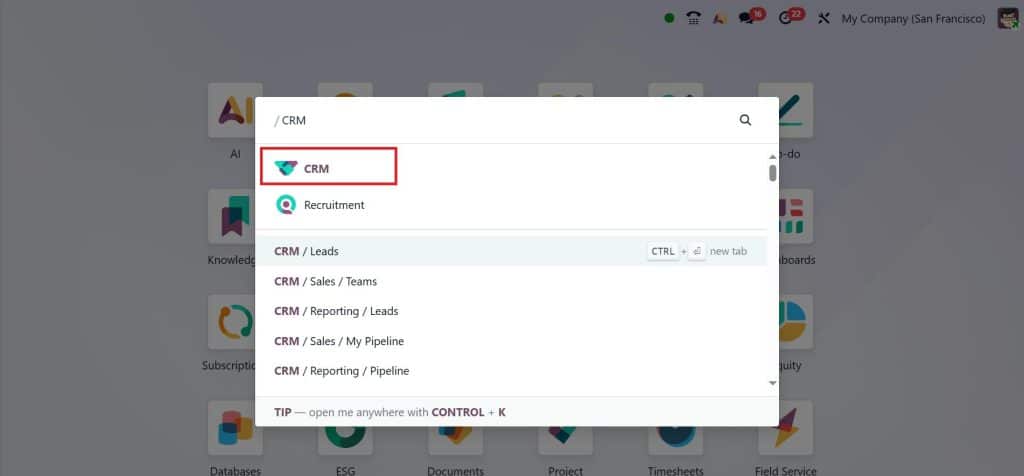
Make sure your CRM module is installed. Open the CRM module from your Odoo 19 dashboard.
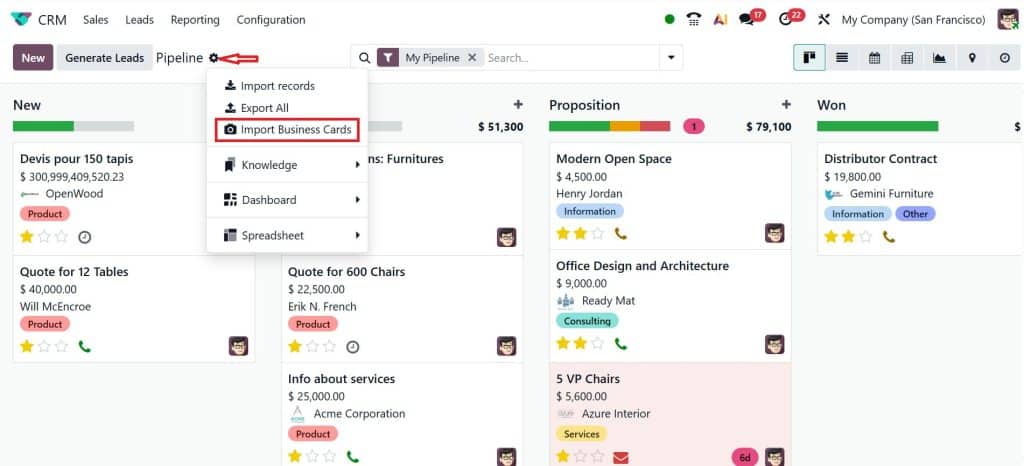
Here, you can find all the leads that are generated. Now, we can also generate a lead from the business card. As you just moved on to the Actions > Import Business Cards.
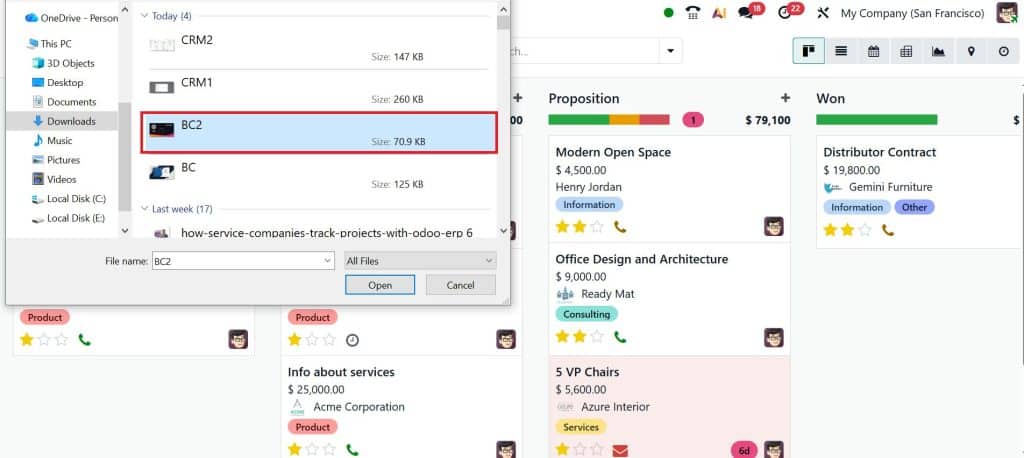
Let’s import a business card.
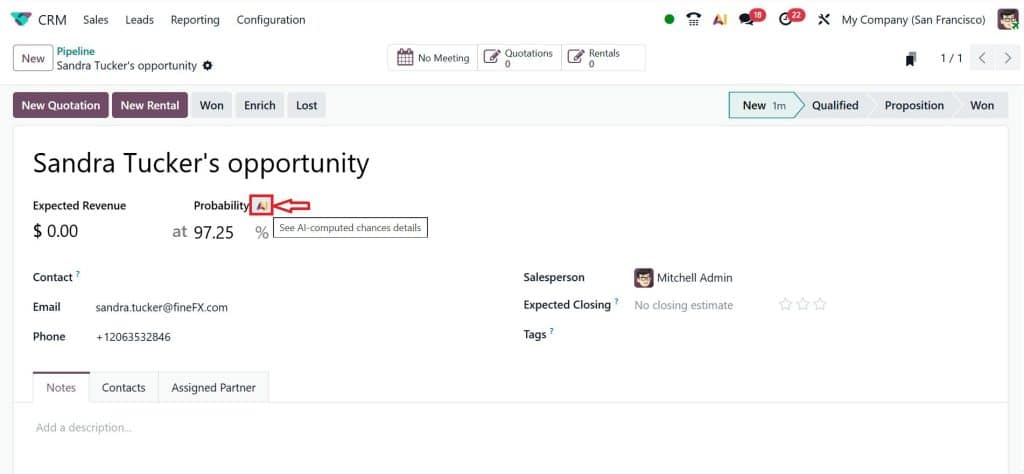
Since you just imported the business card, Odoo will automatically create a lead here. You can see an option labeled Probability AI (see AI-computed chance details). Click on AI.
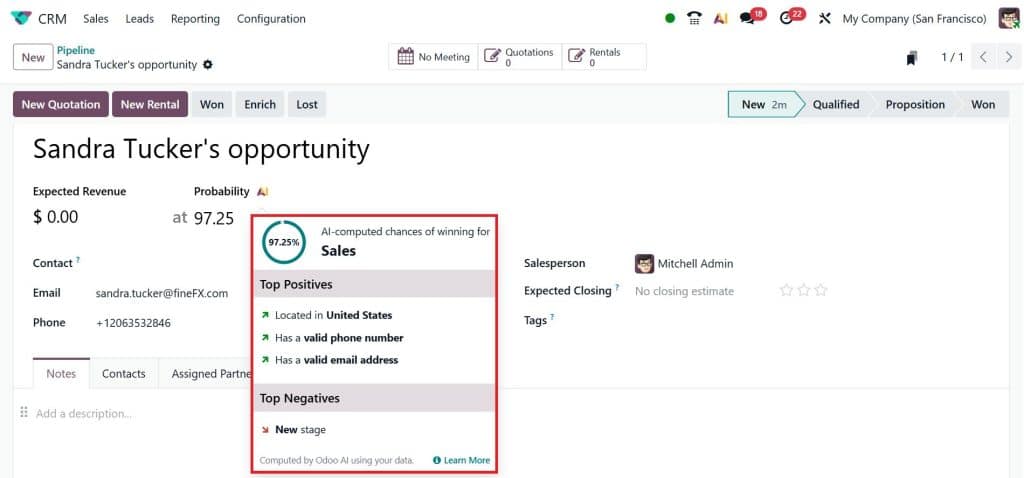
Now, you can find the AI-computed chances of winning for Sales, like top positives & top negatives.
So, that’s how we just create a lead from a business card.
Odoo 19 Mobile CRM Business Card Feature – Capture Leads Even When You’re Outside the Office
Sales don’t only happen at your desk. Most of the time, you’re outside meeting people. That’s why the Odoo 19 mobile CRM business card feature is so useful.
Right after a meeting, while the discussion is still fresh in your mind, you can scan a visiting card to lead Odoo 19 on the spot. You don’t have to wait until you go back to the office. This helps you remember where you met the person and what you talked about. You can even add notes in the lead right away.
When you import business card Odoo 19, your follow-up becomes faster. You can send a message the same day instead of waiting a week and hoping they still remember you.
Automate Lead Creation from Cards Odoo – Save Time for Real Conversations
When you automate lead creation from cards in Odoo, you save time to spend on actual client conversations. Instead of sitting and typing data, you’re calling leads, sending proposals, and building relationships.
Also, automation reduces the chances of forgetting someone. Every time you create a lead from a business card in Odoo 19, that person is added to your system. You can set reminders, schedule activities, and ensure no leads are overlooked.
Over time, this habit makes a big difference. Small actions, like scanning cards on the same day, can lead to more replies and more deals.
Create a Lead from a Business Card in Odoo 19 and Keep Your Sales Pipeline Active
Your sales pipeline only works well when new leads keep coming in. Business cards are one of the most common sources of new contacts, but only if you actually use them.
When you regularly create leads from business cards in Odoo 19, your pipeline stays active. You always have new people to follow up with. And because you used the Odoo 19 business card scanner CRM, the information is already saved in the correct fields.
This also helps your team. If you are unavailable, another team member can review the lead, read your notes, and continue the conversation. That’s how important the business card is in Odoo 19; it supports teamwork.
Why Readers Like You Should Start Using Odoo 19 AI Lead Capture from Card Today
If you often meet people but struggle to manage all those contacts later, this feature is for you. Odoo 19 AI lead capture from cards removes the tedious data-entry process and lets you focus on real communication.
The next time you get a business card, don’t just put it in your pocket. Open your CRM, scan the visiting card to create a lead in Odoo 19, review the details, and save. In just a few seconds, you can create a lead from a business card in Odoo 19 and ensure the contact is not forgotten.
When you consistently automate lead creation from Odoo cards, you build a habit of quick follow-ups and better organization. And that’s exactly what helps you stay on top of your sales work without feeling stressed about unfinished data entry.
Ready to Create a Lead from a Business Card in Odoo 19? Let’s Set It Up for You
If you and your team are still saving business cards in drawers or typing details manually, it’s time to switch to a smarter way. With the Odoo 19 business card scanner CRM, you can start turning every new contact into a proper lead within seconds.
At Netilligence, we help businesses set up CRM tools the right way so your team can easily create a lead from a business card in Odoo 19, use Odoo 19 AI lead capture from a card, and fully automate lead creation from cards in Odoo as part of your daily sales process.
Want to see how the Odoo 19 mobile CRM business card feature works on your own system?
Contact Netilligence today for a quick demo and let us help you turn simple business cards into real sales opportunities.




