


How to Create Quick Contacts in Odoo 19 CRM Without Losing Your Momentum
Hey, Let’s Talk About Quick Contacts in Odoo 19 CRM
For a second, let’s be honest: CRM data entry can feel like watching paint dry. You’re in the middle of something exciting (a new lead, maybe!), and suddenly you’re forced to fill in 10 fields, scroll through dropdowns, save, click here, click there… ugh. That part is so annoying and destroys the flow. But guess what? If you’re using Quick Contacts in Odoo, especially in the super-slick Odoo 19 CRM, you can skip all the boring stuff and add contacts in seconds. Literally seconds.
It’s not magic. It’s just smart CRM functionality that lets you stay in your flow. And if you’re still doing it the long, slow, discouraging way, you’re about to be blown away.
What Makes Odoo 19 Quick Create Contact a Total Catalyst?
Let’s suppose you’re on a call. You’ve just connected with a lead. They tell you their name, email, and company. You’re listening carefully, and then it hits you: You must save their contact info before it vanishes.
This is where the Odoo 19 quick create contact feature becomes your best friend. There is no need to click through five tabs. A fast, neat pop-up that lets you jot down just the basics: name, email, and a number. Done. You can breathe. You can refocus. You can return to your lead without saying, “Hold on, let me open something up.”
Seriously, the simple tool makes you wonder: Why wasn’t it always this easy?
Odoo 19 CRM Add Contact Like You'd Add Someone to Your Phone
Visualize adding a new contact to your phone. The name, number, maybe an email; that’s it.
That’s exactly the vibe of the Odoo 19 CRM add contact feature. It doesn’t force you to write the contact’s life story to save them. Whether at your desk, walking into a meeting, or a mid-sales call, this feature respects your time.
It’s fast, lightweight, and flexible enough to grow that contact into a full lead later. There’s no pressure or confusion; just CRM done the right way.
The Odoo 19 Contact Creation Tutorial You'll Enjoy Reading
Now, I know “tutorial” sounds dry. But this isn’t one of those snoozy, step-by-step guides with 50 screenshots. This is the Odoo 19 contact creation tutorial that’s fun to read.
Why? Because it feels more like a conversation than a textbook.
You open your CRM dashboard, click “New,” and start typing. If that contact becomes a deal later, you can enrich their profile, attach documents, assign them to your team, and even send them a quote from one place.
There’s no learning curve. You’ll pick it up in one sitting and love its smoothness.
Lightning Fast Leads? Meet Odoo 19 CRM Quick Contact Entry
Here’s a challenge: try adding a new lead before your coffee cools. With Odoo 19 CRM quick contact entry, it’s possible and your new standard.
This feature is built for speed and stability. You don’t need to create a new company first, fill in “Job Position” or “VAT Number,” or even capture the moment.
Think of it this way: You build your sales pipeline like a chef collects ingredients. It’s okay to grab what you can now and prepare it later.
So yes, with this tool, you can add 10 contacts when it used to take you to enter just one.
Odoo 19 Create Contact from Kanban View Is a Joy
There’s something satisfying about seeing your leads lined up as cards. But here’s the exciting part: did you know you can create a contact directly in Kanban view in Odoo 19?
Yep, there’s no need to jump between menus or dig around. Click “+ Add” at the top of a column, type a name, and a brand-new contact card will appear. You’re not breaking the flow, you’re not switching context, you’re just building your pipeline like a boss.
Odoo 19 creates a contact from the Kanban view, which makes you feel like a productivity wizard.
The Sneaky Power of Odoo 19 CRM Contact Management
It’s Smarter Than You Think
So you’ve got a bunch of new contacts. Cool. But now what?
Here’s where Odoo 19 CRM contact management steps up. This isn’t just about storing data. It’s about activating your contacts.
Want to send a follow-up? Done. Need to tag contacts by region or industry? Easy. Are you looking to assign contacts to different team members? One-click.
Everything is filterable, segmentable, and searchable. You can build smart lists, automate actions, and analyze your contract performance.
In short, your CRM isn’t a necropolis of forgotten names anymore. It’s a living ecosystem that fuels your business every single day.
The No-Fluff Odoo 19 CRM Contact Creation Guide You Can Use
Let’s keep it real; nobody has time for complicated instructions. That’s why this is your no-fluff, no-nonsense Odoo 19 CRM contact creation guide.
This is for anyone who wants to get contacts into their CRM in 30 seconds or less.
Now that you’ve learned how excellent Quick Contacts in Odoo 19 CRM are, let’s proceed with the step-by-step process.
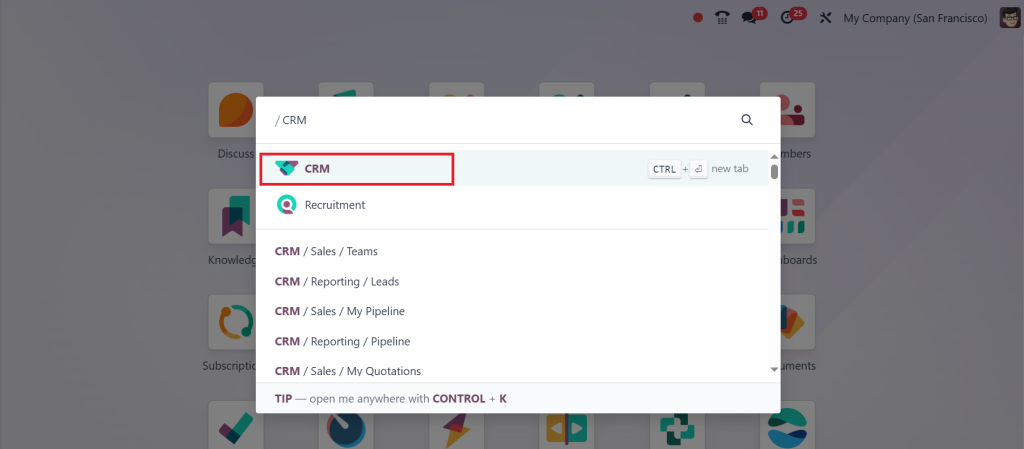
Fire up your Odoo 19 dashboard and click on the ‘‘CRM Module’’ from the main screen. This is where the magic begins.
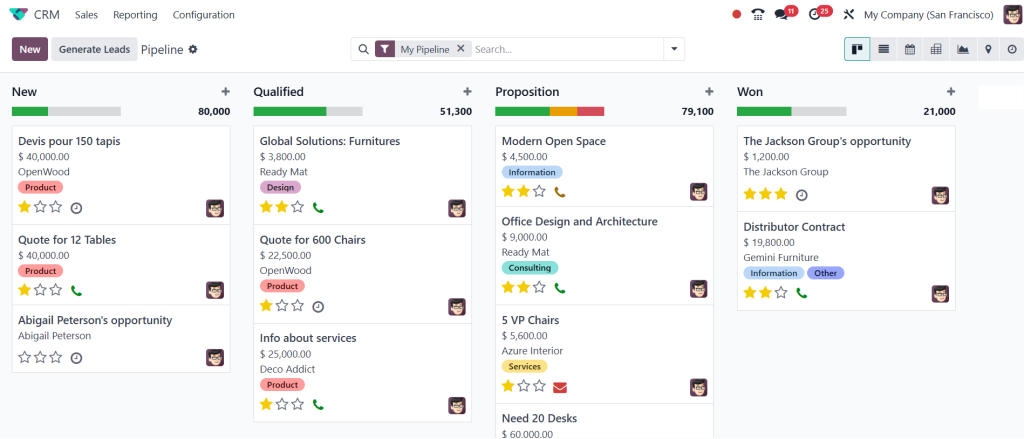
Once inside the CRM module, ensure you’re in the Kanban view; this is the beautiful card-based pipeline layout where you can see leads at different stages.
You’ll spot columns like “New,” “Qualified,” “Proposition,” and so on.
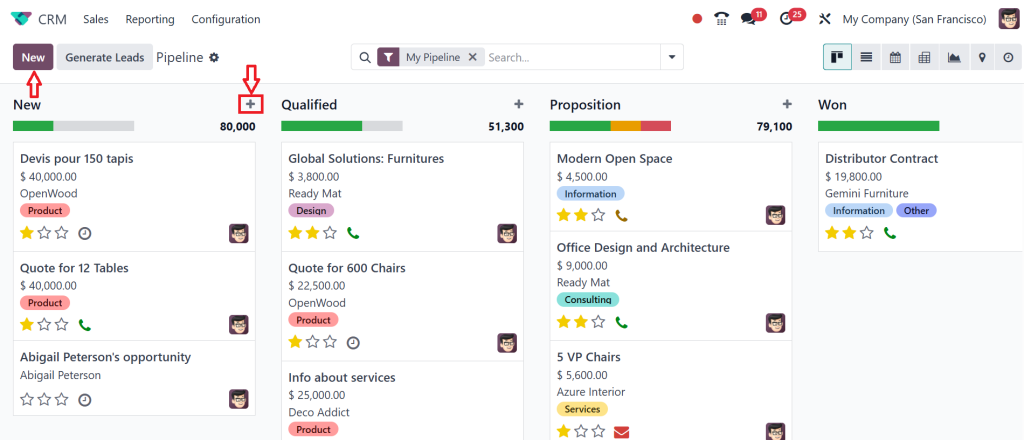
You just got off a call and want to save this lead fast.
All you need to do is:
- Hover over the top right corner of any pipeline column.
- Click the “+ Add” button or click the ‘‘New’’.
This opens the Odoo 19 quick-create contact form for your best friend.
A pop-up appears with just a few simple fields:
- Opportunity Name (this can be the contact’s name or company)
- Add an email, phone, or notes if you want to.
- Once you’ve typed in whatever info you have, click ‘‘Add’’.
That’s it. Really.
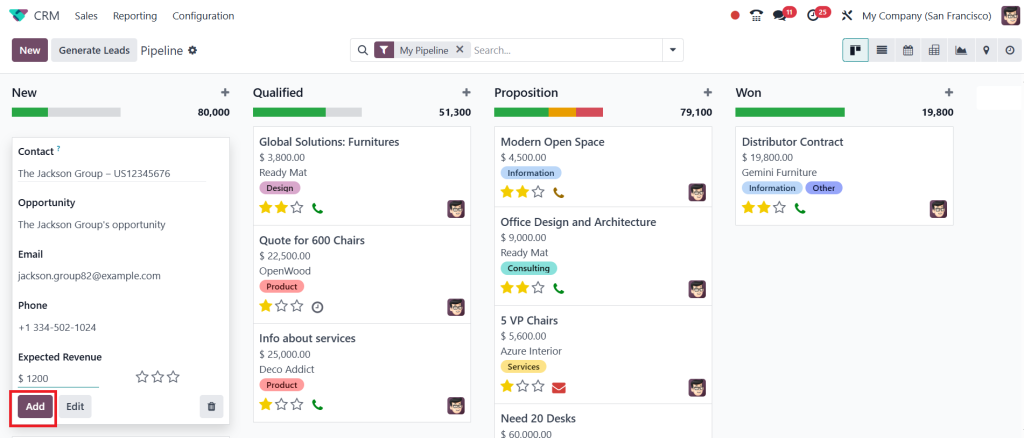
Boom. You’ve now added a new quick contact in Odoo 19 CRM, which didn’t break your focus. Your coffee is still hot, and your lead is safe.
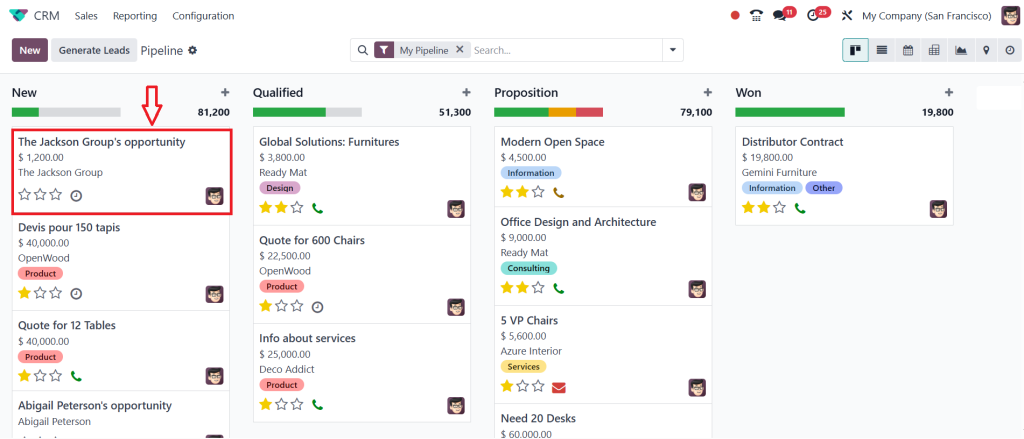
Now, let’s choose the ‘‘The Jackson Group Opportunity’’.
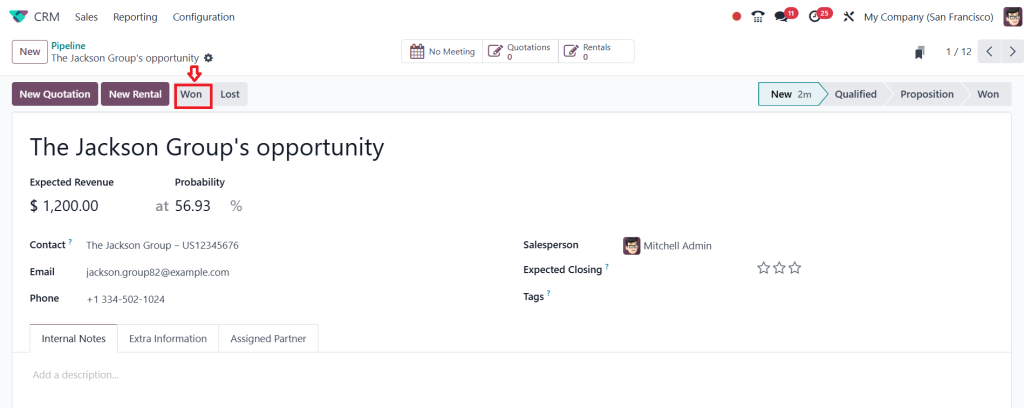
Once it’s done, you can click on ‘‘Won’’. So, we can see that it is treated as a lead.
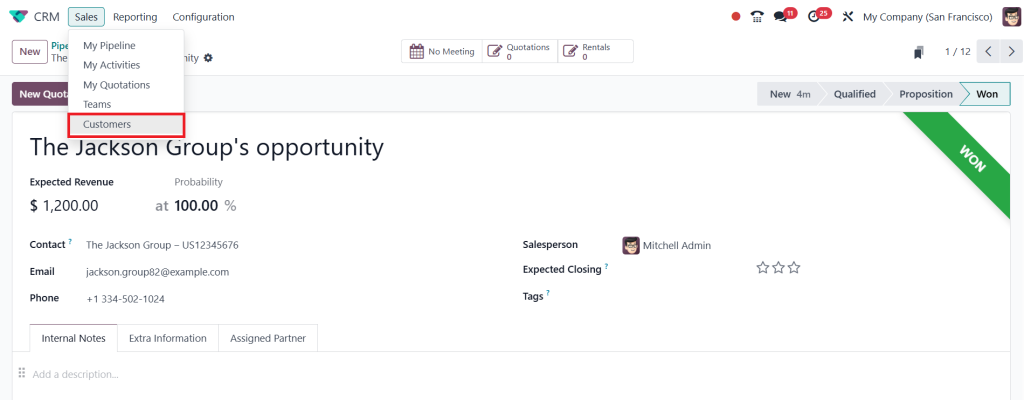
As it’s created as a lead, it will be made a “Contact” under the sales customer. So, let’s click on “Customers”.
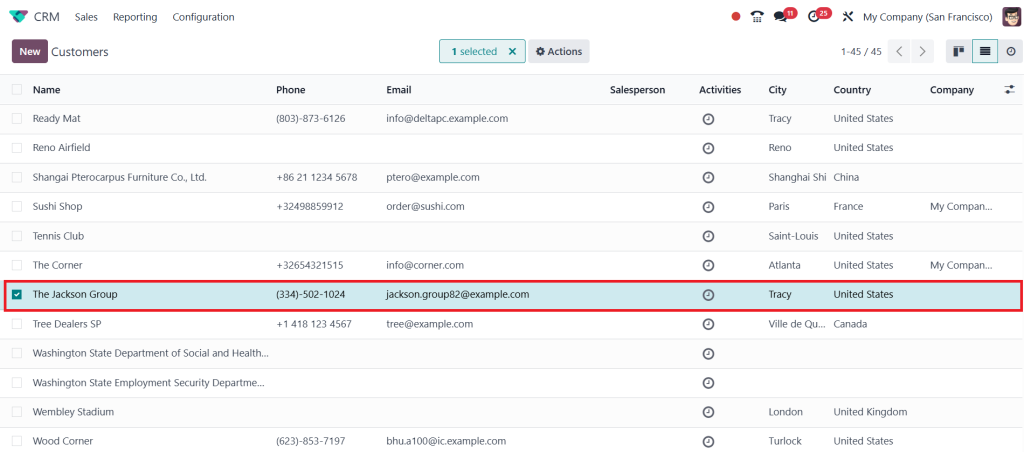
Then, you can find the “Contact” that has been created here. So, this is the new feature under Odoo 19 CRM.
Remember, quick doesn’t mean incomplete. It just means fast now, smart later. And that’s how the best CRMs work.
You don’t need a degree in CRMology to use this system. It’s built for humans, not robots.
Still Not Using Quick Contacts in Odoo?
You’re Missing Out on More Than Time
Let me end with this: If you’re not using Quick Contacts in Odoo, especially with all the slick updates in Odoo 19 CRM, you’re not wasting time but missing out on momentum.
Every conversation, every trade show, every referral is a potential goldmine. But if you’re fumbling to enter contacts, you’re leaving money on the table.
The world moves fast. Your CRM should, too.
With tools like Odoo 19 Quick Create Contact, Odoo 19 CRM Quick Contact Entry, Odoo 19 Create Contact from Kanban View and the most innovative contact management system you’ve ever used, you’ll be flying through your day and sales pipeline.
So go ahead. Open Odoo. Add that next contact in 5 seconds. And keep the conversation going.
If you won’t believe how fast your pipeline grows when Quick Contacts become second nature. Please don’t say I didn’t warn you.




