

Businesses operating in today’s digital environment require marketing strategies that deliver direct personalized messages to reach their customers effectively. The Odoo 18 SMS marketing platform enables businesses to connect with their audience through automated personalized message campaigns. Odoo 18 SMS marketing provides an easy solution for startups and enterprises to create SMS campaigns through its rich features and seamless integration capabilities.
Odoo provides both pre-designed SMS templates and sophisticated campaign management tools which simplify the process of launching and tracking successful marketing campaigns. The following blog provides an actionable tutorial about Odoo SMS marketing that helps businesses use Odoo 18 SMS features to improve customer engagement and return on investment.
Why Use Odoo 18 SMS Marketing?
The Odoo 18 SMS marketing module functions as a transformative business tool which enables organizations to establish trust while delivering updates and achieving conversion goals. The following list explains why businesses select this tool as their preferred choice.
> Real-time Communication: Messages are delivered and read within minutes.
> Automation Capabilities: Save time with automated SMS workflows.
> Analytics and Tracking: Measure open rates, delivery success, and responses.
> Integration: Connects easily with CRM, Sales, and Marketing modules.
Through Odoo 18 SMS marketing businesses can establish a quick and personalized communication system that surpasses traditional email and notification methods to reach their customers.
Getting Started – How to Create SMS Campaign Odoo 18 Style
To create SMS campaign Odoo 18, follow these quick steps:
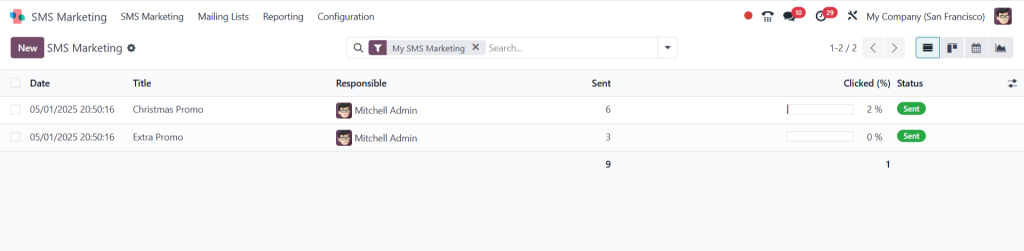
Step 1: Access SMS Marketing Module
- Open the Odoo Dashboard.
- Use the search bar to find “SMS Marketing”.
- The dashboard displays existing SMS campaigns by default.
- A filter “My SMS Marketing” is already applied.
- You can remove or add more filters based on your need.
Step 2: Create a New SMS
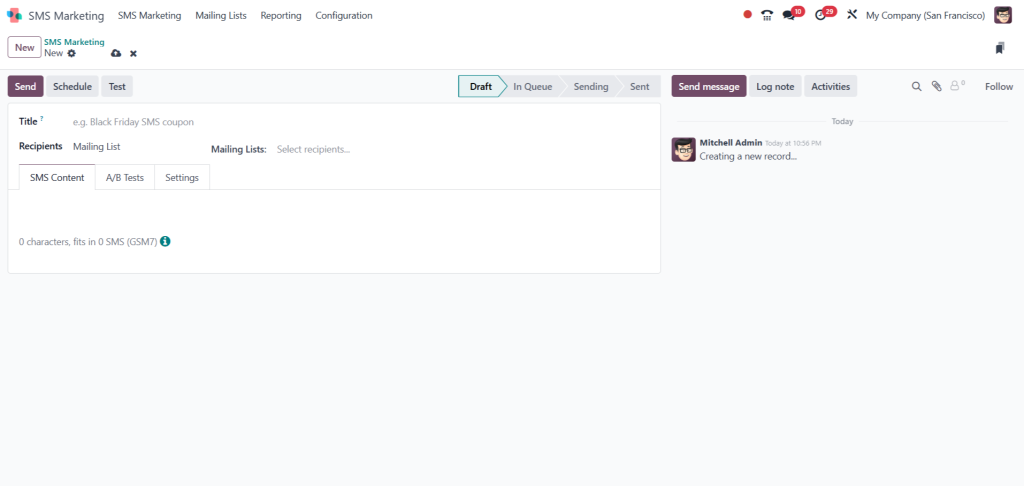
- Click on the “Create” or “New” button to start a new campaign.
- This will open a blank form for a new SMS.
Step 3: Fill in SMS Details
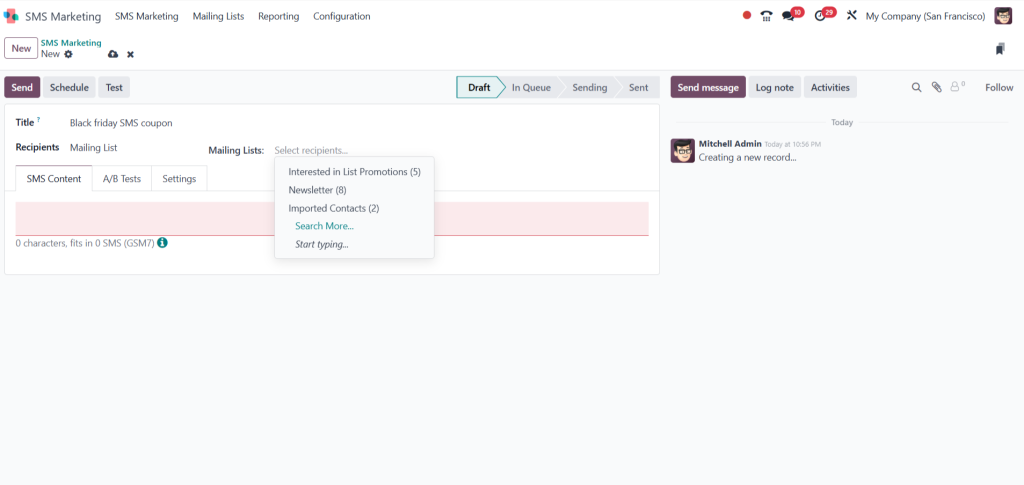
- Title: Enter a subject line for your SMS (e.g., Black Friday SMS Coupon).
- Recipient Options:
- Choose from a Mailing List (predefined groups like Interested Customers, Newsletter Subscribers, etc.).
- Or remove the mailing list and choose other recipient types like:
- Application Contact
- Event Registration
- Journal Entry
- Leads, etc.
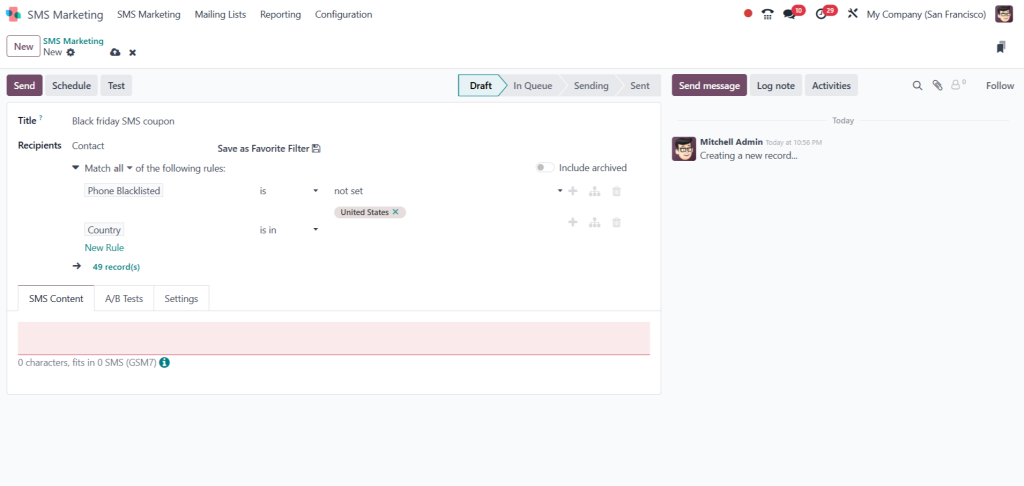
Step 4: Add/Modify Filters (Optional)
- You can modify the recipient filter.
- Click on “Modify Filter”.
- Add new rules such as Country, and select a specific country (e.g., United States).
- This helps to target a specific audience.
Step 5: Enter SMS Content
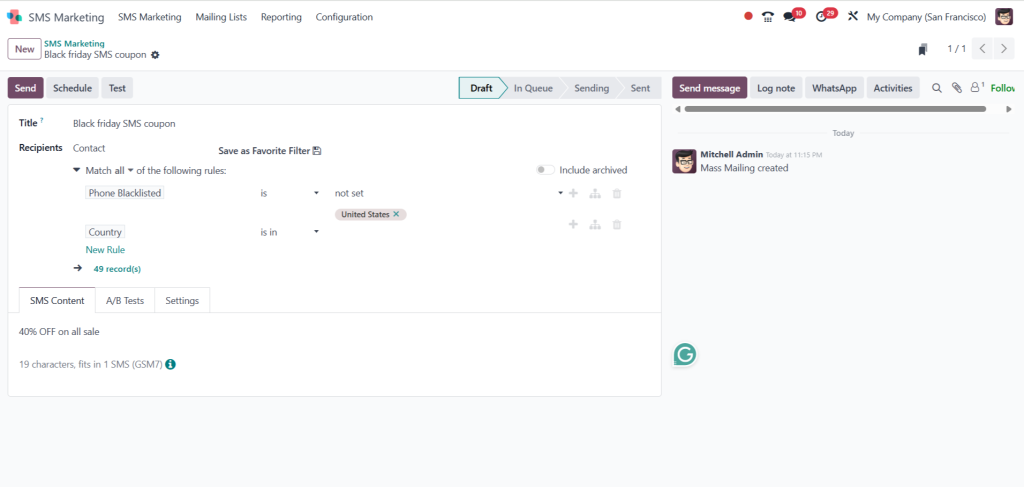
- Type your SMS message content (e.g., “Get 40% OFF on all sales!”).
- Options available within the message field:
- Insert Fields (e.g., product links, website links).
- Emojis (e.g., 🔥, 🎉).
- SMS Pricing Icon to preview credit cost.
Step 6: Review SMS Pricing
- SMS pricing depends on the number of recipients and country.
- You must purchase SMS credits in Odoo to send messages.
Step 7: Save and Send
- Click on “Save”.
- The SMS is now ready to be scheduled or sent immediately.
Key Odoo 18 SMS Marketing Features You Must Know
Odoo 18 SMS marketing delivers its power through its modern and advanced features. The new version includes the following key features that distinguish it from others.
> Contact List Segmentation enables you to deliver messages to users who match specific behavioral or geographic or demographic criteria.
> The Odoo SMS templates library provides users with numerous pre-built templates that help speed up their campaign development process.
> The system allows users to send SMS messages to thousands of recipients through a single click.
> The system enables users to establish automated messaging protocols which trigger when users perform specific actions.
> The dashboard provides real-time analytics that enable users to monitor open rates and delivery status among other metrics.
The Odoo 18 SMS marketing features provide both efficiency and impact in your campaigns.
Customizing Odoo SMS Campaign Settings for Better Results
Every campaign requires personalization. Odoo gives you full control through its advanced Odoo SMS campaign settings:
> A/B Testing: Try different messages to test what works.
> Send Time Optimization: Deliver messages at times when users are most active.
> Dynamic Fields: Automatically personalize messages with customer name, order number, etc.
> Opt-Out Options: Include an unsubscribe link for better compliance.
Fine-tuning your Odoo SMS campaign settings ensures better deliverability, user satisfaction, and engagement.
Designing Impactful Messages with Odoo SMS Templates
Content matters. Odoo SMS templates enable you to create precise and clear effective messages quickly through the following features:
> The system includes pre-designed templates for reminders and promotions and order confirmations and other communication types.
> The system allows users to insert personalization tokens which include [Customer Name] and [Order ID].
> The system allows users to save custom templates for later use.
Odoo SMS templates help users avoid mistakes while saving time and maintaining consistent branding throughout their marketing campaigns.
Understanding Odoo 18 SMS Marketing Pricing
Odoo provides SMS services through a credit-based pricing system. Odoo 18 SMS marketing pricing operates as follows:
> SMS Credits: You purchase SMS credits based on your needs. Prices vary by country.
> Usage-Based Deduction: The number of credits used for each SMS depends on the recipient’s location and message length.
> You can track your usage and billing history through your account.
Odoo’s pricing structure works for both small and large-scale campaigns while remaining competitive across different regions.
Take Your Business Communication to the Next Level
Odoo 18 SMS marketing functions as a powerful tool which transforms your customer communication methods. The platform unifies speed with clarity and automation and personalization into a single system. Your Odoo SMS campaigns will reach and convert audiences through Odoo 18 SMS features combined with optimized campaign settings and effective template usage.
The comprehensive Odoo SMS marketing tutorial combined with your ability to create SMS campaign Odoo 18 has prepared you to launch successful campaigns with assurance. Odoo 18 SMS marketing delivers your messages with maximum clarity during both urgent promotional campaigns and essential notification operations.




