

Managing business finances is not just about recording transactions; it’s about understanding how money moves through your business. In the modern world of finance, Odoo 19 Accounting modernizes this process, making it not only accurate but also automated and insightful.
Suppose you’re wondering how to generate a Cash Flow Statement in Odoo 19 Accounting. In that case, this complete guide will help you understand everything, from setting up your financial statements to automating your cash flow reporting. Whether you’re a finance professional, an accountant, or a business owner, this tutorial will help you take complete control of your financial visibility with Odoo 19 cash flow statement tools.
Understanding the Cash Flow Statement in Odoo 19 Accounting
When running a business, cash flow is the lifeblood that keeps operations alive. Tracking how money enters and leaves your company ensures sustainable financial health. The Cash Flow Statement in Odoo 19 Accounting provides a clear view of your organization’s liquidity, helping you make informed strategic financial decisions.
Unlike traditional methods that require manual data entry and calculations, Odoo 19 automates most of the process. With its updated cash flow tags, financial statement setup, and cash flow automation features, it ensures accuracy and saves hours of manual work.
Here’s what makes the Cash Flow Statement in Odoo 19 Accounting an essential part of your business toolkit:
- It automatically categorizes transactions into operating, investing, and financing activities.
- It helps track incoming and outgoing cash in real-time.
- It allows businesses to generate reports instantly with the ‘Generate Cash Flow Report’ feature in Odoo.
- It improves decision-making by giving a clear view of liquidity and financial performance.
At Netilligence, as an Odoo Partner, we help businesses implement, customize, and optimize their Odoo accounting cash flow processes, making financial management effortless, accurate, and growth-driven.
How to Generate a Cash Flow Statement in Odoo 19 Accounting (Step-by-Step Tutorial)
Now, let’s dive into the practical part, how to generate a Cash Flow Statement in Odoo 19 Accounting efficiently. Follow these simple steps:
Step 1: Enable the Accounting Module
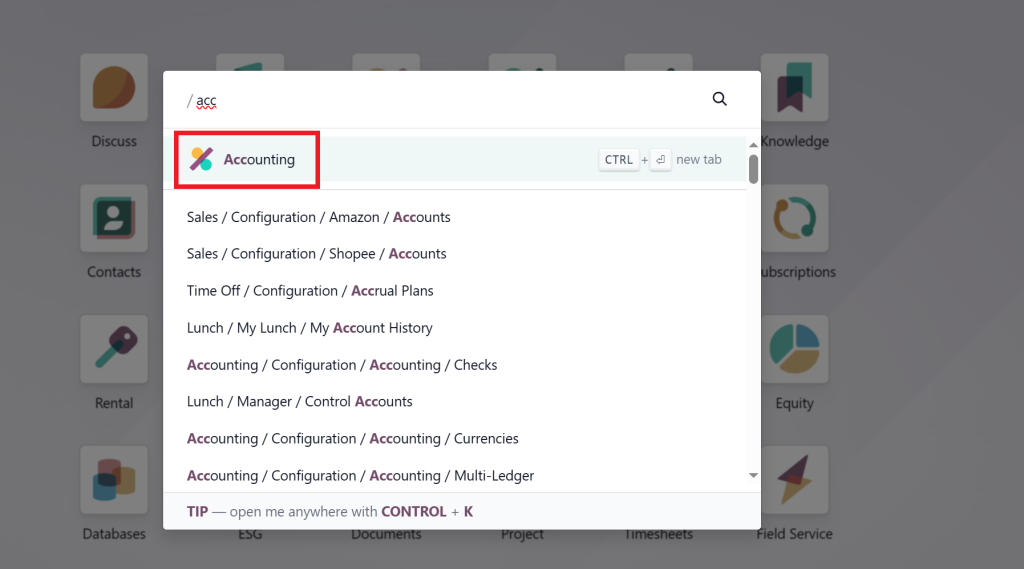
First, ensure the Accounting app is installed in your Odoo 19 instance. Navigate to Apps > Accounting and click “Install.”
Once installed, you’ll gain access to all financial management tools, including cash flow statements, balance sheets, and profit & loss reports.
Step 2: Configure Your Chart of Accounts
Before generating any reports, ensure your chart of accounts is configured correctly.
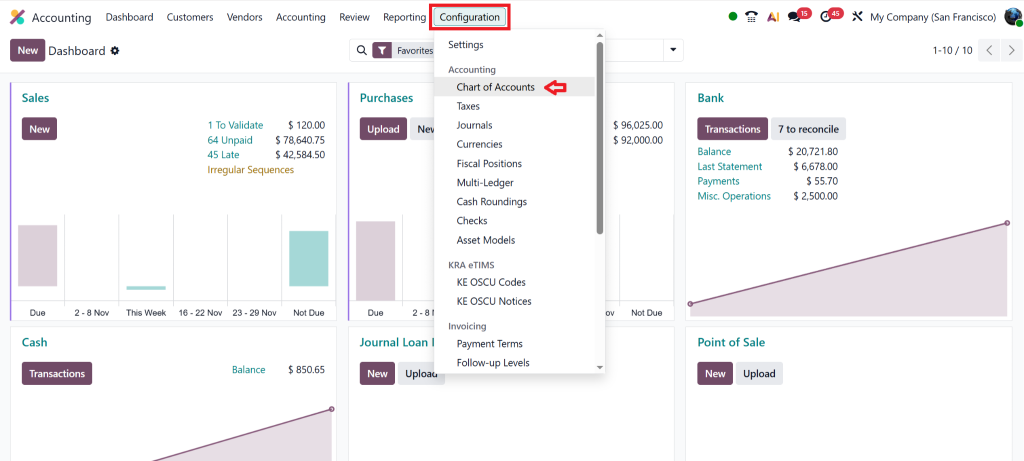
Go to Accounting > Configuration > Chart of Accounts.
Here, review and edit your account types; each one determines how transactions appear in financial statements.
For example:
- Cash and Bank accounts → Operating activities
- Loan accounts → Financing activities
- Investments → Investing activities
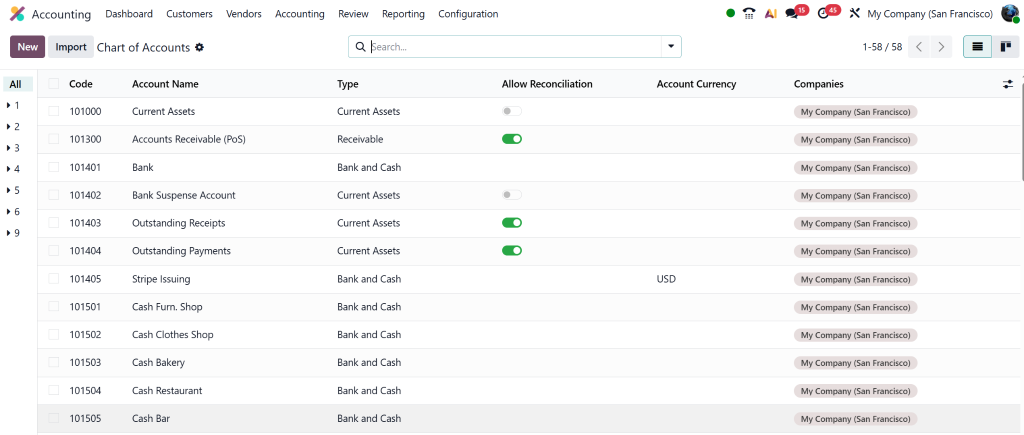
This setup ensures accurate categorization in the Odoo 19 cash flow statement.
Step 3: Set Up Cash Flow Tags
In Odoo 19, cash flow tags play a vital role. These tags define how each account contributes to the cash flow report.
You can configure them via Accounting > Configuration > Accounts and select the correct cash flow tag for each account.
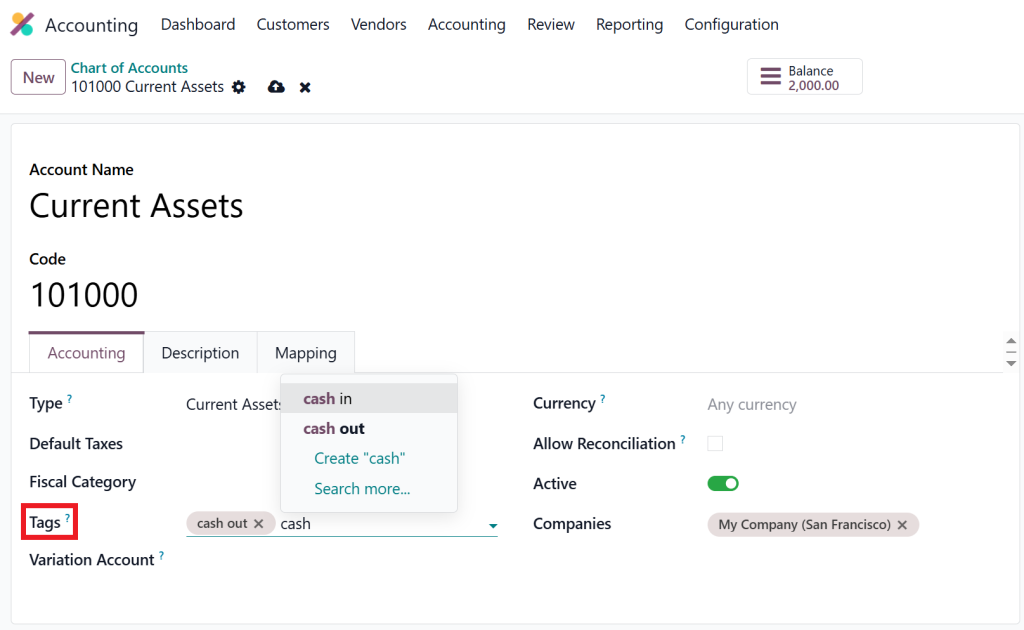
For example:
- Receipts → Inflow
- Payments → Outflow
This mapping enables Odoo accounting cash flow reports to separate transactions automatically.
Step 4: Record Transactions
Record your invoices, bills, and payments as usual in Odoo. Every transaction affects your cash flow.
Odoo 19 automatically updates your cash flow report based on real-time data.
Step 5: Generate the Cash Flow Report
Now, go to Accounting > Reporting > Cash Flow Statement.
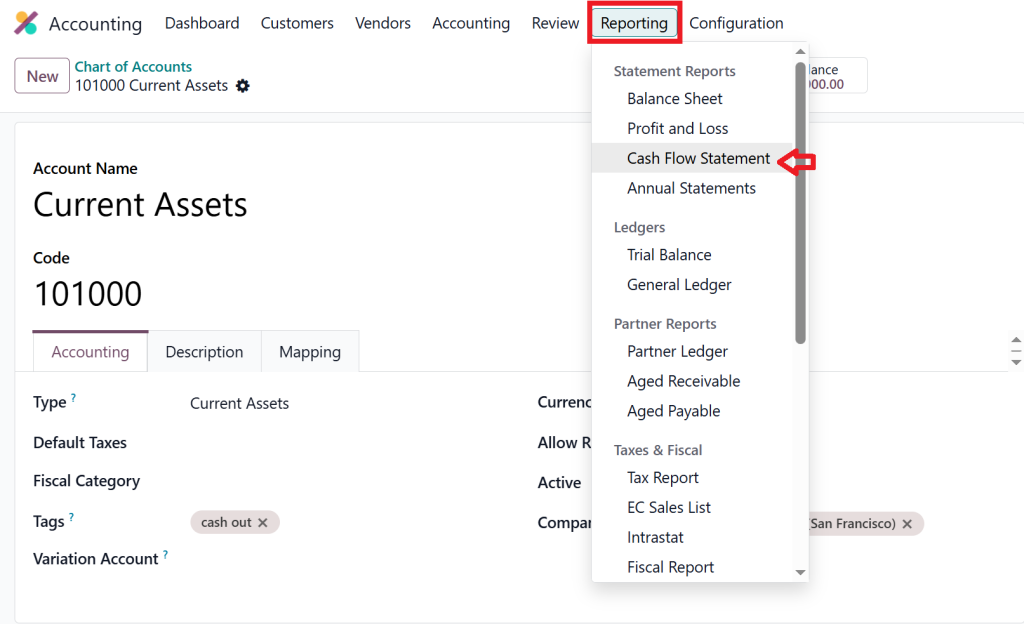
Here, you can:
- Choose a date range.
- Filter by journal or company.
- Click “Generate Report.”
Within seconds, you’ll have a detailed Cash Flow Statement in Odoo 19 Accounting, clearly showing cash inflows and outflows categorized into:
- Operating Activities
- Investing Activities
- Financing Activities
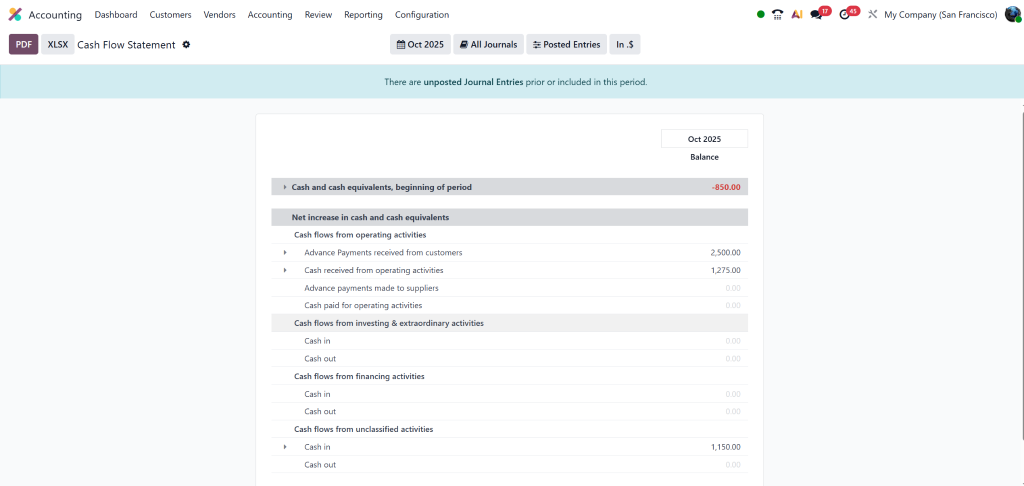
Step 6: Analyze and Export
Odoo allows you to export the cash flow statement in PDF or Excel format for sharing or presentation.
Analyze your liquidity trends, identify areas for improvement, and plan future expenditures accordingly.
How Odoo 19 Makes Cash Flow Automation Simpler
Odoo 19 Accounting introduces enhanced automation features that make managing cash flow effortless.
Automated Report Updates
The cash flow automation feature in Odoo updates your financial statements automatically whenever new transactions are recorded, saving manual effort and ensuring accuracy.
Scheduled Reports
You can schedule automatic cash flow reports to be sent on a weekly, monthly, or quarterly basis. These reports are emailed directly to finance managers and stakeholders.
Smart Filters & Dashboards
Odoo’s smart filters allow quick insights into specific time periods, while dashboards give a real-time overview of all Odoo financial statement setups.
Customizing the Cash Flow Statement in Odoo 19
Every business is unique, and so should its reporting be. Odoo 19 offers flexibility to customize your cash flow statement. Check out the Odoo tutorial for more tailored financial reporting.
Custom Cash Flow Categories
You can define new categories under operating, investing, or financing sections according to your business model.
Personalized Layout
Through Odoo Studio, you can design custom layouts for your Odoo 19 cash flow statement, including additional KPIs or color-coded visual indicators.
Multi-Company Reporting
If your organization manages multiple entities, Odoo can consolidate reports for an overall financial picture.
This level of customization makes Odoo 19 one of the most powerful accounting tools in the ERP market.
Advantages of Using Odoo 19 for Financial Statement Setup
Odoo is more than an accounting tool; it’s a complete ERP solution. Here’s why businesses across industries choose Odoo 19 for their financial statement setup and cash flow management:
- Unified Data Source – All financial and operational data is centralized.
- Time Efficiency – Automation reduces manual entries and human errors.
- Data Accuracy – Real-time synchronization ensures every transaction is reflected instantly.
- Whole Integration – Works perfectly with Odoo’s Sales, Inventory, and Purchase modules.
- Comprehensive Insights – Helps you forecast and plan cash needs with precision.
- Scalability – From startups to enterprises, Odoo 19 grows with your business.
As an Odoo Partner, Netilligence specializes in implementing these features for clients, ensuring they get maximum efficiency and return from their ERP investment.
Cash Flow Statement in Odoo 19 Accounting
The Cash Flow Statement in Odoo 19 Accounting is more than just a report; it’s a strategic tool for financial planning and growth. With features like cash flow automation, cash flow tags Odoo 19, and advanced financial statement setup, Odoo makes managing liquidity effortless.
When implemented by experts like Netilligence, you can unlock the full potential of your Odoo ERP and make data-driven decisions with confidence.
Start your journey today, let Netilligence help you automate, analyze, and optimize your financial reporting for a brighter future.




