

Understanding Access Rights for Inventory Teams in Odoo 19 Inventory
As your business grows, you’ll need more people to manage your stock, warehouses, and delivery processes. That’s where managing Access Rights for Inventory Teams in Odoo 19 Inventory becomes essential.
Access rights decide who can see, edit, or manage specific parts of your inventory system. Odoo 19 makes this process much easier. It allows every company to set clear rules so that only the right people can do the right jobs.
For example, a warehouse worker might only need to view products, while a warehouse manager should be able to approve transfers or adjustments. With proper Odoo 19 inventory access rights, you can ensure that everyone has access only to what they need.
This blog will help you understand how to manage inventory access in Odoo, set up Odoo user permissions, and assign warehouse roles in a simple and organized way. You’ll also learn why these steps matter for better teamwork, accuracy, and business control.
Why Access Rights Are Important in Odoo 19 Inventory
Odoo 19 Inventory requires proper access rights management for inventory teams because data control enables better team collaboration and business security.
Access rights play a crucial role because they determine who can view and modify inventory data.
- The system protects your data because it allows only approved team members to access and modify stock information.
- The system prevents confusion because each employee receives access to their specific job-related information.
- The system decreases errors when users accidentally remove or relocate incorrect products.
- The system enhances operational speed because managers do not need to verify everything, while workers can work autonomously on their tasks.
- The system enables you to monitor all system modifications through its tracking feature.
When you properly manage Odoo 19 inventory access rights, your business runs smoothly, and your team works more confidently.
How Access Rights Work in Odoo 19 Inventory
In Odoo 19, every user has a role. This role decides what they can do inside the Inventory module.
Here’s how it works simply:
- The Inventory User can view and perform stock movement operations, product transfers, and inventory management.
- The Inventory Manager can approve stock adjustments, manage settings, and control warehouse operations.
- The Administrator possesses complete system access, which includes user management and system configuration options.
These roles ensure your team can do their work easily without overlapping responsibilities. When you correctly configure Odoo warehouse roles, you create a clear structure in your company, just like in real life, where everyone has a defined duty.
To learn how to modify user permissions programmatically, check out our detailed guide on customizing access rights in Odoo 18 using Python code.
Step-by-Step Guide to Manage Access Rights for Inventory Teams in Odoo 19 Inventory
Let’s go through a simple process to help you manage Access Rights for Inventory Teams in Odoo 19 Inventory.
Step 1: Go to User Settings
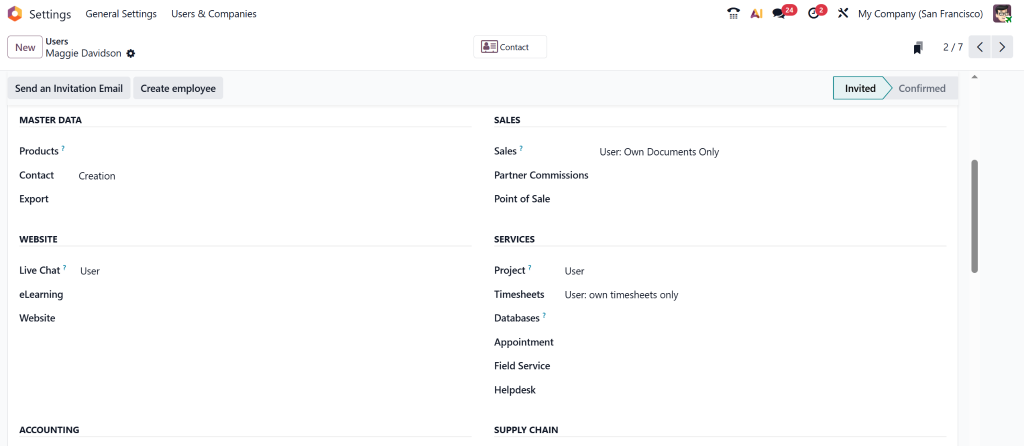
In Odoo, open Settings → Users & Companies → Users.
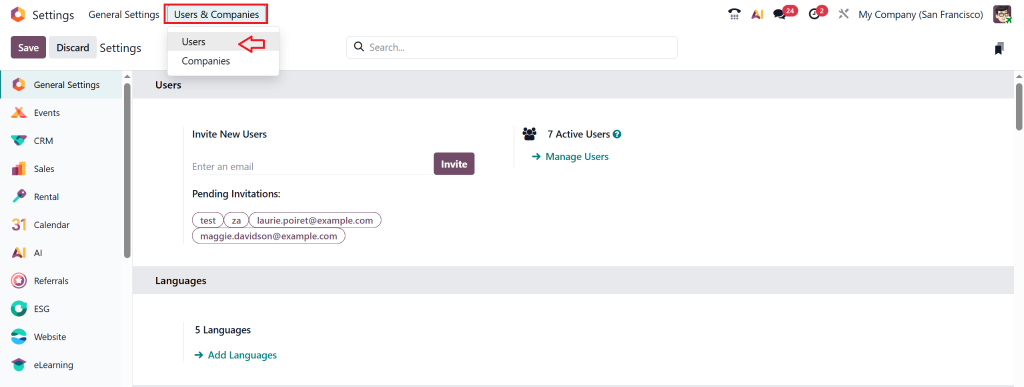
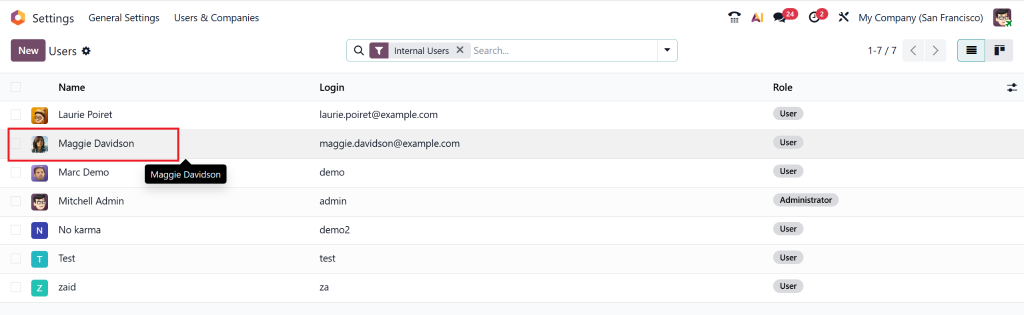
You’ll see a list of all people using your Odoo account.
Click on a user’s name to open their profile.
Step 2: Assign the Right Role
The Access Rights section lets you determine the extent of access this person should receive.
For example:
- The Inventory User role should be selected when someone only performs warehouse tasks.
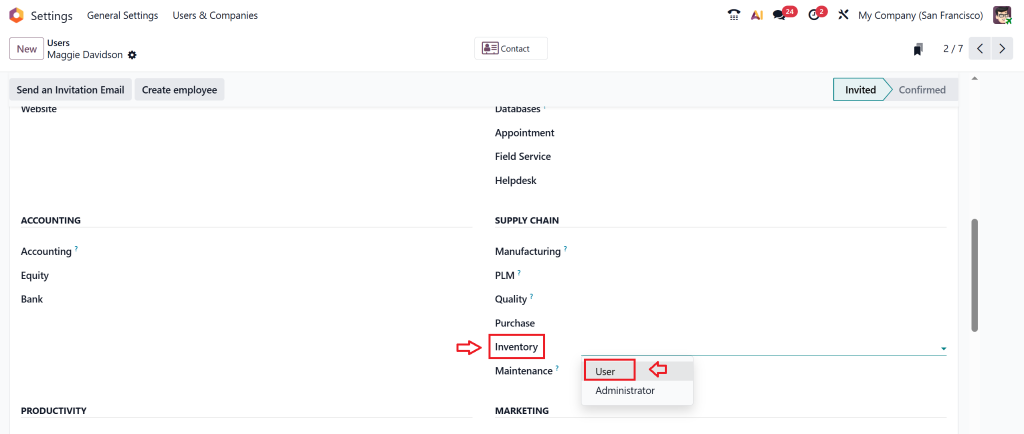
- The Inventory Manager role should be assigned to users who manage operations across different warehouses.
- System setup and approval responsibilities require the Administrator role.
This step helps you ensure your Odoo 19 inventory access rights match each employee’s job.
Step 3: Limit Access to Warehouses (Optional)
If your business has more than one warehouse, you can choose which warehouse each person can access. This is useful when you don’t want one team to see or edit data from another location.
This step keeps your inventory data organized and secure.
Step 4: Review and Test
Once you’ve assigned roles, log in as that user (or ask them to check) and make sure everything works as planned.
They should only see what’s related to their work, not the entire company’s data.
That’s how easy it is to manage inventory access in Odoo.
How Access Rights Help Your Warehouse Teams Work Better
When you set up Access Rights for Inventory Teams in Odoo 19 Inventory, you’re not just controlling access; you’re helping your team perform better.
Here’s how:
1. Clear Roles and Responsibilities
Everyone knows what they are allowed to do. For instance, warehouse staff focus on deliveries, and managers handle approvals.
2. Fewer Mistakes
With the proper Odoo user permissions setup, there’s less chance of someone accidentally changing or deleting vital data.
3. Better Coordination
Teams can work together smoothly without waiting for approvals or double-checking each other’s work.
4. Improved Data Security
Odoo ensures that only trusted people handle sensitive information such as stock valuation and order details.
5. Time-Saving Operations
Proper access rights mean fewer delays, no need to chase someone for access or approvals every time.
By managing Odoo 19 inventory settings carefully, you build a warehouse system that is both productive and safe.
Common Problems Businesses Face with Access Rights (and How to Fix Them)
Although Odoo simplifies access management, some businesses continue to face challenges. Here are a few common issues and simple ways to solve them:
Problem 1: Everyone Has the Same Access
The system becomes confusing and vulnerable to threats when all users receive manager permissions.
Fix: Assign roles carefully. The system should only grant managerial access to users who require it for their work.
Problem 2: Employees Can See Data from Other Warehouses
Sometimes, team members from one location can see other warehouse details.
Fix: Adjust access so each team only sees their warehouse.
Problem 3: People Can’t Access the Features They Need
This usually happens when access rights are too limited.
Fix: Review the Odoo user permissions setup and give access where needed.
Problem 4: No One Knows Who Made a Change
Without clear access roles, it’s hard to track who updated stock records.
Fix: Set up distinct logins for every user, not shared ones.
Best Practices for Managing Inventory Access in Odoo 19
The following best practices will help you manage Odoo 19 inventory access rights effectively:
- Begin with fundamental roles.
- Check access rights at least twice a year or whenever employee roles change.
- All team members need to know before you expand access permissions later.
- Maintain a written log that tracks all user access permissions to understand their specific duties.
- Seek assistance from Odoo professionals at Netilligence when you need help with the setup process.
The described steps enable you to manage user roles in Odoo through an efficient process that protects your system security.
Why Choose Netilligence for Odoo 19 Inventory Implementation
Managing Access Rights for Inventory Teams in Odoo 19. Inventory becomes effortless when you work with the right Odoo partner.
Netilligence, an Odoo Partner, helps businesses like yours configure, customize, and optimize Odoo systems for smooth warehouse operations.
What Makes Netilligence Different:
- Our team of Certified Odoo Experts brings extensive experience in Odoo implementation across multiple business sectors.
- Our team provides customized Odoo solutions that match the specific operational requirements of your business.
- Our approach focuses on delivering results through straightforward explanations that avoid complicated technical terms.
- Our team provides full support throughout the entire process from initial setup to training and beyond.
- Our company has succeeded in having 100+ satisfied clients operating in more than 20 different industries.
If you’re planning to improve your warehouse operations, Netilligence can help you manage Odoo 19 inventory access rights accurately, clearly, and confidently.
Access Rights for Inventory Teams in Odoo 19 Inventory
Setting up and managing Access Rights for Inventory Teams in Odoo 19 Inventory is one of the smartest ways to protect your data and improve efficiency. With clearly defined roles, you avoid mistakes, keep information secure, and help your teams work faster and smarter.
Odoo 19 gives you all the tools you need to control who can see and do what. When appropriately configured, it becomes a robust system for managing warehouses of any size.
To achieve the best results from your Odoo system, consider partnering with experts like Netilligence, your trusted Odoo Partner. We make Odoo simple, effective, and perfectly aligned with your business goals.




