

Why Customer Rating in Odoo 18 Project is Essential
Have you ever found yourself dealing with multiple projects or support tickets and wondering what your clients think?
You’re not alone. In today’s work environment, understanding customer feedback isn’t optional, it’s vital. Or support tickets, knowing what your customers think isn’t a luxury, it’s a necessity. That’s where the Customer Rating in Odoo 18 Project comes into play. It’s not just another checkbox on your to-do list; it’s an innovative, built-in way to listen, learn, and improve your services.
Think of it like this: you’ve done the work and delivered the service, and now you want to know, was the client happy? Did your support team meet expectations? With the Odoo 18 customer rating feature, you no longer have to guess. Everything you need to know about your customer’s experience is tied to the project or ticket they were involved in.
The best part? It’s easy to set up, easy to understand, and provides a comprehensive view. Imagine you’ve just completed a project milestone or resolved a helpdesk issue. Wouldn’t it be helpful to immediately know if your client was satisfied with how things went? That’s precisely what the Odoo 18 rating system lets you do – gather timely, helpful feedback tied to specific tasks or tickets, so you’re always in tune with your customer’s experience. Valuable feedback that’s directly connected to the work your team is doing. That means making better decisions, having more satisfied clients, and achieving stronger team performance.
In this guide, I’ll walk you through how to manage Customer Ratings in Odoo 18 Project, including setting it up, handling feedback, and how Netilligence can help you maximise its benefits.
The Benefits of Odoo 18 Customer Rating
1. See What Clients Think
The Odoo 18 customer rating allows your clients to voice their thoughts without any friction. It’s simple, quick, and generates genuine responses that you can act on.
2. Improve with Every Task
Feedback is more than stars. With the Odoo 18 rating system, you get trends and summaries that show exactly where your team is shining and where there’s room to grow.
3. Build Stronger Client Relationships
When customers see you responding to feedback, it builds trust. Whether it’s a thank-you or a follow-up on a concern, Odoo project customer feedback helps you maintain that connection.
4. Stay Updated in Real Time
Thanks to Odoo customer satisfaction tracking, you don’t have to wait for quarterly reviews. You get a live view of how things are going, which helps you fix problems before they grow.
5. Save Time with Automation
Manually collecting feedback? No need. With Odoo feedback automation, you can automatically send feedback requests at the perfect moment, after a task or ticket is marked as complete.
How to Set Up Customer Rating in Odoo 18 Project
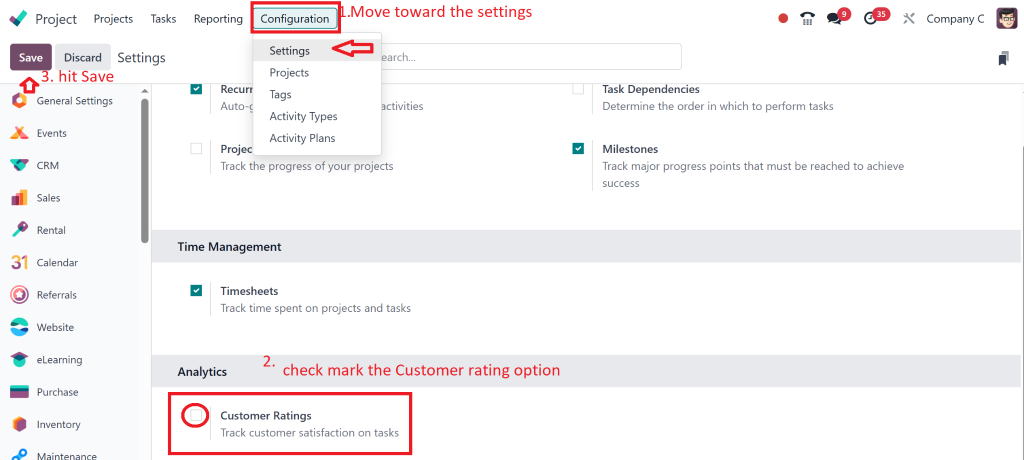
Setting up the Customer Rating in Odoo 18 Project is easier than you might think – even if you’re not a developer. Think of it like helping a teammate: start by opening the Project or Helpdesk module, toggle on the customer rating feature in the settings, and you’re halfway there. From there, you decide when to send feedback requests (like after completing a task), write a quick thank-you message, and let Odoo handle the rest. It’s a straightforward process, and I’ll walk you through each step next. Here’s how to get started:
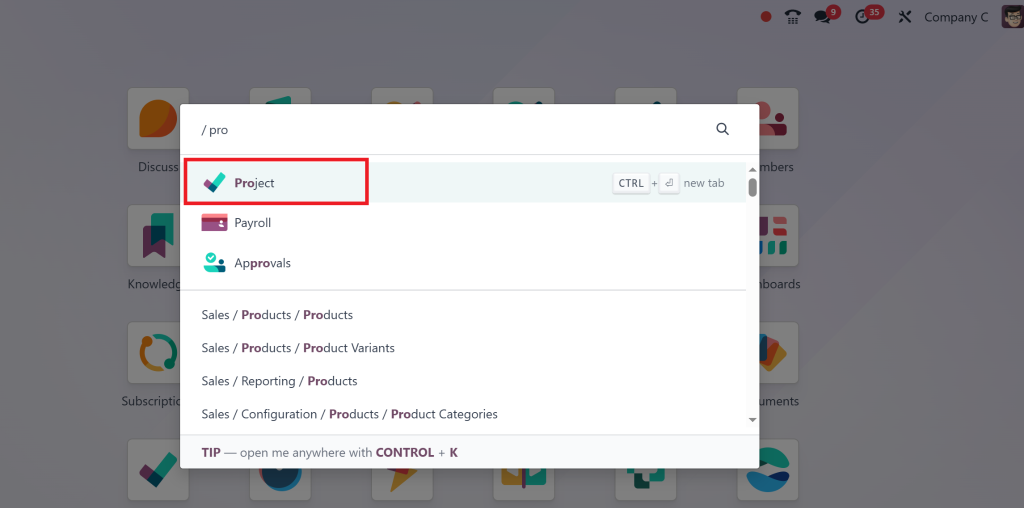
Step 1: Enable the Rating Feature
Head to your Project or Helpdesk module settings and toggle on “Customer Rating.” That will activate the Odoo 18 rating system in your dashboard.
Step 2: Configure Triggers
You can decide when the feedback request goes out. Most teams set it to trigger after a task or ticket is marked as done, which is when clients are most likely to respond.
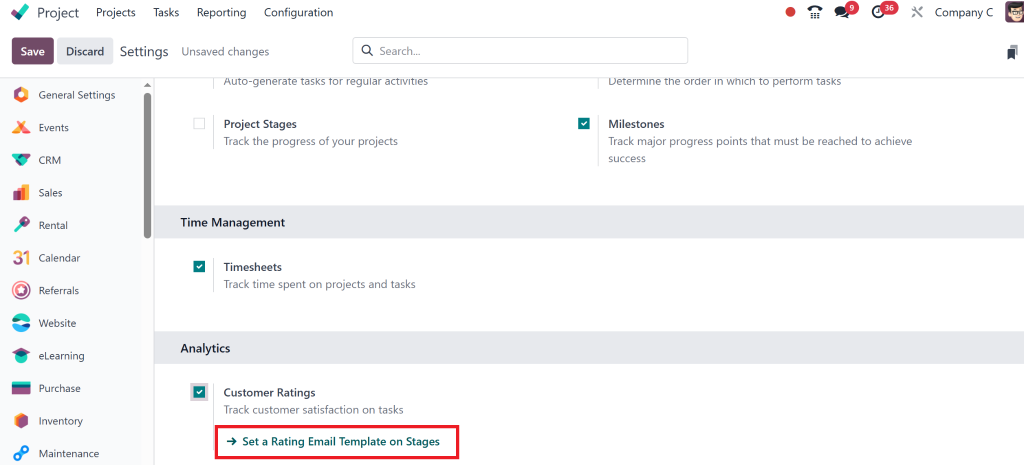
Step 3: Write a Friendly Email
The feedback request email can be personalized. A simple, friendly tone works best. Let the customer know that their input is appreciated, and keep the response brief and concise.
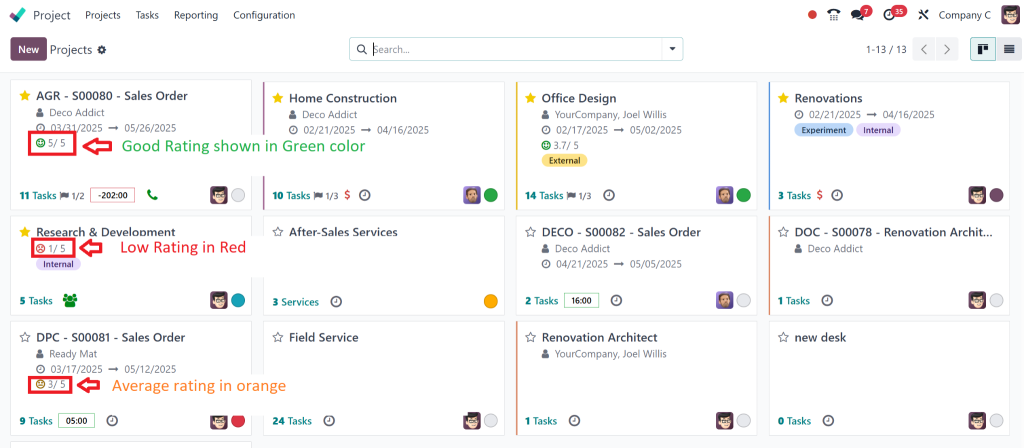
Step 4: Monitor Responses
With Odoo project management ratings, you’ll see feedback data appear in your reports.
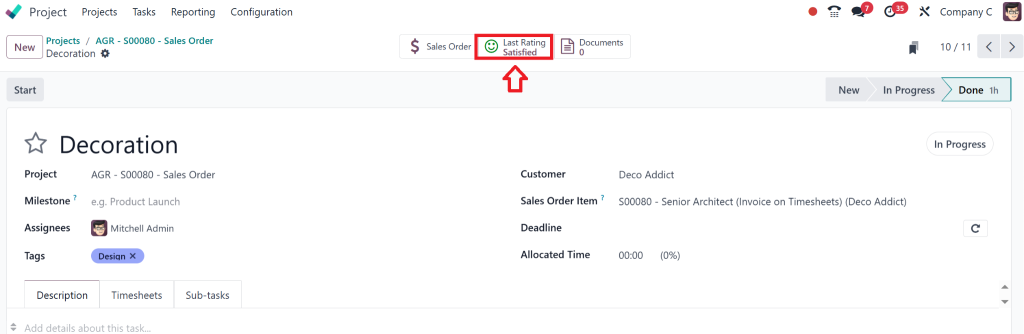
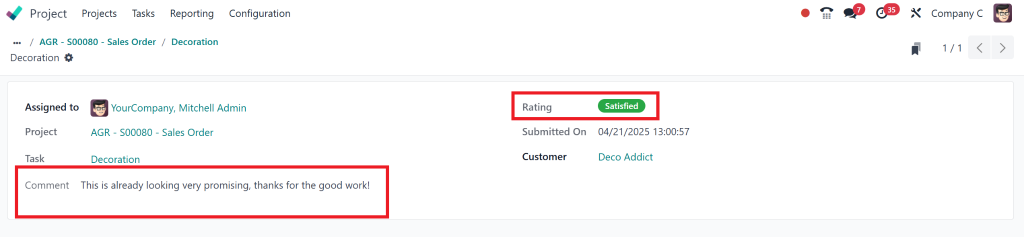
You can view averages, dig into individual responses, and spot trends.
Tips for Getting Better Odoo Project Customer Feedback
Getting feedback is one thing- getting helpful, honest, and frequent feedback is another. Here’s what we’ve learned from working with businesses that use Customer Rating in Odoo 18 Project daily:
Be Clear About Why You’re Asking
Tell your customers that their feedback helps you improve. This will increase their likelihood of responding to your Odoo 18 customer rating request.
Make It Easy
Use a 1–5 star scale and one optional comment box. The easier it is, the more likely your clients are to participate.
Ask Right After the Experience
Timing matters. With Odoo feedback automation, you can send requests as soon as the task is completed, while the experience is still fresh.
Acknowledge and Act
Nothing frustrates customers more than giving feedback and seeing nothing happen. If you receive great feedback, be sure to say thank you. If it’s negative, reach out and make it right. This strengthens your Odoo customer satisfaction tracking loop.
Share Positive Ratings with Your Team
Don’t keep good feedback to yourself. Use it to motivate your team and highlight what’s working.
Using Odoo 18 Helpdesk Customer Ratings in Real Scenarios
Let’s take a look at a real example. One of our clients- a mid-sized software company -implemented Odoo 18 helpdesk customer ratings across its support team.
Here’s what happened:
- Within the first month, they saw a 28% faster average ticket resolution time.
- Their customer satisfaction score improved by 19%.
- They used the Odoo 18 rating system data to redesign their onboarding process.
Their support enables the use of Odoo project customer feedback every week to guide team meetings and enhance client communication.
You can do the same. Whether you’re in IT, logistics, retail, or services, customer ratings help you pinpoint what your clients love and what they need more of.
Advanced Ways to Personalise Customer Rating in Odoo 18 Project
The basics work great, but you can take the Customer Rating in Odoo 18 Project even further with a few customisations:
- Create separate surveys for different services (like support vs. delivery)
- Segment results by customer or region
- Integrate with Slack or email for instant alerts
- Use Odoo feedback automation to trigger internal workflows (like notifying a manager of low ratings)
At Netilligence, we help businesses customise these tools to their specific workflow so that feedback becomes a natural part of your growth, not an extra task.
Why Partner with Netilligence to Improve Odoo Project Management Ratings
Sure, Odoo gives you the tools, but how you use them counts. At Netilligence, we help teams like yours make the most of Customer Ratings in the Odoo 18 Project by:
- Customizing how and when ratings are collected
- Setting up dashboards that help decision-makers
- Integrating Odoo 18 customer rating tools with other modules like CRM and Timesheets
- Training your team to read and respond to Odoo project customer feedback the right way
We believe feedback should be a driver of growth, not a hassle if that sounds like what your business needs, we’re ready to help.
Let Feedback Drive Your Project Success
Your reputation depends on how well you serve your customers and how well you respond when things go wrong. With Customer Rating in Odoo 18 Project, you gain the insights needed to lead, deliver, and strengthen your relationships.
From Odoo 18 helpdesk customer ratings to ongoing Odoo customer satisfaction tracking, every bit of feedback helps your business improve. And with automation and innovative tools, you don’t have to chase it- it comes to you.
So, if you’re ready to turn feedback into business fuel, let Netilligence show you how.




