How to Set Asset Model & Automation in Odoo 18 Accounting?
Managing your company’s assets, from machines and vehicles to office equipment, is no small feat. If you’re using spreadsheets or outdated systems, you probably know how time-consuming and prone to errors this process can be. That’s where Odoo 18 asset management comes into play.
With Odoo 18 accounting automation, you can finally put those tedious, repetitive tasks on autopilot. Imagine never worrying about manual depreciation calculations again or forgetting to make a journal entry for asset acquisition. In this post, I’ll show you how to set up asset models in Odoo 18 and automate your accounting for a more updated, efficient process.
Trust me, this will make your life a whole lot easier!
What Exactly Are Asset Models in Odoo 18 Accounting?
Think of Asset Models as Your Assets' Blueprint
An asset model is a template for your assets. It tells Odoo how to handle different assets in your system, whether an office computer, a fleet vehicle, or heavy machinery. This model outlines essential information such as:
How to calculate depreciation (straight-line, declining balance, or custom rules)
Which accounts should be impacted when you buy, depreciate, or sell the asset
How to categorize your assets for better reporting and tracking
In short, asset models in Odoo 18 fixed asset management act like a blueprint for everything your asset will go through in its lifecycle.
How to Perform Odoo 18 Accounting Setup
Setting up an asset model is simpler than you think. Follow these steps to get started:
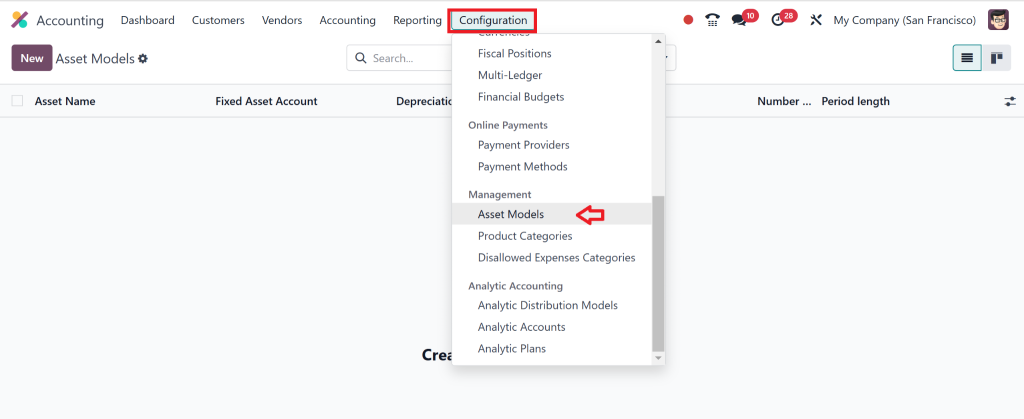
Go to the Accounting Module: Open your Odoo 18 dashboard and head straight to the Accounting module.
Find the Configuration Menu: Under the “Configuration” section, click on Asset Models.
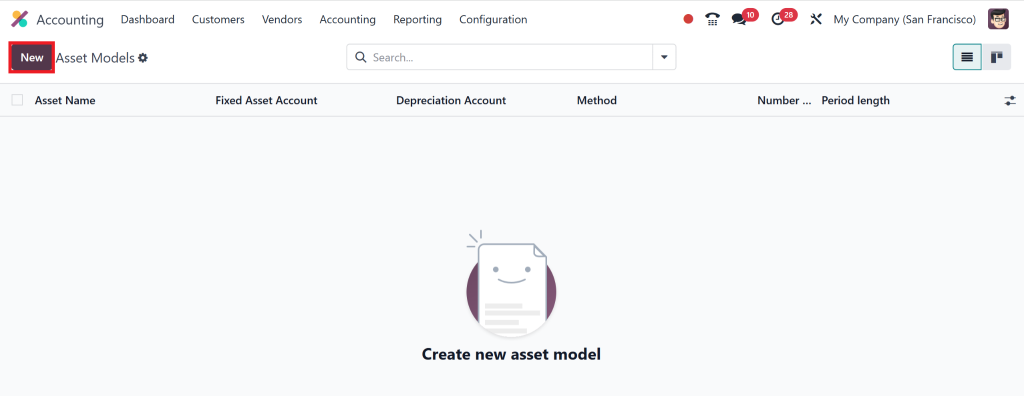
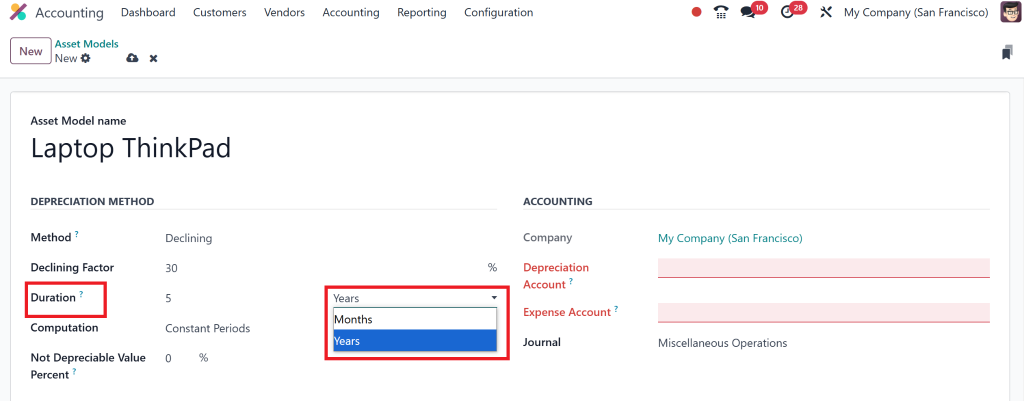
Create a New Asset Model: Click the “New” button to define a new asset model.
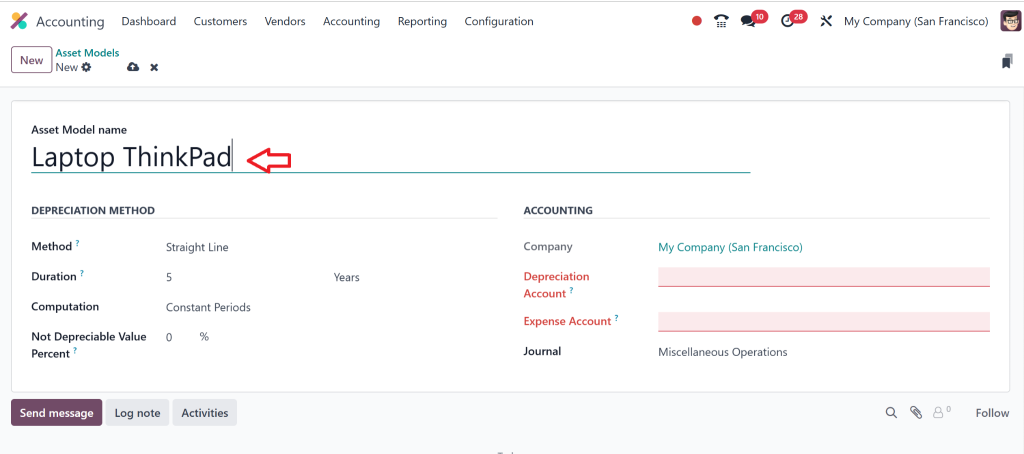
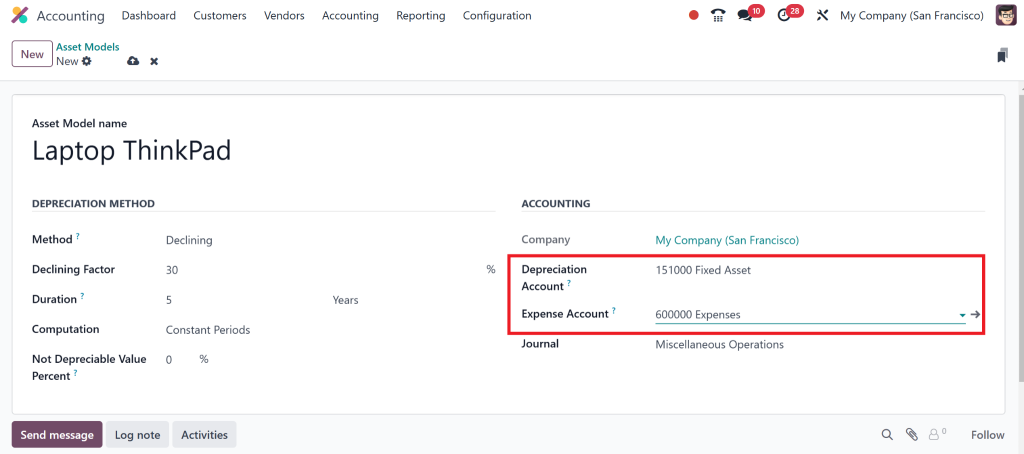
Enter the following details:
Asset Category: Define whether this asset is machinery, office equipment, etc.
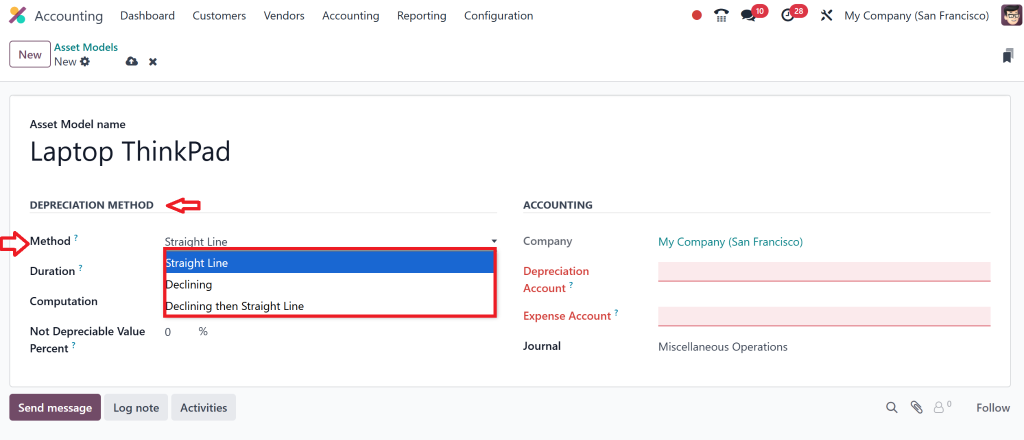
Depreciation Method: Choose how depreciation will be calculated (e.g., straight-line, declining balance).
Depreciation Frequency: Set whether depreciation happens monthly, yearly, etc.
Accounting Entries: Choose which accounts should be used for acquisition, depreciation, and disposal.
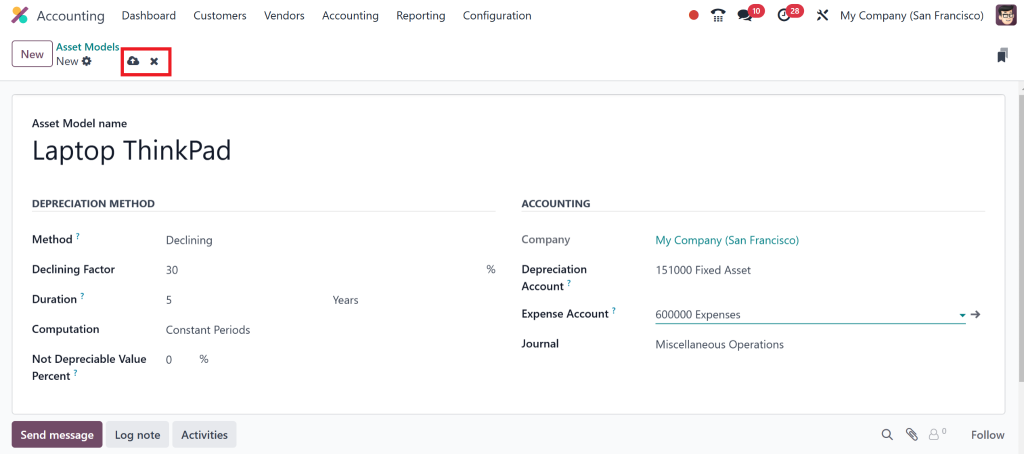
Save and Use It: Once you’re done, save your model. When you acquire an asset in this category, Odoo will automatically use the model’s rules.
Odoo 18 Accounting Automation
No More Manual Tracking!
Automation is the real magic behind Odoo 18 accounting automation. Instead of manually tracking each asset’s depreciation, creating journal entries, or even worrying about tax implications, Odoo automatically does it all for you.
Let’s break down what’s possible when you set up automation for your assets in Odoo 18:
Automated Depreciation:
Odoo calculates depreciation based on the rules you’ve set in the asset model. Whether you need straight-line depreciation or a custom method, Odoo covers you.
Automatic Journal Entries:
When you acquire or dispose of assets, Odoo posts the appropriate journal entries without you having to lift a finger.
Tax Compliance:
Odoo ensures that all asset-related transactions comply with tax regulations, reducing the risk of errors in your financial reports.
By automating these processes, you’ll save time and ensure that everything stays accurate and compliant.
How to Set Up Asset Automation in Odoo 18
Here’s how to configure asset automation in Odoo 18 to update your accounting tasks:
1. Enable Asset Automation Features:
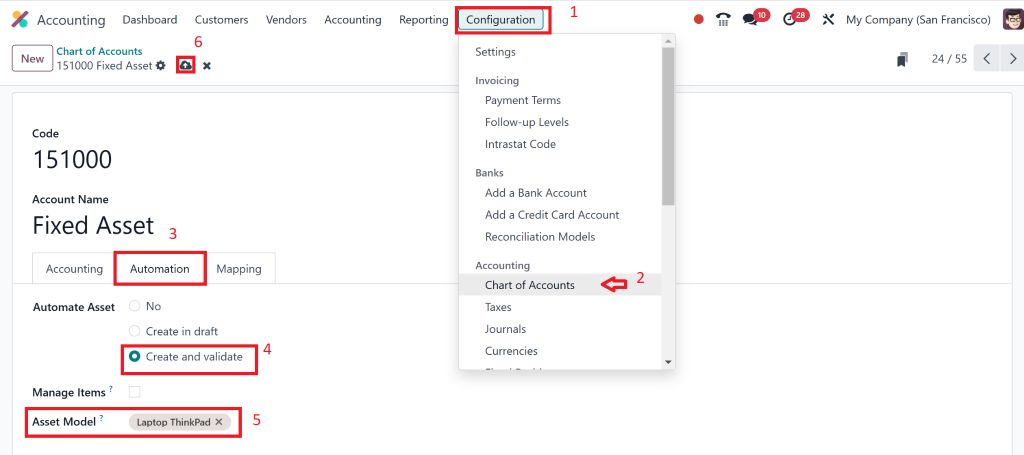
In the Accounting module, go to Configuration and ensure the asset automation options are turned on. That includes automation for depreciation, journal entries, and asset reports.
2. Link Your Asset Models to Automation Rules:
Each time you create an asset model, ensure it’s linked to its corresponding automation rules. For example, if you have different types of assets (office equipment vs. vehicles), set up distinct rules for depreciation frequency or journal entries.
3. Use Tags for Better Organization:
Tags help group assets based on characteristics like department or type (e.g., IT assets, office assets). That makes automation even smoother by letting you apply different depreciation or accounting rules depending on the asset category.
4. Schedule Actions for Depreciation:
Odoo 18 allows you to schedule recurring actions. Set up scheduled depreciation calculations so that Odoo automatically handles them without you having to input entries each month manually.
Why You'll Love Odoo 18 Asset Automation
Real-Time Depreciation Tracking
No more waiting until the end of the quarter to manually calculate depreciation. Odoo does this in real-time, updating your financial reports and balance sheets as assets depreciate.
Journal Entries for Purchases, Depreciation, and Disposals
Imagine this: you buy a new computer, and Odoo automatically creates all the necessary journal entries. The same goes for depreciation – Odoo handles that on its own, following the depreciation method you’ve set.
Tax Reporting
Tax season doesn’t need to be stressful. With Odoo 18 asset models and automation, tax reporting for your assets is as easy as clicking a button. Odoo ensures that everything is accounted for in your financial statements, reducing the risk of errors when filing your taxes.
Best Practices for Using Odoo 18 Fixed Asset Management
Keep Your Odoo 18 Asset Models Up to Date
As your business grows, your asset needs change. Remember to revisit your asset models periodically to ensure they align with your business needs and accounting practices.
Regularly Review and Audit Your Assets
Automation is powerful, but periodically reviewing and auditing your assets is always good. That ensures that everything matches up and helps catch any discrepancies early.
Categorize Your Assets Properly
Proper categorization makes all the difference. By correctly tagging and categorizing assets in Odoo 18, you make tracking, reporting, and automating the right processes for each asset easier.
Odoo 18 Accounting Features Makes Management & Accounting Simple
If you’re tired of manually tracking asset depreciation, entering journal entries, and worrying about tax compliance, Odoo 18 has you covered. With its powerful asset models and accounting automation, you can automate your entire asset management process – from acquisition to disposal.
Setting up Odoo 18 asset automation isn’t just about saving time; it’s about creating a more intelligent, efficient system for your business that keeps everything running smoothly and accurately. Whether managing a few assets or a whole portfolio, Odoo 18 simplifies the process and ensures you’re always compliant with tax laws.
Ready to make your asset management and accounting processes more efficient? Odoo 18 is the tool you need to transform how you handle assets. Get in touch with us today to learn how we can help you set up Odoo 18 accounting automation and start saving time and effort!
Hi, I'm Nabia, an Odoo ERP functional & technical content writer. I specialize in blogs, social media content, ad copy, landing pages, service pages, and email campaigns.
We use cookies to ensure that we give you the best experience on our website. If you continue to use this site we will assume that you are happy with it.