

Why Learning to Manage Global Discount in Odoo Is a Catalyst for Your Retail Strategy
If you’ve ever wondered how top-performing retail businesses effortlessly run promotions without confusion at the checkout counter, you’re about to discover their mystery. It’s not just about cutting prices or running flashy sales; it’s about intelligent systems. One of the most effective tools in this domain is the ability to manage global discount in Odoo, especially in the latest Odoo 18 POS system.
Suppose your store is packed with customers during a festive weekend. Customers are lining up. Your staff is busy ringing up purchases. You need to apply a flat 15% discount to every order instantly. Do you stop the line and manually discount each item? Or do you use a single, system-wide adjustment that applies across the bill? That’s precisely what the global discount in Odoo 18 enables you to do with just a tap.
This blog explores everything you need to know about setting up and managing global discounts in Odoo 18 POS, and why it’s not just a “nice-to-have” but a competitive edge for modern retailers. From configuration to real-time use, and from business benefits to hidden features, we’ll take you on a journey into the practical power of Odoo’s POS module.
We’ll also discuss how this relates to Odoo POS pricing rules, enabling you to create sophisticated discount strategies. Stay with us because each section discovers something that might change how you run promotions forever.
How to Set Up Discount in Odoo POS Without Breaking a Sweat
When considering how to set up a discount in Odoo POS, the first thing you’ll appreciate is how straightforward the system is, yet how deeply customizable it can be if needed.
Start by enabling the Point-of-Sale module in Odoo 18.
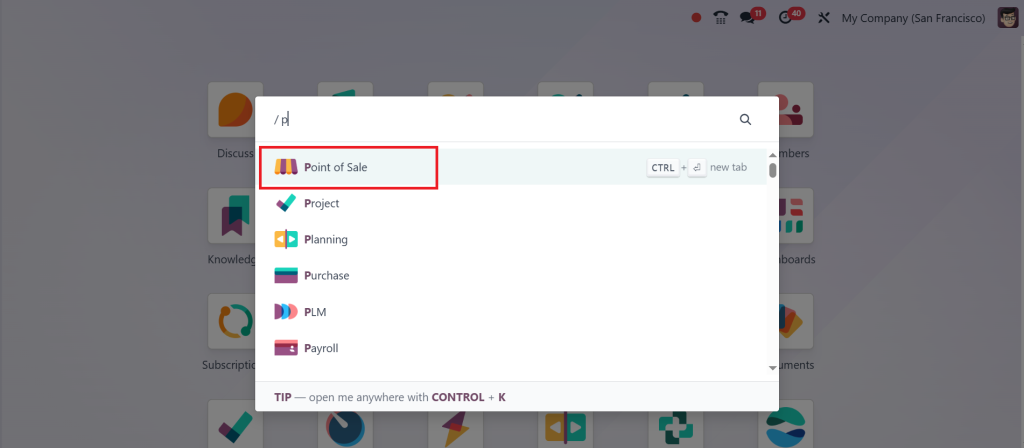
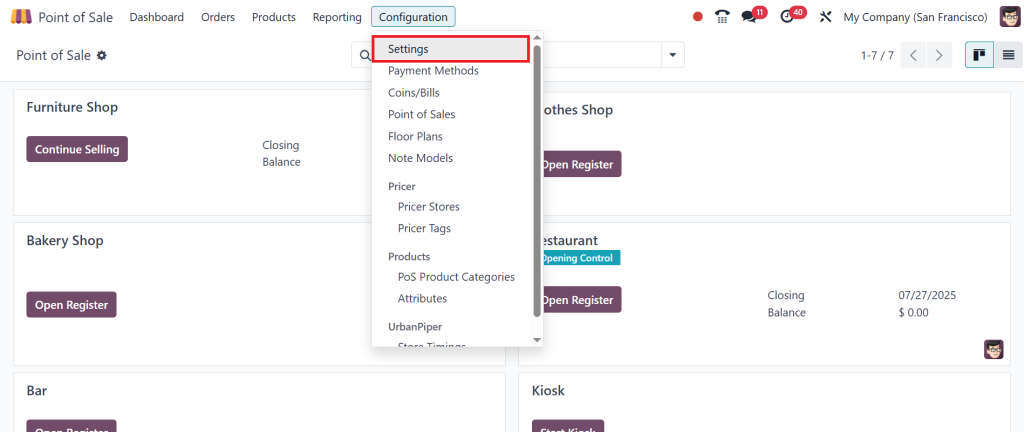
Once it’s active, head into your POS Configuration > Settings.
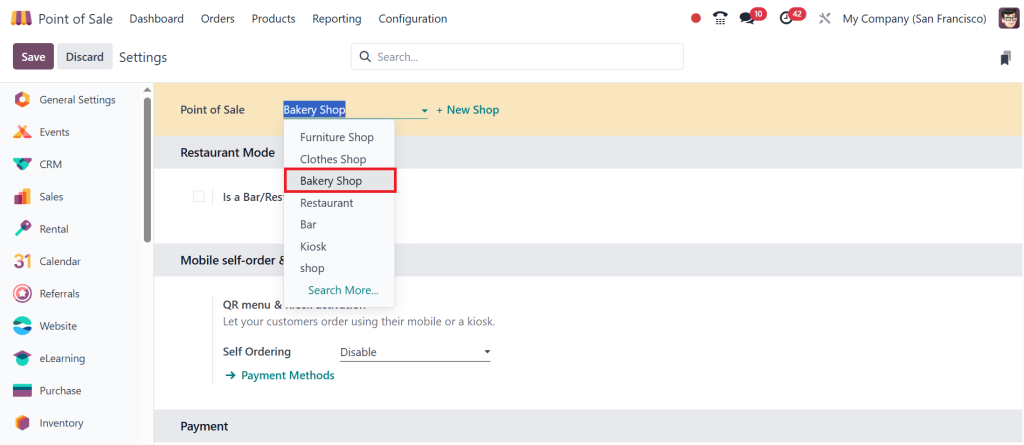
Use the drop down menu at the top to select the POS you want to configure. I’ll select a Bakery Shop.
Then scroll down until you find the ‘Global Discount Option’ under the Pricing Section. Tick (✔) the check box to enable it and click Save. It sounds like a small step, but this single setting opens the door to smart selling.
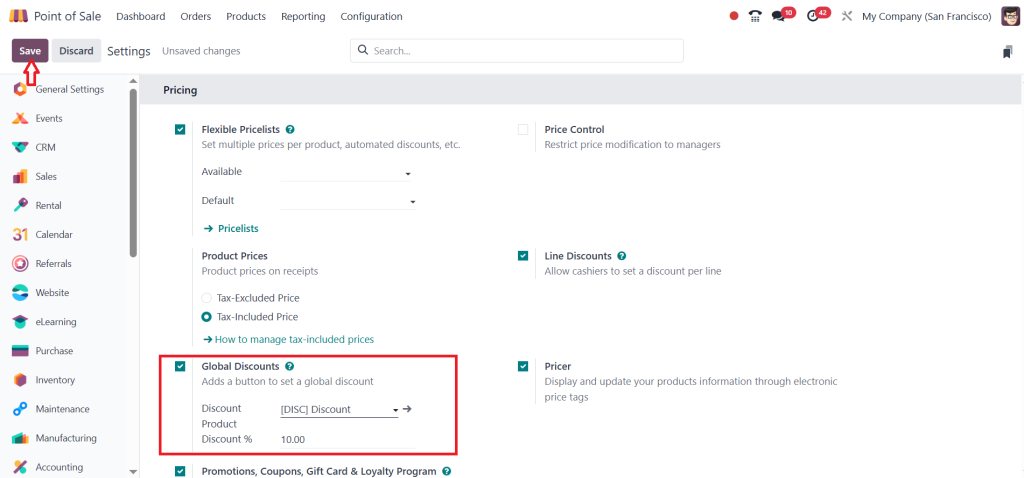
But setting the feature is just the beginning. The magic lies in creating a discount product, which serves as the logical placeholder that Odoo uses to track the deduction. You define it as a service item, so it doesn’t affect your physical inventory. Once linked to your POS, this product becomes the tool that applies global discounts in real-time.
Let’s go back to the POS dashboard & open the Bakery Shop session. Click ‘Open Register’.
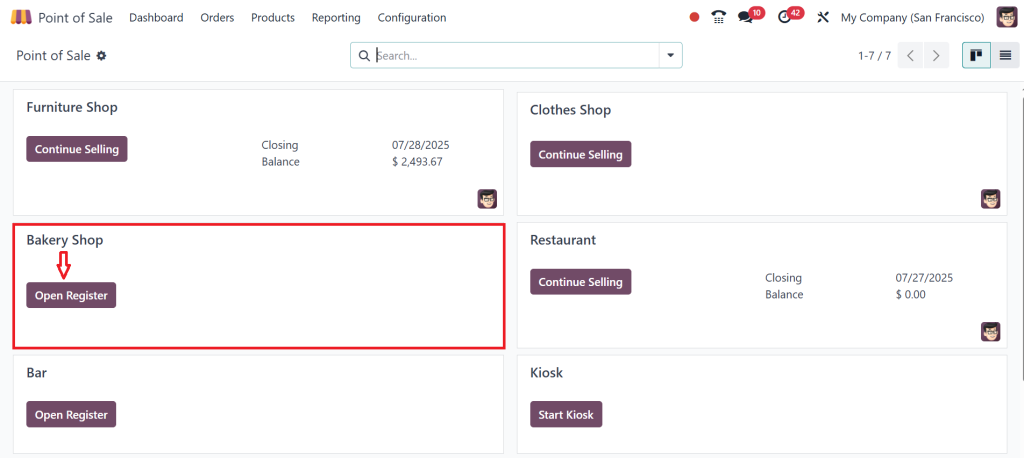
Here, you can set the opening cash balance. Then click Open Register again to launch the POS.
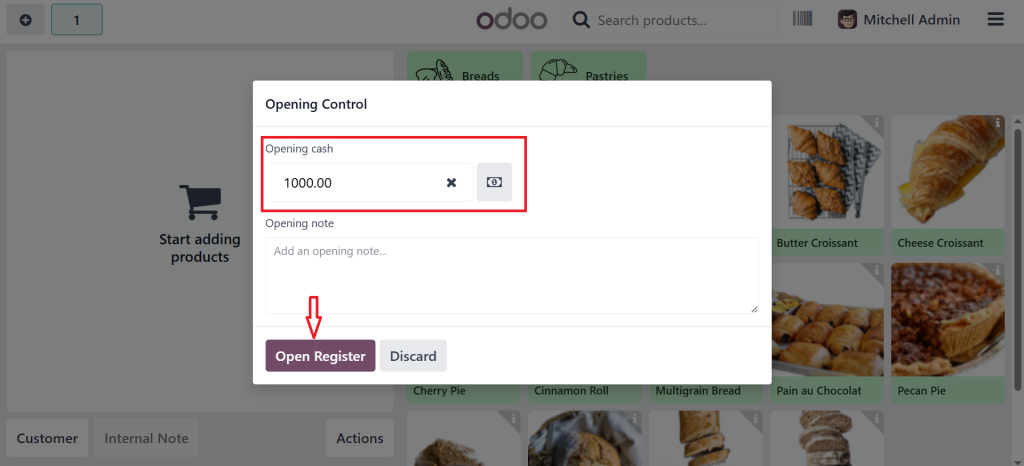
Let’s start by adding a few items to the cart. I’ll go ahead and add Cinnamon Roll, Blueberry Muffin, and Pain au Chocolat. Once your items are in the cart click the Actions button.
You’ll see an option called Discount. This button only appears if the global discount feature is enabled. Click on Discount.
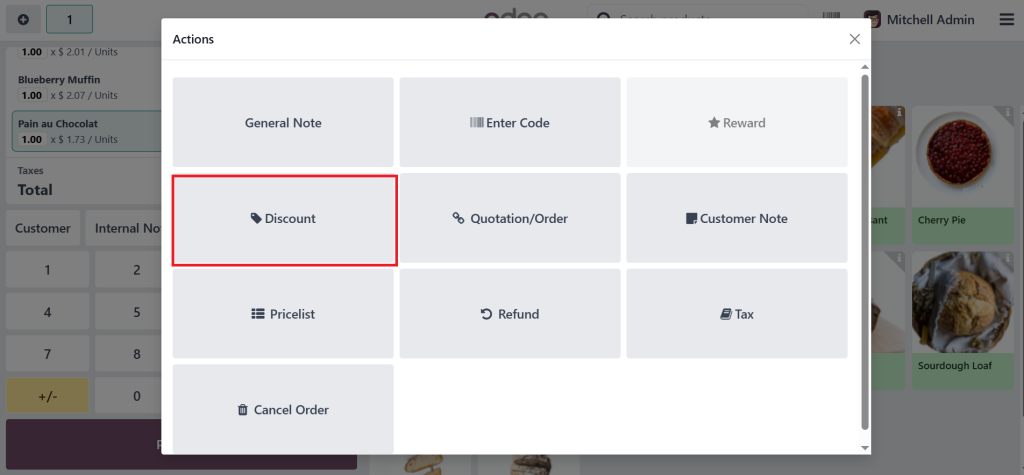
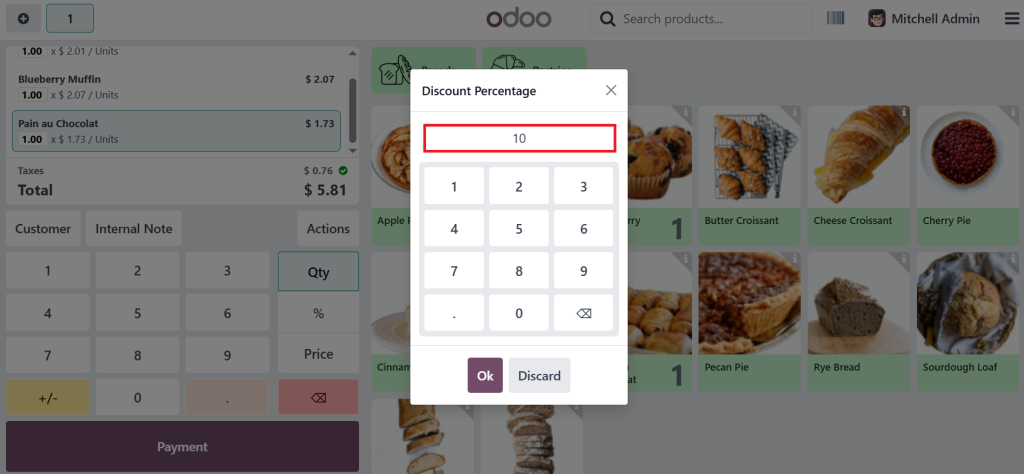
After clicking on discount, you’ll notice the 10% default discount automatically applied but you can always change it.
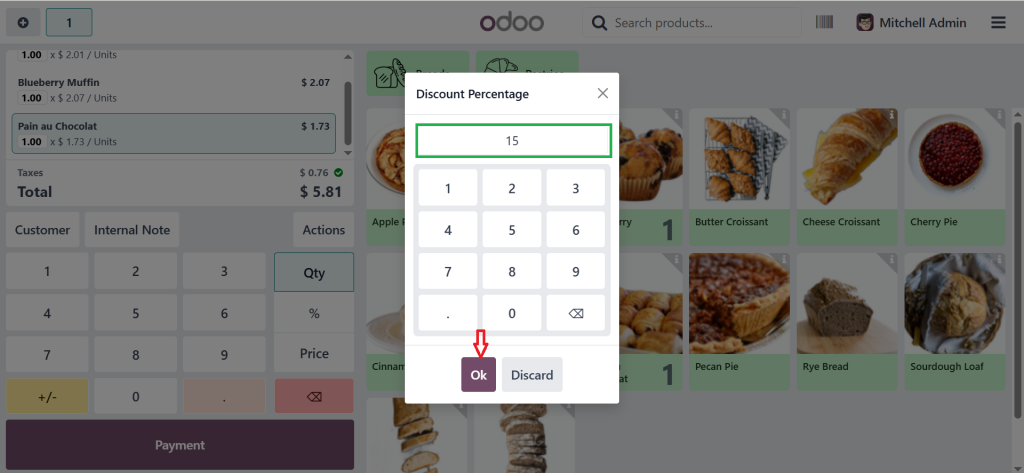
Just delete the current value and enter a new one. Let’s go with 15% & click OK to apply the new discount.
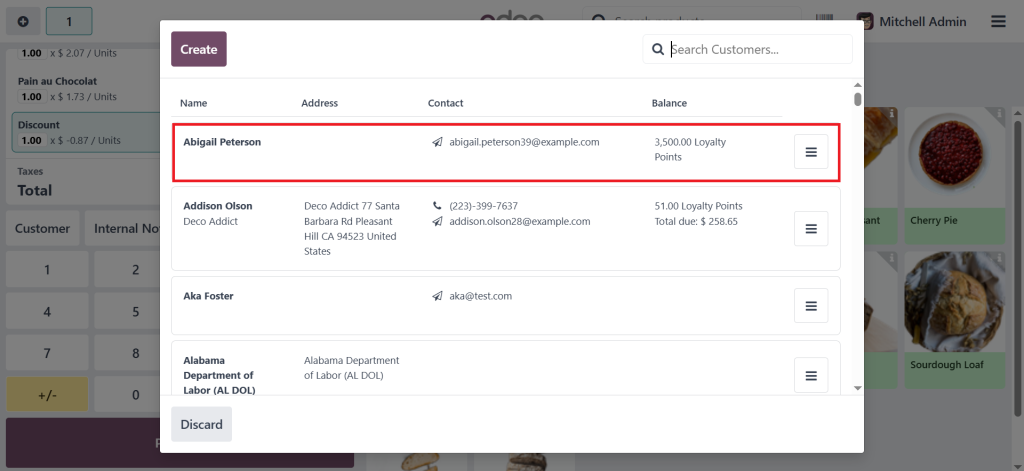
As you can see in the screenshot below, we now have a new line added to the order. That’s the discount we just applied, and it covers the entire sale. Now, let’s go ahead and complete the order. First, select the Customer.
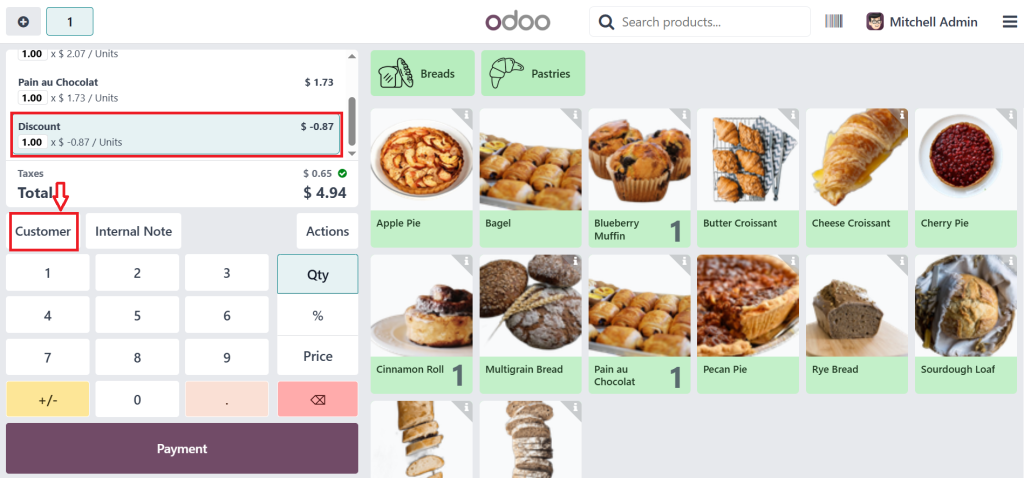
I’ll choose Abigail Peterson for this example.
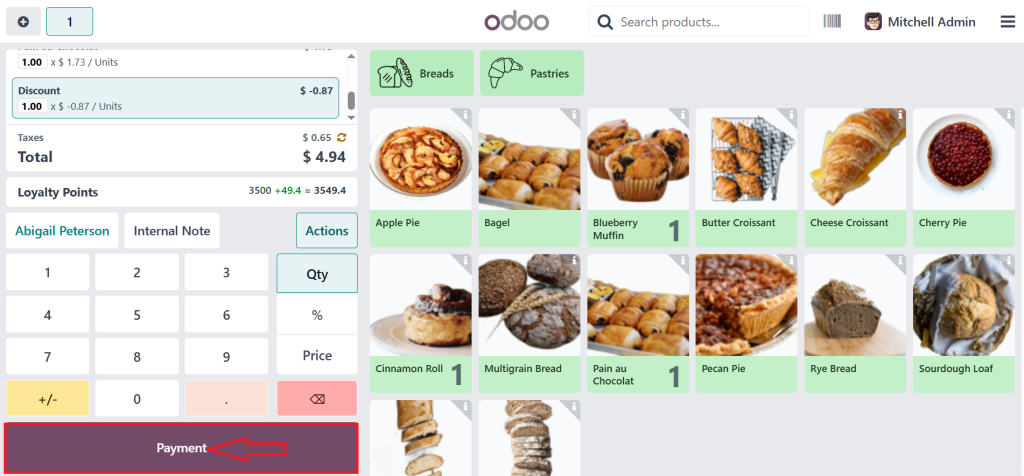
Next, click on Payment.
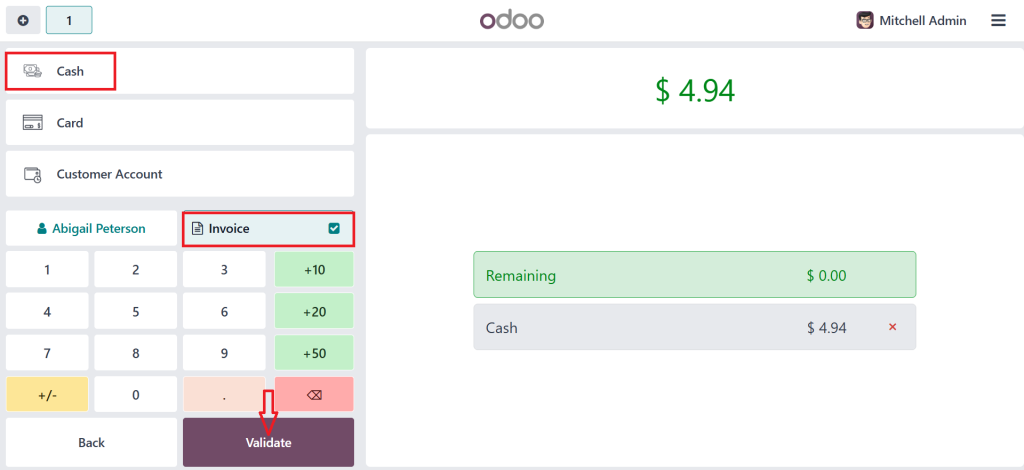
Select the payment method, I’ll go with the cash & if the customer asks for an invoice, make sure to enable this option. Then, click Validate to confirm that transaction.
Once it’s completed, you’ll see the receipt with all the order details including the product purchased & the global discount applied.
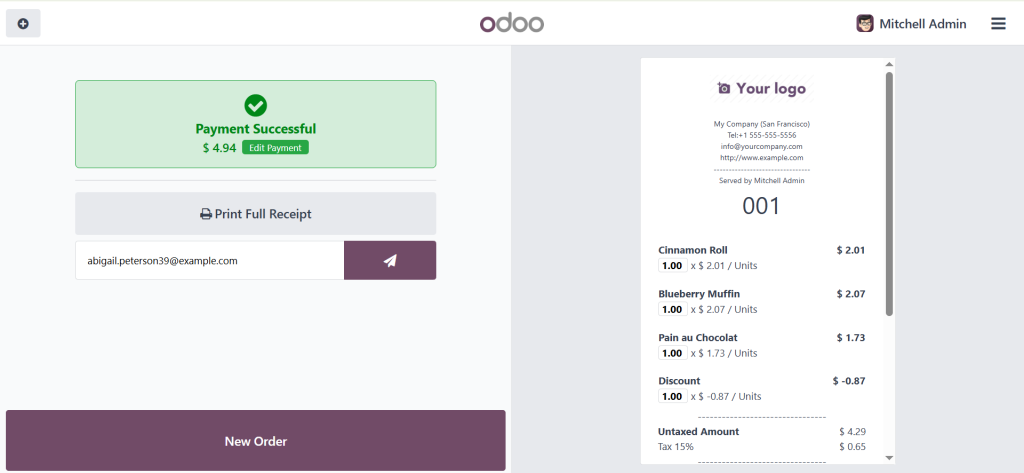
That’s how you can set up and use the global discount feature in Odoo 18 POS. Remember, this discount applies to the entire order, not individual products.
Now, when your staff launches the POS interface and adds items to the cart, a “Discount” button appears. One tap, a simple entry, say 10%, 15% or 20% and boom: the entire order adjusts itself instantly. No more clicking on each product to enter individual discounts. No more errors or delays. This is Odoo 18 POS global discount in action, and it’s beautiful in its simplicity.
Global Discount in Odoo 18: The Overlooked Feature That Changes Everything
At a glance, the global discount in Odoo 18 might seem like just another toggle in your settings, but underestimate it, and you’ll miss one of the most impactful pricing tools available in Odoo’s ecosystem. It’s not just about cutting prices; it’s about control. Control over how you position your brand, manage customer expectations, and allow your staff with the tools they need to confidently close sales.
The beauty of global discounts is in their immediacy and uniformity. Whether it’s a site-wide flash sale or an end-of-day clearance push, this tool ensures every customer gets the same deal fairly, quickly, and transparently. In a world where customer loyalty hinges on speed and trust, having this level of consistency can make or break a retail business.
Odoo POS Discount Configuration: Where Smart Selling Begins
Digging deeper into Odoo POS discount configuration, you realize it’s more than flipping a switch. It’s where strategy meets execution. For example, do you want to allow all users to apply discounts, or just your managers? Should the system allow discounts of 5%, 10%, or up to 50%? Are these discounts before or after tax? The configuration options in Odoo 18 POS provide the level of precision you need.
And here’s the kicker: Odoo’s configuration doesn’t just stop at how the discount is applied; it affects how it’s reported. Each discount line appears as its entry in the transaction, ensuring clarity in receipts and backend reports. That means when it’s time to analyze your sales at the end of the month, you know exactly how much revenue was influenced by your global discount strategies. It’s not just about giving away value, it’s about understanding the impact.
Odoo 18 Point of Sale Discount Setup: A Potent Tool for Modern Retailers
The Odoo 18 point of sale discount setup offers incredible flexibility for both small and large retailers. Whether you’re running a cozy boutique or a chain of outlets across cities, the same system scales with you. One of the best aspects of Odoo is that it offers these robust features without requiring third-party plugins or complex custom code.
Even better, the POS discount setup is part of the broader Odoo ecosystem, which is connected to accounting, inventory, CRM, and marketing. When you apply a discount, it’s not just a front-end adjustment; it flows through the financial backend, giving you an accurate picture of profit margins and tax obligations. This unified integration is what makes Odoo more than just a POS; it’s an intelligent business management system.
Odoo POS Pricing Rules vs Global Discounts: What's the Difference?
This is where things get interesting. While Odoo POS pricing rules allow you to define advanced discount logic, such as offering a free item after three purchases or providing VIP customers with exceptional prices, global discounts in Odoo 18 offer a more straightforward yet compelling solution. It lets you apply a flat discount to the entire cart without worrying about which products qualify.
So, which one should you use? The real might comes in using both. Suppose your VIP customers automatically receive 10% off selected items via pricing rules, but on top of that, during a flash sale, you offer a 5% global discount across all products. The result? A layered, flexible promotional system that feels personalized to the customer and effective for the business. The key is knowing when to use Odoo POS pricing rules for precision and when to use global discounts for speed and scale.
How to Manage Global Discount in Odoo for Maximum Profit
Knowing how to manage global discounts in Odoo is not just about activating them; it’s about getting them. You need to create rules for your team. Who can apply discounts? What’s the maximum allowable percentage? What audit trails are in place if someone misuses the feature? Odoo 18 gives you user-level controls to assign permissions. You can restrict discount privileges to specific roles and track who applied for what, and when.
And then there’s the analytics. Odoo’s backend lets you track discount performance. You can compare revenue with and without discounts, evaluate the most commonly discounted products, and even spot patterns in staff behavior. This changes the global discount from a blunt tool to a surgical instrument in your pricing strategy.
By learning how to manage this feature effectively, you open the ability to test pricing models, respond to market trends, and optimize for margins, all while maintaining a smooth and friendly customer experience.
Secrets Behind the Simplicity of Odoo 18 POS Global Discount
Behind the effortless front-end operation of Odoo 18 POS, there’s an intelligent architecture doing the heavy lifting. The way Odoo handles discount logic, separating it as a service item, allows for precise tracking in accounting. The clean interface conceals the complexity behind how it calculates tax, inventory valuation (which remains unchanged, as discounts don’t affect quantity), and customer receipts.
And there’s more: once you enable global discounts, the system automatically adapts the invoice layout, includes clear labelling on receipts, and logs it in the session reports. Every touchpoint, from cashier to finance department, remains aligned. This is what makes the Odoo 18 point of sale discount setup truly enterprise-grade.
Why You Need to Learn Odoo POS Discount Configuration Now
If you’re still applying discounts manually or using outdated systems, you’re not only wasting time, but you’re also risking revenue and customer trust. Today’s customers expect quick checkouts, transparent pricing, and smart offers. Your staff needs tools that are intuitive, fast, and consistent. As a business owner or manager, you need visibility and control.
Learning how to set up a discount in Odoo POS and manage it effectively through proper configuration enables you to gain all of these benefits. It’s one of the fastest ways to modernize your sales approach without incurring significant investments.
And with the growing capabilities of Odoo, learning discount management today puts you in the perfect position to implement more complex pricing structures, loyalty systems, or even AI-based promotions in the future. It’s not just about selling better today; it’s about preparing your business for tomorrow.
How Odoo 18 POS Global Discount Becomes a Competitive Weapon
So now that you’ve seen what it can do, the only question left is: when will you start? Learning how to manage global discounts in Odoo is more than a technical exercise; it’s a strategic shift. It puts your business in a position to scale promotions quickly, reduce human error, and enhance customer satisfaction with every sale.
Whether you’re configuring your Odoo POS discount settings for the first time or looking to refine your Odoo POS pricing rules, there’s no better time to take action. The global discount in Odoo 18 is your key to opening elegant, data-driven retail management.
And the best part? It’s all built into the system you’re already using, no extra tools, no additional cost, just pure Odoo management, ready when you are.
Ready to simplify your promotions and supercharge your sales? Get in touch with Netilligence today and let our Odoo experts help you establish a decisive and smooth global discount strategy personalized to your business.




