

Managing single and consolidated company reports in Odoo 19 requires clarity, especially when multiple companies are involved within the same system. Many professionals working with Odoo 19 multi-company reports often face confusion when report values differ based on company selection. This usually happens due to a lack of understanding of how to switch company reports in Odoo 19 effectively.
A clear understanding of single & consolidated company reports in Odoo 19 helps ensure accurate financial analysis. Whether reviewing a single company report in Odoo 19 or analyzing a consolidated company report in Odoo 19, the ability to control report views is essential for reliable decision-making. The use of the Odoo 19 company selector plays a key role in managing Odoo 19 reporting by company and ensuring that Odoo 19 financial reports are interpreted correctly.
Understanding Single Company Report Odoo 19 and Consolidated Company Report Odoo 19
A single company report in Odoo 19 provides financial data related to one specific company. This includes reports such as profit and loss, balance sheet, and cash flow. It is commonly used for internal reviews, audits, and performance tracking at an individual company level.
In contrast, a consolidated company report in Odoo 19 combines financial data from multiple companies. These Odoo 19 consolidated reports are useful for organizations managing multiple entities, as they present a combined financial overview. A properly configured consolidation report ensures that data from different companies is aligned and presented accurately.
Understanding the difference between these two reporting types is essential when working with Odoo 19 multi-company reports, as it directly affects how financial data is interpreted.
Importance of Single and Consolidated Company Reports in Odoo 19
Working with single & consolidated company reports in Odoo 19 supports both detailed and high-level financial analysis. A single company report in Odoo 19 allows focused evaluation of a single entity, while a consolidated company report in Odoo 19 provides a complete view of multiple companies combined.
For businesses using Odoo 19 financial reports multi-company, this flexibility is critical. It ensures that financial insights are available at both operational and strategic levels. Accurate Odoo 19 reporting by the company also supports compliance, internal control, and performance monitoring.
Role of Odoo 19 Company Selector in Odoo 19 Reporting by Company
The Odoo 19 company selector is the central element that controls how reports are displayed. It allows users to select one or multiple companies within the system.
When only one company is selected, Odoo generates a single company report. When multiple companies are selected, the system automatically produces consolidated reports. This functionality directly impacts Odoo 19 reporting by company and determines whether the output is individual or combined.
Incorrect selection in the Odoo 19 company selector is one of the most common reasons for discrepancies in Odoo 19 financial reports.
How to Switch Company Reports in Odoo 19: A Step-By-Step Guide
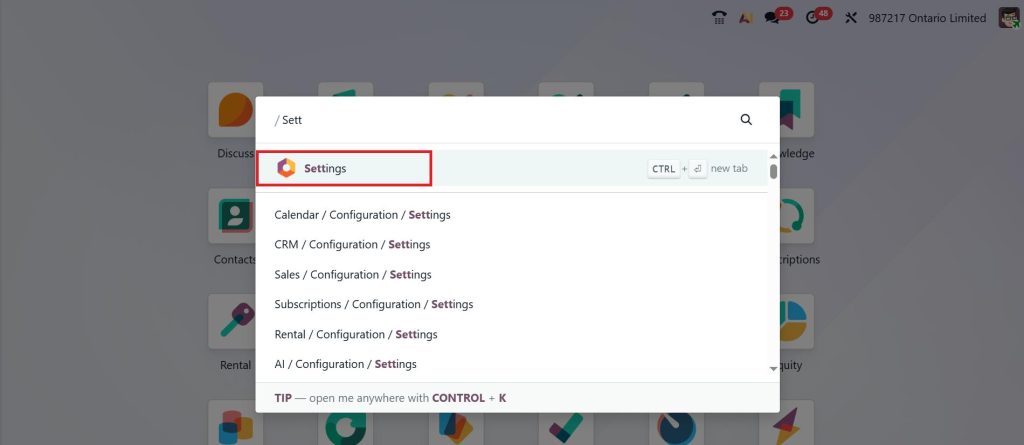
Understanding how to switch company reports in Odoo 19 is essential for accurate reporting. First, open the Settings App.
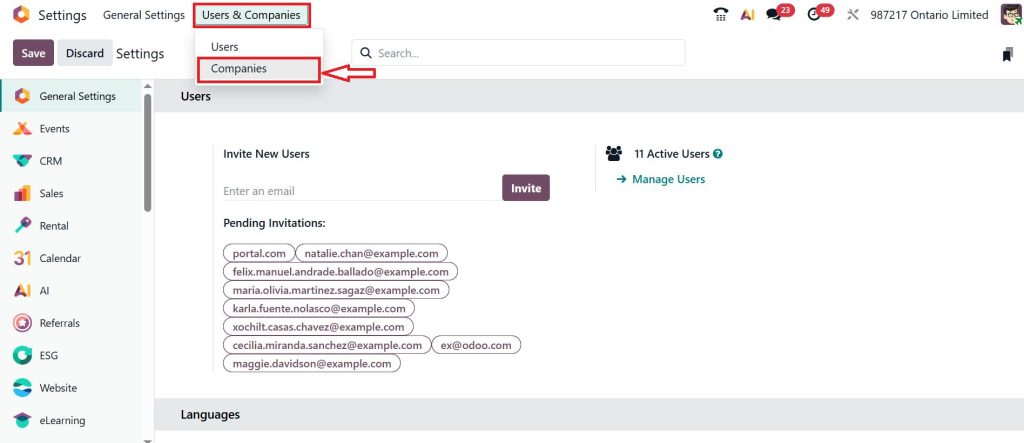
Go to User & Companies > Companies.
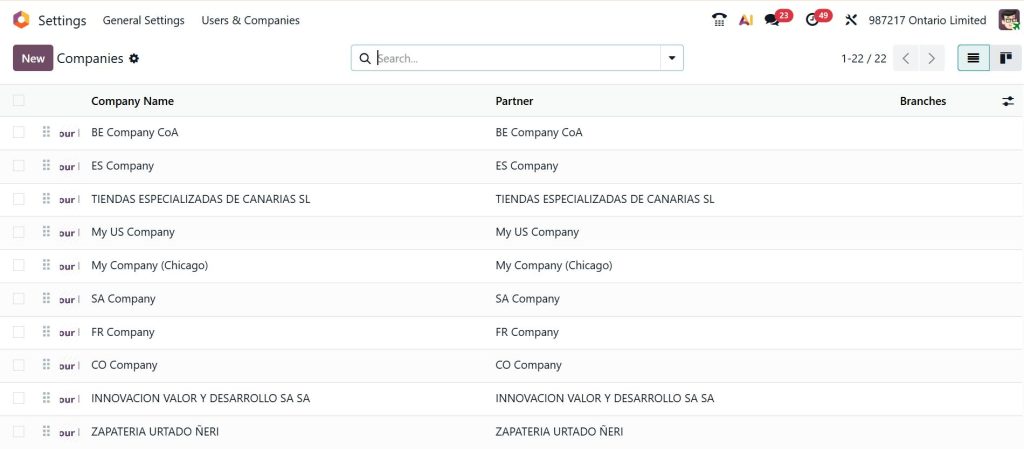
Here, you can check whether multiple companies already exist or not. If not, then click New and create them, and also add important information like company name, email address, and other relevant information.
Now, go to the Settings → Users & Companies → Users and open the any user record.
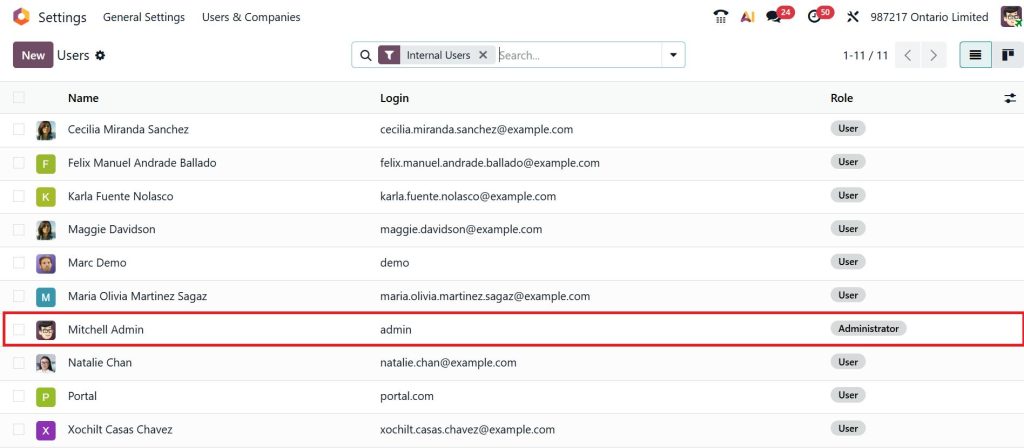
In the Access Rights tab, use the allowed Companies field to grant the user access to the relevant companies. Then, set the Default Company to define the main company the user will operate in.
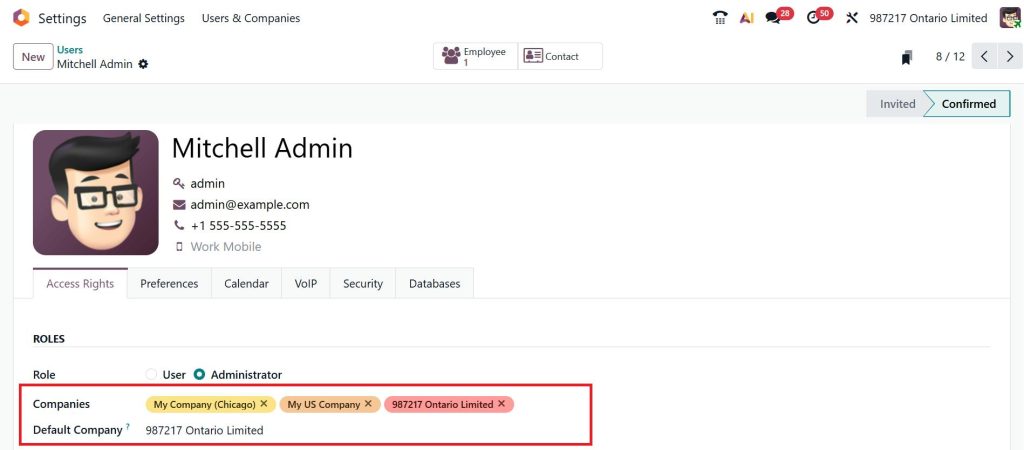
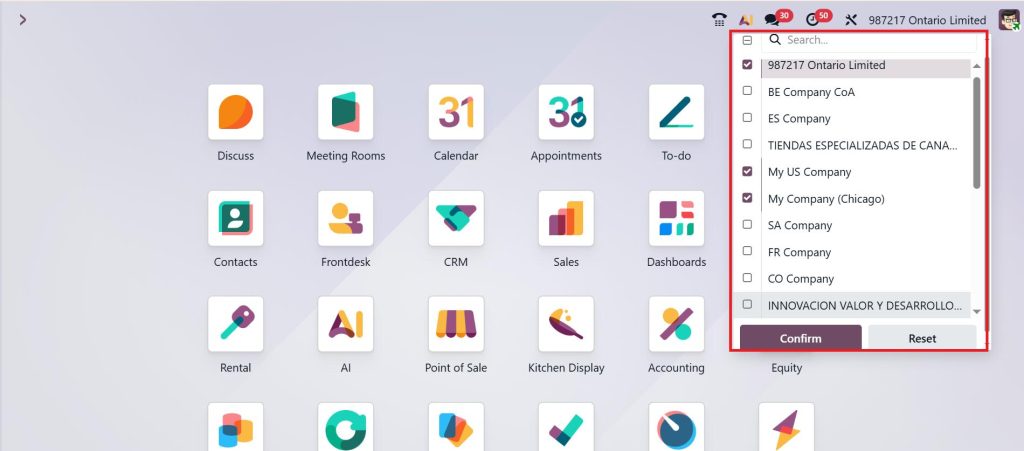
Go back and access the Odoo 19 company selector from the top-right corner of the dashboard. A list of available companies will appear.
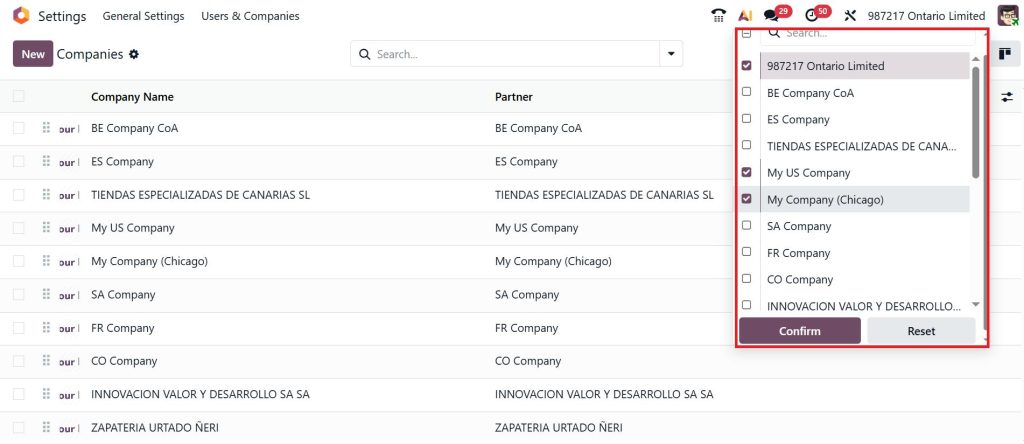
To generate a single company report in Odoo 19, select only one company. Ensure that no additional companies are selected.
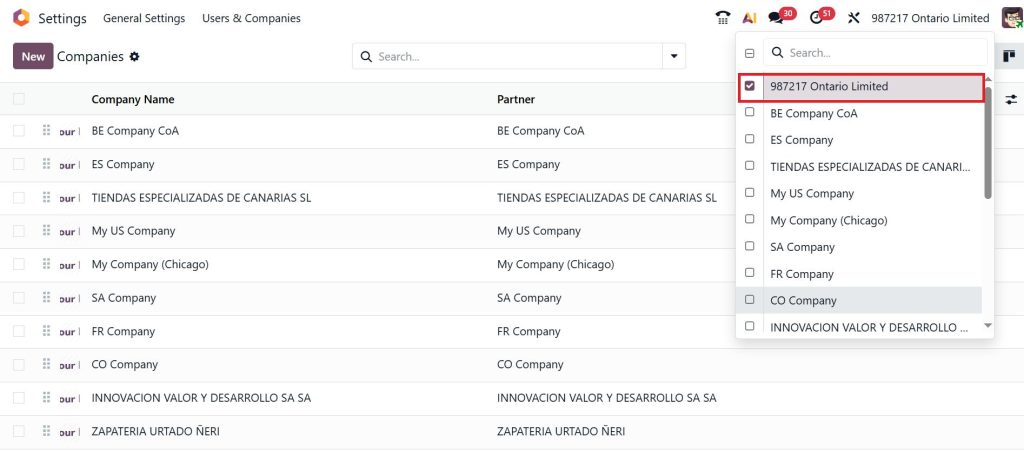
Next, go to Accounting → Reporting → Statement Reports.
Statement reports include:
- Profit and Loss
- Balance Sheet
- Cash Flow Statement
- Annual Statements
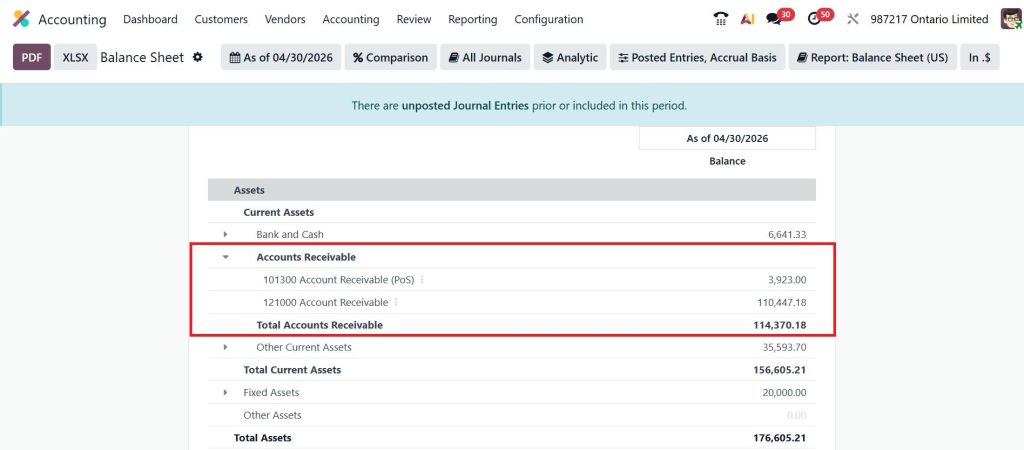
When a single company is selected in the company selector, the report shows data only for that specific company.
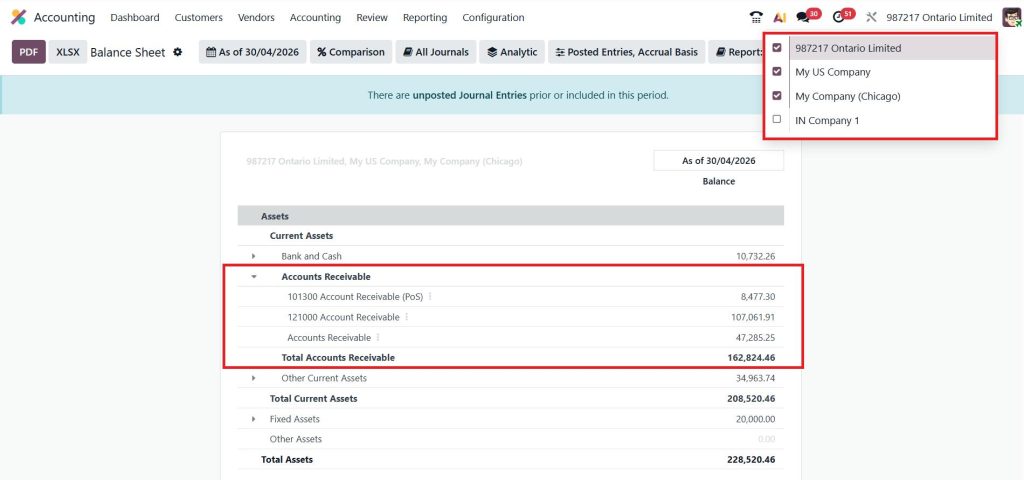
To generate a consolidated company report in Odoo 19, select multiple companies. Odoo will automatically combine the data and display it in the form of Odoo 19 ERP consolidated reports.
After selecting the desired companies, direct to the Accounting module and open the required report. The system will reflect the selected companies in the report output, ensuring accurate Odoo 19 reporting by company.
That’s how you can easily switch company reports in Odoo 19. This enables users to efficiently analyze the combined financial position of multiple companies without the need for manual data consolidation.
Working of Odoo 19 Consolidation Report
Odoo 19 ERP consolidated reports combine financial data from multiple companies into a single view. This process is managed through the Odoo 19 consolidation report feature.
The system aggregates account balances, applies currency conversions if required, and presents a unified financial summary. For organizations operating in multiple regions, this ensures consistency in Odoo 19 financial reports.
To achieve accurate results, companies should maintain a consistent chart of accounts and properly configure intercompany transactions. This ensures that the consolidated company report in Odoo 19 reflects true financial performance without duplication or inconsistencies.
Common Issues in Odoo 19 Multi Company Reports
While working with Odoo 19 multi company reports, certain issues may arise. One common issue is incorrect company selection in the Odoo 19 company selector, which leads to inaccurate reporting. Another issue is confusion between a single company report and a consolidated company report in Odoo 19, especially when switching frequently between views.
Inconsistent accounting structures across companies can also affect Odoo 19 ERP consolidated reports. Proper configuration is necessary to ensure that the Odoo 19 consolidation report produces reliable results.
Best Practices for Odoo 19 Financial Reports Multi Company
Effective management of Odoo 19 ERP financial reports multi company requires consistency and attention to detail. Maintaining a standardized chart of accounts across all companies improves the accuracy of Odoo 19 ERP consolidated reports. Regular review of intercompany transactions ensures that the Odoo 19 consolidation report reflects correct values.
Users should always verify the selected companies in the Odoo 19 company selector before generating reports. This helps maintain accuracy in Odoo 19 reporting by the company. Applying filters and saving report views can further improve efficiency when working with single & consolidated company reports in Odoo 19.
Practical Use of Single and Consolidated Company Reports in Odoo 19
In a multi-company environment, single & consolidated company reports in Odoo 19 provide flexibility in financial analysis. A single company report in Odoo 19 can be used to evaluate the performance of an individual entity. A consolidated company report in Odoo 19 provides a broader perspective by combining results from multiple companies.
This approach supports both operational tracking and strategic planning. With proper use of the Odoo 19 company selector, switching between views becomes efficient and reliable.
Improve Financial Reporting Accuracy Across Multiple Business Entities
Clear and consistent reporting is essential for businesses managing multiple entities. With the right approach to single & consolidated company reports in Odoo 19, organizations can maintain full control over their financial data and avoid reporting inconsistencies. Proper use of the Odoo 19 company selector ensures that every single company report in Odoo 19 and the consolidated company report in Odoo 19 reflect accurate and relevant information.
For businesses working with Odoo 19 multi-company reports, aligning reporting structures and understanding how to switch company reports in Odoo 19 is key to maintaining reliable Odoo 19 multi-company financial reports. Consistency in configuration also improves the accuracy of every Odoo 19 consolidation report and supports better financial visibility across all entities.
Looking to improve your Odoo reporting setup?
Netilligence can help you configure, optimize, and manage your Odoo 19 consolidated reports and multi-company reporting workflows with precision.
Get in touch with our team to ensure your reporting structure is accurate, efficient, and aligned with your business needs.




