how-to-track-real-product-profit-in-odoo-19

How to Track Real Product Profit in Odoo 19?

Why Understanding Real Profit Matters More Than Sales

How to track real product profit in Odoo 19 is one of the most important questions business owners ask once their sales start growing. Because, let’s be honest, high sales do not always translate into high profit.

Many companies celebrate revenue numbers but struggle with actual margins. The problem? They are not using proper Odoo 19 product profitability analysis, or they are only checking sales totals without considering costs, landed expenses, and inventory valuation.

If you truly want to track product profit in Odoo 19 accounting inventory, you must look beyond invoices. You need real-time data from accounting, stock valuation, and cost structure combined. That is where Odoo 19’s real-time product profitability becomes a game changer.

Businesses that understand Odoo 19 product-wise profit-and-loss reports make smarter pricing decisions. They identify low-margin products quickly. They adjust procurement strategy. They improve cash flow.

This guide explains how to track real product profit in Odoo 19, use sales reports to calculate product margin, and generate a powerful product profitability report, step by step.

By the end of this blog, you will not only understand the system, but you will also want to implement it correctly with expert guidance from Netilligence.

What Does “Real Product Profit” Actually Mean?

Before learning how to track real product profit in Odoo 19, we need to understand what “real profit” truly means.

Many businesses calculate profit like this:

Profit = Sales Price – Purchase Price

But this is incomplete.

Real product profit includes:

  • Purchase cost
  • Landed cost (shipping, customs, freight)
  • Manufacturing cost (if applicable)
  • Overhead allocation
  • Discounts
  • Inventory valuation method
  • Returns and refunds

Without including these factors, your profit numbers are misleading.

Odoo 19 integrates accounting and inventory, so you can monitor real margin using:

  • Automated stock valuation
  • Real-time cost updates
  • Accurate sales margin reports
  • Financial statements linked to products

This is the foundation of accurate Odoo 19 product profitability analysis.

How to Track Real Product Profit in Odoo 19 (Step-by-Step Practical Approach)

Now let’s answer the main question directly:

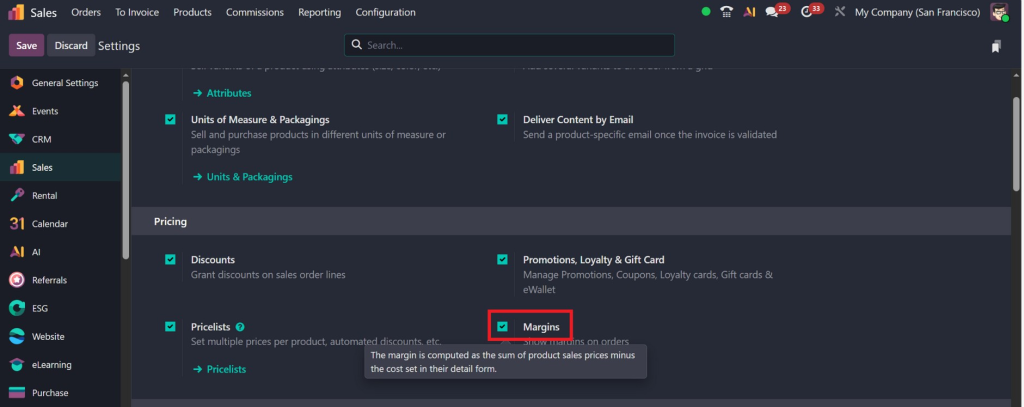
Step 1 – Activate Margin in Odoo 19 Settings

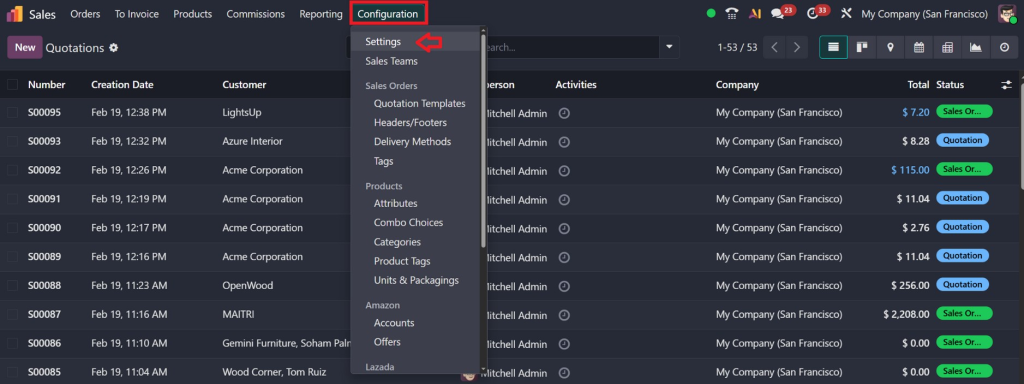
First, you must enable the margin feature.

Go to:

Sales → Configuration → Settings

how-to-track-real-product-profit-in-odoo-19

Scroll to the Pricing section.

✔ Enable Margins
✔ Click Save

how-to-track-real-product-profit-in-odoo-19

Once activated, Odoo will automatically calculate the margin based on:

Sales Price – Cost Price

This is the foundation of tracking real product profit.

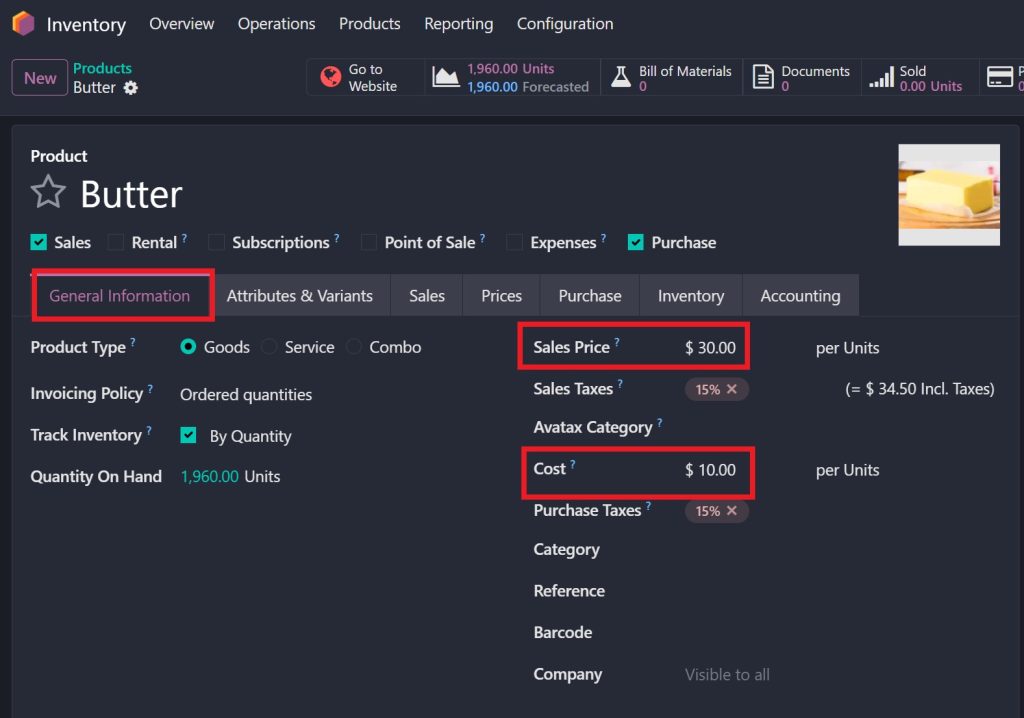
Step 2 – Add Cost Price in Product Form

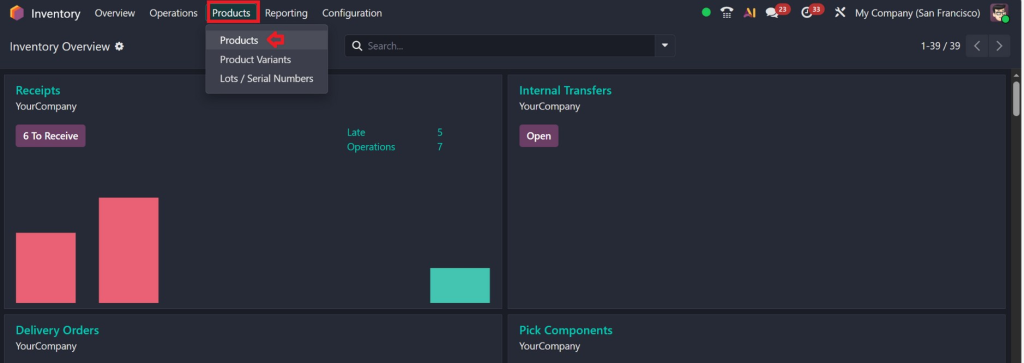
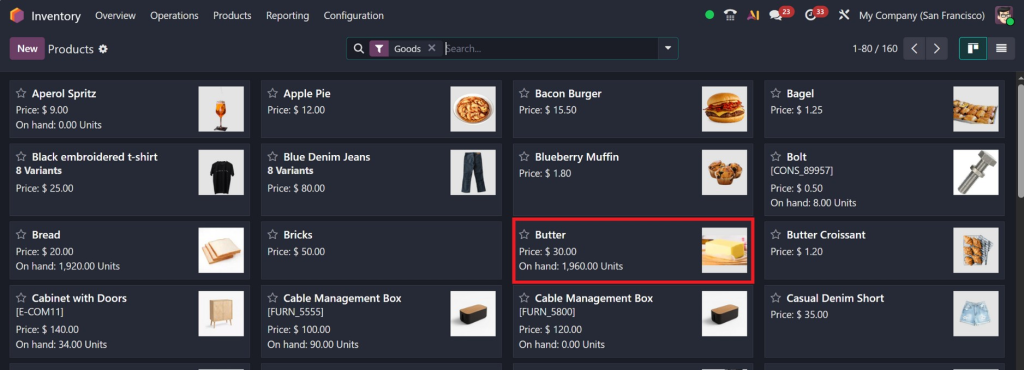
Now go to:

Sales / Inventory → Products → Products

how-to-track-real-product-profit-in-odoo-19

Open the specific product.

how-to-track-real-product-profit-in-odoo-19

Inside the product form:

  • Go to the General Information tab
  • Add the Cost (Cost Price)
  • Set the Sales Price
how-to-track-real-product-profit-in-odoo-19

Example:

  • Cost = 10
  • Sales Price = 30

Save the product.

This step is extremely important.
If cost is not added, the margin will not be calculated correctly.

Step 3 – Create a Sales Order and Check Margin

Now go to:

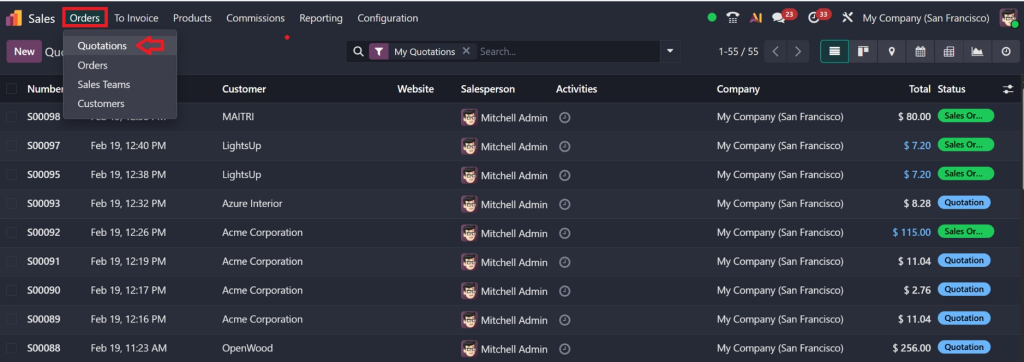
Sales → Orders → Quotations → Create

how-to-track-real-product-profit-in-odoo-19

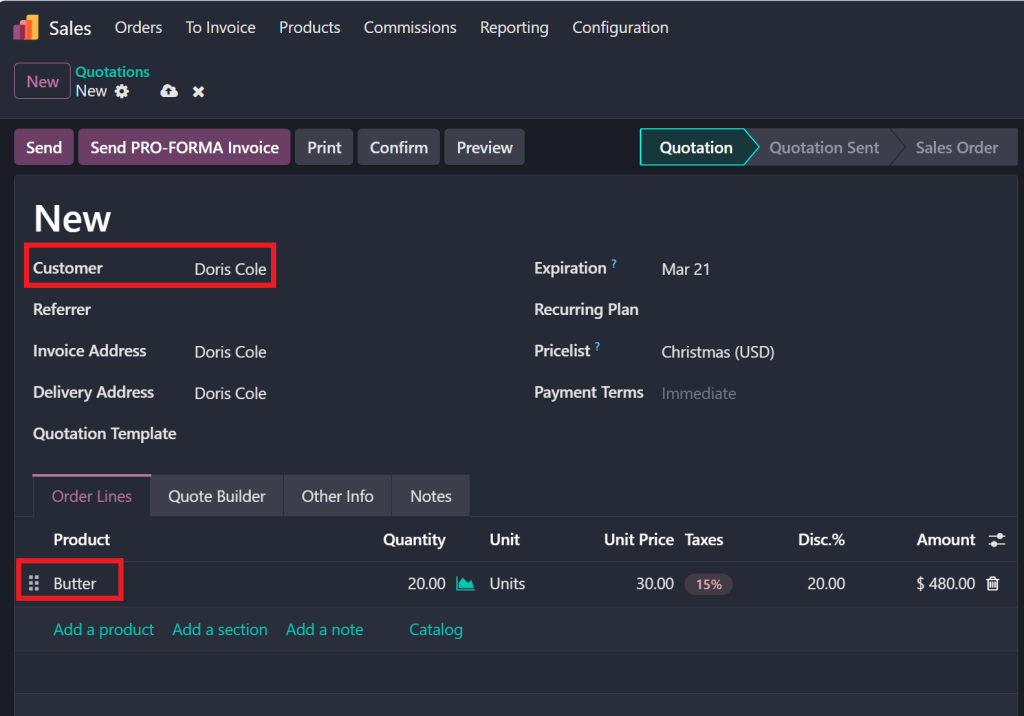
Select:

  • Customer
  • The product you just configured
how-to-track-real-product-profit-in-odoo-19

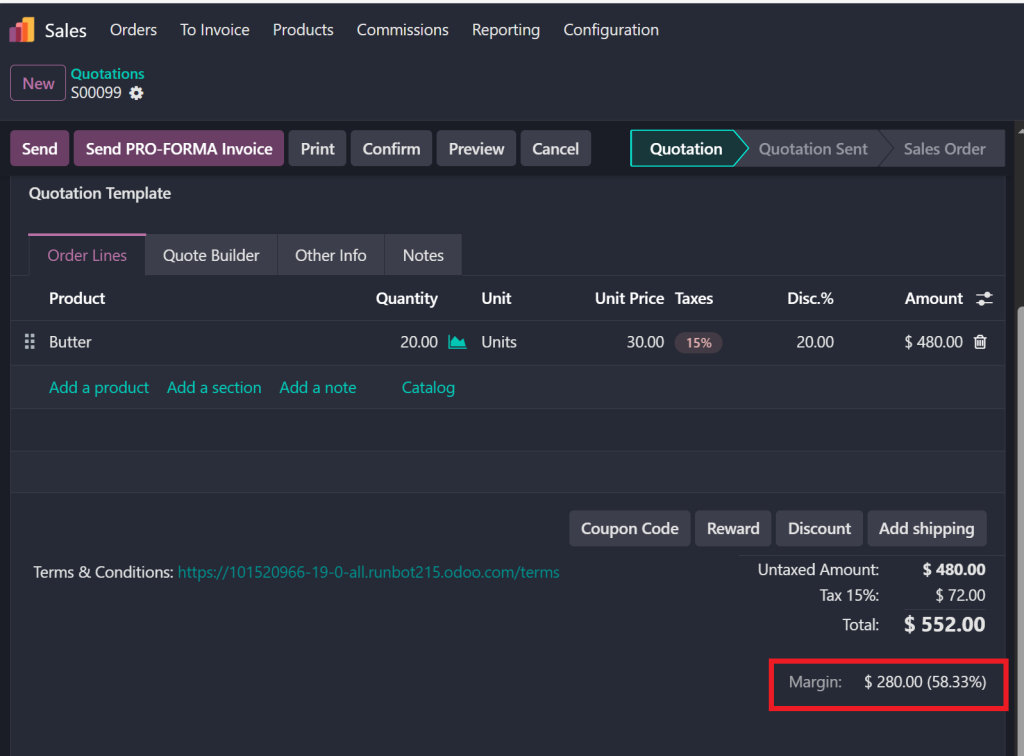
When you add the product to the order line, you will see:

  • Cost
  • Sales Price
  • Margin
  • Margin %

Displayed automatically at the bottom of the order line.

For example:

Cost: 10
Sales Price: 30
Margin: 20
Margin %: 58.33%

how-to-track-real-product-profit-in-odoo-19

This is real-time margin visibility before confirming the sale.

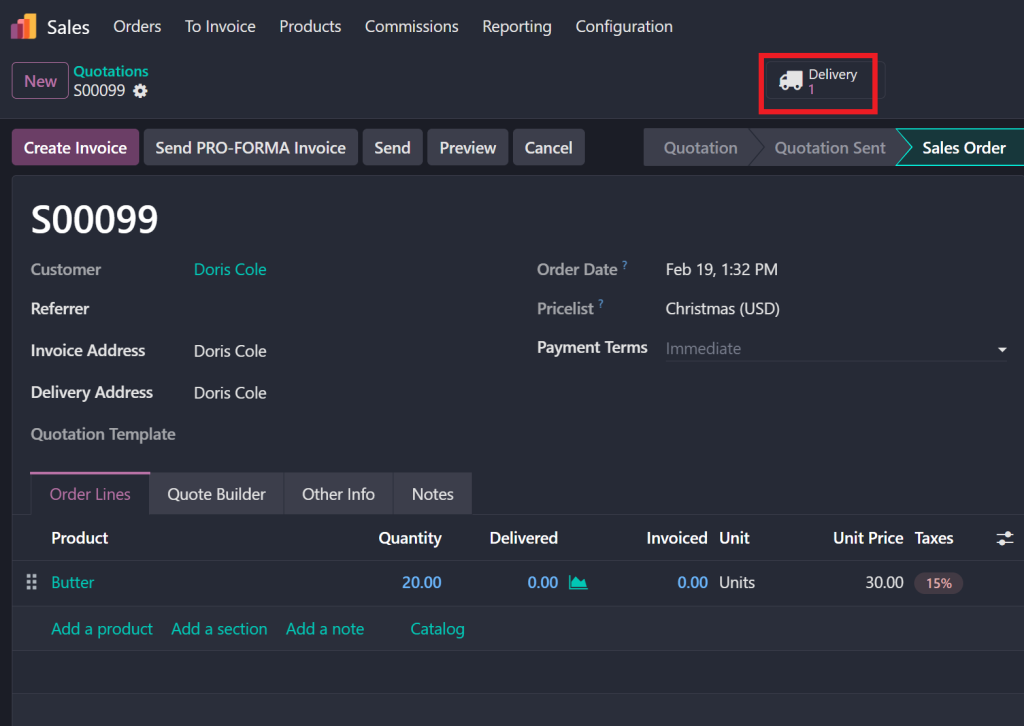
Step 4 – Confirm and Deliver the Product

Now:

✔ Confirm the Sales Order
✔ Click Deliver

how-to-track-real-product-profit-in-odoo-19

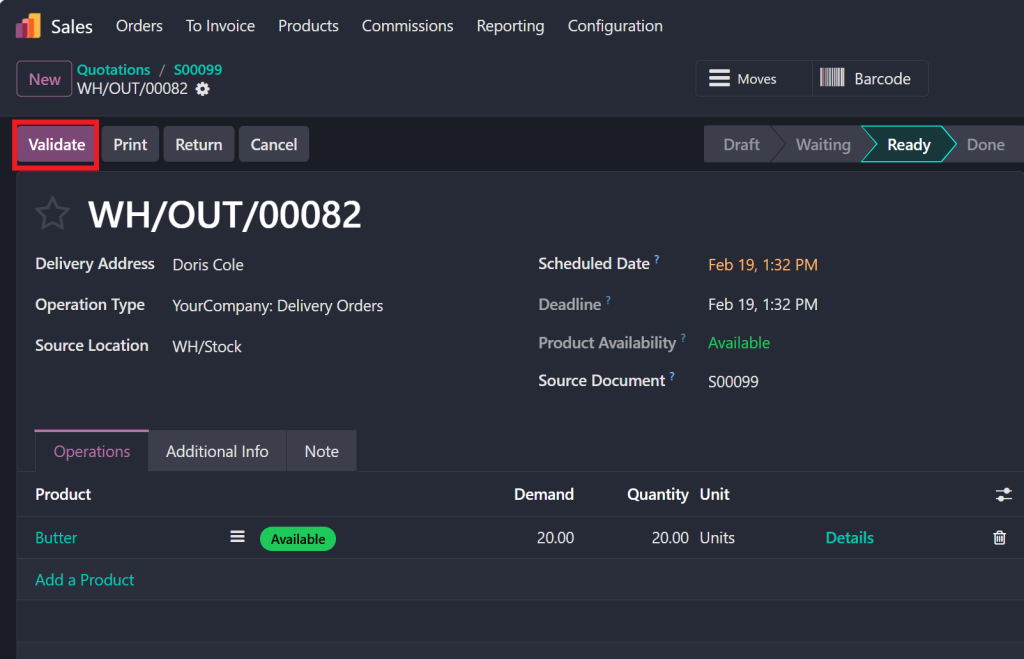
 ✔ Validate Delivery

how-to-track-real-product-profit-in-odoo-19

Once delivery is validated:

  • Stock moves
  • Inventory updates
  • Accounting entries are generated (if automated valuation is enabled)
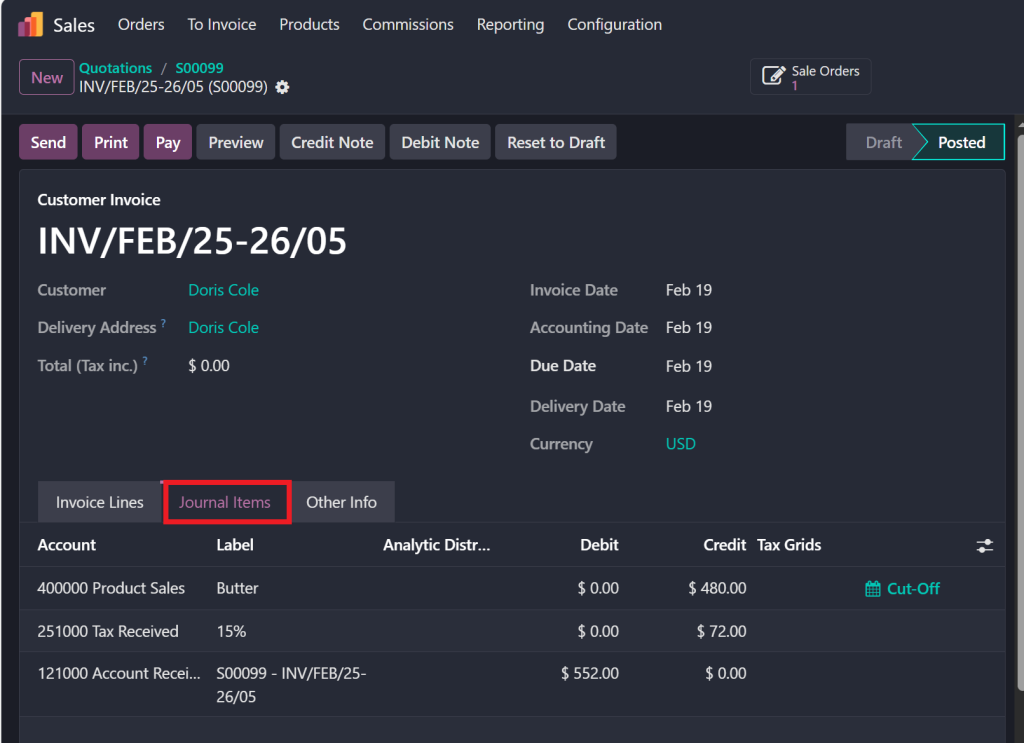
how-to-track-real-product-profit-in-odoo-19

Now the profit is recorded, not just estimated.

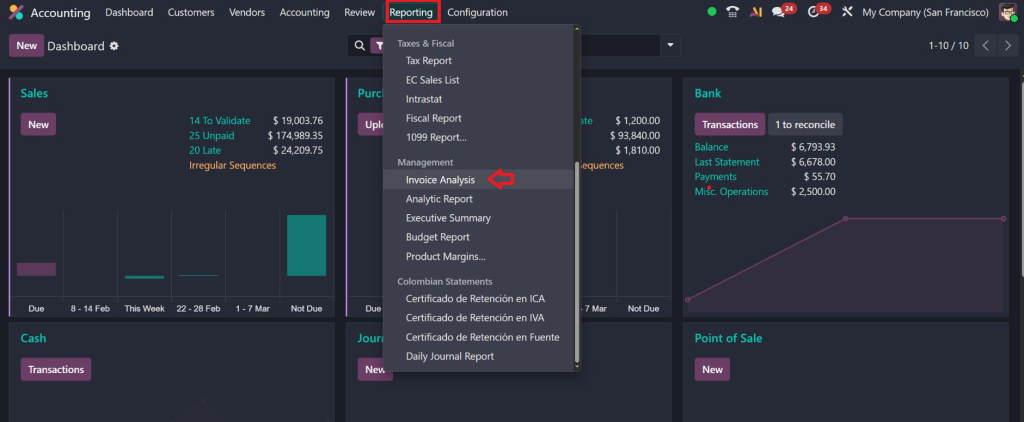
Step 5 – Check Margin in Invoice Analysis

Now go to:

Accounting → Reporting → Invoice Analysis

how-to-track-real-product-profit-in-odoo-19

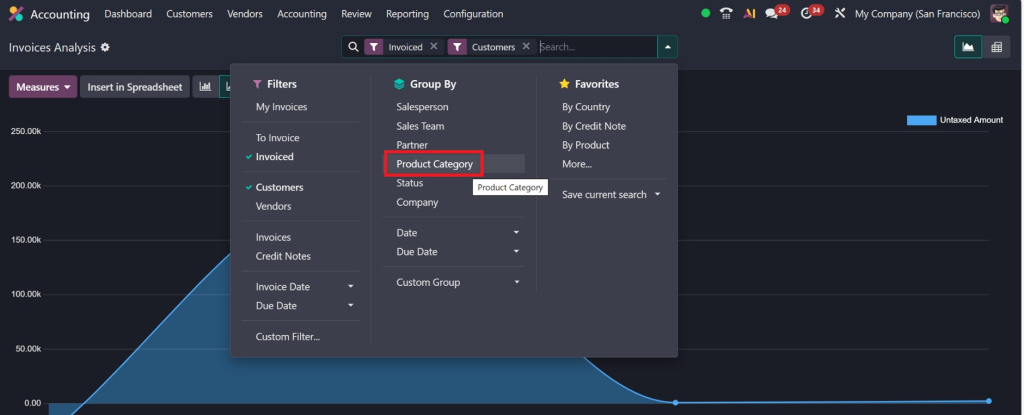
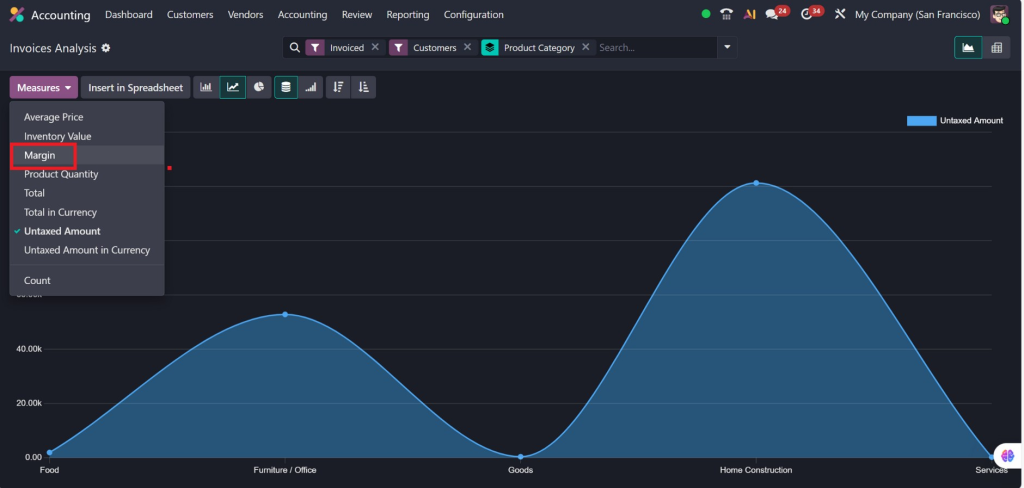
Here you can:

  • Use Group By → Product Category
how-to-track-real-product-profit-in-odoo-19
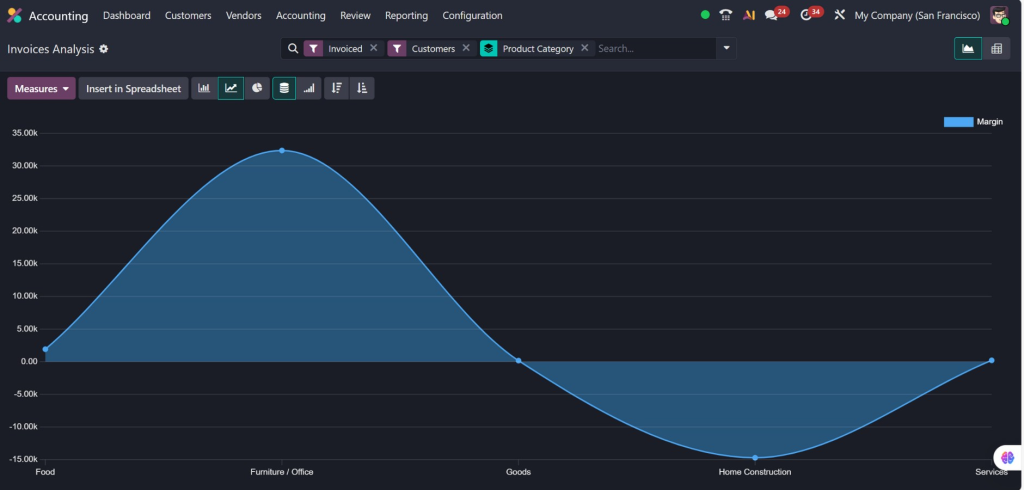
  • Add Measure → Margin
how-to-track-real-product-profit-in-odoo-19
  • Apply Filters
how-to-track-real-product-profit-in-odoo-19

You can also switch to:

  • Pivot View
  • Graph View

This lets you view the margin in chart format.

Now you are not just seeing the margin per sale,
You are seeing overall product profitability trends.

Odoo 19 Real-Time Product Profitability

Traditional systems update costs monthly. Odoo updates instantly.

When stock moves → accounting updates.
When cost changes → margin recalculates.

This means:

  • No manual Excel work
  • No guess-based pricing
  • No delayed profit visibility

With Odoo 19 real-time product profitability, you can:

✔ Adjust pricing immediately
✔ Stop selling loss-making products
✔ Negotiate better vendor rates
✔ Improve gross margin

This is how modern companies stay competitive.

Odoo 19 Product-Wise Profit and Loss

One of the most powerful features in Odoo 19 is the ability to analyze product-level profit.

Instead of checking overall company profit, you can identify:

  • Best-selling high-margin products
  • High-volume but low-margin products
  • Dead stock items
  • Seasonal profit variations

Using Odoo 19 product-wise profit and loss, management can:

  • Discontinue unprofitable products
  • Bundle products strategically
  • Introduce dynamic pricing
  • Improve marketing focus

This is not just reporting. This is strategic control.

Odoo 19 Sales Reports Product Margin

Sales teams focus on revenue. Finance focuses on profit.

Odoo connects both.

In Odoo 19, sales reports product margin. You can:

  • Comparethe  margin by salesperson
  • Compare the margin by product category
  • Compare the margin by customer
  • Compare margins by time period

This gives clarity, such as:

“Product A sells a lot but gives only 5% margin.”
“Product B sells less but gives 35% margin.”

Which one should you promote more?

The answer becomes obvious when you analyze real numbers.

Common Mistakes Businesses Make While Tracking Profit

Even with Odoo 19, businesses often make mistakes:

  1. Not enabling automated valuation
  2. Using the wrong costing method
  3. Ignoring landed costs
  4. Not reconciling stock with accounting
  5. Depending only on sales totals

If these mistakes exist, your product profitability report in Odoo 19 will not show correct data.

That’s why proper implementation is critical.

Why Netilligence is the Right Partner for Odoo 19 Profit Tracking

Software alone does not create results. Proper configuration does.

At Netilligence, we:

  • Configure costing correctly
  • Set up automated inventory valuation
  • Implement real-time margin analysis
  • Customize profitability dashboards
  • Train your team for strategic reporting

We don’t just install Odoo.
We align it with your business goals.

When you ask how to track real product profit in Odoo 19, the answer is not just technical steps. It’s about building a profit-driven system.

That is what we deliver.

Real Business Impact After Proper Implementation

After implementing an accurate Odoo 19 product profitability analysis, businesses typically experience:

✔ 10–25% margin improvement
✔ Better pricing strategy
✔ Reduced stock losses
✔ Smarter purchasing decisions
✔ Clear financial visibility

When management sees real-time numbers, decisions become more powerful and confident.

Stop Guessing. Start Tracking Real Profit Today.

Understanding how to track real product profit in Odoo 19 is no longer optional. It is essential for survival in competitive markets.

Revenue without profit is dangerous.
Growth without visibility is risky.

With accurate Odoo 19 product-level profit and loss, detailed Odoo 19 sales reports on product margins, and automated tracking of product profit through Odoo 19 accounting and inventory integration, your business gains full financial clarity.

And when combined with Odoo 19 real-time product profitability, you are not reacting to problems, you are preventing them.

If you are ready to transform your reporting into real business intelligence, Netilligence is here to help.

Let’s configure your Odoo 19 system the right way.
Let’s uncover hidden losses.
Let’s maximize your real profit.

Because smart businesses don’t just track sales,
They track real profit.

Picture of Nabia

Nabia

Hi, I'm Nabia, an Odoo ERP functional & technical content writer. I specialize in blogs, social media content, ad copy, landing pages, service pages, and email campaigns.

Get a free quote