Cash Basis Accounting in Odoo 19 is one of the most advanced financial features for small and medium-sized businesses seeking full control over their real cash flow. Unlike traditional accounting systems that record income and expenses when invoices are created, Cash Basis Accounting in Odoo 19 records transactions only when money is actually received or paid.
This means your business financial reports reflect your real cash position, not just theoretical revenue.
If you are running a startup, SME, or service-based company, Cash Basis Accounting in Odoo 19 helps you:
Avoid tax on unpaid invoices
Track real income and expenses
Improve cash flow visibility
Simplify compliance
In this guide, you will learn how to use cash basis in Odoo 19, how to perform Odoo 19 cash basis accounting setup, how to configure cash basis tax in Odoo 19, and understand Odoo 19 cash basis vs accrual accounting in real business scenarios.
At Netilligence, we help businesses implement Cash Basis Accounting in Odoo 19 professionally so they can make smarter financial decisions with confidence.
What is Cash Basis Accounting in Odoo 19?
Cash Basis Accounting in Odoo 19 is an accounting method where revenue and expenses are recorded only when cash is exchanged.
Example:
You sent an invoice today
Customer pays after 30 days
Revenue is recorded only on the payment date
This method is ideal for:
Consultants
Freelancers
Small businesses
Agencies
Service providers
Benefits of Cash Basis Accounting in Odoo 19:
Accurate cash flow reports
Lower tax liability
Easy financial tracking
Better business decisions
Cash Basis vs Accrual Accounting in Odoo 19
Odoo 19 Cash Basis vs Accrual Accounting
Feature
Cash Basis
Accrual
Revenue recognition
On payment
On invoice
Expense recognition
On payment
On bill
Tax calculation
When paid
When invoiced
Best for
SMEs, startups
Large enterprises
Cash flow view
Real-time
Theoretical
Odoo 19 cash basis vs accrual accounting clearly shows why most SMEs prefer cash basis.
How to Enable Cash Basis Accounting in Odoo 19
Step-by-Step: Odoo 19 Cash Basis Accounting Setup
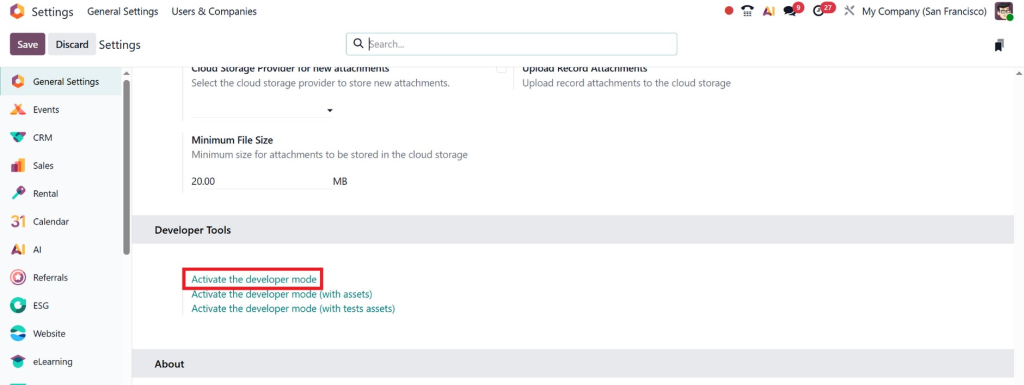
Step 1: Activate Developer Mode
Go to Settings → Activate Developer Mode
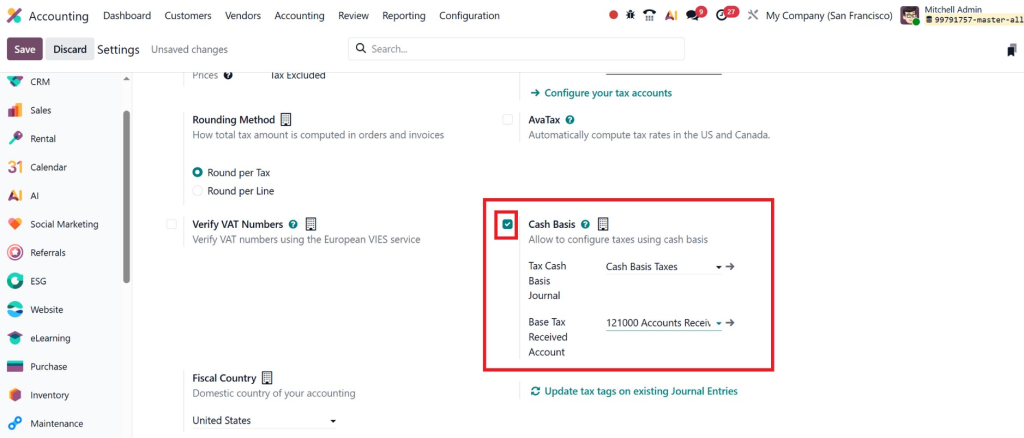
Step 2: Enable Cash Basis Feature
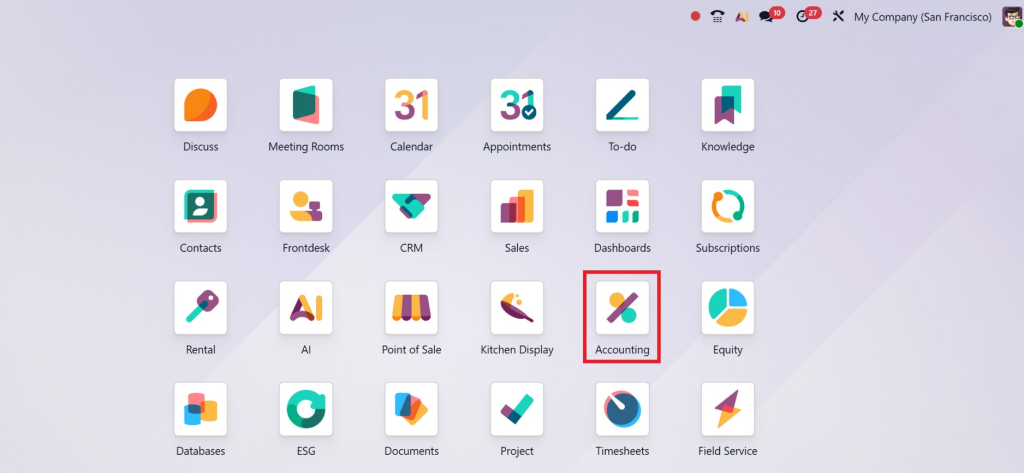
Navigate to: Accounting → Settings → Cash Basis Accounting
Enable: ✔ Cash Basis ✔ Cash Basis Taxes
Configure Cash Basis Tax in Odoo 19
Understanding Cash Basis Taxes
When you enable Odoo 19, enable cash-basis taxes, and set tax to be calculated only when payment is received.
Steps to Configure Cash Basis Tax Odoo 19:
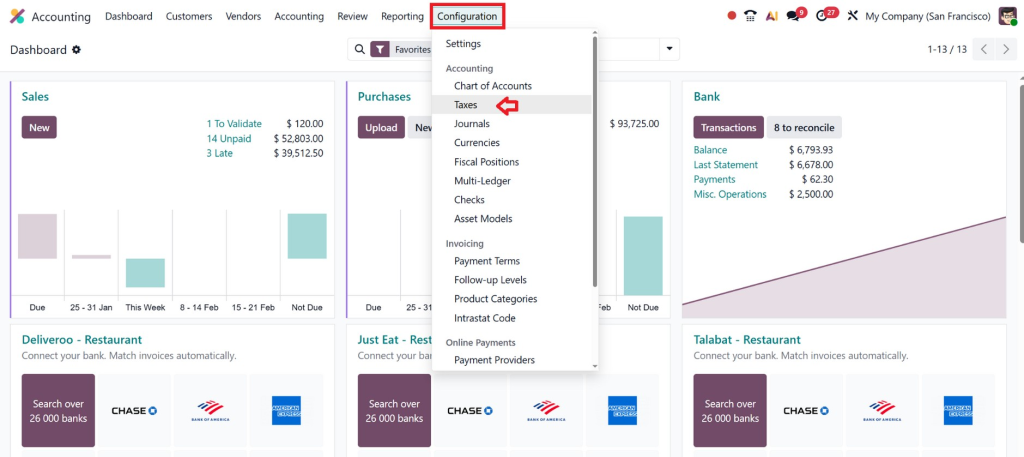
Go to Accounting →
Configuration → Taxes
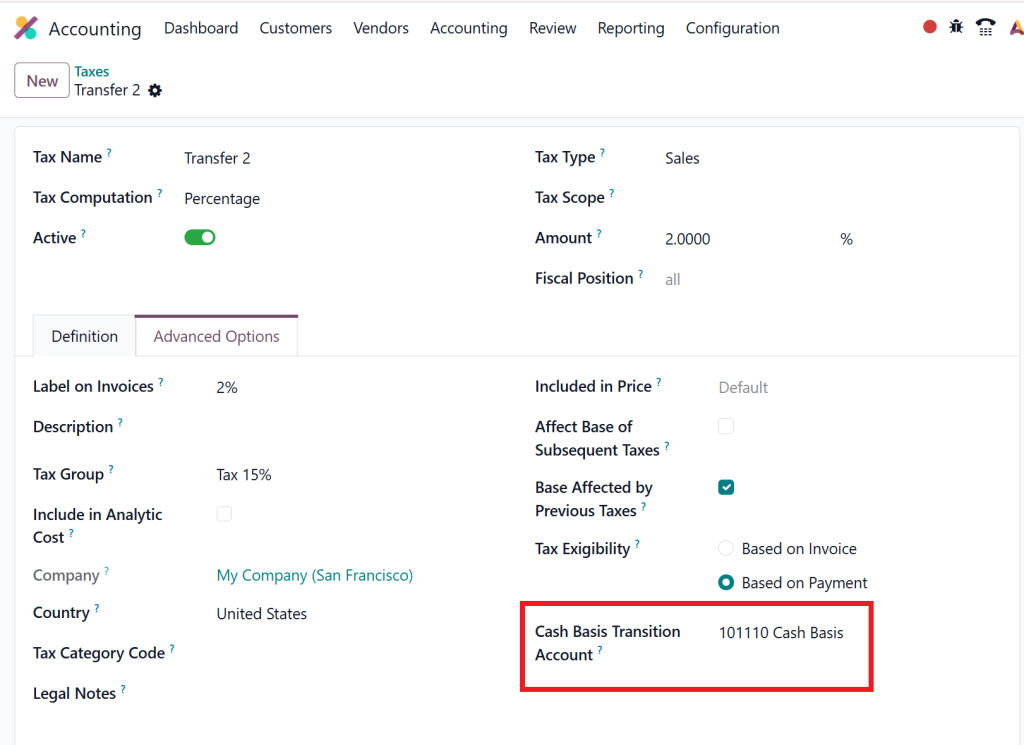
Select any tax (VAT, GST, Sales Tax)
Enable Cash Basis
Set Cash Basis Transition Account
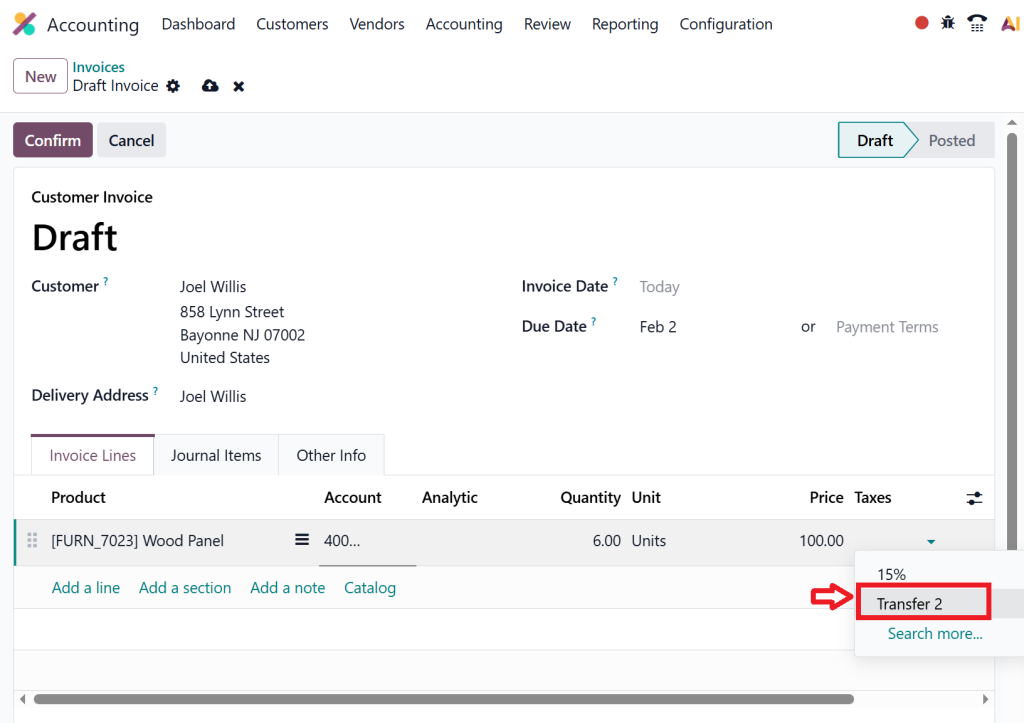
Then we can create new Invoices to check this. When selecting the tax, we can check the option we just created.
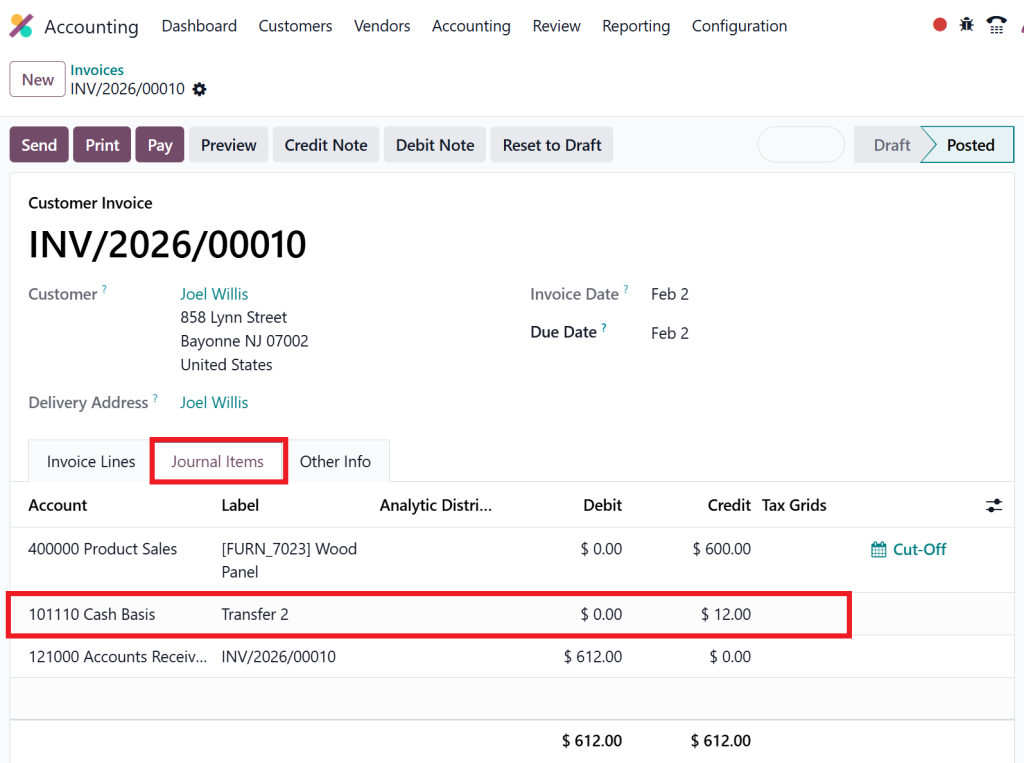
Now in the Journal item, we can check our account as labelled.
What is the Cash Basis Transition Account in Odoo 19?
The cash basis transition account in Odoo 19 is a temporary account used to hold tax values until payment is received.
How to Use Cash Basis in Odoo 19 (Practical Example)
Scenario:
You issue an invoice for $2000 + 10% tax Customer pays $1000 today
Result in Cash Basis:
Revenue recorded: $1000
Tax recorded: $100
Not the full amount until full payment is received.
This is how to use the cash basis in Odoo 19 in real business.
For many businesses, especially e-commerce, payment methods like Cash on Delivery (COD) directly affect when cash is received. Learn how to set up COD on your Odoo 19 website to ensure payments are captured correctly: 👉 How to Set Up Cash on Delivery (COD) in Odoo 19 Website,https://www.netilligence.io/blog/how-to-set-up-cash-on-delivery-cod-in-odoo-19-website/
Under cash-basis accounting, revenue and taxes are recorded only when you actually receive payment.
Lorem ipsum dolor sit amet, consectetur adipiscing elit. Ut elit tellus, luctus nec ullamcorper mattis, pulvinar dapibus leo.
Odoo Cash Basis Tax Reports
Odoo provides powerful reporting tools for cash-basis tax reports.
Access Reports:
Accounting → Reporting → Tax Reports
You can generate:
VAT reports
GST reports
Sales tax reports
Country-specific compliance reports
Key Advantages of Cash Basis Accounting in Odoo 19
1. Real Cash Flow Control
You see only actual money movement.
2. Better Tax Management
Pay tax only on received payments.
3. Lower Financial Risk
No tax burden on unpaid invoices.
4. Simple Financial Statements
Perfect for small businesses.
When Should You Use Cash Basis Accounting?
Cash Basis Accounting in Odoo 19 is ideal if:
You collect payments late
You offer credit terms
You are tax-sensitive
You want simple accounting
Not recommended if:
You have inventory
You operate internationally
You need investor reporting
Common Mistakes in Odoo 19 Cash Basis Accounting Setup
Mistake 1: Not setting the transition account
Leads to incorrect tax posting.
Mistake 2: Mixing accrual and cash
Creates confusing financial reports.
Mistake 3: Not enabling cash basis taxes
The tax was calculated wrongly.
Netilligence helps avoid these mistakes with expert implementation.
Advanced Tips for Cash Basis Accounting in Odoo 19
Tip 1: Use Automated Reports
Schedule monthly cash reports.
Tip 2: Reconcile Daily
Ensure the bank matches Odoo.
Tip 3: Integrate with CRM
Track revenue pipeline accurately.
Real Business Use Case, Why Our Clients Love It
One of our clients, a Dubai-based consultancy, switched to Cash Basis Accounting in Odoo 19 and achieved:
32% better cash visibility
40% lower tax surprises
Faster financial decisions
Cleaner audit reports
This is the real power of a proper Odoo 19 cash basis accounting setup.
Why Choose Netilligence for Odoo 19 Cash Basis Implementation?
At Netilligence, we specialize in:
Odoo Accounting Setup
Cash Basis Accounting
Tax Compliance
ERP Customization
Our Services:
✔ Odoo 19 Accounting Configuration ✔ Cash Basis Tax Setup ✔ Financial Reports Customization ✔ Training & Support
Is Cash Basis Accounting in Odoo 19 Right for You?
Cash Basis Accounting in Odoo 19 is not just a feature, it is a financial strategy.
It helps businesses:
Grow safely
Control taxes
Improve liquidity
Make smarter decisions
If you want:
Clean books
Accurate reports
Stress-free compliance
Then Cash Basis Accounting in Odoo 19 is exactly what your business needs
Ready to Implement Cash Basis Accounting in Odoo 19?
Let Netilligence handle everything for you:
👉 Professional Setup 👉 Expert Configuration 👉 Ongoing Support 👉 Guaranteed Compliance
Contact Netilligence today and transform your financial management with Cash Basis Accounting in Odoo 19.
Hi, I'm Nabia, an Odoo ERP functional & technical content writer. I specialize in blogs, social media content, ad copy, landing pages, service pages, and email campaigns.
We use cookies to ensure that we give you the best experience on our website. If you continue to use this site we will assume that you are happy with it.