

Choosing the right calendar software for business use is a critical decision. Effective scheduling, task management, and integration capabilities are essential for maximizing productivity and operational efficiency. In this comprehensive comparison, we explore Odoo 18 Calendar vs. Google Calendar, analyzing its features, advantages, and limitations to help you determine which is the best calendar software for your business.
Odoo Calendar vs Google Calendar for Business Efficiency
In the realm of productivity tools, the battle between Odoo 18 Calendar vs. Google Calendar has been at the forefront for businesses of all sizes. With organizations relying heavily on efficient scheduling, effective collaboration, and integration capabilities, selecting the right calendar software can directly influence operational efficiency.
While Google Calendar for business use has long been a popular choice due to its simplicity and accessibility, Odoo 18 Calendar features bring a new level of customization and integration that appeal to modern enterprises. This blog compares Google Calendar vs. Odoo 18 for scheduling, highlights the advantages of the Odoo calendar, and evaluates its suitability as the best calendar software for businesses.
By the end of this guide, you’ll clearly understand how these tools compare and which one best meets your business needs.
An Overview of Odoo 18 Calendar
Core Features and Benefits
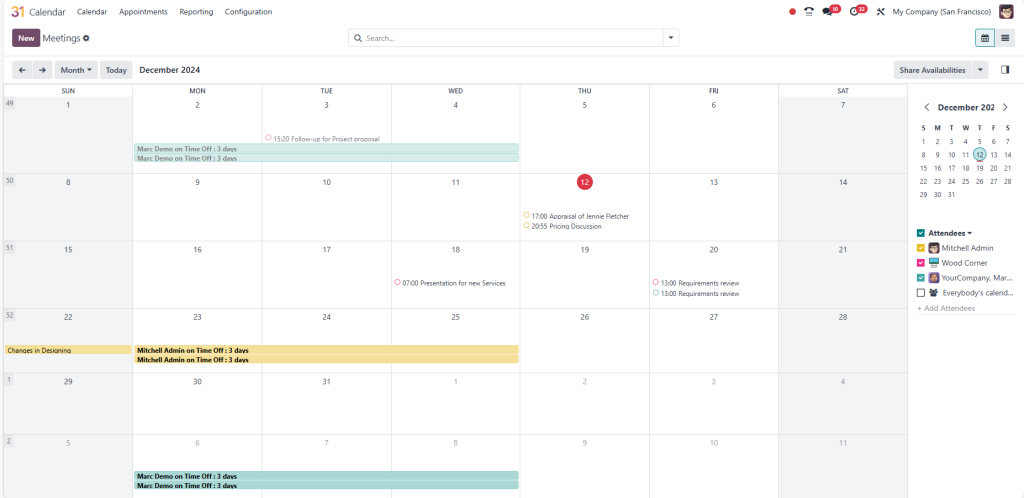
The Odoo 18 Calendar features are custom-made to meet the demands of dynamic business environments. Designed as part of the Odoo ERP suite, this calendar system integrates flawlessly with other Odoo applications, enabling a unified workflow. Some standout features include:
Task Scheduling: Create, assign, and monitor tasks directly from the calendar.
Custom Views: Display your events by day, week, or month with customizable layouts.
Automation: Set up automated reminders, recurring tasks, and notifications.
Integration: Sync with Odoo CRM, project management, and inventory tools.
These features make the Odoo calendar ideal for businesses seeking a holistic solution that supports every aspect of their operations.
Exploring Google Calendar for Business Use
Features that Drive Simplicity
Google Calendar is renowned for its ease of use and accessibility across devices. As part of Google Workspace, it’s designed to fit flawlessly into everyday workflows. Key features include:
Event Scheduling: Quickly create and edit events with drag-and-drop functionality.
Cross-Platform Compatibility: Sync across desktops, smartphones, and tablets.
Collaboration: Share calendars and easily view team members’ availability.
Integration: Link with Gmail, Google Meet, and other Google apps.
These features make Google Calendar an excellent choice for businesses focused on simplicity and fast deployment.
Odoo Calendar Integration
Comprehensive Business Integration
One of the key advantages of the Odoo calendar is its deep integration with the Odoo ERP ecosystem. This allows businesses to connect their calendar with modules like:
CRM: Track leads and schedule follow-ups directly from the calendar.
Inventory Management: Schedule stock updates and delivery timelines.
HR Management: Plan interviews, team meetings, and Odoo training sessions.
Real-Time Updates Across Modules
Changes made in one module automatically reflect across the entire Odoo platform. This synchronization ensures consistency and eliminates the need for manual updates, making Odoo a powerful tool for enterprises managing multiple operations.
Comparing Google Calendar vs Odoo 18 for Scheduling
Aspect | Google Calendar | Odoo 18 Calendar |
User Interface | Simple and user-friendly, ideal for quick adoption. | Detailed interface with advanced features, requiring learning. |
Accessibility | Cloud-based, accessible across all devices. | Web-based with access through Odoo’s platform. |
Integration | Flawlessly integrates with Google Workspace tools. | Integrates deeply with Odoo ERP modules like CRM, HR, and more. |
Customization | Limited customization options. | Highly customizable for specific business needs. |
Event Scheduling | Basic scheduling with color coding and reminders. | Advanced scheduling with dependencies and task linking. |
Recurring Events | It supports recurring events but lacks advanced automation. | Advanced automation for recurring events and workflows. |
Collaboration | Easy sharing with team members; view shared calendars. | Collaboration with team tasks linked to Odoo projects. |
Notifications | Email and mobile notifications. | Customizable notifications across Odoo modules. |
Task Management | Minimal task integration via Google Tasks. | Comprehensive task management integrated with ERP. |
Odoo Calendar Advantages Over Google Calendar
Enhanced Productivity Through Automation
The Odoo 18 Calendar features include automation tools that save time and reduce manual work. From recurring events to task dependencies, Odoo minimizes administrative effort, letting teams focus on strategic tasks.
Scalability for Growing Businesses
The Odoo calendar can adapt to your business’s growth to meet your needs. Its modular structure allows you to add new functionalities without disrupting existing workflows.
Google Calendar for Business Use: Key Benefits
Unified Collaboration with Google Workspace
For businesses already using Google Workspace, Google Calendar offers unparalleled integration. You can schedule meetings, attach files from Drive, and join Google Meet calls with a single click.
Accessibility and Reliability
Google Calendar’s cloud-based platform ensures your schedule is always accessible, whether in the office or on the go. Its reliability and uptime make it a trusted choice for businesses worldwide.
Selecting the Best Calendar Software for Businesses
Factors to Consider
When comparing Odoo 18 Calendar vs Google Calendar, businesses should evaluate the following:
Integration Needs: Does the calendar integrate with your existing tools?
Customization Requirements: Do you need basic features or advanced customization?
Team Size and Complexity: Will your team benefit from ERP integration or prefer simplicity?
Making the Right Choice
Choose Google Calendar if your team values ease of use, quick setup, and compatibility with Google Workspace.
Opt for Odoo 18 Calendar if your business requires advanced features, ERP integration, and scalability.
Real-World Use Cases: Odoo 18 Calendar in Action
Restructuring Operations for a Retail Business
A retail company used the Odoo 18 Calendar features to coordinate inventory restocking, team meetings, and promotional events. The unified integration with Odoo Inventory and CRM improved efficiency and reduced scheduling errors.
Optimizing Team Collaboration for an IT Firm
An IT firm adopted the Odoo calendar to manage project timelines and client interactions. By linking the calendar with the Odoo Project, the company achieved better resource allocation and on-time deliveries.
Real-World Use Cases: Google Calendar for Business Success
Simplifying Scheduling for a Startup
A tech startup relied on Google Calendar for business use to manage daily meetings and sync with remote team members. The platform’s simplicity and Gmail integration ensured effective communication.
Enhancing Accessibility for a Marketing Agency
A marketing agency used Google Calendar to rationalize client appointments and campaign schedules; the platform’s mobile accessibility allowed team members to stay updated on the go.
Odoo 18 Calendar vs. Google Calendar
Both options have their merits compared to the Odoo 18 Calendar and Google Calendar. Google Calendar is a reliable choice for businesses seeking simplicity and quick integration into existing workflows. On the other hand, Odoo 18 Calendar stands out for its deep integration with Odoo ERP, advanced features, and scalability.
The decision ultimately depends on your organization’s specific needs. For businesses requiring robust ERP integration and advanced scheduling capabilities, the Odoo calendar advantages make it a clear winner. Meanwhile, companies prioritizing ease of use and accessibility may find Google Calendar better suited to their workflows.
Selecting the best calendar software for businesses is critical to achieving operational efficiency. Evaluate your goals, consider your team’s preferences, and make an informed decision to drive productivity and success.




