Why the Overview of Audit Trail in Odoo 19 Matters
The overview of audit trail in Odoo 19 is a critical feature for businesses seeking transparency, accuracy, and accountability in their financial operations. Odoo 19 accounting has revolutionized how organizations track user actions, manage invoices, and maintain audit-ready records. By leveraging Odoo 19’s accounting audit trail, businesses can monitor changes, detect discrepancies, and ensure compliance effortlessly.
Whether you are an accountant, finance manager, or business owner, understanding how to use the audit trail in Odoo 19 accounting is essential. With Odoo 19, you gain access to robust audit-ready accounting features, including the ability to track every change in invoices and journal entries, making your accounting system more reliable and transparent.
In this blog, we will provide an overview of the audit trail in Odoo 19, explore its functionalities, explain the difference between the light and full audit trail, and show you how to maximize its benefits.
What Is an Audit Trail in Odoo 19 Accounting?
An audit trail is a chronological record of all financial transactions and modifications within your accounting system. The audit trail in Odoo 19 provides complete visibility into user actions, changes, and document modifications.
With Odoo 19 audit log for invoices and journal entries, you can:
Track who created, edited, or deleted any invoice or journal entry.
Monitor changes in real time to ensure accountability.
Maintain compliance with international accounting standards.
Audit trails are particularly crucial during audits. They allow auditors to verify the accuracy of financial records without manually checking every entry. This is where audit-ready accounting features in Odoo 19 make a significant difference.
How to Use Audit Trail in Odoo 19 Accounting
The Kntrail overview in Odoo 19 is not sufficient. Let’s explore how to use the audit trail in Odoo 19 accounting effectively.
Step 1 - Enable Audit Trail
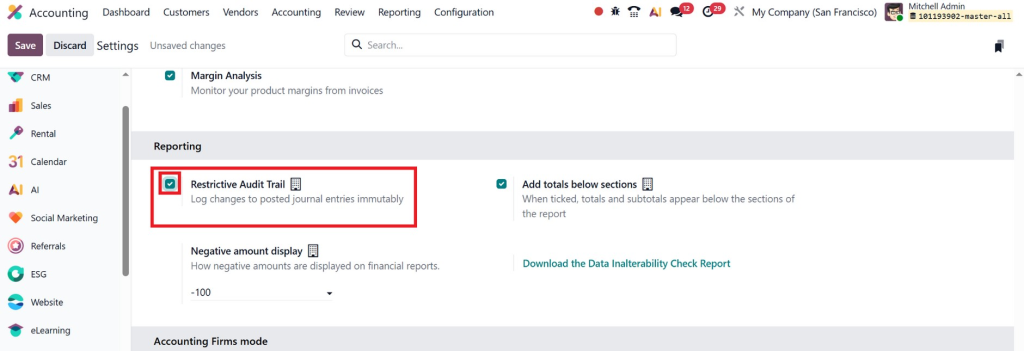
Before tracking changes, you must enable the Audit Trail option.
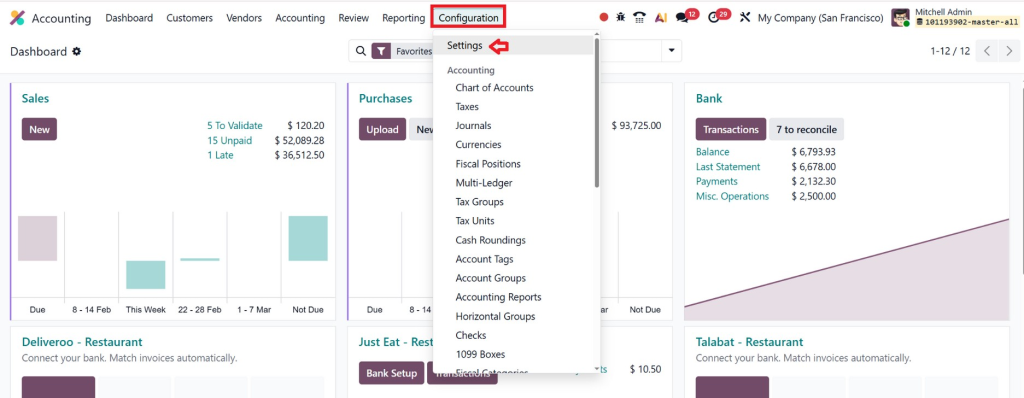
Go to the Accounting Module
Navigate to Settings
Locate the Audit Trail option
Enable the feature by checking the box
Save the settings
Once activated, Odoo will begin recording all modifications made to financial documents.
This ensures that every change made inside the accounting module is properly logged and traceable.
Step 2 - Create an Invoice (Example Scenario)
Once enabled, the audit trail captures all changes. You can:
View audit logs for invoices and journal entries.
Filter by date, user, or document type.
Export audit logs for reporting or auditing purposes.
This helps maintain transparency and ensures all changes are tracked efficiently.
Step 3 - Generate Audit Reports
To understand how the audit trail works, let’s walk through a simple example.
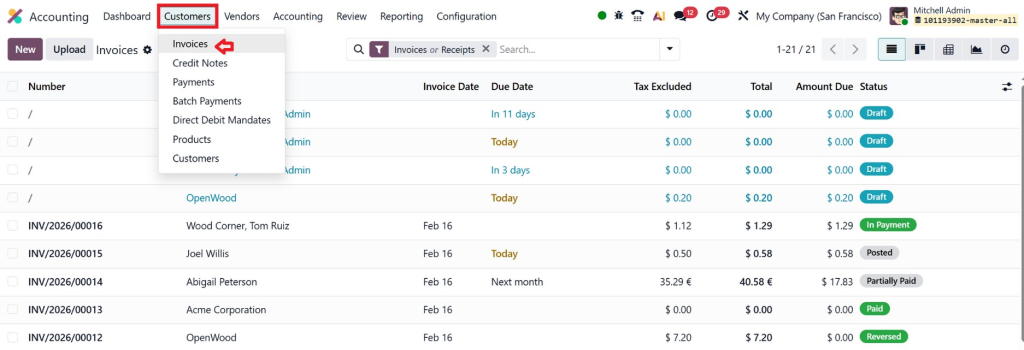
Go to Accounting → Customers → Invoices
Click on Create
Add customer details
Add product/service lines
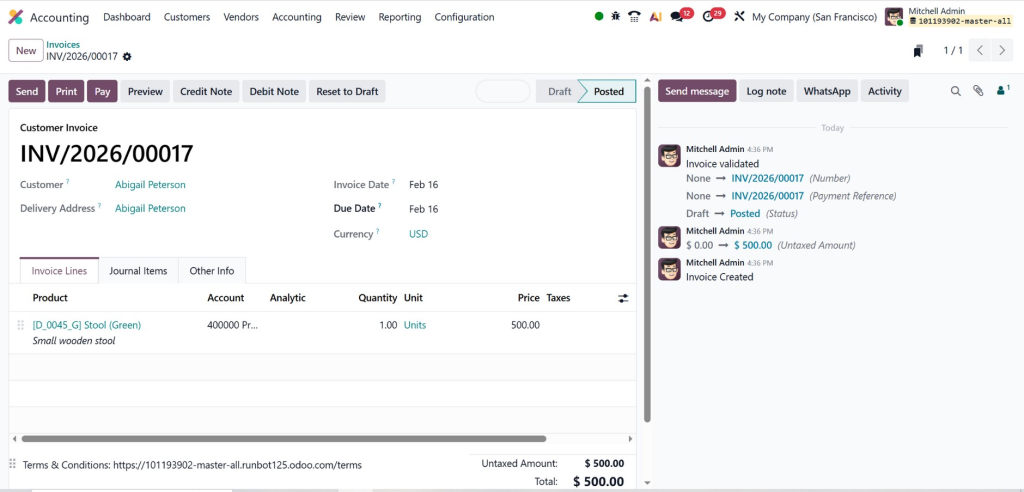
Confirm the invoice
Once confirmed, Odoo automatically creates the related journal entry in the background.
Now, the system has recorded:
Who created the invoice
The date and time of creation
The associated journal entry
This information becomes part of the audit history.
Step 3 – Access the Audit Trail from an Invoice
After creating the invoice:
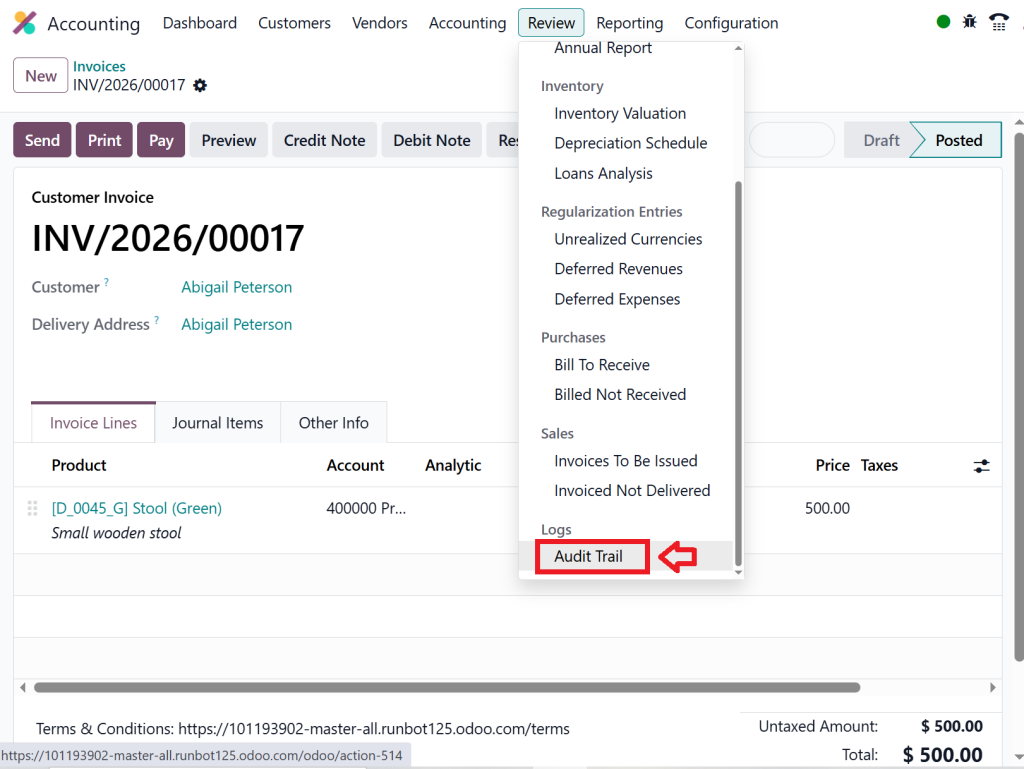
Open the invoice
Click on Go to Audit Trail
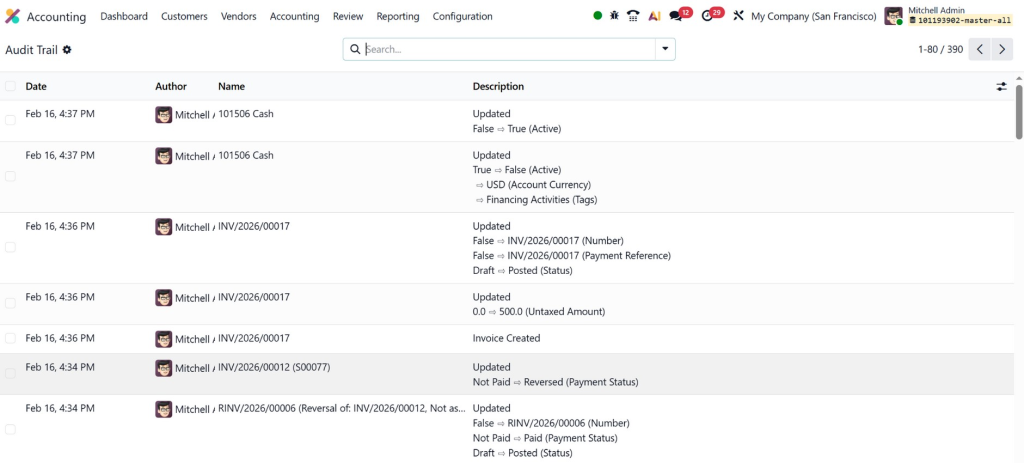
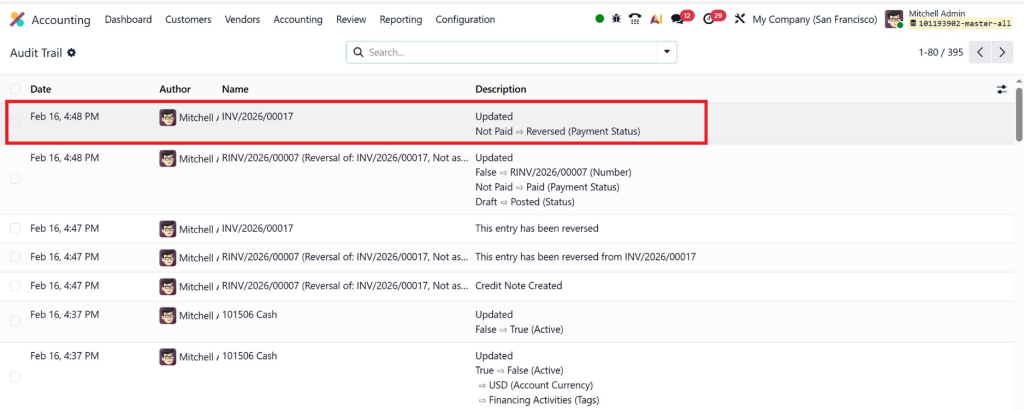
Inside the Audit Trail view, you will see:
Date of the action
Author (User who made the change)
Related journal entry
Description of the modification
This gives auditors and managers complete visibility into what happened and when.
Step 4 – Modify or Reverse the Invoice
Now let’s simulate a real-life situation.
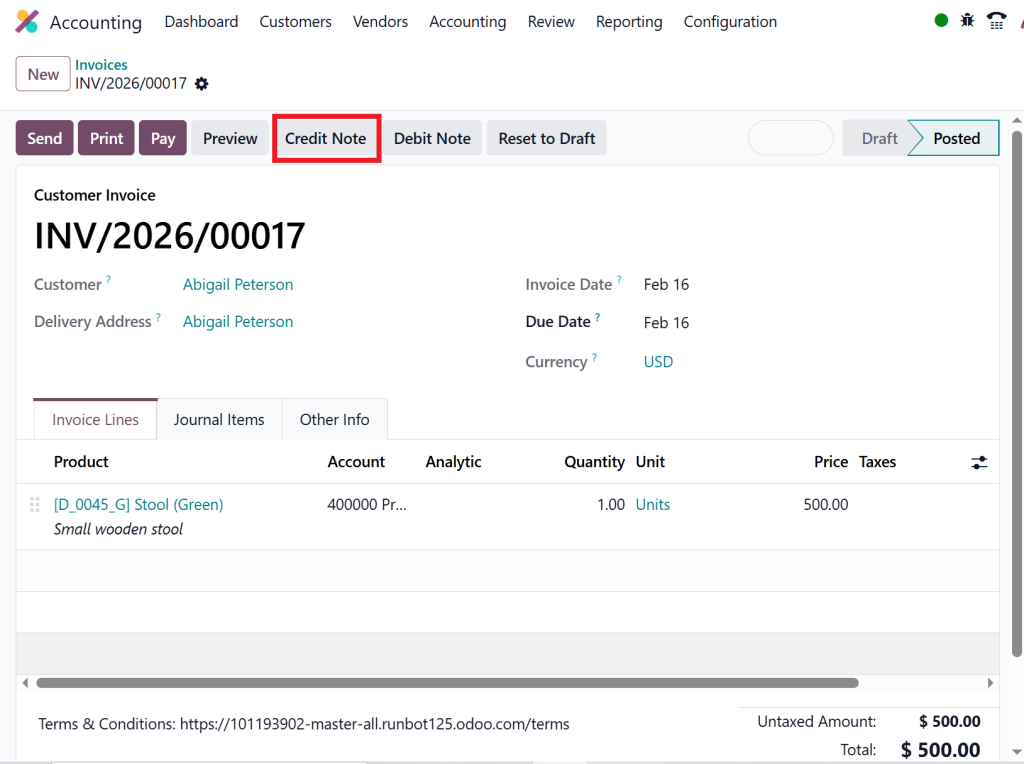
Suppose a customer returns goods, and you need to reverse the invoice.
Open the invoice
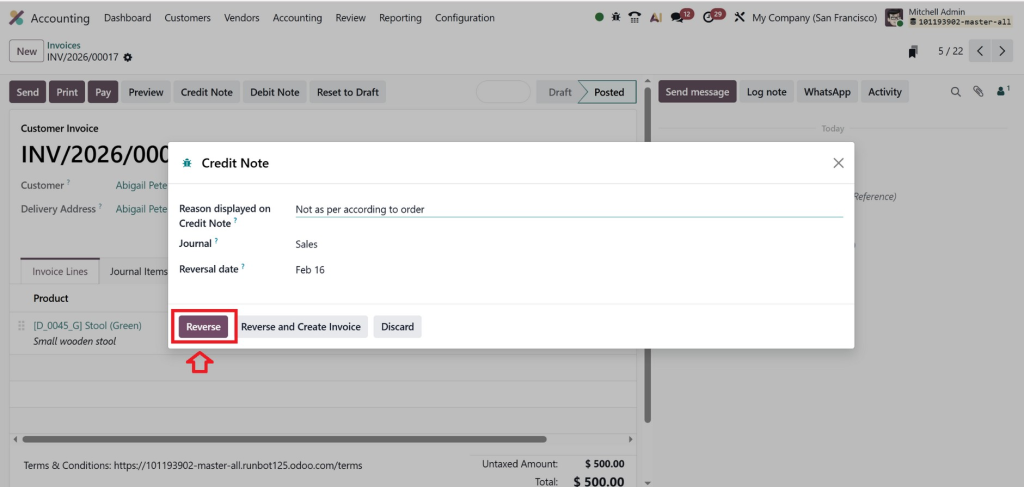
Click on Credit note
Confirm the reversal
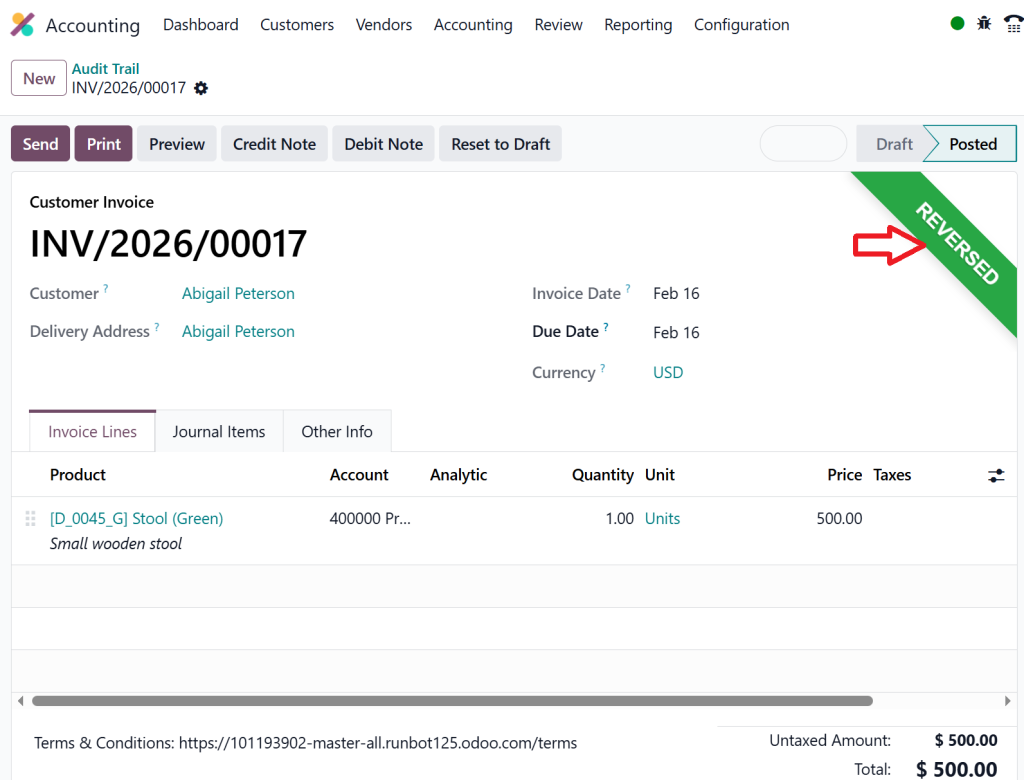
Once the reversal is processed, Odoo updates the accounting records accordingly.
Now go back to:
Invoice → Go to Audit Trail
You will see:
The reversal action was recorded
The user who performed the reversal
Timestamp of the action
Description of the change
This ensures full transparency of financial corrections.
Step 5 – Review Updated Audit Records
After any modification (edit, reverse, payment registration, or cancellation):
Access the Audit Trail again
Review the updated entries
You will now see:
Original creation record
Any edits made
Reversal entries
Updated journal entry references
This creates a clear chronological financial history, exactly what auditors need.
Key Features of Odoo 19 Accounting Audit Trail
Understanding the audit trail in Odoo 19 requires exploring its core features. Odoo 19 provides a user-friendly yet powerful auditing system that supports every financial workflow.
1. Track User Changes in Odoo 19 Accounting
One of the most important aspects of Odoo 19 accounting audit trail is the ability to track user changes. Every time a user edits an invoice, journal entry, or payment, the system records:
Who made the change
What was changed
Date and time of the change
This makes it easier for finance managers to review actions and maintain accountability.
2. Light Audit Trail vs Full Audit Trail
Odoo 19 offers two types of audit trail: light and full.
Light Audit Trail: Captures basic changes such as modifications in invoices and journal entries. Best for small to medium businesses.
Full Audit Trail: Tracks every user action across the accounting module, including configuration changes and reconciliation edits. Ideal for large enterprises and highly regulated industries.
Knowing which one suits your organization is essential to of effectively using tof audit traoverview il in Odoo 19.
3. Audit-Ready Accounting Features in Odoo 19
Odoo 19 goes beyond simple tracking. Its audit-ready accounting features help businesses:
Generate automatic audit reports
Provide proof of compliance during internal or external audits
Reduce errors and fraud with transparent record-keeping
By utilizing these features, businesses can demonstrate accountability to investors, regulators, and management teams.
Benefits of Using Audit Trail in Odoo 19 Accounting
Implementian of audit traoverview il in Odoo 19 offers significant advantages for businesses of all sizes.
Enhanced Transparency
With Odoo 19 accounting audit trail, every action is recorded, ensuring no hidden modifications. This transparency builds trust with auditors, management, and stakeholders.
Simplified Audits
Odoo 19 audit log for invoices and journal entries reduces the time and effort spent on audits. Auditors can verify changes without manually checking paper trails, saving time and costs.
Error Detection and Fraud Prevention
Tracking all user actions helps detect errors and prevent fraud. The audit-ready accounting features in Odoo 19 ensure that any unauthorized changes are identified immediately.
Regulatory Compliance
Many industries require strict financial reporting standards. The overview of audit trail in Odoo 19 ensures your business remains compliant with tax and audit regulations.
Best Practices for Using Audit Trail in Odoo 19
To get the most out of the overview of audit trail in Odoo 19, businesses should follow these best practices:
Regularly Review Audit Logs: Make it a habit to review logs weekly or monthly.
Assign Permissions Carefully: Only authorized personnel should have editing access.
Use Full Audit Trail for Critical Operations: For high-risk areas, full audit trail provides better visibility.
Integrate with Reporting Tools: Combine audit logs with financial reports for comprehensive insights.
Train Your Team: Ensure your accounting team understands how to use the audit trail effectively.
These practices not only improve accountability but also enhance operational efficiency.
How Netilligence Helps You Become Audit-Ready with Odoo 19
Here’s why businesses choose Netilligence:
1. Expert Odoo Consultants
Certified professionals with real-world accounting experience.
2. Custom Audit Modules
We build tailored audit trail solutions.
3. Compliance-Focused Setup
Perfect for tax, IFRS, and statutory audits.
4. End-to-End Support
From implementation to training and optimization.
5. ROI-Driven Approach
We ensure your system saves time, money, and risk.
If you truly want to master the overview of audit trail in Odoo 19 accounting, professional guidance is the fastest and safest way.
Overview of Audit Trail in Odoo 19 Accounting
The overview of audit trail in Odoo 19 accounting clearly shows that Odoo is not just an ERP, it’s a powerful financial control system. With features like Odoo 19 audit log for invoices and journal entries, track user changes in Odoo 19 accounting, and advanced audit-ready accounting features in Odoo 19, businesses gain complete financial transparency.
Whether you’re a startup or an enterprise, understanding how to use audit trail in Odoo 19 accounting will help you:
Pass audits effortlessly
Prevent fraud
Improve internal controls
Build long-term trust
And when combined with expert implementation from Netilligence, Odoo 19 becomes your ultimate audit-proof accounting system.
If your goal is growth, compliance, and financial clarity, Odoo 19 with a full audit trail is the smartest investment you can make today.
Hi, I'm Nabia, an Odoo ERP functional & technical content writer. I specialize in blogs, social media content, ad copy, landing pages, service pages, and email campaigns.
We use cookies to ensure that we give you the best experience on our website. If you continue to use this site we will assume that you are happy with it.