

Why Understanding Project Tracking Tools in Odoo 18 Community Is a Catalyst
The Odoo 18 Community has made a decisive mark in open-source ERP solutions, especially in project management. For businesses and teams striving for efficiency without the hefty price tag, knowing the key project tracking tools in the Odoo 18 Community becomes essential. From Odoo 18 ERP project tracking tools to robust Odoo 18 task tracking features, this new version offers an arsenal of capabilities to advance how you manage projects, monitor team performance, and stay ahead of deadlines.
However, the Odoo 18 Community version is captivating because it blends simplicity and power. The platform introduces Odoo 18 Community project management enhancements that convert ordinary tracking into an intelligent, automated, intuitive experience. Whether it’s the visually rich Odoo 18 project Kanban view, the highly functional Odoo 18 project dashboard, or accurate Odoo 18 project timesheet tracking, every tool serves a purpose designed for real-world business users, freelancers, developers, and project managers alike.
So, let’s dive deep. If you’ve ever wondered how Odoo’s free version helps you control chaos, simplify processes, and optimize team effort, buckle up. This blog is your immersive journey into the most critical yet fascinating Odoo 18 project tracking tools in the Community Edition.
Curiosity awakened? Let’s explore the strong hidden catches inside this open-source giant.
The Magic of Odoo 18 Community Project Management
The latest Community release has turned heads for a reason. Odoo 18 Community project management tools offer an experience that was once reserved for premium users. You no longer need an excessive software suite to manage projects effectively. Odoo 18 simplifies everything.
You start by creating a project with just a periodic click, assign tasks to team members, and instantly get a snapshot of the project’s status. But what makes the experience intriguing is how the interface reacts and adapts. As soon as you start interacting with your project, whether through the Kanban or list view, it feels more like a live organism than a static tool. You’re not just managing a project; you’re experiencing it.
The Odoo 18 Project Kanban View Experience
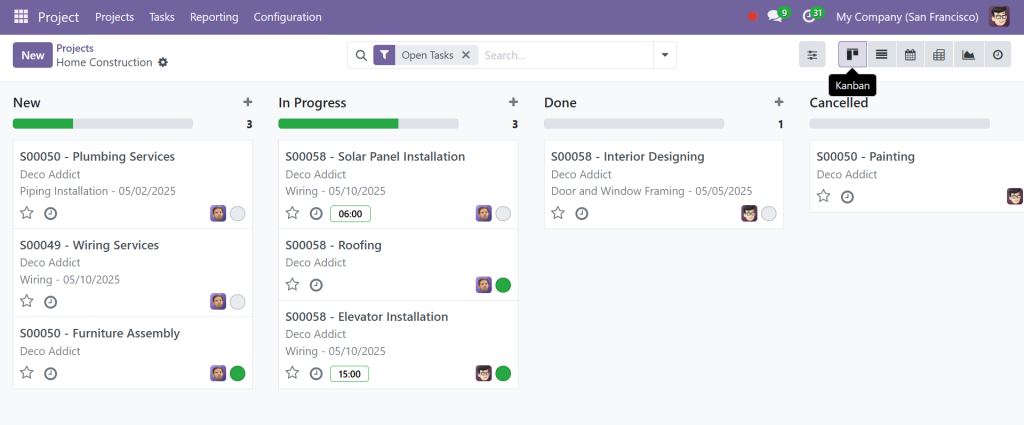
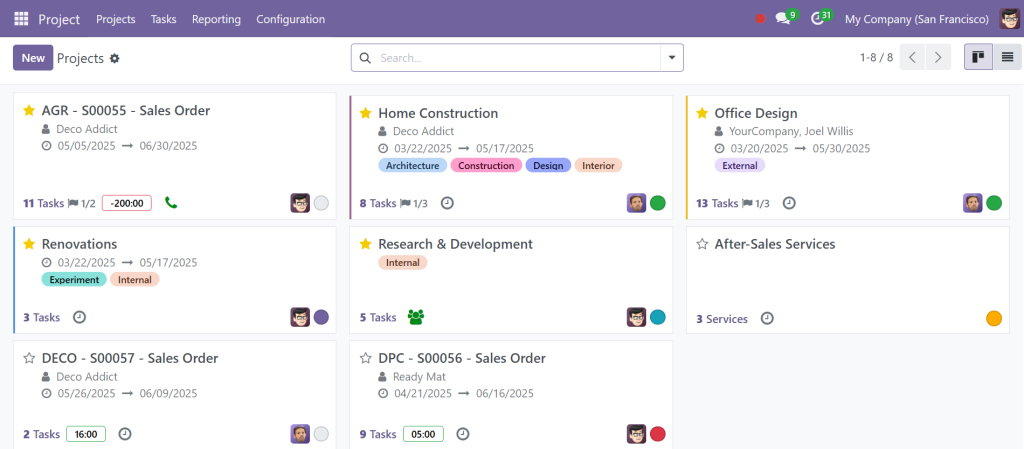
Every project manager knows the pain of juggling too many tasks without a clear system. Join the Odoo 18 project Kanban view, a visual delight and a productivity catalyst. In the Community version, the Kanban view allows users to create, drag, drop, and reorder tasks easily. You can color-code them, tag priorities, and add real-time status updates.
But it doesn’t stop there. The Kanban view is not just a pretty board; it’s an interactive canvas. Clicking on any task opens a deeper layer where you can log activities, assign timesheets, and even schedule deadlines. It’s minimal yet mighty.
When you use Odoo 18 ERP project tracking tools like this Kanban board, something magical happens: tracking becomes less of a chore and more of an intuitive flow. This encourages users to update their progress frequently, thus keeping everyone in the loop.
Odoo 18 Task Tracking Features That Make You Stay Ahead
Now, let’s discuss what helps track a project: the details. And that’s where the Odoo 18 task tracking features shine. Each task isn’t just a checkbox; it’s a rich database of assignments, subtasks, progress logs, time-tracking entries, and communication threads.
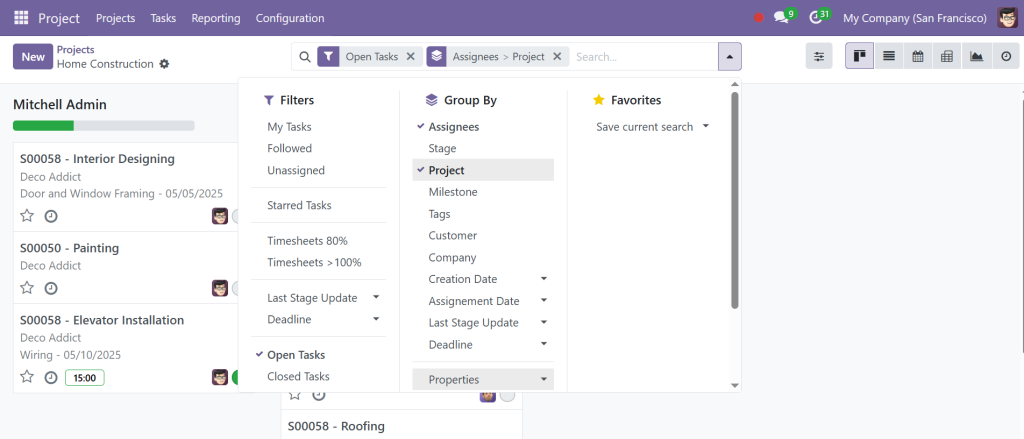
These features have been developed in Odoo 18 Community to let users slice and dice their data. You can filter tasks by project, assignee, deadline, or stage. You can even create saved filters for recurring reports. This roughness, especially in a free version, is simply unmatched.
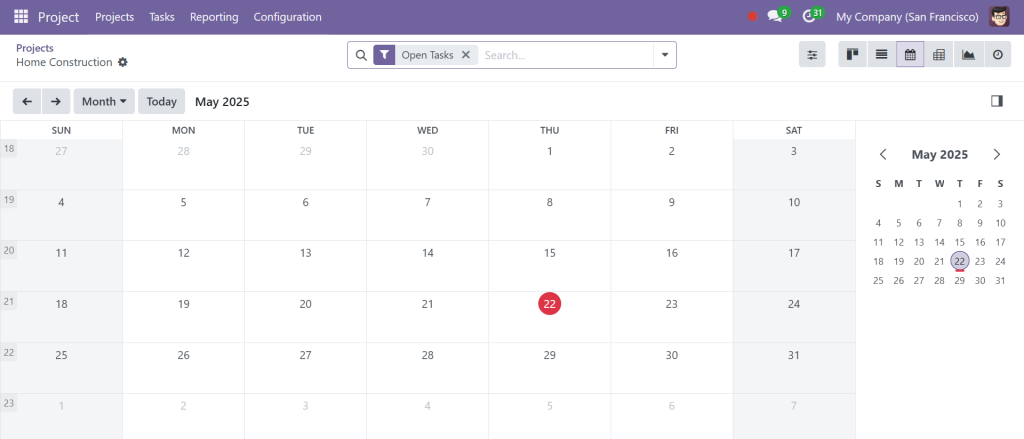
Here’s the twist: These task features integrate flawlessly with other apps in the Community version, such as calendars and timesheets. So, when you log a meeting or work session, that data reflects directly within the task card. It’s smart tracking minus the micromanagement.
Why the Odoo 18 Project Dashboard is Your Control Tower
Welcome to your war room, the Odoo 18 project dashboard. This isn’t just a display panel; it’s your strategic command center. It consolidates real-time data across projects and renders visual representations like charts and graphs, even in the Community edition.
The dashboard in Odoo 18 is particularly effective because it presents multidimensional insights. In one view, you can instantly see task statuses, late activities, overdue milestones, and employee workloads. This kind of actionable insight is crucial for quick decision-making.
The dashboard is also configurable, allowing you to focus only on KPIs that matter most to you. Whether you’re tracking the number of completed tasks or identifying bottlenecks, Odoo 18 ERP project tracking tools like this dashboard make it easier to stay ahead of your competition.
The Precision of Odoo 18 Project Timesheet Tracking
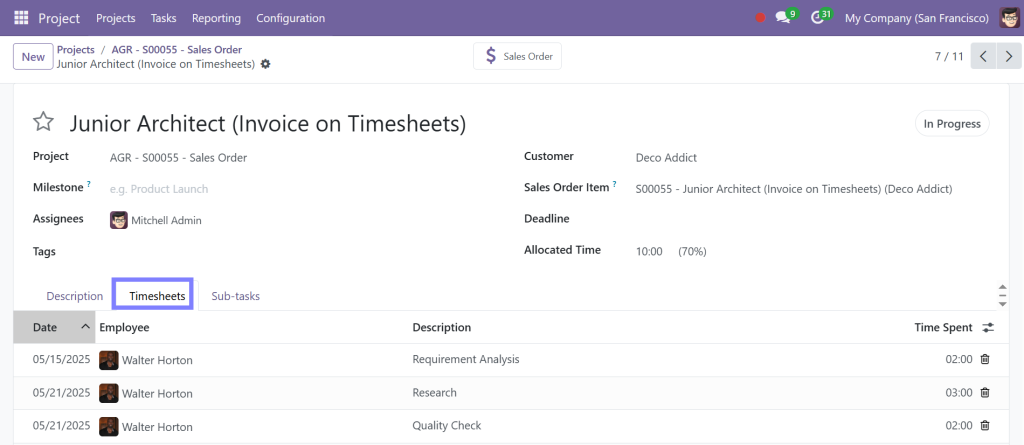
Time tracking can be either a mess or a masterpiece. The Odoo 18 project timesheet track leans toward the latter. The timesheet module, even in the Community version, is surprisingly robust. With a few clicks, it lets users record hours spent on tasks, projects, or clients.
What sets it apart is its smooth integration with tasks. You don’t need separate software for timesheets; click within the task and start recording. Each entry gets logged against that project, providing accurate data on effort vs. output. It’s a brilliant way to assess productivity without the burden of manual logs.
Even better, managers can generate reports based on timesheet entries, providing another layer to the comprehensive Odoo 18 project reporting tools. This blend of effort tracking and insightful reporting is where Odoo excels, helping businesses make more innovative staffing and billing decisions.
Dip into Odoo 18 Project Reporting Tools
If you believe reports are dull, think again. The Odoo 18 project reporting tools bring your data to life. Whether you’re analyzing project health, resource allocation, or deadlines, these tools give you a fresh perspective.
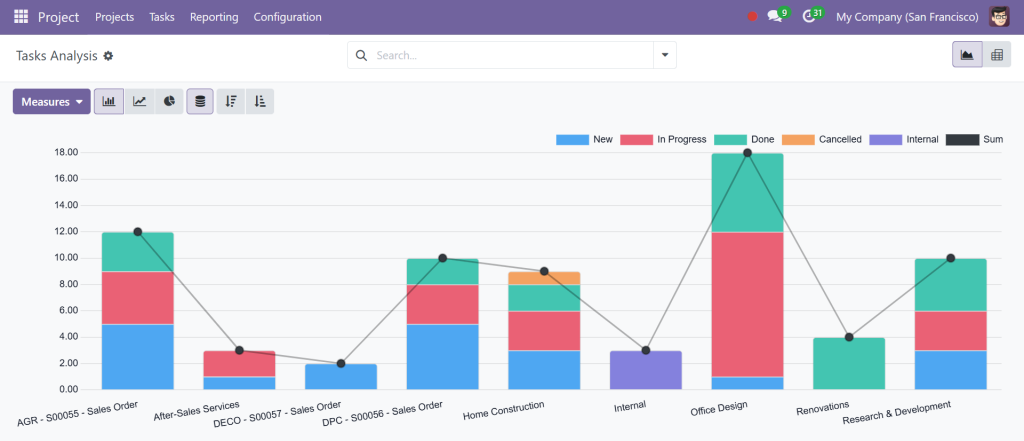
Odoo 18 Community allows users to generate analytical reports with filters such as employee, project, date, and task. You can export these statements to Excel or PDF, making them ideal for stakeholder meetings or internal audits. But here’s the kicker: these reports are not just static snapshots but dynamic reflections of your ongoing operations.
Because the reports integrate tightly with timesheets, tasks, and dashboards, you get a 360-degree view without switching platforms or toggling between multiple tools. That’s the hallmark of great Odoo 18 ERP project tracking tools; they work together, not in the bin.
How Odoo 18 Project Tracking Tools Work in Harmony
One of the most fascinating aspects of Odoo 18 Community project management is how flawlessly its tracking tools connect. The Odoo 18 task tracking features flow into the Odoo 18 project dashboard, which pulls data from Odoo 18 project timesheet tracking, which, in turn, feeds directly into Odoo 18 project reporting tools.
Add to that the intuitive Odoo 18 project Kanban view, and you’ve got a full-circle ecosystem that feels more like a living, breathing assistant than a software platform. This level of interconnectivity makes managing even complex projects feel natural and fluid. You can start a project, assign tasks, monitor progress, track time, and generate a report without leaving the Odoo environment.
Why Everyone's Talking About Odoo 18 Project Tracking Tools
So, what are the key project tracking tools in the Odoo 18 Community? They are not just a list of features. They represent a philosophy, a commitment to simplicity, integration, and usability that most platforms reserve for their paid tiers.
From the visually stunning Odoo 18 project Kanban view to the data-rich Odoo 18 project dashboard, efficient Odoo 18 task tracking features, and insightful Odoo 18 project reporting tools, everything in the Community edition has been thoughtfully crafted to make project management easier and more enjoyable.
Combining that with the precision of Odoo 18 project timesheet tracking gives you an open-source toolkit that entrusts teams to deliver better, faster, and smarter.
Whether you’re a solo entrepreneur, a growing startup, or a mid-sized business looking to break free from bulky tools, Odoo 18 Community project management offers an irresistible blend of functionality and freedom. It’s no wonder people don’t look back once they use these tools.
So, are you ready to explore Odoo 18 ERP project tracking tools and change how you work? The future of efficient, smooth, and engaging project management is already here.




