
Boosting Odoo Data Integrity with Python Constraints
Data integrity is crucial for maintaining accurate business records in Odoo. Maintaining reliable data in Odoo is helpful and the cornerstone for wise company decision-making. But when mistakes pass through the system? One effective method of enforcing data rules is to implement Python constraints. These behind-the-scenes protections ensure that the data entered into your Odoo system is consistent, dependable, and free from frequent errors.
At Netilligence, we will show you how to simplify your procedures, why they are so successful, and how to use them. In this guide, you’ll learn how to create a Python constraint to prevent duplicate invoice numbers in Odoo, ensuring data consistency. Ultimately, you will realise how much peace of mind this tiny reasoning can provide for your Odoo configuration.
What Are Python Constraints in Odoo?
Python constraints are custom rules written in Python to validate data before it’s saved in the database. They are defined using the _constraints attribute or by overriding the create() and write() methods.
How to Prevent Duplicate Invoice Numbers
Preventing duplicate invoice numbers is paramount for maintaining accurate financial records. In Odoo, you can set up unique constraints or use Python code to ensure that each invoice number is distinct. This avoids confusion, keeps your accounting clean, and prevents costly errors.
Let’s create a constraint that restricts users from creating invoices with duplicate invoice numbers.
Step 1: Define the Python Constraint
We’ll inherit the account.move model (used for invoices) and add a constraint.
Python Code:
					from odoo import models, fields, api
from odoo.exceptions import ValidationError


class AccountMove(models.Model):
   _inherit = 'account.move'


   invoice_number = fields.Char(string='Invoice Number', required=True)


   @api.constrains('invoice_number')
   def _check_invoice_number_unique(self):
       for record in self:
           if self.search_count([
               ('invoice_number', '=', record.invoice_number),
               ('id', '!=', record.id)
           ]):
               raise ValidationError(f"Invoice number '{record.invoice_number}' already exists!")
Step 2: Add the Field to the View
Next, we’ll add the invoice_number field in the invoice form view.
XML Code:
   account.move.form.inherit
   account.move
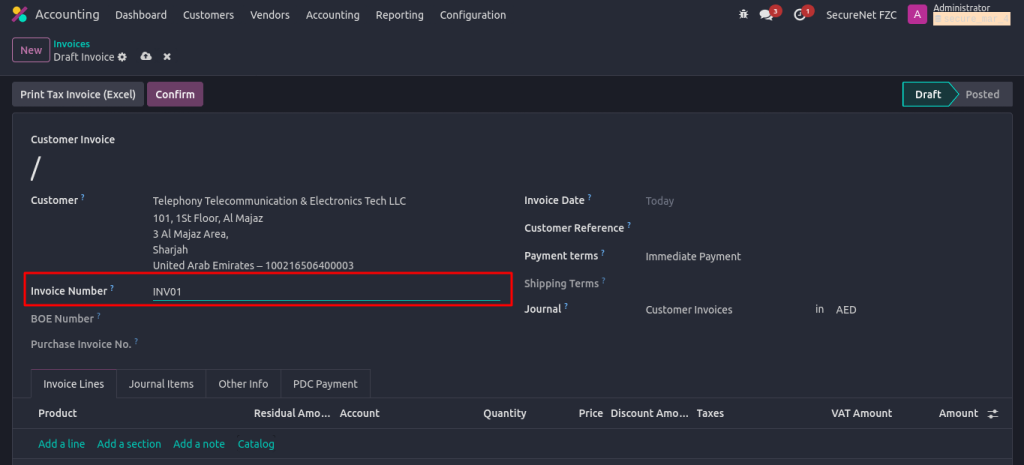
Invoice Creation with invoice_number Field
In the below screenshot, you can see the new Invoice Number field added to the invoice form. This mandatory field ensures users always provide a unique invoice number when creating invoices.
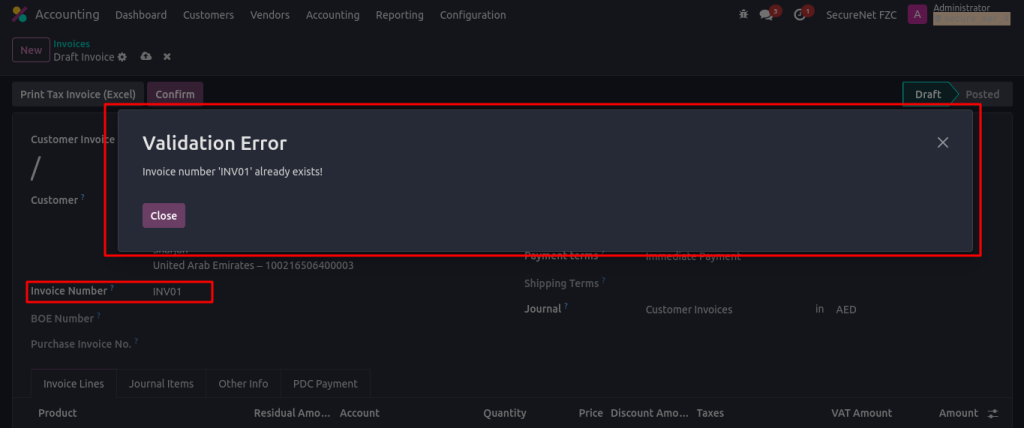
Error Message for Duplicate Invoice Number
The below screenshot shows an error message when creating an invoice with a duplicate number. Preventing duplicate entries ensures data integrity, helping to maintain accurate financial records.
Enriching Data Accuracy with Python Constraints in Odoo
By implementing Python constraints, you can effectively prevent data entry errors and ensure consistent records in your Odoo database. This flexible approach can be applied to various models and fields, making it a powerful tool for maintaining data integrity.