

Getting the Vendor Catalog in Odoo 18 Purchase App
Efficient procurement starts with precise vendor data, and nothing supports this better than the Vendor Catalog in Odoo 18 Purchase App. Handling multiple suppliers is a daily necessity whether you’re a procurement officer, operations manager, or business owner.
The Vendor Catalog in Odoo Purchase App transforms procurement by enabling centralized vendor details, clear price visibility, and fast purchase order processing. It’s your foundation for smarter vendor management and quicker decision-making.
In this in-depth tutorial, we’ll explore how to master the Odoo 18 vendor catalog, use Odoo 18 purchase vendor management tools effectively, set up Odoo vendor price list records, and influence all the essential Odoo purchase app features.
You’ll Discover:
- The core of the Odoo vendor catalog and its benefits
- How to implement Odoo 18 purchase vendor management strategies
- Building and maintaining an Odoo 18 vendor price list
- Exploring the robust Odoo purchase app features
- Real-life usage of Odoo supplier catalog in modern businesses
- A practical Odoo 18 vendor management tutorial
- Enhancing your Odoo purchase order management workflows
Why the Vendor Catalog in Odoo 18 Purchase App is an Update
The Seller Catalog in Odoo Buy App is not just a digital directory. It is your intelligent sourcing assistant, connecting real-time Seller data with actionable decisions.
Centralized Vendor Information with Odoo 18 Vendor Catalog
The Odoo Seller catalog compiles product and price details for each supplier, including delivery timelines and payment terms. This centralization reduces confusion and eliminates outdated spreadsheets.
Drive Smart Sourcing with Odoo 18 Purchase Vendor Management
Using Odoo Buy Seller management, businesses can compare vendor offerings, track past performance, and forecast costs, all from a single screen. Seller ranking helps prioritize top suppliers.
How to Build a Vendor Catalog in Odoo 18 Purchase App
Creating a strong Seller Catalog in Odoo Buy App requires a few foundational steps.
Getting Started with the Odoo 18 Purchase App Features
First, install the Buy App. Navigate to Apps > Purchase > Install. Then go to Purchase > Configuration > Settings to activate relevant Odoo purchase app features like multiple Seller, price rules, and automated POs.
Step-by-Step Odoo 18 Vendor Management Tutorial
- Add Vendor: Go to Purchase >
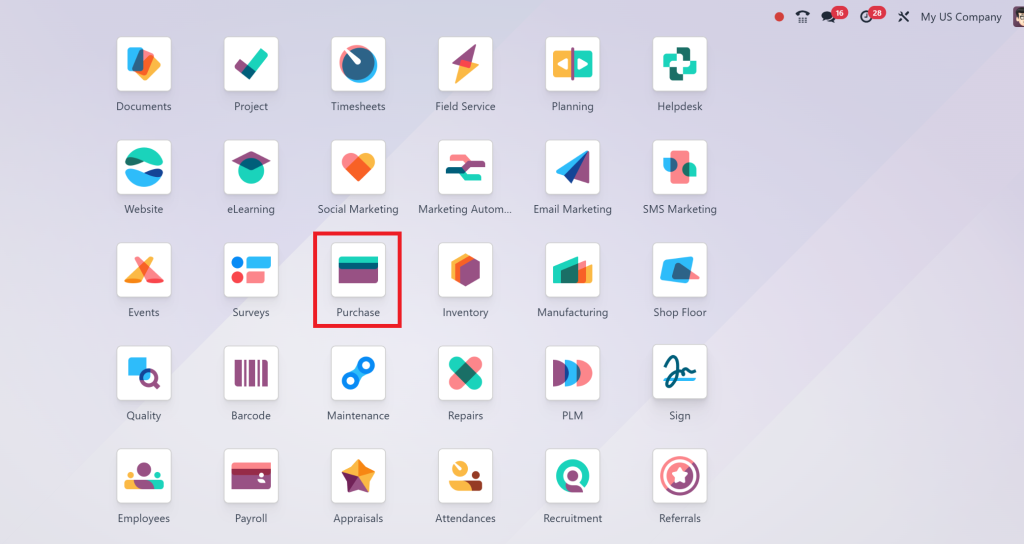
- Vendors > Create
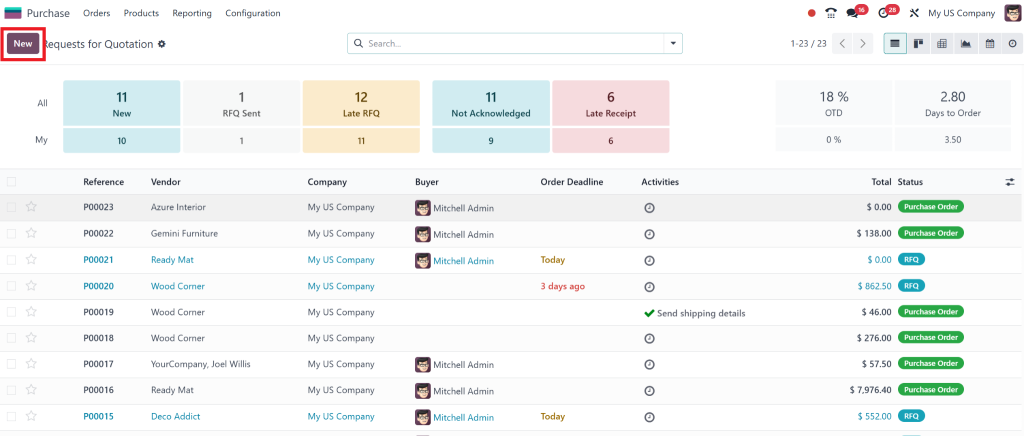
- Link Products: Assign vendor products under the “Products” tab
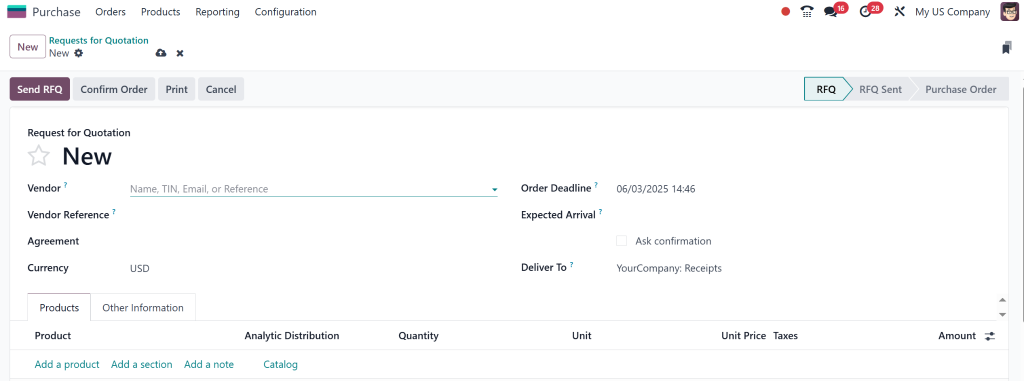
- Define Price Lists: Under each Product, set the Odoo vendor price list per quantity, region, and delivery time
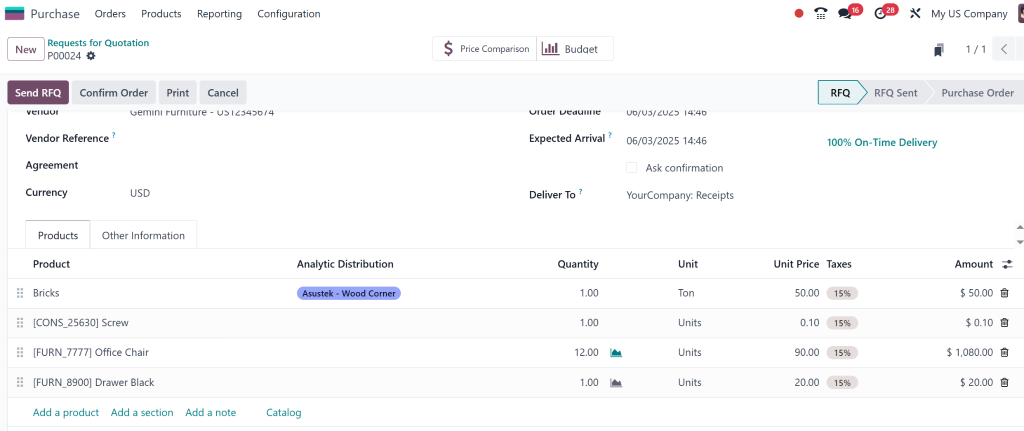
Procurement Efficiency with Odoo 18 Vendor Price List
A well-structured Odoo Seller price list gives companies powerful control over purchasing.
Why Every Buyer Should Use the Odoo 18 Vendor Price List
With a custom Odoo Seller price list, businesses can:
- Forecast procurement budgets accurately
- Compare pricing across multiple vendors
- Automate PO generation using vendor-based pricing rules
How to Use Vendor Price List in Odoo 18 Purchase Vendor Management
- Go to Products > Choose Product
- Under “Purchase”, add Seller lines with price, lead time, MOQ
- Automatically apply the best offer during Buy order creation
Odoo 18 Supplier Catalog: Real-Time Insights at Your Fingertips
The Odoo supplier catalog offers real-time tracking of supplier performance, delivery schedules, and pricing.
What Sets Odoo 18 Supplier Catalog Apart?
- Live tracking of Seller inventory
- Consistent product descriptions and codes
- Integrated directly into PO and Inventory workflows
Use the Seller Catalog for smooth Odoo Purchase Order Management
Buy order errors and inefficiencies can be costly. The Seller Catalog in the Odoo 18 Buy App helps businesses minimize these risks.
Automate Your Odoo 18 Purchase Order Management Process
When minimum stock rules are triggered, Odoo uses Seller priority and price to generate an accurate PO. This process is part of the intelligent Odoo Buy app features.
Real-World Benefits of Odoo 18 Purchase Vendor Management
- Reduce manual entry errors
- Ensure consistent pricing and delivery expectations
- Keep audit trails and approvals centralized
The Big Benefits of Vendor Catalog in Odoo 18 Purchase App
Implementing the Seller Catalog in Odoo Purchase App offers the following advantages:
- Improved Planning: Thanks to the Odoo Seller catalog, planning purchases becomes fast and strategic
- Enhanced Control: With a detailed Odoo 18 Seller price list, buyers get complete control over costs
- Better Supplier Relations: Track and assess Seller delivery performance within the Odoo 18 supplier catalog
- Automation at Scale: Integrated Odoo Buy app features allow automated, rule-based ordering
- Compliance and Audit: Every PO linked to Seller data for transparency
Maximize Efficiency with Vendor Catalog in Odoo 18 Purchase App
The Seller Catalog in Odoo 18 Buy App isn’t just another module, it’s your intelligent procurement assistant. It simplifies complex purchasing decisions, ensures accuracy with the Odoo Seller price list, and supports innovative sourcing using all the robust Odoo Buy app features.
Whether you’re running a small procurement team or managing enterprise supply chains, mastering the Odoo Seller catalog, supplier catalog, and Buy Seller management tools can save you time and money.
Need help implementing your Seller catalog strategy? Contact Netilligence, your trusted Odoo Partner, for expert configuration, customization, and support.




