

In every business, knowing what to expect in the coming weeks or months is essential for making good decisions. Learning how to use forecast report in Odoo 18 CRM helps businesses prepare for the future with accurate, data-based predictions. The Odoo 18 CRM forecast report collects information from your sales pipeline and presents it in a way that helps you see what revenue you might earn and when.
The Odoo 18 CRM forecasting feature examines all your opportunities, assesses their current stage, and calculates the expected revenue based on the probability of closing each deal. This gives you a clear view of where your sales are headed. When you understand how to use the forecast report in Odoo 18ERP CRM, you can make timely adjustments, focus on the right opportunities, and avoid last-minute surprises in your targets.
The Odoo 18 CRM forecast report tutorial process is straightforward. You don’t need technical skills to use it effectively. Whether you’re managing sales forecasts in Odoo 18 for a small team or planning for a larger business, the report provides reliable numbers to work with. Many companies rely on sales forecasting in Odoo 18 CRM to make decisions about marketing campaigns, budgets, and staffing.
In the following sections, we will go through the details of how to use the forecast report in Odoo 18 ERP CRM. You will learn how to read the report, adjust the filters, track performance against targets, and make informed decisions. We will also discuss how Odoo 18 CRM pipeline forecasting can help you improve your sales process and reach your goals more efficiently.
Understanding the Forecast Report in Odoo 18 CRM
The Odoo 18 CRM forecast report provides a detailed view of your future sales potential. It takes the information from your current opportunities, applies the probability percentages, and gives you a calculated revenue figure. This is not just a total of all deals in your pipeline. Instead, it adjusts the numbers based on how likely each deal is to close.
For example, if you have a deal worth $15,000 with a 60% chance of closing, the forecast will show $9,000 for that deal. By adding up similar calculations across your pipeline, you get a realistic revenue prediction. This is how the Odoo 18 CRM forecasting feature ensures that your numbers are as close to reality as possible.
When you learn how to use the forecast report in Odoo 18 ERP CRM, you start to notice patterns. You can see which types of deals move faster, which ones take longer, and which stages have the highest success rate. This helps in planning your follow-ups, adjusting timelines, and setting more achievable targets.
Steps in the Odoo 18 CRM Forecast Report Tutorial
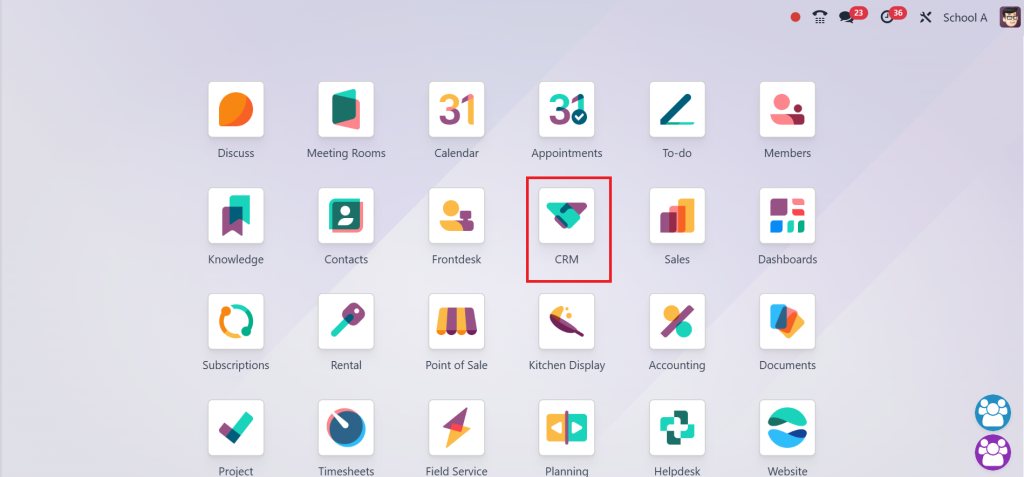
The Odoo 18 CRM forecast report tutorial begins with accessing the feature from your dashboard. After logging into Odoo 18, you open the CRM module.
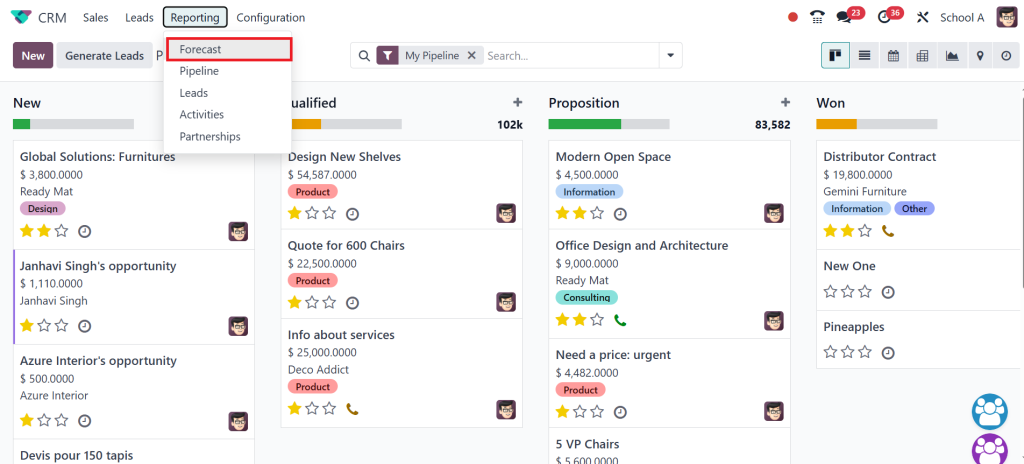
And select the Reporting menu. From there, choose the Forecast option.
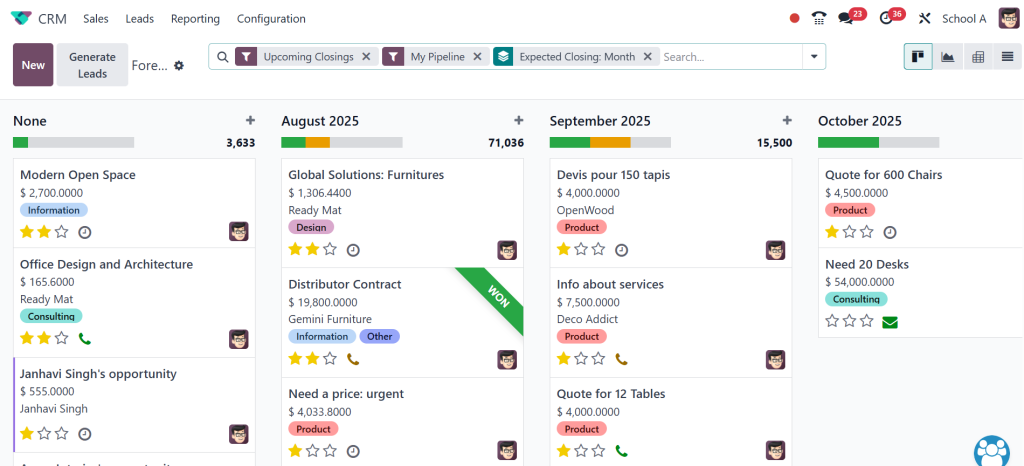
This brings up the forecast dashboard, where you can see your sales opportunities arranged by date, stage, and probability.
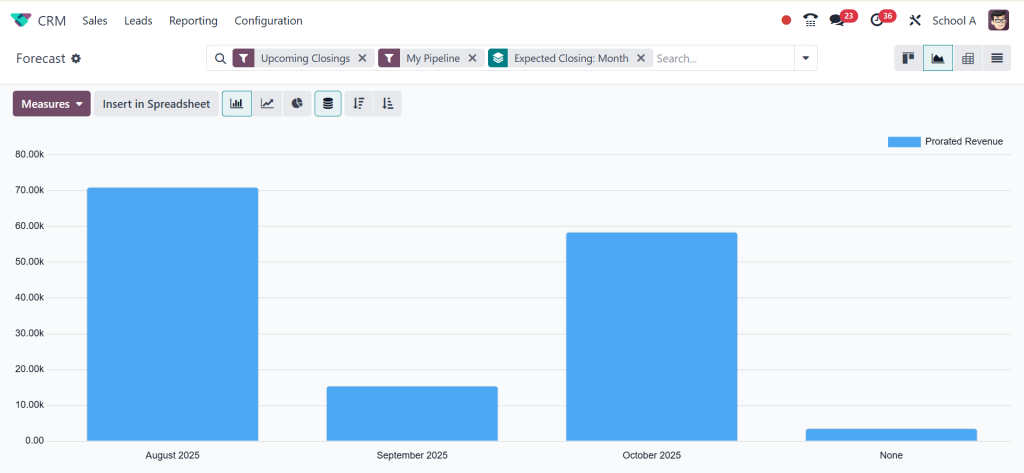
The system offers different views to help you analyze your data. In graph view, you can quickly see trends and changes over time.
In pivot view, you get a detailed breakdown of figures for more precise analysis.
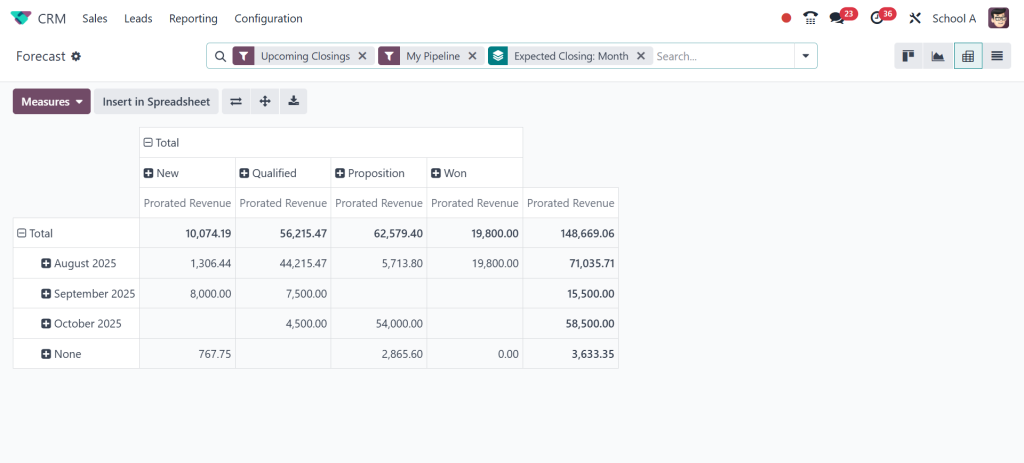
By switching between these views, you can get both a broad and detailed understanding of your forecast.
A key part of using the forecast report in Odoo 18 ERP CRM involves applying filters and grouping data. You should see forecasts for a specific salesperson, a sales team, or a particular product category.
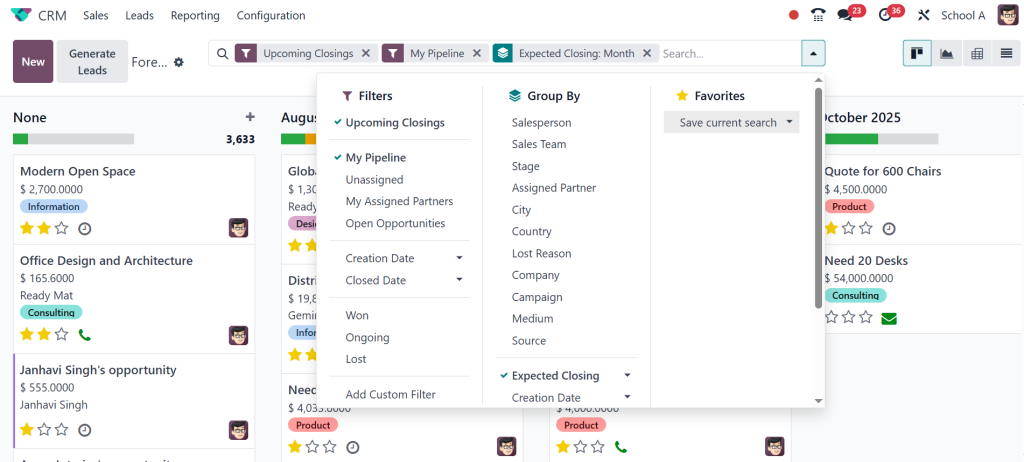
Grouping data by month, quarter, or year helps you compare performance over time. The Odoo 18 CRM forecasting feature makes it simple to adjust these settings, giving you a clear and customized view of your pipeline.
Managing Probabilities for Accurate Sales Forecasting in Odoo 18 CRM
One of the most essential elements of sales forecasting in Odoo 18 CRM is the probability setting for each deal. This percentage represents how likely it is for the deal to close. Setting accurate probabilities is crucial for getting a realistic forecast. Overestimating these numbers can lead to inflated predictions, while underestimating them may cause unnecessary caution.
When you work regularly with the Odoo 18 CRM forecasting feature, you can use your historical data to set better probabilities. If deals in a particular stage have closed 70% of the time in the past, you can set a similar percentage for current deals at that stage. This makes Odoo 18 CRM pipeline forecasting more reliable and consistent over time.
Using Forecast Report Odoo 18 CRM to Manage Sales Targets
Once you know how to use the forecast report in Odoo 18 ERP CRM, you can link your forecasts to sales targets. This makes it easier to track whether you are on course to meet your goals. If the forecast indicates you’ll fall short in the next quarter, you can take steps now to improve the pipeline. This might mean increasing marketing efforts, focusing on high-value leads, or speeding up follow-ups.
The Odoo 18 CRM forecast report tutorial also helps in comparing the performance of individuals and teams. Managers can see which salespeople are meeting or exceeding their targets and which ones may need more support. This allows for better allocation of resources and more effective team management.
Improving Accuracy in Odoo 18 CRM Pipeline Forecasting
Accuracy in Odoo 18 CRM pipeline forecasting depends on keeping your CRM data up to date. Whenever a deal transitions to a new stage, its value changes, or the closing date is revised, this information should be updated in the system. The Odoo 18 CRM forecasting feature works best when it has the latest and most complete data.
Regular reviews of the forecast are also critical. By checking the Odoo 18 CRM weekly, you can spot changes early and make timely adjustments. This habit ensures that you are always aware of your sales position and can respond to challenges quickly.
Manage Sales Forecast Odoo 18 with Integration and Automation
When managing sales forecasts in Odoo 18, you can enhance their effectiveness by integrating them with other Odoo modules, such as Sales, Accounting, and Inventory. This allows you to connect your sales predictions with your revenue tracking, invoicing, and stock planning.
Automation can also improve your sales forecasting in Odoo 18 CRM. For example, you can set rules to automatically update the probability when a deal moves to a particular stage. This reduces manual work and ensures consistency in your forecasts. The Odoo 18 CRM forecast report tutorial process benefits from these integrations, as they provide a more complete view of your business performance.
How to Use Forecast Report in Odoo 18 CRM for Long-Term Planning
The value of knowing how to use the forecast report in Odoo 18 CRM extends beyond short-term sales goals. You can also use it for long-term planning. By looking at forecasts over several months or years, you can identify seasonal trends, market patterns, and areas where growth is steady or declining.
This long-term view helps in planning product launches, budget allocations, and staffing needs. The Odoo 18 CRM forecasting feature gives you the information needed to make these decisions with greater confidence. Over time, Odoo 18 CRM pipeline forecasting becomes part of your regular business process, guiding both day-to-day actions and larger strategic plans.
Building Reliable Predictions with Odoo 18 CRM Forecast Report
Learning how to use the forecast report in Odoo 18 CRM gives businesses a clear and realistic view of their future sales. The Odoo 18 CRM forecast report uses real pipeline data and probability settings to produce accurate revenue predictions. The Odoo 18 CRM forecasting feature makes it easier to plan activities, meet targets, and adjust strategies based on reliable information.
By following the Odoo 18 CRM forecast report tutorial approach, keeping your data current, and reviewing your forecasts regularly, you can manage sales forecasts Odoo 18 with greater efficiency. Over time, you will see how sales forecasting in Odoo 18 CRM supports better decisions and how Odoo 18 CRM pipeline forecasting can guide your business toward consistent growth.
Ready to take your sales forecasting to the next level? Implement Odoo 18 CRM today and experience the difference accurate forecasting can make for your business growth.




