


If you are running a team, you already know how stressful scheduling can get. One wrong entry and suddenly two people are on the same shift, or nobody shows up at all. This not only hurts the workflow but also frustrates employees. That is why using shifts in Odoo 18 Planning makes sense for any business that wants to avoid mistakes and save time.
When you use shifts in Odoo 18 Planning, you are not guessing anymore. You can plan both weekly and monthly schedules in one place, without jumping between spreadsheets or writing on paper. If your business needs flexible short-term adjustments, you can use Odoo 18’s weekly shifts setup. If you need a longer schedule, you can use Odoo 18’s monthly shifts configuration. The option to build an Odoo Planning weekly schedule or an Odoo 18 planning monthly roster means you always stay prepared.
With periodic clicks, you can create weekly shifts in Odoo 18 or set up monthly shifts in Odoo Planning. The system gives you complete control over timings, roles, and even employee preferences. The feature of Odoo 18 shift scheduling, weekly, and monthly makes it easier to match business needs with employee availability. In this blog, let us go step by step and also look at real-life examples of how weekly and monthly shifts can be set up in Odoo 18.
Why Businesses Need Shifts in Odoo 18 Planning
Let me share a quick story. A retail manager used to manage her shop’s weekly roster on Excel. Every week, she would spend hours adjusting shifts, sending messages, and fixing mistakes. Employees often complained because they did not know their schedules until the last minute. Things changed when she switched to shifts in Odoo 18 Planning.
Now, she sets up a full Odoo Planning weekly schedule in less than 15 minutes. Employees get notified right away, and they know precisely when they are working. For the first time, she has extra time on her hands to focus on sales rather than correcting schedules.
This is why Odoo 18 weekly shifts setup and Odoo 18 monthly shifts configuration matter. They solve the daily problem of confusion and wasted time. Every business, whether small or large, depends on staff showing up at the right time. Without proper planning, things fall apart quickly. With Odoo 18, you create schedules once and share them instantly.
Odoo 18 Weekly Shifts Setup and How It Helps
Weekly shifts are helpful for businesses that need flexibility. With Odoo 18’s weekly shifts setup, you can adjust schedules fast. For example, in a restaurant, managers often need to move people around because of sudden changes in customer flow. Odoo 18 lets you assign staff, set timings, and adjust duties in a clear weekly view.
When you build a weekly schedule in Odoo Planning, you can see if you have too many or too few people at any time. This prevents situations where one person ends up handling too much while another has nothing to do. Once you create weekly shifts in Odoo 18, the system notifies employees. They can check their hours anytime without asking the manager again and again.
Odoo 18 Monthly Shifts Configuration for Stable Planning
Now let’s talk about monthly scheduling. Some businesses prefer to lock their schedules for the whole month. Take the example of a hospital. Doctors and nurses need to know their duties well in advance. Using Odoo 18’s monthly shifts configuration, the hospital administrator can prepare a detailed Odoo 18 planning monthly roster.
In the monthly view, the administrator sets night shifts, day shifts, and even rotating duties. The team sees the whole month at once. There is less confusion because everyone knows their availability and responsibilities ahead of time. When you set up monthly shifts in Odoo Planning, it removes the stress of making constant changes every week. For industries where stability is more important than flexibility, monthly scheduling works best.
Create Weekly Shifts in Odoo 18 Without Stress
If you have ever written down shifts on paper or tried to fix them in Excel, you know how tiring it is. One mistake can cause hours of correction. But when you create weekly shifts in Odoo 18, the process is simple. You drag and drop names into the calendar. If you need the same schedule again, you can copy it.
This is what a retail manager or a small café owner needs; something fast and precise. Once the Odoo Planning weekly schedule is ready, employees see it instantly. No more last-minute phone calls or WhatsApp messages asking, “When am I working this week?” The transparency saves time for everyone.
Setup Monthly Shifts in Odoo Planning for a Better Representation
When you set up monthly shifts in Odoo Planning, you give your team a bigger picture. Instead of worrying about what happens next week, they can plan for the entire month. This is very useful for employees with families or other commitments. Knowing their schedule early allows them to organize their personal life better.
For managers, a monthly roster in Odoo 18 Planning gives long-term visibility. If you see too many people scheduled for one week and too few for another, you can fix it before it becomes a problem. This long-term balance reduces stress for both sides.
How to Set Up Weekly & Monthly Shifts in Odoo 18 Planning: A Step-By-Step Guide
Some industries, like healthcare or manufacturing, require long-term schedules, and businesses like retail stores need short-term schedules. Here’s how to perform weekly & monthly Shifts in the Odoo 18 Planning module.
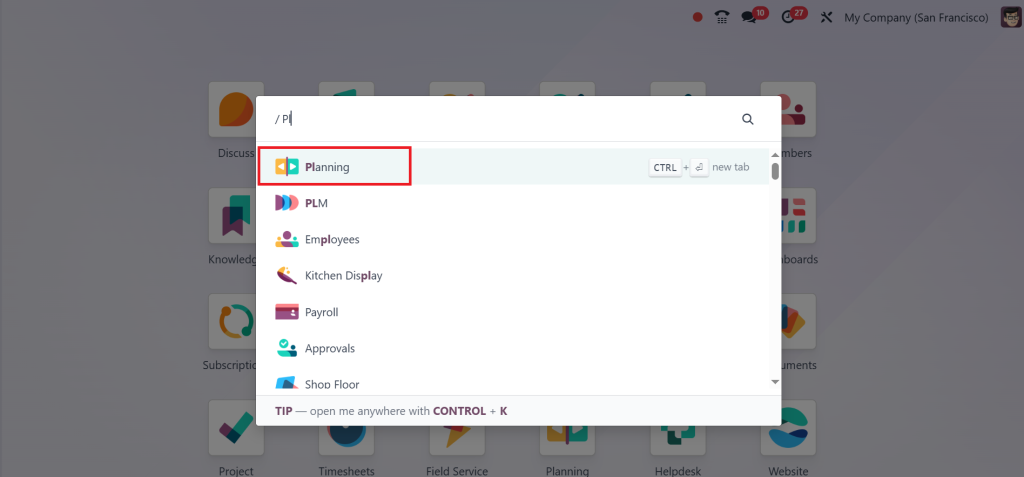
Open the Planning module in your Odoo dashboard.
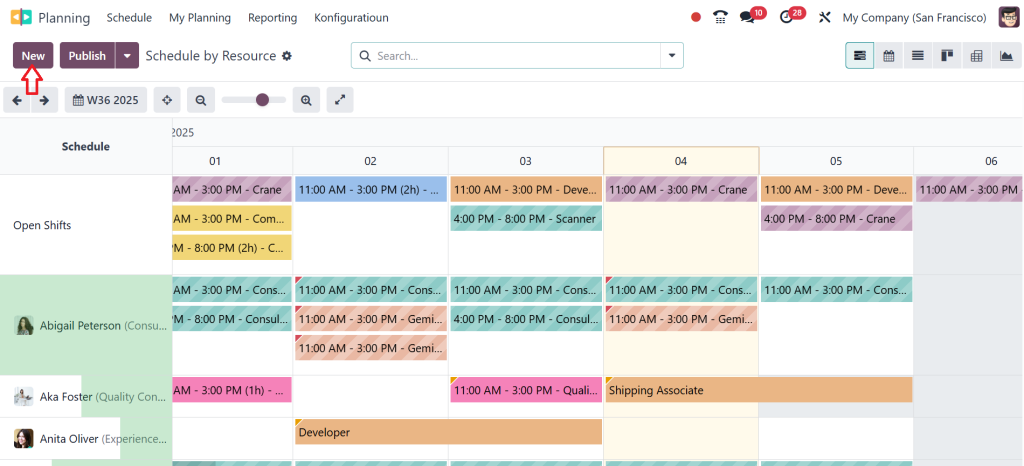
Select or create a shift by clicking on New.
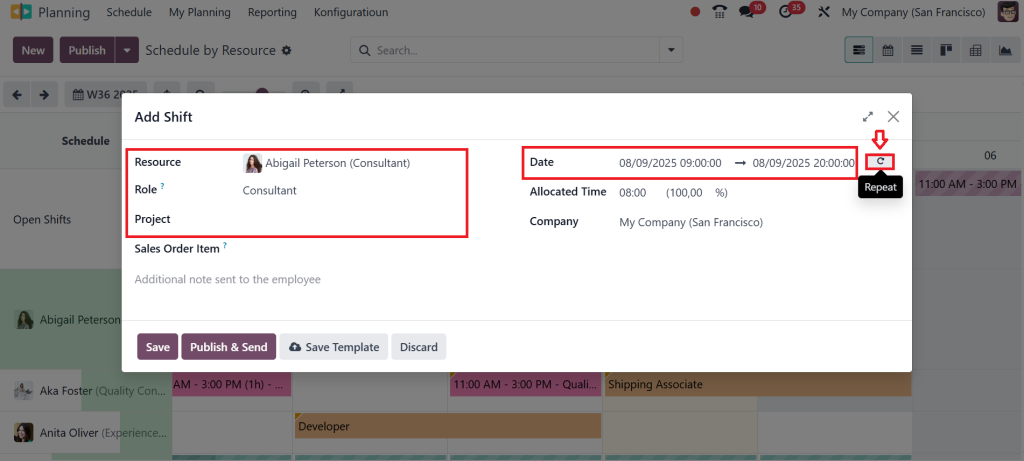
Fill out the basic shift information like:
- Select the Resource (employee); e.g., Abigail Peterson.
- Assign the Project if the employee belongs to one.
- Specify the Start Date; for example, 8th of the month.
- Set the Start Time (e.g., 9:00 AM) and end time (e.g., 5:00 PM).
Near the date option, you can see a box called Repeat. Click on it and enable this feature.
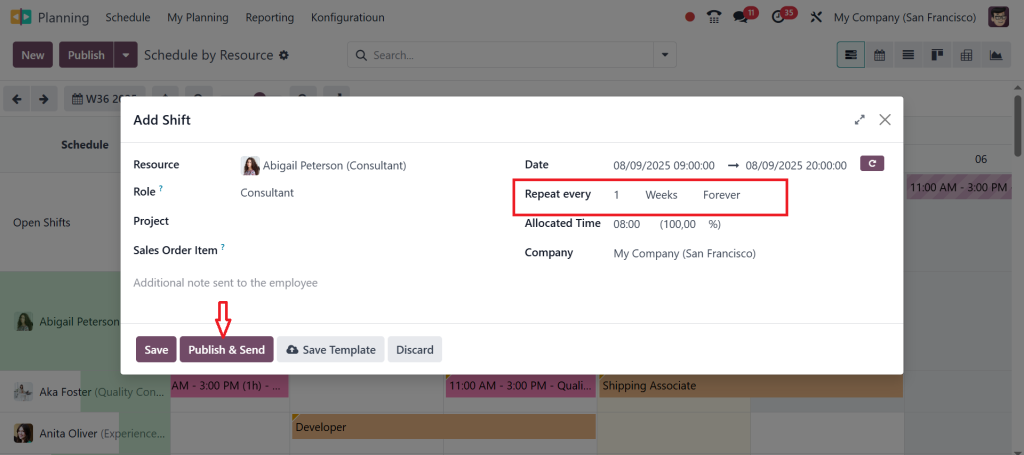
After enabling this feature, you can see another option appear, which is called Repeat every. These are the additional configuration options for recurrence. Choose the recurrence frequency: Daily, Weekly, Monthly, or Yearly. In this example, we select Weekly and set recurrence to “Forever” or limit it to a specific number of occurrences. Then, enter any additional notes or instructions for the employee if needed. Now, click on “Publish & Send” to save and apply the shift plan.
So, as you can see in the screenshot below, a recurring shift is successfully created and sent.
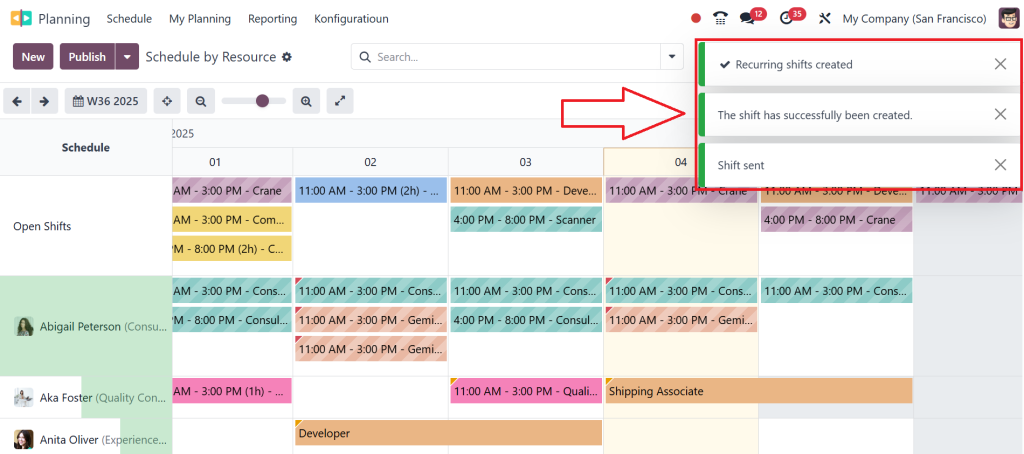
Confirm the shift is repeated correctly. Check the calendar or schedule to see that the shift repeats on every selected interval (e.g., every Monday).
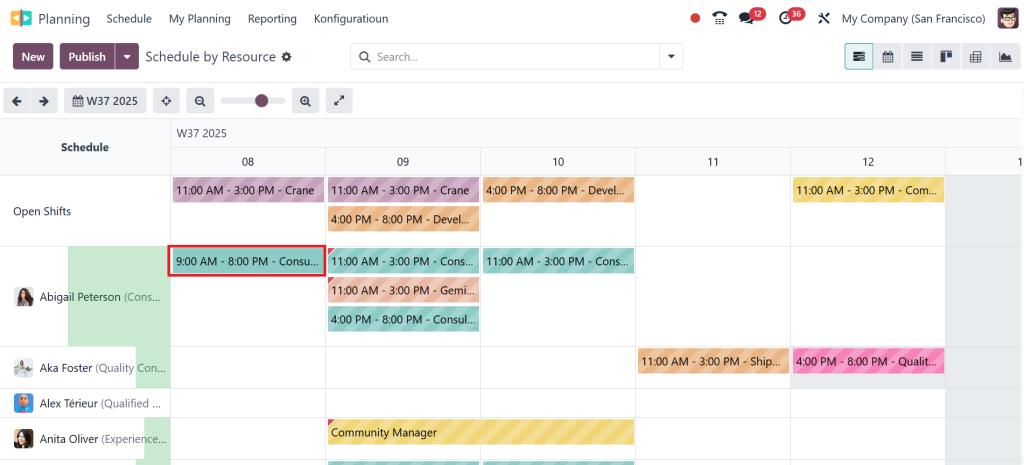
The shift will now be scheduled and repeated automatically based on the set frequency. This is how we can create and set up recurring shift plans within the change very easily.
Odoo 18 Shift Scheduling Weekly Monthly for Different Needs
The real strength of Odoo 18 is that it does not force you to choose between weekly and monthly. The Odoo 18 shift scheduling weekly and monthly option lets you switch based on your situation. Retail shops may prefer weekly schedules. Hospitals and factories may prefer monthly rosters. Odoo enables you to handle both in the same system.
This flexibility means you don’t have to buy separate tools or struggle with different methods. Whether you are making short-term changes or building a long-term plan, Odoo 18 Planning can handle it.
Why Odoo Planning Weekly Schedule Improves Workplaces
A clear Odoo Planning weekly schedule creates a sense of order. Employees stop guessing when they need to show up. Managers stop repeating themselves. When everyone is on the exact page, there are fewer mistakes. This creates a better work environment where people feel respected and informed.
Weekly schedules are also easier to adjust. If someone calls in sick or if there is a sudden rush in business, the manager can quickly edit the weekly plan in Odoo 18 and publish it again. This minor adjustment keeps operations running smoothly without causing stress.
The Value of Odoo 18 Planning Monthly Roster
The Odoo 18 planning monthly roster is more than just a calendar. It gives structure to businesses that cannot afford to make constant changes. For example, in manufacturing, where machines run on fixed cycles, managers need a clear monthly view of staffing. With Odoo 18, they can prepare this roster and share it with the entire team.
Employees appreciate this approach because they know precisely when they will be working weeks in advance. Managers appreciate it because it reduces last-minute surprises. In short, the monthly roster creates stability and predictability for everyone.
Final Thoughts on Shifts in Odoo 18 Planning
Managing schedules does not have to be stressful. With shifts in Odoo 18 Planning, you can finally organize work hours in a way that makes sense for your business. The option of Odoo 18 weekly shifts setup helps when you need flexibility, while Odoo 18 monthly shifts configuration works when you want stability.
Whether you create weekly shifts in Odoo 18 for short-term planning or set up monthly shifts in Odoo Planning for long-term stability, you can rely on the system to reduce mistakes and keep everyone informed. The ability to use Odoo 18 shift scheduling weekly and monthly ensures that no matter how your business operates, you always have the right scheduling option.
From a simple Odoo Planning weekly schedule to a detailed Odoo 18 planning monthly roster, everything is designed to make your job easier. If you are still juggling spreadsheets or trying to remember shifts on paper, it might be time to try Odoo 18. Once you do, you will see how much smoother scheduling becomes for both managers and employees.
Take the next step now and explore how shifts in Odoo 18 Planning can help your business stay organized, reduce stress, and keep your team on track.




